

Most advice on container orchestration still defaults to the same answer: use Kubernetes, then work backwards from there. That’s often the wrong starting point.
Kubernetes is the standard. It also imposes a real operational tax. If your team runs a small SaaS on private infrastructure, a few internal services on bare metal, or mixed workloads that include VMs and traditional apps, the best platform often isn’t the most popular one. It’s the one that matches the workload, the staff you have, and the infrastructure you control.
The smarter question isn’t “What replaces Kubernetes?” It’s “Which orchestrator belongs on which class of workload?” For many SMBs and lean DevOps teams, the right answer is a split model: one platform for edge nodes, another for mixed VM and container estates, and a simpler deployment path for stateless apps that never needed full Kubernetes in the first place.
| Platform | Best fit | Strength | Main trade-off |
|---|---|---|---|
| Kubernetes | Large, standardized container platforms | Ecosystem depth and portability | Complexity and operational overhead |
| HashiCorp Nomad | Mixed containers, VMs, and bare metal | Flexible hybrid orchestration | Smaller ecosystem than Kubernetes |
| Red Hat OpenShift | Enterprises wanting opinionated Kubernetes | Integrated security and tooling | Higher cost and added platform complexity |
| Docker Swarm | Small teams already using Docker | Fast setup and simple operations | Lower scalability |
| Amazon ECS | AWS-native stateless services | Managed experience inside AWS | Strong vendor lock-in |
| K3s | Edge, labs, private cloud, constrained nodes | Low CPU and memory consumption | Not ideal for every enterprise feature set |
Beyond the Hype When to Look for Kubernetes Alternatives
Kubernetes has won the market. It holds a 92% share of container orchestration. That settles the popularity question. It doesn’t settle the architecture question.
A default standard can still be the wrong fit. I’ve seen teams choose Kubernetes before they’ve defined service boundaries, logging standards, or a clear ownership model for networking and storage. They end up operating a platform that’s over-engineered for the application estate it serves.
Popular doesn’t mean right-sized
Kubernetes shines when you need a broad ecosystem, strong API consistency, and a platform many engineers already understand. It makes sense for organizations standardizing dozens of services across multiple environments. It also makes sense when procurement, hiring, and tooling all benefit from choosing the market leader.
But many companies don’t have that profile. They have a handful of customer-facing apps, some internal systems, a few databases, maybe a VPN, maybe a legacy VM workload that isn’t going anywhere.
Practical rule: If your operational model is still simple, adding a complex orchestrator won’t make it mature. It usually just makes troubleshooting slower.
The teams most likely to benefit from Kubernetes alternatives tend to share a few traits:
- Lean platform staffing: They don’t have a dedicated platform engineering group to own cluster lifecycle, policy, ingress, storage classes, and upgrades.
- Mixed workload reality: They run containers, but they also run VMs, scheduled jobs, and services that don’t fit a pure cloud-native pattern.
- Private infrastructure bias: They use colocated hardware, bare metal, or private cloud because they need predictability, control, or data locality.
- ROI discipline: They care less about checking the “cloud native” box and more about deploying services with fewer moving parts.
The real goal is fit
The best orchestration strategy usually follows the workload. Stateless web front ends might belong on a managed platform or simple container service. Edge nodes may need K3s. Internal application clusters on bare metal may fit Nomad better than Kubernetes. A heavily regulated enterprise may still land on OpenShift because it wants opinionated controls and support contracts.
That isn’t fragmentation for its own sake. It’s right-sizing.
When evaluating Kubernetes alternatives, I’d frame the decision around three questions:
- What are you running?
- Who will operate it at 2 a.m.?
- Which parts of the stack need portability, and which just need to work?
Answer those critically, and the “Kubernetes everywhere” mindset starts to look less like best practice and more like cargo cult infrastructure.
The True Cost of Kubernetes Complexity and Overhead
Kubernetes complexity usually doesn’t show up in the demo. It shows up in day-two operations, upgrades, policy drift, storage behavior, ingress edge cases, and the first incident where three teams each own a different layer of the stack.
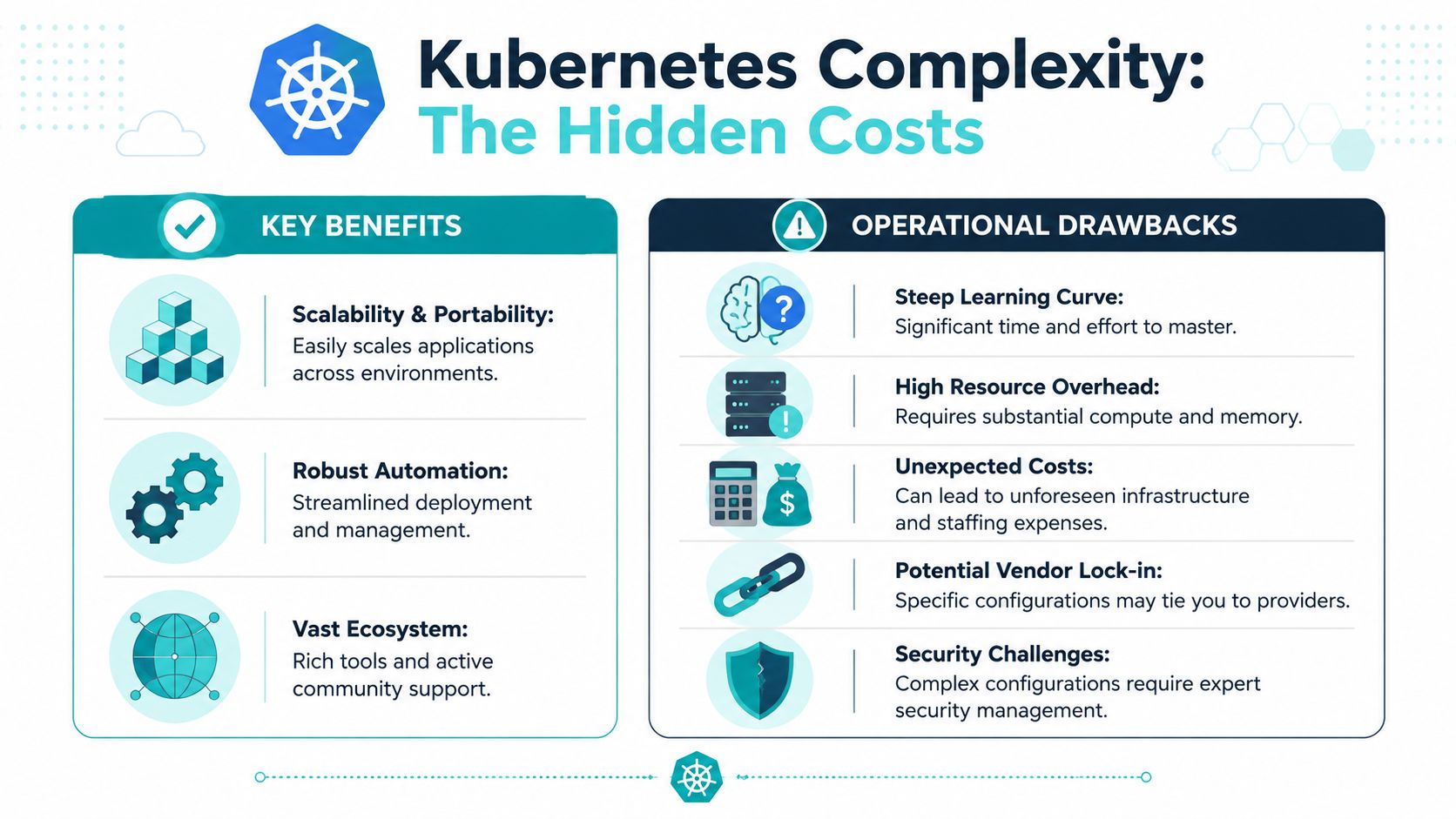
The hidden cost isn’t just infrastructure. It’s the number of decisions you now have to make correctly and keep making correctly. Networking, secrets handling, image policy, observability, autoscaling behavior, pod disruption budgets, storage plugins, and admission controls all become part of normal operations.
Where teams feel the pain first
The first problem is usually staffing and expertise. Kubernetes expects operators to understand distributed systems behavior and a long list of adjacent tools. Even when using a managed control plane, teams still own enough of the platform to create expensive mistakes.
The second problem is resource overhead. The control plane, supporting services, and ecosystem components can consume more CPU and memory than teams expect, especially in smaller environments where every node matters.
The third problem is platform coupling. Organizations often choose a cloud-managed path to reduce effort, then discover the workload is easier to deploy than it is to move.
Recent data cited by Cycle on Kubernetes alternatives states that 72% of SMBs migrating to managed containers on major cloud platforms face hidden egress costs averaging $1,200/month due to ecosystem lock-in. That’s exactly the kind of cost many teams miss in early planning. Even before compute gets expensive, architecture decisions can make normal traffic patterns more expensive than expected.
A rough budgeting exercise helps. Teams comparing self-managed and managed options should estimate control plane overhead, support tooling, backup design, observability, and lock-in costs before they pick an orchestrator. This server cost planning guide is a useful reference point for that exercise.
Later in the evaluation, it helps to hear a practical walkthrough from an operator perspective:
What complexity looks like in practice
A small team running six services may only need:
- Simple rolling deploys: Update containers without writing a platform engineering handbook.
- Basic service discovery: Internal traffic between a small set of apps.
- Predictable persistence: Databases and stateful services placed deliberately.
- Straightforward recovery: Restore services quickly without untangling multiple abstractions.
Kubernetes can do all of that. The issue is that it brings much more than that.
The hardest Kubernetes environments aren’t always the biggest ones. They’re the undersized teams running a big-platform tool without enough time to maintain it properly.
If your environment doesn’t need the full Kubernetes operating model, choosing an alternative isn’t a compromise. It’s often the more disciplined engineering choice.
Heavyweight Contenders HashiCorp Nomad and Red Hat OpenShift
When teams outgrow simple Docker hosts but still need serious orchestration, two options come up quickly: HashiCorp Nomad and Red Hat OpenShift. They solve different problems, even when they appear in the same shortlist.

Nomad fits mixed estates better
Nomad is attractive when the environment is operationally messy in a very normal way. You have containers, but also VMs, standalone binaries, and services that need to land directly on bare metal. In those conditions, platform purity matters less than scheduling flexibility.
Sysdig’s review of Kubernetes alternatives notes that platforms like HashiCorp Nomad excel at hybrid orchestration of containers, VMs, and bare-metal applications, offering significant cost-effectiveness through reduced resource usage and lower maintenance compared to opinionated Kubernetes platforms like OpenShift.
That aligns with what makes Nomad compelling:
- One scheduler for mixed workloads: You don’t have to force every application into containers just to satisfy the platform.
- Cleaner operational footprint: Teams often prefer its simpler architecture when running on private infrastructure.
- Bare metal friendliness: It’s a practical choice for colocated servers, internal clusters, and organizations outside the major cloud defaults.
Nomad is especially useful when you’re modernizing gradually. You can containerize what should be containerized and leave the rest alone until there’s a real reason to change it.
OpenShift is Kubernetes with enterprise opinions
OpenShift takes the opposite approach. It assumes you do want the Kubernetes model, but you want more enterprise functionality packaged around it. Security controls, monitoring integrations, developer tooling, and a more curated operating experience are part of the value proposition.
That can be the right answer for organizations that need:
- Stronger built-in governance
- A supported enterprise platform with vendor backing
- A more standardized developer workflow
- A Kubernetes base with integrated platform services
The trade-off is predictable. You get a more complete stack, but you also inherit more platform and licensing weight. OpenShift can reduce integration work for some enterprises while still being too much platform for smaller teams.
Buy OpenShift when you want Kubernetes plus strong vendor structure. Choose Nomad when you want orchestration without turning every infrastructure decision into a Kubernetes decision.
Side by side for CTO decisions
| Platform | Strongest use case | Operational model | Best infrastructure fit |
|---|---|---|---|
| HashiCorp Nomad | Hybrid scheduling across containers, VMs, and bare metal | Lighter and more flexible | Bare metal, colocation, private clusters |
| Red Hat OpenShift | Enterprise Kubernetes with integrated tooling | Heavier but more opinionated | Standardized enterprise platforms |
Here’s the practical dividing line. If the business needs a broad platform team, formal controls, and a supported Kubernetes distribution, OpenShift is credible. If the business needs to run mixed workloads efficiently on owned infrastructure without forcing every service into the Kubernetes pattern, Nomad is often the better engineering move.
That’s why Nomad shows up so often in private cloud and non-hyperscaler discussions. It respects the fact that real infrastructure estates are rarely all containers, all cloud-native, or all greenfield.
The Simplicity Champions Docker Swarm and PaaS
Not every orchestration problem deserves a platform team. Sometimes the right answer is to strip the problem down.
Docker Swarm still appeals to operators who want clustering behavior without adopting a full control plane culture. It stays close to Docker’s mental model, which matters for teams that already build, ship, and troubleshoot with Docker tooling every day.
Docker Swarm for small teams that value clarity
Qovery’s overview of alternatives describes Docker Swarm as a native Docker orchestrator designed for teams seeking fast, lightweight container management without adopting a complex control plane, offering simpler setup and flexible orchestration with full functionality but lower scalability compared to Kubernetes.
That trade-off is clean and honest. Swarm is easier to understand. It’s easier to deploy. It’s often easier to recover when something breaks. The compromise is that it won’t match Kubernetes for ecosystem depth or large-scale feature breadth.
A practical Swarm setup for an SMB might look like this:
docker swarm init
docker network create --driver overlay app-net
docker service create --name web --network app-net --replicas 3 nginx:stable
docker service ls
That doesn’t remove every operations concern, but it does keep the platform surface area small. For internal apps, lightweight web services, and development environments, that’s often enough.
PaaS for teams that shouldn’t manage orchestration at all
The simpler path is to avoid orchestrator ownership completely. If the application is mostly stateless and the team wants deployment velocity over infrastructure control, a PaaS model is usually better than self-managing clusters.
A good PaaS workflow removes these concerns from the application team:
- Node lifecycle
- Cluster networking
- Service scheduling internals
- Control plane maintenance
That changes the conversation from “which orchestrator do we run?” to “how do we package and deploy code safely?” For many internal business apps and frontend services, that’s the better question.
If developers mainly need build, deploy, logs, and rollback, a PaaS usually delivers better ROI than teaching the team to operate a scheduler.
Where simplicity wins and where it doesn’t
Docker Swarm works best when the team still wants host-level control. PaaS works best when the team doesn’t.
Swarm is the fit when you need to manage containers directly, tune placement, and keep infrastructure visible. PaaS is the fit when infrastructure should fade into the background and deployment should feel closer to shipping code than managing servers.
Both options are valid Kubernetes alternatives. Both are often dismissed too quickly because they aren’t fashionable enough. That’s usually a mistake. Infrastructure that your team can operate confidently beats infrastructure that looks more advanced on a diagram.
Niche Specialists Amazon ECS and Lightweight K3s
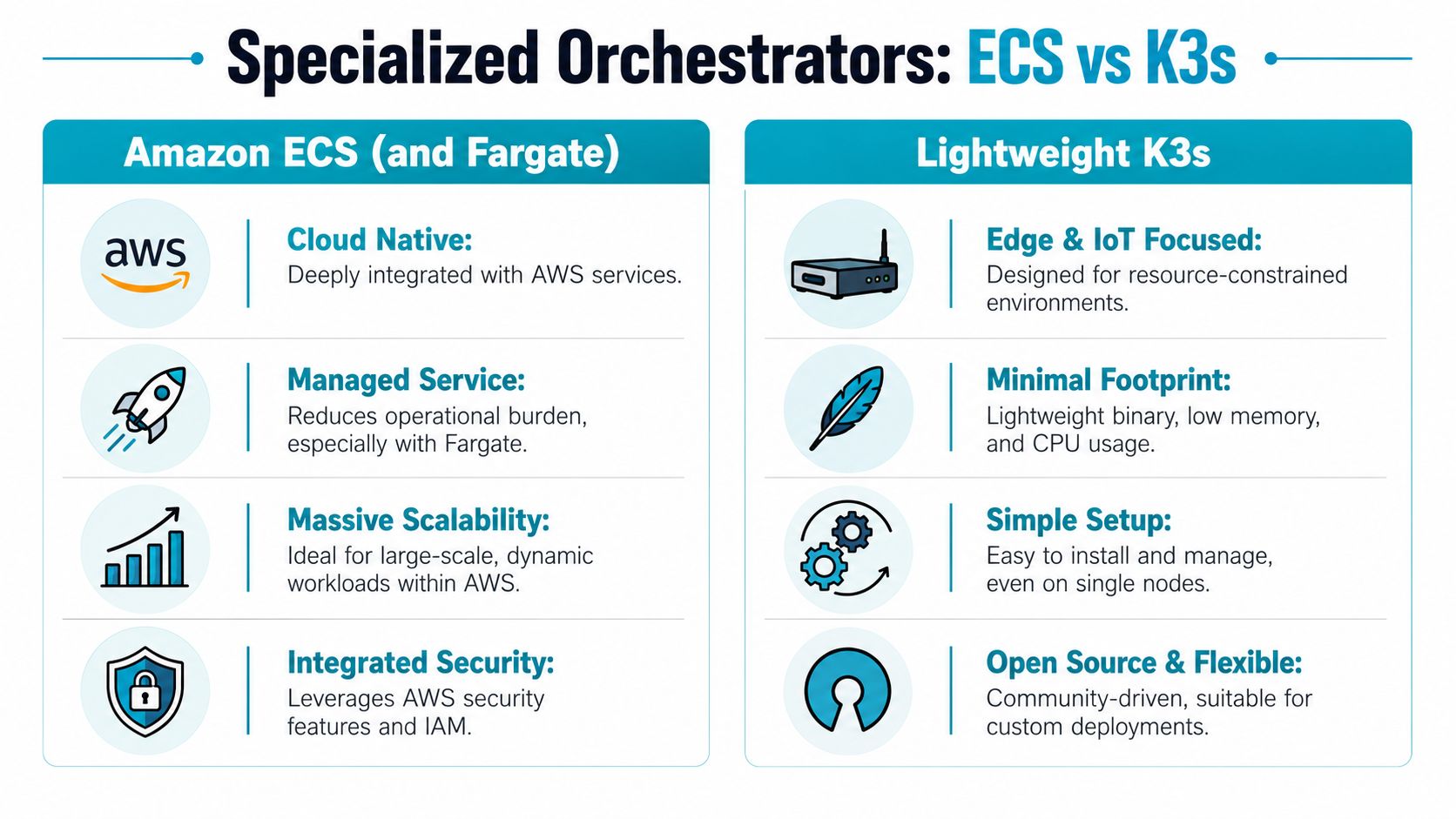
Some platforms aren’t broad alternatives so much as highly effective specialists. Amazon ECS is one of the clearest examples of an orchestrator that makes sense inside a specific ecosystem. K3s is the opposite. It brings Kubernetes compatibility into places where standard Kubernetes is too heavy.
ECS is good when AWS is the strategy
If a company has a strong commitment to AWS, ECS is often the shortest path to production. It reduces control plane burden and fits neatly with AWS networking, identity, and service integrations. For stateless services and bursty application logic, that can be a strong operational choice.
The catch is strategic, not technical. ECS works best when you accept the AWS operating model as a long-term decision. If portability matters, or if the business already wants to avoid hyperscaler dependence, ECS can become a dead end.
Not all workloads require Kubernetes. They need a deployment model with lower friction. In fact, Cloudfest’s discussion of Kubernetes alternatives cites data showing 68% of SMBs still use Kubernetes for stateless front-end apps and bursty logic, where serverless or PaaS like AWS Lambda or Heroku are 3–5x more cost-effective and reduce operational overhead. That’s the core right-sizing lesson. Don’t use a cluster where a managed application platform would do.
K3s makes Kubernetes practical in smaller places
K3s is for teams that do want the Kubernetes API and ecosystem, but can’t justify the weight of a full distribution. Edge deployments, lab environments, compact private clouds, and resource-constrained systems are where it stands out.
An arXiv comparative analysis of lightweight Kubernetes distributions found that k3s demonstrated the lowest CPU and memory consumption among lightweight Kubernetes distributions, making it a strong fit for edge computing and constrained environments. The same analysis also found k3s showed consistently low latency for common cluster operations.
That combination matters in places like:
- Small Proxmox-backed private clouds
- Factory or branch deployments
- Raspberry Pi and compact testbeds
- Single-purpose internal clusters
A minimal K3s installation can be very direct:
curl -sfL https://get.k3s.io | sh -
sudo kubectl get nodes
sudo kubectl create namespace apps
The specialist mindset
ECS and K3s solve very different problems.
ECS says, “Stay inside AWS and simplify operations.” K3s says, “Keep Kubernetes semantics, but reduce the footprint enough to run it where standard Kubernetes would be wasteful.” Both are useful. Neither should be treated as a universal replacement.
If your environment spans branch offices, private cloud nodes, or compact virtualization hosts, K3s is often the more interesting option. If your business is already standardized on AWS and doesn’t need multi-environment portability, ECS can be perfectly rational. The mistake is assuming either choice generalizes well outside its lane.
Your Decision Framework Choosing the Right Orchestrator
The right orchestrator is rarely the one with the longest feature list. It’s the one that matches your workload shape, team capability, and infrastructure strategy without forcing unnecessary complexity into the system.
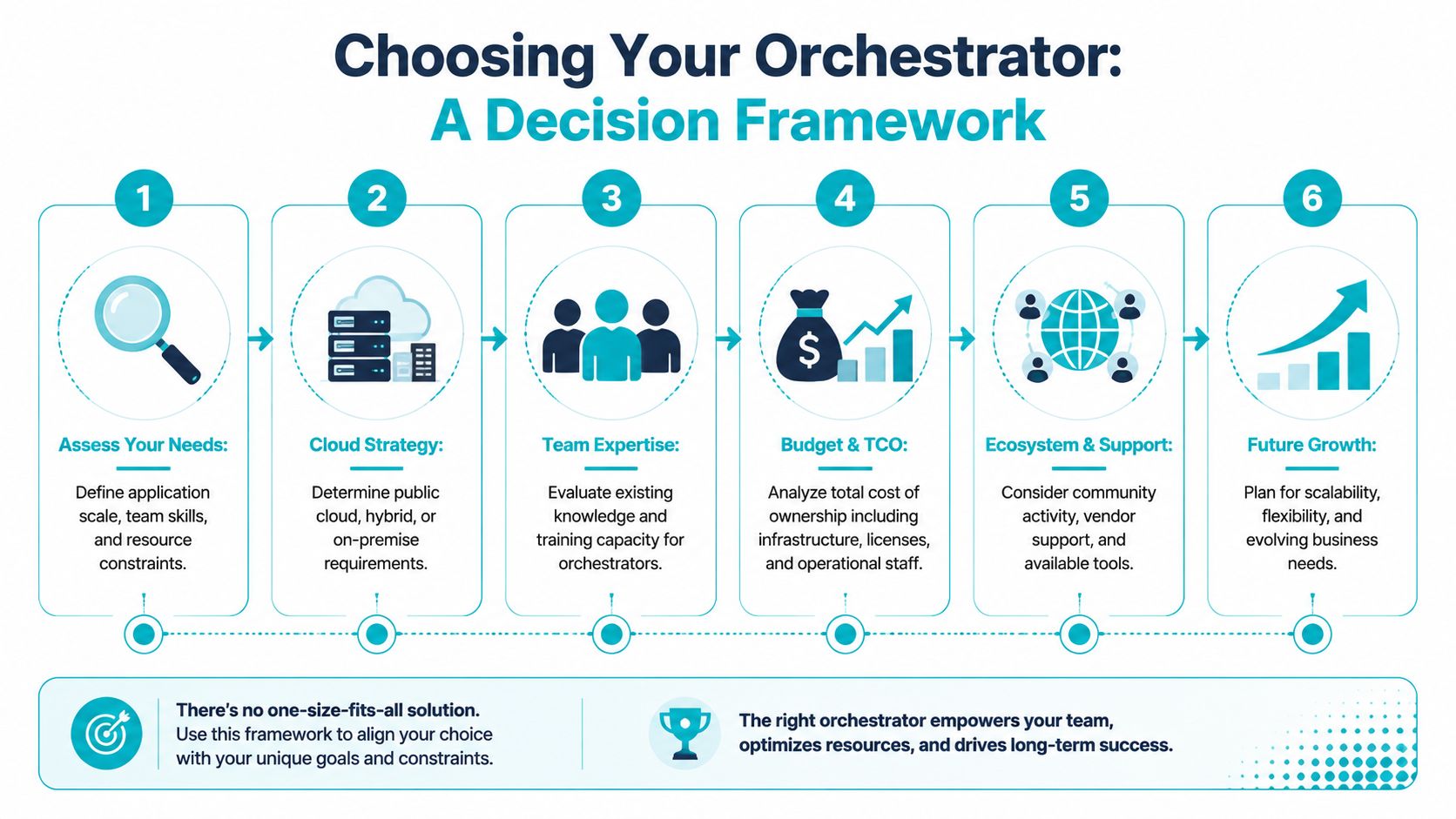
A useful first filter is your cloud position. If you’re still deciding where critical systems should live, compare those constraints before picking the scheduler. This private cloud vs public cloud guide is a good framing tool because orchestration decisions get easier once the hosting model is clear.
The questions that matter
Ask these in order.
What kinds of workloads are in scope?
If you run containers plus VMs or standalone applications, Nomad should be on the shortlist immediately. If you only run simple stateless services, Swarm or a PaaS may be enough.How much platform expertise do you really have?
Teams with deep Kubernetes experience can absorb more platform complexity. Teams without that bench should prefer simpler systems or managed abstractions.Do you need portability or convenience?
ECS is convenient inside AWS. K3s is flexible for compact and private deployments. OpenShift supports enterprises that want a supported Kubernetes distribution with stronger defaults.What does failure recovery look like?
If restoring service requires too many dependencies, the platform may be overbuilt for the job.
Decision lens: Choose the platform your team can operate consistently, not the one your architects can explain most elegantly in a slide deck.
Orchestrator Decision Matrix
| Orchestrator | Best For | Operational Complexity | Workload Flexibility | Ideal ARPHost Environment |
|---|---|---|---|---|
| Kubernetes | Large standardized container estates | High | Container-focused | Dedicated private cloud or high-core bare metal |
| HashiCorp Nomad | Mixed containers, VMs, bare metal apps | Moderate | High | Bare metal servers for hybrid estates |
| Red Hat OpenShift | Regulated enterprise Kubernetes platforms | High | Container-focused | Dedicated enterprise clusters |
| Docker Swarm | Small teams and straightforward services | Low | Moderate | VPS or compact private cloud |
| Amazon ECS | AWS-native stateless workloads | Low to moderate | Lower outside AWS | Not ideal for private infrastructure-first teams |
| K3s | Edge, labs, compact private cloud | Low to moderate | Container-focused | Small private cloud clusters and lightweight nodes |
Practical recommendations by profile
- SMB with a few web apps and APIs: Start with Docker Swarm or a PaaS-style deployment path. Don’t introduce Kubernetes unless the applications clearly demand it.
- DevOps team running mixed infrastructure on owned servers: Nomad is often the best balance of flexibility and operational sanity.
- Enterprise standardizing on supported Kubernetes: OpenShift can make sense if the budget and governance model support it.
- Private cloud or edge deployments: K3s is usually the strongest fit when you want Kubernetes compatibility without standard Kubernetes overhead.
- AWS-only application teams: ECS is reasonable if portability isn’t a strategic concern.
The important shift is this: stop looking for one orchestrator to do everything. A right-sized platform portfolio often costs less, fails in simpler ways, and gives teams a clearer operating model.
Deploying Your Stack on ARPHost Infrastructure
Choosing the orchestrator is only half the design. The hosting layer determines how predictable that orchestrator will feel under load, during upgrades, and when recovery matters.
For hybrid scheduling with Nomad, bare metal is often the cleanest foundation. A host with fixed performance characteristics avoids noisy-neighbor issues and makes placement decisions easier to reason about. For denser virtualization or compact Kubernetes deployments, a Proxmox-based private cloud gives you isolation, snapshots, and room to segment workloads without surrendering root access.
Matching orchestrators to hardware
A few deployment patterns stand out:
- Nomad on dedicated servers: Good for mixed estates where containers, VMs, and traditional services need one scheduler. A high-core system is useful when jobs vary widely in runtime profile.
- K3s on private cloud nodes: Good for lightweight Kubernetes clusters, edge simulation, staging, and internal application platforms.
- Docker Swarm on VPS or compact clusters: Good for small service fleets that need fast deployment and minimal operational drag.
On the hardware side, different node classes fit different roles. A Dual Intel Xeon E5-2690 V3 with 28 cores and 64GB DDR4 ECC RAM is a practical candidate for dense scheduling, Proxmox cluster roles, and multi-tenant service placement. An AMD EPYC 4584PX with 16 cores and 192GB DDR5 RAM is better suited for memory-intensive databases, AI or inference-adjacent workloads, and high-density virtualization. An AMD Ryzen 9600X with 6 cores and 96GB DDR5 RAM fits single-tenant applications, build runners, and high-clock workloads where per-core responsiveness matters.
A simple private deployment pattern
For a compact K3s or Swarm footprint on private infrastructure, the layout can stay straightforward:
- Provision compute nodes on dedicated hardware or a Proxmox private cloud.
- Separate control and application roles where practical, even in smaller clusters.
- Keep storage decisions explicit, especially for stateful workloads.
- Put backup and rollback first, not last.
- Treat network services as part of the platform, including internal name resolution and address assignment.
That last point is often underplanned. If your orchestration stack spans private subnets, overlays, VPN-connected users, and internal services, DHCP and DNS design become foundational.
A Proxmox-backed deployment can start with clear operational basics:
pvesh get /nodes
qm list
pct list
Those commands won’t build the platform for you, but they reinforce an important principle. If the virtualization layer is simple and observable, the orchestrator you place on top of it is easier to manage.
Why ARPHost Excels Here
ARPHost’s Proxmox bare metal server platform is a strong fit for this style of deployment because it supports the two infrastructure patterns most Kubernetes alternative discussions ignore: owned hardware economics and private cloud control. That matters when you want to avoid hyperscaler lock-in, keep mixed workloads close together, or build a right-sized platform that doesn’t force every application into the same operational mold.
The company’s stack is also well aligned with teams that need more than raw compute:
- VPS hosting for small Swarm clusters, utility nodes, and staging systems
- Bare metal servers for Nomad clusters, database-heavy services, and dense virtualization
- Dedicated Proxmox private clouds for K3s, isolated application platforms, and migration projects
- Secure web hosting bundles for teams that need managed website and email hosting alongside app infrastructure
- Fully managed IT services for patching, monitoring, backups, and network operations
If you’re trying to right-size infrastructure instead of overbuilding it, that mix is exactly what you want. The best orchestrator strategy usually sits on top of hosting that gives you room to choose, not hosting that pre-decides the architecture for you.
If you’re comparing Kubernetes alternatives and want infrastructure that fits the workload instead of forcing a one-size-fits-all stack, ARPHost, LLC offers a practical foundation. You can start with VPS hosting, review bare metal server options, explore Proxmox private cloud plans, or request a managed services quote for help with deployment, monitoring, migrations, and day-to-day operations.
