


For most small business owners, IT feels like an unpredictable expense—a necessary evil you pay for when things break. But what if that’s the wrong way to look at it?
The truth is, strategic IT services for small businesses are a powerful engine for growth, not just a drain on your budget. It all comes down to shifting from a reactive "fix-it" mindset to a proactive, technically sound strategy that provides a genuine competitive edge.
Why Smart IT Is a Growth Engine, Not a Cost Center
Let's reframe the whole conversation around technology. For a small business, IT is no longer just about keeping the lights on. It's about building a rock-solid foundation for efficiency, security, and scalability. When you start viewing technology as an investment in your infrastructure—from bare metal servers to a private cloud—you unlock real opportunities to optimize operations and drive more revenue.
Think of it like this: you wouldn't try to compete in a Formula 1 race by building your own garage from scratch, hiring a full-time crew, and buying every diagnostic tool yourself. The upfront cost and learning curve would be staggering. Instead, you'd partner with an expert pit crew that delivers world-class service exactly when you need it. That’s the modern approach to IT.

From Reactive Fixes to Proactive Strategy
The old-school, reactive IT model means you only call for help when a server crashes or data gets lost. This approach isn't just stressful; it's incredibly expensive. Every minute of downtime costs you money.
A proactive model, delivered through managed IT services, is all about preventing problems before they happen through continuous monitoring and patch management. This strategic shift brings a few key advantages to the table:
- Predictable Budgeting: Forget surprise repair bills. With a fixed monthly fee, financial planning becomes simple and reliable. This is a cornerstone of effective IT cost optimization strategies.
- Access to Enterprise-Grade Tools: You get the power of advanced infrastructure—like Proxmox VE private clouds, robust cybersecurity defenses, and automated backup solutions—without the enterprise-level price tag.
- Focus on Your Core Business: When you offload IT management, your team is free to concentrate on what they do best: serving customers and growing the business.
We see this shift happening constantly. Small businesses are realizing that trying to juggle everything in-house is a recipe for falling behind.
The Shift from In-House IT to Managed Services
Here's a quick look at why so many are making the move from traditional IT models to modern managed services:
| Aspect | Traditional In-House IT | Modern Managed IT Services |
|---|---|---|
| Cost Model | High upfront costs, unpredictable repair bills | Fixed, predictable monthly fee |
| Expertise | Limited to the skills of your in-house staff | Access to a deep bench of specialized experts in Proxmox, Juniper, etc. |
| Technology | Often struggles to keep up with new tools | Leverages the latest enterprise-grade technology and automation |
| Focus | Reactive; fixing problems as they arise | Proactive; preventing issues and optimizing systems via 24/7 monitoring |
| Scalability | Difficult and expensive to scale up or down | Flexible and easily scalable to meet demand with virtualized resources |
Ultimately, the goal is to find a partner who can handle the technical complexities so you can focus on the bigger picture.
Unlocking New Opportunities for Growth
But smart IT isn't just about maintenance and prevention. It’s about using technology to actively propel your business forward. A great example is seeing how AI chatbots can drive small business growth by automating customer support and boosting conversions around the clock.
The right IT partner doesn't just solve technical problems. They provide the stable, secure infrastructure and expertise that make these kinds of opportunities possible, helping your business scale confidently and efficiently.
The Four Pillars of Modern IT Infrastructure
Every successful business stands on a solid foundation. These days, that foundation is built with technology. To build an operation that’s both resilient and ready to scale, you can’t think of your IT as just a random collection of tools. Instead, picture it as four interconnected pillars. Get these right, and you’ll spend your time growing the business, not constantly putting out fires.
The demand for solid IT services for small businesses is blowing up. Small and medium-sized enterprises (SMEs) are the main force behind the global IT services market’s explosive growth, which is expected to jump from $1.43 trillion in 2025 to a staggering $2.32 trillion by 2032. In fact, SMEs are projected to hit the highest growth rate of 8.69% during this time, outpacing even large corporations. This isn't just a trend; it's a fundamental shift in how business gets done.

Pillar 1: High-Performance Infrastructure
The first pillar is the engine room of your business—your core infrastructure. This is where your applications run, your data gets crunched, and your customers connect with you. If this part is sluggish, it directly hits your revenue and leaves customers frustrated.
Modern infrastructure gives you the kind of power and flexibility that used to be reserved for massive corporations:
- Bare Metal Servers: For maximum raw performance and total control. Ideal for resource-intensive applications or custom software stacks where you need direct hardware access.
- KVM Virtual Private Servers (VPS): The optimal balance of performance and cost. KVM virtualization provides hardware-level isolation, guaranteeing your resources are never impacted by other users ("noisy neighbors").
- Private Clouds (Proxmox VE): For ultimate control and scalability. A Proxmox private cloud lets you manage your own pool of virtual resources, allowing you to deploy new VMs and containers in minutes and create a truly agile environment. A deep dive into building a small business IT infrastructure can help you map out the best path.
Real-World Example: An e-commerce business using a managed KVM VPS experiences a traffic surge during a promotion. Their managed service provider proactively scales CPU and RAM resources to handle the load, ensuring a smooth customer experience and maximizing sales. The resources are then scaled back down to control costs.
Pillar 2: Proactive Cybersecurity
The second pillar is your shield. With sophisticated cyber threats evolving daily, a reactive security posture is a recipe for disaster. Proactive cybersecurity involves building layered defenses—including managed firewalls, intrusion detection systems, and rigorous patch management—to protect your data, reputation, and bottom line.
For example, a best practice is to configure firewall rules on your Juniper network devices to deny all inbound traffic by default, only allowing connections to specific, necessary ports (e.g., TCP 443 for HTTPS). This simple step dramatically reduces your attack surface.
Pillar 3: Bulletproof Cloud and Backup Solutions
Your third pillar is the ultimate safety net. Disasters happen—whether it’s a hardware failure, human error, or a ransomware attack. A robust disaster recovery (DR) plan ensures your business can restore operations quickly.
Modern solutions like Proxmox Backup Server offer critical features like immutable storage, which renders backups unchangeable for a defined period. This is your most effective defense against ransomware.
Actionable Tip: To implement a basic backup strategy in Proxmox VE, you can schedule nightly backups of a critical VM (e.g., VM ID 100) to a dedicated storage location (local-backup) with a 7-day retention policy using this command in your vzdump.conf:
# /etc/cron.d/vzdump
0 2 * * * root vzdump 100 --mode snapshot --compress zstd --storage local-backup --prune-backups 'keep-last=7'
Pillar 4: Expert Support and Monitoring
Finally, the fourth pillar is your command center. Even the best infrastructure requires vigilant oversight. 24/7 expert support and proactive monitoring act as an extension of your team, constantly tracking system health.
This isn't about waiting for a problem ticket. Advanced monitoring tools track server health (CPU, RAM, disk I/O), network performance, and security logs, often identifying and resolving potential issues before they can impact service. This proactive oversight guarantees maximum uptime and provides peace of mind.
Choosing Your Model: Managed vs. Unmanaged Services
This is one of the most critical technical decisions a business can make. The choice is not just about cost—it's about control, responsibility, and where your team invests its valuable time. Do you need root-level control to build a custom environment, or do you need a partner to handle the operational complexities so you can focus on development?
Getting this right lays a foundation for growth. Getting it wrong leads to security vulnerabilities, performance bottlenecks, and hours wasted on low-level system administration.
The Unmanaged Model: You Get the Keys to the Engine
Think of an unmanaged service as leasing a high-performance race car. You're handed the keys and given full, unrestricted access to the engine. This is the root access that sysadmins and developers value—the freedom to tune, modify, and rebuild any part of the software stack.
But here’s the catch: you’re also the mechanic.
Every security patch, OS update, and performance diagnostic is on you. This model is ideal for teams with deep technical expertise who require absolute control over their environment for custom applications or strict compliance mandates.
Unmanaged plans usually provide:
- Full Root/Administrator Access: Complete command over the operating system and all installed software.
- Hardware and Network Provisioning: The provider guarantees hardware functionality and network connectivity.
- Bare-Bones OS Installation: You start with a clean OS, but all configuration, hardening, and software installation is your responsibility.
This level of control is essential for deploying custom automation pipelines or unique software stacks that don't fit a standard template.
The Managed Model: You Get a Dedicated Pit Crew
A managed service, on the other hand, is like leasing that same race car but with a dedicated pit crew included. Your team’s only job is to drive. The experts handle everything else behind the scenes: proactive monitoring, performance optimization, security patching, and disaster recovery.
If a warning light comes on, the crew is already diagnosing the issue before it can cause a failure. This model provides access to enterprise-level expertise and lets your team focus entirely on core business objectives—like writing code or serving customers—instead of server maintenance.
Managed IT services are designed to be a seamless extension of your team. The goal is proactive support that stops problems before they happen, giving you maximum uptime and security without the cost of a full-time, in-house expert.
With a managed service, the provider shoulders a huge amount of the technical weight, letting you get back to business.
Feature and Responsibility Breakdown: Managed vs. Unmanaged Services
To make the right decision, you must understand the clear division of labor. The best choice depends on your team's skillset, budget, and strategic focus.
| Responsibility Area | Unmanaged Service (Client Responsibility) | Managed Service (Provider Responsibility) | Best For |
|---|---|---|---|
| OS & Security Patching | You must monitor for, test, and apply all security updates yourself. | Proactively applied by the provider after testing to ensure compatibility. | Businesses that need to ensure consistent security posture without dedicated staff. |
| Performance Monitoring | You're in charge of setting up and watching your own monitoring tools. | 24/7 monitoring of server health, CPU, RAM, and disk usage. | Companies that need guaranteed uptime and peak performance for critical applications. |
| Backup and Recovery | You are responsible for configuring, managing, and testing all backups. | Automated, managed backups with proven and tested recovery plans. | Any organization where data integrity and availability are non-negotiable. |
| Software Installation | You install and configure all necessary applications and dependencies. | Assistance with installing and optimizing common software stacks (e.g., LAMP, LEMP). | Teams that want to accelerate deployment and ensure best-practice configurations. |
| Technical Support | Limited to the physical hardware and the network connection. | Comprehensive support for the entire managed environment and software stack. | Businesses that need expert assistance 24/7 to resolve technical issues rapidly. |
At the end of the day, unmanaged it services for small businesses empower tech-savvy teams who need granular control. Managed services give a competitive edge to businesses that want to outsource the complexity and focus on what truly matters: growth.
How Cloud Hosting and Virtualization Fuel Growth
For many, "cloud hosting" and "virtualization" sound like complex, enterprise-level technologies. In reality, they are practical tools that provide the agility and cost-efficiency needed to compete at any scale. They fundamentally change how you deploy, manage, and pay for digital infrastructure.
Imagine traditional IT is like buying a physical server. You pay for 100% of the hardware, power, and cooling, even if your application only uses 15% of its CPU capacity. The rest of the resources sit idle, wasting capital.
The Power of On-Demand Resources
Cloud hosting and virtualization, powered by hypervisors like KVM and platforms like Proxmox VE, solve this problem. Instead of dedicating an entire physical machine to one task, you can create multiple isolated virtual servers (VMs) on a single piece of bare metal hardware.
This flexibility translates directly into business agility. Let's say your web application is featured on a major news site. With a physical server, the traffic surge would likely cause a crash.
Key Takeaway: Virtualization allows you to dynamically scale resources—CPU, RAM, and storage—to handle traffic spikes. For instance, in Proxmox, you can hot-add resources to a running KVM virtual machine without a reboot. Once traffic normalizes, you can scale back down, ensuring you only pay for what you use.
This on-demand model is a game-changer for managing cash flow, eliminating large capital expenditures on hardware that may be underutilized. You can get a deeper dive into these benefits in our guide on the advantages of virtualizing servers.
The decision tree below can help you figure out if a hands-on unmanaged service or a fully supported managed service is the right fit for your business.
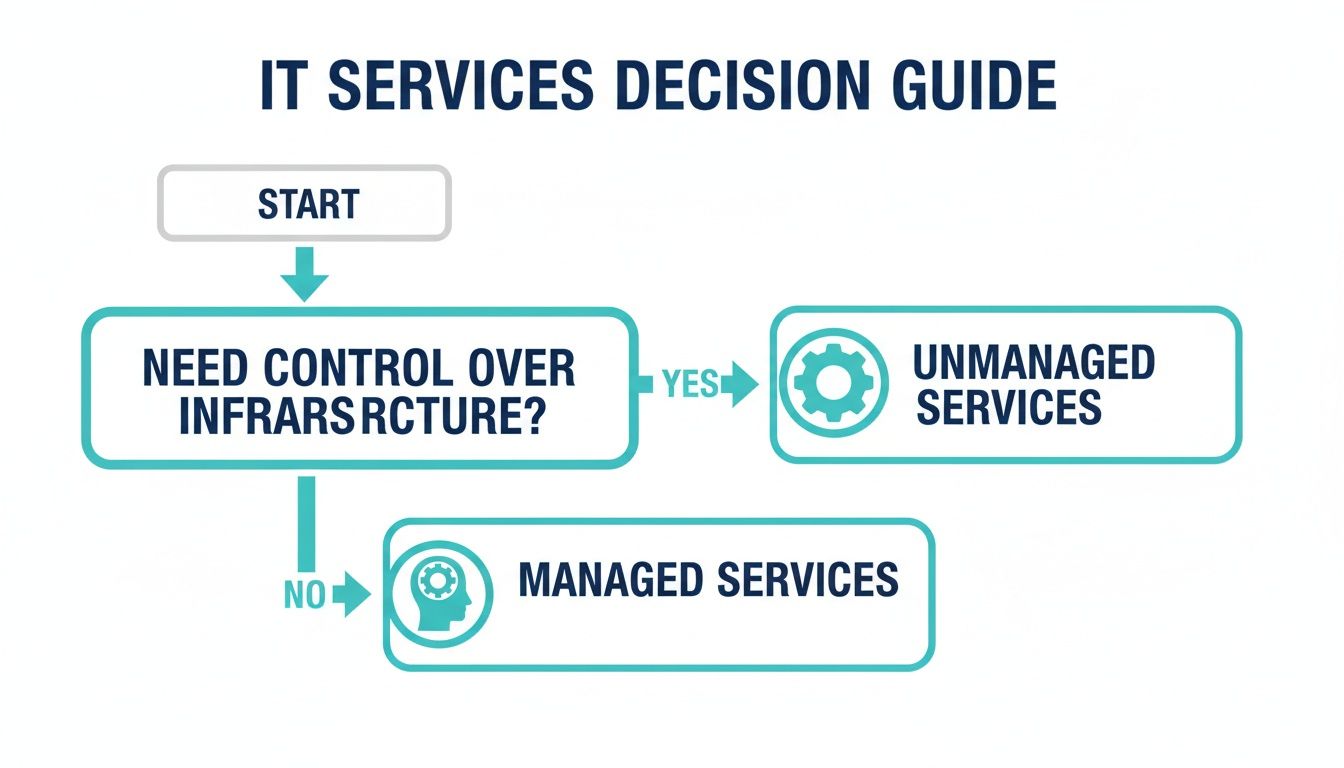
As the chart shows, the main question comes down to how much direct control and responsibility your team is ready to take on.
Unlocking Enterprise-Grade Infrastructure
This strategic shift to cloud services has become the backbone of modern IT for small and medium-sized businesses (SMBs). Projections show that cloud solutions are on track to make up more than 50% of SMB tech budgets in 2025 alone. The global IT services market, largely pushed by this trend, is expected to grow from $1.50 trillion in 2024 to $2.59 trillion by 2030. Smaller businesses are leading this charge, all thanks to these affordable, on-demand solutions.
Virtualization gives you access to enterprise-grade functionality without the enterprise-level price tag.
Here’s how virtualization directly helps you grow:
- Rapid Deployment: Need a new dev environment or a staging server? A new virtual machine can be provisioned from a template and running in minutes, not days.
- Improved Disaster Recovery: VM snapshots can be created before major changes, allowing for instant rollbacks. Full backups can be restored to new hardware in a fraction of the time it would take to rebuild a physical server.
- Resource Isolation: KVM virtualization ensures that one VM cannot consume the resources allocated to another, guaranteeing consistent performance for your critical applications.
By adopting these technologies, small businesses are no longer constrained by physical hardware. You can build a dynamic and resilient foundation that scales with your ambition, turning IT from a fixed cost into a flexible, strategic asset.
A Practical Checklist for Choosing Your IT Partner
Selecting an IT provider is a strategic partnership, not a commodity purchase. The right partner can accelerate growth, while the wrong one can lead to downtime, security vulnerabilities, and operational friction. To make an informed decision, you must look beyond marketing claims and evaluate true technical capabilities.
This checklist is designed to help you vet potential partners on what truly matters, ensuring you find a provider who operates as a technical advisor and an extension of your team.
Assessing True Technical Expertise
Not all providers are created equal. You need a partner whose technical depth aligns with your current and future needs. Ask direct, technical questions to verify their real-world experience.
Here are the key areas to dig into:
- Platform Specialization: Ask, "Do your engineers hold certifications or have demonstrable experience with Proxmox VE 9, including clustering, high availability, and storage configurations like Ceph or ZFS?"
- Complex Migration History: A true test of expertise is migration. Ask, "Can you provide a technical overview of a complex migration you've managed, such as a multi-host VMware cluster to a Proxmox VE environment, including the tools and automation scripts used?"
- Network and Security Acumen: Gauge their knowledge of enterprise-grade networking. Ask, "What is your team's experience managing Juniper network devices? Can you describe a best-practice approach for configuring firewall zones and routing policies in Junos OS?"
A partner with deep, verifiable expertise will answer these questions confidently and provide specific, technical examples.
Scrutinizing Support and Service Delivery
When your production environment is down, "24/7 support" is meaningless if you're waiting for a first-level agent to escalate your ticket. You must evaluate the provider's support structure and responsiveness before signing a contract.
The most crucial element of a great IT partnership is the reliability and quality of service delivery. A provider's ability to consistently meet your needs, resolve issues promptly, and communicate clearly is what separates a mere vendor from a true partner.
When evaluating potential partners, understanding service delivery management is a critical step to ensure your chosen IT partner can consistently meet your business needs and expectations.
Verifying Scalability and Transparent Pricing
Your infrastructure must scale with your business. A good partner will provide a clear, flexible path for scaling resources (CPU, RAM, storage) up or down without punitive fees. Ensure you understand the technical process for scaling and any potential downtime involved.
Finally, scrutinize the contract and pricing model. Hidden fees for data transfer, API calls, or emergency support can quickly negate an otherwise attractive price. Demand a complete breakdown of all potential charges so there are no surprises. By following this checklist, you can confidently select the right provider for your IT services for small businesses and build a foundation for long-term success.
How ARPHost Engineers Your Success
Theory and checklists are important, but execution requires a partner with the right infrastructure and proven expertise. We have built a full suite of IT services for small businesses designed for one purpose: to transform your technology into a competitive advantage.
Whether you need a managed KVM VPS, a high-performance bare metal server, or a custom Proxmox Private Cloud, we provide the infrastructure and partnership to help you scale efficiently. It all starts with a rock-solid foundation engineered for reliability and supported by seasoned engineers.

Differentiators That Drive Client Success
Many providers can sell you a server. Few can deliver a strategic partnership that actively contributes to your growth. We integrate our key differentiators into every solution, ensuring your infrastructure is a powerful asset, not just an operational cost.
- Obsessive Proactive Monitoring: We don't wait for trouble tickets. Our systems constantly monitor server health, network performance, and security logs, enabling our engineers to resolve potential issues before they impact your business.
- Support by Real Engineers: When you need support, you connect with an expert. Our 24/7 support team is staffed by seasoned engineers with deep knowledge of complex hosting environments, delivering fast, effective solutions.
- Proven Migration Expertise: We specialize in complex infrastructure projects, including challenging VMware to Proxmox migrations. Our methodical process ensures data integrity and minimizes downtime, removing the risk and complexity from your shoulders.
This isn’t just a hosting plan. It’s a managed growth platform.
At ARPHost, we operate as an extension of your team. Our goal is to handle the technical complexities so you can focus entirely on innovation and serving your customers, knowing your infrastructure is in expert hands.
Your Partner for Digital Transformation
For small businesses, adopting modern IT infrastructure is no longer optional—it's essential for competition. The U.S. SME market for IT services is projected to grow from $490.86 billion in 2025 to $691.57 billion by 2030.
Furthermore, 40% of small businesses are now using generative AI tools—double the rate from last year. This demonstrates that the right IT services are the key to unlocking innovation and efficiency. You can dig into more stats about this growing market on MordorIntelligence.com.
So, whether you need a flexible KVM VPS for a new application, a powerful bare metal server for a heavy database, or a secure Proxmox Private Cloud for complete control, ARPHost has the tailored infrastructure and expert guidance to make it happen. We help you move faster, scale smarter, and build a resilient business that's ready for whatever comes next.
Frequently Asked Questions
When you're looking into IT services for small businesses, a lot of practical questions come up. Getting clear answers is the only way to make a smart decision that actually fits your budget and your vision for growth. Let's tackle some of the most common questions business owners ask.
How Much Should a Small Business Budget for IT Services?
The old "3-6% of annual revenue" rule is outdated. A modern approach focuses on value and risk mitigation. Ask yourself: what is the cost of one hour of downtime for your critical application? For most businesses, that figure far exceeds the monthly cost of a managed service designed to prevent it.
A managed KVM VPS plan covering essential security and monitoring might start at a few hundred dollars per month, while a fully redundant, high-availability Proxmox private cloud with a comprehensive disaster recovery plan represents a more significant investment. The key is to find a provider with scalable solutions, allowing you to start with what you need today and grow without re-platforming.
Can I Switch IT Service Providers Without Downtime?
Yes, a zero-downtime or near-zero-downtime migration is achievable with a professional provider. This is not a simple "flip of a switch" but a carefully orchestrated engineering project.
A successful migration follows a clear, step-by-step process:
- Step 1: Technical Audit. The new provider performs a deep discovery of your current environment, including applications, data, network configurations, and dependencies.
- Step 2: Parallel Environment Build-out. A new, isolated infrastructure is provisioned on the target platform.
- Step 3: Data Synchronization and Testing. Data is replicated to the new environment. Rigorous testing is performed to validate application functionality, performance, and data integrity.
- Step 4: Scheduled Cutover. The final switch (e.g., a DNS change) is performed during a pre-approved, low-traffic maintenance window to ensure a seamless transition.
For complex projects like a VMware to Proxmox migration, engineers use specialized tools for live replication of virtual machine disks to ensure data consistency and minimize the final cutover window. Always insist that a potential provider detail their migration methodology.
What Is the Most Critical IT Service for a New Business?
For a new business, the foundational services are secure, high-performance hosting and automated, reliable backups.
Your website and applications are your digital storefront; they must be fast, available, and secure. A managed KVM VPS offers a significant advantage over shared hosting by providing guaranteed resources and a hardened environment.
However, a disaster recovery plan is equally critical.
A service like Proxmox Backup as a Service, which uses immutable storage, is your ultimate safety net. It means that if the worst happens—whether it's a server failure or a ransomware attack—you can get your business back online quickly. These two services work together to protect your most valuable digital assets and ensure you can keep operating, no matter what.
Ready to build a powerful, scalable IT foundation for your business? The experts at ARPHost specialize in engineering success with managed KVM VPS, bare metal servers, and custom Proxmox Private Clouds tailored to your needs. Get in touch with an ARPHost solutions expert today.