

The counterintuitive reality is that financial-services IT isn't primarily a cloud-buying exercise. It's a sequencing problem governed by recovery targets, security controls, audit evidence, and the need to keep regulated systems operating while newer workloads change around them.
Financial services is expected to spend roughly $694.4 billion on IT in the next 12 months, with IT services accounting for $309 billion, or more than 44% of that total, according to HG Insights' financial-services industry market report. The right question for a CIO isn't whether to outsource infrastructure or move everything to cloud. It's which workloads should stay on hardened hardware, which belong on private cloud, and which operating responsibilities a provider can safely own.
Why Financial Services Treats IT as a Regulated Utility
A generic enterprise can often tolerate an infrastructure decision that prioritizes convenience or short-term price. A bank, insurer, payments company, or investment platform has a narrower margin for error. Compliance, recovery, security, and predictable performance matter more than an attractive benchmark or a cloud-first slogan.
Long-running banking research shows why service providers remain central. Software and services each represented around 33% of total banking IT budgets, while hardware accounted for about 17% and communications about 9% That spending pattern favors recurring application support, systems integration, managed infrastructure, cloud operations, and security services over one-time equipment purchases.
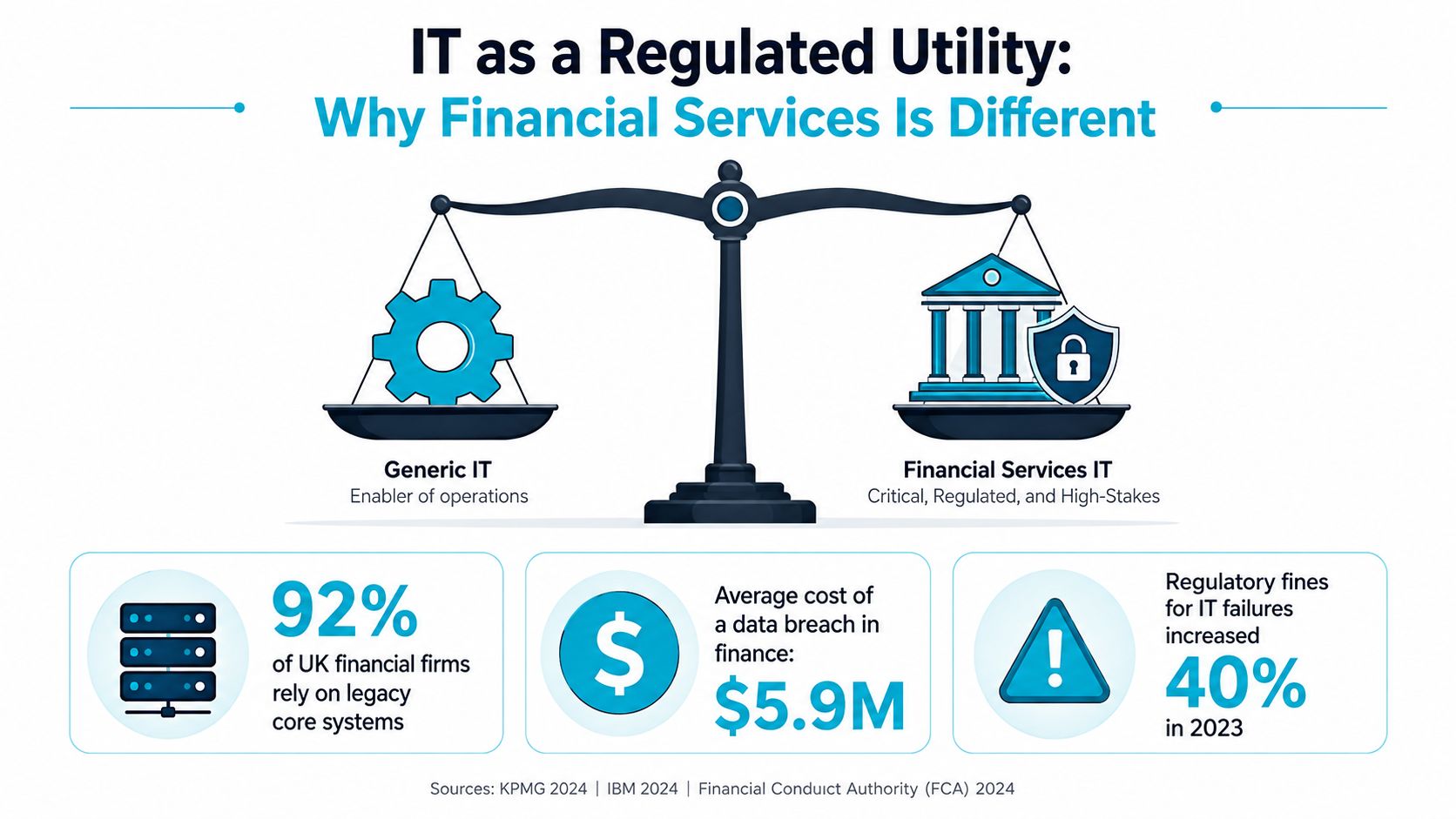
The market's scale reinforces the point. The United States is the largest single-country market at about $195.4 billion across roughly 71,000 companies, while APAC represents about 42% of global financial-services IT spend, according to the same HG Insights market report. Managed infrastructure, outsourcing, integration, and support aren't peripheral purchases. They underpin modernization, security, and operational resilience.
The cloud-first default creates avoidable risk
Cloud can be the right destination for elastic analytics, customer-facing applications, development environments, and selected integration services. It isn't automatically the right location for every ledger, payment dependency, data store, or administrative control plane.
A better evaluation starts with workload characteristics:
- Regulatory sensitivity: Identify systems with strict data-handling, access, retention, and audit requirements.
- Recovery criticality: Map each service to an RTO and RPO that operations can test and prove.
- Performance predictability: Separate workloads that need dedicated compute or storage from those that benefit from elasticity.
- Change tolerance: Modernize systems in reversible stages instead of creating a single migration event.
Practical rule: Treat infrastructure as a regulated utility. Choose the operating model that makes control, recovery, and evidence repeatable, not merely the platform with the most features.
The Eight Capability Domains Every Financial-Services IT Stack Must Cover
A vendor shortlist should map cleanly to eight capability domains. If a proposal covers servers and tickets but leaves identity, audit evidence, or recovery testing vague, it isn't a complete IT services for financial services offering.
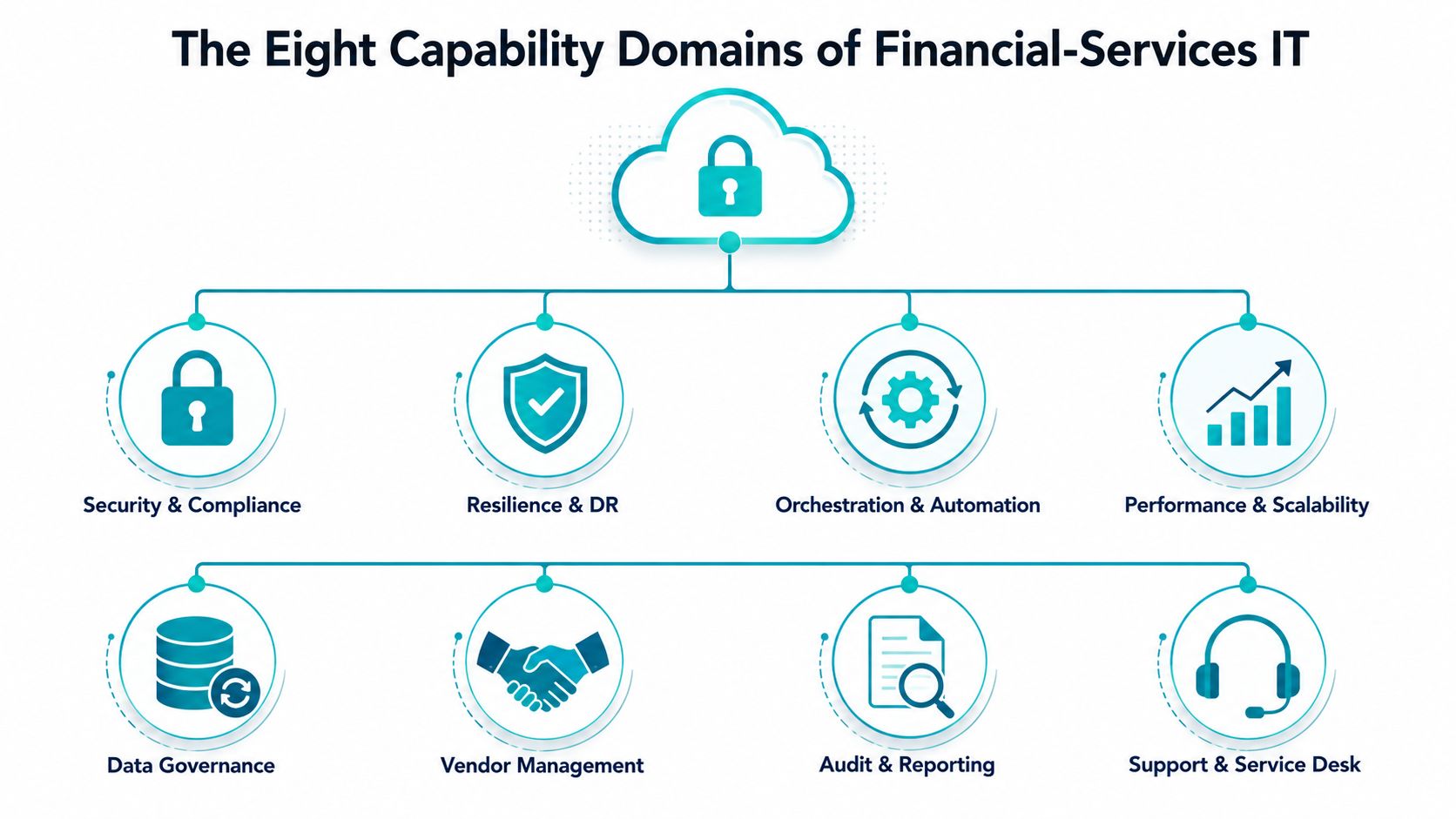
Security and compliance
Security must cover identity, privileged access, encryption, vulnerability management, segmentation, and continuous monitoring. Map controls to the institution's obligations, including PCI DSS for card-related programs, GLBA safeguards, NYDFS Cybersecurity requirements where applicable, and supervisory expectations such as FFIEC guidance for outsourcing.
Resilience and disaster recovery
Resilience means more than redundant servers. It includes dependency mapping, tested failover, backup integrity, documented runbooks, recovery ownership, and evidence that the organization can restore the service under pressure.
Orchestration and automation
Automation should handle repeatable work such as provisioning, patch workflows, backup checks, configuration enforcement, and controlled migrations. Use infrastructure as code where it improves traceability, but require review gates for changes affecting regulated workloads.
Performance and scalability
Measure the complete path, including compute, storage latency, network behavior, database dependencies, and application response. A high-core-count server won't solve a poorly designed dependency chain.
Data governance
Define where sensitive data resides, who can access it, how administrators use it, how long logs are retained, and how copies are protected. Governance has to include backups, replicas, exports, and temporary data.
Vendor management
Require clear service ownership, escalation paths, subcontractor visibility, maintenance procedures, evidence retention, and exit assistance. A provider should explain what happens when a service fails, not just what happens during normal operations.
Audit and reporting
Request operational reports that show access activity, patch status, backup results, incidents, changes, exceptions, and SLA performance. Reports should help internal risk teams answer questions without reconstructing events from scattered tickets.
Support and service desk
Support must connect technical response to business impact. A payment dependency, customer portal, and internal reporting system shouldn't share identical severity definitions or escalation paths.
These domains give procurement and infrastructure teams a common language. They also expose the difference between a hosting package and a provider prepared to support regulated operations.
Designing Disaster Recovery That Actually Meets Banking Recovery Targets
Nightly backups aren't enough for many financial workloads. Common benchmarks place the RTO for ATM and payment infrastructure at about 2 hours, the RTO for online banking at about 1 hour, and workload-dependent RPOs between 15 minutes and 1 hour
| Workload | Target RTO | Target RPO | Primary DR Mechanism |
|---|---|---|---|
| ATM and payment infrastructure | About 2 hours | 15 minutes to 1 hour, depending on workload | Replication, image-level backups, and tested failover |
| Online banking | About 1 hour | 15 minutes to 1 hour, depending on workload | Application-aware replication and automated recovery |
| Supporting financial workloads | Defined by business impact | Defined by data-change tolerance | Tiered backups and documented restoration |
The table is an engineering starting point, not a substitute for business impact analysis. Your operations team should establish the target for each service, identify dependencies, and test whether the proposed mechanism can meet the envelope.
Build the recovery path in steps
- Classify the workload. Record business owner, dependencies, data sensitivity, acceptable data loss, and recovery sequence.
- Select the protection mechanism. Use frequent backups for recoverable workloads, replication for tighter recovery windows, and failover automation where manual intervention creates unacceptable delay.
- Protect the backup system. Separate administrative access, encrypt data in transit and at rest, and prevent a compromised production credential from destroying recovery copies.
- Create a dependency-aware runbook. Document network, identity, database, application, and customer-service steps in execution order.
- Test restoration. Restore representative images, validate application behavior, measure elapsed time, and record failures.
- Feed results into the SLA. A recovery target that hasn't been demonstrated is an aspiration, not an operational capability.
Proxmox Backup Server and image-level VM backups can simplify restoration because teams can protect complete guests rather than rebuilding every component manually. That still requires capacity planning, credential separation, retention decisions, and regular restoration exercises.
For a practical framework covering operational resilience and testing, review these SRE and DR testing best practices. Teams evaluating recovery architecture can also use ARPHost's recovery time objective guidance to frame recovery requirements before selecting infrastructure.
Why Zero Trust Has Become the Baseline for Financial-Services IT
A perimeter-only security model is insufficient for a financial institution with mainframes, private cloud, SaaS platforms, remote administrators, third-party integrations, and hybrid networks. Zero Trust treats every trust-boundary crossing as untrusted until it's continuously verified, which is why it has become a baseline architecture for financial-services IT.
The implementation should be concrete rather than rhetorical:
- MFA: Require strong authentication for workforce, vendor, and administrative access.
- Least privilege: Grant users and service accounts only the permissions required for a defined task.
- Encrypted inter-environment traffic: Protect connections between mainframe, private cloud, hosted services, and management networks.
- Privileged access management: Broker, record, and review elevated sessions instead of distributing standing administrator credentials.
- Microsegmentation: Limit lateral movement between workloads so a compromised account or service has a narrower blast radius.
- Continuous monitoring: Send identity, access, configuration, and network events to the monitoring function for correlation.
Apply the model to hybrid infrastructure
A financial institution shouldn't treat Zero Trust as a product purchase. It's a control design that must survive platform boundaries. An administrator accessing a Proxmox cluster, a vendor connecting to a backup console, and an application calling a payment service should each have distinct identities, permissions, authentication requirements, and audit records.
Service providers should explain how they enforce these controls in their own operations. Ask whether administrative access requires MFA, how privileged sessions are logged, how credentials are rotated, how emergency access is approved, and how segmentation changes are reviewed.
ARPHost's secure hosting offerings can map to portions of this model through Imunify360, CloudLinux isolation, firewalls, DDoS protection, and managed monitoring. Those controls don't replace an institution's governance program, but they can reduce the operational burden for appropriately scoped web, email, and application workloads.
Managed Versus Unmanaged IT Services for Financial Services
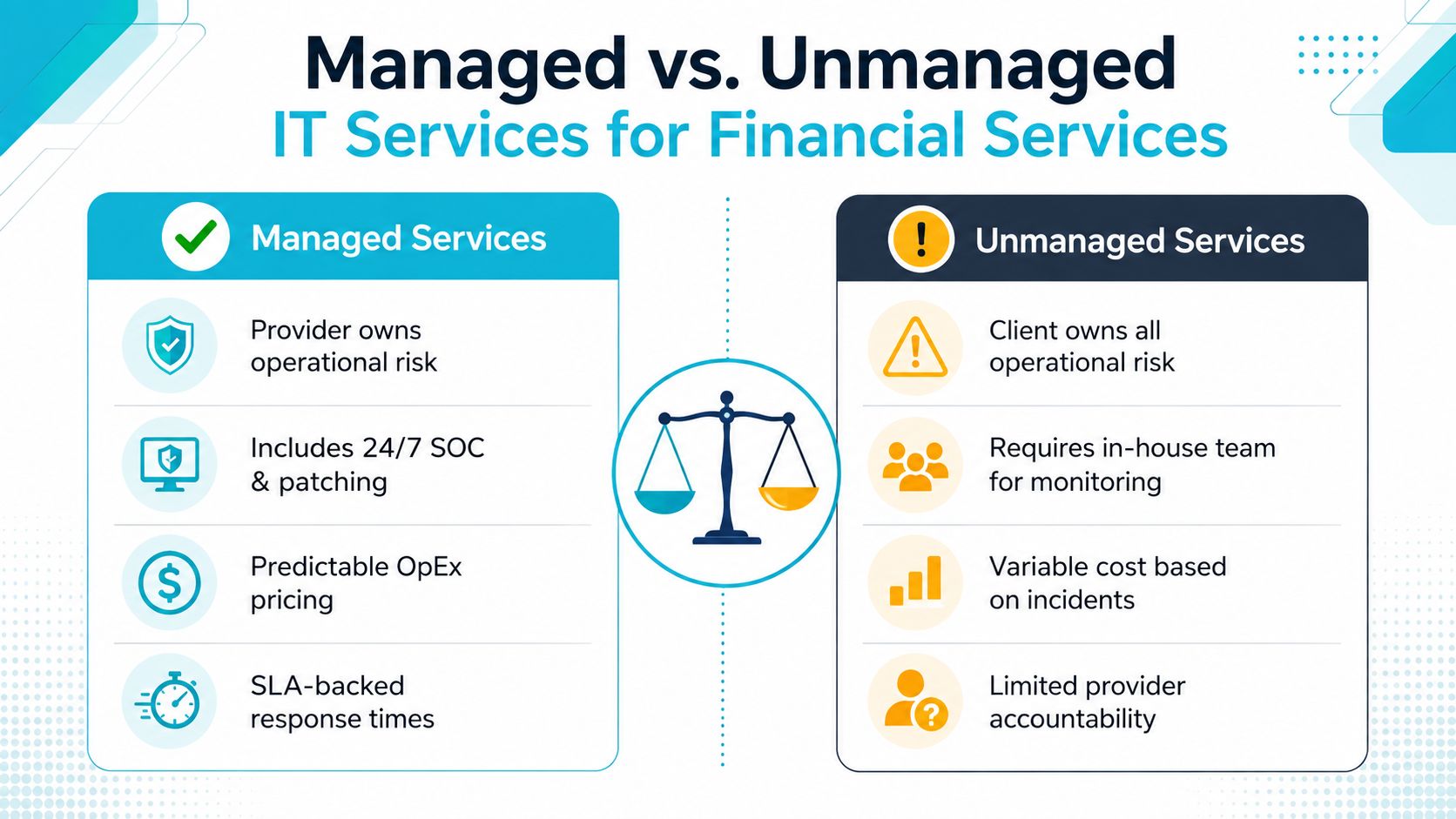
The managed-versus-unmanaged decision isn't binary. Financial institutions are dividing work according to control, specialization, staffing, and risk rather than choosing one model for the entire estate.
Research from Whitelane captures that tension. 26% of organizations in UK and Ireland financial services plan to move spend from outsourcing to insourcing, while 48% also plan to increase offshore activities, indicating selective re-bundling rather than wholesale insourcing or outsourcing.
Managed services
A fully managed provider can own infrastructure monitoring, patch coordination, backup verification, security updates, configuration management, and escalation. This model suits organizations that need predictable operating costs or lack enough internal staff for continuous coverage.
The trade-off is governance. The client must define approval boundaries, evidence requirements, access controls, maintenance windows, and termination procedures. “Managed” shouldn't mean “provider does whatever it wants.”
Unmanaged infrastructure
Unmanaged hosting preserves direct customer control. Your team chooses the operating system, patch schedule, monitoring stack, backup policy, firewall configuration, and incident process. That flexibility works when the institution has mature operational coverage and wants to retain hands-on responsibility.
The risk is often underestimated. An unmanaged server still needs vulnerability remediation, backup testing, alert triage, capacity planning, privileged-access review, and after-hours response. Those responsibilities don't disappear because the provider supplies hardware.
A practical allocation model
Retain functions where regulatory accountability, business rules, or sensitive decision-making require direct institutional control. Delegate repeatable execution where a provider can meet documented controls and produce evidence.
A useful split might look like this:
- Retain in-house: Risk acceptance, security policy, architecture approval, data classification, application ownership, and regulatory communication.
- Delegate selectively: Hardware operations, infrastructure monitoring, patch execution, backup administration, network maintenance, and first-line incident triage.
- Govern jointly: Cloud changes, recovery tests, privileged access, vulnerability exceptions, and major migrations.
For organizations that want a provider to own operational execution while internal teams retain governance, ARPHost's managed IT services for businesses provide a relevant operating model to evaluate.
Sequencing Modernization Without Breaking Regulated Systems
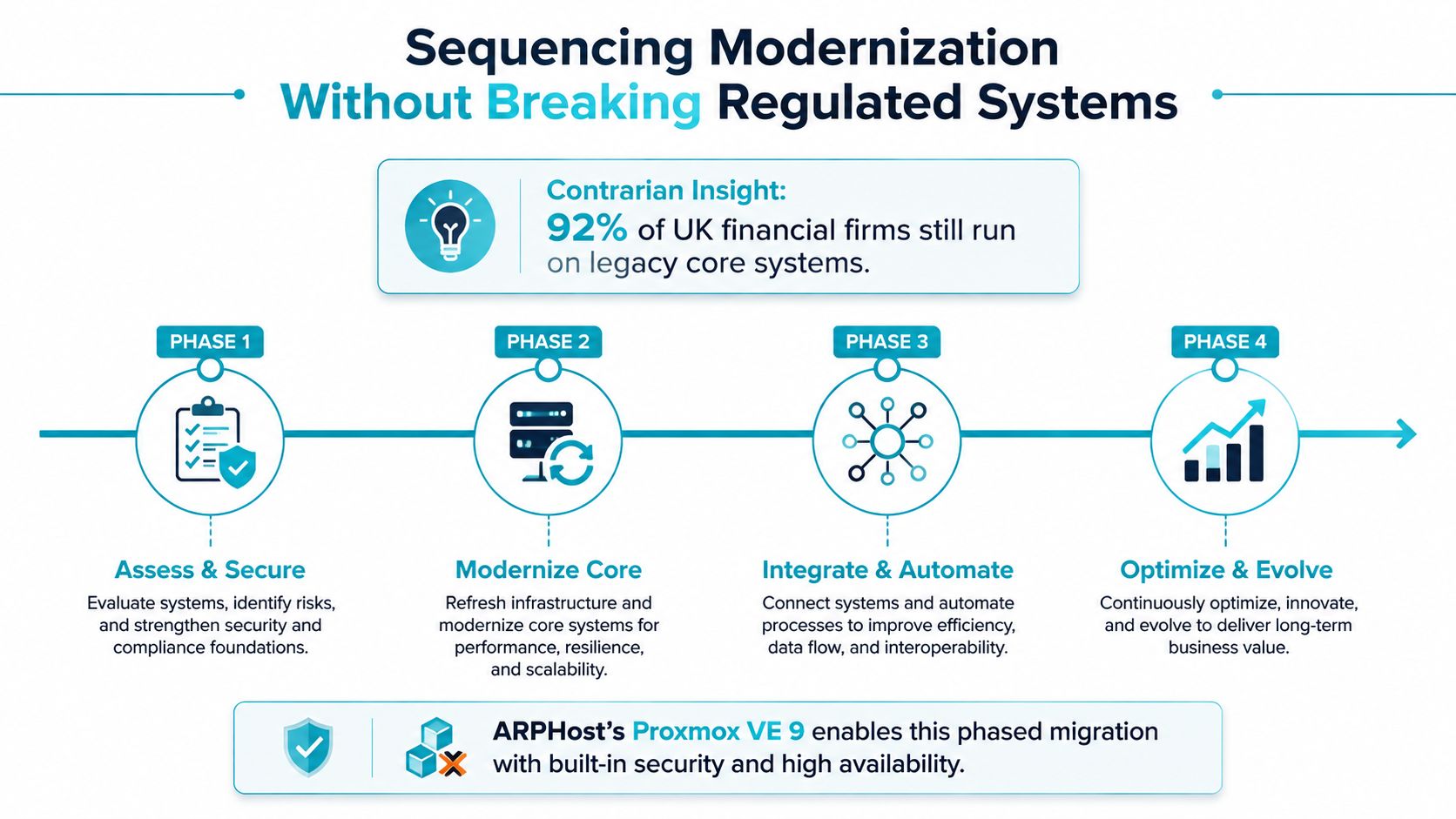
The modernization backlog shouldn't begin with “move to cloud.” It should begin with workload placement.
KPMG cites that 92% of UK financial-services firms still rely on legacy technology at risk of end-of-support or end-of-life, while Nutanix reports that 98% of financial-services respondents struggle to scale GenAI from development to production and 52% identify infrastructure upgrades as the top investment need. The figures point to an infrastructure-readiness problem, not a lack of interest in innovation.
Use three workload tracks
Track one, hardened core. Keep core ledger, payment, and tightly coupled regulated systems on dedicated bare metal or other hardened infrastructure when predictability, isolation, and operational control outweigh elasticity.
Track two, private-cloud expansion. Move elastic application tiers, development environments, integration services, and selected internal platforms to a Proxmox-based private cloud. Dedicated hardware and full root access give infrastructure teams control over placement, networking, storage, and lifecycle decisions.
Track three, data and GenAI readiness. Isolate analytics and inference workloads from transaction-critical systems. High-memory infrastructure can support experimentation without forcing the core platform to absorb unpredictable resource demand.
Sequence the platform changes
Proxmox VE 9.2 adds a Dynamic Load Balancer using the Cluster Resource Scheduler in dynamic mode. It makes placement decisions from real-time node and guest utilization and can automatically migrate HA-managed guests to reduce cluster imbalance while respecting HA rules, according to Proxmox's VE 9.2 announcement.
That capability supports phased expansion, but it doesn't eliminate change control. Build the cluster, validate storage and network behavior, onboard non-critical guests, test migration, and only then introduce more consequential workloads.
For upgrades, Proxmox guidance states that migration from an older version to a newer version is supported, while moving from a newer version to an older version is generally unsupported. It also notes that HA groups are automatically migrated to HA rules once all nodes are upgraded to Proxmox VE 9, as described in the Proxmox VE 8 to 9 upgrade guidance.
Use a cluster-by-cluster migration plan, preserve rollback options where supported, and document guest behavior before changing production placement. For a broader planning framework, review legacy system modernization strategies.
How ARPHost's Portfolio Maps to Financial-Services IT Requirements
ARPHost, LLC offers infrastructure options that can be evaluated against workload placement rather than purchased as a generic bundle. The relevant question is which service provides the required isolation, control, recovery, and operating ownership.
Dedicated compute for fixed and demanding workloads
The bare metal server inventory includes a Dual Intel Xeon E5-2690 V3 with 28 cores and 56 threads, 64GB DDR4 ECC RAM, and enterprise storage in Tampa, Florida. It fits Proxmox clusters, multi-tenant VPS nodes, and workloads where dedicated CPU and predictable resource access matter.
The AMD EPYC 4584PX provides 16 cores, 32 threads, 192GB DDR5 RAM, and NVMe SSD storage in Tampa, Florida. Its memory profile suits large databases, dense virtualization, and AI or ML inference environments that need more headroom than a small virtual server.
The AMD Ryzen 9600X includes 6 cores, 12 threads, 96GB DDR5 RAM, and NVMe SSD storage in Tampa, Florida. It's appropriate for single-tenant applications, development environments, and high-clock-speed workloads.
Virtualization, hosting, and recovery
ARPHost's VPS hosting starts at $5.99 per month, making it an entry point for development, internal tools, and appropriately scoped production services. Secure web hosting bundles combine Webuzo, Imunify360, and CloudLinux OS for customer portals, email, databases, and websites that need isolation and simpler administration.
For elastic workloads, Proxmox private clouds start at $299 per month per cluster. Dedicated hardware, full root access, high-availability designs, and instant provisioning let infrastructure teams build a controlled virtualization layer rather than placing every application on shared infrastructure.
Proxmox Backup as a Service addresses image-level protection and restoration. Firms that already own hardware can assess Tampa colocation instead of replacing equipment, while managed services can cover monitoring, patching, configuration, security updates, and incident response.
For enterprise application estates, infrastructure teams may also compare SAP service delivery options by Kagool when application support and infrastructure operations need to align under a broader service model.
Evaluating Vendors and a 90-Day Adoption Roadmap
A vendor scorecard should measure operational results, not presentation quality. The FDIC recommends four phases for managing technology-provider SLAs: measure service results against defined levels, examine results to identify causes, take corrective action for failed activities, and continuously guide providers through feedback sessions based on objectively measured performance metrics
Questions for the shortlist meeting
Ask every provider:
- How do you define service ownership? Identify who handles infrastructure, identity, backup, security events, and application escalation.
- What evidence can you produce? Request samples for access reviews, patch status, backup results, incident records, and change approvals.
- How do you test RTO and RPO? Require a schedule, restoration procedure, dependency map, and failure-reporting process.
- How is administrative MFA enforced? Confirm coverage for provider staff, customer administrators, emergency accounts, and third parties.
- How do you isolate workloads? Ask about tenant boundaries, network segmentation, privileged access, and backup-console protection.
- What happens after an SLA failure? Look for root-cause analysis, corrective action, and executive escalation.
- Which work remains with the client? Clarify assumptions for monitoring, patching, application support, compliance, and incident response.
- How do you support migration and exit? Require data portability, documentation, transition assistance, and rollback planning.
- How do you handle platform upgrades? Ask about Proxmox lifecycle management, maintenance windows, testing, and HA behavior.
- Who responds outside business hours? Confirm location, escalation authority, communication channels, and severity-based response.
The 90-day adoption plan
Days 1 to 30: Map workloads to the eight capability domains. Classify systems by regulatory sensitivity, recovery need, performance profile, and change tolerance. Shortlist providers against the scorecard rather than against feature count.
Days 31 to 60: Run a proof of concept focused on a private-cloud segment, backup service, monitoring workflow, or secure hosting workload. Test administrative access, restoration, alert handling, evidence production, and handoffs.
Days 61 to 90: Formalize SLAs, escalation rules, maintenance procedures, RTO and RPO test schedules, access controls, reporting requirements, and operational handovers. Start with a bounded workload, then expand only after the provider demonstrates control.
ARPHost supports several entry points for this sequence, including VPS hosting, bare metal servers, Proxmox private clouds, and managed IT services. Its stated operating model includes Tampa-based U.S. support, a 99.99% uptime SLA, and a documented 11-year track record, all of which should be evaluated against your own SLA, location, and continuity requirements.
ARPHost, LLC provides VPS hosting, dedicated bare metal, Proxmox private clouds, colocation, backup services, and fully managed IT services for servers, networks, and communications. Visit ARPHost, LLC to map a regulated workload to the right infrastructure and request a practical architecture review.
