

A restore usually starts the same way. Someone deleted the wrong directory. A WordPress update broke the site. A VM won’t boot after storage corruption. Or the uglier version: the management node is gone, the backup repo is under scrutiny, and leadership wants an ETA in minutes.
That’s when backup strategy stops being a checkbox and becomes operational discipline. Knowing how to restore from backup isn’t about clicking “recover” and hoping for the best. It’s about restoring the right point, into the right place, in the right order, with enough validation that you don’t turn a bad day into a longer outage.
From a managed hosting perspective, the pattern is clear. Simple file restores are common. Full application restores are harder. VM recovery under pressure is harder still. Bare-metal recovery is where weak runbooks fall apart. The teams that recover cleanly usually share the same habits: they define recovery objectives early, verify backups before disaster, and treat restore testing as part of production operations.
Beyond the Backup Button Understanding RPO and RTO
A failed server doesn’t just create downtime. It forces two business decisions immediately.
First, how much data can you afford to lose. Second, how long can you afford to stay down.
Those are RPO and RTO.
What they mean in real operations
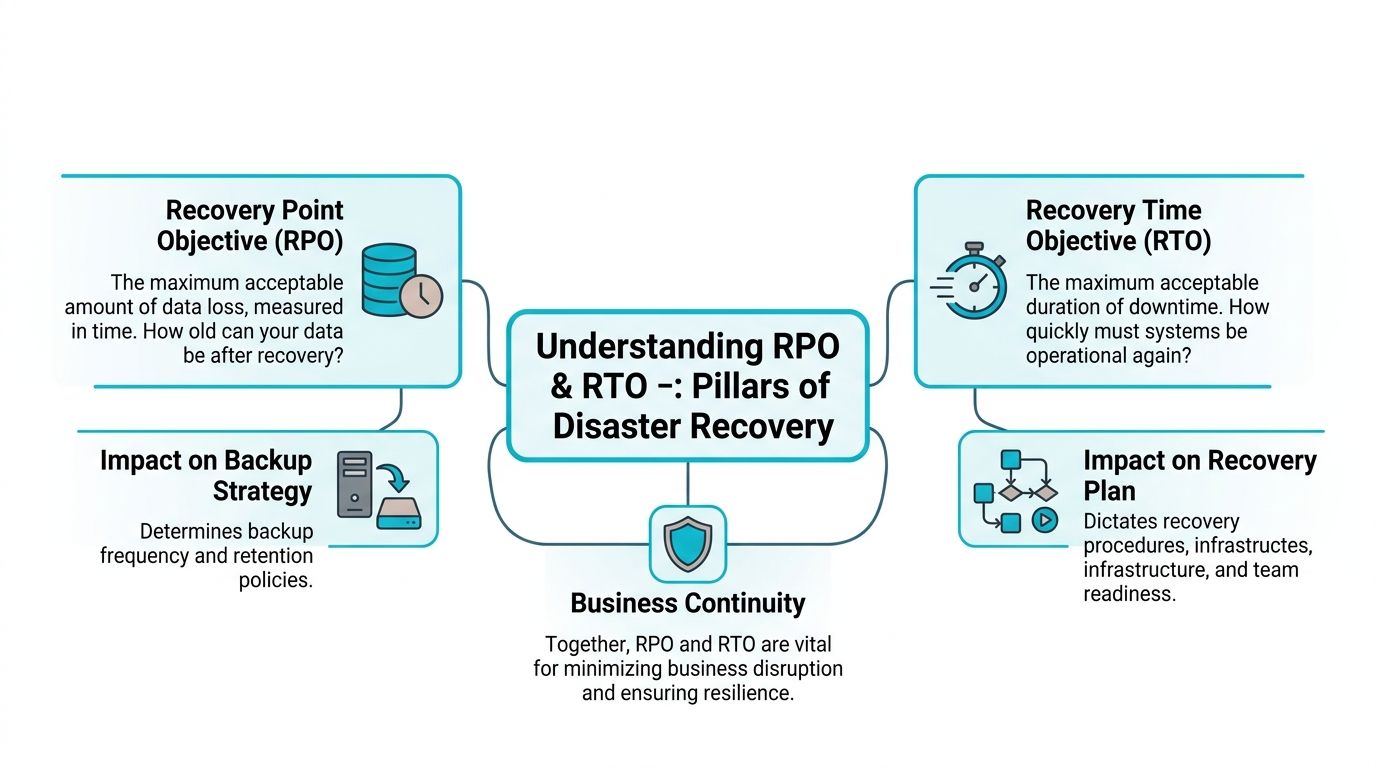
Recovery Point Objective (RPO) is your acceptable data loss window. If your last clean backup is from four hours ago, then four hours of changes may be gone after recovery.
Recovery Time Objective (RTO) is your acceptable outage window. If finance says payroll must be live again in one hour, your restore plan has to meet that target in practice, not just in vendor screenshots.
A lot of backup plans ignore this distinction. They focus on backup frequency, storage retention, and completion alerts. Those matter, but they don’t answer whether the restored system will be usable within the time the business expects.
According to the 2023 Global Data Protection Survey, 78% of organizations experienced a data loss incident in the past five years, with the average time to restore critical data being 14 hours, far exceeding the 4-hour recovery window most businesses deem acceptable. That gap is the fundamental disaster. The backup may exist, but the business still misses its recovery target.
RPO and RTO drive different technical choices
A useful way to frame it is this:
| Objective | Core question | What it changes |
|---|---|---|
| RPO | How recent must the recovered data be? | Backup frequency, snapshot cadence, replication, retention |
| RTO | How quickly must the service return? | Restore workflow, standby infrastructure, automation, staffing |
If your RPO is tight, you need more frequent capture points. If your RTO is tight, you need faster recovery paths, tested runbooks, and infrastructure that can accept a restore without manual improvisation.
Operational rule: A backup schedule is not a recovery plan. RPO and RTO are what turn storage into continuity.
The framework that usually keeps teams honest is 3-2-1-1-0: multiple copies, different media, off-site protection, one immutable copy, and zero backup errors verified through testing. If you need a business-level primer before building the technical runbook, ARPHost has a solid overview of disaster recovery planning fundamentals.
Your Universal Pre-Restore Playbook
The worst time to think clearly is during an outage. That’s why every serious restore starts with the same pre-flight routine.

Start with the backup model, not the restore button
The baseline framework is the 3-2-1-1-0 rule. As explained in Veeam’s overview of the 3-2-1-1-0 backup rule, it requires three copies of data, on two different media, with one off-site, one immutable, and zero errors verified through testing.
That last piece matters most during recovery. “Backup completed successfully” only tells you a job finished. It doesn’t prove the recovered data is complete, bootable, permission-correct, or application-consistent.
Before touching production, confirm five things:
Define the failure scope
Is this file deletion, application corruption, OS failure, storage failure, or full host loss? A file-level restore solves one of those. It doesn’t solve all of them.Choose the recovery point deliberately
The newest restore point isn’t always the right one. If corruption or ransomware spread before detection, the latest backup may carry the same problem.Protect evidence if security is involved
If you suspect compromise, preserve logs and affected systems before overwriting them with a restore.Check credentials and keys
Encrypted backup sets, service accounts, API tokens, and application secrets often become blockers only after the data is back.Pick a validation target
Critical systems should land in a non-production environment first.
Sandbox validation is the gate
For high-value systems, I treat sandbox validation as mandatory. Restore the image or dataset into an isolated environment and check three pillars: completeness, integrity, and timing. You’re verifying that volumes are present, the recovered data passes checksum or hash validation, and the workflow meets your actual recovery target.
Often, many “failed restores” are exposed as dependency failures. The data exists, but the app won’t start because a service account is missing, a mount point changed, or a backend dependency was never rebuilt.
Backup status alone is a false positive. A sandbox restore is what confirms the data is usable.
A practical pre-restore checklist looks like this:
- Completeness: Confirm expected disks, databases, attachments, and configuration files are all included.
- Integrity: Validate checksums where available, open files, mount images, and review application logs after startup.
- Dependencies: Test database listeners, local service bindings, cron jobs, queues, and service account permissions.
- Timing: Measure the restore and startup sequence against your stated RTO.
- Reconciliation: Compare restored state against known-good business records where consistency matters.
What works and what usually fails
Teams recover faster when they maintain current runbooks, test quarterly or more often for critical systems, and restore into environments that mirror production closely enough to expose timing and dependency issues.
What doesn’t work is trusting retention alone, restoring straight into production under pressure, or assuming a green backup dashboard proves recoverability. In managed environments, operational support earns its keep precisely in these situations. Someone has to own validation, timing, and the ugly edge cases before the outage happens.
Restoring Websites and Applications with cPanel and Webuzo
Most restore requests aren’t full infrastructure events. They’re websites, mailboxes, databases, and broken application updates. Those restores feel simpler, but they’re where people often reintroduce corruption by restoring pieces in the wrong order.
File restore is easy. Application restore isn’t.
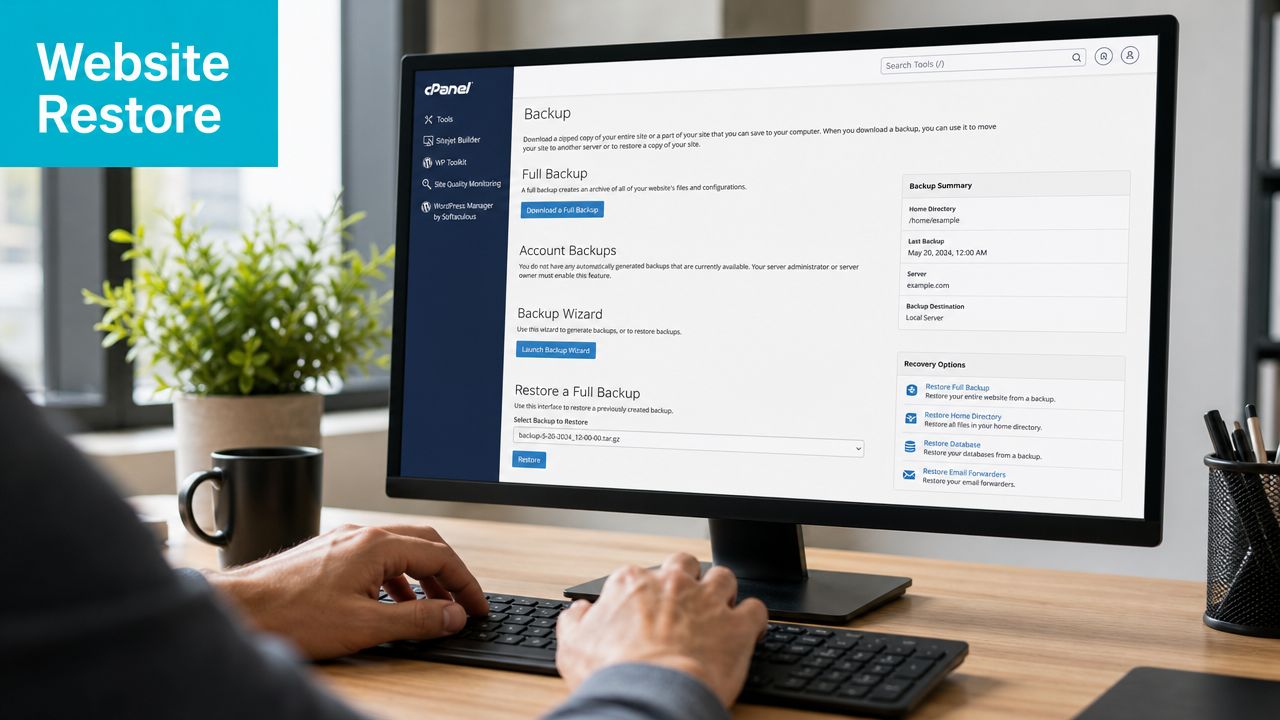
A web hosting control panel such as cPanel or Webuzo makes common tasks straightforward:
- Single file recovery: restore a deleted theme file,
.envfile, or media asset. - Mailbox recovery: recover messages or a whole account after accidental deletion.
- Full account restore: rebuild site files, databases, email settings, and user-level configuration together.
That’s useful, but it’s only half the job for dynamic applications. According to the 2025 Gartner cloud infrastructure audit summary, 68% of failed post-disaster application recoveries stem from data inconsistency between restored databases and application caches, not from the simple loss of files. In other words, the files may be back, but the application state is wrong.
A safer restore sequence for WordPress, Magento, and similar stacks
If you’re restoring a content site or commerce stack, use order and isolation:
Put the app into maintenance mode
Don’t let users write new data while you’re restoring old state.Restore the database first when consistency matters
The database is usually the source of truth for content, orders, sessions, and settings.Restore application files to a staging path
Compare key files before replacing production content. This catches custom modules, changed configs, or partial overwrites.Clear or rebuild caches
Don’t trust stale application caches after a database rollback.Validate background jobs and writable paths
Queue workers, scheduled tasks, uploads, and temp directories often break even when the frontend loads.Bring the site back only after a functional test
Login, form submission, order workflow, admin actions, and outbound mail should all be checked.
For websites, a “successful restore” means the application works end to end. It doesn’t mean the files simply exist again.
Example commands for database-focused recovery
For MySQL or MariaDB workloads, you want to restore cleanly, then validate schema and app access:
mysql -u restore_user -p target_db < site_backup.sql
mysqlcheck -u restore_user -p --check --databases target_db
For PostgreSQL:
psql -U restore_user -d target_db -f app_backup.sql
vacuumdb -U restore_user -d target_db --analyze-in-stages
In practical hosting operations, control panels help with the account-level restore, but the database and cache relationship still needs operator attention. That’s especially true for WooCommerce, Magento, OpenCart, and other systems where carts, orders, sessions, and object caches can drift after rollback.
On managed stacks, one useful pattern is restoring the account in a panel, validating the database state separately, then rotating the application back into service only after cache and scheduled task checks pass.
Scaling this with hosted tooling
For businesses that don’t want to hand-roll restore workflows, secure hosting bundles with panel access, backups, malware controls, and application installers reduce the number of moving parts you have to coordinate during an incident. That matters most for teams without a full-time sysadmin watching every restore point and cron log.
Full VM Recovery with Proxmox and VMware
VM recovery is where restore quality starts to separate platforms, runbooks, and operators. Restoring a file is one thing. Restoring an operating system, attached storage, boot order, virtual hardware profile, and application dependencies is another.

Standard VM restore versus disaster-grade recovery
In a normal Proxmox or VMware event, the workflow is familiar. You identify the affected VM, pick a restore point, recover to the same node or an alternate target, and validate boot, storage attachment, and guest services.
That’s the standard path. It works when the hypervisor estate is still alive.
The harder scenario is the one most basic guides skip: your primary management node is gone, and you need to rebuild enough control plane to recover encrypted, immutable backups on fresh hardware. That gap matters because the 2025 Linux Foundation Security Report summary notes that 42% of ransomware incidents now target backup repositories, yet only 15% of enterprise recovery guides include a protocol for metadata reconstruction on a new bare-metal server after the primary host is compromised.
The clean restore path inside Proxmox
For an ordinary VM failure inside a healthy Proxmox environment, the sequence should stay disciplined:
- Identify the exact guest and recovery point
- Restore to alternate storage or alternate VM ID first if possible
- Boot with networking constrained
- Check filesystem integrity and guest logs
- Verify application services before cutover
- Only then reattach to production traffic
If the issue is limited to guest corruption, that’s usually enough. If the backup repository is immutable and off-site, the restore path is cleaner because you’re less likely to be recovering attacker-modified data.
For teams that don’t want to manage the backup fabric themselves, Proxmox Backup as a Service is one way to externalize immutable, encrypted, off-site backup handling while keeping a Proxmox-centered recovery flow.
Cold start recovery after management node loss
This is the workflow I’d document for a true cold start:
Provision a fresh bare-metal target
Match CPU virtualization support, storage layout expectations, and network design closely enough that restored guests won’t hit avoidable hardware mismatches.Install a clean Proxmox node
Keep it minimal at first. Don’t rush to restore every integration.Re-establish access to the backup repository
That includes encryption keys, datastore references, and any metadata required to enumerate backup sets.Reconstruct restore metadata carefully
This is the step many guides omit. You need the platform to understand what backups exist and how they map to guests, storage, and restore targets.Restore priority guests first
Domain services, database nodes, jump hosts, application frontends, then lower-priority workloads.Validate each guest in isolation before broad reattachment
A recovered VM that boots is not the same as a recovered service.
A visual walkthrough can help if you’re planning this kind of runbook:
Proxmox versus VMware in restore operations
The practical trade-off is usually less about whether recovery is possible and more about how transparent the process is during failure.
| Platform path | Strength | Common restore friction |
|---|---|---|
| Proxmox-native restore | Clear storage and guest mapping, strong fit for self-managed clusters | Cold-start metadata handling must be documented |
| VMware-heavy workflow | Familiar in established enterprise estates | Migration and licensing complexity can complicate DR changes |
| Managed backup layer over either | Cleaner operational ownership and tested procedures | You still need application-level validation after the VM returns |
If you’re restoring from snapshots alone, remember they aren’t the same as disaster-proof backups. They’re useful operational checkpoints. They are not your only line of recovery.
Advanced Bare Metal and Database Restoration
Bare-metal recovery exposes every shortcut in your documentation. You’re not just restoring data. You’re rebuilding the platform that data expects.
Hardware choice affects restore quality
For full host rebuilds, hardware consistency matters. Driver behavior, storage performance, RAID layout, and available RAM all change how a restored image behaves after boot. That’s why high-performance recovery plans usually specify target hardware in advance instead of “any spare server.”
For database-heavy restores, a memory-rich box shortens the painful part after import. The AMD EPYC 4584PX with 16 cores, 192GB DDR5 RAM, and NVMe storage is well suited to large MySQL or PostgreSQL recovery because database validation, cache warmup, and index-heavy post-restore work benefit from abundant memory and fast local storage. For virtualization rebuilds, the Dual Intel Xeon E5-2690 V3 with 28 cores and 64GB DDR4 ECC RAM is a practical fit for reconstituting Proxmox clusters and multi-tenant nodes. Both are available through bare metal server inventory.
Restore the database to a consistent state
The biggest mistake on bare metal is treating database recovery like file copy. It isn’t. You need consistency first, then service startup.
A basic MySQL flow might look like this:
systemctl stop mysqld
mysql -u root -p -e "CREATE DATABASE app_restore;"
mysql -u root -p app_restore < full_backup.sql
mysqlcheck -u root -p --repair --databases app_restore
For PostgreSQL:
systemctl stop postgresql
createdb -U postgres app_restore
psql -U postgres -d app_restore -f full_backup.sql
reindexdb -U postgres -d app_restore
After import, check application credentials, queue consumers, and local paths before opening traffic. If the restored system pulls from immutable backup storage and validation is built into the process, you reduce the chance of replaying corruption into a fresh machine. That’s the practical reason many teams move toward immutable backup solutions for serious recovery planning.
The fastest bare-metal restore is usually the one that was mapped to specific hardware, tested in advance, and tied to a database validation checklist.
Building True Resilience with ARPHost Managed Services
Most businesses don’t fail at backup. They fail at recovery operations under time pressure.
The pattern is consistent. Someone has backups, but no one has tested restore timing. The VM comes back, but the app doesn’t. The files restore, but caches and databases are out of sync. The repository exists, but the team hasn’t documented cold-start recovery after management node loss.
What managed recovery changes
A managed approach changes who owns the hard parts:
- Validation ownership: restore testing gets scheduled and reviewed instead of deferred.
- Infrastructure fit: backup, hosting, and restore targets are designed together.
- Operational response: there’s a defined path for file restores, VM recovery, and host rebuilds.
- Security controls: immutable copies, encrypted backup sets, and administrative restrictions are part of the restore design, not an afterthought.
In practice, that means fewer improvised restores and fewer hidden dependencies discovered at the worst moment. It also gives smaller internal teams a way to operate at a level closer to an MSP or hosting operations team without staffing all of that in-house.
Where a managed provider actually helps
This is the point where tooling and service meet. A provider such as ARPHost, LLC can combine secure VPS hosting, Proxmox-based private cloud infrastructure, bare metal systems, immutable backup handling, and fully managed IT services into one recovery model. That’s useful when your environment spans cPanel sites, custom applications, VMs, and dedicated hardware instead of just one backup product.
For businesses growing beyond ad hoc restores, the practical stack often looks like this:
- Secure managed VPS hosting for websites and smaller apps
- Dedicated Proxmox private clouds when VM sprawl and isolation matter
- Bare metal servers for databases, high-I/O apps, and cluster rebuild targets
- Fully managed IT services for monitoring, patching, restore testing, and incident response
Why ARPHost excels here
The advantage isn’t marketing language. It’s operational fit. Hosting, backup strategy, validation, and recovery support work better when they’re built around the same environment and owned by people who handle restores routinely.
That matters whether you’re deploying a small web stack, rebuilding a Proxmox cluster, or trying to recover a database-heavy application onto replacement hardware without guessing through the process.
If you need a restore plan that goes beyond backup jobs and into verified recovery, ARPHost, LLC offers practical paths for that. You can start with VPS hosting for smaller workloads, review secure web hosting bundles for cPanel and Webuzo environments, explore Proxmox private clouds for clustered virtualization, or request a managed services quote if you want ongoing help with backup validation, recovery testing, and live incident response.
