

A conference call rarely fails because someone forgot to mute. It fails because the system underneath the meeting was built like an afterthought.
That usually looks familiar. A sales review starts on time, one remote manager can’t join from a hotel network, another person drops every few minutes, screen sharing permissions are wrong, and the host spends the first part of the meeting playing traffic cop. Teams blame the app. In practice, the app is often the smallest part of the problem.
If you want to understand how to do conference calling well, start with infrastructure. That means call routing, PBX design, SIP trunking, network behavior, host controls, recording policy, and failure planning. User etiquette matters, but it doesn’t fix weak architecture.
Beyond the Mute Button Why Your Conference Calls Keep Failing
The failure usually starts before anyone says a word. An executive review is scheduled for 9:00. One attendee joins from a hotel Wi-Fi network behind aggressive firewall rules. Another comes in through a mobile app that prefers a different audio path. The host can start the meeting, but half the room spends the first ten minutes troubleshooting join methods, echo, and dropped audio.
That is not a meeting etiquette problem. It is a systems design problem.
A lot of conference call advice stays at the user level. Mute unused microphones. Reduce background noise. Do not talk over other people. What that guidance usually skips is the part IT can control: call routing, fallback access, codec handling, PBX behavior, carrier diversity, and the policies that decide what happens when one component fails.
For teams comparing options, the bigger question is not which app has the cleanest interface. It is which business phone system comparison lines up with your network, security requirements, and tolerance for operational overhead.
Common Failure Points
Conference calls break in predictable places:
- Single-path access: If users can only join through one client or one transport method, a local app issue becomes a meeting-wide problem. Reliable systems provide alternate entry paths such as SIP, browser, and PSTN dial-in.
- Poor media handling: Bad codec selection, packet loss, jitter, and endpoint echo control problems create choppy audio long before users blame the platform.
- Weak host controls: Hosts need clear control over muting, lobby admission, participant permissions, and recording. Without that, small disruptions spread fast.
- No redundancy: One PBX instance, one SIP trunk, or one internet edge is a fragile design. Failure will show up during the call that matters most.
- No pre-call operations: High-stakes meetings need test calls, device checks, and a fallback plan. Good infrastructure still fails in practice if nobody validates it.
I have seen companies replace conferencing software twice and keep the same call failures because the PBX, WAN policy, and SIP routing never changed. The symptoms looked different. The underlying fault stayed put.
What changed, and what did not
Early conference calling was limited by switching infrastructure, line availability, and cost. Modern systems replaced a lot of that physical complexity with software, virtualization, and IP transport. The constraint moved. It now sits in your hosting model, network quality, session border configuration, and recovery planning.
That is why reliable conference calling starts below the interface. A polished app can hide weak architecture for a while. It cannot correct a badly placed PBX, oversubscribed uplink, misconfigured QoS policy, or a conferencing stack with no failover path.
Choosing Your Conferencing Infrastructure A Strategic Comparison
There are three common ways to build conference calling into a business environment. Each one solves a different problem, and each one creates a different maintenance burden for IT.
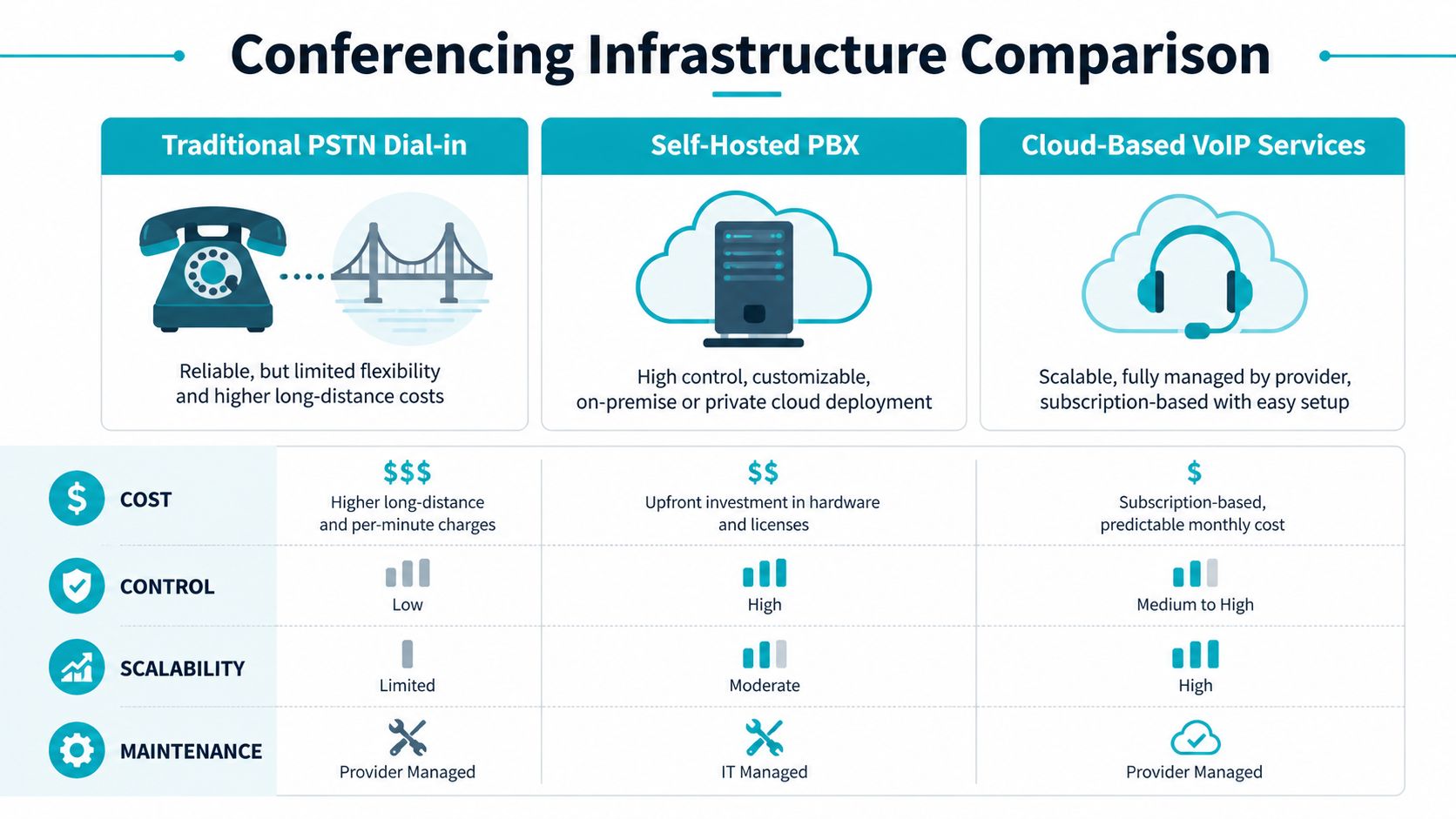
Three models that actually matter
Traditional PSTN dial-in bridge is the old-school model. It’s dependable in one narrow sense: nearly everyone can join by phone. But flexibility is limited, feature growth is slow, and international or long-distance cost structures can become annoying fast.
Self-hosted PBX gives IT full control. You choose the PBX software, the SIP trunks, the recording policy, the authentication model, and the redundancy strategy. This is the route for teams that need custom call flows, compliance-driven storage, or deeper integrations with internal systems.
Managed cloud PBX or UCaaS shifts responsibility to a provider. That reduces internal admin effort and gets users productive quickly, but it also narrows your control over underlying architecture, troubleshooting depth, and feature customization.
Conference Calling Infrastructure Comparison
| Criterion | PSTN Dial-in Bridge | Self-Hosted PBX (on ARPHost Private Cloud) | Managed Cloud PBX (UCaaS) |
|---|---|---|---|
| Control | Low | High | Medium |
| Deployment speed | Fast | Moderate | Fast |
| Customization | Limited | Extensive | Provider-dependent |
| Dial-in support | Native | Native with trunk setup | Usually included |
| Video and collaboration features | Minimal | Depends on platform | Strong on many platforms |
| Security control | Limited | High | Shared with provider |
| Maintenance burden | Low to medium | High unless managed | Low |
| Best fit | Basic audio access | IT-led businesses with custom needs | Teams that want fast rollout and less admin work |
How to choose without guessing
A simple way to decide is to ask which trade-off you can tolerate.
- Choose PSTN if your need is narrow. You want audio access, broad phone compatibility, and you don’t need much beyond a bridge and PIN.
- Choose self-hosted PBX if your team cares about call routing, policy control, recording placement, and system integration.
- Choose managed cloud PBX if your staff needs conferencing but your IT team doesn’t want to own the whole voice stack.
There’s also a growth question. Some businesses start with a basic hosted setup, then realize they need custom queues, bridge security, or integration with support workflows. That’s where a self-hosted PBX becomes more attractive, especially when it runs in a private cloud rather than on a single on-prem appliance.
A conferencing stack should match your tolerance for ownership. If your team wants custom policy and low surprises, build closer to the infrastructure. If your team wants simplicity, hand off more responsibility.
For teams comparing deployment models in more detail, this business phone system comparison is a useful next step.
What works and what doesn’t
What works:
- Multiple join paths
- Clear ownership of the voice stack
- A supported PBX platform with known operational procedures
- A plan for growth without redesigning everything later
What doesn’t:
- Using a consumer meeting app as a business phone strategy
- Mixing unsupported SIP providers and soft clients
- Treating conference bridges as isolated features instead of part of the phone system
- Ignoring recording, compliance, and failover until after users depend on the system
The strongest design is usually the one that can start small, then scale without switching architectural direction halfway through.
Deploying a Resilient PBX on Your Private Cloud
If you want predictable conference calling, deploy the PBX like any other critical service. Give it dedicated resources, clean network paths, controlled updates, and a backup plan that doesn’t depend on luck.
A practical pattern is to run a PBX such as FreePBX or 3CX inside a virtual machine on a dedicated Proxmox environment. That keeps the voice stack isolated from web apps, internal utilities, and test workloads that don’t belong anywhere near production telephony.
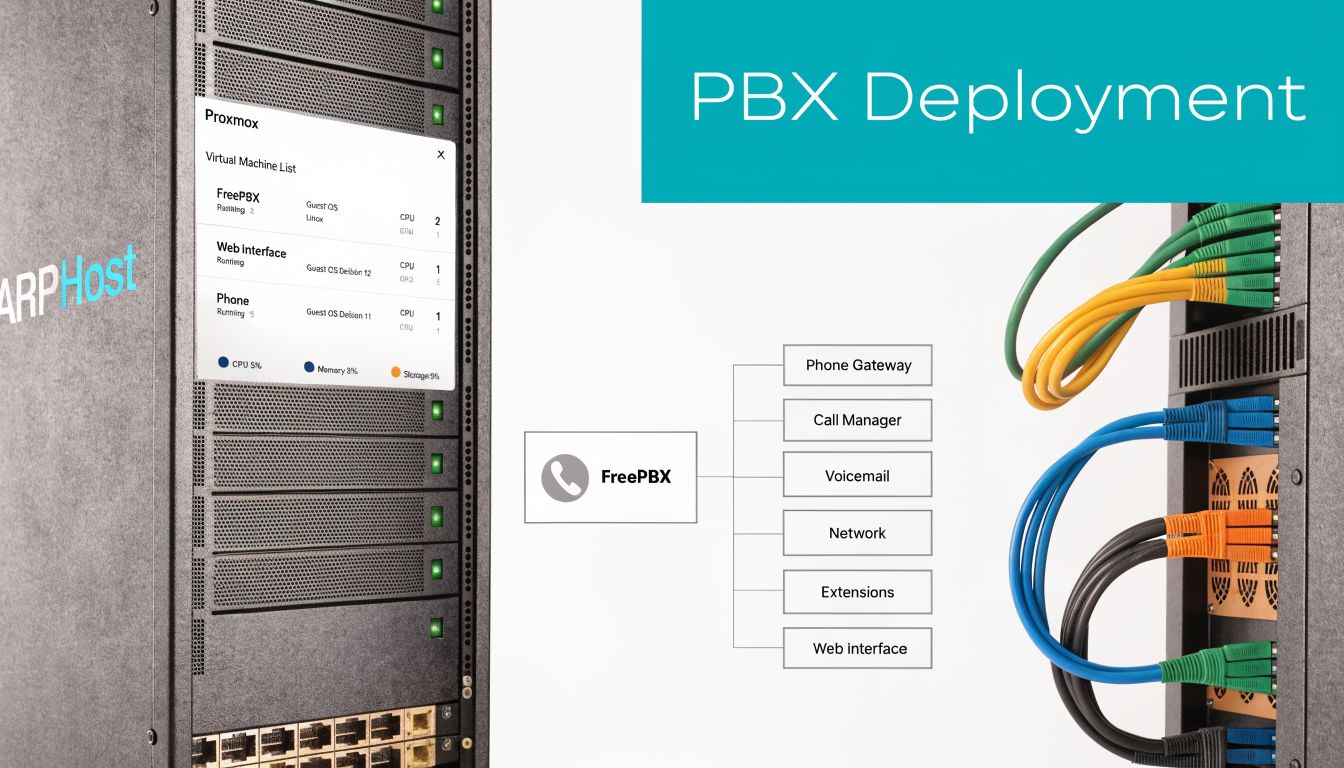
Start with the VM design
For a conferencing VM, keep the design boring. Boring is reliable.
At minimum, define these before you install anything:
Dedicated virtual CPU allocation
Reserve enough CPU so media processing doesn’t compete with unrelated guests.Stable memory allocation
Don’t run a PBX with aggressive memory overcommit if the same node also hosts bursty workloads.Separate storage intent
Put call recordings, backups, and the live PBX OS on storage with clear retention and performance behavior.Simple network placement
Give the PBX a clean path to SIP trunks and admin access. Avoid stacking avoidable NAT complexity around it.
Example Proxmox VM creation
A Proxmox deployment often starts with a straightforward VM definition. The exact values depend on your workload, but the structure matters more than fancy tuning on day one.
qm create 210 --name freepbx-prod --memory 4096 --cores 4 --net0 virtio,bridge=vmbr0
qm importdisk 210 /var/lib/vz/template/iso/freepbx.qcow2 local-lvm
qm set 210 --scsihw virtio-scsi-pci --scsi0 local-lvm:vm-210-disk-0
qm set 210 --boot order=scsi0
qm set 210 --serial0 socket --vga serial0
qm start 210
That gives you a clean base to install and harden the PBX. If you need a ready starting point for planning features and business use cases, this PBX system for small business overview is relevant.
Configure the PBX for conferencing, not just calling
A lot of PBX installs work for one-to-one calls and still fail at conferences. Conferencing introduces host controls, larger mixing loads, recording concerns, and a more chaotic user experience.
Enterprise conference platforms need features beyond simple connectivity. They should support multiple joining options, including video links and traditional dial-in numbers, plus screen sharing permissions, participant queues, and Mute All controls. Pre-call testing is also essential so teams validate workflows before a live meeting.
Here’s a practical SIP trunk example in a PJSIP-style configuration:
[provider-trunk]
type=registration
transport=transport-tls
outbound_auth=provider-auth
server_uri=sip:sip.provider.example
client_uri=sip:company@sip.provider.example
retry_interval=60

[provider-auth]
type=auth
auth_type=userpass
username=company
password=strong-secret

[provider-endpoint]
type=endpoint
transport=transport-tls
context=from-trunk
disallow=all
allow=ulaw,alaw
aors=provider-aor
outbound_auth=provider-auth

[provider-aor]
type=aor
contact=sip:sip.provider.example
And here’s a simple conference bridge fragment:
[boardroom]
type=conference
admin_pin=4829
user_pin=7641
record_conference=yes
max_members=25
announce_join_leave=no
music_on_hold_when_empty=yes
The details differ by PBX, but the design principle stays the same. Use separate admin and participant access controls. Limit unnecessary announcements. Keep conference bridge policy explicit instead of inherited from defaults you forgot to review.
Extension and bridge workflow
Once the trunk is stable, create extensions and route them into conference resources intentionally.
- Create named bridges: Don’t leave “conference room 1” as a permanent production convention.
- Assign host privileges carefully: Executives, operations leads, and support managers may need different bridge rights.
- Set recording policy per bridge: Not every internal standup should be recorded, but client or compliance-sensitive calls may need it.
- Test both join methods: Validate extension-to-bridge behavior and external dial-in access separately.
Don’t treat a conference room as just another extension. It’s a shared service with its own access policy, recording rules, and abuse surface.
A sample extension block might look like this:
[1001]
type=endpoint
context=from-internal
disallow=all
allow=ulaw,alaw
auth=1001-auth
aors=1001

[1001-auth]
type=auth
auth_type=userpass
username=1001
password=change-this-now

[1001]
type=aor
max_contacts=2
Test before users ever touch it
Run a scripted test call before go-live. Don’t just confirm that the PBX powers on and routes one successful call.
Check these items:
- Dial-in path: External caller reaches the bridge and enters the correct PIN flow.
- Internal path: Extension can enter, leave, and rejoin without registration weirdness.
- Host controls: Mute all, lock room, and recording controls work as expected.
- Recovery behavior: A trunk reset or endpoint reconnect doesn’t leave the conference in a broken state.
This walkthrough is a useful visual companion to the deployment process:
Why this deployment model holds up
A PBX in a private cloud gives you isolation, clean resource planning, and room to build the rest of the voice stack around it. You can split supporting services into separate guests, keep backups independent, and avoid tying telephony to a random all-in-one server.
If you need dedicated infrastructure for that model, ARPHost offers Dedicated Proxmox Private Cloud Environments starting at $299/month with dedicated hardware and full root access, which fits teams that want to run their own PBX and related voice services on controlled infrastructure.
Mastering Call Execution From Agenda to Action Items
A reliable system still needs disciplined call handling. Good conferencing isn’t just about whether users can join. It’s about whether the meeting produces decisions, owners, and next steps without confusion.
The easiest way to improve call quality operationally is to standardize the meeting itself. Structured conference call methodology includes pre-call agendas, a designated call leader, real-time note-taking, and post-call documentation with owners and deadlines.
Before the call
The host should send an agenda early enough that attendees can prepare. The agenda should include timing, the goal of each segment, and links or attachments for anything people need open during the call.
This is also where many technical failures get prevented.
- Confirm the call format: Audio-only bridge, video-enabled meeting, or hybrid.
- Define participant roles: Host, presenter, note-taker, decision-maker.
- Run a test call when the meeting matters: New hardware, guest presenters, and executive sessions should never be “test in production.”
During the call
The host should run the meeting actively, not passively. That means doing roll call when appropriate, stating the agenda, controlling transitions, and using platform controls instead of hoping people self-organize.
A practical in-call model looks like this:
| Call stage | Host action | Why it matters |
|---|---|---|
| Opening | Confirm attendees and purpose | Stops side-topic drift early |
| Discussion | Use queue or hand-raise controls | Reduces interruptions |
| Decision point | Restate the decision clearly | Prevents conflicting interpretations |
| Wrap-up | Review owners and next actions | Creates accountability |
Short meetings drift when nobody owns the transitions. Long meetings drift when nobody restates decisions.
If your bridge supports muting, participant management, and recording, use those features deliberately. “Mute all” isn’t rude when background audio is wrecking the call. It’s host control doing its job.
After the call
The meeting isn’t done when people hang up. It’s done when participants receive a usable follow-up.
Send the summary within 24 hours if the discussion mattered. Keep it compact:
- Key conclusions
- Action items
- Named owners
- Deadlines
- Open questions
- Recording link if policy allows sharing
That structure matters even more for distributed teams and regulated environments, where people may need to review a recording or notes asynchronously. It also reduces the usual “I thought someone else had that task” problem that makes recurring conference calls so expensive in practice.
What works better than etiquette alone
Teams often overemphasize speaking order and underemphasize documentation. In real operations, a slightly awkward meeting with strong notes is more useful than a polished meeting with no accountable follow-up.
The pattern that consistently holds up is simple: prepare the room, run the room, close the room, document the room. That process works whether the conference bridge sits inside your PBX or behind a managed UC platform.
Optimizing Network Performance for Crystal-Clear Audio
A conference bridge can be configured correctly and still sound terrible if the network underneath it is unstable. That is the part many user-level conference calling guides miss. Call quality is usually decided before anyone dials in, by routing, queueing, firewall behavior, and whether the PBX is sitting on compute that can hold timing under load.
Audio is a real-time service. It does not tolerate the same sloppiness that web browsing, email, or file sync will hide. A delayed download is an annoyance. A delayed voice packet turns into people talking over each other, clipped sentences, and support tickets that get blamed on the conferencing app instead of the underlying path.
The network factors that matter
Four conditions shape call quality more than anything else:
- Latency: Too much delay breaks natural turn-taking.
- Jitter: Uneven packet arrival creates choppy, robotic speech.
- Packet loss: Missing packets cause clipping, gaps, and dropped words.
- Congestion: Voice loses fast when it competes with backups, sync jobs, or large transfers on the same path.
The goal is not a huge network. It is a predictable one.
In practice, that means keeping the media path short, classifying voice traffic correctly, and avoiding infrastructure that introduces random delay. A private cloud PBX with poor host contention can sound worse than a modest deployment on cleaner infrastructure. That trade-off matters. Conference calling is an infrastructure problem first, and an application problem second.
Practical tuning decisions
QoS earns its keep at the edge, where contention begins. Mark and prioritize RTP and SIP-related traffic on switches, routers, and firewalls that will honor those classes. Keep the policy simple enough that the team can troubleshoot it at 2 a.m. without guessing which queue a packet entered.
Codec selection is another trade-off, not a checkbox. Higher-quality codecs can improve room audio and reduce listener fatigue, but they consume more bandwidth and can expose weak links sooner. More compressed codecs hold up better across constrained or inconsistent connections, but callers will hear the difference. Choose based on the weakest part of the environment, not the cleanest office on the network.
A short checklist I use during deployment:
- Prioritize voice traffic where enforcement is real: DSCP markings alone do nothing if the switching and firewall path ignores them.
- Reduce avoidable hops: Each SBC, firewall policy set, VPN overlay, and WAN handoff adds another place for jitter or misclassification.
- Test from bad locations on purpose: Home Wi-Fi, guest networks, and branch circuits reveal failure points faster than headquarters.
- Watch the uplink during meetings: Conference rooms often fail because one busy uplink is carrying voice, screen sharing, updates, and cloud backups at once.
What to avoid
Do not put a PBX on overcommitted virtual infrastructure and expect stable media timing. Do not leave voice traffic unclassified on a firewall that is also inspecting bulk transfers all day. Do not assume internet bandwidth alone solves the problem. Poor queueing and bad path design can ruin calls even when the circuit has plenty of headroom.
Good conference audio usually comes from disciplined system design. That includes clean VLAN boundaries, sane QoS policies, controlled east-west traffic, and hosts that are not fighting for CPU time. ARPHost approaches telephony the same way it approaches layered infrastructure security for production services. The stack matters from the hypervisor to the edge.
If the business depends on conference calling, treat the voice path like any other production service. Set performance policy deliberately, measure from the edge, and fix the infrastructure that carries the call instead of blaming the handset or softphone.
Implementing Security and Compliance for Business Communications
Conference calls often carry pricing discussions, HR issues, support escalations, legal review, and internal planning. That makes security part of the phone system, not a bolt-on.
The shift from specialized hardware to software-based communications made conferencing more flexible, but it also widened the attack surface. In 1991, IBM and PictureTel introduced PC-based video conferencing that supported 16 users in eight simultaneous conferences per server at $20,000 per endpoint, marking an important move toward software-driven communications, according to this history of videotelephony. Modern SIP systems are far more accessible, but they also need deliberate security design.
Secure the signaling and the media
At minimum, a business conference platform should protect both call setup and the audio stream.
Use these controls as baseline policy:
- TLS for signaling: Protects SIP signaling from casual interception and tampering.
- SRTP for media: Encrypts the media path so voice content isn’t exposed in transit.
- Strong bridge PINs and host authentication: Don’t rely on predictable room numbers or default access codes.
- Restricted admin access: PBX administration should sit behind hardened access paths, not broad public exposure.
Handle recordings like sensitive data
Call recordings create a second security problem. The call itself may be secure, but the stored file can become the primary risk if access controls are weak.
Store recordings with clear retention rules, permission boundaries, and audit discipline. If your business operates in a regulated environment, align legal notice and consent procedures with your compliance team before enabling broad recording by default.
A useful way to think about this is policy-as-code. Security posture improves when administrators define repeatable controls instead of relying on tribal memory.
Private infrastructure changes the risk profile
A private cloud or dedicated server gives you tighter isolation than a broad multi-tenant SaaS platform. That doesn’t make it automatically secure. It does mean you control more of the trust boundary.
That matters for conference calling because the system usually touches several sensitive areas at once:
| Security layer | What to protect |
|---|---|
| PBX application | Accounts, extensions, bridge controls |
| Transport layer | SIP signaling and RTP media |
| Storage | Recordings, voicemail, logs |
| Admin plane | Web UI, shell access, API keys |
Security also needs to be layered. This security in layers approach is the right mental model for PBX environments because no single control fixes weak access design, weak storage policy, and weak transport security at the same time.
The safest conference system is the one with the fewest surprises. Fewer exposed services, fewer default settings, fewer people with admin rights.
If you need to share recordings with clients, employees, or patients, build the access path with the same care as the PBX itself. A secure portal, hardened web hosting, and clear retention controls matter just as much as the bridge PIN.
Build Your Communication Foundation with ARPHost
Conference calling works when the business treats it like infrastructure. That means choosing the right architecture, deploying the PBX carefully, enforcing host controls, protecting the network path, and securing recordings and admin access.
That approach scales better than app-hopping. A startup may begin with a modest virtual PBX and a simple dial-in bridge. A larger team may need a private cloud PBX, SIP trunks, separate recording storage, and managed failover planning. The underlying idea stays the same. Build the communication layer with the same discipline you’d use for email, backups, or customer-facing systems.
Why ARPHost fits this kind of build
ARPHost’s service catalog maps cleanly to the way voice systems grow:
- VPS hosting for small PBX deployments and support utilities
- Bare metal servers when telephony needs dedicated performance and isolation
- Dedicated Proxmox private clouds for PBX virtualization, supporting services, and controlled expansion
- Colocation for teams that want physical control over specialized voice hardware
- Fully managed IT services for businesses that need someone to monitor, patch, troubleshoot, and maintain the environment
- Secure web hosting bundles for portals that publish recordings, documentation, or support access securely
That’s the practical advantage. You can build around one provider relationship instead of stitching together telephony, compute, hosting, and support from unrelated vendors.
A final operational point
Don’t separate conference calling from the rest of your environment. It touches identity, storage, security policy, networking, user training, and sometimes compliance review.
The strongest conference systems aren’t flashy. They’re predictable. People can join. Hosts can control the room. Audio stays clean. Recordings stay protected. Support knows where to look when something breaks.
That’s how to do conference calling in a way the business can rely on.
If you want help designing a conference calling environment that fits your infrastructure, talk with ARPHost, LLC. You can start with a low-cost VPS for a small PBX, move to dedicated servers or a Proxmox private cloud as requirements grow, or request a managed services quote for ongoing support, monitoring, and voice administration.
