

Before you write a single blog post, you’ll face the most important decision for your new WordPress site: picking the right hosting foundation. This isn't just about finding the cheapest plan; it's about choosing a technical environment that dictates your site's speed, security, and scalability.
Get this right now, and you'll save yourself from the technical debt and painful migrations that plague under-provisioned sites.
Choosing Your WordPress Hosting Foundation
The hosting world is full of options, from basic shared plans to powerful private clouds. Your choice should be a direct match for your technical skills, expected traffic, and long-term business objectives. We're talking about the real-world performance of Secure Web Hosting, the flexibility of VPS Hosting, and the raw power of Dedicated Proxmox Private Clouds.
For our friends down under, local performance can be a huge advantage. Checking out options for the best WordPress hosting Australia can give you a leg up on speed.
Matching Hosting to Your Blog’s Needs
Let’s be clear: a personal blog with a few hundred monthly readers has completely different infrastructure requirements than a business site processing thousands of concurrent user requests. The key is to analyze resource allocation (CPU and RAM), storage technology (NVMe vs. SSD vs. CEPH), and the architectural path to scaling.
If you’re just starting, one of ARPHost’s Secure Web Hosting bundles is a perfect, technically superior starting point. They come with the Webuzo control panel for easy application management and are hardened out-of-the-box with Imunify360.
Why This Isn't Your Average Shared Hosting: We don't just cram you onto a server with hundreds of others. ARPHost uses CloudLinux OS to create lightweight virtualized environments (LVEs) for each account. This "caged" approach provides resource isolation, meaning a neighbor's poorly coded plugin or sudden traffic spike won't cause performance degradation or downtime for your site—a classic and unacceptable problem on traditional shared platforms.
As your audience grows and your application's demands increase, you'll inevitably require dedicated resources. That's where a Virtual Private Server (VPS) becomes the logical next step. A VPS gives you guaranteed resources (vCPU cores, RAM, and NVMe/SSD storage) that are yours alone, ensuring consistent and predictable performance.
Our High-Availability VPS plans are engineered for production workloads, leveraging KVM virtualization and CEPH distributed storage to create a redundant, self-healing, and lightning-fast environment that tolerates hardware failure without impacting your service.
This decision tree gives you a quick visual guide. For a personal blog, shared hosting often makes sense. But once your site becomes business-critical or traffic starts to scale, dedicated resources become non-negotiable.
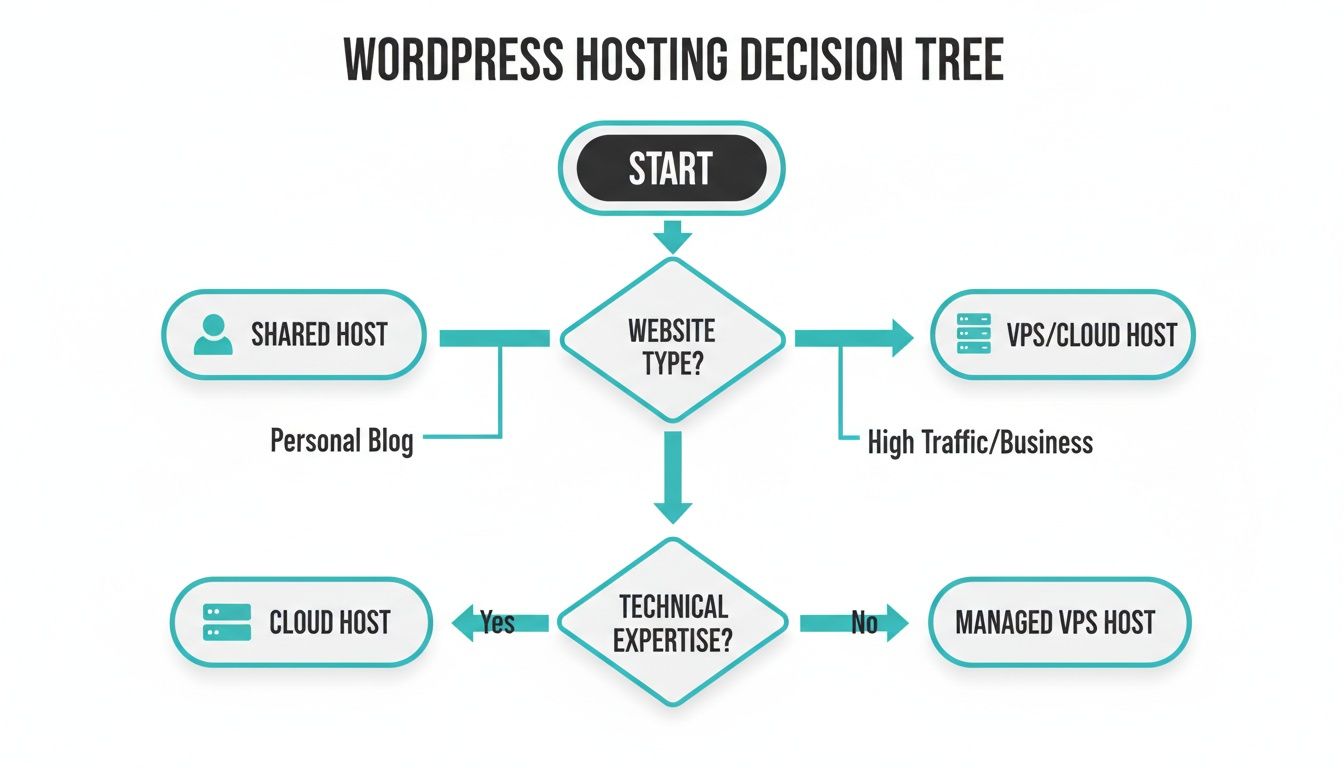
The flowchart makes it simple: as your needs for performance, security, and control intensify, so should your hosting architecture. To really get into the weeds, check out our in-depth guide on the best managed hosting for WordPress.
The table below breaks down which ARPHost solution is right for you, whether you're launching a personal project or running a high-traffic business site.
Comparing ARPHost's WordPress Hosting Solutions
| Hosting Type | Ideal For | Key Features | ARPHost Solution |
|---|---|---|---|
| Secure Web Hosting | New blogs, personal sites, low-traffic projects | CloudLinux OS isolation, Webuzo Panel, free SSL, daily backups, Imunify360 security | Secure Web Hosting Bundles |
| VPS Hosting | Growing blogs, SMBs, e-commerce stores, developers | Dedicated vCPU/RAM, full root access, KVM/CEPH high-availability, scalable resources | High-Availability VPS |
| Dedicated Private Cloud | High-traffic enterprise sites, agencies, mission-critical apps | Maximum performance, full hardware control, Proxmox VE, ultimate security and isolation | Dedicated Proxmox Private Clouds |
Choosing the right path from day one ensures your infrastructure is ready to grow alongside your audience. When you're ready for more power, our secure and scalable VPS hosting plans, starting at just $5.99/month are waiting.
Deploying WordPress With Confidence
Alright, you've selected your hosting foundation. Now for the deployment: getting WordPress itself up and running. This is where you decide between getting online in minutes with an automated script or taking a more methodical, hands-on approach for ultimate control and security hardening.
You’ve got two main routes: the lightning-fast one-click install or the deliberate, manual setup via CLI. Neither is inherently right or wrong—it's a trade-off between deployment velocity and granular configuration control.
The One-Click Install for Rapid Deployment
For most users, the quickest path from zero to a live WordPress site is an Instant Application installer. This is exactly what the Webuzo control panel—included with our Secure Web Hosting packages—excels at. The entire process is abstracted into a simple web-based wizard.
This approach is perfect for:
- Beginners who want to focus on content, not command lines.
- Developers who need to spin up a quick staging or test site without manual configuration.
- Business owners whose time is better spent on strategy, not server administration.
Inside the Webuzo panel, you navigate to the WordPress script, fill in basic metadata like your site name and admin credentials, and click "Install." The system automates database creation, user permissions, file placement, and initial configuration. In minutes, you have a functional, secure WordPress instance ready for development.
The Manual Install for Full Control
For DevOps professionals, system administrators, and anyone who needs to micromanage every aspect of their deployment—especially on a clean VPS Hosting plan or a Bare Metal Server—the manual install is the professional standard. This method gives you a deep understanding of the WordPress stack and guarantees every configuration parameter is set to your exact specification.
You'll be using the command line to create your database and user, downloading the latest WordPress package with wget, editing the wp-config.php file manually, and locking down file permissions with chmod. It’s more involved, but the payoff is absolute control.
Here's a quick look at the typical CLI workflow on a fresh ARPHost VPS:
# 1. Create MySQL Database and User
mysql -u root -p
CREATE DATABASE wordpress_db;
CREATE USER 'wp_user'@'localhost' IDENTIFIED BY 'YourStrongPassword';
GRANT ALL PRIVILEGES ON wordpress_db.* TO 'wp_user'@'localhost';
FLUSH PRIVILEGES;
EXIT;

# 2. Download and Unpack WordPress
cd /var/www/html
wget https://wordpress.org/latest.tar.gz
tar -xzvf latest.tar.gz
cd wordpress

# 3. Configure and Secure
cp wp-config-sample.php wp-config.php
nano wp-config.php # Manually edit DB details, salts, and keys
chown -R www-data:www-data /var/www/html/wordpress
find . -type d -exec chmod 755 {} ;
find . -type f -exec chmod 644 {} ;
This hands-on approach is the gold standard for security. By manually setting unique database prefixes and security salts/keys in
wp-config.php, you immediately harden the installation against common attack vectors left open by less sophisticated installers.
This path is the right choice for integrating WordPress into a CI/CD pipeline, meeting strict compliance requirements, or deploying within a complex, multi-application environment. It takes more time, but the control is non-negotiable for mission-critical projects.
Whichever route you take, ARPHost has you covered. For a streamlined, out-of-the-box experience, our Secure Web Hosting bundles are ready to go. If you're after that granular control, you can spin up a clean server in seconds with our VPS hosting plans, starting at just $5.99/month.
Building a Multi-Layered Security Defense
Let's be blunt: a default WordPress installation is an attractive target. It’s an open invitation for every automated bot and threat actor scanning the web. Believing a single plugin is a sufficient security strategy is a critical error. Real security isn’t a product; it’s an architecture—a multi-layered defense that starts deep in the server kernel and extends all the way to your WordPress login page.
Your goal when hosting a WordPress blog should be to create a hardened environment that doesn't just react to threats, but actively repels them at every layer.
True security begins at the infrastructure level, long before WordPress is even installed. At ARPHost, our Secure Web Hosting bundles are built on this principle. We use CloudLinux OS to create completely isolated LVEs for each user. This means if a neighboring site on the server is compromised, yours remains secure in its own container—a crucial defense that most basic shared hosting simply can’t offer.

Hardening at the Hosting Level
The most effective security controls operate at the server level, intercepting threats before they can even reach your WordPress files. This is where Imunify360, a core component of our secure hosting stack, proves its worth. It’s not just one tool, but a full suite of integrated defenses:
- Proactive Malware Scanning: It’s always on, using signature and heuristic analysis to identify and quarantine malicious code in real-time.
- Web Application Firewall (WAF): This intelligent WAF filters HTTP traffic, blocking common attack vectors like SQL injections, cross-site scripting (XSS), and remote file inclusion before they hit your application.
- Intrusion Detection & Prevention System (IDPS): It constantly monitors server logs for suspicious activity, automatically blocking malicious IPs at the firewall to prevent brute-force attacks and vulnerability scanning.
Think of this server-side protection as your perimeter defense, creating a secure boundary around your entire application environment.
A well-architected hosting environment handles 90% of security threats automatically. This is the core value proposition of a security-focused managed host—it frees your team from the constant battle against bots and hackers, allowing them to focus on development and content.
Securing the WordPress Application
With a solid server foundation, it’s time to harden the application layer. This is your responsibility in the shared security model, and it involves closing the common loopholes attackers exploit.
Implement this non-negotiable checklist:
- Change the Default
adminUsername: This is low-hanging fruit for attackers. Create a new administrator account with a unique username, then delete the defaultadminuser. - Enforce Strong Password Policies: Use a plugin or custom code to enforce complexity requirements (length, characters, numbers, symbols) for all user roles.
- Implement Two-Factor Authentication (2FA): This is one of the single most effective controls for preventing unauthorized access. It adds a critical second verification step to your login process.
- Limit Login Attempts: A simple plugin or WAF rule that locks out an IP after a few failed login attempts will stop brute-force attacks cold.
Building a truly secure site is a partnership between you and your host. To dig deeper into this philosophy, check out our guide on implementing security in layers.
Of course, if you'd rather have peace of mind, let ARPHost’s experts handle it all. Request a managed services quote and we'll architect, deploy, and manage your digital fortress.
Tuning Your Blog for Peak Performance
In the digital economy, speed isn't a feature—it's a prerequisite for success. A slow blog frustrates users, kills conversions, and gets penalized by search engines. Real performance when you're hosting a WordPress blog isn't about a single caching plugin. It's a holistic strategy that combines powerful server architecture with intelligent application-level optimization.

A fast site starts with its foundation: the hosting infrastructure. This is where server-side technology makes a night-and-day difference. For instance, ARPHost's High-Availability VPS plans are built on a hyperconverged stack combining KVM virtualization with a CEPH distributed storage backend.
This architecture delivers blazing-fast I/O for rapid database queries and file access, but more importantly, it provides inherent redundancy. Your blog is protected from the single points of hardware failure that can take down sites on lesser platforms.
Application-Level WordPress Tuning
With a rock-solid server foundation, you can shift your focus to WordPress itself. The goal is to make the application as efficient as possible.
Start with these high-impact optimizations:
- Choose a Lightweight Theme: Many commercial themes are bloated with unnecessary scripts and code that grind a site to a halt. Choose a performance-first theme built on a clean, modern codebase.
- Optimize Your Images: Uncompressed, oversized images are a primary cause of slow page loads. Implement a workflow to compress and resize images before uploading.
- Implement a Multi-Layer Caching Strategy: Caching serves visitors a pre-built static version of your pages, dramatically reducing server load. For best results, combine a WordPress caching plugin (for page caching) with server-side technologies like Redis or Memcached (for object caching).
Proactive Monitoring is Non-Negotiable: A high-performing site is not a "set it and forget it" asset. You need continuous monitoring to identify performance bottlenecks before they impact the user experience. This involves tracking metrics like Time to First Byte (TTFB), database query times, and resource utilization (CPU, RAM, I/O).
Why ARPHost Excels Here
This is where managed services become a strategic advantage. With ARPHost's fully managed IT services, our team of experts monitors your server's health 24/7. We don't wait for your site to slow down; we proactively identify and resolve performance issues—from tuning database queries to optimizing web server configurations—before they become user-facing problems.
This frees you to focus on your core business: creating great content and driving growth. For a deeper dive into specific techniques, check out our guide on how to optimize website performance.
For an even more comprehensive look at performance tuning, this guide to WordPress Page Optimization offers some invaluable insights. This focus on performance is absolutely critical, especially when you consider that as of March 2026, WordPress powers a staggering 43.4% of all websites. That massive adoption proves its reliability, but it also means you need a high-performance hosting environment just to stand out from the crowd.
Building a Bulletproof Backup and Recovery Plan
Let’s get one thing straight: your WordPress data is a critical business asset. A robust backup strategy isn't just a "nice-to-have"; it's your insurance policy against hardware failure, human error, and malicious attacks. It is a core component of any serious disaster recovery (DR) plan.
We’re not just talking about saving a few files. We’re talking about building a real disaster recovery plan that guarantees business continuity. Before we jump into modern, automated solutions, let's look at the manual process. It will make you appreciate just how far we've come.
The Old Way: A Look at Manual Backups
To understand the value of modern backup systems, you need to see the manual process they’ve replaced. A complete manual WordPress backup has two components:
- Your Files: This is your
public_htmldirectory, containing the WordPress core, themes, plugins, and all uploaded media. The traditional method involves using an FTP/SFTP client to connect to your server and manually download the entire directory. - Your Database: This is the engine of your site, storing posts, pages, users, and configuration settings in a MySQL database. To back it up, you’d log into a tool like phpMyAdmin and export the entire database as a
.sqlfile.
While knowing this process is useful for troubleshooting, it's an unworkable strategy for any live site. The process is slow, prone to human error, and completely impractical for a site that is updated regularly. Relying on manual backups in an emergency is a significant liability.
The Right Way: Automated and Managed Backups
The manual method is a lesson, not a strategy. For any serious website, an automated, off-site, and versioned solution is the only acceptable approach. This is where a managed service like ARPHost's Proxmox Backup as a Service demonstrates its enterprise-grade value.
The killer feature is immutable, encrypted storage. This means once a backup is created, it cannot be altered or deleted by a threat actor—not even by a ransomware attack that has compromised your live production server. It is the ultimate defense. Paired with automated scheduling and granular retention policies, you have multiple, verifiable recovery points ready at a moment's notice.
A backup you haven't tested is not a backup; it's a hope. The most critical step in any disaster recovery plan is performing a test restoration. This involves taking a recent backup and restoring it to a temporary or staging environment to confirm its integrity.
With WordPress now powering over 43% of the internet, its ubiquity makes it a massive target. We're talking about an estimated 472 million sites globally, a statistic you can track at W3Techs. This is why serious enterprises are moving workloads to private clouds and colocation facilities to mitigate risk—services ARPHost provides, fortified with specialized tools like Proxmox Backup as a Service.
Ultimately, a rock-solid backup plan is about business continuity. If you want a completely hands-off solution, explore ARPHost's fully managed IT services. We handle everything from proactive monitoring and patch management to disaster recovery, so you can focus on your business.
Answering Your WordPress Hosting Questions
When you're architecting a WordPress solution, the same technical and business questions arise. Let's provide clear answers based on our experience deploying and managing WordPress for a wide range of clients.
Can My Hosting Do More Than Just Run a Blog?
Absolutely. Thinking of WordPress as just a blogging platform is a decade out of date. It's a full-featured Content Management System (CMS) and application framework.
On a properly provisioned ARPHost plan—like a High-Availability VPS or a Bare Metal Server—you have the resources to run your corporate website, a high-traffic WooCommerce store, and even custom PHP applications right alongside your blog. The key is to select a solution with sufficient CPU, RAM, and fast storage to handle the combined load. Our Secure Web Hosting bundles include the Webuzo control panel to simplify the management of multiple sites, emails, and databases. Furthermore, you can even integrate our Virtual PBX phone systems for a complete business communication and web presence solution.
What’s the Deal with Managed WordPress Hosting? Is It Worth the Cost?
Managed hosting is an operational model where the provider takes responsibility for the technical administration of the server. This includes OS updates, security patching, performance tuning, and backups. This is the core of what our fully managed IT services at ARPHost deliver.
Is it worth the investment? For any business where uptime is critical and IT resources are limited, the answer is an unequivocal yes. An unmanaged server provides full control, but also full responsibility. A managed plan offers superior security, performance, and the invaluable peace of mind that comes from having an expert team proactively managing your infrastructure.
Think of it this way: managed hosting is like having an outsourced expert IT department on call 24/7, proactively preventing problems. It's an investment in reliability and business continuity that allows your team to focus on strategic goals.
How Do I Move My Current WordPress Site to ARPHost?
Migrating a live website can be a high-stress event, but we've engineered a process to de-risk it. ARPHost provides expert managed migration support to ensure a smooth transition with minimal to zero downtime.
Our team will coordinate with you to back up your application files and database, securely transfer them to your new ARPHost server, and manage the DNS cutover. We have extensive experience migrating everything from single blogs to complex, multi-site e-commerce platforms.
For clients with more complex infrastructure, we also specialize in large-scale migration projects, such as moving entire virtualized environments from VMware to one of our high-performance Dedicated Proxmox private clouds. We manage the entire technical lift from planning to execution, ensuring your operations continue seamlessly as you upgrade your infrastructure.
Ready to scale your WordPress site with confidence? ARPHost offers powerful, secure, and affordable hosting built for growth. Start with our $5.99/month VPS today.