

Your team is probably dealing with a familiar problem right now. The application works. Users depend on it. Someone has finally asked the hard question: is the hosting environment fit for PHI, or is it just “secure enough” in the vague, marketing sense?
That’s where most HIPAA projects go sideways. The gap usually isn’t intent. It’s operational reality. Legal teams talk about obligations, engineers talk about architecture, and nobody translates those requirements into a hosting model that can survive an audit, an incident review, or a bad handoff during an on-call shift.
HIPAA compliant hosting isn’t a product label. It’s a disciplined combination of infrastructure design, access control, logging, backup strategy, vendor accountability, and day-to-day operational management. If any one of those pieces is weak, the environment becomes fragile fast.
Understanding Your Role in HIPAA Compliance
A hosting decision becomes a compliance decision the moment your systems create, receive, maintain, or transmit protected health information, or PHI. In practice, PHI shows up in more places than teams expect. Appointment requests, uploaded documents, patient messages, portal sessions, database exports, backups, and support screenshots can all pull infrastructure into scope.
That’s why the first question isn’t “do we run an EHR?” It’s “where does PHI touch our stack?”
Who carries the obligation
HIPAA applies differently depending on your role. Covered entities are typically healthcare providers, health plans, and related organizations that directly handle patient information as part of care or payment operations. Business associates are vendors and service providers that handle PHI on behalf of those organizations.
A hosting provider can become a business associate if it manages or maintains systems containing PHI. That matters because your provider isn’t just renting you compute. It’s entering the compliance boundary with you.
The HITECH Act tightened the consequences of weak handling and pushed organizations to treat security controls, breach response, and vendor oversight as operational requirements rather than paperwork exercises.
Practical rule: If your infrastructure partner can access systems storing PHI, or is responsible for the environment where PHI resides, legal review and technical review have to happen together.
Why the BAA matters
The Business Associate Agreement, or BAA, is the contract that turns vague assurances into enforceable responsibility. It defines how PHI is handled, what each party must protect, and how incidents are reported and managed.
A provider that won’t sign a BAA is easy to disqualify. The harder problem is a provider that signs one but can’t explain its operational controls. A weak BAA paired with weak infrastructure still leaves your team exposed.
Before procurement goes too far, align legal, security, and infrastructure owners around the same checklist and review process. A managed relationship is only useful if the scope of management is explicit. The service terms, escalation paths, and responsibility boundaries should be documented alongside the agreement itself, not assumed later through tickets and emails. A good starting point is reviewing how a formal managed IT services agreement frames operational responsibility.
Shared responsibility is not shared ambiguity
Most HIPAA failures in hosting don’t come from one dramatic mistake. They come from unclear ownership. The provider assumes your team handles application hardening. Your team assumes the provider monitors access changes. Nobody notices backup restore testing was never assigned.
Use a simple division of responsibility:
- Your organization owns application behavior, user access approvals, data classification, and internal policy.
- Your hosting partner should clearly own or support infrastructure security, system maintenance, monitored backups, logging pipelines, baseline hardening, and incident escalation.
- Both parties must coordinate around breach response, evidence retention, and audit support.
If that split isn’t written down, it won’t hold under pressure.
The Three Pillars of HIPAA Safeguards
A reliable way to think about HIPAA is to treat it like securing a facility that holds sensitive records. You need management controls, physical protection, and technical enforcement. Remove one pillar and the others can’t compensate for it.
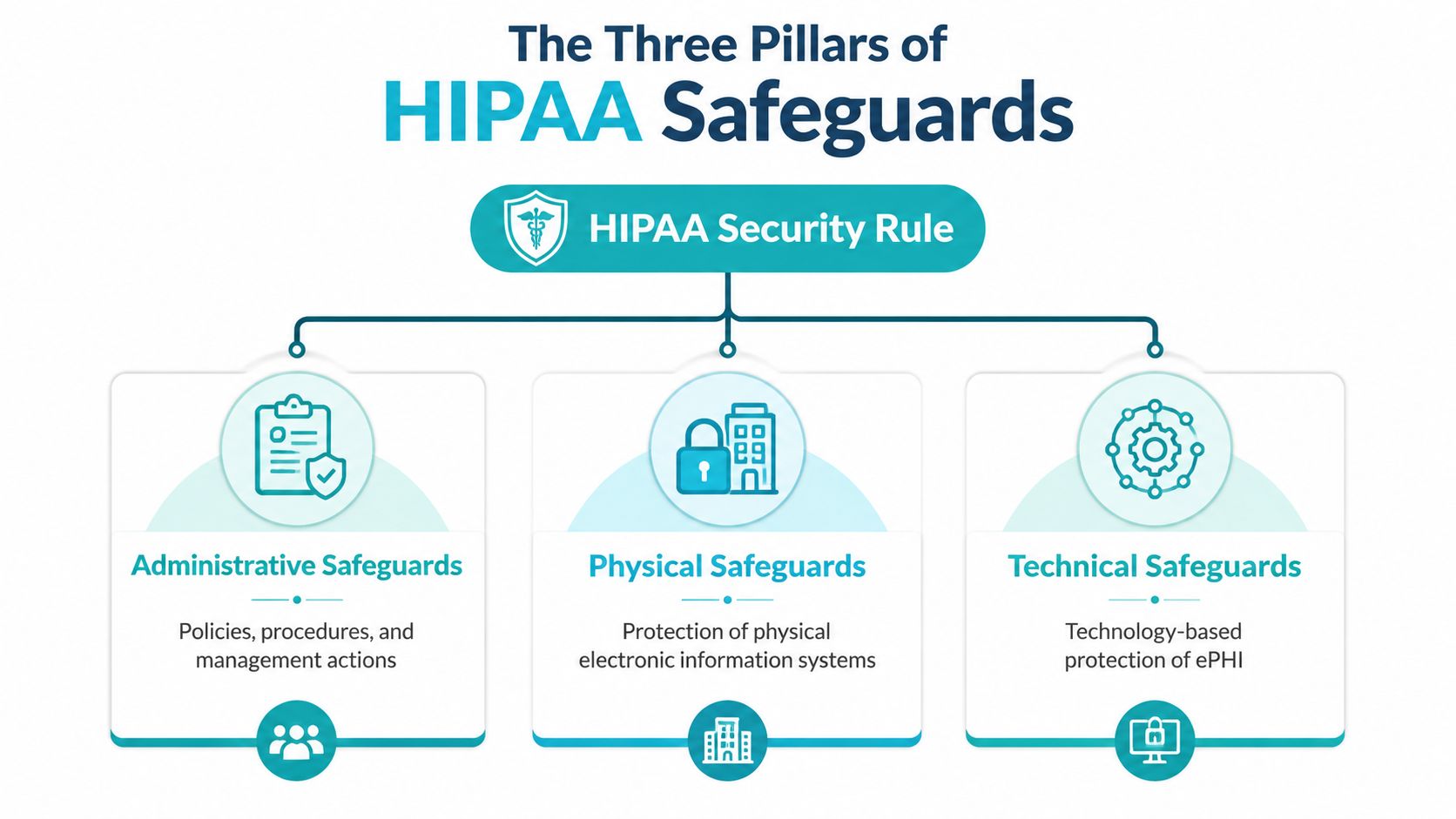
Administrative safeguards
Administrative safeguards are the policies and management actions that decide how security gets practiced. This includes risk analysis, documented procedures, workforce training, access approval workflows, incident response planning, and vendor management.
These controls often get dismissed as “paperwork,” which is a mistake. Technical controls fail undetected when the administrative layer is weak. If nobody owns user offboarding, stale credentials linger. If patching windows aren’t defined, critical systems drift. If incident escalation paths aren’t documented, teams waste the first part of a security event arguing over who should respond.
Good administrative safeguards answer practical questions:
| Area | What good looks like |
|---|---|
| Access approvals | Named approvers, role definitions, and documented provisioning steps |
| Change control | Planned maintenance, rollback procedure, and review of security impact |
| Training | Staff know what PHI is, where it appears, and how to handle it |
| Incident response | Clear notification chain, evidence handling, and containment steps |
Physical safeguards
Physical safeguards protect the facilities and hardware where electronic PHI lives. That includes controlled entry, visitor handling, surveillance, hardware tracking, and secure media disposal.
Generic hosting claims often fall short concerning physical security. Teams focus on encryption and forget that physical compromise still matters. If a provider can’t explain who can enter the data center, how failed drives are handled, or what happens to retired hardware, you’ve found a real risk, not a theoretical one.
For colocated deployments and dedicated systems, physical controls matter even more because the integrity of the hardware layer directly affects the trustworthiness of every virtual layer above it.
- Facility access control keeps unauthorized people away from racks, consoles, and removable media.
- Asset handling procedures reduce the chance that failed disks or decommissioned servers leave the environment without proper sanitization.
- Environmental reliability supports availability. Power instability and unmanaged hardware faults become compliance problems when PHI isn’t accessible.
Technical safeguards
Technical safeguards are where engineers spend most of their time. They cover identity, authentication, encryption, audit logging, session control, network isolation, and system integrity protections.
But technical safeguards only work well when they sit on top of the first two pillars. A carefully segmented network doesn’t help much if administrators share accounts. Encrypted storage doesn’t solve anything if restore paths aren’t controlled and logged. Strong controls are cumulative.
A secure hosting environment is built in layers. Policies decide what should happen, facilities reduce physical risk, and technical controls enforce the rules when people make mistakes.
For organizations using secure managed VPS hosting, colocation, or dedicated virtualization clusters, this three-part model is the right way to judge readiness. If a provider talks only about firewalls and SSL, the conversation isn’t mature enough.
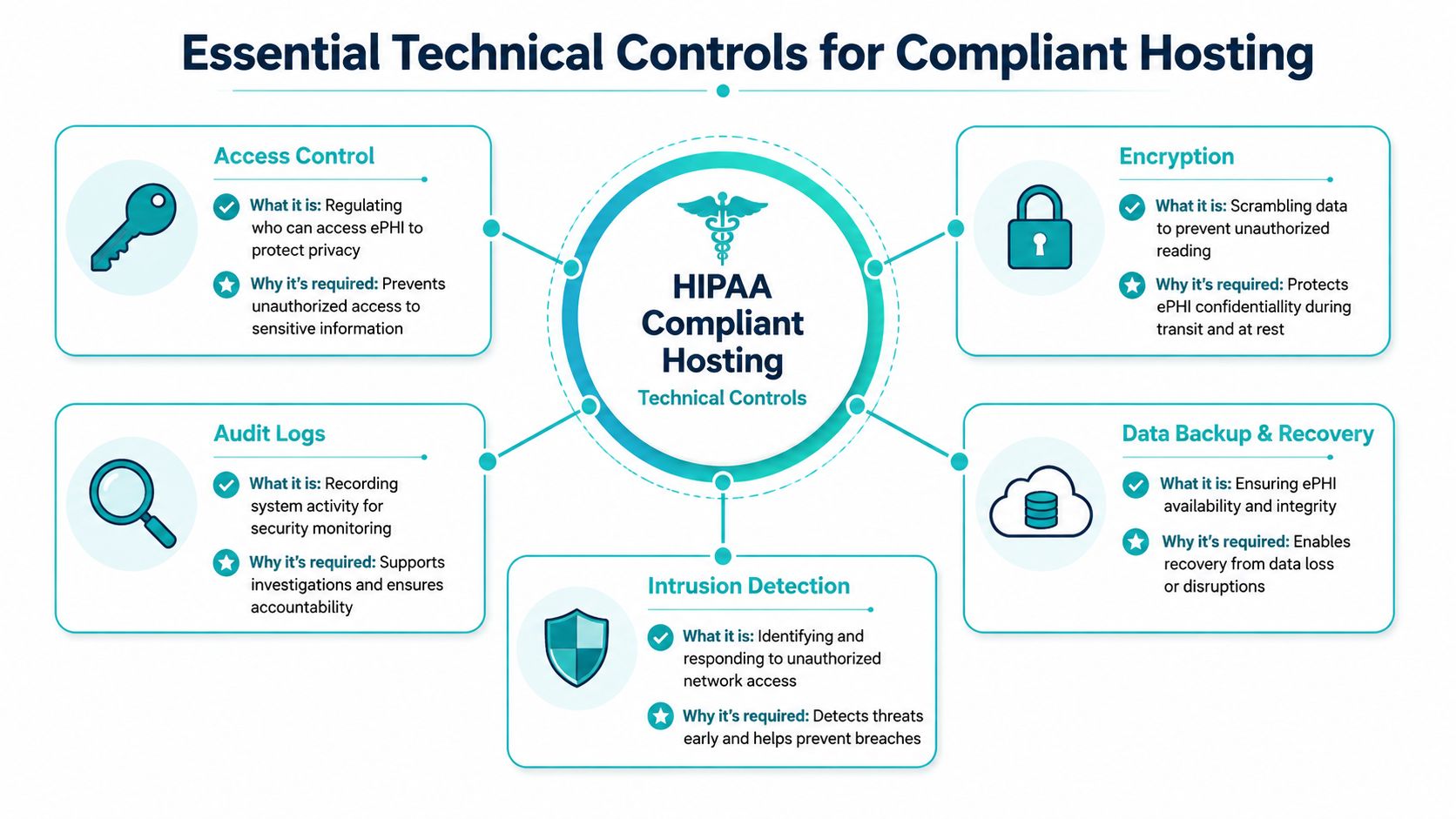
Essential Technical Controls for Compliant Hosting
This is the part that decides whether a hosting environment can carry PHI without creating constant operational risk. Legal language matters, but audits and breach reviews eventually land on system behavior. Who had access. What was logged. Whether data was encrypted. Whether a restore worked. Whether suspicious activity was noticed in time.
Encrypt data in motion and at rest
Encryption is table stakes, but teams still implement it unevenly. PHI should be protected when users access applications, when services talk to each other, when data lands on disk, and when backups leave the primary environment.
The mistake is treating TLS on the public website as the finish line. It isn’t. You also need to account for database storage, snapshot retention, backup repositories, administrative sessions, and internal service traffic where PHI may pass between application components.
A practical baseline looks like this:
- Transport protection for browser sessions, APIs, admin panels, and remote administration.
- Storage encryption on virtual disks, block storage, database volumes, and backup targets.
- Key handling discipline so encryption doesn’t become meaningless because secrets are poorly stored.
For healthcare analytics and research workflows, some teams also reduce exposure before data ever reaches downstream platforms.
Enforce least privilege without exceptions
Access control is where compliant hosting either becomes manageable or turns into permanent anxiety. Shared admin accounts, broad root access, and standing privileges create hidden risk that only shows up during investigations.
Every person and system should have only the access needed for its role. That sounds basic, but implementing it properly means controlling more than login prompts.
Use this checklist:
- Separate accounts by person and function so activity can be traced.
- Limit administrative access paths to hardened entry points, not open convenience channels.
- Review privileges regularly so temporary access doesn’t become permanent.
- Constrain service accounts to specific actions and systems.
Here’s a Linux example for tightening a service account that should own files but never expose an interactive shell:
sudo useradd -r -s /usr/sbin/nologin -d /opt/app appsvc
sudo chown -R appsvc:appsvc /opt/app
sudo chmod -R 750 /opt/app
That command set doesn’t make an environment compliant by itself, but it shows the mindset. Access should be intentional, minimal, and auditable.
For a stronger baseline, teams should work from a documented server hardening checklist that covers account policy, exposed services, package hygiene, SSH controls, firewall rules, and logging defaults.
Make logs useful before you need them
Audit controls aren’t about collecting noise. They’re about producing evidence. If an administrator accesses a PHI-bearing system, changes a firewall rule, exports data, or fails authentication repeatedly, the record must exist and be preserved.
Logs should answer specific questions:
| Event type | Why it matters |
|---|---|
| Authentication attempts | Shows who tried to enter and whether access failed or succeeded |
| Privilege changes | Reveals escalation, role modification, and account drift |
| System configuration changes | Helps investigators tie behavior to timeline and impact |
| Backup and restore activity | Confirms whether protected data moved or was recovered |
| Security alerts | Establishes whether suspicious activity was detected and handled |
Short retention and mutable local logs are common failures. If an attacker or careless admin can alter them, they’re weak evidence.
Keep logs off the box that generated them whenever possible. If the same compromise can change the workload and the audit trail, your visibility is brittle.
A basic system configuration might forward logs centrally like this:
sudo apt-get install rsyslog
sudo systemctl enable rsyslog
sudo systemctl restart rsyslog
The exact forwarding design depends on the platform, but the principle stays the same. Centralize. Protect. Review.
Here’s a short technical overview worth watching if you’re evaluating infrastructure for healthcare workloads:
Build recovery around integrity, not just copies
Backups are often present but still inadequate. A zip file on another server isn’t a recovery strategy. HIPAA environments need encrypted backups, protected backup access, offsite separation, tested restoration, and controls against tampering or silent corruption.
This is one reason private virtualization environments are attractive for healthcare applications. With a well-designed Proxmox stack, teams can combine VM-level backup policies, isolated backup networks, and immutable repository options in a way that’s easier to reason about than sprawling public cloud sprawl.
Why this architecture works: Dedicated private cloud environments make segmentation easier to enforce because compute, storage, and administrative boundaries are under direct control. In shared public cloud designs, teams often inherit flexibility at the cost of complexity. More moving parts means more chances to misconfigure PHI exposure.
For large PHI databases, fully isolated dedicated hardware can be the right foundation. A memory-heavy platform such as the AMD EPYC 4584PX is well suited to database workloads and high-density virtualization where you want strong tenant isolation, predictable storage behavior, and no noisy neighbors. That’s also where dedicated Proxmox cloud pricing becomes easier to justify. You’re buying control, not just capacity.
Detect hostile behavior early
Intrusion detection and security monitoring close the loop. Encryption and least privilege reduce blast radius, but they don’t tell you when something abnormal is happening. You still need visibility into login anomalies, repeated access failures, unexpected outbound activity, and changes that don’t match approved maintenance.
What works is boring but effective:
- Host monitoring for integrity changes, suspicious processes, and service instability.
- Network monitoring for unusual flows and unauthorized lateral movement.
- Alert routing to people who will reliably respond, not just an inbox nobody watches.
- Managed patching and remediation so known weaknesses don’t remain open indefinitely.
Teams that try to self-manage all of this on a small internal staff usually discover the problem isn’t tools. It’s consistency.
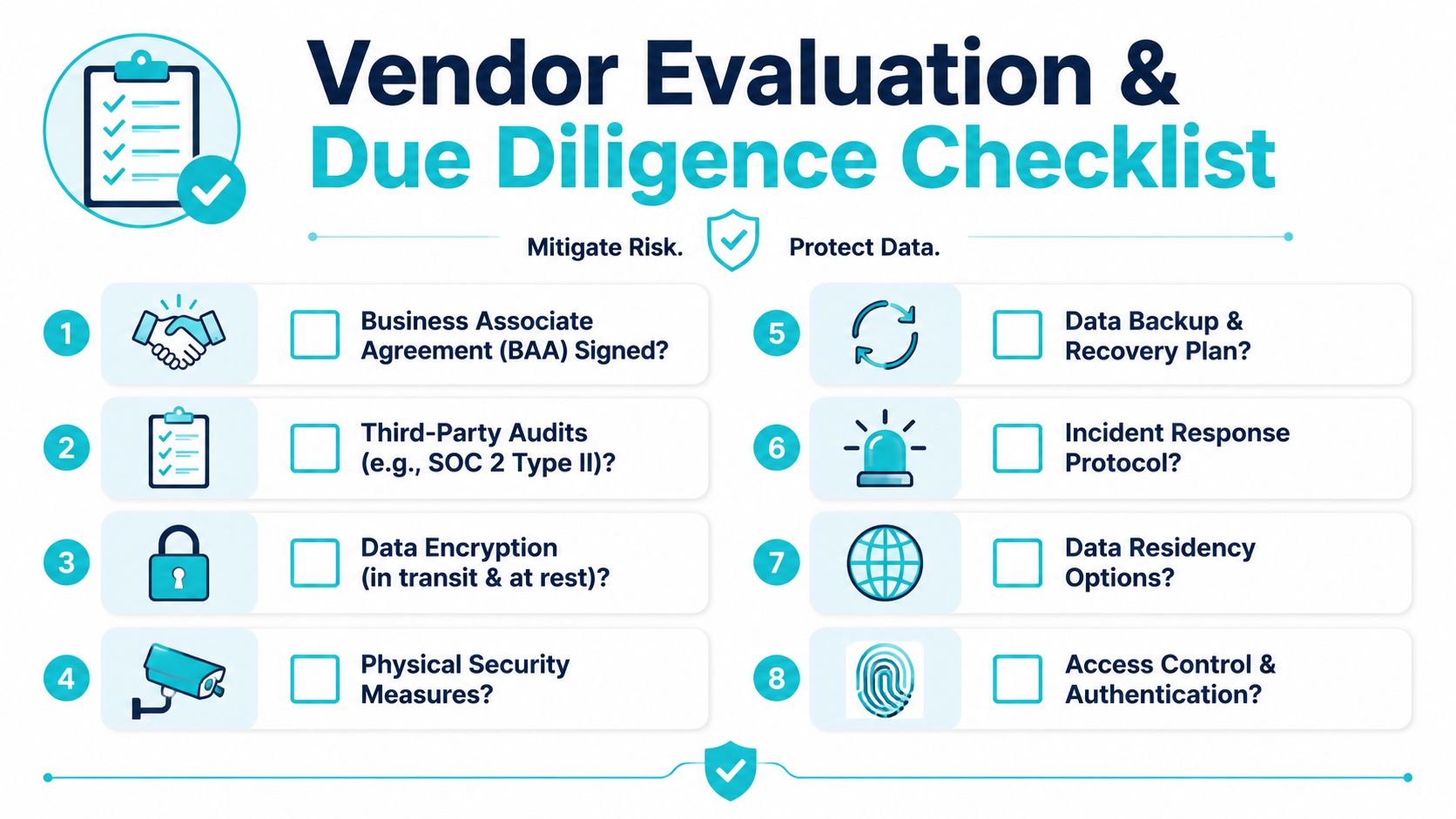
Your Vendor Evaluation and Due Diligence Checklist
A serious HIPAA hosting evaluation should feel uncomfortable for the vendor. If your questions don’t force them to get specific about operations, you’re only testing sales language.
Questions that separate capable providers from generic hosts
Start with the legal threshold. Ask whether the provider will sign a BAA before contract execution and whether you can review it early. If the answer is evasive, move on.
Then push into operations.
Access governance
Ask who can access your systems, how that access is approved, and whether administrator actions are logged. Good providers can explain workflows, not just intentions.Physical environment
Ask where systems are hosted, how access to facilities is controlled, and how failed storage media is handled. If dedicated hardware is part of the design, ask what protections exist during replacement, shipping, and decommissioning.Backup and recovery
Ask how backups are encrypted, where they live, who can restore them, and how restore testing is handled. A provider that talks only about snapshots is giving you half an answer.Incident handling
Ask how security events are triaged, who gets notified, and what evidence is retained. You want a process, not a promise.
One useful way to test maturity is to compare the vendor’s answers against infrastructure expectations common in secure facilities. A review of Tier 4 data center requirements can help frame what substantial physical resilience and operational discipline should look like, even if your final deployment model doesn’t require that exact standard.
What a good answer sounds like
A credible provider usually answers in terms of systems, controls, and ownership. A weak provider answers in adjectives.
Here’s the difference:
| Question | Weak answer | Strong answer |
|---|---|---|
| Will you sign a BAA? | “We support compliance.” | “Yes, and legal can review the agreement before service activation.” |
| How is access controlled? | “Only authorized staff can log in.” | “Named accounts, role-based access, logged administration, and approval workflow.” |
| How do you handle incidents? | “We take security seriously.” | “We triage alerts, contain affected systems, preserve logs, and notify according to contract.” |
| What about backups? | “We back everything up.” | “Encrypted backups, restricted restore permissions, offsite retention, and restore validation.” |
The best vendors answer hard questions without sounding defensive. They’ve heard them before because mature customers ask them every time.
Red flags worth treating as disqualifiers
Some warning signs should end the evaluation quickly:
- No clear responsibility boundary because that turns every incident into a blame exercise.
- Unmanaged or lightly managed PHI infrastructure when your internal team doesn’t have continuous security coverage.
- Marketing claims like “fully compliant” without technical explanation because compliance depends on implementation.
- Support that can’t reach engineering because healthcare incidents rarely fit front-line scripts.
- No evidence of hardening, monitoring, or backup governance because these are foundational, not optional extras.
If you’re building a shortlist, create a downloadable internal checklist and score vendors side by side. Don’t score only feature presence. Score whether the provider can explain the control in operational terms. That’s the difference between a compliant-looking environment and one that can survive scrutiny.
Best Practices for Implementation and Migration
Most compliant hosting projects fail during transition, not design. Teams know where they want to end up, but they underestimate how many places PHI is hiding in the current environment. Old backups, support exports, temporary admin shares, abandoned integrations, and copied test databases are where migration plans become risky.

A phased migration path that works
A controlled migration usually breaks into four phases.
Planning comes first. Inventory every system that stores, processes, or transmits PHI. Classify data paths, identify dependencies, and define what absolutely cannot break during the cutover.
Preparation is where the target environment gets hardened before data arrives. Build the virtual machines, network boundaries, backup jobs, logging pipeline, privileged access controls, and patch baseline first. Don’t migrate into an unfinished security model.
Migration should use secured transfer methods, narrow maintenance windows, and rollback planning. For a patient portal moving from a generic web host into a secure VPS bundle, that often means syncing application files, moving the database over an encrypted path, validating secrets and certificates, and switching traffic only after functional and security checks pass.
Validation is the part many teams rush. Test user access, logging, backup completion, restore workflow, and alerting. Then document what was validated and who approved it.
Where Proxmox fits well
For teams moving away from sprawling VMware estates or overcomplicated public cloud deployments, a dedicated Proxmox private cloud can simplify control boundaries. That matters for HIPAA because simpler boundaries are easier to document, monitor, and defend.
A practical target architecture often looks like this:
- Application VMs separated from database VMs
- Management interfaces restricted to approved admin paths
- Dedicated backup networks isolated from user-facing services
- Segmented environments for production, staging, and administrative tooling
If the workload is small, a secure managed VPS can be enough. If you’re consolidating multiple healthcare applications, need stronger isolation, or want room for clustered failover and internal segmentation, private cloud infrastructure is usually the cleaner long-term design.
Migration tasks that should be scripted
Some of the highest-risk steps are repetitive. Script them where you can.
sudo apt-get update
sudo apt-get upgrade -y
sudo systemctl enable auditd
sudo systemctl start auditd
That snippet isn’t a migration plan by itself, but it shows the right discipline. Standardize the baseline so each new system enters service with the same patch and audit posture.
A compliant migration is less about moving bytes and more about preserving control. If the destination is secure but the transfer path, validation process, or rollback plan is weak, the project still carries avoidable risk.
Complex moves benefit from managed migration support because the technical problem isn’t just hypervisor conversion. It’s preserving access rules, backup coverage, logging, and evidence while minimizing downtime and operator error.
Common Pitfalls That Lead to Compliance Failures
The most expensive HIPAA hosting mistakes are usually the ones teams thought were already handled. They bought “secure hosting,” enabled HTTPS, and assumed the rest was covered. It wasn’t.
The fake comfort of “HIPAA certified”
There is no magic badge that makes a host safe for PHI by itself. Teams still get trapped by providers that market themselves as if certification settles the issue.
The key question is always operational. Will the provider sign a BAA? Can it explain access controls, encryption, logging, backup integrity, incident response, and managed responsibility in concrete terms? If the answer is no, the label doesn’t matter.
Treating the BAA like the finish line
Some organizations finally get a signed agreement and stop there. That’s a legal milestone, not a technical one. The environment still needs hardened systems, controlled access, monitored logs, secure backups, and regular review.
A common failure pattern looks like this: legal approves the vendor, engineering deploys quickly, and no one verifies whether the implementation matches the assumptions in the agreement.
Assuming shared responsibility means someone else is watching
This causes more trouble than almost anything else. Internal teams assume the host is patching everything. The host assumes the customer owns guest operating systems and application dependencies. Months later, stale packages, broad admin access, and missing alerts are still sitting in production.
Use explicit ownership for:
- Operating system patching
- Application updates
- Firewall management
- Backup restore testing
- Account lifecycle management
- Security alert review
If a line item has no owner, it will eventually become your incident root cause.
Letting convenience tools touch PHI
Staff will use the easiest tool available unless you give them a safe alternative. That includes consumer file sharing, unmanaged mailbox forwarding, ad hoc screenshots, and temporary exports copied to laptops.
These shortcuts are rarely malicious. They’re usually workflow problems. But they create uncontrolled copies of PHI outside the environment where you thought protections existed.
The risky system is often the one nobody documented because it started as a quick workaround.
Neglecting ongoing maintenance
A compliant environment degrades if nobody tends it. Unreviewed logs become noise. Backup jobs fail unnoticed. Certificates expire. Former contractors keep access longer than they should. Vulnerabilities sit unpatched because every update window feels inconvenient.
Fully managed IT services are often worth the cost. Not because internal teams lack skill, but because consistency is hard to maintain when healthcare infrastructure competes with every other operational priority.
Achieving and Maintaining Audit Readiness
Audit readiness isn’t a sprint before an assessor shows up. It’s the condition of being able to explain, demonstrate, and defend your controls on an ordinary weekday.
That means your team can produce the current access model, show where PHI resides, review recent administrative activity, confirm backup integrity, and walk through incident response without improvising. If those answers depend on one engineer’s memory, the environment isn’t ready.
What audit-ready operations look like
An audit-ready hosting environment usually has a few traits in common:
- Documentation stays current because changes in architecture, access, and vendors are recorded as they happen.
- Logs are reviewed with intent because collected data only helps if someone checks it for anomalies and policy drift.
- Risk assessment is periodic because systems, people, and dependencies change even when the core application does not.
- Incident procedures are rehearsed because response quality drops fast when teams are seeing the process for the first time during a real event.
Why architecture and operations have to stay connected
Many healthcare teams learn the hard lesson that you can’t separate compliance from infrastructure choices. A poorly segmented public cloud build, an unmanaged VPS with stale packages, or a dedicated server with weak logging all create the same outcome. The environment becomes hard to explain and harder to defend.
The strongest approach is to choose infrastructure that makes secure operations simpler. Dedicated private cloud environments, secure managed VPS hosting, isolated bare metal for sensitive databases, encrypted backups, and accountable managed services all reduce ambiguity. They don’t replace your obligations, but they make those obligations practical to meet.
Being audit-ready means your legal commitments, technical controls, and daily operations line up. When they do, HIPAA compliant hosting stops feeling like a moving target and starts functioning like a disciplined operating model.
If you need a hosting and managed infrastructure partner that understands secure VPS deployments, bare metal isolation, Proxmox private clouds, colocation, instant applications, and fully managed IT services for servers, ARPHost, LLC is worth a close look. You can explore VPS hosting, review secure web hosting bundles, compare bare metal servers, check Dedicated Proxmox private clouds, or request a managed services quote. For teams planning a larger redesign, it’s a practical place to discuss secure managed VPS hosting, dedicated Proxmox cloud pricing, VMware migration support, and fully managed IT services for servers with engineers who work in this layer every day.
