

A familiar pattern shows up right before teams start shopping for bigger infrastructure. The application worked well in staging, looked fine during early production, and then user behavior changed. The dataset grew, more workers came online, cache hit rates slipped, and suddenly the database starts timing out during peak activity. Developers blame slow queries. Operations blames storage. Leadership hears only that the platform feels unreliable.
In many of those environments, the core issue is memory pressure.
When RAM is tight, the entire stack gets dragged into slower paths. Databases stop serving hot data from memory. Hypervisors start fighting over allocations. Containers get evicted or throttled. Analytics jobs run long enough to interfere with transactional work. That’s when a move to high memory dedicated server hosting stops being a hardware preference and becomes an architectural decision.
That shift is happening across the market. The dedicated server hosting market is valued at $20.04 billion in 2025 and projected to reach $23.94 billion by 2026, with a 19.4% CAGR, and 42% of organizations are actively migrating out of public cloud environments to regain stability and exclusive resource access. Those numbers line up with what infrastructure teams already know from experience. Shared resources are convenient until memory-bound workloads become business-critical.
A high-memory dedicated platform solves a specific class of problems. It gives databases room to cache aggressively, lets virtualization nodes run without swapping, and gives AI or analytics pipelines a predictable floor instead of fighting noisy neighbors. It also forces a better buying process. You can’t evaluate RAM in isolation. You have to match memory, CPU behavior, storage latency, management model, and migration discipline to the workload that pays the bills.
Introduction When Your Application Hits a Memory Wall
The fastest way to recognize a memory wall is to look at the symptoms users notice first. Pages that used to load quickly now pause on data-heavy screens. Background jobs pile up. Search gets inconsistent. Query latency jumps only under load, which makes the problem look random even when it isn’t.
Teams often waste time tuning around it.
They add another cache layer, bump worker settings, or split services across more small instances. Those changes can help for a while, but they don’t fix the core issue if the active dataset, VM footprint, or model pipeline no longer fits comfortably in memory. Once the working set spills into slower storage paths, every optimization becomes defensive.
Where smaller platforms break down
This usually hits in a few predictable places:
- Database-heavy applications: PostgreSQL, MySQL, and similar systems slow down when hot indexes and frequently queried rows can’t stay resident in memory.
- Virtualization hosts: Consolidation looks efficient until too many guests compete for the same memory pool.
- Analytics and search stacks: Log aggregation, Elasticsearch-style indexing, and reporting jobs consume memory in bursts that are hard to absorb on undersized hosts.
- Mixed-use business platforms: E-commerce, internal APIs, admin dashboards, and scheduled jobs often share the same infrastructure and expose memory problems faster than single-purpose systems do.
Practical rule: If CPU graphs look moderate but the application still feels slow under concurrency, investigate memory pressure before you buy more cores.
A dedicated high-memory server changes the operating conditions. Instead of negotiating with a scheduler on shared infrastructure, your workload gets exclusive access to RAM, local NVMe performance, and CPU behavior you can plan around. That makes troubleshooting cleaner and scaling decisions more honest.
What Truly Defines a High Memory Dedicated Server
A high-memory server isn’t just a machine with a large RAM number in the spec sheet. It’s a balanced system built so memory-heavy applications can use that capacity without hitting a different bottleneck a minute later.
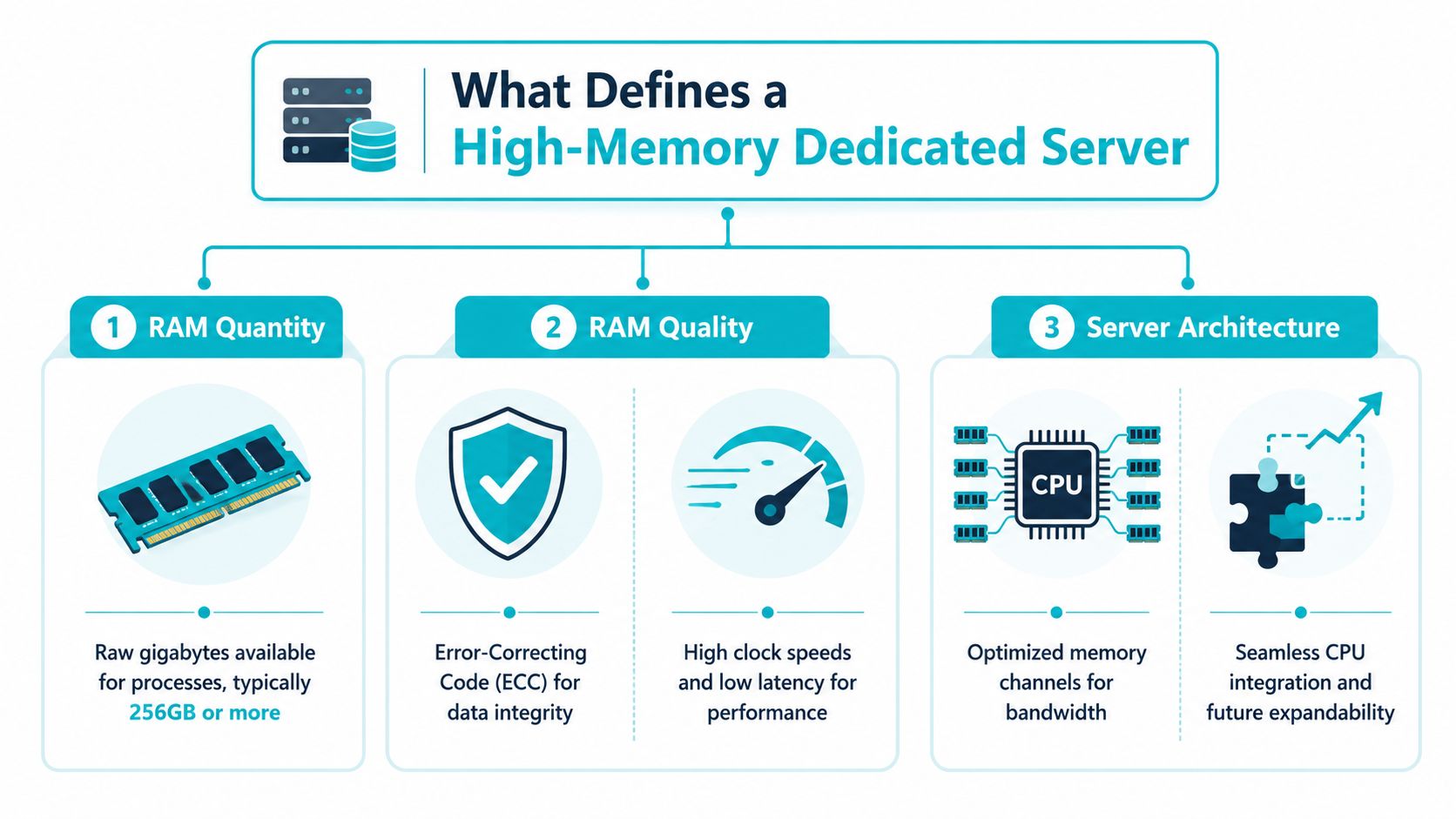
Start with memory capacity, then check memory quality
For enterprise work, ECC RAM matters. Memory errors are rare until they aren’t, and database corruption or hypervisor instability is the wrong place to learn that consumer-grade assumptions don’t hold up in production. ECC gives you error detection and correction at the memory layer, which is exactly what you want when running long-lived databases, dense virtualization, and analytics jobs.
Capacity still sets the floor. If the workload needs a large in-memory working set, no amount of tuning will make a small memory pool behave like a large one. But capacity alone doesn’t define the platform. RAM has to be usable under sustained load, not just technically installed.
CPU choice decides whether the memory can be used well
Memory-heavy systems need the right processor behavior.
Modern high-memory server specifications now commonly include DDR5 ECC RAM up to 192 GB, NVMe storage, and unmetered bandwidth in the 3 to 10 Gbps range, while CPU matching remains critical. AMD EPYC processors with 16+ cores suit virtualization and AI parallel workloads, while higher clock speeds fit single-threaded database tasks better.
That distinction matters more than buyers expect. A virtualization node wants lots of concurrent execution capacity and broad memory throughput. A database engine with heavy single-threaded paths often rewards clock speed and low latency more than raw core counts. Buying the wrong CPU for the job creates a second bottleneck right after you solve the first one.
Buy for the dominant bottleneck, not the most impressive spec. A server can have abundant RAM and still underperform if the processor profile doesn’t match the application.
NVMe keeps storage from becoming the next problem
Once you give an application enough memory, storage latency becomes easier to see. That’s why serious high-memory systems pair ECC RAM with NVMe, often in RAID-1, instead of relying on slower SATA SSDs. Faster reads and writes improve checkpointing, database responsiveness, and recovery behavior when the workload does need to touch disk.
A useful evaluation checklist looks like this:
- RAM architecture: ECC support, enough installed capacity, and a platform built for sustained memory use.
- CPU fit: High-core-count processors for VM density or AI parallelism. Higher clock speeds for latency-sensitive, single-threaded paths.
- Storage path: NVMe first. Slower storage usually becomes visible the moment memory pressure is relieved.
- Bandwidth profile: Enough upstream and east-west capacity to support replication, backups, and cluster traffic without creating new contention.
Key Use Cases That Demand High Memory Hosting
Some workloads benefit from more memory. Others depend on it. The difference is operational. If RAM falls short, the application doesn’t just get slower. It changes behavior in ways users and administrators both feel.

Industry guidance puts clear boundaries around those needs. Large databases typically need 64 GB RAM and above, moderate virtualization hosting 4 to 10 VMs commonly needs about 128 GB, heavy virtualization requires 256 GB or more, and enterprise AI or ML workloads often need 128 to 256 GB RAM.
Large databases and in-memory working sets
Databases are usually the first place memory limits become expensive. Once the active dataset no longer fits cleanly in RAM, read latency gets inconsistent and write-heavy periods start interfering with normal application traffic. Teams often respond by adding replicas or query caching, but the simpler fix is often enough memory to keep the hot set resident.
For larger datasets, 64 GB and above often becomes a realistic starting point. It isn’t about bragging rights. It’s about preventing a well-indexed database from acting disk-bound because the cache budget is too small.
A few signs the database belongs on a high-memory host:
- Frequent cache misses: Good queries still feel slow during business hours.
- Heavy reporting overlap: Analytical reads collide with transactional work.
- Growing index footprint: You can’t keep key indexes and buffers warm.
- Replication lag under pressure: Secondary systems struggle when the primary gets busy.
Proxmox virtualization and private cloud density
Virtualization punishes optimistic sizing.
A Proxmox node can look healthy while still being one maintenance window away from trouble. The hypervisor itself needs headroom, each guest needs committed memory, and bursty tenants never spike on a clean schedule. Once the host starts reclaiming aggressively or swapping, every VM suffers.
That’s why 128 GB is a common fit for moderate virtualization and 256 GB or more is the safer territory for heavy consolidation. If you’re building a private cloud for mixed Windows and Linux guests, or combining KVM with LXC containers, memory planning matters more than almost any other hardware choice.
For teams standardizing on Proxmox, quorum planning matters too. A minimum of three nodes is required for reliable high availability in a Proxmox VE cluster, although the third can be a low-spec device, as documented in the Proxmox VE cluster manager guidance.
A two-node cluster without proper quorum planning creates operational fragility. The memory budget may be right, but the cluster design still isn’t.
A larger build also needs architectural restraint. For clusters around 21 nodes, a common best practice is to split storage and compute into separate clusters, with roughly 7 nodes for Ceph storage and the rest for compute, based on Proxmox community scaling guidance. That separation prevents the storage fabric and guest workloads from competing inside the same operational blast radius.
Here’s a simple way to picture the layout:
| Layer | Primary role | Memory implication |
|---|---|---|
| Compute cluster | Runs KVM and LXC workloads | Needs generous headroom for guest growth |
| Storage cluster | Handles Ceph and data resilience | Needs stable allocation for storage services |
| Quorum device or third node | Maintains cluster integrity | Low resource need, high operational value |
Later in the planning cycle, many teams review architecture videos to compare node roles and cluster behavior in real deployments.
AI, analytics, and memory-bound processing
AI inference, model training, log analytics, and search indexing all have one thing in common. They punish undersized memory pools quickly. Intermediate datasets, feature matrices, search segments, and aggregation jobs all want fast local access to large volumes of data.
In these demanding environments, 128 to 256 GB becomes normal, not excessive. Even when GPU acceleration is part of the design, system RAM still supports preprocessing, batching, orchestration, and parallel worker behavior. If you try to run those pipelines on a host sized for general-purpose web traffic, you’ll spend more time controlling failure modes than extracting value from the workload.
Matching Server Specs to Your Workload
Spec matching starts with one question. What fails first under load: CPU, RAM, or storage latency?
That answer should drive the purchase. A PostgreSQL server with a hot working set needs a different profile than a Proxmox node carrying dozens of mixed VMs, and both behave differently from an inference stack that keeps large models and preprocessed data in memory. Teams waste money when they buy for headline specs instead of the bottleneck they have.
Which configuration fits which job
ARPHost’s current lineup maps cleanly to three common buying patterns.
| Server Model | CPU (Cores/Threads) | RAM (Size/Type) | Ideal Workload | Link |
|---|---|---|---|---|
| Dual Intel Xeon E5-2690 V3 | 28 cores / 56 threads | 64GB DDR4 ECC RAM | Proxmox clusters, game server hosting, multi-tenant VPS nodes | View bare metal options |
| AMD EPYC 4584PX | 16 cores / 32 threads | 192GB DDR5 RAM | Large databases, AI/ML inference, high-density virtualization | See the 192 GB RAM dedicated server |
| AMD Ryzen 9600X | 6 cores / 12 threads | 96GB DDR5 RAM | Single-tenant applications, development environments, high-clock-speed workloads | Browse bare metal inventory |
The EPYC 4584PX with 192GB DDR5 is the best default choice for serious memory pressure. It fits teams running large MySQL or PostgreSQL instances, Redis-heavy application tiers, AI inference pipelines, or dense virtualization where RAM exhaustion is the first real risk. DDR5 capacity matters here, but so does balance. You still need enough cores to keep concurrent jobs moving while the dataset stays resident in memory.
The dual Xeon E5-2690 V3 remains useful for broad VM distribution and service consolidation. It is not the platform I would choose for a memory-hungry primary database, but it can be a cost-effective fit for lab environments, game hosting fleets, and VM nodes where thread count and predictable ECC memory matter more than modern memory density.
The Ryzen 9600X serves a narrower purpose. It suits workloads that care more about per-core speed than total memory ceiling, such as CI runners, application servers, smaller databases, and development stacks. It is a good single-tenant option when you want fast response times without paying for capacity you will not use.
A practical sizing filter
Use the workload, not the marketing label, to choose the box:
- Choose EPYC with 192GB DDR5 for memory-bound databases, AI inference, analytics pipelines, and Proxmox hosts expected to carry dense VM or container populations.
- Choose dual Xeon for mixed virtualization, test platforms, and multi-service hosts where many threads help more than high RAM per node.
- Choose Ryzen for high-clock business applications, staging environments, and lighter production stacks with clear memory limits.
One more rule matters in practice. Buy for peak working set plus headroom, not average utilization. Average memory graphs hide spikes, cache growth, maintenance jobs, and failover events. That is how a host that looks comfortable in monitoring ends up swapping during the worst possible hour.
For many enterprise workloads, the 192GB DDR5 dedicated server from ARPHost lands in the right middle ground. It gives enough RAM for serious production use without forcing you into a larger footprint before the workload justifies it.
Managed vs Unmanaged High Memory Servers
This decision changes the operating model more than the hardware itself.
An unmanaged server gives you full root control and maximum flexibility. That’s attractive when your team already handles OS hardening, patching, monitoring, backup validation, and incident response in-house. It also keeps the scope clean. If you want a box and only a box, unmanaged is the direct path.
The problem isn’t capability. It’s attention.
Where unmanaged works well
Unmanaged high-memory servers are a solid fit when you have:
- A mature internal team: Someone owns kernel updates, performance tuning, firewall rules, and recovery playbooks.
- Strong observability already in place: Metrics, alerting, logging, and backup testing are part of routine operations.
- Specialized application requirements: You need unusual kernel modules, custom scheduler behavior, or platform-specific tuning and don’t want a managed wrapper around it.
That model breaks down quickly when the server supports revenue-critical systems and nobody has time to babysit the infrastructure layer.
What managed service changes
A managed service shifts the question from “Can we administer this?” to “Should our team spend time on this at all?” For many businesses, the better answer is no. The value isn’t just someone applying patches. It’s having a partner handle routine maintenance, proactive monitoring, baseline security work, and troubleshooting before minor issues become outages.
A managed platform is often the better move when the server hosts customer-facing applications, ERP systems, production databases, or a growing private cloud. Internal teams stay focused on application delivery instead of spending late nights on package updates, firewall mistakes, and failed change windows.
You can see what that operating model looks like in fully managed dedicated server hosting.
Managed isn’t about giving up control. It’s about keeping control over outcomes while handing repetitive infrastructure work to people who do it every day.
The real trade-off
This isn’t a simple cheap-versus-expensive comparison.
| Model | Best fit | Main risk |
|---|---|---|
| Unmanaged | Skilled teams with time and established processes | Misconfiguration, patch drift, operational overload |
| Managed | Teams protecting business-critical systems and limited internal bandwidth | Less attractive if you want to own every task personally |
For high-memory systems, that trade-off gets sharper because the workloads tend to be more sensitive. The server usually isn’t hosting a brochure site. It’s hosting the database, the virtualization layer, the analytics platform, or the application tier everyone notices when performance slips.
Migration and Management Best Practices
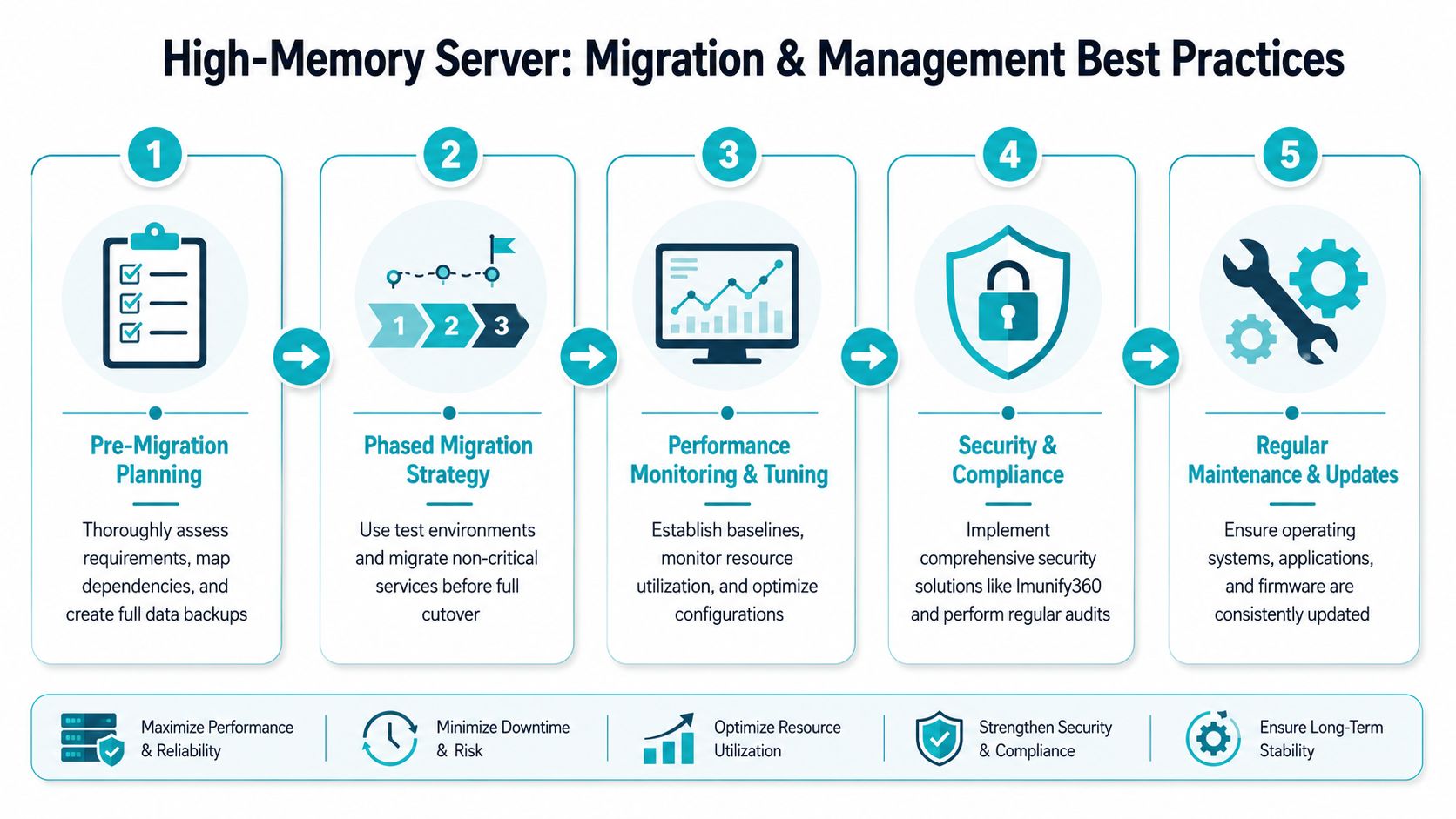
Migrating to a high-memory platform is where good architecture can still fail through poor execution. Most outages during these projects aren’t caused by the new hardware. They’re caused by incomplete dependency mapping, rushed cutovers, or weak rollback planning.
Build the migration around dependencies
A clean migration starts with inventory, not provisioning. You need to know which services depend on the database, which jobs write to local paths, which applications assume old mount points, and which integrations fail unnoticed when credentials or latency patterns change.
A practical migration sequence looks like this:
- Inventory the workload and classify what is stateful, stateless, scheduled, and externally integrated.
- Map dependencies between the application, database, cache layers, background workers, and monitoring.
- Create full backups and validate restoration before moving anything.
- Migrate non-critical components first so you can verify access patterns, performance baselines, and operational procedures.
- Schedule cutover with rollback criteria that are explicit, not improvised during the event.
A useful pre-cutover reference is this server migration checklist.
Harden Proxmox before the cluster grows
If the target platform includes Proxmox VE 9, security hardening should happen immediately after deployment, not after tenants are already live. Guidance for Proxmox VE 9 includes disabling root SSH access entirely, creating a normal user with pseudo-privileges, and enforcing SSH keys by disabling password authentication, as covered in this Proxmox VE 9 hardening walkthrough.
That translates into a short operational checklist:
- Create an administrative user: Use a normal account for routine access and privilege escalation.
- Disable direct root SSH login: Remove the easiest remote target first.
- Turn off password authentication: Require SSH keys only.
- Apply host firewall policy early: Don’t wait until the node is in production.
- Validate backup and restore paths: Security and recoverability belong together.
A minimal Linux-side SSH hardening example looks like this:
sudo adduser opsadmin
sudo usermod -aG sudo opsadmin
sudo nano /etc/ssh/sshd_config
Update the SSH configuration so root login is disabled and password authentication is turned off, then reload SSH only after confirming your key-based session works through the new administrative user.
Operational advice: Never harden SSH on a remote production node without testing a second authenticated session first. Locking yourself out is still one of the most common self-inflicted outages.
Keep tuning after the move
Migration isn’t the finish line. High-memory systems need post-cutover observation. Watch cache behavior, guest density, ballooning, storage latency, backup windows, and noisy background jobs. A server with abundant RAM can still underperform if one badly behaved workload consumes memory aggressively or if backups contend with live I/O.
Managed support proves its worth. Ongoing patching, monitored backups, and routine platform review reduce the chance that a strong initial deployment slowly drifts into a fragile one.
Why ARPHost Excels for High Memory Hosting
A provider earns trust on high-memory deployments by getting three decisions right. It needs hardware that matches the workload, a product set that does not force bad compromises, and support that remains useful after cutover.
ARPHost performs well here because the server lineup maps to clear operational roles. The AMD EPYC 4584PX with 192GB DDR5 RAM is a strong fit for in-memory databases, larger AI inference jobs, and virtualization hosts where memory pressure is the first limit you hit. The Dual Xeon E5-2690 V3 remains a practical choice for Proxmox clusters, lab environments, and multi-tenant infrastructure where core count and RAM capacity matter more than single-thread speed. The Ryzen 9600X fits application stacks that benefit from higher clock speed but do not justify stepping into the largest memory tiers.
That range matters in practice.
Too many providers treat every project like it should land on the same platform class. ARPHost gives teams room to start with the right size and change direction without replacing the entire operating model. A business can begin on VPS infrastructure for development or lower-risk services, then move to dedicated hardware or a private virtualization environment when the workload outgrows shared resources. That is the kind of progression I want to see when advising on infrastructure, because growth rarely happens in one clean jump.
The service catalog also supports the way real environments evolve. Bare metal, KVM VPS, web hosting, colocation, instant applications, and managed operations make it possible to build around the application instead of forcing the application to fit a narrow product boundary.
Managed support is where many high-memory projects either stabilize or become expensive to operate. ARPHost offers managed services for teams that need patching, monitoring, firewall administration, migration support, and recovery planning handled with discipline. That is especially useful for database platforms, virtualization clusters, and business-critical services where downtime usually comes from operational drift rather than from raw hardware limits.
If the goal is simple, ARPHost makes a strong case. The inventory is specific enough to match real workloads, the upgrade path is practical, and the support options fit teams that need either direct control or operational help from day one.
If you’re planning a move to high-memory infrastructure, ARPHost, LLC is a strong place to start. You can compare bare metal platforms, request fully managed support, price out private virtualization capacity, or talk through a migration plan with a team that works across VPS, dedicated servers, backups, and managed IT every day.
