

Your checkout is open, traffic is flowing, and then a host node dies.
If your VPS lives on one physical server, the incident becomes a repair ticket. If your service runs on a real HA platform, the event becomes an automated recovery process your users may barely notice. That distinction is where most buying mistakes happen.
A lot of providers sell “high availability” as if RAID, snapshots, or a premium plan name solve the problem. They don’t. RAID helps a single server survive a disk issue. It doesn’t remove the server itself as a failure domain. For businesses that depend on web apps, email systems, APIs, or customer portals, the key question isn’t whether a provider offers a VPS. It’s whether the underlying architecture can keep the workload alive when hardware fails.
Beyond 99% Uptime What Is High Availability VPS Hosting
The phrase high availability VPS hosting gets used loosely. In practice, it should mean one thing: your virtual machine is backed by infrastructure designed to keep services available when a physical component fails.
That matters because VPS is no longer a niche deployment model. Over 24 million websites globally rely on virtual private servers as of 2026, which makes VPS a mainstream infrastructure choice rather than a specialist tool.
Standard reliability versus failure tolerance
A standard VPS can be stable for months. It can also still depend on one host, one motherboard, one storage path, and one maintenance window. When that server has a serious problem, the VM stops because the system underneath it is gone.
A real HA platform is built differently. Compute is clustered. Storage is available outside a single node. Monitoring detects a failure. Failover logic moves or restarts the workload on healthy infrastructure.
That’s the practical line between uptime as a promise and availability as an architecture.
Most outages that hurt businesses don’t start at the application layer. They start with an ordinary hardware fault that the platform wasn’t designed to absorb.
What business owners should care about
If you run a revenue-generating site, an internal line-of-business app, or hosted email for staff, the technical details matter because they map directly to business outcomes:
- Less service interruption: Automatic failover reduces the chance that a hardware issue becomes a customer-visible outage.
- Safer maintenance: Clustered environments let operators patch hosts and perform maintenance with less risk than single-server deployments.
- Better isolation: Dedicated CPU, RAM, and storage boundaries matter, but they matter more when they sit on resilient infrastructure.
- Lower operational stress: Your team spends less time coordinating late-night incident response around one failed machine.
What high availability is not
It’s not a backup strategy by itself.
It’s not the same as RAID.
It’s not a marketing badge attached to a VPS that still runs on one server with local disks.
If a provider can’t clearly explain what happens when the physical host disappears, you’re not looking at high availability. You’re looking at a standard VPS with a stronger headline.
The Anatomy of a True High Availability Architecture
A resilient HA stack has several moving parts, but the operating principle is simple. Remove single points of failure, detect faults quickly, and shift work automatically.
Redundancy, monitoring, and failover are the three essential elements that have to work together in high availability VPS environments.
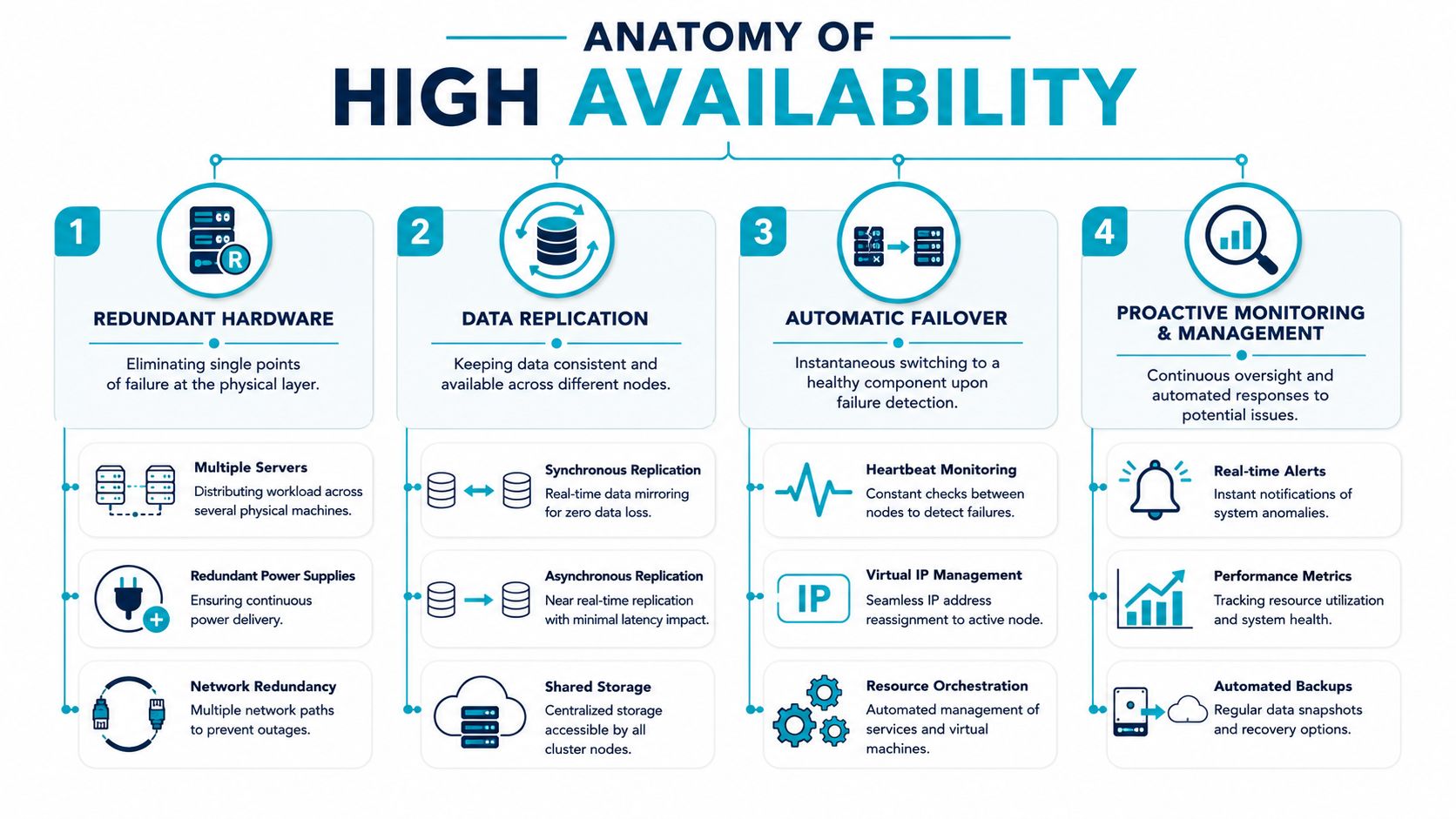
Redundant compute and network paths
The first layer is the hypervisor cluster. Instead of pinning every VM to one server, multiple hosts operate as a pool. If one host fails, another node can take over the workload.
Network design matters just as much. A clustered platform still breaks if all traffic depends on one switch path or one upstream segment. Good HA design includes redundant physical and logical paths so an isolated network issue doesn’t become a full service outage.
For readers comparing cluster concepts, server clustering fundamentals are worth reviewing before evaluating any provider’s claims.
Storage is where most fake HA falls apart
Many “cloud VPS” offers still rely on local RAID inside one physical machine. That protects against some disk failures, but it leaves storage attached to the same server that’s running the VM. If the chassis, controller, or host fails, the VM still goes down.
Distributed storage changes that equation. The VM disk exists outside one server and remains accessible to healthy nodes in the cluster. That’s the difference between repairing a host and recovering a service.
Practical rule: If storage can’t survive the loss of one physical node without human intervention, the platform isn’t truly HA.
Monitoring and failover orchestration
HA doesn’t work by magic. It works because the cluster constantly checks health and acts on failures. Heartbeats, service probes, resource checks, and orchestration logic decide when a node is unhealthy and where workloads should restart.
A competent operations team also watches the quieter indicators that cause trouble before a node dies:
- Latency drift: rising storage or network latency often appears before broader instability
- Resource pressure: sustained memory and CPU contention can make failover harder when it’s needed most
- Replication health: if storage copies aren’t healthy, recovery becomes slower and riskier
- Alert fatigue: too many noisy alerts cause teams to miss the one event that matters
The result is an environment that can absorb normal infrastructure faults instead of turning every hardware issue into downtime.
Common HA Architectures and Their Real-World Tradeoffs
A provider says its VPS platform is “high availability.” Then a host fails and your service is offline until support manually restarts the VM somewhere else. That gap usually comes down to architecture, not wording.
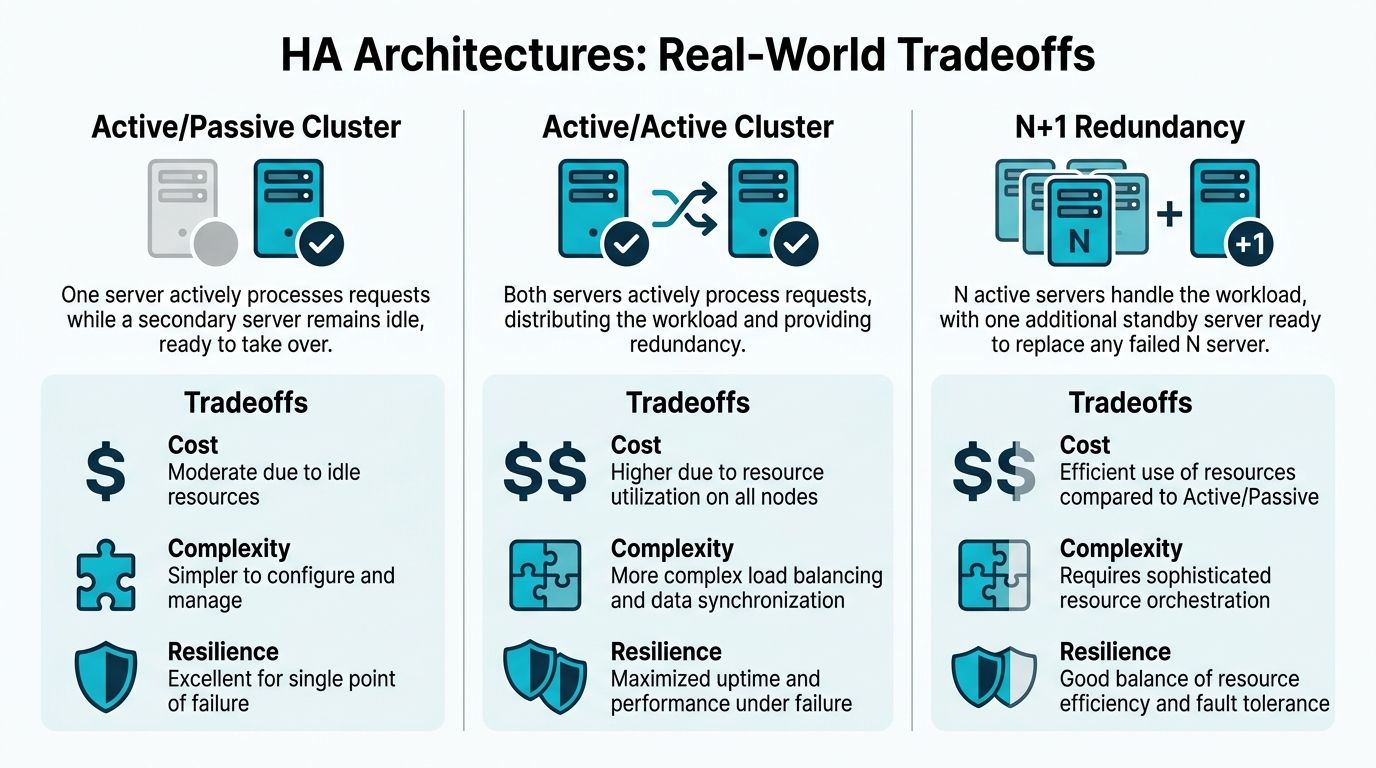
Different HA models solve different failure modes. The right one depends on what the application costs you per minute of downtime, how much spare capacity you can afford, and whether your team can operate the platform without creating new risk.
Active passive clusters
Active passive is still common because it is easy to explain and relatively easy to run. One node carries production traffic. A second node is reserved for failover.
That simplicity has a price. Standby resources sit underused, and failover is only as good as the storage design and failure detection behind it. If the provider has a clean fencing process, shared state that stays consistent, and enough spare headroom on the passive side, this model can work well for line-of-business applications, internal systems, and workloads where a short restart is acceptable.
It is less attractive for fast-growing environments. You keep buying insurance capacity instead of using it.
Shared storage HA
Shared storage clusters are often marketed as enterprise HA because VMs can restart on another host quickly. In practice, the compute layer may be clustered while the storage layer remains the primary risk concentration point.
A central SAN or NAS can be perfectly reasonable if it is designed, sized, and operated well. It can also become the outage. I have seen environments where hypervisors were healthy but storage latency spiked hard enough to stall every VM at once. From the customer’s side, that still looks like a full platform outage.
This pattern is a fit for teams that want familiar operational models and can accept the cost and care that centralized storage requires. It is a weaker fit if the provider cannot explain storage redundancy, controller failover, and how performance is protected during a node loss.
Hyperconverged clusters with distributed storage
Hyperconverged HA is the design to look for when you want infrastructure-level resilience rather than single-server hardening. Compute and storage both live across multiple nodes, so a host failure does not also remove the only copy of the VM’s usable data.
That is why clustered platforms built on Proxmox and Ceph are a stronger answer than marketing language around RAID or “redundant hardware.” The storage replicas already exist across the cluster. Failover becomes an orchestration event, not a restore job.
The trade-off is operational discipline. Distributed storage gives better fault tolerance and cleaner scale-out, but it also demands correct network design, replica sizing, recovery tuning, and capacity management. If a provider runs this architecture well, you gain better failure isolation and faster service recovery. If they run it poorly, you get noisy performance and slow rebalancing.
For applications that also need traffic distribution across multiple frontend instances, this load balancing configuration guide for HA environments covers the next design layer.
Good, better, best in practice
| Architecture | What works well | Where it falls short |
|---|---|---|
| Active passive | Predictable failover path, simpler operations | Idle capacity, slower scaling efficiency |
| Shared storage cluster | Fast VM mobility, familiar enterprise design | Central storage can become the main bottleneck or outage domain |
| Hyperconverged with Ceph | Better fault isolation, scale-out growth, storage survives host loss | More operational complexity, stronger networking and monitoring requirements |
Evaluate HA by failure behavior. Ask what happens if a host dies, if storage latency spikes, or if a network path drops. A serious provider should answer each case clearly, without hiding behind the label.
Building Your Own HA Cluster with Proxmox VE
A lot of teams discover the difference between “HA” and real HA the hard way. The provider said the VPS sat on redundant SSDs, but a hypervisor failure still meant waiting for someone to rebuild or restore the VM. If you want to judge a provider’s design properly, it helps to understand what an actual clustered platform looks like in practice.
Proxmox VE is useful here because it exposes the mechanics. You can see quorum, storage placement, node membership, HA state, and recovery behavior instead of trusting a black-box control plane.

Quorum decides whether the cluster can act
The first real design question is not CPU size or VM count. It is whether the cluster can still make safe decisions during a fault.
Proxmox requires a voting majority to keep cluster operations consistent, as described in the Proxmox VE Cluster Manager documentation. In practical terms, that means a three-node layout is the baseline for production HA. With only two nodes, any network split turns into an argument over who should own the workload. That is how split-brain starts, and split-brain is how a simple outage becomes a data integrity problem.
A common small-cluster pattern looks like this:
- Node 1: compute and storage
- Node 2: compute and storage
- Node 3: quorum voter, sometimes with lighter workload responsibility
That third node is not wasted budget. It buys decision safety during failure, which is cheaper than recovering from corruption or an unplanned service stop.
Cluster formation is simple. Operating it well is not.
Creating the cluster is the easy part.
# On the first node
pvecm create prod-ha-cluster

# On additional nodes
pvecm add <cluster-join-address>

# Verify membership
pvecm status
The harder part is everything that follows. Every node needs reliable low-latency connectivity. VM disks must live on storage the failover target can access. Fencing has to be defined so a failed or isolated node cannot keep writing after the cluster has moved its workload elsewhere.
That is the practical gap between a lab build and a production platform. A provider can market “HA” because a single server has RAID and good backups. Infrastructure-level HA starts only when another healthy node can take over the VM with shared cluster state and accessible storage. Readers comparing providers should look for architecture details similar to a Proxmox high availability cluster design, not just plan tables and uptime claims.
HA should be the last switch you flip
Teams get into trouble when they enable HA before validating storage, fencing, and restart policy. Proxmox will happily let you define HA resources. That does not mean the recovery path is ready.
A safer workflow looks like this:
- Place the VM on storage that every failover node can access.
- Set node preferences and restrictions so the VM restarts only where capacity and network access are valid.
- Add the VM to HA management after the failover path is confirmed.
- Run a controlled failover test during a maintenance window and measure restart time, application recovery time, and client impact.
The Proxmox HA manager commands are straightforward:
# List HA resources
ha-manager status

# Add a VM to HA
ha-manager add vm:101

# Check the resource state
ha-manager config
The business impact sits above those commands. If storage is slow to recover, the service is still down. If the target node is already full, failover becomes contention. If fencing is weak, the cluster may hesitate or make the wrong call. Good HA design reduces downtime only when the dependencies are already in place.
Here’s a good visual walkthrough of the Proxmox HA model in action:
Hardware still sets the ceiling
Proxmox can coordinate failover, but it cannot fix undersized nodes, inconsistent disk performance, or thin memory margins. In the field, HA incidents often expose capacity problems that were hidden during normal operation. A node failure concentrates surviving workloads onto fewer systems. If there is no headroom, the cluster stays online but performance collapses.
That is why mature HA environments standardize node profiles and leave room for failure. Mixed hardware can work, but it complicates scheduling and makes failover behavior less predictable. For customer-facing services, predictability matters as much as raw benchmark speed.
Teams building this themselves should size for degraded operation, not just normal operation. If one node disappears, the remaining cluster must still run the important workloads at an acceptable service level. That is the difference between technical HA and business HA.
An Essential Checklist for Evaluating HA VPS Providers
A provider sales page says “high availability.” Then a host dies during business hours, the VM disappears for twenty minutes, and support explains that your data was protected by RAID. That is the gap buyers need to close before they sign anything.
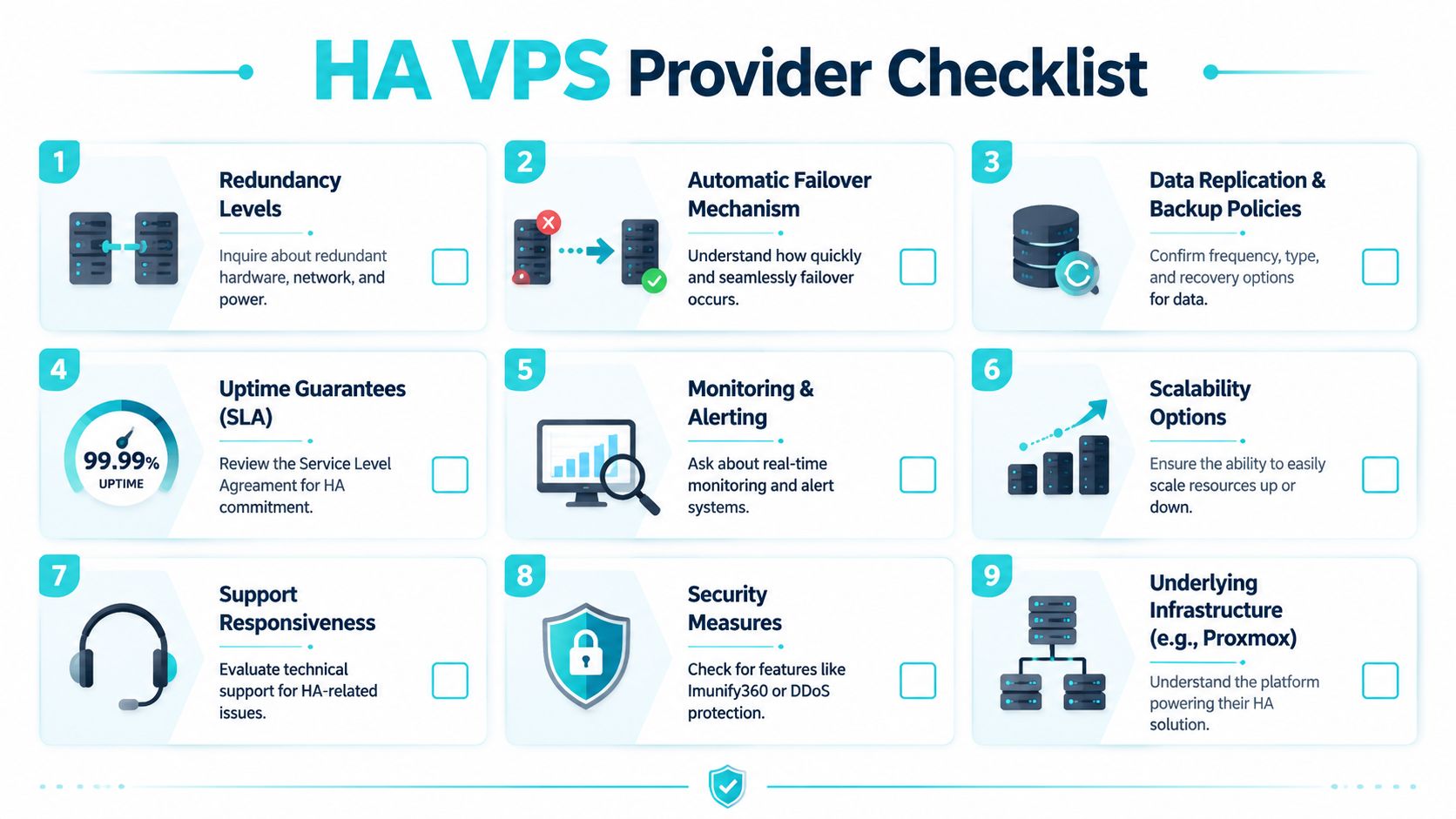
The fastest way to evaluate an HA VPS provider is to stop comparing plan sizes and start tracing failure domains. vCPU, RAM, and NVMe capacity matter for performance. They do not tell you whether a service survives the loss of a node, a storage path, or a switch.
Questions that expose marketing HA
Ask direct questions that force the provider to describe the platform in operational terms:
- How many physical nodes can run this VPS, and what happens if one fails? If the answer stays vague, the workload may still be tied to one host.
- Where do the VM disks live? Local RAID protects against a disk failure inside one server. It does not provide infrastructure-level HA.
- Is failover automatic, and what is the trigger? You want a monitored cluster that restarts workloads on another node, not a manual ticket response.
- How is storage replicated between nodes? If storage does not survive host loss, compute failover does not help much.
- What are the network single points of failure? Redundant compute on a fragile network still produces downtime.
- How is maintenance handled? A mature HA platform should support planned host work without taking customer services offline.
- How are backups separated from HA? HA keeps a service available during certain failures. Backups are still required for deletion, corruption, ransomware, and bad updates.
These questions change the conversation. Providers that built real clustered infrastructure can answer them plainly. Providers selling single-server resilience usually drift back to generic uptime language.
Uptime claims need context
An uptime percentage by itself is not enough. A provider can report strong uptime over a billing period while still running customer VPS instances on isolated hosts with local storage. That model can be stable for months and still create a long outage when the wrong motherboard, RAID controller, or hypervisor fails.
Ask for the failure sequence. What detects the issue, what fences the failed node, where the VM restarts, and what dependencies must already be healthy for recovery to work. If the provider cannot explain that path clearly, the HA label is doing more work than the architecture.
Ask, “If the host running my VPS fails right now, what happens in the next five minutes?” The quality of that answer tells you more than a feature table.
What a strong answer sounds like
Good answers are specific and testable:
- Cluster design: the provider can name the virtualization stack and explain how nodes are grouped
- Shared or distributed storage: they can describe how VM data remains available after node loss
- Automatic recovery behavior: they can explain restart logic, priorities, and any conditions that block failover
- Operational monitoring: they can identify who watches the cluster and how incidents are escalated
- Security boundaries: they can separate infrastructure HA from application and OS security, instead of blending everything into one promise
In practice, architecture holds more importance than branding. A Proxmox cluster backed by distributed Ceph storage, for example, answers these questions cleanly because compute and storage are designed to survive node loss at the platform level. That is very different from a VPS on a single host with mirrored disks and a good backup policy. Both have value. Only one is actual HA.
Why buyer discipline saves money
Teams usually discover weak HA during an outage, when every missing design detail turns into a business cost. Recovery takes longer, support has fewer options, and internal teams have to explain why “high availability” did not survive a single host failure.
The safer approach is simple. Treat HA as an infrastructure design question, not a marketing label. Ask where the VM can run, where the data lives, how failover is triggered, and which components still represent a single point of failure. Providers that built the right foundation will answer without hesitation.
Migration Strategies and Failover Testing Best Practices
A migration to an HA VPS platform usually fails for ordinary reasons. The VM boots, but a background worker still points to the old database. Shared storage syncs, but file permissions break the application. DNS changes cleanly, but no one tested what happens if a node drops during the cutover window. That is why migration planning matters as much as the target architecture.
The first job is to separate services by risk, not by convenience. Stateless web nodes, workers, and API tiers are usually the best first move because they prove scheduling, networking, and storage behavior without putting the primary data set at risk. Databases, mail systems, and file services need stricter sequencing because rollback is harder once writes start landing in two places.
Migrate in controlled stages
A pattern that works well in production looks like this:
- Map service dependencies: document every upstream and downstream dependency, including DNS, storage mounts, cron jobs, API callbacks, and firewall rules.
- Start with low-risk workloads: move components that can be rebuilt quickly and validated fast.
- Replicate data before cutover: confirm the new platform has the right storage path, replication state, and performance profile before production traffic shifts.
- Validate in parallel: compare logs, job execution, session behavior, and application responses between old and new environments.
- Define rollback before go-live: set clear conditions for reversing the cutover, and assign who makes that call.
Teams moving off a single server often underestimate the difference between “the VM migrated” and “the service is ready.” In real environments, the hard part is dependency control. Firewall objects, backup jobs, monitoring targets, certificates, and scheduled tasks all need to move with the workload. Miss one of them and the new platform looks healthy until the first incident.
Failover testing deserves the same discipline. Marketing HA often stops at host-level redundancy or RAID, which helps with disk failure but does nothing for a full node loss. True HA has to prove that a workload can restart on another node, attach to available storage, rejoin the network, and return the application to a usable state within the business’s tolerance for downtime.
Test failover before production does it for you
Useful failover tests are boring by design. They should be planned, repeatable, and documented well enough that a different engineer can run them six months later and get the same result.
A practical test cycle includes:
- Node failure simulation: put a host into maintenance mode or remove it from service during a controlled window
- Application health checks: confirm users can log in, transactions complete, and background jobs resume
- Alert and logging review: verify monitoring fired on time and operators received the right signal
- Recovery validation: check storage health, replication state, resource contention, and any services that did not restart cleanly
The business question is simple. How long is the service unavailable, and what manual work is still required?
That question exposes the gap between a provider selling “high availability” and one delivering cluster-level resilience. If failover depends on a technician rebuilding a VM on another host, that is not the same outcome as an HA cluster restarting the workload automatically on shared or distributed storage. Both approaches can be valid. They serve different uptime targets and different budgets.
Keep HA and disaster recovery separate
High availability covers localized infrastructure faults inside the running environment. Disaster recovery covers corruption, destructive mistakes, failed updates, and site-level events. A business that needs short interruptions still needs backups, restore testing, and a recovery plan that works when the problem is bigger than a single host failure.
Operational discipline keeps the whole design honest. Regular patch windows, storage health reviews, backup verification, and scheduled failover drills are what turn an HA platform from a marketing promise into an operating standard.
Scaling Your Resilient Infrastructure with ARPHost
A resilient platform does not stay resilient on architecture alone. It stays that way when patching, storage monitoring, backup verification, and failover testing are handled as operating work, not left as a customer problem after deployment.
That is the practical difference in ARPHost’s model. The company offers infrastructure across VPS, colocation, bare metal, instant applications, and managed environments, but the stronger point for HA buyers is architectural clarity. ARPHost does not blur the line between a hardened single server and a clustered platform designed to survive node failure. For teams that need Proxmox-based private cloud infrastructure, the service is positioned as dedicated cluster infrastructure rather than “HA” by marketing label alone.
That distinction matters during growth. A smaller workload may start on a standard virtual server because the budget is tight and the application can tolerate some manual recovery. A production stack with stricter uptime targets usually needs shared or distributed storage, coordinated restart policies, and enough nodes to absorb a host loss without starving the remaining cluster. Those are design decisions with cost attached, but they are also what reduce outage time from hours of manual work to a controlled service restart.
Why ARPHost Excels Here
ARPHost is strongest when the requirement moves past simple VM hosting into day-two operations. The stack centers on technologies infrastructure teams already trust, including KVM virtualization and Proxmox-based environments, and the service can extend into monitoring, maintenance, migrations, patching, and backup oversight. That matters because HA failures rarely come from one dramatic event. They come from missed storage alerts, capacity drift, stalled replication, or an update window that was never tested under load.
Security also fits into the same operating model. A clustered platform that restarts cleanly after a node failure still creates business risk if patching lags, access control is loose, or backups cannot be trusted after a compromise.
Scaling This with ARPHost
The right path depends on the risk the business is carrying.
A single application with moderate uptime requirements may belong on a managed VPS with clear backup and recovery procedures. A growing production environment with multiple services, stricter maintenance windows, and higher revenue impact from downtime may justify dedicated hosts or a private cluster. Regulated workloads or custom network requirements can push the design toward colocation or a more specifically designed private cloud layout.
The useful question is not “Do you sell HA?” It is “What happens when a node dies, how is storage handled, what restarts automatically, and how much operator work remains?” Providers that can answer those points plainly are usually the ones worth trusting with production.
