

Your Minecraft world starts fine, then ten friends log on at once and the tick rate falls apart. Or your Valheim server feels smooth until a boss fight, then players rubber-band and everyone blames “the host” even though the problem is that you've outgrown shared hosting. At that point, gaming VPS hosting is the first serious move because it gives you isolation, root access, and predictable resources instead of hoping a crowded shared box stays calm.
When a Game Server Outgrows Shared Hosting
A shared plan can handle a private world for a small group, but it falls over fast when the server has to do real work. The moment you add more players, heavier world generation, or mod/plugin overhead, the weaknesses become obvious. Lag spikes stop being random and start being a pattern.
The clean break is moving to a VPS. You're no longer squeezed into a generic web-hosting environment. You get a virtual machine with its own CPU share, memory allocation, and storage path, which is exactly what a game server needs when several people hit it at once.
The shift from “good enough” to “actually stable”
A community admin usually notices the change in the same way every time, chat complaints come first, then delayed actions, then crashes during peak hours. Shared hosting can't give you the control to tune CPU, RAM, firewall rules, or backups the way a game server needs. A VPS does.
Practical rule: if you're apologizing for lag every weekend, you're already beyond shared hosting.
That's why gaming VPS hosting becomes the first sensible step for small studios and community admins. It's not just faster hosting, it's a different operating model. You decide what runs on the box, who can reach it, and how much headroom you leave for spikes.
The bigger win is operational. With a VPS, you can choose the OS, harden the firewall, monitor memory pressure, and restore backups without waiting on a shared-host support queue. That control matters more than marketing language about “unlimited” resources.
What Gaming VPS Hosting Is
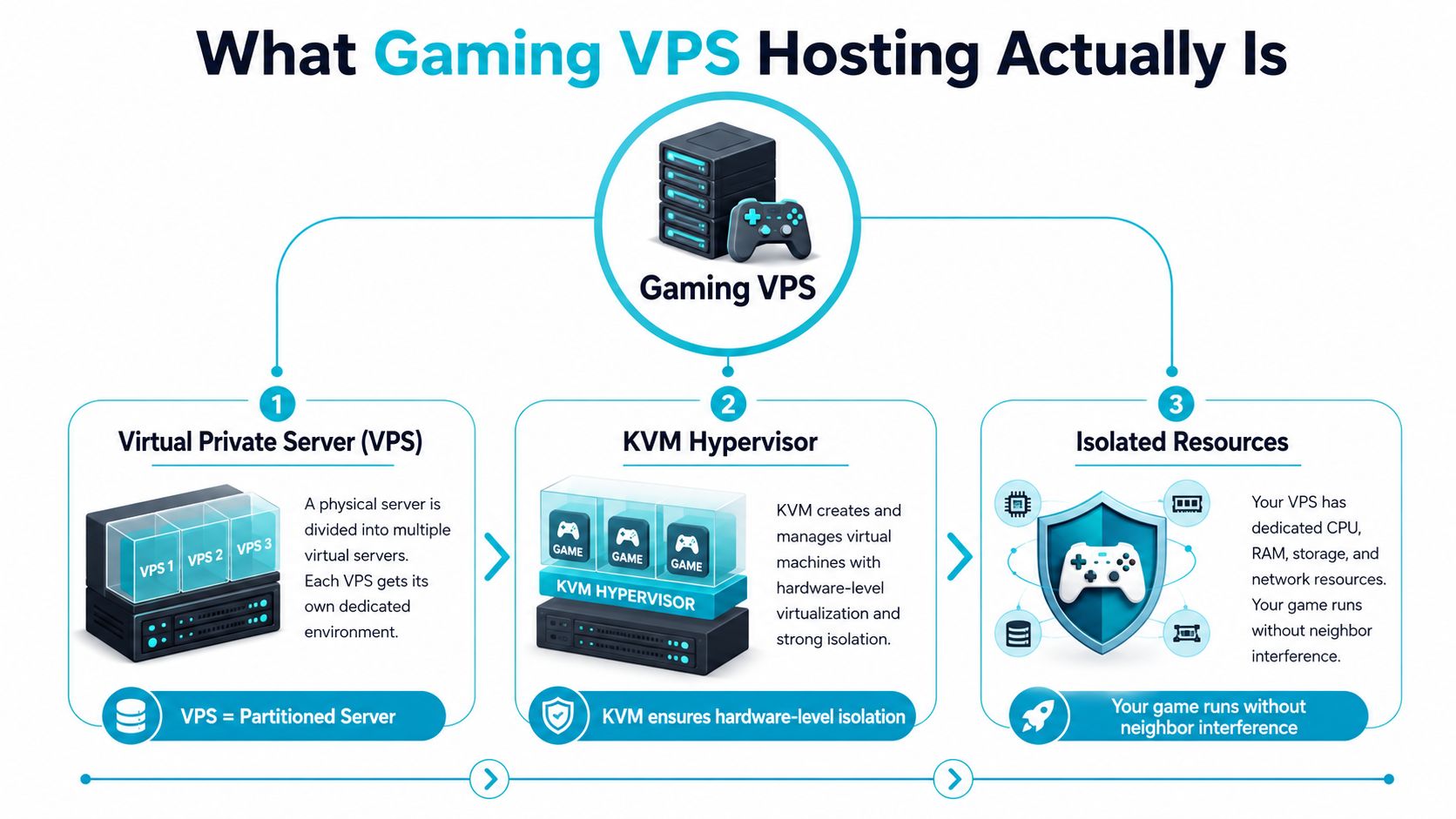
A Virtual Private Server is a partition of a physical machine that behaves like its own server. For game hosting, that matters because your game process is not competing with random neighbors for every CPU cycle and disk request. The result is fewer surprises and tighter control over how the server behaves under load.
Value is the isolation layer. KVM-style virtualization keeps one customer's workload separated from another's, so a noisy workload on the host does not spill directly into your game server. Shared hosting does not give you that separation. Bare metal gives you even more control, but it also costs more and asks more from the person running it.
Why VPS fits multiplayer workloads
You do not buy a gaming VPS because it sounds technical. You buy it because multiplayer servers care about steady performance more than headline specs. A game loop that hesitates for a fraction of a second feels worse than a machine with extra theoretical capacity.
A VPS is the right middle ground when you need:
- Root access to install the game server stack you want
- Dedicated-ish resources instead of competing with unrelated websites
- Network control so you can open only the game ports you need
- A clear growth path before you jump to bare metal
For a community admin, the difference shows up in day-to-day control. Shared hosting is like putting a game server inside a busy public web panel with whatever limitations the provider decided to impose. A VPS gives you your own runtime environment, your own firewall rules, and your own service stack. Dedicated hardware is the point where you take on the whole machine yourself.
That is also why virtualization overhead is usually not the first thing to worry about. Storage latency, CPU behavior, and network quality decide whether players feel the server as smooth or sluggish. If disk I/O stalls or the route to players is poor, a bigger box still feels bad. If those pieces are right, a well-sized VPS can handle a surprising amount of work, and a solid NVMe VPS hosting setup usually matters more than raw marketing claims.
CPU, RAM, NVMe, and Network Requirements Explained
The first thing to understand is that many game servers care more about single-core CPU strength than headline core count. The main loop in a lot of real-time games is still sensitive to one hot thread, so weak per-core performance shows up as hitching, delayed actions, and uneven tick behavior. That's why a fast 4-core VPS often beats a sloppy 8-core one.
For size planning, a practical hosting guide recommends roughly 2 to 4 strong cores, 6 to 10 GB RAM, and NVMe for 10 to 30 active players, then scaling to 8+ strong cores and 32 to 64 GB RAM for 100+ players A separate VPS selection guide says to keep 20 to 30% RAM headroom above the game's baseline, because bursts like combat, explosions, and mod overhead can push memory use up and trigger swapping or latency spikes OVHcloud.
What actually breaks first
Storage is the quiet killer. World saves, chunk loads, log writes, and backup jobs all want fast storage paths, which is why NVMe matters so much more than generic “SSD” marketing. If the disk stalls, players feel it as slow joins and stutter.
Network quality matters just as much. You want low jitter, clean routing, and a region close to your players.
Operational rule: buy for peak behavior, not average behavior. Average load lies to you.
ARPHost's NVMe VPS hosting is the kind of profile I'd look at for a small public server because the storage and CPU profile line up with game-server realities instead of generic web-hosting assumptions.
| VPS Resource Targets by Player Count | CPU Cores | RAM | Storage |
|---|---|---|---|
| 10 to 30 players | 2 to 4 strong cores | 6 to 10 GB | NVMe |
| 30 to 60 players | 4 to 6 strong cores | 12 to 20 GB | NVMe |
| 60 to 100 players | 6 to 8 strong cores | 24 to 32 GB | NVMe |
| 100+ players | 8+ strong cores | 32 to 64 GB | NVMe |
The other practical filter is geography. If your community is centered in one region, host near that group. A Tampa-based facility with strong transit is a real advantage for East Coast latency-sensitive communities because it avoids the “technically hosted, practically annoying” problem.
Matching the Right VPS Profile to Your Game
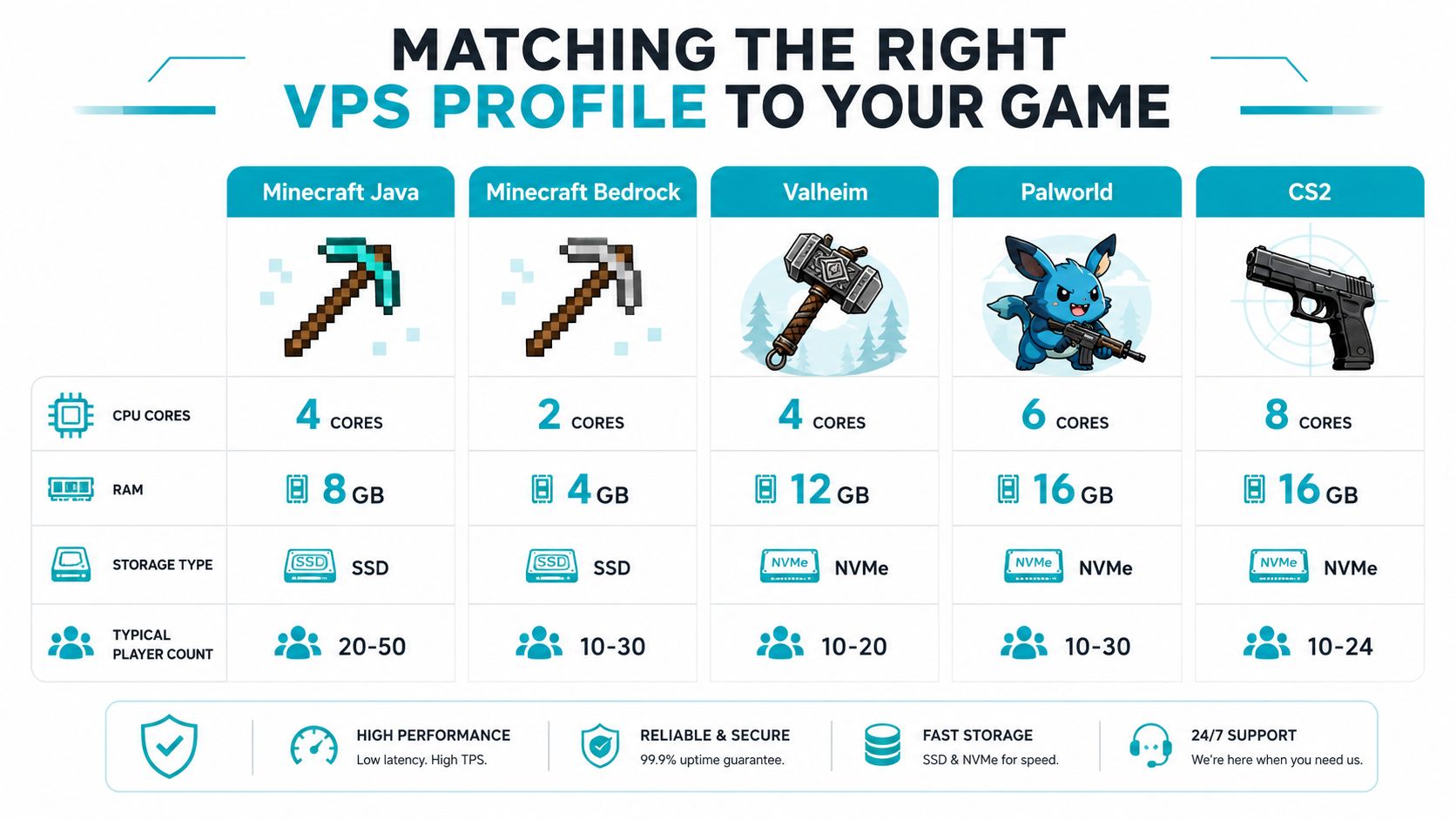
Different games punish different weak spots. A Minecraft world with a few plugins behaves nothing like a modded ARK cluster or a tick-sensitive shooter. Generic advice like “get a fast CPU and lots of RAM” is too vague to help you choose.
Start with the game, then size the machine
Minecraft Java usually runs well on a modest VPS if the world is clean and the plugin stack is disciplined. Minecraft Bedrock tends to be lighter. Valheim wants enough CPU and RAM to survive busy fights and world saves. Palworld leans harder on memory and storage responsiveness. CS2 and other Source-engine titles care a lot about low-latency CPU behavior and clean networking.
A practical hosting guide from Liquid Web is blunt about the core issue, game engines are often single-thread sensitive, and the right choice changes by title and mod load Liquid Web.
Here's the decision frame I use:
| Game Type | VPS Profile I'd Start With | Why |
|---|---|---|
| Minecraft Java | 4 strong cores, 8 GB RAM, SSD or NVMe | Plugins and world growth need headroom |
| Minecraft Bedrock | 2 to 4 strong cores, 4 GB RAM, SSD | Lighter than Java in many small setups |
| Valheim | 4 strong cores, 12 GB RAM, NVMe | World saves and combat spikes matter |
| Palworld | 6 strong cores, 16 GB RAM, NVMe | Heavier on memory and storage |
| CS2 | 8 strong cores, 16 GB RAM, NVMe | Tick sensitivity and CPU behavior matter |
Hard truth: modpacks multiply resource needs fast. If you're loading a heavy Minecraft modpack, the “minimum spec” you saw on a forum is usually a lie by the time the server is public.
The same VPS can be a great fit for one title and a bad fit for another. That's why workload fit matters more than brand slogans. A low-latency VPS that is fine for a small vanilla server can underperform badly once you add large player counts, autosave-heavy worlds, or lots of plugin churn.
Security Essentials for a Public Game Server
A public game server gets probed fast. Once it's visible on the internet, login attempts, noisy traffic, and opportunistic abuse start showing up. Security belongs in the launch plan, not in the cleanup phase.
Open only the ports the game needs
The cleanest firewall setup exposes only the ports the game needs. For common setups, that means TCP 25565 for Minecraft Java, UDP 19132 for Minecraft Bedrock, UDP 2456 and 2457 for Valheim, UDP 8211 for Palworld, and UDP 27015 for CS2 3v-host Leave admin ports closed unless you have a real reason to open them.
A VPS should also be hardened from the start:
- DDoS mitigation at the network edge
- Host-level firewall rules that expose only the game ports
- SSH key authentication instead of password login
- Automatic backups with tested restore procedures
- Intrusion detection for noise you do not want to miss
If you are comparing providers, ARPHost's DDoS-protected web hosting is a useful signal of how they approach layered protection across services.
The other mistake is treating a game VPS like a desktop. Standard VPS hardware has no GPU and uses a virtual display adapter, so it fits CPU-centric dedicated servers, not graphics-rendering workloads SSDNodes. That is fine for Minecraft, Valheim, Palworld, Source-engine titles, and similar servers. It is the wrong choice for anything that needs GPU rendering on the host.
A lightweight security baseline also includes endpoint hygiene on the admin side, and a resource like lightweight antivirus for gaming helps keep that discussion grounded. That matters most when the same machine is also used for server management, file transfers, or day-to-day browsing.
Gaming VPS vs Dedicated vs Managed Game Hosting
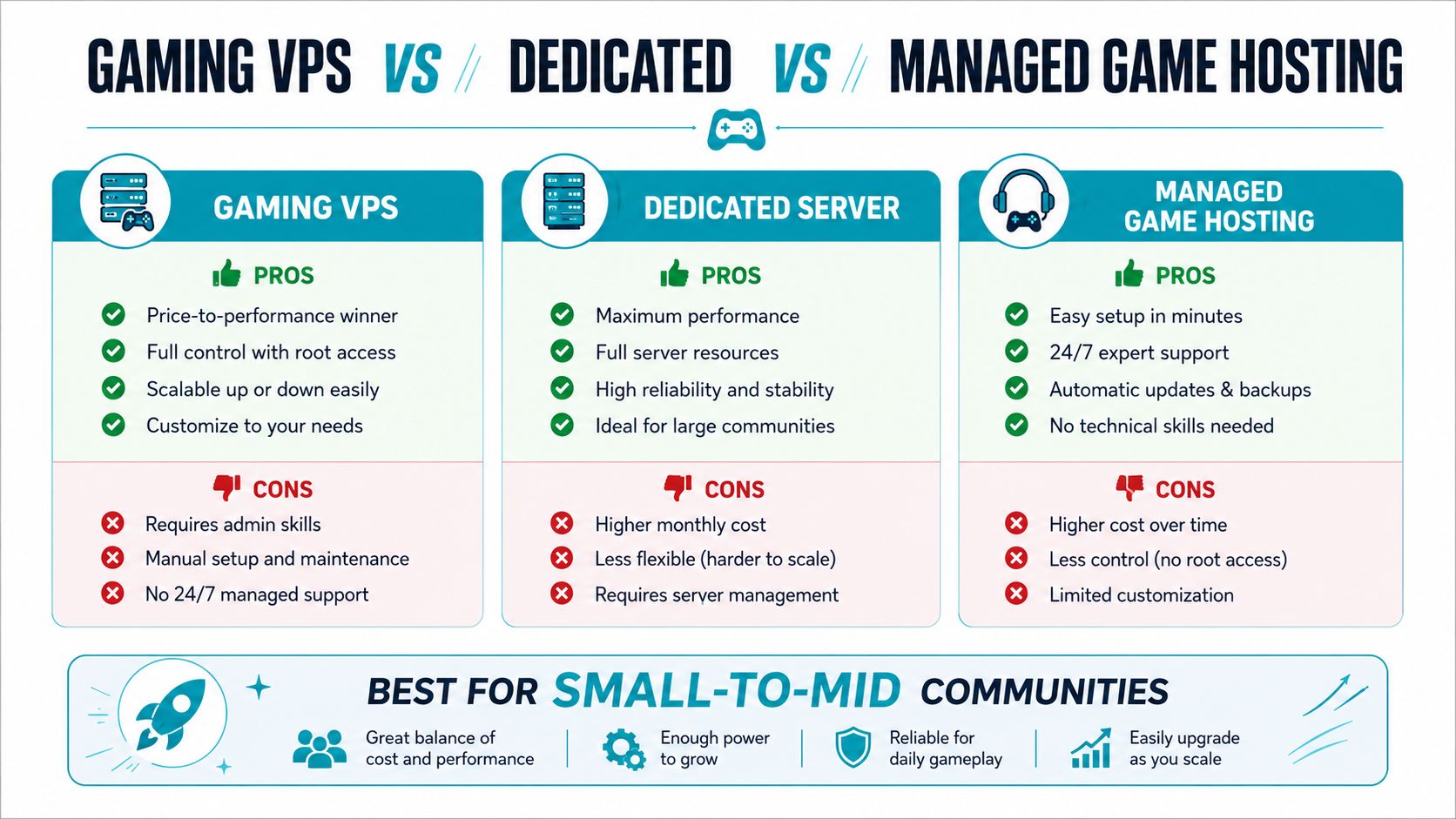
This choice gets messy because the three models solve different operational problems. A VPS gives you control and efficiency. Dedicated hardware gives you isolation and the most consistent performance. Managed game hosting gives you convenience and less admin work.
Where each option wins
A VPS is the right call when you want root access, low overhead, and a cost profile that still makes sense for small-to-mid communities. It fits admins who can install and tune the stack themselves, or who want a provider to manage only the parts they do not want to touch.
Dedicated hardware wins when the workload has outgrown the virtualization layer. Heavy modpacks, larger player counts, and servers where consistency matters more than monthly spend are the classic trigger points. If you want a cleaner picture of when that jump makes sense, see dedicated game server hosting guidance from ARPHost. Neutral industry guidance puts community dedicated server costs around $100 to $300 per month, and high-core EPYC builds at $500 to $1,500+ per month That price band is why dedicated should be a scale decision, not the default.
Managed game hosting wins when the admin does not want to spend time in Linux, or when the team values convenience over fine-grained control. It is the fastest path to a live server, but it usually trades away the flexibility that makes a VPS appealing.
Break-even rule: stay on VPS while CPU, RAM, and network behavior are still predictable. Move up when the workload, not the budget, starts forcing the decision.
The comparison is responsibility. VPS means you own more of the stack. Dedicated means you own all of it. Managed hosting means you pay to offload most of it. For a small studio or community admin, that should follow actual ops capacity, not marketing polish.
If you want to avoid the command-line work, a managed panel is fine. If you want the strongest control for the money, a VPS is the better move. If your server becomes a serious public community, dedicated hardware starts making more sense fast.
The cost comparison also needs to include the support stack. A low monthly rate means little if you still have to patch, monitor, and recover everything yourself.
Buyer Checklist and Pricing Reality Check
A cheap entry tier looks fine until the plan starts imposing limits that affect actual play. Bandwidth caps, shared CPU contention, and vague resource ceilings turn a low monthly bill into a poor operating choice. I want a provider that states the hardware and limits plainly, not one that hides behind a discount banner.
What to verify before you buy
- CPU disclosure: Check whether the provider names the CPU family and whether the plan is built for strong per-core performance.
- Storage type: Make sure it says NVMe if you plan to host a real game server.
- Backup frequency: Daily backups matter if the world file or mod stack gets corrupted.
- Support hours and channels: You want ticket, chat, or phone access when the server fails at night.
- Data center location: Put the server near the player base, not just in a “global” region.
- DDoS handling: Ask where mitigation happens and whether game traffic is protected by default.
That checklist beats any glossy “best host” page. It forces the provider to answer the questions that affect playability, not checkout flow. If a company will not say where the hardware sits or how backups work, I would walk.
What pricing really looks like
The monthly sticker price is the wrong comparison. Judge the cost per sustained player slot at your actual concurrency, with backups, protection, and support included. That is the only way to compare plans, because some providers advertise low starting rates and then bury cost in traffic limits, resource ceilings, or paid add-ons.
The same lesson applies here. A cheap VPS that runs out of headroom is not cheap.
If your community keeps growing, stop treating VPS as a permanent answer. ARPHost's available bare metal inventory gives you sane step-up options for game servers and private clouds, including a Dual Intel Xeon E5-2690 V3 box for cluster-style workloads, an AMD EPYC 4584PX for memory-heavy virtualization, and an AMD Ryzen 9600X for high-clock single-tenant use. Those are the machines to consider when the VPS is no longer the right tool.
How ARPHost Fits a Gaming VPS Workflow
ARPHost's Tampa-based NVMe VPS plans line up with the needs of game servers, with 99.99% uptime SLA, multi-layer DDoS mitigation, daily backups with one-click restore, and 24/7 U.S.-based support. That makes it a practical fit for a community admin who wants a real server path without jumping straight to dedicated hardware. When the player count grows, ARPHost's secure bundles, managed services, and bare metal options give you a clean upgrade path.
Start with VPS hosting, compare secure web hosting bundles, review managed services, and check the bare metal servers when the workload gets bigger.
ARPHost, LLC gives you the infrastructure stack that matters for game hosting, from Tampa NVMe VPS to bare metal and managed support when your community outgrows the first server. If you want a practical path for a Minecraft world, a Valheim server, or a heavier public community, visit ARPHost, LLC and match the plan to the workload instead of guessing from a generic spec sheet.
