

A lot of IT managers hit the same wall during a phone system refresh. The new VoIP platform is ready, users are moving to softphones or IP handsets, and then the exceptions show up. The fax machine in accounting still matters. The warehouse paging adapter is analog. The front gate intercom was never designed for SIP. Someone also wants a fallback line if the WAN has a bad day.
That's where the FXO vs FXS question stops being academic and becomes operational. If you choose the wrong gateway type, calls won't complete, devices won't ring, and your migration turns into a patchwork of half-working analog ports.
The practical answer is simple once you see the roles clearly. FXS feeds analog devices. FXO consumes an analog line. The hard part isn't memorizing that. The hard part is applying it correctly when you're bridging legacy copper-era endpoints into an IP network that now depends on switches, virtualization, SIP registration, and power continuity.
Bridging Analog and Digital Telephony
A common migration looks clean on the diagram and messy in the rack. You replace an old key system or PBX with a virtual PBX, move desk users to IP phones, and keep a handful of analog services because replacing them would be disruptive or unnecessary. That's usually where confusion starts.
If you're evaluating phone system architecture at the same time, it helps to review how a PBX system fits into a modern business network. Once you understand where call control lives, analog integration becomes much easier to design.
Where teams usually get stuck
Most businesses don't need analog for everything anymore. They need it for the parts that are awkward to replace:
- Fax machines that still tie into vendor or legal workflows
- Door phones and entry systems that expose only analog interfaces
- Paging adapters in warehouses, schools, or manufacturing spaces
- Emergency fallback paths when leadership wants something outside the main SIP path
The mistake is treating these devices as if they're all the same. They aren't. Some are endpoints that need a line presented to them. Others are external lines that need to be brought into the PBX.
The fastest way to break an analog deployment is to think in product names instead of signal roles.
Why this still matters
FXO and FXS remain relevant because many hybrid environments still depend on analog edges. Even when the core PBX is virtualized, the last mile for a fax machine or gate phone may still be copper inside the building. That means your VoIP rollout has to handle both packet signaling and analog line behavior without guessing.
The Fundamental Difference FXS vs FXO
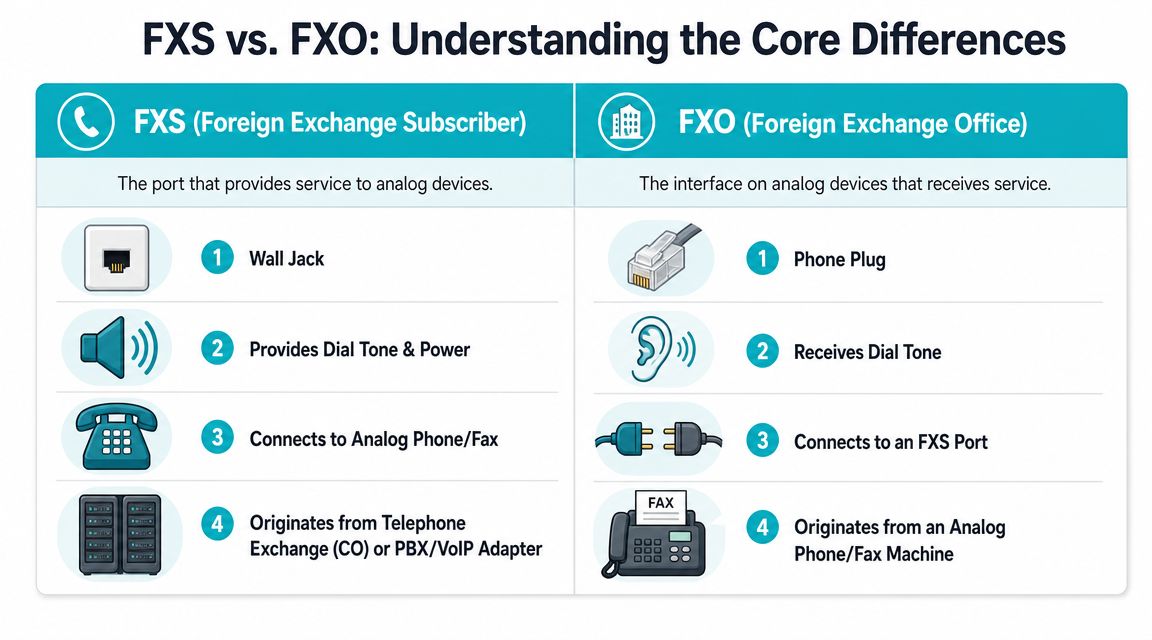
The cleanest mental model is this: FXS is the wall jack. FXO is the phone plug. One side provides service. The other side expects to receive it.
Here's the quick comparison teams often need before they ever log into a gateway.
| Interface | Practical role | Connects to | What it does |
|---|---|---|---|
| FXS | Line provider | Analog phone, fax, modem, paging adapter | Delivers dial tone, battery current, and ring voltage |
| FXO | Line consumer | PSTN line or telco-style analog service | Receives line conditions and presents off-hook/on-hook behavior |
What FXS actually does
FXS is the service side., an FXS port supplies the line, delivering dial tone, battery current, and ringing voltage to devices such as phones, fax machines, and modems. Patton also states that FXS line power is approximately 50 volts DC, which matters when you're troubleshooting why a passive analog device isn't behaving like it did on a traditional telco circuit.
In practical deployments, an FXS port lives on:
- An ATA
- An analog gateway
- A PBX card that presents station ports
- A voice appliance that emulates a standard analog line
If you plug an analog fax machine into an FXS port, the fax sees what it expects. It gets line presence, can go off-hook, hears dial tone, and can attempt a call.
What FXO actually does
FXO is the device-side interface. It receives the line rather than creating it. That's why it's used to connect into a telco analog line or another service-providing port.
An FXO port behaves like a phone from the line's perspective. It waits for the line conditions to exist, then signals state changes such as going off-hook to seize the line for a call.
Here's the video version if you want a fast visual walkthrough before wiring hardware:
The pairing rule that never changes
The most important rule in the FXO vs FXS discussion is simple. They work as a pair. The circuit only works correctly when an FXO side connects to an FXS side. If you connect FXS to FXS, both are trying to provide the line. If you connect FXO to FXO, neither side is providing it.
Practical rule: When you aren't sure which port you need, ask one question. “Is this device expecting dial tone, or is it supplying dial tone?”
That single question prevents most buying mistakes.
Key Electrical and Signaling Differences
The names make more sense when you remember where they came from. The terminology reflects the old telephone network split between the subscriber end and the central office end, which is why FXS is often described as the wall jack and FXO as the phone-side plug. Algo Solutions' overview of FXS vs FXO also notes that the ports are always used in pairs, that the FXO side sends on-hook and off-hook signaling, and that the FXS side provides the line conditions needed for ringing and call setup.
On-hook and off-hook behavior
The electrical logic matters because analog ports aren't just audio paths. They carry state.
When an analog phone is idle, it's on-hook. When a user lifts the handset or a fax seizes the line, it goes off-hook. The FXO side changes loop state to indicate that event. The FXS side detects it and responds as the line provider.
That's why these failures often look strange at first:
- No ring on inbound calls can mean the FXS side isn't generating expected line conditions
- Line always busy can mean the loop state is being interpreted incorrectly
- Calls that won't release can mean disconnect supervision isn't being handled as expected
Why analog problems don't feel like IP problems
With SIP, admins usually think in terms of registration, routing, codecs, and NAT. Analog adds another layer. You're now dealing with electrical state, ring cadence, battery, and supervision behavior that the gateway has to emulate correctly.
That creates two practical realities:
- A cabling issue can look like a software issue.
- A signaling mismatch can look like bad hardware.
Ground start and loop start
Many business environments still encounter loop start and sometimes ground start behavior on analog trunks or legacy PBX ports. If those expectations don't line up, you can get line seizure problems or call collisions, often called glare in telephony work.
You don't need to memorize every signaling variant to operate safely. You do need to confirm that the gateway profile matches the service you're connecting to, especially if you're interfacing with an older PBX card, a building entry controller, or a carrier line that was installed long before your IP migration.
If the analog side behaves unpredictably, don't start with codecs. Start with port role, electrical state, and signaling assumptions.
A simple field check
When a port isn't behaving, run this sequence:
- Verify role first: Confirm the endpoint is connected to the right port type
- Check hook state: See whether the line appears idle or seized from both ends
- Review regional and line settings: Ring patterns and disconnect behavior can matter
- Test with a known-good analog device: A cheap analog handset can save a long troubleshooting session
Real World Use Cases and Wiring Scenarios
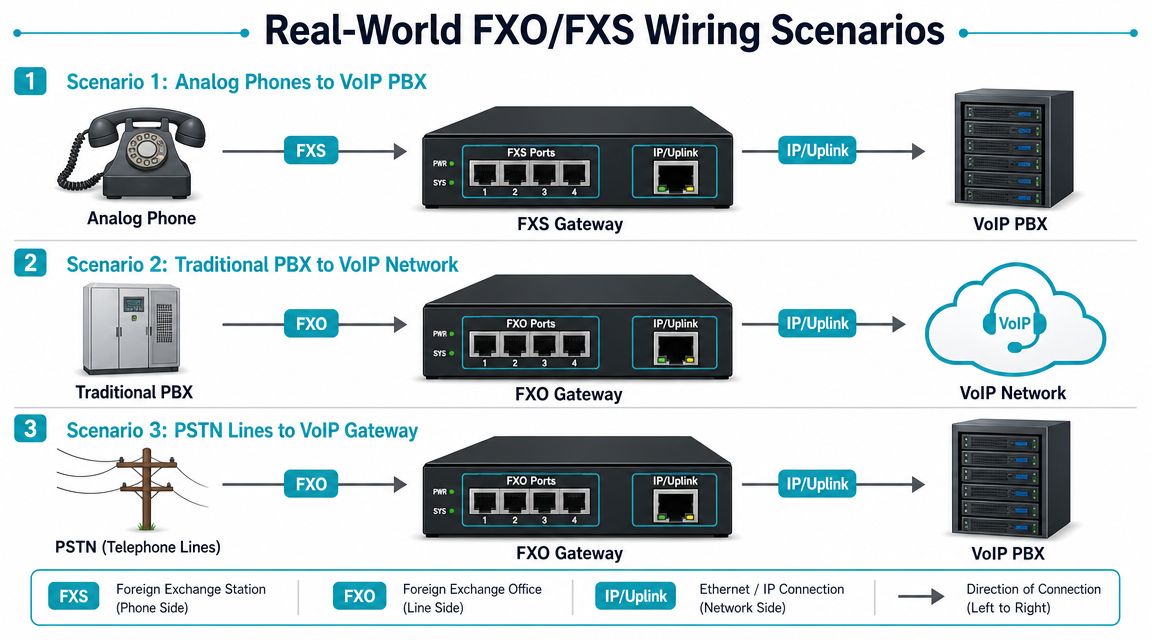
Most production deployments fall into a small number of patterns. Once you match the business need to the wiring model, hardware selection gets easier.
Bringing PSTN lines into an IP PBX
This is the classic FXO gateway use case. You have one or more analog telco lines and want your IP PBX to use them for inbound and outbound calling.
The signal path looks like this:
- Analog telco line lands on the FXO port
- Gateway converts analog call control and audio into SIP
- PBX receives the call as a trunk
- PBX routes the call to IP phones, ring groups, queues, or IVRs
This model still shows up in small offices, temporary sites, and migration phases where SIP trunks haven't fully replaced legacy lines.
Connecting analog devices to a VoIP PBX
This is the FXS gateway or ATA scenario. The PBX is IP-based, but a local device still needs what looks like a normal analog line.
Typical examples include:
- Fax machine in finance
- Analog lobby phone
- Warehouse paging adapter
- Gate or door intercom
- Legacy modem-type device that hasn't been retired yet
The path flips direction compared with FXO:
- Analog device plugs into an FXS port
- Gateway presents line conditions to that device
- Gateway registers to the PBX over SIP
- PBX treats the port like an extension or service endpoint
Hybrid environments that use both
Some sites need both external analog lines and internal analog endpoints. In that case, a mixed-port gateway or separate FXO and FXS appliances can make sense. The design choice usually comes down to change control and fault isolation.
A separate device for each role is often easier to troubleshoot. A hybrid chassis can reduce rack clutter and simplify power and management.
A basic decision matrix
| Requirement | Port type you need |
|---|---|
| Connect a fax machine to VoIP | FXS |
| Connect a door phone to VoIP | FXS |
| Bring a telco analog line into the PBX | FXO |
| Keep an outside analog fallback path | FXO |
| Attach a paging adapter that expects a line | FXS |
Wiring and provisioning checks that save time
Before you rack anything, verify these points:
- Port count: Count true analog needs, not assumptions carried over from the old PBX
- Cable destination: Label whether each run lands on a device or on a carrier-style line
- Call path ownership: Decide whether routing lives mostly in the gateway or the PBX
- Provisioning method: If you're pushing phone-related settings through the network, DHCP Option 66 basics can help standardize provisioning for adjacent voice devices
The cleanest hybrid phone systems are boring on purpose. Clear labels, fixed port roles, and documented call paths prevent almost every late-night surprise.
Why infrastructure matters more than the gateway brochure
A lot of gateway comparisons focus on port count and codec checkboxes. In practice, stable analog integration depends just as much on the platform hosting the PBX, SBC, monitoring stack, and backups. If the virtual PBX is undersized, storage is noisy, or networking is sloppy, analog edges suffer first because they don't tolerate timing and state drift well.
That's why many teams place the PBX and supporting voice services on infrastructure built for consistent performance, such as a managed VPS, bare metal host, or a Proxmox cluster with clear resource controls.
VoIP Gateway Configuration and SIP Integration
Once the wiring is correct, the gateway still has to behave like a good SIP citizen. Many projects stall at this point. The analog port works electrically, but the PBX doesn't know what to do with it yet.
FXO ports as trunks and FXS ports as extensions
The most common pattern is straightforward:
- FXO ports register or present as SIP trunks
- FXS ports register or present as SIP endpoints or extensions
On an FXO gateway, each analog line usually maps to a trunk object, a port group, or both. You then define inbound call routing and outbound dial rules on the PBX side.
On an FXS gateway, each analog port often maps to a user, extension, or service object. That means the fax machine or door phone isn't “just analog” anymore. Operationally, it becomes another endpoint in your SIP plan.
Configuration items that matter
In most gateway interfaces, the checklist looks like this:
- Set the SIP server details so the gateway can register to the PBX or send calls to it.
- Map each physical port to the intended trunk or extension object.
- Build dial plans so the right calls leave on the right path.
- Choose codecs intentionally. For fax and analog reliability, many teams prefer G.711 paths where possible.
- Enable fax handling features such as T.38 if your PBX and gateway support it in the path.
- Tune disconnect and supervision settings if call release behavior is inconsistent.
For teams replacing outside lines with IP service, a SIP trunking and VoIP deployment model usually becomes the long-term architecture, with analog retained only where there's a concrete operational reason.
The risk most comparisons skip
The bigger issue in 2026 isn't understanding the label on the port. It's operational risk. The video discussion on analog gateway risk highlights failure modes that basic comparison articles often ignore, including power loss, SIP registration loss, codec mismatch, line reversal, and changing emergency-calling behavior when the “line” is no longer a native telco circuit.
That changes how you should design critical analog services such as:
- Elevator lines
- Alarm panels
- Emergency phones
- Fax paths tied to regulated workflows
What works in production
For critical analog retention, treat the gateway as infrastructure, not as an accessory.
That means:
- Power planning: Put gateways, switches, and PBX hosts on protected power
- Registration monitoring: Alert on failed SIP registration before users report outages
- Test procedures: Schedule outbound and inbound test calls for critical ports
- Fallback design: Document what still works if the PBX, WAN, or SIP service drops
One practical option for teams that want voice administration folded into broader infrastructure operations is to place the PBX and related services on managed infrastructure and have the environment monitored as part of the same stack. ARPHost, LLC offers managed services, SIP-related hosting, and infrastructure that can support that kind of integrated voice deployment.
Troubleshooting and Strategic Buying Guidance
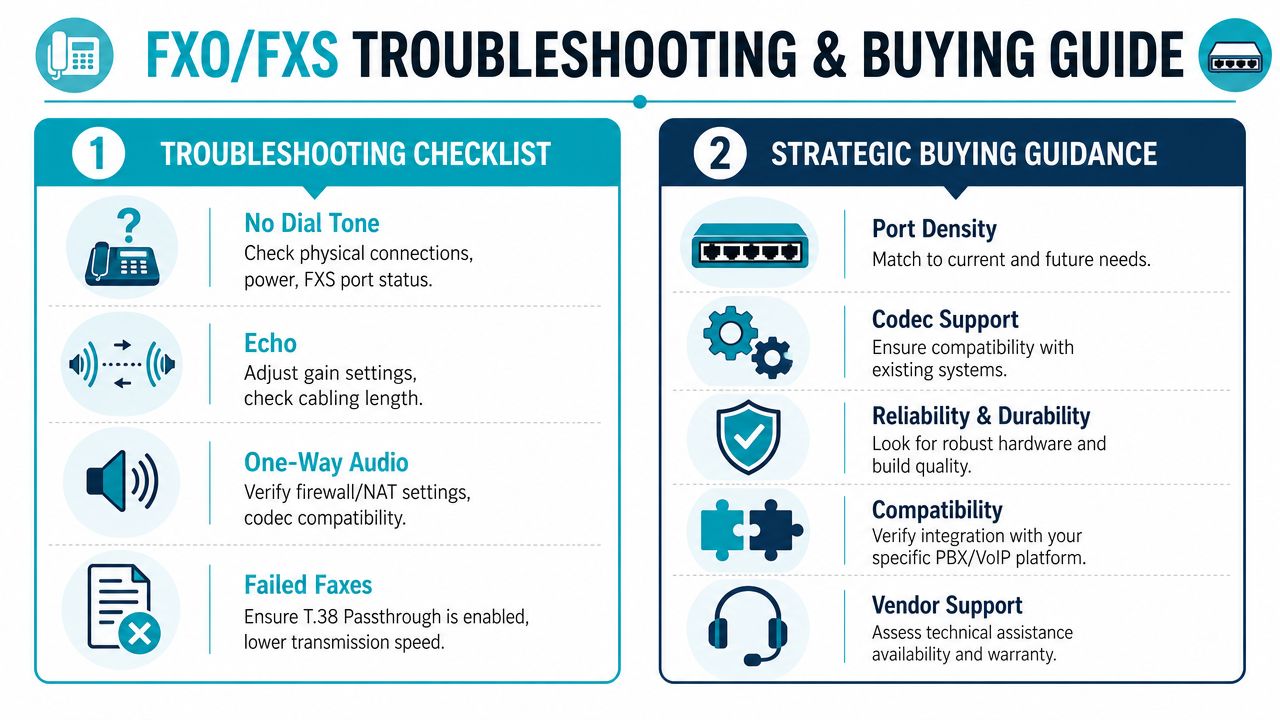
Most analog issues can be isolated quickly if you stop guessing and separate the problem into three layers: physical port role, gateway behavior, and PBX call routing.
A field checklist for common faults
Use this when the symptom is vague and users just report that “the analog line is broken.”
- No dial tone: Confirm the device is plugged into an FXS port, not an FXO port. Then check gateway power, port state, and whether the analog device itself works on a known-good line.
- Inbound calls don't ring: Verify the FXO line is detecting ring and that the PBX has an inbound route for that trunk.
- One-way audio: Check the SIP side before blaming the analog side. NAT, firewall handling, and codec negotiation often cause this symptom.
- Echo or poor audio: Review gain settings, analog cabling quality, and the line source. Analog trunks can need more tuning than SIP-only paths.
- Fax failures: Keep the path simple, prefer stable codec handling, and test with the exact destination workflow that matters to the business.
Buy one known-good analog test handset and keep it in the voice toolkit. It's still one of the fastest ways to separate device faults from gateway faults.
What to look for in a gateway
Don't buy on port density alone. Look for a device that matches your operations, not just your current wiring count.
A practical shortlist:
- Port layout that matches the actual migration plan
- Clear management interface and useful logging
- Support for fax-friendly configurations
- Reasonable failover behavior and supervision settings
- Compatibility with your PBX platform and support model
If the environment will stay hybrid for a while, hardware quality matters. If the environment is transitional, management quality matters more.
The buying mistake that causes the most pain
Teams often over-focus on the analog gateway and under-focus on the host platform. If your PBX is virtualized on overloaded infrastructure, has weak storage performance, or competes with noisy workloads, voice problems become harder to diagnose because analog symptoms and IP symptoms blend together.
For denser voice environments, hosting PBX workloads on dedicated hardware can simplify capacity planning. A server like the AMD EPYC 4584PX with 16 cores, 192GB DDR5 RAM, and NVMe storage is a sensible fit for high-density virtualization and multiple PBX-adjacent services when you're building a private voice stack. If you need dedicated hardware options, review bare metal server configurations that support PBX, monitoring, logging, and backup services on the same controlled platform.
Think beyond the phone closet
Phone systems don't live alone. Staffing, call handling, and business continuity all touch the same environment.
The short version of FXO vs FXS is easy. FXS connects your analog endpoints. FXO connects your analog lines. The longer version is what matters in production. Analog still works well when the port role is correct, the gateway is configured carefully, and the surrounding infrastructure is treated like a business-critical service.
If you're planning a hybrid phone deployment, migrating a PBX, or need help hosting the systems around it, ARPHost, LLC provides infrastructure and managed IT options that can support virtual PBX workloads, SIP services, dedicated servers, and broader business continuity planning.
