

A lot of teams touch firewall rules only when something is already broken. A new app won't connect. A VPN user can't reach the file server. A public service needs to go live before the end of the day. Someone adds a quick allow rule, traffic starts flowing, and the change gets left in place because nobody wants to risk another outage.
That's how bad firewall configuration happens in real environments. Not because admins don't understand ports and protocols, but because operations are messy. Rules accumulate. Exceptions lose owners. Temporary fixes become permanent policy. Then one day the firewall is still “working,” but nobody can prove what it's enforcing.
A sound firewall configuration process has to cover the full lifecycle. Design. Implementation. Validation. Logging. Rollback. Governance. If you skip any one of those, the rulebase becomes technical debt with packet filtering attached.
The Foundation of a Secure Network
The most expensive firewall mistakes rarely look dramatic at first. They look ordinary. An allow-any rule added during troubleshooting. A management port opened for a vendor and never closed. A jump host that can suddenly reach systems it was never meant to touch.
That's why firewall configuration is a business process, not just a network task. The rulebase controls uptime, segmentation, remote access, exposure to the internet, and how quickly an attacker can move if they get in. Teams that treat it like a one-time setup usually end up maintaining exceptions instead of policy.
Why small oversights become major incidents
A firewall doesn't fail only when it's offline. It also fails when it permits the wrong path or blocks the right one. Both are operational failures. In hosted environments, that can mean exposing an admin interface on a VPS, flattening segmentation between application and database tiers on a bare metal deployment, or allowing unrestricted lateral movement inside a private cloud.
The pattern is predictable:
- A change is made under pressure
- The change isn't tied to a documented requirement
- Nobody validates the final traffic path
- The exception stays longer than intended
Practical rule: If a rule doesn't have an owner, a purpose, and a review date, it shouldn't be in production.
Security programs that hold up under pressure usually build their process around layered controls.
The same principles apply at every scale
The environment changes, but the logic doesn't. A single public web server still needs strict ingress control and tightly scoped administrative access. A larger stack with multiple networks needs the same discipline applied to every trust boundary. The difference is that complexity multiplies the cost of vague rules.
That's why a layered approach matters. If you're running hosted workloads, security in layers is the right mental model. The firewall is one control inside that stack, not a substitute for hardening, logging, backup security, identity controls, and disciplined operations.
A good firewall rule isn't just syntactically correct. It reflects an intentional path that the business needs, and nothing more.
Designing Your Firewall Policy and Network Zones
Most bad rulebases start with the same mistake. Admins begin by writing rules before they've defined what traffic should exist. The result is a firewall built from exceptions instead of design.
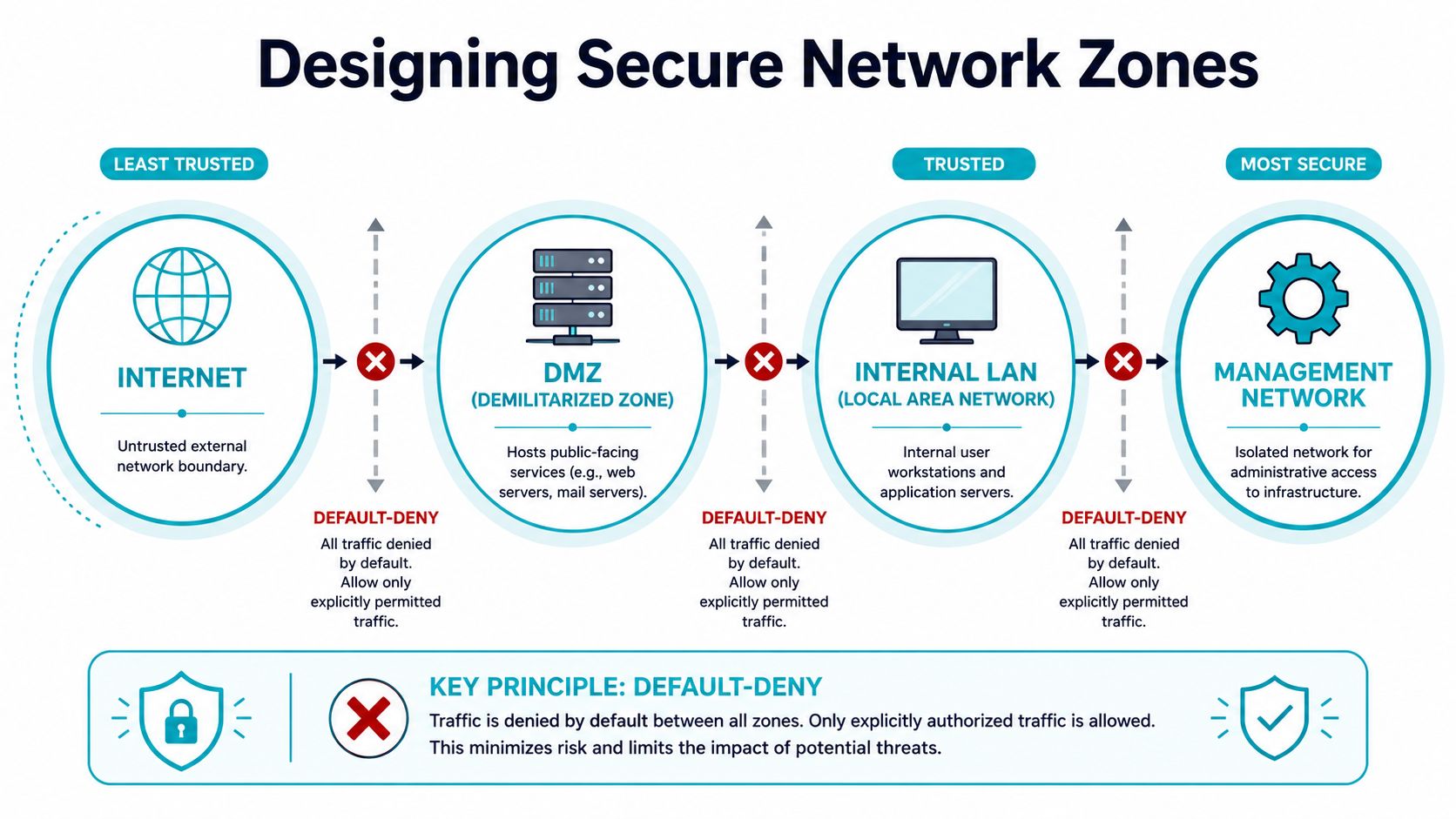
The clean way to start is simple. Define the required communication paths first, map each allow rule to a documented business requirement, apply a default-deny baseline, then test by attempting disallowed connections and checking that they fail. Finally, validate logs to confirm only expected traffic is passing and that detections are tied to the correct rule and identity, as outlined in Palo Alto Networks' firewall best practices.
Start with traffic intent
Before opening a console, answer these questions:
- What service is being published: Public web, mail, VPN, API, remote desktop, admin portal.
- Who needs access: Internet users, staff, vendors, automation systems, monitoring nodes.
- From where: Public network, office VPN, management subnet, application tier.
- Over what protocol: Be exact. Don't hide uncertainty inside broad service groups.
- For how long: Permanent business path or time-bound maintenance exception.
This forces every rule to justify its existence. If the request comes in as “open whatever the app needs,” push it back. That wording usually means the app team hasn't mapped dependencies.
Zone first, rule second
A firewall works better when the network has clear trust boundaries. That usually means separating at least these logical areas:
| Zone | Purpose | Typical treatment |
|---|---|---|
| Internet edge | Untrusted external traffic | Deny by default, allow only published services |
| DMZ | Public-facing systems | Strict inbound publishing, limited east-west access |
| Internal application tier | Business services | Allow only required app flows |
| Data tier | Databases and storage | No direct internet access, narrow app-to-data rules |
| Management network | Administrative access | Isolated, tightly restricted, logged heavily |
This applies whether you're segmenting services on one server or building virtual networks across a Proxmox cluster. On a single host, zoning might mean separating management access from public services with host firewall rules. In a private cloud, it usually means distinct VLANs, bridge mappings, virtual routers, and different policies for tenant, management, and storage traffic.
A firewall rule should describe a business path between zones, not a vague permission between endpoints.
Default-deny is what keeps the policy honest
Least privilege gets repeated so often that people stop treating it as a design constraint. It matters because broad rules don't stay broad in isolation. They interact with NAT, route changes, new workloads, and future exceptions. A permissive rule that looks harmless today often becomes dangerous after the next deployment.
If you want policy logic that scales, define each zone boundary with an implicit deny posture and then add only the flows you can defend. Teams using policy-as-code often borrow ideas from admission control and policy engines for this reason.
What a usable rule standard looks like
A practical rule template should capture:
- Source zone and destination zone
- Service or protocol
- Business owner
- Purpose
- Change ticket or approval reference
- Expected logging behavior
- Review date
That sounds administrative, but it saves time later. When a stale rule causes trouble, the worst possible situation is finding a line in the firewall with no rationale and no owner.
Hands-On Firewall Configuration Examples
The fastest way to ruin a server is to copy firewall commands without understanding the policy they implement. The examples below all use the same scenario: publish a web server, allow secure administration only from a trusted management origin, and deny everything else by default.
If you're securing Linux hosts in hosted environments, ARPHost maintains a useful resource on firewalls for Linux that fits well alongside these examples.
UFW on Ubuntu
UFW is a good fit for straightforward host-based firewall configuration. It's readable, fast to audit, and usually enough for a VPS that runs a small number of services.
A clean starting point looks like this:
sudo ufw default deny incoming
sudo ufw default allow outgoing
sudo ufw allow 80/tcp
sudo ufw allow 443/tcp
sudo ufw allow from <management-network> to any port 22 proto tcp
sudo ufw enable
sudo ufw status verbose
Use that pattern when the host is public-facing and SSH should never be open broadly. If you need mail services, monitoring agents, or application-specific ports, add them deliberately. Don't replace precision with convenience.
A few operational notes matter:
- Put admin access on a narrow source scope instead of opening SSH to the world.
- Name your rules in change records even if the tool itself doesn't store rich metadata.
- Check IPv6 behavior before assuming the host is fully covered.
Firewalld on RHEL and compatible systems
Firewalld is zone-oriented, which makes it a better fit when you want to express trust levels directly. The mistake people make is dumping everything into public and calling it done.
A basic public web server pattern:
sudo firewall-cmd --permanent --set-default-zone=public
sudo firewall-cmd --permanent --zone=public --add-service=http
sudo firewall-cmd --permanent --zone=public --add-service=https
sudo firewall-cmd --permanent --zone=trusted --add-source=<management-network>
sudo firewall-cmd --permanent --zone=trusted --add-service=ssh
sudo firewall-cmd --reload
sudo firewall-cmd --get-active-zones
sudo firewall-cmd --list-all --zone=public
sudo firewall-cmd --list-all --zone=trusted
That layout is cleaner than adding SSH directly to the public zone. It separates public service exposure from administrative access and makes later audits easier.
If your zone model doesn't reflect trust boundaries, the firewall will drift toward one giant public zone with extra steps.
nftables for modern Linux rule management
For admins who want explicit chain logic and a modern framework, nftables is the right tool. It's especially useful when you need deterministic control and want the live policy to be understandable in one file.
Example policy:
sudo nft add table inet filter
sudo nft 'add chain inet filter input { type filter hook input priority 0; policy drop; }'
sudo nft 'add chain inet filter forward { type filter hook forward priority 0; policy drop; }'
sudo nft 'add chain inet filter output { type filter hook output priority 0; policy accept; }'

sudo nft add rule inet filter input iif lo accept
sudo nft add rule inet filter input ct state established,related accept
sudo nft add rule inet filter input tcp dport 80 accept
sudo nft add rule inet filter input tcp dport 443 accept
sudo nft add rule inet filter input ip saddr <management-network> tcp dport 22 accept
sudo nft add rule inet filter input counter log prefix "DROP_INPUT " drop
sudo nft list ruleset
What this gets right:
- Default drop on input
- Explicit allowance for established traffic
- Restricted SSH
- Logging on denied traffic
What it doesn't do is solve bad policy design. nftables is powerful, but it also makes it easy to express complicated mistakes very clearly.
Windows Server with netsh advfirewall
Windows teams often leave host firewalls underused because they assume the perimeter firewall already covers the server. That's backwards. Host firewalls are where you can enforce role-specific access close to the workload.
Example:
netsh advfirewall set allprofiles state on
netsh advfirewall firewall add rule name="Allow HTTP" dir=in action=allow protocol=TCP localport=80
netsh advfirewall firewall add rule name="Allow HTTPS" dir=in action=allow protocol=TCP localport=443
netsh advfirewall firewall add rule name="Allow RDP from Management" dir=in action=allow protocol=TCP localport=3389 remoteip=<management-network>
netsh advfirewall firewall set rule group="Remote Desktop" new enable=yes
After adding rules, inspect them:
netsh advfirewall firewall show rule name=all
The same policy principles apply. Publish only what the server role requires. Narrow administrative access. Keep the host aligned with upstream segmentation rather than assuming one layer is enough.
One policy, different tools
The point of these examples isn't tool preference. It's consistency.
- Web traffic is allowed because the service is intended to be public
- Administrative traffic is restricted because management paths are higher risk
- Everything else is denied unless there is a documented reason
That's the part many teams skip. They learn commands, but they never standardize the decision logic behind them.
Testing Validation and Rollback Strategies
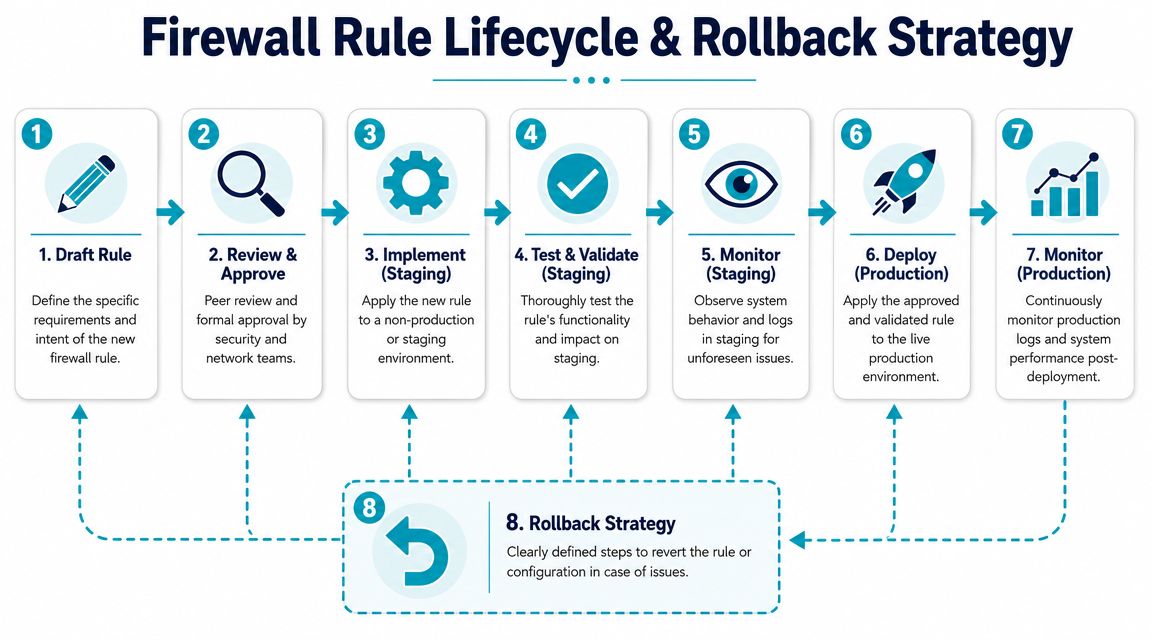
A firewall rule isn't finished when it loads successfully. It's finished when you've verified the intended path works, confirmed the unintended path fails, and documented how to undo the change without improvising.
That sounds obvious, but much operational damage often originates here. Teams focus on authoring rules and rush through validation. Then they discover the policy only after users complain or monitoring fires.
Test the deny path, not just the allow path
Admins often verify only the service they meant to enable. That's incomplete. Good firewall validation checks both sides.
Use a simple checklist:
- Confirm the intended service works from the expected source.
- Attempt the same access from an unauthorized source and confirm failure.
- Review firewall logs to make sure the correct rule matched.
- Check adjacent services that might be affected by rule order or NAT behavior.
- Verify management access remains intact before ending the change window.
Practical testing tools vary by platform, but the pattern is the same. Use connection tests, service clients, and controlled port probes. The key is proving enforcement, not just connectivity.
The firewall is enforcing policy only when you can explain why traffic passed or failed.
Rollback needs to be designed before deployment
Rollback is not “remove the rule if something breaks.” That's a guess, not a plan. A real rollback strategy identifies what state you are returning to and how you'll restore it under pressure.
Useful rollback methods include:
- Saved rule exports: Keep the last known-good firewall configuration in version control or secure change storage.
- Config snapshots: Take system snapshots before high-risk changes on virtual infrastructure.
- Staging parity: Test rule changes against a staging environment that matches production behavior closely enough to catch surprises.
- Timed review windows: Schedule changes when the right operators are available to validate and revert if needed.
This gets more important in fast-moving environments. STIG guidance says firewall policy updates must be applied immediately, which highlights a risk many teams underplay. Stale rules and delayed propagation create exposure during cloud, container, and branch-network changes, as noted in the Firewall Security Requirements Guide.
Validation is part of governance
The hidden operational problem isn't only writing bad rules. It's letting good rules age into bad ones as systems move around them. New subnets appear. Services migrate. Reverse proxies get added. VPN patterns change. The old allow rule still works, but the original reason for it may be gone.
That's why validation has to be cyclical:
| Phase | Question |
|---|---|
| Before change | What business path is required? |
| During change | Did the firewall load the intended logic? |
| After change | Did expected traffic pass and unexpected traffic fail? |
| Later review | Does the rule still need to exist? |
Managed operations help here because they make validation repeatable. On hosted infrastructure, snapshots, configuration exports, monitoring, and structured change windows reduce the chance that a firewall update turns into an outage.
Common Firewall Pitfalls and How to Avoid Them
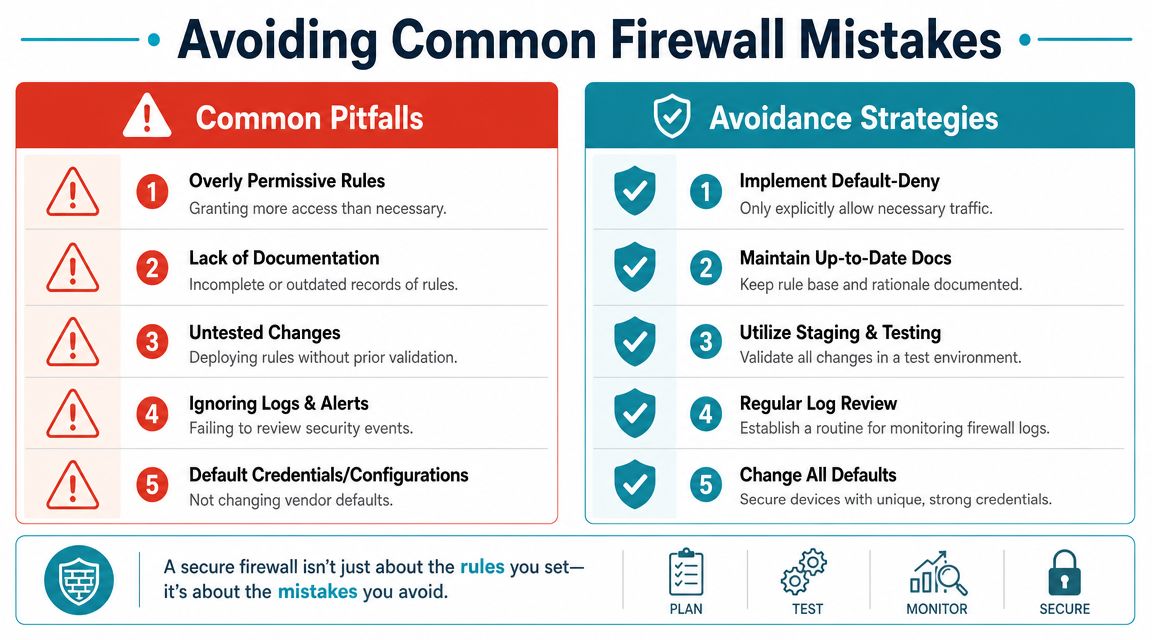
Audits consistently show that firewall failures usually come from ordinary operational mistakes: a rule added in a hurry, a translation path nobody re-tested, or an admin interface exposed wider than intended. In production, the failure pattern is rarely exotic. It is usually drift.
The hard part is not writing one correct rule. The hard part is keeping the policy correct after months of exceptions, application changes, subnet moves, and staff handoffs. Teams that manage this well treat firewall rules as living controls with an owner, a purpose, a review date, and a removal path.
The mistakes that keep showing up
These are the failure modes I see most often during rule reviews and outage analysis:
Rule order that defeats intent
Firewalls evaluate in sequence. A narrow deny placed below a broad allow does nothing. Write the policy so the device reaches the right decision early, and document why that order matters.Temporary troubleshooting rules that become permanent
Emergency access should expire by default. If a rule was added to get an application back online, attach a ticket, an owner, and an expiration date before it reaches production.NAT changes reviewed separately from security policy
Translation changes can create new reachable paths even when the filter table looks clean. Review NAT and access control together or you will miss exposure that only appears after address translation.IPv6 left outside the policy
Dual-stack environments need dual-stack controls. If the host, load balancer, or upstream provider is speaking IPv6, the firewall policy has to enforce the same intent on both protocols.Management access opened for convenience
SSH, HTTPS, API endpoints, and VPN admin portals should sit behind tightly scoped source controls, MFA where supported, and logging you review. Broad management access is a shortcut to compromise.
A short technical explainer can help reinforce those operational basics:
Backups are part of the attack surface
Firewall backups deserve the same care as privileged credentials.
Configuration files often expose internal addressing, VPN peers, object groups, service definitions, and trust boundaries. In the 2025 SonicWall incident, the company expanded its initial disclosure and Arctic Wolf reported broader impact to customers using the cloud backup service in its analysis of the SonicWall backup exposure.
That kind of file gives an attacker a map. Even without every secret, it can reduce reconnaissance time and make lateral movement easier to plan. Store exports in encrypted locations, restrict who can retrieve them, log access, and rotate exposed credentials if a backup repository is ever in doubt.
Do not separate firewall governance from backup governance. The backup can expose nearly as much as the live device.
How to reduce drift
Good firewall administration is mostly lifecycle discipline:
- Document the business reason for each rule
- Assign an owner who can confirm the rule is still needed
- Set review dates for temporary and high-risk exceptions
- Store backups as sensitive infrastructure data
- Remove unused services and packages from the firewall host
- Use a managed firewall operations service when the team cannot sustain regular review cycles
The last point matters more than many teams want to admit. Drift starts when nobody has time to revisit old rules. A structured managed firewall operations service helps keep reviews, backups, change records, and cleanup on schedule, which is how you prevent a reasonable policy from turning into an unreliable one.
Scaling Your Security with ARPHost Managed Services
Firewall administration gets harder as the environment grows, not because adding a rule is difficult, but because every rule carries follow-on work. Someone has to review the request, stage the change, validate the result, watch for regressions, keep backups secure, and remove exceptions after the business case expires. In a small team, that work usually lands on the same engineers handling incidents, user support, and platform changes.
Managed operations make sense when that lifecycle work is no longer getting done on schedule. If your team wants control over the infrastructure but needs help keeping firewall operations disciplined, managed firewall services can take over the recurring tasks that usually slip first: change review, post-change validation, backup handling, patch coordination, and policy cleanup.
Where managed support changes the outcome
The value is operational consistency.
A well-run managed service does more than open and close ports. It puts structure around the full rule lifecycle:
- Changes are reviewed before production deployment
- Rule intent is documented so old access can be challenged later
- Validation confirms the policy behaves as expected after each change
- Rollback points are prepared before higher-risk updates
- Backups, snapshots, and audit records are handled as sensitive infrastructure data
- Firewall hosts stay patched and free of unnecessary packages
That discipline prevents the failures engineers see over and over in real environments. Rule order breaks an application path. A NAT change exposes traffic nobody meant to publish. Temporary access stays in place for months because no owner was assigned. As noted earlier, those problems usually come from weak process, not from a lack of firewall features.
Matching service model to risk
Unmanaged hosting is still the right choice for teams with strong in-house network and security operations. If you already have engineers who can design policy, test changes, review logs, and clean up stale rules on a fixed schedule, full control over a VPS, bare metal node, or private cloud is a reasonable fit.
If you do not have that bench strength, handing firewall governance to ARPHost, LLC as one managed option among others is often the lower-risk decision. The primary benefit is not a single rule change. It is keeping design, implementation, validation, rollback, and long-term governance tied together so the policy stays accurate six months later, not just on the day it was deployed.
If you need infrastructure that supports disciplined firewall configuration from day one, ARPHost, LLC offers VPS hosting, secure web hosting bundles, bare metal servers, Proxmox private clouds, colocation, and fully managed IT services. Choose the control level that fits your team, then run the firewall as an operational process with documented intent, staged changes, verified enforcement, and a rollback path for every meaningful update.
