

Misconfigured firewalls still cause avoidable exposure on otherwise well-run systems. The pattern is familiar. A Linux host gets hardened, a Windows server is patched, pfSense is deployed at the edge, and a Proxmox cluster is segmented well enough on paper. Then one broad allow rule, one forgotten management port, or one exception added during troubleshooting undercuts the whole design.
A firewall is part access policy, part containment control, and part operational discipline. Good configuration means more than blocking ports. It means defining which systems should talk, over which protocols, from which sources, and under what conditions. That applies whether the control point is iptables or nftables on a web server, Windows Defender Firewall on an application node, pfSense on a dedicated appliance, or the built-in firewall stack around virtual machines and bridges in Proxmox.
The practical goal is simple. Allow required traffic, deny the rest, log what matters, and keep rules readable enough that the next admin can verify them under pressure.
That cross-platform discipline is what keeps managed environments stable. Teams that treat firewall work as part of a layered security model for hosted infrastructure reduce both breach risk and self-inflicted outages. The same mindset also sits at the center of real cybersecurity network security roles, because firewall mistakes rarely stay isolated. They spill into uptime, incident response, tenant isolation, and recovery time.
Why Expert Firewall Configuration Matters
A firewall can look clean in a change ticket and still be dangerous in production. I have seen Linux hosts, Windows servers, pfSense appliances, and Proxmox nodes all pass a quick visual check while one permissive rule exposed management access, backup traffic, or an internal service that was never meant to face the internet.
That is why expert configuration matters. The risk is rarely the firewall software itself. The risk is weak policy translated into rules without enough thought about source addresses, administrative paths, tenant separation, or what should happen when a service fails over to another node.
Misconfiguration usually starts with operations
The common failures are familiar:
- Troubleshooting exceptions left in place after the incident is over
- Broad source ranges added to save time during deployment
- Management ports exposed too widely instead of being limited to VPN ranges, jump hosts, or specific admin subnets
- Rule changes pushed without testing from the client side, server side, and across internal segments
Those mistakes show up everywhere. A web server on nftables might allow SSH from any address. A Windows application server might keep an old RDP exception that was meant for a vendor. A pfSense edge firewall might permit traffic between VLANs that should stay isolated. A Proxmox host might expose cluster or management interfaces beyond the private network. Different platforms, same failure pattern.
A firewall rule is production code with security impact. If it is undocumented, unreviewed, or added in a hurry, treat it as a likely future incident.
The administrator has to translate business requirements into rules that support the application, protect the host, and still leave room for maintenance, monitoring, backups, and recovery.
The impact reaches uptime, recovery, and tenant isolation
Poor firewall configuration creates two kinds of damage. The first is obvious. Unneeded exposure increases the chance of unauthorized access, brute-force attempts, and lateral movement. The second is quieter and often more expensive. Nobody knows which rule is safe to remove, failover traffic breaks during maintenance, logs are too noisy to help during an incident, and troubleshooting takes longer because the policy was never written clearly.
That matters in managed hosting more than many teams admit. Stable environments depend on predictable network boundaries between public services, management planes, storage networks, hypervisors, and customer workloads. A disciplined firewall policy is part of a layered security model for hosted infrastructure, not a box-checking exercise.
Good firewall configuration protects services and keeps operations sane under pressure. That is the difference between a rule set that merely exists and one that holds up during an outage, an audit, or an attack.
Core Principles of Effective Firewall Rule Design
Good firewall configuration starts before you touch the CLI or a GUI. The first decision is philosophical. Default deny or eventual compromise by exception creep.
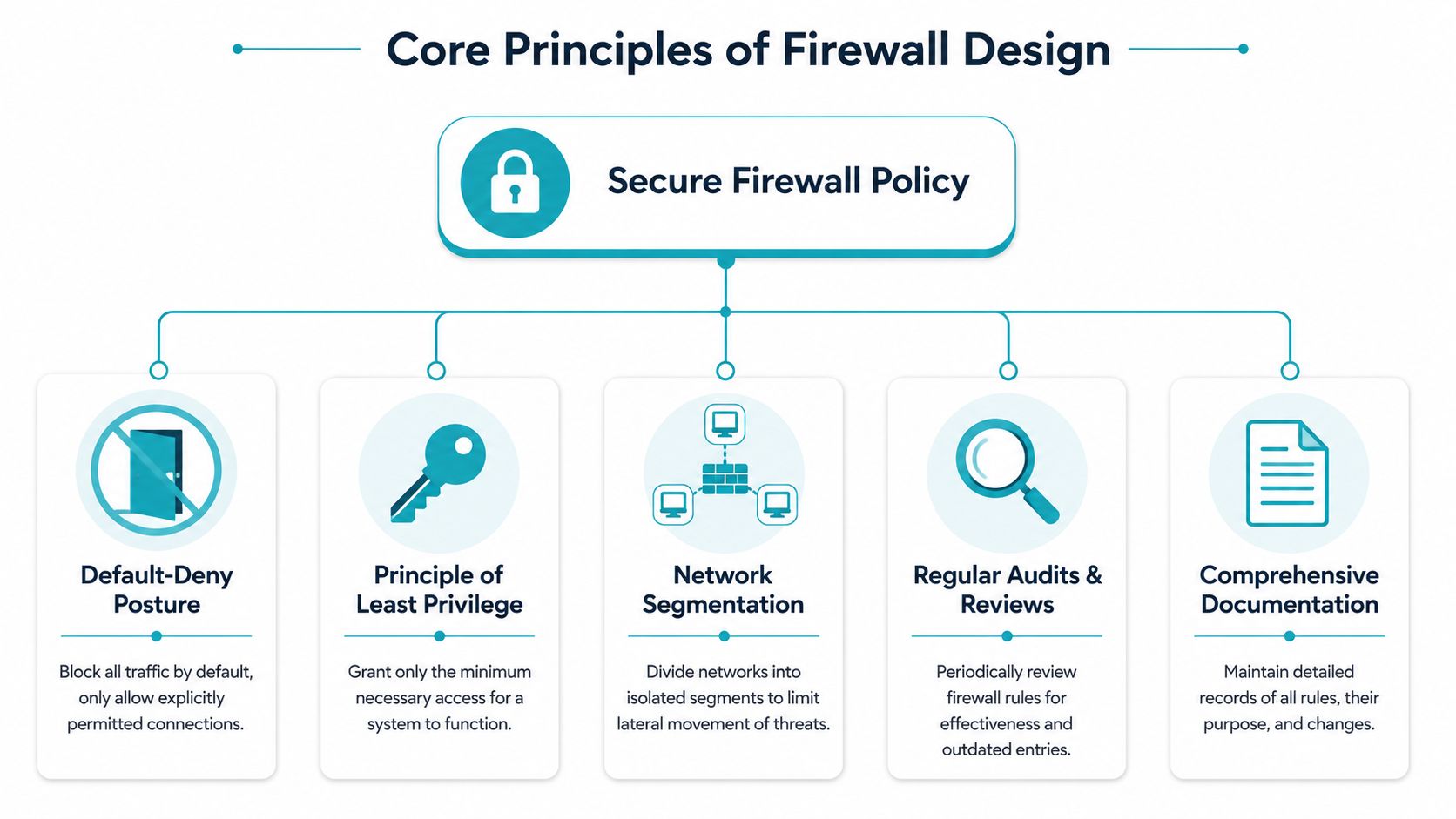
A rigorous methodology requires a default-deny posture, every permit rule must map to a documented business requirement, and validation must prove that traffic outside the allowed set fails while logs confirm the denial (firewall methodology reference). That’s the baseline.
Start with default deny and documented intent
Think of the firewall as a guarded gate, not a fence with random openings. If a service needs access, write down:
- What application or function needs it
- Whether the traffic is inbound, outbound, or east-west
- Which systems should talk
- Whether the access should be permanent or temporary
- Who approved it
If you can’t answer those five points, the rule probably shouldn’t exist.
Practical rule: Every allow entry should survive the question, “What breaks if I remove this?”
That one question catches a surprising amount of junk. Old monitoring exceptions, legacy management ports, forgotten vendor access, and test rules usually fail it.
Rule order can quietly defeat your intent
Broad allows placed above narrow restrictions create rule shadowing. The admin thinks the restrictive rule protects the service, but traffic already matched the broad rule earlier.
A simple design pattern prevents most of this:
| Rule design element | What works | What fails |
|---|---|---|
| Ordering | Specific rules before general ones | Broad allow near the top |
| Documentation | Ticket or business reason attached | “Needed for app” |
| Grouping | Web, admin, backup, monitoring | Mixed, unsorted rule lists |
| Validation | Test allowed and denied paths | Testing only happy path |
Group by business function, not by admin mood
Organize rules so another admin can audit them fast. These categories usually hold up well:
- Public services such as web and mail listeners
- Administrative access for SSH, RDP, VPN-restricted management
- Application dependencies between app, database, cache, and message services
- Backup and monitoring for jobs that need predictable paths
- Outbound controls for patching, package repositories, alerting, or APIs
This same discipline shows up in more regulated environments too. Teams working in critical sectors often benefit from broader controls guidance like this cybersecurity guide for energy providers, because the core lesson is universal. Access should be intentional, justified, and reviewable.
Auditable beats clever
Admins sometimes build overly clever rule sets that only the original author understands. That’s a mistake. A maintainable policy is more valuable than a clever one.
Use naming conventions. Keep comments short and specific. Put temporary exceptions on a review list. If a firewall platform supports tags or objects, use them. Clarity is a security feature.
Practical Firewall Configuration on Linux Servers
On Linux, most admins today interact with UFW or firewalld, while the kernel-level packet filtering is typically backed by nftables on modern distributions. As of 2025, firewalld and UFW were active on 88.4% of home and small-business Linux installations, reflecting the shift from iptables to nftables that became standard on major Linux distributions released after 2019 (Linux firewall adoption data).
That matters because the syntax you touch may be simple, but the underlying engine is more modern than many old guides assume.

UFW on Debian and Ubuntu
UFW is a good fit for single VPS instances, web servers, and mail hosts where you want fast, readable host-based policy.
A clean starting pattern looks like this:
sudo ufw default deny incoming
sudo ufw default allow outgoing
sudo ufw allow from TRUSTED-ADMIN-RANGE to any port 22 proto tcp
sudo ufw allow 80/tcp
sudo ufw allow 443/tcp
sudo ufw enable
sudo ufw status verbose
What this does:
- Default inbound deny closes the host unless you explicitly open a path.
- Default outbound allow keeps the server functional at first. Tighten this later if the workload justifies it.
- Restricted SSH allows administration only from a trusted source range.
- Web ports expose only the services the public needs.
For a mail server, add only the mail services you really use. Keep submission, relay, and retrieval paths separate in your own notes so future audits make sense.
A stronger pattern for admin access is to avoid public SSH exposure entirely unless there’s a business need. If you must allow it, limit source ranges tightly and pair the firewall with key-only authentication and login hardening.
Firewalld on RHEL and compatible systems
Firewalld is better when you want zones, service abstractions, and a clearer path to more structured policy on CentOS Stream, Rocky Linux, AlmaLinux, or RHEL.
A practical baseline:
sudo firewall-cmd --set-default-zone=public
sudo firewall-cmd --permanent --zone=public --add-service=http
sudo firewall-cmd --permanent --zone=public --add-service=https
sudo firewall-cmd --permanent --zone=public --add-rich-rule='rule family="ipv4" source address="TRUSTED-ADMIN-RANGE" port protocol="tcp" port="22" accept'
sudo firewall-cmd --reload
sudo firewall-cmd --list-all
This keeps the public zone focused on web traffic while making SSH conditional.
For internal applications, don’t keep stacking everything into the same zone. Create roles in your design first. Public-facing service, admin path, backup path, and storage path should be separated conceptually even if the host is small.
If a server has one NIC and one public role, host-based firewalling is usually enough. If it runs mixed workloads or participates in a larger private cloud, host rules should complement upstream network controls rather than replace them.
Validation is part of configuration
After adding rules, test both expected success and expected failure.
Check:
- Allowed service paths by connecting to the ports you intentionally opened
- Blocked management paths from locations that shouldn’t have access
- Logging behavior so denied attempts leave useful records
- Persistence after reboot because runtime-only changes don’t count in production
Many junior admins stop too early. “The site loads” isn’t a firewall test. An effective test determines whether everything else fails as intended.
A quick visual walkthrough can help if you’re standardizing Linux host policy across multiple nodes:
Host firewall versus upstream firewall
For a single VM, UFW or firewalld is often enough. For a cluster, database tier, or multi-tenant setup, host firewalls should be one layer in a broader design.
Use host-based rules when you need:
- Service-local enforcement that moves with the VM
- Application awareness at the operating system boundary
- Defense against internal mistakes from adjacent workloads
Use upstream filtering when you need:
- Shared policy enforcement across many systems
- Clear segmentation between networks
- Centralized review and change management
If you’re building standards for Linux nodes, keep your host-level policy simple, explicit, and reproducible. A good operational reference point is this guide to Linux firewalls, especially when you’re applying the same baseline across VPS fleets and web workloads.
Securing Proxmox VE and Dedicated Network Appliances
Proxmox changes the shape of firewall configuration because you’re no longer protecting one operating system. You’re protecting the hypervisor, the cluster fabric, and the guest workloads.
That means one flat rule set won’t cut it.
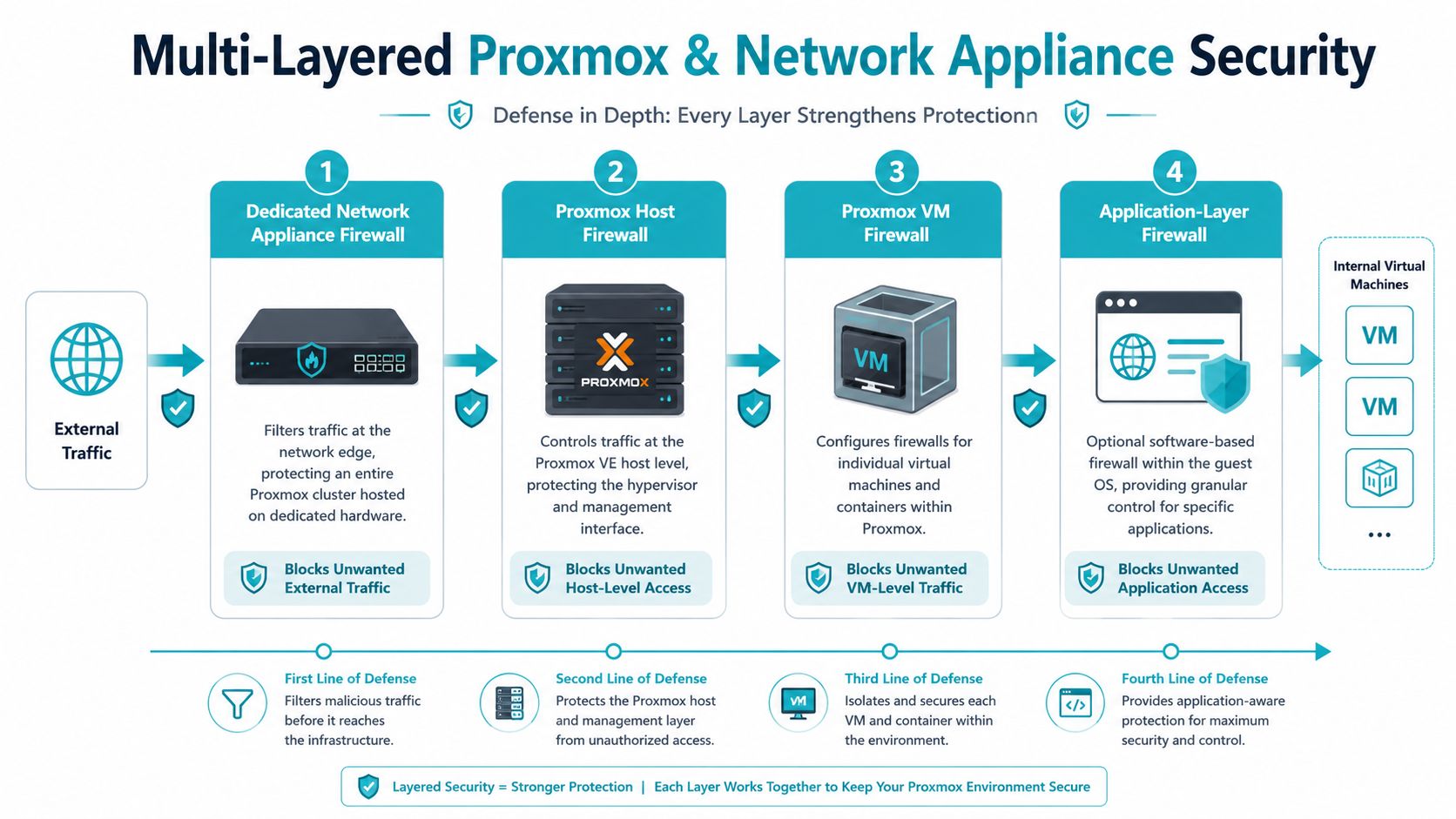
Think in layers inside Proxmox
Proxmox firewalling works best when you use all available layers for their intended role:
- Datacenter level for broad defaults and shared security groups
- Node level for hypervisor protection and management restrictions
- VM or container level for workload-specific access control
- Guest OS firewall for application-local enforcement
That layered model is more reliable than putting every decision in one place. It also aligns with practical layers of security thinking, where no single control carries the entire burden.
Proxmox host hardening comes first
Proxmox firewall hardening requires a default deny all rule, explicit whitelisting of necessary services such as the web interface on port 8006, disabling root SSH access, enforcing SSH key authentication only, and isolating management interfaces like IPMI or iDRAC on a dedicated VLAN separate from VM and container traffic (hardening guidance referenced here).
A practical checklist for the host looks like this:
- Enable the Proxmox firewall at the datacenter and node levels.
- Create a management-only allow policy for the web interface.
- Disable root SSH login.
- Use SSH keys only for administrators.
- Keep out-of-band management on its own VLAN.
- Review any inherited group rules before attaching them broadly.
The Proxmox host is not just another Linux server. If you expose it carelessly, you expose every guest that depends on it.
Cluster traffic and storage traffic need their own path
For Proxmox VE clustering, use an odd number of nodes such as 3 or 5 to avoid split-brain scenarios. If you run a two-node cluster, you need a QDevice to establish quorum, and firewall rules must allow UDP ports 5405 through 5412
Network layout matters just as much as firewall policy. Proxmox best practices for clustered environments call for at least two NICs per node, one for management and VM traffic, and another for storage and cluster communication, with 10 GbE strongly recommended over the minimum 1 GbE
For production-grade Proxmox VE 9 clusters using Ceph, isolate replication traffic from VM traffic with separate public_network and cluster_network definitions, deploy one Ceph MON and one MGR per node, and use SSD or NVMe OSDs
Where pfSense and similar appliances fit
A dedicated network appliance such as pfSense belongs at the edge when you need central segmentation, VPN termination, upstream filtering, and cleaner control of east-west traffic between VLANs.
Use a dedicated appliance when:
| Environment | Host firewall only | Dedicated network appliance |
|---|---|---|
| Single public VPS | Usually enough | Usually unnecessary |
| Small virtualization host | Helpful but limited | Stronger control point |
| Proxmox cluster | Not enough by itself | Recommended |
| Mixed private cloud | Too fragmented | Better for shared policy |
In practice, the cleanest designs use both. The appliance filters at the perimeter and between network segments. Proxmox enforces host and guest policy closer to the workload.
Configuring Windows Server and Cloud Platform Firewalls
Windows admins often assume the GUI makes firewalling simpler. It makes it more accessible, not less important. The same design rules still apply.
Windows Firewall with Advanced Security
On Windows Server, use Windows Defender Firewall with Advanced Security to create inbound and outbound rules tied to ports, programs, services, or connection profiles. The mistake to avoid is enabling broad access because the wizard makes it easy.
A solid workflow looks like this:
- Set a default posture first. Review the active profile and confirm what inbound behavior is allowed by default.
- Create service-specific rules. If IIS is serving a site, allow only the web services required for that role.
- Scope admin access tightly. RDP should never be broadly reachable just because it’s convenient.
- Name rules clearly. Include the application and purpose in the rule name so audits don’t turn into guesswork.
For example, a Windows application server may need inbound HTTPS, limited management access, and outbound access to update and monitoring services. Create those paths individually instead of turning on permissive profile-wide behavior.
A Windows firewall full of vague custom rules is just as risky as a Linux host with a messy nftables chain. The interface doesn’t change the principle.
Windows versus Linux versus cloud security groups
The tooling differs, but the logic is the same.
| Platform | Typical interface | Best use case | Common mistake |
|---|---|---|---|
| Linux host firewall | CLI with UFW or firewalld | Fast, reproducible host policy | Rules added ad hoc |
| Windows Firewall | GUI and policy-driven controls | Service-aware Windows workloads | Overbroad remote admin access |
| Cloud security groups | Cloud console or IaC | Per-instance or per-service edge control | Treating them as the only layer |
Cloud security groups behave a lot like stateful virtual firewalls. You still need least privilege. You still need documented rule intent. You still need to test whether denied paths are denied.
Cloud-native controls don’t replace host controls
Security groups in AWS, Azure, or similar platforms are great for defining which instances can talk to which services. They’re not a full substitute for host-based controls inside the workload.
Use cloud platform rules for:
- Perimeter control around instances and application tiers
- Environment-wide standards applied through templates or infrastructure as code
- Segmentation between service groups
Keep host firewalls when:
- Applications need local restrictions
- Hybrid environments require consistent behavior across cloud and on-prem
- You want defense in depth after a cloud rule is loosened by mistake
For mixed estates, consistency matters more than platform loyalty. A Windows VM in a cloud VPC, a Linux VM in Proxmox, and a physical server behind pfSense should all follow the same policy logic even if the interfaces differ.
Advanced Hardening Logging and Long-Term Maintenance
Many firewall failures happen after deployment, not during it. The pattern is familiar. A temporary allow rule stays in place, firmware falls behind, logging fills a disk or gets ignored, and six months later nobody can explain why a risky path is open.
Palo Alto Networks’ guidance on firewall best practices highlights three weak spots that show up again and again in real environments: poor outbound controls, missing inspection where the platform supports it, and neglected patching and policy upkeep (firewall best practices from Palo Alto Networks). On Linux hosts, that usually means stale iptables, nftables, UFW, or firewalld rules. On Windows Server, it often shows up as broad legacy exceptions that nobody removed after a migration. On pfSense, Proxmox, and similar appliance or virtualized platforms, the failures are usually configuration drift, weak management-plane restrictions, or upgrades that were postponed until they became risky.
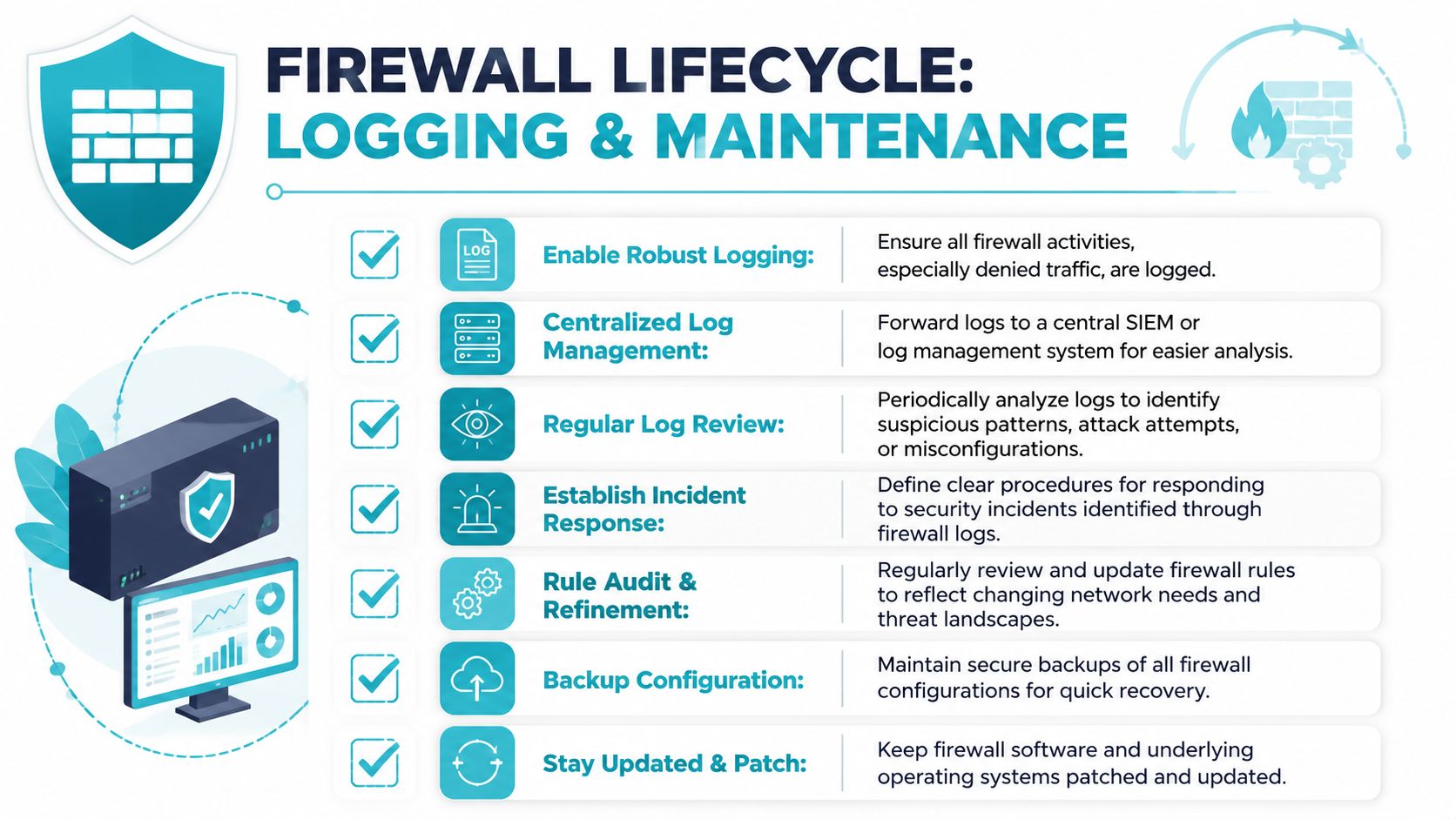
Logging needs to answer operational questions, not just satisfy a checkbox.
Start with denied traffic, administrative changes, and repeated connection attempts from the same source. Add enough context to trace an event back to the host, interface, rule, and time window. If you run a mixed estate, centralize logs so Linux servers, Windows hosts, pfSense appliances, and Proxmox nodes can be reviewed in one place during an incident. That cross-platform view matters in managed hosting because a problem rarely stays inside one layer for long.
Useful firewall logs should help you answer questions like these:
- What was blocked, and by which rule
- Which sources are generating repeated noise or probing
- Who changed the policy, and when
- Which temporary exceptions are still being hit
- Whether outbound traffic matches the system’s actual role
Do not turn on every possible log category without testing storage and retention. I have seen smaller servers lose useful data because verbose connection logging flooded the disk, pushed out older records, and made investigation harder instead of easier.
Long-term maintenance works best when it is tied to a calendar and a change process. Ad hoc review is how bad rules survive.
A practical review cycle looks like this:
- Export the current rule set and recent change history.
- Mark temporary, duplicated, shadowed, and rarely used rules.
- Verify that every allow rule still maps to a current service or business requirement.
- Review management access first, especially SSH, RDP, web admin panels, VPN entry points, and cluster interfaces.
- Check egress rules for systems that should only reach package repositories, backup targets, identity services, or specific APIs.
- Back up the configuration before and after significant edits.
- Test rollback steps, not just the new policy.
Patch management belongs in the same routine. A well-written policy does not help much if the firewall host, hypervisor, or appliance software is exposed through an old management service. On Proxmox, protect the cluster and web interface before worrying about cosmetic cleanup in guest rules. On pfSense and similar appliances, firmware and package updates need the same discipline as server patching. On Windows and Linux, host firewall reviews should happen alongside OS updates and service audits so policy changes track what the machine is doing.
Good firewall administration is repetitive by design. That is a strength. Stable environments, especially in managed hosting, come from documented rules, controlled change windows, tested backups, and regular review across every layer that can pass or block traffic.
Secure firewall configuration comes from recurring review, tested changes, and disciplined operations.
Teams that host mixed workloads across dedicated servers, VPS instances, Proxmox clusters, Windows systems, and network appliances usually struggle with one thing more than rule syntax. They struggle with consistency over time. The environments that stay secure are the ones where logging, patching, backup, and rule review are treated as routine operations, not cleanup work for later.
