

You usually start looking at dual processor server rental after a familiar failure pattern appears. A line-of-business app gets slower during busy hours. Backups start bleeding into production time. A virtualization host that looked fine six months ago now feels tight on RAM, CPU scheduling, or storage queue depth. Nothing is fully broken, but the margin is gone.
At that point, buying “more server” blindly is expensive. The better move is to match the hardware shape to the workload shape. Dual-socket hardware can be the right answer, but not because two CPUs automatically beat one. The key question is whether your applications benefit from more parallel compute, more memory capacity, and more expansion headroom, or whether you’d get a better result from a fast single-socket system, a small cluster, or a managed private cloud design.
Is It Time to Upgrade Your Server Infrastructure
A single-processor server usually shows its limits in operations before it shows them on a spec sheet. VM consolidation gets harder. Database jobs compete with application services. Maintenance windows stretch because every task shares the same box and the same performance ceiling.
That’s when dual processor server rental starts making sense as an operational decision, not just a hardware upgrade. You’re renting a platform designed for sustained concurrency, larger memory footprints, and better parallel task handling.
What the pressure usually looks like
A move to dual-socket hardware is often justified when you see patterns like these:
- Virtual machines crowding each other: Host contention appears even though individual VMs don’t look oversized.
- Memory emerging as the bottleneck: The CPU graph looks acceptable, but applications stall because the box can’t hold enough working data.
- Mixed workloads colliding: Databases, web services, and background jobs all behave differently, and one single-socket server becomes a compromise machine.
- I/O expansion needs growing: You need room for more storage devices, faster networking, or specialized cards without redesigning the whole stack.
If your monitoring already shows recurring contention in compute, memory, and throughput during normal operations, the problem usually isn’t bad luck. It’s capacity planning.
Why this isn’t a niche decision
Dual-socket infrastructure remains mainstream. One market forecast values the global dual CPU server market at USD 14.6 billion in 2025 and projects USD 22.5 billion by 2035, with a 4.5% CAGR over 2026 to 2035.
Practical rule: Upgrade when the server is no longer giving you operational headroom, not when a benchmark makes a new CPU look attractive.
That matters because renting a dual-processor platform isn’t a fringe move for unusual workloads. It’s still a standard path for teams that need more cores, more memory capacity, and better parallel processing than a single-socket host can comfortably deliver.
The decision that matters most
The wrong reason to upgrade is “we need a bigger server.” The right reason is more specific. You need a system that can carry virtualization density, concurrent application demand, analytics jobs, or memory-heavy services without turning routine operations into a scheduling problem.
If that sounds like your environment, the next step isn’t shopping by socket count. It’s mapping the workload correctly.
When to Choose a Dual Processor Server Rental
The easiest way to think about dual-socket architecture is this. A single wider highway helps, but two highways let you route more traffic at the same time. That doesn’t make every trip faster. It does make heavy, parallel traffic easier to move without everything competing for the same path.
That’s why dual processor server rental works best when the workload can spread work across many threads, many VMs, or many concurrent service processes.
Workloads that usually benefit
Industry guidance recommends 16+ cores for virtualization and enterprise workloads, and dual-CPU platforms are positioned for multitasking, AI and data analytics, and high-concurrency services in BACloud’s guidance on dual dedicated servers.
In practice, these are the common fits:
- Virtualization hosts: Proxmox VE, VMware, and similar platforms benefit when you’re consolidating many guests with different usage patterns.
- Database servers with parallel activity: Not every database scales the same way, but multi-user transactional systems and mixed query loads often benefit from more scheduling room and more memory capacity.
- Application stacks with constant concurrency: API platforms, internal business systems, and multi-service environments often need predictable throughput more than bursty single-thread speed.
- AI and analytics jobs: CPU-side preprocessing, parallel data handling, and memory-heavy analysis jobs are often a better match for more cores and more RAM than for a smaller high-clock box.
Workloads that often do not
Dual-socket hardware is not a default answer for every performance complaint.
- Latency-sensitive apps with low thread parallelism: If one critical process dominates performance, a faster single-socket CPU may be the better tool.
- Light web hosting nodes: If the workload is modest and horizontally scalable, adding another socket can be unnecessary complexity.
- Software with licensing tied to cores: More hardware can raise software cost before it improves service quality.
Buy dual-socket systems for parallel work. Don’t buy them to fix a single-thread bottleneck.
A quick architecture overview helps if you’re comparing designs across virtualization and enterprise workloads:
A simple decision filter
Ask these three questions:
- Can the workload use many threads or many guests at once? If yes, dual-socket becomes more attractive.
- Do you need larger memory footprints or more expansion flexibility? That pushes the design toward enterprise-class hardware.
- Are you solving steady concurrency, not just occasional spikes? Rental value improves when the capacity is used consistently.
If you answer yes to all three, dual processor server rental is usually worth serious consideration. If not, a smaller but faster system may produce a better outcome.
Evaluating Key Hardware Specifications for Your Workload
Spec sheets mislead buyers when they compress everything into “more cores” or “more RAM.” What matters is the interaction between CPU behavior, memory design, storage latency, and network throughput. A good rental decision starts with the application profile, then works backward into hardware.
CPU selection and workload shape
The CPU decision is not just Intel versus AMD. It’s thread count versus clock behavior, cache behavior, and how your software scales. Virtualization hosts, container nodes, and mixed service stacks usually like more cores because they schedule many independent tasks. A transactional application with a smaller concurrency footprint may care more about per-core speed.
If you need a quick refresher on how to evaluate logical threads against actual workload demand, this breakdown of CPU cores and threads for optimal hosting is worth reviewing before you price servers.
A practical approach:
- Choose higher core density for virtualization clusters, multi-tenant nodes, and broad service consolidation.
- Choose stronger per-core behavior for applications where one process or a few worker threads drive the experience.
- Don’t confuse more cores with faster licensing efficiency. Some software stacks get more expensive as core counts rise.
Memory and why capacity often decides the build
RAM is where many dual-socket rentals justify themselves. In enterprise hosting, CPU pressure gets attention, but memory pressure causes ugly failure patterns. VM swapping, database cache misses, and unpredictable application latency all show up long before users say “we need more RAM.”
ECC memory matters for server rentals because stability matters more than chasing a consumer-grade price point. The DDR4 versus DDR5 choice is usually a generation and platform question rather than a standalone buying decision, but the practical point is simple. Newer memory platforms often help with bandwidth and platform longevity, while overall capacity still carries the most operational weight.
Storage and the cost of waiting on disks
Storage speed changes whether a server feels responsive under pressure. NVMe matters because low-latency storage reduces the waiting time for databases, VM images, caches, queue workers, and indexing tasks. If you’re renting a server for parallel workloads but attaching slow storage, you’re limiting the benefit of the CPUs.
Use this checklist:
- Databases: prioritize RAM and low-latency NVMe storage.
- Virtualization hosts: prioritize predictable storage performance because many guests amplify I/O contention.
- Application servers: keep storage fast enough that deploys, logs, caches, and local data handling don’t pile up.
Slow storage can make a large server behave like a small one.
Network and expansion planning
Networking matters more than many rental buyers expect. The wrong port profile or uplink design can cap backup windows, replication speed, storage movement, and east-west traffic between services. If you’re running a hypervisor, private cloud node, or storage-heavy application tier, network capability becomes part of the compute decision.
Also check expansion headroom. Enterprise platforms are often selected because they leave room for more drives, more memory, or additional connectivity without forcing a redesign. That’s important in rented infrastructure because replacing a production server is always harder than sizing correctly at the start.
What to look for on the final shortlist
Before you approve a server, make sure the configuration answers five practical questions:
- What is the primary bottleneck today? CPU, RAM, storage, or network.
- What is the software scaling model? Parallel, bursty, memory-heavy, or single-thread dominant.
- Will licensing costs change as core counts rise?
- Can the platform support growth without migration pain?
- Who will manage patching, monitoring, backup validation, and incident response?
Those last two questions matter as much as raw hardware.
Sizing Your Rental with Real-World Configuration Examples
A team rents a dual-processor server because the spec sheet looks strong, then discovers six weeks later that the primary bottleneck is memory pressure, storage latency, or software licensing. That is the sizing mistake to avoid.
The practical way to size a rental is to start with the workload, then check how CPU layout, RAM capacity, storage, and operating overhead interact. Dual-socket hardware is often the right fit, but not by default. A virtualization node, an in-memory database host, and a latency-sensitive application server can all justify very different rental choices even if their aggregate CPU demand looks similar on paper.
One common example is a Proxmox or mixed virtualization host that needs broad thread capacity, ECC memory support, and room to grow into more guests over time. In that case, a dual Xeon server hosting platform for virtualization-heavy deployments is usually the first profile worth evaluating.
A different buyer is constrained by RAM footprint more than socket count. Large databases, analytics jobs, and inference services often run better on a newer platform with substantial memory and fast local NVMe, even if the system has fewer total sockets.
A third case is easy to miss. Some teams assume dual processors are required because the application is important, not because the software scales well across many cores. If the workload is licensed per core, tied to fast individual threads, or only uses a small number of worker processes, a modern single-socket server can deliver better value and lower monthly waste.
Example configurations and where they fit
| Server Model | Cores/Threads | RAM | Storage | Best Fit |
|---|---|---|---|---|
| Dual Intel Xeon E5-2690 V3 | 28 cores (56 threads) | 64GB DDR4 ECC RAM | Enterprise storage | Proxmox nodes, multi-tenant VPS hosting, mixed VM consolidation |
| AMD EPYC 4584PX | 16 cores (32 threads) | 192GB DDR5 RAM | NVMe SSD storage | Memory-heavy databases, analytics, AI inference, dense virtualization |
| AMD Ryzen 9600X | 6 cores (12 threads) | 96GB DDR5 RAM | NVMe SSD storage | High-clock application hosting, dev environments, lower-core licensed software |
ARPHost offers these profiles because they solve different operational problems, not because one class of server wins every comparison.
How these map to real rental decisions
For multi-tenant virtualization, the Dual Intel Xeon E5-2690 V3 profile fits environments that benefit from many available threads and a proven enterprise platform. It makes sense for labs, internal cloud nodes, reseller VPS infrastructure, and service stacks where several moderate-demand guests share one host. The trade-off is efficiency. Older dual-socket hardware can still be a strong rental, but only when your workload can fully utilize the thread count and platform headroom.
For memory-first workloads, the AMD EPYC 4584PX profile changes the planning conversation because RAM capacity drives placement flexibility. Teams running larger databases, in-memory caches, analytics jobs, or high-density VM packs usually feel memory pressure before they run out of CPU. In that situation, fewer but newer cores with more memory per host often beat an older dual-socket server that looks larger in a spec table.
For fast-core application hosting, the Ryzen 9600X profile is often the financially cleaner answer. This matters when applications respond better to stronger per-core performance, or when software costs rise with core count. Renting extra cores that sit idle is still oversizing, even if the server appears more powerful.
Good sizing protects the workload, leaves reasonable growth room, and avoids paying every month for capacity the application will never use.
The decision point buyers get wrong
The mistake is treating dual processor rental as the target outcome. It is only one design option.
A company consolidating many VMs may need dual sockets. A database team may get better results from a memory-heavy single-socket platform. A SaaS team with a small number of latency-sensitive services may be better served by fewer, faster cores and simpler management. The right rental is the one that balances performance, operational complexity, and long-term cost with the way the software behaves.
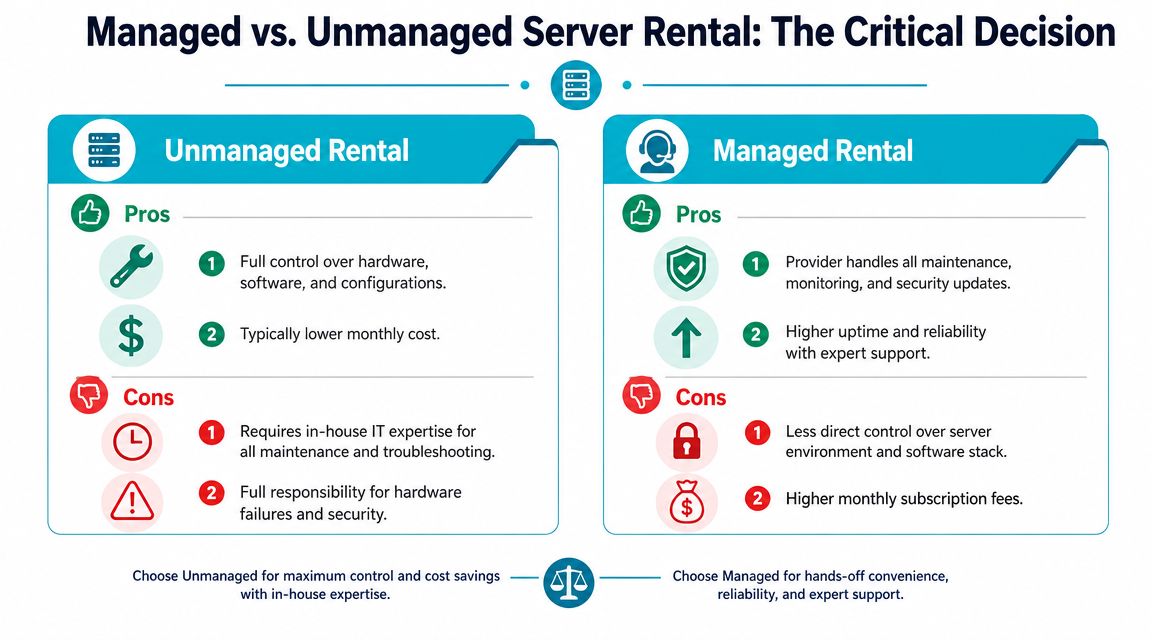
Managed vs Unmanaged Rental The Critical Decision
Most rental mistakes aren’t hardware mistakes. They’re operating-model mistakes. Teams rent the right server, then underestimate what it takes to patch it, secure it, monitor it, back it up, and recover it under pressure.
That’s why managed versus unmanaged is not a checkbox. It’s a risk decision.
What unmanaged actually means
Unmanaged rental is a good fit when your team wants direct control and already has the internal discipline to operate the stack. You get root access, freedom to choose the OS, hypervisor, security tooling, and deployment model.
That freedom comes with full ownership of:
- Patch management: kernel updates, package maintenance, and reboot planning.
- Security hardening: firewall policy, service exposure review, access control, and vulnerability response.
- Monitoring and alerting: system metrics, service health, disk pressure, and incident triage.
- Backup design: not just taking backups, but testing restore paths.
If your DevOps team already has mature runbooks, unmanaged can be efficient. If not, it often becomes “managed badly, by whoever is free.”
Where managed rental changes the equation
Managed rental makes sense when the business needs the hardware but doesn’t want server administration to become a second full-time job. That’s common in SMB environments, lean IT teams, and growth-stage companies that need infrastructure reliability without carrying every operational task internally.
A provider such as ARPHost, LLC can handle areas like proactive monitoring, updates, security maintenance, backups, and broader managed IT work around the server environment, which is often more useful than just provisioning the box and leaving the rest to the customer.
Side-by-side decision view
| Model | Best Fit | Main Advantage | Main Trade-off |
|---|---|---|---|
| Unmanaged | Experienced infrastructure teams | Full control over stack and policy | You own maintenance, troubleshooting, and security response |
| Managed | Teams focused on applications or business operations | Lower operational burden and outside support | Less direct day-to-day control and a higher service layer cost |
If your team can build the server but can’t reliably operate it at 2 a.m, unmanaged probably isn’t cheaper.
A blunt test
Choose unmanaged if your team can answer these questions confidently:
- Who patches the host and on what cadence?
- Who validates backups and recovery?
- Who responds to after-hours alerts?
- Who owns hardening, monitoring, and incident documentation?
If those answers are vague, a managed model usually lowers operational risk faster than adding another internal task list.
Understanding Pricing SLAs and Total Cost of Ownership
Monthly server price is only the visible part of the decision. The harder cost is everything attached to the server after it goes live. That includes staff time, software licensing, operational mistakes, and the business impact of weak support during incidents.
Historical provider data shows entry dual-CPU dedicated server plans at $275/month, $339/month, and $359/month for basic configurations, while a broader enterprise range for dual CPU dedicated servers sits around $400 to $2,000+ per month That tells you where the market positions this class of hardware. It’s a premium tier, not entry hosting.
What buyers miss in the first quote
The invoice line for the server is rarely the full story.
- Software licensing: Per-core licensing can turn “more CPUs” into a more expensive platform decision.
- Support scope: A low monthly number may exclude the help you’ll need during deployment or incidents.
- Operations labor: Internal time spent patching, troubleshooting, and recovering systems is still a cost.
- Change friction: Cheap infrastructure becomes expensive when every upgrade requires migration pain.
The more mature way to think about this is total cost, not rack price.
Read the SLA before you compare vendors
An SLA matters because it defines what the provider commits to, not what the sales conversation implied.
Focus on:
- Uptime language: What is covered, and what isn’t.
- Support boundaries: Hardware only, or OS and service-layer assistance too.
- Response expectations: How incidents are acknowledged and escalated.
- Replacement process: What happens if the physical server develops a fault.
If you’re budgeting the platform seriously, it also helps to review a broader dedicated server hosting cost breakdown so the rental fee is evaluated alongside management, support, and platform fit.
The licensing issue that changes the math
One of the biggest shifts in server buying is that dual-socket is no longer the automatic default. As discussed earlier, some environments are constrained more by licensing and total workload economics than by hardware alone. If software costs rise with core count, a larger single-socket server or a smaller cluster can be the cheaper production design even when a dual-socket rental looks powerful on paper.
That’s why cost modeling has to happen before provisioning, not after.
Procurement Checklist and Final Questions Answered
A disciplined procurement process prevents expensive mistakes later. Dual processor server rental decisions go wrong when buyers focus on CPU count first and leave operating responsibility, migration risk, and software cost for after the order is placed.
Use the checklist below to pressure-test the decision before provisioning.
Procurement checklist
Define the workload clearly
Separate virtualization, database, analytics, web, and application workloads. Identify the dominant constraint, CPU contention, memory pressure, storage latency, or east-west traffic between services. If that bottleneck is unclear, the rental will be guesswork.Shortlist hardware by bottleneck
Match the platform to the actual limit. Memory-heavy VM density problems need RAM capacity and a board layout that supports the target footprint. Transaction-heavy databases often care more about storage behavior and clock speed than raw core count.Model management responsibility
Decide who owns patching, monitoring, hardening, backups, and incident response. A lower monthly rental rate loses its appeal quickly if the internal team has to absorb every operational task.Review provider terms carefully
Read the SLA, support scope, hardware replacement process, and escalation path. Procurement should confirm what happens during a fault, not assume the sales process covered it.Plan deployment before ordering
Lock in the OS or hypervisor, storage layout, backup policy, access controls, and migration steps before the server is built. Provisioning is faster and cutover risk is lower when those decisions are made early.
The right server has to fit the application, the team running it, and the cost model behind it.
Final questions
Can I install my own operating system or hypervisor?
Usually yes, depending on provider policy and service model. That matters for teams standardizing on Proxmox VE, VMware, a custom Linux build, or an internal platform with strict controls.
How is rental different from colocation?
Rental means the provider owns and maintains the hardware. Colocation means you supply the hardware and place it in the provider’s facility. Rental reduces capital expense and hardware lifecycle management. Colocation gives tighter control over component choice and refresh timing.
Is dual-socket still the default choice?
No. In many deployments, it is the right choice only when the workload benefits from the extra memory capacity, PCIe lanes, or aggregate core count. If licensing scales poorly with cores or sockets, a larger single-socket server or a small cluster can be the better production design, as discussed in VergeIO’s analysis of why data centers still use dual processor servers.
A good final review asks three things. What is the bottleneck today? Who will run the platform day to day? What will the server cost once management, support boundaries, licensing, and growth are included? Buyers who answer those questions before ordering usually make better infrastructure decisions and avoid overbuying.
Those choices are easier with a provider that understands both the hardware and the operational trade-offs. ARPHost offers dedicated hardware, VPS and private cloud options, colocation, and managed service coverage, which gives buyers flexibility to match the operating model to the workload instead of forcing every project into the same template.
If you’re evaluating dual processor server rental and want a workload-first recommendation instead of a generic spec quote, talk with ARPHost, LLC. Their team can help you compare bare metal, private cloud, VPS, colocation, and managed service options based on how your applications behave.
