

A disaster recovery plan for small business often fails before the first backup job runs. Forty-six percent of small businesses have never tested their backup and disaster recovery plan. That means many owners aren't protecting recovery. They're protecting an assumption.
A workable plan connects technology to payroll, customer commitments, accounting, and cash flow. It identifies which systems must return first, defines how much data the business can afford to lose, assigns people to each decision, and proves the restore process under controlled conditions. The following framework focuses on that execution gap, with practical recovery choices for a small team and infrastructure options that can grow with the business.
Why Most Small Business Disaster Recovery Plans Fail
A disaster recovery document can look complete and still fail during an outage. Emergency contacts, backup locations, and recovery steps matter only when the team has verified credentials, mapped dependencies, confirmed restore order, and reserved enough cash to keep operating while systems are unavailable.
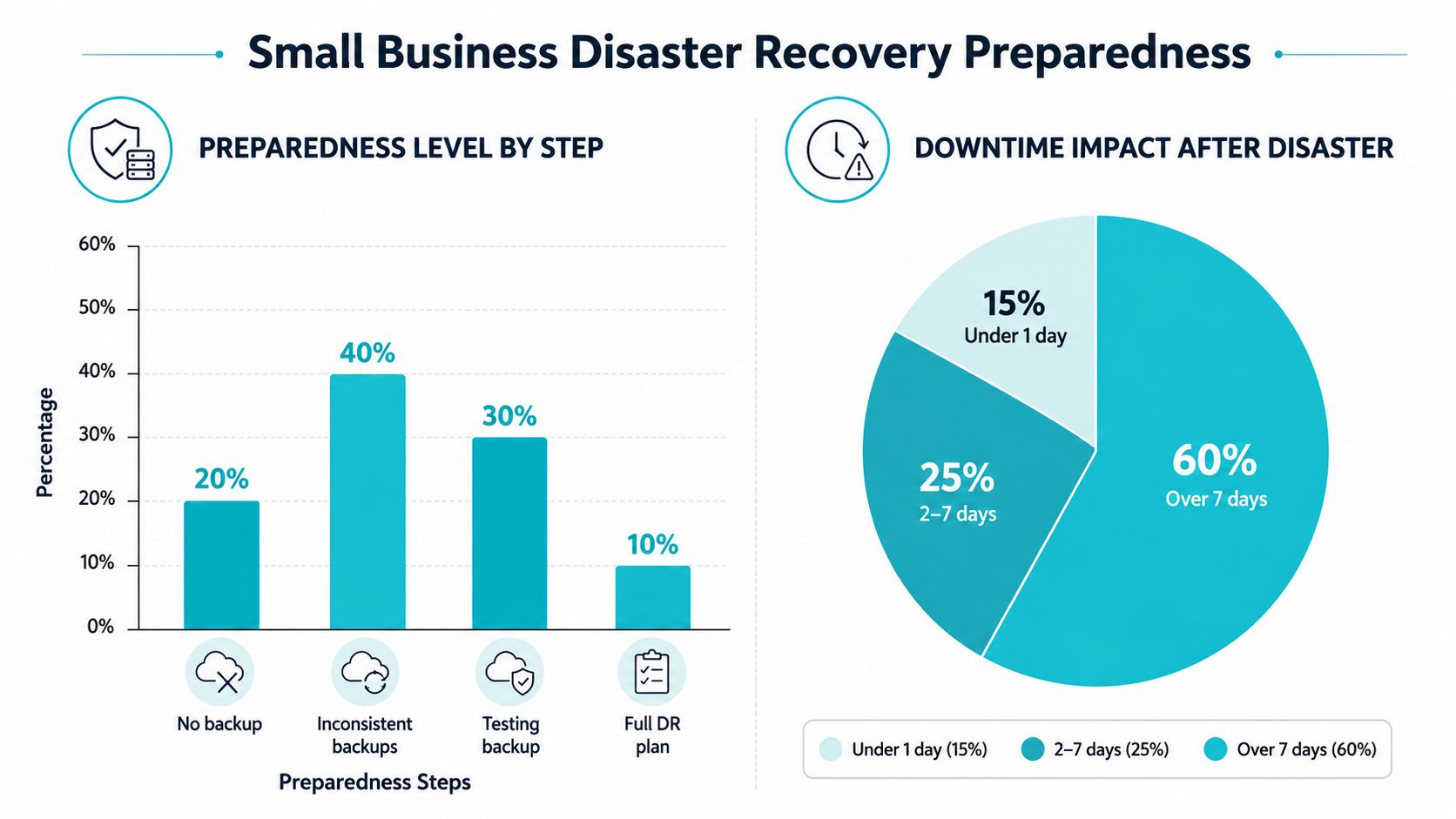
The preparedness gap remains substantial. A Nationwide survey summarized by Frontier Technology found that 75% of small businesses did not have a disaster recovery plan, while only 18% of firms with fewer than 50 employees had one. The same survey reported that 52% of small businesses expected recovery to take at least three months after a disaster. A separate industry summary reports that 69% of small businesses have no disaster plan, reinforcing the scale of the execution problem.
The gap is also visible in testing. Many businesses write a plan once, store it in a shared folder, and never run a restore exercise. That leaves unverified assumptions about administrator access, vendor response, backup integrity, and the order in which systems must return. A plan that has never been tested is a proposal, not an operating procedure.
The core failure is usually financial
Owners often treat disaster recovery as an infrastructure purchase. The practical question is whether the business can fund payroll, temporary operations, emergency support, and customer remediation while recovery proceeds.
U.S. Chamber Foundation research reports that 80% of small businesses don't have a disaster budget, and 36% say they can't pay employees beyond one month after a disaster. The same research says owners estimate preparedness costs at 30% of annual revenue, while the actual cost is closer to 5%. That perception gap can delay action. A tiered design can address the most damaging risks without requiring an enterprise-scale program.
Downtime affects cash flow quickly. One business continuity summary reports an average loss of $8,500 per hour for small companies, while another cited estimate places average IT downtime at $5,600 per minute. These figures come from different datasets and should not be combined into one forecast. They support the same operating lesson: recovery planning protects revenue as well as systems.
Practical rule: Fund recovery around the systems that generate or protect revenue first. A tested plan for priority workloads is more useful than an untested plan that claims to cover everything.
A small business plan should answer five questions:
- What must return first? Identify payment, order, communication, and accounting dependencies.
- How long can each system remain unavailable? Set a recovery time objective by workload.
- How much data can disappear? Set a recovery point objective based on transaction risk.
- Who makes the call? Name primary and backup owners.
- How will the business keep paying people? Document cash reserves, insurance contacts, emergency approvals, and temporary operating procedures.
The objective is practical control. Define the priorities, test the restore process, and fund the recovery steps that prevent an outage from becoming an unmanaged financial crisis.
Ranking Your Critical Systems and Setting Recovery Targets
Start with a Business Impact Analysis that a small team can complete in a working session. Create an inventory of applications, data stores, devices, vendors, and network dependencies. Include systems that feel ordinary, such as email, identity management, accounting, file sharing, CRM, payment processing, e-commerce, phones, and the tools employees need to work remotely.
For each item, ask two questions. What stops if this system disappears, and which other systems must work before it can be restored? A CRM may be important, but it might depend on identity services, internet connectivity, and a database. That dependency chain determines recovery order.
Build tiers instead of one blanket target
RTO, or Recovery Time Objective, is the maximum acceptable downtime after an outage. RPO, or Recovery Point Objective, is the maximum acceptable data loss measured by the time since the last valid backup or restore point. The distinction is explained in this RTO and RPO guide, and it directly determines backup frequency, replication, failover design, and staffing.
A practical benchmark used across industries is a 4-hour RTO for a critical system, while cloud-based systems average 2.1 hours in the cited benchmark. E-commerce workloads during peak periods may require an RPO around 5 minutes. These are reference points, not automatic requirements. A small business should choose targets based on transaction volume, customer commitments, and the cost of interruption.
| Workload Tier | Example Systems | Target RTO | Target RPO | Backup Frequency |
|---|---|---|---|---|
| Tier 1, revenue critical | Payment processing, e-commerce, order database | About 4 hours | Around 5 minutes for peak e-commerce | Continuous or frequent replication where justified |
| Tier 2, operationally critical | Email, identity, accounting, CRM | Same business day | Up to 1 hour where transactions require it | Hourly or scheduled image backups |
| Tier 3, important but deferrable | File archives, reporting, internal knowledge bases | Next business day or longer | Daily restore point may be acceptable | Daily backups with defined retention |
| Tier 4, noncritical | Development copies, obsolete archives | Best effort | Based on business value | Periodic backup and lifecycle review |
The table gives you a starting matrix. Your finance lead should validate the financial impact, and the system owner should confirm whether the target is technically achievable. Document the reason for each target instead of copying a generic policy.
Turn the matrix into a restore sequence
Write the restoration order as an explicit runbook:
- Establish a clean network and administrative access.
- Restore identity and security controls.
- Recover databases and transaction systems.
- Bring up customer-facing applications.
- Restore email, file access, and collaboration tools.
- Validate transactions, permissions, integrations, and customer workflows.
Keep the matrix with system owners, dependencies, backup locations, and review dates. For additional implementation detail, use this guide to define recovery time objectives and verify that every target has a matching technical method.
Choosing the Right Backup and Replication Architecture
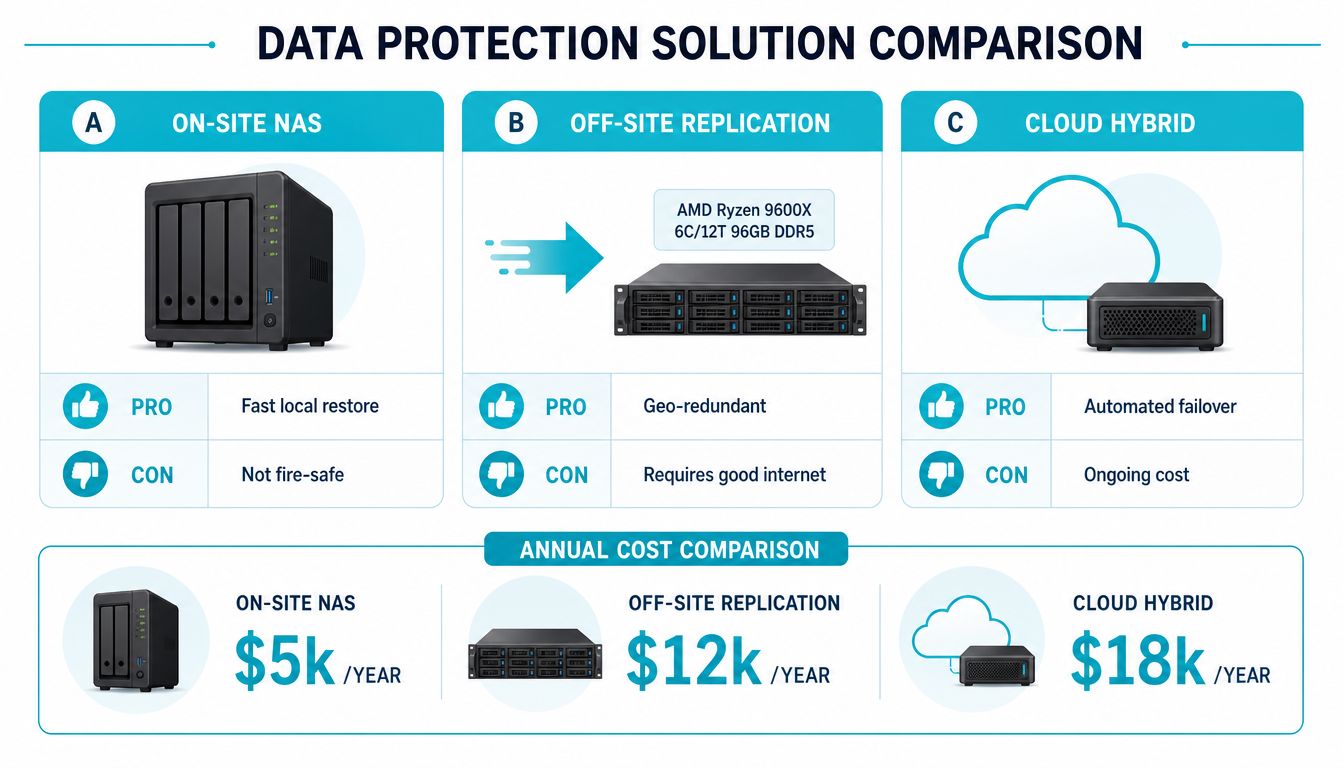
Architecture should follow the recovery targets, workload, and team capacity established earlier. Local storage can restore files quickly, but fire, flood, theft, or another building-level event can destroy production and backup together. Off-site replication separates the copies geographically, yet depends on connectivity, usable credentials, retention settings, and enough bandwidth for restoration. Hybrid recovery can support faster failover, though it adds operating cost, configuration work, and more components to test.
The 3-2-1 backup rule provides a practical baseline: keep three copies of data, use two different storage media, and keep one copy off-site. The remote copy must be logically and physically separate from production. A second appliance in the same office does not protect against a site-wide loss.
Compare the practical options
| Architecture | What works | What fails | Best fit |
|---|---|---|---|
| On-site NAS | Fast local restore and simple access | Building-level incidents can remove production and backup together | Small files, local recovery, secondary copy |
| Off-site replication | Geographic separation and stronger site resilience | Poor connectivity can delay replication or restoration | Critical servers and business databases |
| Cloud hybrid | Automated recovery options and flexible capacity | Ongoing cost, configuration complexity, and testing requirements | Revenue-critical systems with tighter targets |
| Colocation | Dedicated equipment in a protected facility | Requires hardware ownership and operational planning | Businesses needing control without hosting equipment in the office |
A same-office backup can address a failed disk or server, but it cannot address the loss of the site. Choose an architecture that matches the failure you are preparing for, then document who owns the configuration, credentials, retention, and restore process.
For virtualized environments, Proxmox Backup as a Service can support image-level backups and controlled restores without requiring a small team to operate every storage layer. A dedicated backup node may also fit organizations that need local restore speed. The AMD EPYC 4584PX with 192GB DDR5 RAM suits memory-intensive backup and dense virtualization workloads, while the Dual Intel Xeon E5-2690 V3 with 28 cores and 56 threads can support a multi-tenant backup node or Proxmox cluster expansion. Document encryption, access control, retention, and recovery procedures using these best practices for data security.
A backup job has value only when a clean restore works under pressure. Test representative files, applications, and full-system recovery, and record the time, dependencies, and failures. Those results show whether the selected design can meet the recovery targets or needs a different service level.
This video provides a visual introduction to recovery architecture and backup planning:
Assigning Roles and Building Your Communication Chain
A recovery plan fails quickly when ownership is assumed rather than assigned. One employee may manage the hosting account, another payroll, and a third the network. If those responsibilities exist only in people's memory, an absence or unreachable account can stop recovery before the technical work begins.
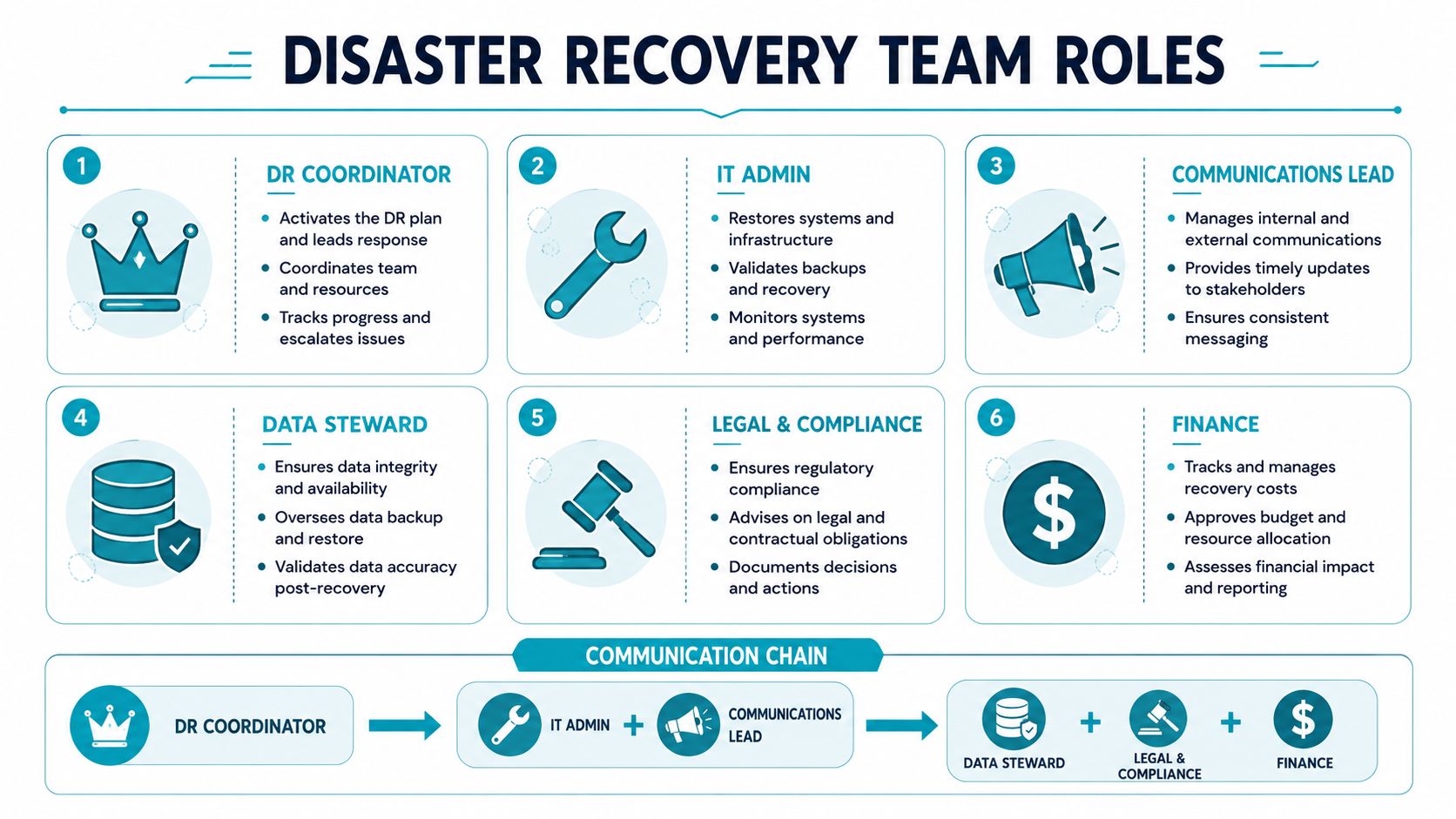
Assign roles by decision-making, execution, information, and finance. Give every role a primary owner, a backup owner, an emergency contact method, and clear authority limits. Store the plan in encrypted storage that remains reachable when the office and production network are unavailable.
Create a chain that works under pressure
- DR coordinator: Declares the incident, sets priorities, approves major decisions, and maintains the incident timeline.
- IT administrator: Isolates affected systems, starts the restore sequence, verifies access, and coordinates vendors.
- Communications lead: Sends employee updates, customer notices, status-page changes, and vendor messages.
- Data steward: Checks data integrity, identifies the last usable restore point, and approves business validation.
- Legal and compliance contact: Handles notification duties, contracts, insurance records, and evidence preservation.
- Finance lead: Maintains payroll continuity, approves emergency spending, tracks losses, and contacts insurers or lenders.
Keep command separate from technical execution. The coordinator should not be the only person operating the recovery console. During a ransomware event, that split lets one person make business decisions while another follows the restore procedure.
Ransomware-related outages can last long enough to disrupt a full workday. InvenioIT reports that 40% of SMEs experiencing ransomware face eight or more hours of downtime. That exposure makes an alternate contact path and a named decision-maker practical requirements, not paperwork.
Prepare messages before systems fail
Write short templates for employees, customers, and vendors. Employees need the work location, approved systems, and next update time. Customers need the affected service, available workaround, and next confirmed update. Vendors need the incident scope, account identifiers, requested action, and escalation authority.
A useful internal message is direct: “The accounting system is unavailable. Don't attempt local repairs. Use the approved emergency channel for updates. The next status review is scheduled by the incident coordinator.” Do not promise a restoration time until the technical lead confirms the recovery path.
Record operational knowledge in runbooks, screen recordings, and checklists. Require the backup owner to perform the procedure, rather than watching the primary owner complete it.
A hosting or managed IT partner can extend coverage outside normal staffing hours, but the business retains decision authority. ARPHost provides 24/7 U.S.-based support and cites sub-15-minute average responses, which may help when an infrastructure issue occurs without internal staff available.
Testing Your Plan Before a Real Disaster Strikes
A recovery plan becomes credible only after the team restores systems under controlled conditions. Backup jobs can report success while credentials have expired, encryption keys are missing, application dependencies were omitted, the recovery network is undocumented, or the backup was corrupted before anyone checked it.
Use a cadence a small team can sustain
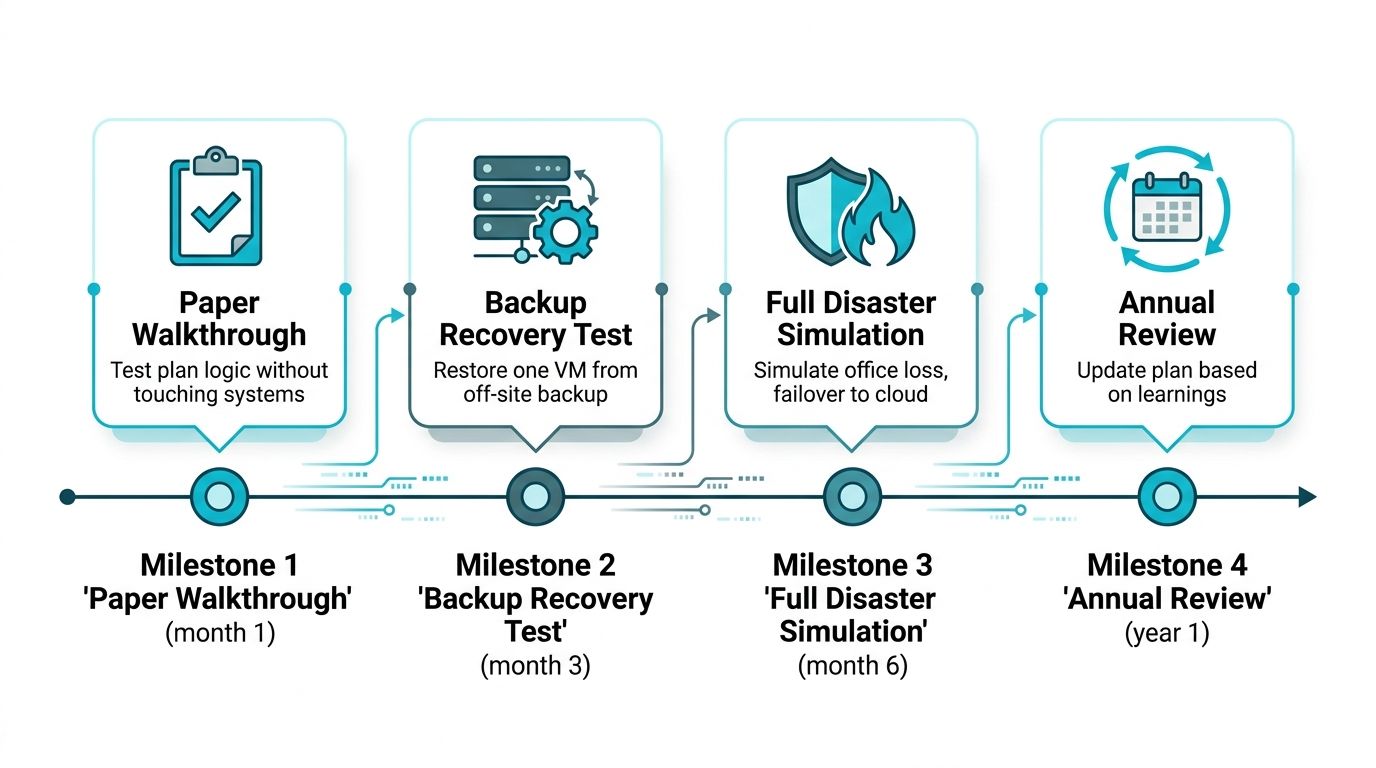
Testing should progress from discussion to technical restoration and then to a broader simulation:
- Monthly paper walkthrough: Choose a scenario and have each owner read the runbook aloud. Check contacts, authority, dependencies, and communication timing without changing production systems.
- Quarterly restore test: Restore a virtual machine, database, or representative file set into an isolated network. Record the restore point, elapsed time, errors, and validation result.
- Semi-annual partial failover: Move a selected service to the recovery environment. Have users complete a real workflow, such as creating an invoice or processing a test order.
- Annual full simulation: Practice office loss, ransomware isolation, clean-room rebuilding, identity recovery, application restoration, and customer communication.
Ransomware exercises require stricter controls. Isolate the recovery network, confirm that the selected backup predates the compromise, rebuild clean systems, rotate credentials, and validate endpoint protection before reconnecting production. A short reboot will not test prolonged partial operations, so the exercise should include manual workarounds and degraded service procedures.
Every test needs an evidence record. Capture the restore point, system owner, start and finish times, dependencies tested, failed steps, corrective action, and reviewer approval. Compare recovery performance with the stated RTO and RPO. A failed test is useful when the team documents the cause, assigns an owner, and retests after the fix.
The disaster recovery testing checklist can standardize those records and keep each exercise repeatable. Use the same validation steps each time, then update runbooks when systems, vendors, credentials, or recovery targets change. A plan that exists only in a document will fail at the first undocumented dependency. A plan exercised against realistic constraints gives the team evidence about what it can restore, how long restoration takes, and where managed support may be required.
Leveraging Managed Services and SLAs for Faster Recovery
A small business doesn't need to outsource every decision, but it should be honest about the skills and time available during an incident. Self-managed recovery can work when the team owns the systems, maintains current documentation, and tests restores consistently. Co-managed recovery works when internal staff handle business priorities while a provider manages infrastructure, monitoring, backups, patching, and escalation. Fully managed recovery is appropriate when no internal owner can reliably operate the environment during nights, weekends, or extended incidents.
An SLA should be read as an operating commitment, not a guarantee that every application will be restored instantly. ARPHost's stated 99.99% uptime SLA applies to service availability under its terms. Redundant network connectivity, N+1 power systems, firewalls, DDoS protection, daily backups, and one-click restoration can reduce the likelihood and impact of infrastructure failures, but they don't replace workload-specific RTOs, application validation, or customer communication.
Match the service to the recovery tier
A budget-conscious business may place a lower-priority workload or recovery appliance on VPS hosting from $5.99 per month, provided the selected resources and recovery process match the required target. A business that needs clustered virtualization can evaluate Dedicated Proxmox Private Cloud plans starting at $299 per month, with dedicated hardware and full root access for workloads requiring stronger isolation and control.
Website owners may need a different layer. Secure web hosting bundles using Webuzo, CloudLinux OS, and Imunify360 can combine account management, workload isolation, and malware protection for websites, email, and databases. These controls reduce exposure, but the recovery runbook should still cover application data, administrative access, and post-restore verification.
For deeper operational coverage, fully managed IT services for small business can include proactive monitoring, patch management, endpoint protection, network and firewall administration, VoIP support, and disaster recovery coordination. Ask any provider how it handles restore testing, immutable copies, credential escrow, incident ownership, escalation, evidence collection, and recovery exclusions.
Physical recovery also deserves planning. If a fire, flood, or structural event affects the workplace, technical recovery may depend on facility access, replacement equipment, and temporary operations.
The right choice is the one that assigns every critical task to a named person or provider, then proves that arrangement through testing.
Your 90-Day Disaster Recovery Implementation Roadmap
A practical disaster recovery plan for small business doesn't need to launch as a large transformation. Build the minimum viable recovery system first, then add resilience where the Business Impact Analysis shows the greatest exposure.
Days 1 through 30
Inventory applications, data, devices, vendors, accounts, and dependencies. Rank each workload, assign an RTO and RPO, document the business reason, and identify primary and backup owners. The deliverable is a recovery matrix with a draft incident communication chain.
Days 31 through 60
Implement the selected 3-2-1 architecture. Configure off-site retention, isolated or immutable copies where ransomware risk warrants them, and documented restore permissions. A VPS can provide an immediate destination for selected backups, while a Proxmox private cloud can support higher-availability workloads. Businesses needing dedicated backup hardware can review ARPHost bare metal servers, including the AMD Ryzen 9600X with 96GB DDR5 RAM for a single-tenant recovery environment or the AMD EPYC configuration for dense virtualization.
Assign emergency spending authority, payroll continuity responsibilities, vendor contacts, and customer communication templates. Store an offline copy of critical procedures and verify that the backup owner can access them.
Days 61 through 90
Run a paper walkthrough, restore a representative system into isolation, and perform a partial failover. Record evidence, compare actual recovery results with the targets, correct failed steps, and set the next review date. If the team can't operate the recovery environment without the primary administrator, the plan isn't finished.
The Chamber Foundation research cited earlier reports that actual preparedness costs are closer to 5% of annual revenue, rather than the 30% owners estimate. Treat that difference as a reason to scope the first phase carefully, not as permission to postpone it.
ARPHost, LLC provides VPS hosting, dedicated bare metal, Proxmox private clouds, backup services, colocation, and fully managed IT services for servers, networks, and business communications. Visit ARPHost, LLC to review recovery infrastructure options or request help turning your plan into a tested operating process.
