


When choosing between a dedicated server and a VPS, the decision comes down to a single, critical factor: how resources are architected and allocated.
A dedicated server, or bare metal server, is a single-tenant environment. You get exclusive access to an entire physical machine, meaning every CPU core, every gigabyte of RAM, and all storage I/O is reserved for your workloads. This delivers unmatched performance and complete security isolation. A VPS (Virtual Private Server), in contrast, uses a hypervisor like KVM to partition a powerful physical server into multiple, isolated virtual environments, offering a cost-effective and scalable balance of performance and flexibility.
Comparing Key Hosting Differences
Selecting the right infrastructure is a foundational decision for any IT project. The core difference between these two hosting models is their tenancy structure—a distinction that dictates performance, security, and control.
A dedicated server provides a single-tenant environment. With no other users on the hardware, you eliminate resource contention (the “noisy neighbor” problem) and achieve the highest level of physical security isolation. For a deeper dive into the technical specifics of this model, our guide on what a bare metal server is provides a comprehensive overview.
In contrast, a Virtual Private Server (VPS) operates in a multi-tenant environment. We provision a powerful physical server and use a Type-1 hypervisor like KVM to create multiple, logically isolated virtual machines. Each VPS receives guaranteed resources, but the underlying hardware is shared among tenants. This virtualization strategy is what makes a VPS highly scalable and cost-effective, positioning it as an ideal solution for a wide range of applications.
To clarify the technical trade-offs, let’s compare the key distinctions head-to-head.
Quick Comparison: Dedicated Server vs VPS Hosting
This table provides a high-level summary of the fundamental differences that should inform your infrastructure decision.
| Attribute | Dedicated Server (Bare Metal) | VPS (Virtual Private Server) |
|---|---|---|
| Resource Allocation | Exclusive, uncontended access to all physical resources. | Guaranteed virtual resources on shared hardware. |
| Performance | Highest possible; consistent and predictable output. | High, but potentially variable due to shared I/O and CPU scheduling. |
| Isolation & Security | Complete physical and logical isolation; highest security. | Strong logical isolation via hypervisor; shared hardware tenancy. |
| Scalability | Vertical scaling requires downtime; horizontal scaling is complex. | Rapid vertical and horizontal scaling with minimal downtime. |
| Control & Customization | Full hardware and software control, including kernel and hypervisor. | Full OS control within the VM; no direct hardware or hypervisor access. |
| Cost | Higher initial and ongoing cost due to exclusive hardware. | More affordable with a lower entry price and predictable costs. |
Ultimately, the optimal choice hinges on your specific requirements for performance, control, scalability, and budget. We will now explore each of these areas in greater technical detail to help you architect the right solution.
Deconstructing Server Architecture and Resource Control
To properly evaluate the dedicated server versus VPS debate, it is essential to look beyond marketing claims and analyze the underlying architecture. The method by which resources are allocated, managed, and accessed at the hardware level fundamentally defines performance, security, and operational flexibility.
A dedicated server provides a bare metal environment, where the operating system is installed directly onto the physical hardware. The CPU, RAM, and storage are entirely yours, with no hypervisor layer consuming resources or introducing latency.
This direct hardware access is the key architectural differentiator. It eliminates the “performance tax” inherent in virtualization, ensuring every CPU cycle and I/O operation is dedicated to your workloads. The result is consistently predictable performance, which is non-negotiable for applications like high-frequency trading platforms, large-scale databases, or real-time data processing where millisecond latency matters.
The Bare Metal Advantage: Validating Hardware via CLI
On a bare metal server, you can use command-line tools to inspect the physical hardware and verify that the provisioned components match your specifications. The lshw (list hardware) utility, for example, provides a granular inventory of every component, from the motherboard model to the firmware versions of network interface cards.
For a concise summary, a command like hwinfo --short offers a clear overview:
# hwinfo --short
cpu:
                       Intel(R) Xeon(R) E-2388G CPU @ 3.20GHz, 4900 MHz
                       Intel(R) Xeon(R) E-2388G CPU @ 3.20GHz, 4900 MHz
                       ... (14 more cores)
keyboard:
  /dev/input/event0    AT Translated Set 2 keyboard
mouse:
  /dev/input/mice      ImExPS/2 Generic Explorer Mouse
graphics card:
                       ASPEED Graphics Family
storage:
  /dev/sdb             NVMe SSD Controller
  /dev/sda             NVMe SSD Controller
network:
  eth0                 Intel I210 Gigabit Network Connection
  eth1                 Intel I210 Gigabit Network Connection
This level of transparency is unique to dedicated hardware and provides complete confidence in your server’s capabilities.
The KVM Virtualization Model
A Virtual Private Server (VPS) is architected on a virtualization technology—most commonly Kernel-based Virtual Machine (KVM). A hypervisor partitions a powerful physical server into multiple, completely isolated virtual machines. Each VPS operates as an independent server with its own OS and a guaranteed allocation of resources (vCPU, RAM, storage).
KVM is a Type-1 hypervisor integrated directly into the Linux kernel. This deep integration allows KVM to leverage core kernel functionalities, delivering near-bare-metal performance. It also enables the robust, hardware-assisted isolation required to mitigate the “noisy neighbor” problem, where one tenant’s resource consumption impacts others.
KVM’s architecture establishes strong logical boundaries between each tenant. Although the underlying hardware is shared, the hypervisor ensures that one VPS cannot access another’s memory or processes, creating a secure, multi-tenant environment that is both affordable and highly scalable.
How Architecture Shapes the Market
These distinct architectural approaches serve different market needs, and both are projected for continued growth. Industry forecasts for 2025 predict that VPS hosting will capture approximately 25.38% of the market share as businesses scale beyond shared hosting. Concurrently, dedicated hosting is expected to maintain a solid 18% share, driven by persistent demand from enterprises requiring maximum performance and security.
When evaluating server architecture, it’s also crucial to consider your desired level of control. For instance, following a guide on setting up a self-hosted email server highlights the granular, hands-on configuration possible in these environments. Ultimately, the choice between bare metal’s raw power and KVM’s efficient virtualization depends entirely on your application’s specific technical requirements.
Benchmarking Performance and Scalability Limits
Moving from architectural theory to real-world outcomes, the dedicated server vs. VPS comparison centers on measurable performance. For IT professionals, abstract terms are insufficient; hard data from standardized benchmarks is required to make informed infrastructure decisions. Let’s quantify the performance gap and analyze the practical limits of each model.

The most significant performance delta lies in CPU allocation. A dedicated server delivers sustained, predictable CPU performance because you have exclusive access to the physical cores’ full clock cycles. A vCPU on a Virtual Private Server, conversely, is a time-sliced share of a physical core. While effective for handling bursty workloads, it cannot match the raw, uninterrupted processing power of bare metal for compute-intensive, long-running tasks.
Practical Benchmarking with CLI Tools
We can use standard Linux utilities to measure performance directly and illustrate the practical differences between a bare-metal server and a KVM-virtualized instance.
CPU and Memory Performance with sysbench
The sysbench utility is an industry standard for running compute benchmarks. A common test involves calculating prime numbers, which heavily stresses the CPU.
# This command tests CPU performance by calculating prime numbers up to 20000
# using 8 threads. A lower execution time indicates better performance.
sysbench cpu --cpu-max-prime=20000 --threads=8 run
When executed on a dedicated server with a high-frequency Xeon processor, this test will consistently complete faster than on a VPS with 8 vCPUs. This is because the dedicated server’s physical cores are not subject to the hypervisor’s scheduling queue.
Disk I/O Performance with fio
For database-driven applications, disk I/O is often the primary bottleneck. The Flexible I/O Tester (fio) can simulate various workload patterns. Let’s compare random read/write operations on a dedicated server’s local NVMe drive versus a VPS on a shared storage array.
# This fio command simulates a 4k random read/write workload, a common
# pattern for database operations. Higher IOPS and bandwidth are better.
fio --name=random-rw --ioengine=libaio --rw=randrw --bs=4k --size=4g
--numjobs=16 --iodepth=64 --runtime=60 --group_reporting
The results are typically stark. A dedicated server with local NVMe storage can achieve hundreds of thousands of IOPS. A VPS, even with high-performance storage, is constrained by the shared network fabric connecting it to the storage area network (SAN).
To translate these abstract metrics into concrete expectations, consider the following comparison.
Performance and Scalability Metrics Compared
| Metric | Dedicated Server | KVM VPS | Technical Consideration |
|---|---|---|---|
| CPU Performance | Sustained, predictable | Bursty, subject to scheduling | Dedicated cores vs. time-sliced vCPUs. |
| Typical Disk IOPS | 100,000+ (NVMe) | 10,000 – 50,000 (SSD SAN) | Local storage latency is significantly lower than networked storage. |
| Network Throughput | Dedicated 1-10 Gbps port | Shared 1-10 Gbps port | VPS throughput can fluctuate based on other tenants’ activity. |
| Vertical Scaling | Difficult (physical upgrade, downtime) | Easy (reboot, click-to-upgrade) | VPS offers near-instant resource adjustments. |
| Horizontal Scaling | High (build custom clusters) | High (add new instances easily) | Both scale horizontally, but dedicated offers more network control. |
This table illustrates that while a VPS provides superior flexibility, a dedicated server offers a baseline of raw performance that is unattainable in a virtualized, multi-tenant environment.
Unpacking Scalability Nuances
Scalability is not a monolithic concept; it depends on the specific growth vector required.
- Vertical Scaling (Scaling Up): This involves increasing the CPU, RAM, or storage of an existing server. VPS hosting is the clear winner here, as upgrades can typically be performed via a control panel with only a reboot. Scaling a dedicated server is a major operation requiring physical hardware changes and significant planned downtime.
- Horizontal Scaling (Scaling Out): This involves adding more servers to a cluster to distribute load. Both models support this, but it requires a well-designed architecture with load balancers and a distributed application design.
A key architectural advantage of dedicated servers is the ability to build a private cloud. By installing a hypervisor like Proxmox VE on a powerful bare metal server, you can create a scalable, multi-tenant environment under your complete control. This combines the raw power of dedicated hardware with the operational flexibility of a VPS.
Ultimately, dedicated hosting provides an unmatched foundation for applications where performance is paramount. Industry analysis confirms that exclusive server control leads to superior speed and reliability, which is why enterprises and high-traffic platforms choose dedicated infrastructure when resource guarantees are non-negotiable. You can find more data on these trends in these web hosting statistics on DiviFlash. This is the core reason the dedicated server vs VPS hosting decision almost always comes back to your specific workload demands.
Security Posture, Isolation, and Compliance
In hosting infrastructure, security is not a feature but the foundation. In the dedicated server vs. VPS debate, the critical question is not which is “more secure,” but rather understanding the distinct security models and operational responsibilities inherent to each. Your choice directly impacts your security posture and your ability to meet stringent compliance standards.
The primary security advantage of a dedicated server is physical isolation. As the sole tenant, you eliminate an entire class of threats associated with multi-tenancy. There are no “noisy neighbors” and, more importantly, no risk of hypervisor vulnerabilities or side-channel attacks that could expose your data to other tenants.
This absolute isolation is critical for organizations handling sensitive data. For industries governed by strict regulations, the clearly defined boundaries of a dedicated server simplify the audit process significantly. When handling payment or health records, understanding the nuances between a dedicated server and a VPS regarding PCI DSS and HIPAA compliance considerations is not just important—it’s essential.
Hardening a Bare Metal Server: A Step-by-Step Checklist
Securing a dedicated server is an ongoing, hands-on responsibility. Here is a foundational checklist for hardening a newly provisioned bare metal server according to industry best practices:
- Initial OS Hardening: Immediately change all default credentials, create non-root user accounts with
sudoprivileges, and disable direct root SSH login in/etc/ssh/sshd_config. - Firewall Configuration: Implement a strict, default-deny firewall policy using
iptablesor a front-end like UFW. Only open ports that are absolutely necessary for your application’s functionality. - Automated Patch Management: Configure automated security updates for the operating system and all installed packages. This is your primary defense against known exploits.
- Deploy Intrusion Detection: Install and configure a host-based intrusion detection system (HIDS) like Wazuh or OSSEC to monitor system logs, file integrity, and detect anomalous activity.
KVM VPS Security and Network Segmentation
While a KVM VPS exists in a multi-tenant environment, its security model is exceptionally robust. KVM’s integration at the kernel level provides powerful, hardware-enforced isolation between virtual machines. One VPS cannot access the memory or processes of another, creating logically secure, self-contained environments.
However, the shared nature of the hardware and network introduces different security considerations. The security of a VPS depends on both the provider’s architecture and your own configuration efforts.
The key takeaway is this: while dedicated hardware offers unparalleled physical isolation, a properly configured and managed VPS within a high-quality KVM environment can absolutely achieve an enterprise-grade security posture. In both models, top-tier security hinges on expert configuration and proactive management.
One of the most effective strategies for securing a VPS is advanced network segmentation. This involves using granular firewall rules to control traffic not only at the network edge but also between internal services. For instance, you can create a rule that allows your web server to communicate with your database server on port 3306 while blocking all other traffic to that port.
For mission-critical applications, this can be extended with enterprise-grade network hardware. At ARPHost, we leverage Juniper’s SRX series firewalls to implement advanced security policies, providing granular control over traffic flow and enabling threat prevention capabilities that surpass basic port filtering. This same principle underpins our dedicated hosting with DDoS protection, which uses network-level mitigation to stop volumetric attacks before they reach your server—a critical defense layer for both dedicated and VPS environments.
Management Overhead vs. Total Cost of Ownership: The Real Price Tag
The monthly hosting fee is only one component of the overall expenditure. The true cost of an infrastructure solution is revealed in its management requirements and the Total Cost of Ownership (TCO). When comparing a dedicated server to a VPS, you must account for the “hidden” cost of IT labor, particularly with unmanaged solutions.
An unmanaged bare metal server places the entire operational burden on your team. You gain complete control but also inherit the full responsibility for OS installation, security hardening, patching, monitoring, and troubleshooting. This represents a significant and continuous workload.
Conversely, a managed solution—whether for a dedicated server or a VPS—offloads this operational overhead to the provider. Services like proactive monitoring, OS updates, security patching, and backup management are handled by experienced engineers, freeing your internal team to focus on core business objectives rather than server administration.
The Grind of an Unmanaged Server
Opting for an unmanaged server means your team is accountable for its health and security 24/7. This is not a “set it and forget it” scenario; it demands a disciplined, proactive approach.
A typical monthly task list for a system administrator managing an unmanaged server includes:
- Patch Management: Diligently applying all critical OS and software security patches, typically on a weekly cycle, to mitigate vulnerabilities.
- System Monitoring: Continuously monitoring CPU, RAM, and disk utilization to preemptively address performance bottlenecks.
- Log Auditing: Regularly analyzing system and application logs (e.g., in
/var/log/) to identify suspicious activity or potential errors. - Backup Verification: Performing periodic test restores to ensure backup integrity and data recoverability in a disaster scenario.
- Security Scanning: Executing regular vulnerability and malware scans to identify and remediate threats.
This work requires significant time and deep technical expertise. An unmanaged server can quickly become a security liability and a performance bottleneck without the requisite resources. For skilled teams, however, the best unmanaged VPS hosting can offer a powerful and cost-effective middle ground.
Calculating the Total Cost of Ownership
The list price is just one variable in the TCO equation. A realistic financial assessment must also include the cost of the human labor required for ongoing maintenance.
An unmanaged dedicated server may have a lower monthly fee, but its TCO can escalate dramatically when you factor in the salary of a qualified system administrator required to manage it effectively.
Dedicated hosting is inherently more expensive—often 10 times the cost of shared hosting, according to some web hosting trends on DiviFlash.com—due to the exclusive hardware. The management overhead can inflate this cost further, which is why it is typically reserved for organizations with specific control and security mandates.
Let’s quantify this with a two-year cost analysis.
TCO Showdown: Unmanaged Dedicated vs. Managed VPS
This table breaks down the estimated costs for a project requiring a robust server environment, comparing an unmanaged bare metal server against a fully managed KVM VPS.
| Cost Component | Unmanaged Dedicated Server (24 Months) | Fully Managed KVM VPS (24 Months) |
|---|---|---|
| Monthly Hosting Fee | $150/month | $100/month |
| Total Hosting Cost | $3,600 | $2,400 |
| SysAdmin Labor (Est.) | 20 hours/month @ $75/hour | 2 hours/month @ $75/hour |
| Total Labor Cost | $36,000 | $3,600 |
| Total Cost of Ownership | $39,600 | $6,000 |
The data is unequivocal. The labor savings from a managed service dramatically alter the financial comparison. The unmanaged dedicated server, while appearing only moderately more expensive on a monthly basis, has a TCO over 6.5 times higher due to the intensive management it requires. This stark contrast underscores the importance of looking beyond the monthly fee when making strategic infrastructure decisions.
Making the Right Choice with Practical Use Cases
Let’s translate technical specifications into real-world application. The decision between dedicated server vs VPS hosting is not about determining which is objectively “better,” but about aligning the right tool with a specific technical and business objective.
The initial decision-making process often begins not with CPU benchmarks, but with questions of management, budget, and cost predictability. This flowchart illustrates that preliminary decision tree.
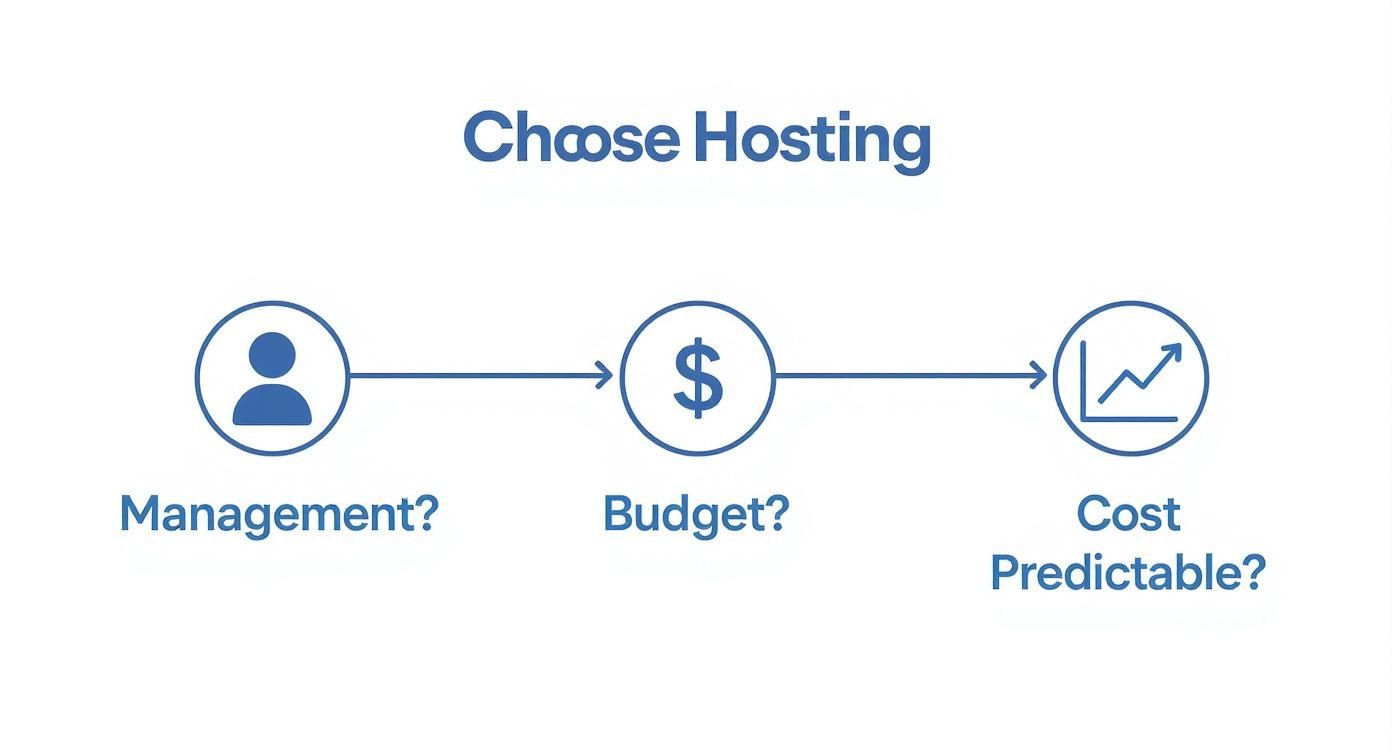
As shown, the choice is frequently guided by operational and financial constraints before a performance comparison is even necessary.
When to Deploy a Dedicated Server
A dedicated server is the appropriate choice when performance, security, and control are non-negotiable. The bare metal architecture provides raw, uncontended resources and complete isolation for the most demanding workloads.
Consider a dedicated server for these scenarios:
- High-Traffic E-commerce Platforms: When revenue is directly correlated with page load times and database query speed, a dedicated server’s guaranteed I/O and CPU resources are essential for maintaining performance during peak traffic events.
- Large-Scale Private Clouds: When architecting a private cloud using virtualization platforms like Proxmox VE, from top hosting companies like Atlantic.Net a dedicated server is the only viable foundation. It provides the necessary hardware resources to provision and manage numerous high-performance VMs without contending with a provider’s hypervisor.
- Strict Compliance and Data Sovereignty: For applications handling sensitive data under regulations such as HIPAA or PCI-DSS, the physical isolation of a dedicated server simplifies security audits and eliminates the risks inherent in a shared hardware environment.
Ideal Scenarios for KVM VPS Hosting
A KVM VPS offers a powerful combination of performance and agility, making it the workhorse for a vast array of modern applications. It provides a balance between affordability and performance that is difficult to surpass.
VPS hosting is ideally suited for these use cases:
- Development and Staging Environments: A VPS can be provisioned in minutes, providing an isolated, low-cost sandbox for developers to test code without impacting production systems.
- Medium-Traffic Web Applications: For websites and applications that have outgrown shared hosting but do not yet require the full resources of a dedicated machine, a VPS is the logical and scalable next step.
- Containerized Workloads: Running applications with containerization technologies like Docker or Kubernetes on a VPS is a standard industry practice. It allows for efficient resource utilization and enables rapid scaling of container instances in response to demand.
A hybrid architecture is often the optimal solution. Utilize a powerful dedicated server to host a resource-intensive production database, ensuring consistent I/O performance. Concurrently, deploy a fleet of scalable VPS nodes to handle the variable traffic of the web front-end. This strategy creates a robust, flexible, and cost-effective infrastructure tailored precisely to your workload’s demands.
Common Questions, Answered
Let’s address some common technical questions that arise when evaluating a dedicated server against a VPS. Clarifying these points is crucial for making an informed decision.
Can I Run My Own Hypervisor Like Proxmox VE on a VPS?
In virtually all cases, the answer is no. Attempting to run a hypervisor within another hypervisor—a configuration known as nested virtualization—is technically complex, introduces significant performance overhead, and is typically disabled by hosting providers for stability and security reasons. A VPS is, by definition, a virtual machine operating on the provider’s hypervisor (e.g., KVM).
If your objective is to build and manage your own fleet of virtual machines with full control over the virtualization layer, a dedicated bare metal server is the required solution. It provides the direct hardware access necessary to install Proxmox VE and construct a private cloud tailored to your exact specifications.
When Does a Dedicated Server Become More Cost-Effective?
The financial tipping point is reached when resource requirements stabilize and performance becomes a critical, non-negotiable factor. A dedicated server offers superior long-term value once you are consistently maximizing the resources of a high-tier VPS, experiencing performance degradation due to I/O contention, or incurring frequent costs for on-demand resource scaling.
Analyze this from a Total Cost of Ownership (TCO) perspective. Sum the monthly cost of your largest VPS plan and quantify the business cost of any performance issues or downtime. When this total approaches the price of an entry-level dedicated server, it is time to migrate. A dedicated server provides a stable, guaranteed performance baseline that no shared environment can consistently match.
What’s the Migration Process from a VPS to a Dedicated Server Like?
A successful migration from a VPS to a dedicated server follows a structured, multi-step process designed to minimize downtime and ensure data integrity.
Here is a standard migration plan:
- Provision and Secure: The new dedicated server is provisioned and the operating system is installed. The first step is to perform initial security hardening, including firewall configuration and user access control.
- Transfer Data: Application files, databases, and other critical data are transferred.
rsyncis an efficient tool for synchronizing file systems, while databases should be migrated using their native dump and restore utilities (e.g.,mysqldump). - Update DNS: The final step is to update the DNS A records for your domain to point to the new server’s IP address. To minimize downtime, perform a final data synchronization immediately before making the DNS change.
At ARPHost, LLC, our expert team executes these migrations regularly. We can manage the entire transition process, ensuring a professional and seamless move to a high-performance dedicated server. Explore our scalable infrastructure solutions at https://arphost.com.