

A lot of IT teams arrive at the same point the same way. The VPS that worked fine a year ago now feels tight under normal load, or the public cloud invoice keeps changing for reasons nobody on the finance side likes. Performance drops during traffic spikes, storage IOPS become the quiet bottleneck, and every attempt to “right-size” the environment turns into another tuning exercise.
That’s when dedicated server hosting cost stops being a simple line-item question and becomes an infrastructure decision. The sticker price matters, but it’s rarely the full picture. What matters is whether the platform gives you stable performance, predictable monthly spend, and enough control to stop fighting the environment.
Is Your Hosting Holding You Back?
Organizations don't typically move to dedicated servers because they’re nostalgic for physical hardware. They move because a virtualized environment stops behaving like a good bargain. The usual signs are familiar: noisy-neighbor symptoms on a VPS, escalating cloud bills tied to storage and bandwidth, or an application stack that needs consistent CPU and disk performance instead of “best effort” allocation.
That shift is showing up in the market. A 2025 Liquid Web dedicated server study found that 55% of IT professionals chose dedicated over cloud for full customization, 34% of organizations increased dedicated spending in 2024, and 47% faced unexpected cloud costs. Those three numbers explain the current mood well. Teams still want flexibility, but they’re less willing to pay for unpredictability.
A dedicated server is often the practical answer when workload behavior is already known. If you run a steady application, database, eCommerce stack, or internal platform, dedicated hosting replaces variable billing and shared-resource contention with something easier to plan around.
Dedicated servers aren’t a step backward. They’re often the point where infrastructure becomes easier to operate because fewer layers are making decisions for you.
If your team is weighing the trade-offs now, it helps to start with a clear definition of what dedicated server hosting is. Once that baseline is clear, the cost discussion gets more useful. You stop asking only “what’s the monthly fee?” and start asking “what am I buying in performance headroom, isolation, and operational simplicity?”
Deconstructing the Price Tag Core Hardware Costs
The base price of a dedicated server comes from hardware. That sounds obvious, but many buying mistakes happen because teams treat the server as a generic box instead of a combination of compute, memory, and storage decisions. Each one affects both monthly cost and workload behavior.

CPU is your concurrency budget
CPU selection is usually the first major pricing lever. More cores, newer architectures, and higher sustained clock speeds all raise the monthly bill, but they do so for a reason. Application servers, database engines, build systems, and virtualization hosts all consume CPU differently.
For web and app workloads, the question isn’t just raw core count. It’s whether the application benefits more from strong single-thread performance, broader parallelism, or both. A WooCommerce store under search and checkout load behaves differently than a CI runner or a virtualization host with multiple guest machines.
The available market tiers reflect that split, mid-tier servers with 12-32 cores and NVMe SSDs cost $150-$350/month, and NVMe throughput can reach up to 7GB/s while reducing latency by 50-70% over SATA SSDs for latency-sensitive applications like eCommerce or SaaS backends.
RAM decides whether the system breathes or thrashes
Memory shortages create some of the ugliest performance problems because they don’t always look dramatic at first. The server still responds. It just starts swapping, queueing work, or forcing the database to read hot data back from disk more often than it should.
For a simple website stack, moderate RAM may be enough. For MySQL, PostgreSQL, Redis, Elasticsearch, container hosts, or Proxmox nodes, RAM quickly becomes one of the primary cost drivers. Virtualization-heavy environments feel this the most because memory oversubscription sounds efficient right up until host contention shows up.
One useful way to view this is:
- Light web hosting fits lower memory footprints if the stack is simple and caching is effective.
- Database-backed applications need enough RAM to keep active datasets and query structures in memory.
- Virtualization hosts need room not only for each guest, but also for the hypervisor, host filesystem cache, and burst capacity.
- Growth planning matters. Buying exactly for today usually forces an early migration.
When teams want to understand storage and hardware layouts more concretely, even something as simple as the physical form factor matters. A server built around dense local disks and fast flash behaves differently from one tuned for lower-cost capacity. This becomes clearer when you look at rack hard drive options and server storage layouts.
Storage is often the hidden performance tier
Storage choice has an outsized effect on dedicated server hosting cost because it changes how quickly the whole stack can move. Cheap storage can look acceptable in a product listing and still become the reason your application feels slow under load.
Here’s the practical breakdown:
| Storage type | Best fit | Trade-off |
|---|---|---|
| HDD | Backups, archives, low-I/O workloads | Lowest performance |
| SATA SSD | General hosting, lighter databases, balanced cost | Good, but not ideal for high write intensity |
| NVMe SSD | eCommerce, SaaS, virtualization, active databases | Higher monthly cost, much better latency |
For stores, APIs, and busy admin systems, NVMe is usually worth paying for. Product search, cart updates, session writes, and database commits all benefit from lower latency and higher IOPS. On a virtualization host, NVMe also prevents one guest’s disk activity from degrading every other guest on the node.
A quick hardware overview is useful before comparing vendors in detail:
Match hardware to the workload, not to a marketing tier
The cleanest buying process starts with the application profile.
- List the dominant load type. Web requests, database activity, file serving, virtualization, or build jobs.
- Find the pressure point. CPU saturation, memory pressure, storage latency, or network throughput.
- Buy for sustained use, not peak panic. If the workload is consistently busy, dedicated hardware pays off faster.
- Leave room for growth. A server that runs hot on day one becomes an expensive migration project later.
Practical rule: If you can already identify which resource is constraining the workload, you’re ready to size dedicated hardware intelligently.
Beyond the Box Uncovering Additional Cost Drivers
Most cost comparisons go wrong because they stop at CPU, RAM, and storage. The monthly bill for a dedicated server also reflects the network, software stack, and the operating environment wrapped around the hardware. Those line items are where cheap-looking plans often turn into frustrating ones.
Network quality affects both cost and user experience
A dedicated server isn’t useful if the network around it is weak. Port speed, traffic allowance, routing quality, and DDoS protection all impact the effective value of the platform. These aren’t “extras” for production workloads. They’re the difference between a server that performs well on paper and one that holds up during actual business use.

When evaluating plans, watch for these items:
- Bandwidth policy. Unmetered traffic is easier to budget than metered transfer when your traffic profile is steady.
- Port speed. A server with strong local storage can still feel constrained if the network uplink is narrow.
- DDoS handling. Included mitigation matters for public-facing services, especially stores and SaaS platforms.
- Carrier quality. Low-latency transit and decent routing often matter more than a flashy hardware spec.
A lot of teams learn this the hard way. They buy the cheapest dedicated node available, then discover that support, routing consistency, and traffic policy are significant bottlenecks.
Licensing can change the economics fast
Software licensing is one of the most overlooked parts of dedicated server hosting cost. Linux itself may be straightforward, but production stacks often include control panels, backup tooling, security software, and commercial operating systems.
The biggest example right now is control panel pricing., cPanel’s January 1, 2026 price hikes set the Premier tier at $69.99/month, and server DRAM prices are forecasted to rise 55-60% in Q1 2026. That matters for two reasons. First, software can become a material share of the monthly bill. Second, memory-heavy environments will likely become more expensive to build or upgrade.
The hardware price is only half the conversation if your stack depends on commercial tooling.
If you host many websites, mailboxes, or customer accounts on one box, panel licensing can move from “minor add-on” to “budget issue” quickly. For that reason, some teams reduce panel sprawl, move some services into separate roles, or choose a different control approach entirely.
Power and cooling are usually embedded, not itemized
When you lease a dedicated server, you’re typically buying more than components. You’re buying rack space, power delivery, cooling, upstream connectivity, and on-site physical handling as a bundled operational expense. That’s a major advantage over self-managed colocated gear if your goal is predictable spend.
This is also why dedicated leasing is often easier for finance to approve than assembling equivalent infrastructure from parts and hosting it yourself. The monthly invoice may look higher than a bare hardware amortization model, but it removes several operational variables.
A sensible budgeting checklist looks like this:
| Cost area | What to verify |
|---|---|
| Network | Traffic policy, port speed, DDoS inclusion |
| Software | Panel licenses, OS fees, backup tooling, security stack |
| Environment | Whether power, cooling, and remote hands are bundled |
| Growth impact | How memory and licensing changes affect future spend |
The bottom line is simple. Don’t compare dedicated plans only by CPU model and RAM count. Compare the whole platform. A slightly higher monthly fee can still be the cheaper option if it includes the network quality, protection, and licensing posture your workload needs.
Managed vs Unmanaged A Critical Cost Decision
The biggest pricing mistake I see in dedicated server planning isn’t hardware selection. It’s assuming unmanaged infrastructure is automatically cheaper. On paper, it usually is. In practice, that depends on whether your team has the time and depth to run the server properly.
Unmanaged is cheaper only if your team has spare capacity
An unmanaged dedicated server gives you the raw platform. You get the hardware, network access, and operating system baseline. Everything after that belongs to your team. That includes system updates, firewalling, service hardening, backups, monitoring, incident response, and recovery when something breaks at the wrong time.
That model works well when you already have strong Linux or Windows administration in-house and the server supports a platform your team thoroughly understands. It also works for labs, temporary environments, and internal systems where the cost of delay is low.
It works poorly when:
- Nobody owns patching and updates happen only when a vulnerability becomes urgent.
- Backups exist but aren’t tested for actual restore workflow.
- Monitoring is shallow and alerts don’t point to root cause.
- One admin knows the whole box and everyone else depends on that person’s availability.
The true cost of unmanaged hosting is staff time. It pulls senior engineers into maintenance work that often isn’t strategic. For small IT teams, that trade-off becomes expensive fast.
Managed hosting changes the TCO calculation
Managed service cost should be evaluated the same way finance evaluates other staffing trade-offs. It isn’t about infrastructure specifically, but the logic transfers well. You’re not only buying labor. You’re buying coverage, process, and the ability to avoid hiring or overloading for every specialist task.
In dedicated hosting, “managed” should mean more than reboot help. A meaningful managed layer usually includes:
- Proactive monitoring of server health, service behavior, and resource contention.
- Patch management for the operating system and critical packages.
- Security hardening with firewall review, malware scanning, and exposure reduction.
- Backup oversight so retention and restore paths are configured and checked.
- Operational support when a kernel update, filesystem issue, or application fault needs a real person.
Operational view: Managed service is less about convenience and more about reducing the number of failure modes your internal team has to carry alone.
A provider offering fully managed dedicated server hosting is usually a better fit when the server runs a revenue-bearing application, client workloads, or infrastructure that can’t sit unattended waiting for business hours.
What works and what doesn’t
The decision gets easier when you frame it by business impact rather than ideology.
| Scenario | Unmanaged fit | Managed fit |
|---|---|---|
| Dev sandbox | Strong | Limited need |
| Internal test server | Strong if team has depth | Useful if staff is thin |
| Production eCommerce | Risky unless ops is mature | Strong |
| Multi-site hosting node | Risky without disciplined maintenance | Strong |
| Private virtualization host | Good for experienced infra teams | Strong if uptime burden is high |
Here’s the practical version.
Choose unmanaged when your team has established runbooks, proper monitoring, tested backups, and someone accountable for platform hygiene. Choose managed when the internal team is already busy, the workload is customer-facing, or the business wants infrastructure to behave like a service rather than an ongoing engineering side job.
The hidden labor cost is usually the deciding factor
An unmanaged server can look lean in a quote. But if your senior admin spends recurring hours on patch windows, service tuning, backup repair, panel troubleshooting, and after-hours incidents, the “savings” shrink. They may disappear entirely.
That’s why TCO matters more than invoice price. A server isn’t cheap if it consumes scarce engineering time, increases outage risk, and creates a single point of operational dependency. Managed hosting turns some of that variable labor into a known monthly cost, which is often the more efficient decision for production infrastructure.
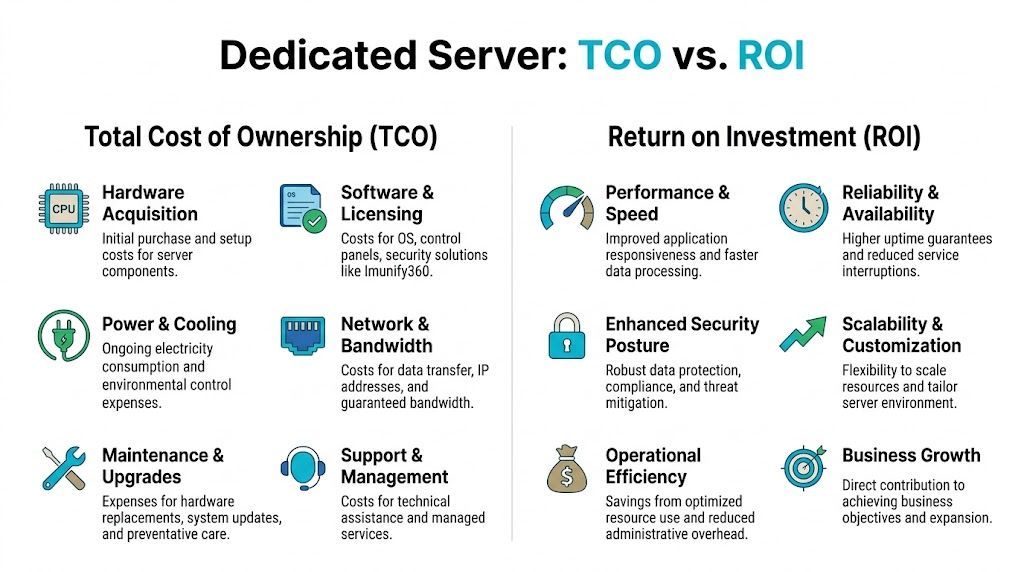
Calculating Your Dedicated Server TCO and ROI
TCO is where the dedicated hosting argument gets concrete. If you only compare monthly sticker prices, cloud and VPS options can look more attractive than they really are. Once you compare equivalent capacity, storage, and network behavior over time, the picture changes.
Start with the monthly cost model
The cleanest benchmark in the available data comes from Atlantic.Net. Their dedicated server TCO guide states that dedicated servers can be 3-5x cheaper than equivalent cloud VMs for steady workloads, and gives a direct example where a $99.99/month server equates to an AWS setup costing over $630/month once compute, storage, and bandwidth egress are counted.
That gap doesn’t happen because cloud is “bad.” It happens because metered pricing is excellent for bursty or temporary use and much less attractive for stable, always-on demand. If your workload runs continuously, you keep paying retail for abstraction layers you may not need.
A practical twelve-month comparison
The easiest way to evaluate ROI is to compare categories, not just totals. That makes it easier to explain the decision internally.
| Cost Component | ARPHost Bare Metal Server | Equivalent AWS EC2 Instance |
|---|---|---|
| Compute | Fixed monthly server lease | Metered instance pricing |
| Storage | Typically bundled with server configuration | Separate storage charges |
| Bandwidth | Usually more predictable under hosting plans | Egress billed separately |
| Performance isolation | Dedicated hardware resources | Shared underlying cloud infrastructure model |
| Support model | Depends on managed or unmanaged selection | Depends on service tier and internal staffing |
| 12-Month estimate | Predictable, easier to budget | More variable as usage shifts |
That table leaves out one important point on purpose. Finance teams often focus on direct cost first, but operations teams live with indirect cost. Those indirect costs are where ROI becomes obvious.
ROI comes from workload behavior, not from marketing
A dedicated server produces return when the workload benefits from consistency.
Examples include:
- eCommerce platforms where checkout, search, and session storage suffer when disk latency spikes.
- Databases that need predictable memory and local storage behavior.
- Build and deployment systems where steady CPU access reduces queueing.
- Virtualization hosts where full control over storage and memory planning prevents noisy-neighbor effects inside your own stack.
A cloud VM may still be the right answer for a short-term test environment. It’s often the wrong answer for a production service with stable utilization and known throughput requirements.
If the workload is permanent, the server should be priced like infrastructure, not like temporary capacity.
Use a simple decision test
When building the business case, ask four questions in order.
- Is the workload steady? Stable demand strongly favors dedicated economics.
- Does performance variance hurt the business? If latency affects revenue or staff productivity, consistency has real value.
- Are bandwidth and storage meaningful cost factors? They often tilt the comparison away from cloud.
- Will root control or hardware customization save admin time? For many teams, yes.
This is also where a dedicated private cloud can outperform both a single VPS and a sprawl of cloud instances. If your team needs multiple isolated environments, internal labs, or migration space, full control at the hardware layer simplifies planning and cuts recurring overhead.
ROI includes fewer surprises
A good ROI model isn’t only “we spend less.” It’s also “we stop absorbing random operating penalties.” Predictable invoices, stable disk performance, fixed capacity planning, and simpler troubleshooting all have financial value even when they don’t appear as separate budget lines.
That’s why dedicated infrastructure often wins for known production workloads. The direct bill is clearer, the operating model is simpler, and the environment behaves more like an asset than a consumption stream.
Choosing Your Server Actionable Recommendations
Not every team should buy the same dedicated server. The right fit depends on where your current environment is failing and what kind of control you need next.

For SMBs running websites email and line-of-business apps
If you’re moving up from shared hosting or a constrained VPS, don’t overcomplicate the upgrade. Start by separating critical services from the limits of multi-tenant hosting. A dedicated server makes sense when the website stack, database, and email or business applications need predictable resource access.
What usually works:
- A single dedicated server for the production website and database when traffic and application weight have outgrown VPS comfort.
- Secure web hosting bundles when the primary need is hardened website and email hosting without managing the full stack manually.
- Managed support if your internal team handles users and applications but not deep server administration.
What usually doesn’t work is trying to squeeze another year out of an overloaded VPS while adding plugins, background jobs, and larger datasets. That path tends to cost more in support time than a clean move to dedicated infrastructure.
For developers and DevOps teams building real environments
Developers rarely need dedicated hardware for a single toy app. They do need it when the environment starts to look like a platform. CI runners, staging systems, multiple containers, nested virtualization, private registries, and test databases all benefit from stable local resources and full root access.
A practical approach is to choose a bare metal system when you need:
- repeatable build performance
- isolated test environments
- direct control of storage layout
- the option to run KVM, LXC, or a private virtualization stack
For teams that want one provider covering multiple stages, ARPHost, LLC offers VPS hosting, secure VPS and web hosting bundles, Proxmox private clouds, and fully managed IT services. That mix is useful when you need to start small, move selected workloads to bare metal, or build a dedicated Proxmox environment without splitting support across multiple vendors.
Buy a single dedicated node when one application needs isolation. Buy a private cloud when the team needs an internal platform.
For enterprises and MSPs standardizing infrastructure
Larger environments should choose dedicated platforms based on operating model, not just raw server specs. If you’re consolidating workloads, migrating from VMware, or building a private virtualization environment, the hardware decision needs to align with network design, backup strategy, and management coverage.
Use this decision lens:
| Team type | Better starting point | Reason |
|---|---|---|
| SMB | Bare metal server or secure hosting bundle | Cleaner jump from shared or VPS |
| DevOps | Bare metal or Proxmox private cloud | Root control and reproducible environments |
| Enterprise | Managed dedicated fleet or private cloud | Governance, migrations, operational consistency |
| MSP | Dedicated nodes with managed overlays | Predictable hosting base for client workloads |
A few practical next steps help avoid buying the wrong thing:
- Audit your current constraint. CPU, RAM, storage, support burden, or billing volatility.
- Map that constraint to a hosting model. VPS, dedicated node, private cloud, or managed platform.
- Decide who operates the stack. Internal team, provider, or a shared responsibility model.
- Plan the migration path. Especially if the server will become the new production anchor.
If you need virtualization, clustering, or migration support, look at a provider that can support those transitions cleanly instead of forcing a rebuild later.
Invest in Predictable Performance and Cost
The important question isn’t whether a dedicated server costs more than a low-end VPS. It usually does. The useful question is whether that higher monthly fee buys lower operational friction, better workload stability, and a more believable long-term budget. For production systems with steady demand, the answer is often yes.
That’s why dedicated server hosting cost should be judged through TCO and ROI, not just entry price. Hardware matters. Network quality matters. Licensing matters. Management coverage matters. Once those pieces are included, dedicated hosting often becomes the simpler and more economical platform for serious workloads.
If your team is spending too much time tuning around shared-resource limits or explaining variable cloud invoices, it may be time to move the conversation from “how cheap can we host this?” to “what infrastructure lets us run this properly?”
If you’re evaluating dedicated infrastructure, ARPHost, LLC can help you compare bare metal, managed hosting, Proxmox private cloud options, and migration paths based on your actual workload and operating model.
