

Picture your dedicated server as the heart of your operation—a central hub where all your critical data and applications live. Now, imagine a Distributed Denial-of-Service (DDoS) attack as a sudden, massive gridlock, deliberately engineered to clog every digital artery and bring your business to a grinding halt. This isn't just a traffic jam; it's a calculated assault meant to overwhelm your server completely.
For any business running on bare metal servers, the stakes are enormous. The raw power, dedicated resources, and direct connection that make dedicated hosting so appealing also turn it into a prime target. Every second of downtime means lost sales, frustrated users, and a hit to your brand's credibility.
Why Your Server Is a Target
Here’s the thing: no business is too small to be a target anymore. In fact, attackers are increasingly setting their sights on small and medium-sized businesses, assuming they have weaker defenses. These attacks are far more than a simple annoyance; they represent a direct threat to your ability to operate. This makes solid dedicated server DDoS protection a fundamental necessity, not an optional feature.
A truly effective defense isn't about buying a single piece of software. It’s about building a comprehensive strategy that weaves together proactive monitoring, smart filtering, and a network built for resilience. This is the core principle behind ARPHost’s managed security approach, ensuring our fully managed IT services protect your infrastructure from every angle.
Historically, SMBs were often overlooked, but that's changed dramatically. The recent spike in attacks targeting smaller companies has pushed the industry to develop powerful, yet affordable, protection. You can dive deeper into this trend by exploring the full research on the DDoS protection market from Grand View Research.
This is exactly why we designed flexible solutions like ARPHost's VPS hosting and managed bare metal servers. They deliver enterprise-grade security that fits a real-world budget, giving you the protection you need to grow without fear.
Ready to build a more resilient foundation for your business? Explore ARPHost's high-performance bare metal servers and secure your infrastructure today.
The Anatomy of a DDoS Attack
To build effective dedicated server DDoS protection, you have to know your enemy. A DDoS attack isn't just one thing; it's a whole family of assaults designed to knock your server offline by drowning it in junk traffic. The attacks are usually grouped by which layer of the Open Systems Interconnection (OSI) model they hit.
Think of the OSI model like the different floors of an office building, where each floor has a specific job. An attacker could target the main entrance (Network Layer), jam the phone lines (Transport Layer), or overwhelm a specific department's front desk (Application Layer). Each one demands a completely different defensive playbook.
This diagram lays out the painful business consequences that ripple out from a successful DDoS attack.
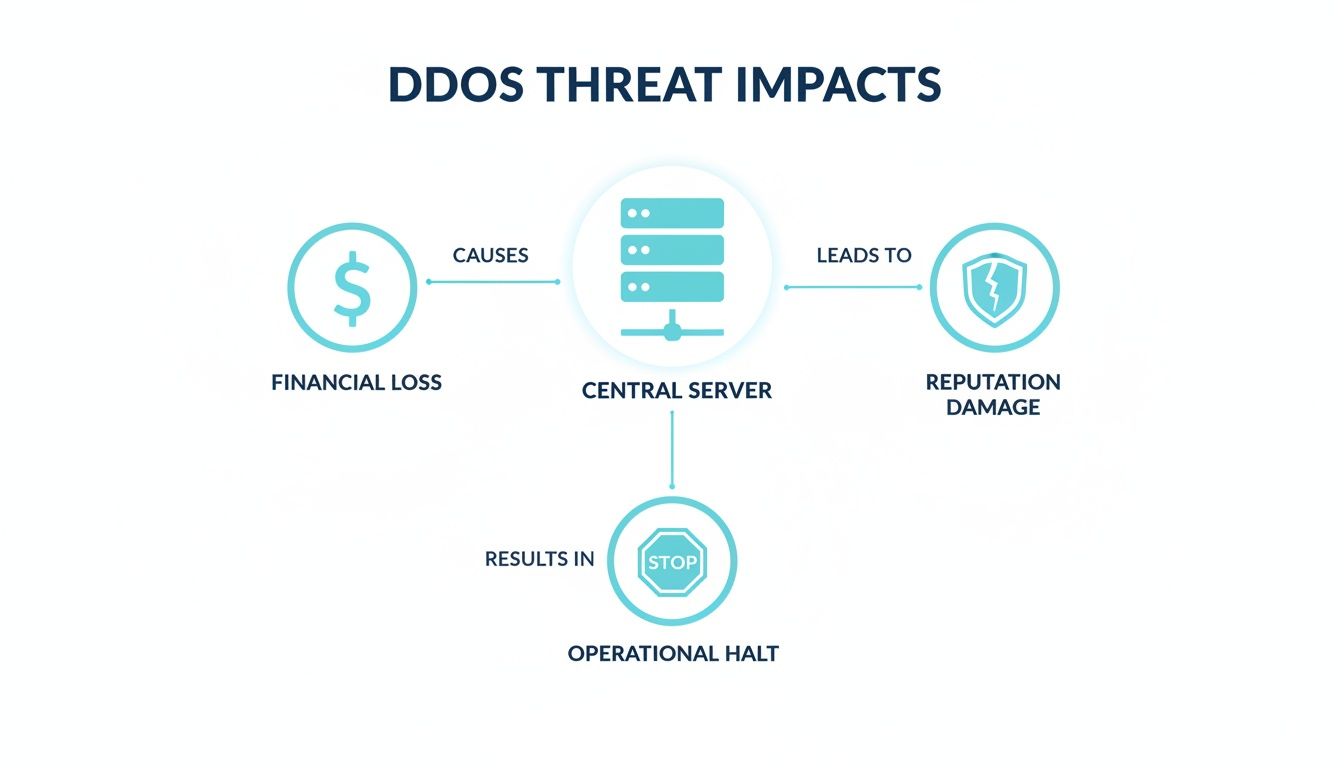
As you can see, it’s not just about downtime. The fallout includes real financial loss, operational chaos, and long-term damage to your brand’s reputation.
Layer 3: Brute-Force Volumetric Attacks
The most common and blunt-force type of DDoS is the volumetric attack, which goes after Layer 3 (the Network Layer). The goal is painfully simple: saturate your server's internet connection with such a massive flood of traffic that legitimate users can't get through. It’s like trying to walk into a stadium when a coordinated mob is blocking every single gate.
Common volumetric attacks include:
- UDP Floods: Attackers blast a huge number of User Datagram Protocol (UDP) packets at random ports on your server. Your machine checks each port, finds nothing listening, and sends back an "unreachable" message for every single one, burning through its resources in the process.
- ICMP Floods (Ping Floods): This is the classic "death by a thousand pings." The server gets overwhelmed with ICMP Echo Request packets and is forced to use its resources responding to each one, eventually grinding to a halt.
Because these attacks are all about sheer volume, your first line of defense is a network with enough capacity to absorb the flood. This is where the massive network infrastructure behind ARPHost's bare metal servers becomes absolutely essential.
Layer 4: Sneaky State-Exhaustion Attacks
Moving up the stack, Layer 4 (Transport Layer) attacks are a bit more clever. Instead of just flooding the pipes, these assaults aim to exhaust the resources of your networking gear itself, like your firewalls or load balancers.
Imagine a call center getting thousands of prank calls at once. The operators are forced to answer every single one, tying up all the phone lines and preventing actual customers from getting through. That's exactly how a state-exhaustion attack works.
The most infamous example is the SYN Flood. It exploits the three-way handshake used to establish a normal TCP connection. The attacker sends a storm of SYN requests (step one) but never bothers to complete the handshake. Your server is left holding thousands of half-open connections, waiting for a response that never arrives, until it runs out of connections and can't accept any new, legitimate ones.
To give you a clearer picture, here’s how these different attack vectors map to the OSI model.
Common DDoS Attack Vectors by OSI Layer
This table summarizes the attack types we've discussed, showing their targets and the damage they cause, helping you quickly identify where your vulnerabilities might be.
| OSI Layer | Attack Type | Target | Impact |
|---|---|---|---|
| Layer 7 | HTTP Flood, Slowloris | Web servers, application resources | Exhausts CPU, memory; mimics real user traffic |
| Layer 4 | SYN Flood, UDP Flood | Firewalls, load balancers, TCP stack | Consumes connection tables, exhausts network gear |
| Layer 3 | ICMP Flood, IP Fragmentation | Network bandwidth, routers | Saturates the internet pipe, causes network congestion |
Understanding this breakdown is key, as you can see that a firewall alone won't stop an application-layer attack, and an application-level fix can't absorb a massive volumetric flood.
Layer 7: Intelligent Application-Layer Attacks
Finally, we get to Layer 7 attacks, which are the toughest to spot because they often look just like legitimate user traffic. They target specific applications or services on your server—like your website's login page, search feature, or API endpoints. These "low-and-slow" attacks use far less bandwidth but can be just as destructive.
Here are a couple of common Layer 7 attack methods:
- HTTP Floods: Attackers unleash a high volume of seemingly normal HTTP GET or POST requests. Since these requests look real, they often bypass simple network filters. They force your server to run complex scripts or heavy database queries, eventually maxing out its CPU and memory.
- Slowloris: This is a stealthy one. The attacker opens many connections to your web server and keeps them open as long as possible by sending partial requests very, very slowly. This gradually ties up all available connection slots, effectively locking the door on legitimate users.
Fighting off these sophisticated threats requires intelligent, application-aware security. Solutions like ARPHost's Secure Web Hosting Bundles, which come armed with tools like Imunify360, are built specifically to identify and shut down this kind of malicious traffic before it ever impacts your services.
Choosing the Right DDoS Mitigation Strategy
Not all dedicated server DDoS protection is created equal. Once you've got a handle on the different attack types, the next critical step is picking a defense model that actually fits your technical needs, budget, and risk tolerance. Getting this right often comes down to balancing speed, scale, and cost.
Generally, you’ll find three main flavors of DDoS mitigation: on-premise hardware, cloud-based scrubbing services, and a hybrid model that aims to give you the best of both. Each has its own strengths and is built for different kinds of threats and business sizes.
On-Premise Hardware Protection
An on-premise (or on-box) solution means you have a physical or virtual appliance sitting right inside your network, usually just in front of your dedicated server. Think of it as stationing a dedicated security guard at your server rack who inspects every single packet before it gets through.
- Pros: This approach gives you the absolute lowest latency for mitigation. Since the appliance is on your local network, it can spot and drop bad traffic almost instantly. This makes it incredibly effective against those smaller, sneakier attacks—like state-exhaustion and application-layer threats—that might otherwise fly under the radar of bigger, upstream filters.
- Cons: The biggest drawback here is capacity. Your on-premise hardware is limited by the size of your own internet pipe. A massive volumetric attack designed to clog that pipe will simply overwhelm the appliance, making it useless. Plus, these solutions require a hefty upfront investment and someone to manage them.
This strategy is a great fit for organizations that can't afford any latency and need to fend off sophisticated, low-bandwidth attacks but aren't as worried about getting hit with a gigantic flood of traffic.
Cloud-Based Scrubbing Services
Cloud-based DDoS protection plays in a completely different league. When an attack is detected, all of your server’s traffic is rerouted through the provider's massive global network of high-capacity data centers, often called "scrubbing centers." These facilities use specialized gear to filter out the malicious traffic and send only the clean, legitimate stuff back to your server.
It's like diverting a hopelessly gridlocked highway through a massive, multi-lane checkpoint system that expertly separates legitimate cars from the troublemakers, sending only the good traffic on its way.
- Pros: The main advantage is sheer, brute-force scale. These services can soak up enormous volumetric attacks, often measured in Terabits per second (Tbps), that would obliterate any on-premise setup in a heartbeat. There's no hardware to buy, and it's all managed by the provider.
- Cons: The trade-off can be latency. Bouncing all your traffic out to a scrubbing center and back can add a slight delay, which might be a deal-breaker for highly sensitive applications like online gaming or high-frequency financial trading.
The Hybrid Model: The Gold Standard
For many, the hybrid model is the perfect compromise, offering a powerful "best of both worlds" strategy. It combines an on-premise appliance for instant, low-latency protection against smaller attacks with a cloud-based scrubbing service that kicks in on-demand to handle huge volumetric floods.
The on-premise gear deals with the everyday nuisance attacks quickly and quietly. But when it detects a tidal wave of traffic that it can't handle, it automatically signals the cloud provider to start rerouting and scrubbing. This tiered defense gives you both speed and scale.
The market is clearly moving in this direction. The global DDoS protection market is exploding, growing from approximately USD 4.73 billion in 2025 to a projected USD 5.38 billion by 2026. While cloud solutions hold the biggest piece of the pie right now, hybrid models are the fastest-growing segment, with a projected CAGR of 15.25%. This rapid adoption shows just how much businesses value a defense that blends immediate detection with massive scrubbing power. You can dive deeper into these market trends and projections from Mordor Intelligence.
Why ARPHost Excels Here
At ARPHost, we've built our network and managed services around this powerful hybrid philosophy. Our core infrastructure is engineered to absorb common network-layer attacks right at the edge, giving all our clients an immediate first line of defense.
For customers on our bare metal servers or Dedicated Proxmox Private Clouds, our fully managed IT services take it a step further. Our expert team configures and monitors your environment to catch and stop sophisticated application-layer attacks, making sure your services stay online and running smoothly. This integrated strategy delivers the snappy response of an on-premise solution with the resilience of a large-scale network—giving you comprehensive protection that’s tailored to what you actually need.
How to Harden Your Dedicated Server Against Attacks
While sophisticated upstream mitigation is your heavy artillery, the first line of defense in your dedicated server DDoS protection strategy is always the server itself. Hardening your server is all about reducing its attack surface and beefing up its ability to shrug off certain attacks, especially those aimed at your applications and network stack. It’s a process of making deliberate configuration changes to turn your machine into a much tougher target.
Think of it like reinforcing the doors and windows of your house. You might have a great neighborhood watch (your upstream protection), but you still need to lock your own doors. These hands-on steps are fundamental to a layered security approach, making sure that even if some malicious traffic slips through, your server is ready for it.

Step 1: Configure Your Firewall for Rate Limiting
Your server’s firewall is one of the most powerful defensive tools you have built-in. When configured correctly, it can spot and drop malicious packets before they ever get a chance to bother your applications. For most Linux systems, Uncomplicated Firewall (UFW) provides a straightforward way to manage the underlying iptables rules.
One of the most effective tactics here is rate limiting. This technique caps the number of connection attempts an IP address can make in a certain amount of time. It’s a fantastic way to shut down brute-force login attempts and some types of application-layer floods.
For example, you can set a basic rate limit on your SSH port (port 22) with a simple UFW command:
# First, ensure UFW is installed and enabled
sudo apt-get install ufw
sudo ufw enable

# Allow SSH traffic but with a rate limit
sudo ufw limit ssh

# Check the status to confirm the rule is active
sudo ufw status
This tells UFW to block any single IP address that tries to make more than six connections in 30 seconds. While this won't stop a massive volumetric attack, it’s an essential step in hardening your server against the more common automated, low-and-slow attacks.
Step 2: Tune Kernel Parameters with Sysctl
When you're dealing with Layer 4 attacks like SYN floods, you can fight back by tuning your server's kernel parameters using sysctl. The kernel is the very core of your operating system, and tweaking its TCP/IP stack settings can make a huge difference in its resilience.
The idea is to increase the server's ability to handle connection requests while enabling defenses that recognize and discard malicious packets. It's like upgrading a call center's switchboard to handle a sudden flood of calls while automatically hanging up on known robocallers.
Key Insight: Kernel tuning is a proactive measure that hardens the very foundation of your server's network stack. It empowers the operating system to absorb the initial shock of a state-exhaustion attack, buying valuable time for upstream mitigation to kick in.
Here are a few essential sysctl settings you'll want to apply. Add these lines to your /etc/sysctl.conf file to make them stick after a reboot:
# Enable SYN Cookies: a primary defense against SYN floods
net.ipv4.tcp_syncookies = 1

# Increase the SYN Backlog queue size
net.ipv4.tcp_max_syn_backlog = 2048

# Reduce the number of SYN-ACK retries
net.ipv4.tcp_synack_retries = 1
Once you've added these to sysctl.conf, run sudo sysctl -p to apply them immediately. These tweaks are crucial for any production bare metal server. For a deeper dive into locking down your machine, you can learn more about how to secure a web server in our comprehensive guide.
Scaling This with ARPHost
Manually hardening a server isn't a one-and-done task; it requires constant vigilance. Firewall rules need to be reviewed, kernel parameters might need adjustments as new threats emerge, and you have to keep an eye on any non-essential services. This is exactly where managed services shine.
With ARPHost's fully managed IT services, our expert engineers take care of all these hardening tasks for you. We roll out industry best practices for firewall configuration, kernel tuning, and attack surface reduction as a standard part of our server provisioning and ongoing management. This makes sure your dedicated server DDoS protection is solid from day one, so you can focus on your business while we keep your infrastructure secure 24/7.
Advanced Monitoring and Incident Response Planning
Solid dedicated server DDoS protection is about more than just soaking up a flood of bad traffic; it’s about seeing the storm coming. A proactive defense starts with robust monitoring to figure out what "normal" looks like for your server. Without that baseline, you’re flying blind—unable to tell the difference between a sudden surge of legitimate customers and the first wave of an attack.
This means keeping a close eye on key metrics like CPU load, network I/O, and the number of active connections on your bare metal server. Tools like Netdata and Zabbix are fantastic for this, giving you a real-time pulse on your server's health. Once you know your baseline, you can set up smart alerts that fire the second those metrics go haywire.

A good dashboard visualizes everything from CPU spikes to network traffic, letting you instantly spot the weird patterns that scream "DDoS."
Creating a Foundational Incident Response Plan
When an attack hits, panic is your worst enemy. A clear, straightforward incident response (IR) plan is what keeps your team moving decisively instead of scrambling. It doesn't need to be a hundred-page novel; it just needs to answer the big questions before you're in the thick of it.
Your IR plan should be a simple, actionable playbook covering three core areas:
- Contact Chain: Who gets the first call? Who else needs to be looped in, and in what order? This list should include key internal team members, your hosting provider's support desk, and any third-party security services you use.
- Analysis Protocol: What are the first diagnostic steps? This usually means diving into logs (firewall, web server, etc.) to figure out the attack vector—like the source IPs or the specific application port being hammered.
- Escalation Triggers: When do you call for backup? Define clear thresholds that trigger an immediate call to your upstream provider for mitigation. For instance, you might escalate when network saturation blows past 80% or when critical services stop responding.
Building a solid defense is a continuous process. These plans are often sharpened and validated through regular reviews, a topic covered well in a complete guide to security audit in network security.
Log Analysis and Identifying Attack Vectors
During an assault, your server logs become your most valuable intelligence source. They hold the digital fingerprints of the attack, helping you quickly understand its nature and origin. Knowing what to look for is half the battle.
- Web Server Logs (Apache/Nginx): A sudden explosion of requests from just a few IP addresses all hitting the same URL is a dead giveaway for an HTTP flood. Hunt for repetitive GET or POST requests hammering resource-heavy scripts or database queries.
- Firewall Logs (
/var/log/ufw.log): In a network or transport layer attack, these logs will be filled with dropped or blocked packets from specific IP ranges. You can use this data to create temporary block rules on the fly. - System Logs (
/var/log/syslogorjournalctl): Keep an eye out for unusual patterns here, like a massive spike insshdconnection attempts or system resource warnings, which can point to brute-force or state-exhaustion attacks.
Recognizing these patterns lets you tweak your on-box defenses quickly while feeding critical intel to your upstream mitigation provider. For a deeper dive, check out our guide on infrastructure monitoring best practices.
Why ARPHost Excels Here
This is where having a true partner really shines. With ARPHost's fully managed IT services, our expert team is your incident response plan. We handle the 24/7 proactive monitoring, establish performance baselines for your specific infrastructure, and watch for anomalies around the clock.
When we spot an attack, we don’t just send you an alert and wish you luck—we take immediate action. Our engineers jump in, analyze the traffic, pinpoint the vector, and apply the right mitigation tactics. We act as a dedicated extension of your team, so you can focus on your business. Whether you're on one of our Secure Web Hosting Bundles or a Dedicated Proxmox Private Cloud, you can sleep well knowing a team of security pros is always on guard.
How to Evaluate DDoS Protection Providers
Picking the right provider for your dedicated server DDoS protection is a huge decision, one that directly impacts whether your business stays online or goes dark during an attack. This isn't just about checking a box on a feature list; it’s about finding a true partner whose infrastructure and know-how match your specific risk profile. You need to dig deep to make sure the protection you're paying for is the protection you'll actually get when things go sideways.
The first step? Ignore the vague marketing fluff and demand hard numbers. You need to know their total mitigation capacity, not just in Terabits per second (Tbps) for handling those massive volumetric floods, but also in Millions of Packets per Second (Mpps). High Mpps capacity is absolutely critical for stopping the sneaky protocol and application-layer attacks that can knock a server offline without using a ton of bandwidth.
Scrutinizing the Service Level Agreement
The Service Level Agreement (SLA) is where the promises written on a website become legally binding commitments. A genuinely solid DDoS protection SLA will go way beyond a simple uptime guarantee.
You need to look for specifics, like:
- Time-to-Mitigate: How fast do they guarantee they’ll spot an attack and start fighting back? Every second counts.
- Quality of Mitigation: Does the SLA clearly define what level of latency or packet loss is acceptable during an attack? The best protection in the world is useless if it makes your service unusable for legitimate customers.
- Financial Penalties: What’s the consequence if they fail to meet their own guarantees? Clear-cut service credits or financial penalties show that a provider is willing to put their money where their mouth is.
Analyzing Pricing and Support Models
DDoS protection pricing is all over the map, so you have to understand the model before you sign. Some providers offer a predictable flat monthly fee, but others use a usage-based model that can stick you with a shocking bill after a big attack. Make sure you know exactly what’s included and what might trigger extra charges, especially for more complex application-layer attacks.
Just as important is the quality of their support team. When you're under fire, you need instant access to security experts—not a generic ticketing system and a canned response. Test their responsiveness. Ask about their team's real-world experience handling sophisticated, multi-vector attacks. This whole process has a lot in common with the bigger picture of vetting a hosting partner, which we cover in our guide on how to choose a web hosting provider.
Why ARPHost Excels Here
At ARPHost, we don't believe in ambiguity. Our multi-layered network defense is built from the ground up to handle both high-volume (Tbps) and high-packet-rate (Mpps) attacks right at our network edge. This isn't an add-on; it's foundational protection we include across all our services, from Secure Web Hosting Bundles to Dedicated Proxmox Private Clouds.
But what really makes us different is our 24/7 expert support. Our security and network teams become an extension of your own, ready for immediate incident response. When you need help, you get a real engineer who knows what they're doing—not someone reading from a script.
Common Questions Answered
When you're looking into DDoS protection for a dedicated server, a few key questions always come up. Here’s what IT managers and business owners typically ask.
Will DDoS Protection Slow My Server Down?
Properly implemented DDoS protection should be virtually invisible to your users. High-quality on-box and upstream filtering solutions are engineered for incredibly low latency, meaning they inspect traffic without causing any noticeable drag on your server's day-to-day performance.
Now, if you get hit with a massive attack, your provider might need to reroute traffic through a cloud scrubbing center. This can introduce a tiny bit of latency—we're talking milliseconds. But the trade-off is a no-brainer: a few extra milliseconds is infinitely better than your server getting knocked completely offline. A good provider will have their network routing optimized to keep this impact as minimal as possible.
What's the Real Difference Between Managed and Unmanaged Protection?
It all boils down to one thing: who's in the driver's seat.
- Unmanaged Protection: You're the one configuring the firewall, monitoring traffic, and responding when an attack hits. This can be a great fit if you already have a dedicated in-house security team with the expertise to handle threat analysis and incident response on the fly.
- Managed Protection: The provider’s team of security experts takes care of everything. They handle the proactive monitoring, detect incoming threats, and jump on mitigation the second it's needed.
For the vast majority of businesses, managed protection is the smarter choice. Think of it as having a 24/7 Security Operations Center on your side without the staggering overhead. It ensures your server is always defended by specialists who live and breathe this stuff.
How Much Is This Going to Cost Me?
The price tag on DDoS protection can vary quite a bit, depending on how much firepower you need. Basic, automated filtering right at the network edge is often included in a good hosting plan. But if you need more advanced protection—especially for sophisticated application-layer attacks or services that guarantee mitigation for huge volumes of traffic—you'll be looking at a premium service.
Pricing models aren't one-size-fits-all, either. Some providers charge a flat monthly fee for peace of mind, while others might bill you based on the size of the attack they had to fight off. It's absolutely critical to find a provider with transparent pricing so you don't get hit with a surprise bill after an incident.
At ARPHost, we don't just add on DDoS protection; we build it directly into the fabric of our network with multiple robust layers. For a completely hands-off security solution, check out our Fully Managed IT Services. Let our experts manage the defenses so you can stay focused on growing your business.