

A DDoS protection plan is a written loop for detecting abnormal traffic, mitigating it, escalating when local controls aren't enough, and recovering without leaving emergency rules in place. If connections surge, first count established sockets by local address with ss, then compare conntrack usage with its limit before raising any firewall setting.
If your site is timing out, SSH feels sticky, or nginx is returning 502s while bandwidth graphs look normal, start here:
ss -Htan state established | awk '{print $4}' | sort | uniq -c | sort -nr | head
sysctl net.netfilter.nf_conntrack_count net.netfilter.nf_conntrack_max
The first command helps show which local addresses are receiving established connections. The second reports current conntrack use and its configured maximum. A high connection count or nearly exhausted table is a reason to investigate, not proof by itself that the host is under attack.
A written plan says who detects the problem, what gets filtered, when to contact the upstream provider, and who can approve a rollback. That beats ad hoc firewall changes because a rushed, overly broad rule can block legitimate customers while leaving traffic that has already saturated an upstream link untouched.
The risk isn't limited to rare, enormous floods. NETSCOUT's historical series recorded an increase from about 325,000 attacks in the first quarter of 2013 to about 2.9 million in the first quarter of 2022, an 807% increase; it also reported nearly 13 million attacks during 2022 (NETSCOUT's DDoS threat intelligence report). In that report's four-year period, more than 4 million attacks lasted longer than one hour, and about one-quarter of those lasted longer than 12 hours. Multi-vector incidents made up more than 40% of attacks, combining techniques rather than testing only one defense.
In shared hosting, one noisy tenant or one expensive, uncached login path can look like a flood. Check the affected service and local connection state before applying a node-wide cap.
What to record during the first check
Save the command output with the incident time, affected service, and any provider alert. Don't raise connection or firewall limits just because the site is slow. Follow the runbook below to distinguish host pressure from traffic that must be filtered upstream.
Table of Contents
- What to record during the first check
- Attack Types That Exhaust Different Resources
- Detection Mitigation Escalation and Recovery
- Linux Checks for Surges and HTTP 429s
- Roles Contracts and Measurable Protection
- How to Test a DDoS Protection Plan
- Confirm the Plan Before the Next Surge
Attack Types That Exhaust Different Resources
Classify the traffic before choosing a control. A volumetric flood consumes transit bandwidth. Protocol abuse consumes network or transport-state capacity. Application-layer pressure consumes compute, workers, or connection pools, sometimes without filling the internet connection.
| Attack class | Resource exhausted | Typical signal | Plan control |
|---|---|---|---|
| Volumetric | Transit bandwidth | Inbound traffic overwhelms the available link | Upstream filtering or scrubbing before traffic reaches the origin |
| Protocol | Network-device capacity or connection state | Connection tables fill, or network services struggle to handle traffic | Protocol-aware filtering, rate controls, and capacity planning |
| Application layer | Application workers, compute, or connection pools | A login, API, or checkout slows while bandwidth remains available | Endpoint-aware rate limits, challenges, caching, and application monitoring |
The purchasing trap is to compare plans only by headline capacity. An attack above 10 Gbps represented only 2.9% of observed events in Corero reporting, while application-layer pressure can target APIs and gateways without saturating a link. That makes protection for login, DNS, checkout, and encrypted HTTPS traffic relevant even when the advertised bandwidth figure looks ample. The report is included in an industry analysis from A10 Networks.
Ask what the service inspects and protects: network and transport traffic, DNS, HTTP requests, APIs, origin IPs, and exposed management ports. Clarify whether HTTPS traffic can be analyzed, how long mitigation takes to activate, how false positives are handled, and whether customers can set rate limits. A plan that can absorb bandwidth but can't protect application workers may preserve the network while the site still fails.
More bandwidth isn't a fix for every resource problem. CISA recommends combining monitoring, filtering, rate controls, load balancing, patching, and a documented response plan, rather than relying on bandwidth alone (CISA's guidance on DDoS attacks). Compare provider coverage against your actual services and endpoints; ARPHost's network DDoS protection is one option to evaluate for that scope.
Detection Mitigation Escalation and Recovery
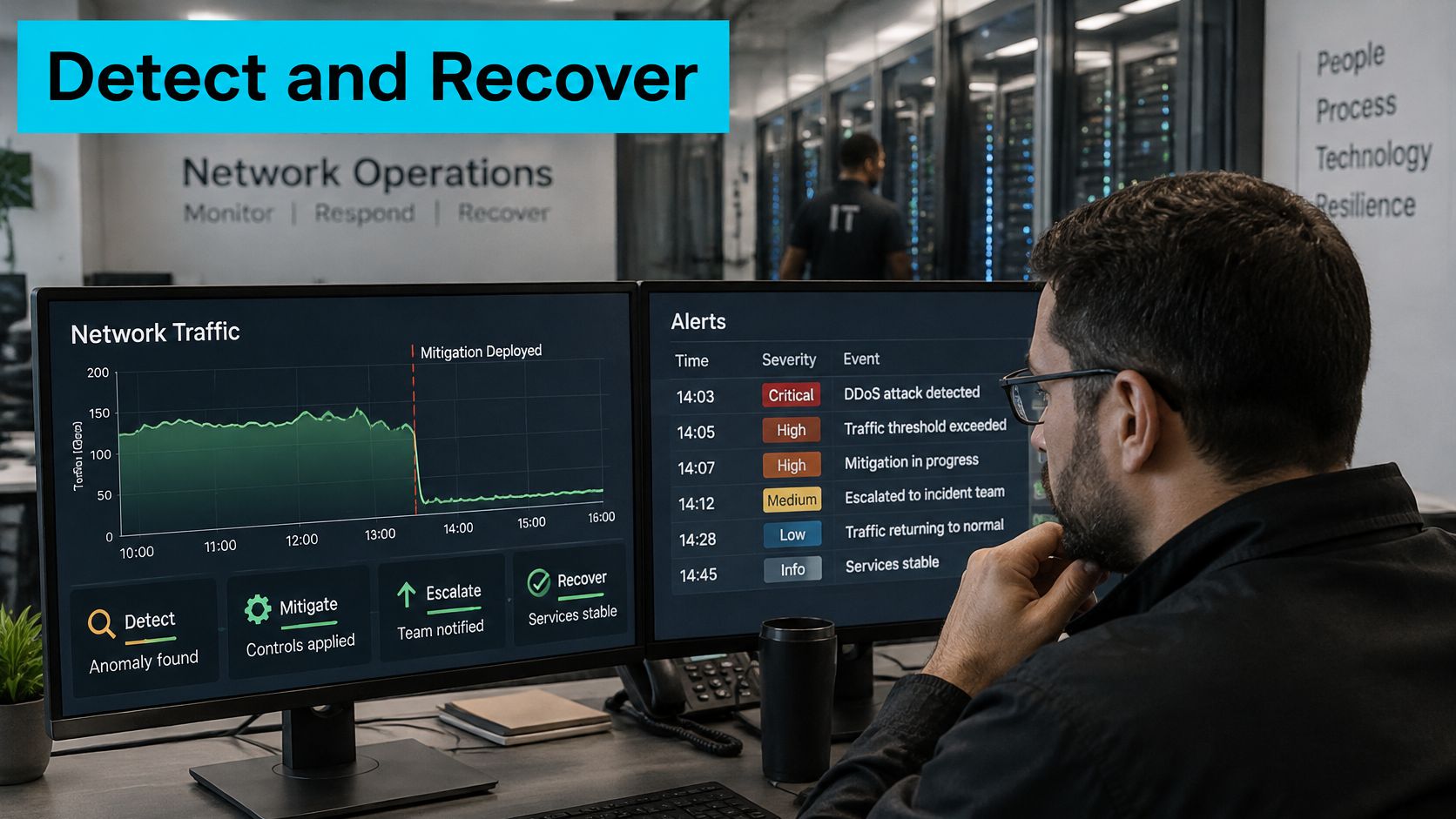
A useful response starts with a saved baseline for each exposed service. Record normal traffic patterns for web, DNS, email, and administrative access, then define what change triggers an alert and who is authorized to contact the provider or enable diversion.
If an edge monitor flags an unusual flow, upstream filtering should inspect suspicious traffic before it reaches the origin. The filtering service may drop, rate-limit, or challenge traffic, depending on the observed pattern. Only validated traffic should return to the host. If a provider's filtering begins blocking legitimate customers, the runbook should state who can request an adjustment and who can approve rollback.
Record the protected assets, escalation thresholds, emergency contacts, and the person allowed to activate filtering. Set rollback criteria in advance, especially for rules that could interfere with legitimate TLS, DNS, email, or administrator access. The ARPHost DDoS attack detection guidance can help frame what to ask about alerting and response.
A host-side evidence sample can help the operator compare the provider's alert with local symptoms:
sar -n DEV 1 10
ss -s
journalctl --since '-10 min'
Keep provider attack metadata with local timestamps: the attack ID, vector, start and end times, target, bytes, packets, and mitigation action. This record helps distinguish an attack from an application fault and gives responders evidence to review afterward.
Restarting nginx or increasing worker_connections won't remove an attack that has already filled the upstream link, firewall capacity, or conntrack table. Escalate when several protocols are affected, the upstream service is saturated, or legitimate traffic remains unavailable after local rules are relaxed.
Recovery means traffic has returned to its baseline, temporary controls have been reviewed, and the incident record says what worked and what didn't. Don't keep an emergency cap just because it was present during the incident. Confirm it still fits legitimate traffic before retaining it.
A short walkthrough can help teams align on incident actions before an event:
Linux Checks for Surges and HTTP 429s
Run these checks with root privileges or sudo. The examples assume nginx access logs and nftables 0.9.0 or newer with Linux kernel 4.19.10 or newer for connection-count rules. Earlier 4.19.x kernels can crash when connlimits are used, so confirm your versions and test changes before production.
For a connection surge, count established sessions by local address and inspect conntrack use:
ss -Htan state established | awk '{print $4}' | sort | uniq -c | sort -nr | head
sysctl net.netfilter.nf_conntrack_count net.netfilter.nf_conntrack_max
If investigation points to one exposed TCP service, a narrowly scoped nftables rule can cap tracked connections:
nft add rule inet filter input tcp dport 443 ct count over 200 drop
Treat that value as a configured example, not a safe universal limit. An ecommerce checkout or reverse proxy can open many legitimate TLS sessions. A low blanket cap can turn an attempted mitigation into customer-facing 502s or connection resets. Apply caps only after checking normal concurrency, and scope the rule to the affected service or workload.
Repeated HTTP 429 Too Many Requests responses point to application rate limiting, not necessarily a volumetric attack. Inspect nginx logs by client and path:
awk '$9==429 {print $1,$7}' /var/log/nginx/access.log | sort | uniq -c | sort -nr | head
Check whether responses include Retry-After, then identify whether the repeated requests target /login, a write API, or a cacheable page. Authentication and write operations often need tighter controls than cached GET traffic. A path-blind limit can punish unrelated sites on a multi-tenant host. Some IPv6 rate-limit implementations group addresses by /64, so a policy may affect multiple addresses from the same network.
Verify and roll back
From an authorized test client, inspect the login response:
curl -sS -o /dev/null -D - https://example.com/login
Repeat controlled requests and confirm ordinary traffic still succeeds while excess requests receive the intended mitigation response. If the rule causes collateral impact, remove the specific temporary rule using its handle:
nft -a list chain inet filter input
nft delete rule inet filter input handle RULE_HANDLE
Replace RULE_HANDLE with the actual handle shown by the listing. Restore the previous rate-limit configuration from your saved copy. In multi-tenant production, cap the noisy virtual host or API consumer, not the entire node.
Roles Contracts and Measurable Protection
During a short attack that stops and restarts, an alert may reach a mailbox nobody is watching. Name the on-call operator, who can request upstream mitigation, who communicates with customers, and who approves rollback. Specify which alert channels reach a person and who takes over if the primary contact is unavailable.
Always-on upstream filtering can stop traffic before it reaches the host. Ask which attack types it covers and how it handles legitimate traffic. Manually activated scrubbing gives an operator control over when mitigation starts, but depends on a staffed contact and a clear activation process. Host firewall rules can handle traffic that reaches the server; they cannot recover upstream capacity already consumed.
For hosting customers, ARPHost describes multi-layer DDoS protection, firewalls, and continuous monitoring across VPS, bare metal, Proxmox private cloud, and colocation services. Its Tampa facility has redundant Tier-1 connectivity and N+1 power, relevant to resilience during an attack or regional outage. Colocation customers may also need on-site remote hands during a prolonged incident. Review the scope of secure web hosting and VPS security, and clarify operational ownership through managed services.
Turn service claims into testable measures. Ask for detection and mitigation activation times, supported attack vectors, tolerated collateral blocking, telemetry retention, and post-incident reporting. Confirm tenant isolation, whether origin concealment is used, and what happens under fail-open or fail-closed behavior. Check that the origin, management services, and every relevant public endpoint are covered.
NIST's mitigation guidance emphasizes configuration, performance analysis, monitoring, and verification as an ongoing cycle (NIST DDoS mitigation guidance). Recheck controls after infrastructure changes; a rule or filtering profile that worked before may no longer match the workload. Review the provider's DDoS protection solutions against the specific services in scope, then document who detects, mitigates, escalates, and restores them. Judge the arrangement by attack type and residual impact on legitimate users, not by a headline capacity figure alone.
How to Test a DDoS Protection Plan
Test only with the provider's approval and an authorized client, during a maintenance window. Agree on the traffic patterns, protected targets, contacts, stop condition, and rollback owner before generating test traffic. Don't run an uncontrolled stress test against shared infrastructure.
Schedule distinct tests so the team can tell which control worked:
- Volumetric-style burst: Confirm that upstream filtering absorbs the test before it consumes the origin link.
- Connection surge: Test one approved port and check whether filtering preserves legitimate sessions.
- Application burst: Target an approved
/loginor API path and assess whether rate limits protect the application without blocking normal users. - Spoofed-source traffic: Include it only if the provider can simulate it safely and confirm the expected control is active.
A single large-flood drill isn't enough. In Nexusguard's 2025 analysis, 85% of reported attacks were below 1 Gbps, HTTPS floods accounted for 21%, and DNS-layer attacks increased 876% (Nexusguard's DDoS trend report). Include short attacks that stop and restart, change vectors, or rotate across subdomains. Confirm that alerts and escalation still work when no single event appears dramatic.
Set pass criteria before testing
Measure false positives, clean-traffic latency, origin CPU and worker use, packet loss, and time to return to baseline. Record whether alerts fired, whether the customer could access provider telemetry, and whether logs were retained long enough to support an incident ticket.
The test fails if the controls block legitimate administration, mail, or checkout traffic, or if temporary limits remain active after the test client stops. Record the result, including the rules that must be rolled back and the person responsible. If the workload is dedicated and a test could affect a shared VPS neighbor, assess whether it belongs on separate bare-metal infrastructure before scheduling it.
Confirm the Plan Before the Next Surge
Before the next surge, confirm that the traffic baseline is saved, an on-call contact is named, and rollback for temporary rate limits has been tested. Check which protection sits upstream and which runs on the host. A measurable plan should show how each attack type is detected, mitigated, escalated, and recovered from, including any impact left on service.
Open a ticket to confirm filtering scope and escalation contacts for your VPS, bare metal server, or private cloud. ARPHost, LLC provides hosting and managed infrastructure services with multi-layer DDoS protection and monitoring. Visit ARPHost, LLC to discuss how those controls apply to your environment.

Leave a Reply
You must be logged in to post a comment.