


DDoS-protected dedicated servers blend rock-solid hardware with proactive defense. They deliver high bandwidth and layered security so your network weathers volumetric floods, protocol probes, and sneaky application exploits.
Understanding DDoS Protected Dedicated Servers
Enterprises running gaming tournaments, high-volume e-commerce, or mission-critical apps choose dedicated servers with built-in DDoS shields. These machines give you low-latency performance and the muscle to absorb attacks.
| Solution | Throughput | Best For |
|---|---|---|
| Inline Appliance | 10 Gbps | Low-latency applications |
| Cloud Hybrid | 20+ Gbps | Sudden traffic spikes |
| Managed Service | 30+ Gbps | Large enterprise platforms |
Think of protection tiers as layers of a fortress gate; each inspects incoming traffic and stops bad actors before they breach the walls.
Key Use Cases
- Gaming networks that face UDP flood risks
- Online stores juggling checkout surges
- Financial systems bound by strict SLAs and compliance
By 2025, the global market for DDoS protection is estimated between USD 2.4 billion and USD 4.5 billion, with forecasts pointing to double-digit growth. This boom shows how organizations crave dedicated servers paired with integrated mitigation and hybrid cloud scrubbing. Learn more in this report.
On top of attack defense, these servers give you complete control over hardware specs and network settings. Check out our guide on bare metal server fundamentals to explore how root access and custom configurations can shape your environment.
This overview lays the groundwork for diving into core mitigation techniques and tier comparisons. Next up, we’ll map out strategies that ensure only genuine traffic reaches your servers.
- Simple deployment via CLI or API.
- Scalable to multi-terabit scrubbing.
Exploring DDoS Mitigation Techniques
Think of DDoS mitigation like diverting a raging river around a dam to safeguard the town beyond. In the world of DDoS-protected dedicated servers, our aim is to spot and block malicious packets long before they ever reach your origin.
Below, we break down five core strategies—each acting as a checkpoint on your traffic’s journey:
- Inline Scrubbing: Real-time filtering at the network edge.
- Cloud Hybrid Pipelines: Elastic rerouting to massive cloud scrubbers.
- Rate Limiting: Traffic throttles that prevent protocol exhaustion.
- Anomaly Detection: Statistical systems that flag abnormal spikes.
- Application-Layer WAFs: Deep inspection of HTTP/HTTPS payloads.
Inline scrubbing appliances inspect traffic on the fly, dropping bad packets with under 500 μs of added latency.
Inline Scrubbing Appliances
Inline scrubbing devices sit at your network boundary, examining every packet as it flows by. You tune thresholds—start around 100 kpps (packets per second)—and adjust dynamically based on real-time traffic.
A typical 1 U appliance can absorb up to 1 Tbps, making it ideal for low-latency scenarios where performance is non-negotiable. Configuration often follows a simple pattern:
• Enable inline mitigation
• Set threshold to 100,000 pps
• Commit changes
Cloud Hybrid Pipelines
When an attack surges past your on-prem capacity, cloud scrubbing centers throw a lifeline. Through BGP redirection (or DNS-based steering), you reroute traffic to global data centers built for massive scale.
Major Dedicated hosting providers like Atlantic.Net have defended against single-attack peeks of 6.5 Tbps and mitigated hundreds of millions of packets per second. Learn more in Cloudflare’s Q1 2025 DDoS Threat Report.
Advanced Filtering Techniques
At this layer, you combine protocol controls, behavioral analytics, and payload inspection:
- Rate Limiting throttles suspicious flows, protecting APIs and services.
- Anomaly Detection learns your normal baselines, then flags outliers on the fly.
- Web Application Firewalls (WAFs) dig into headers and bodies, blocking SQL injection, XSS, and other exploits.
| Technique | Benefit | Ideal Use Case |
|---|---|---|
| Inline Scrubbing | Low-Latency Filtering | Gaming, VoIP |
| Cloud Hybrid | Massive Scale | E-Commerce Flash Sales |
| Rate Limiting | Protocol Control | Public APIs |
| Anomaly Detection | Adaptive Defense | Variable Traffic Profiles |
| WAF | Deep Payload Inspection | Web Applications |
Layering these defenses creates a resilient posture. You select and fine-tune each mechanism to match your unique threat model and performance goals.
Comparing Mitigation Tiers And Capabilities
Mitigation plans behave very differently when the pressure is on. If you’re running ddos protected dedicated servers, you need to understand how each tier handles massive attacks, what it adds in latency, and when it may let traffic slip through.
In this section, we break down three core strategies so you can align your traffic profile and risk tolerance with the right protection level.
The graphic below lays out these approaches by deployment style and the delay they introduce.
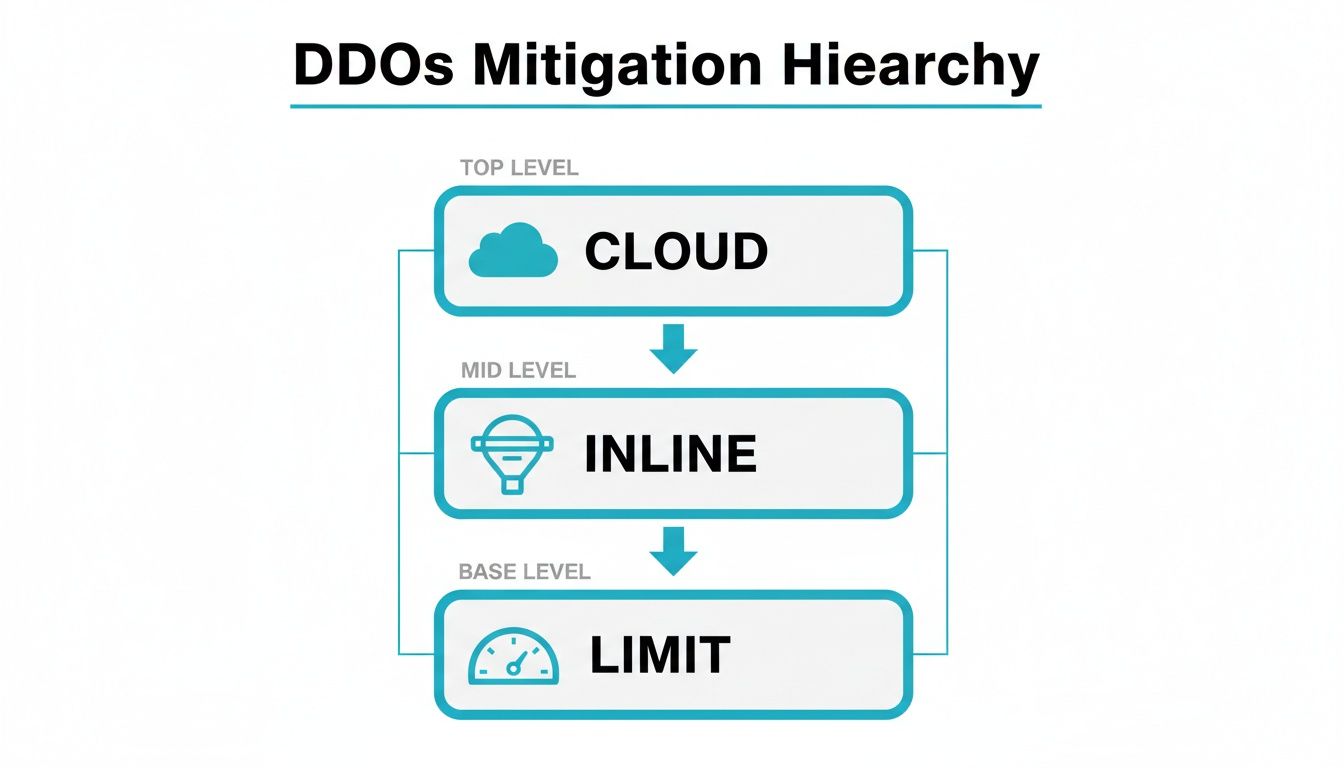
At the base, inline filters add almost zero latency. In the middle, cloud scrubbing handles bursts. At the top, rate limiting smooths out sudden surges.
Here’s a quick snapshot to help you compare these tiers at a glance:
Mitigation Tier Comparison
| Tier | Scrubbing Capacity | Included Bandwidth | Typical Use Case |
|---|---|---|---|
| Basic Filtering | Up to 2 Gbps | 1–5 Gbps | Small sites and blogs |
| Cloud Hybrid | Up to 10 Gbps | 5–20 Gbps | E-commerce flash events |
| Enterprise Inline | 10–100+ Gbps | 20–100+ Gbps | Large enterprises, gaming |
Use this matrix as a starting point, then explore each tier’s strengths and trade-offs below.
Basic Filtering Tier
Think of basic filtering like a gate guard inspecting every packet at layers 3 and 4. It drops malformed traffic in under 1 ms, so your site barely notices.
For example, DNS reflexive filters will knock out SYN flood attempts before they reach your server. But with a cap at 2 Gbps, anything larger can flood right through.
• Low cost per protected IP
• Rapid deployment via ACLs
• Limited scrubbing scope
“Basic filtering works like a gate guard, stopping only the most obvious threats,” says an industry engineer.
Hybrid Cloud Scrubbing
When local filters hit their limit, traffic spills into cloud scrubbers—imagine diverting a river through a network of dams. This setup scales to 10 Tbps via global PoPs.
Your traffic flows normally until a preset threshold is breached, then BGP announcements steer the flood to remote scrubbing centers. You keep low latency during everyday traffic and massive capacity during attacks.
- Monitor traffic thresholds
- Announce protected IPs via BGP
- Redirect attack traffic to scrubbing centers
This is perfect for e-commerce sites facing seasonal peaks without the cost of premium hardware.
Enterprise Inline Appliance Tier
Enterprise appliances sit directly in your data path with dedicated hardware capable of 100 Gbps or more. Latency impact stays in the microseconds, so gamers and financial apps see no hiccups.
These boxes bundle protocol anomaly detection, stateful inspection, and WAF modules. They back up performance with a 99.99% SLA, and you select burst limits that fit your contract.
Hardware appliances accounted for roughly 44.7% of DDoS protection spend in 2025, while cloud deployments took about 54%—a clear sign enterprises split budgets between inline speed and cloud scale. Learn more about DDoS protection spend breakdown in this market research
Organizations running gaming servers or financial platforms often choose this tier for its predictability and compliance support.
• Dedicated packet capture for forensics
• Custom rule updates via CLI
• API integration for automated failover
Use these insights to pick the right tier for your ddos protected dedicated servers, so you stay resilient without overspending.
Evaluating Technical And Business Selection Criteria
Choosing a DDoS-protected dedicated server isn’t a one-size-fits-all exercise—it’s more like picking the right safety gear for a high-stakes climb. You need to balance raw performance numbers against budget constraints and operational goals.
Start by defining a straightforward framework. A crisp checklist helps you score vendors objectively and keeps everyone on the same page.
Buying Criteria Overview
| Criteria | Description | Importance Level |
|---|---|---|
| Protected Bandwidth | Maximum traffic capacity under attack | High |
| Scrubbing Capacity | Tbps throughput and Mpps filtering rate | High |
| Network Geolocation | PoP proximity for low latency | Medium |
| SLA Uptime | Guaranteed availability percentage | High |
| Response Targets | DDoS mitigation latency goals | Medium |
| Integration APIs | Automation hooks and webhooks | Low |
| Cost Model | Pay-per-IP or tiered bandwidth pricing | Medium |
Use this table as your baseline. Then adjust the weight of each criterion based on how critical it is to your service continuity and cost structure.
Scoring And Weighting Criteria
Convert each factor into a score from 1 to 5. Next, apply a weight to reflect its real-world impact. For example, if maintaining throughput is vital, assign 30% to Protected Bandwidth.
- Protected Bandwidth: weight 30%
- Scrubbing Capacity: weight 25%
- SLA Uptime: weight 20%
- Network Geolocation: weight 10%
- Response Targets: weight 10%
- Integration APIs: weight 5%
Key Insight: Compute a total score above 3.5 to qualify vendors for your shortlist.
A weighted sum gives you a clear ranking—no guesswork needed.
Verifying Vendor Claims
Spec sheets can gloss over real-world performance. That’s why quick tests are essential. Fire up iperf3 to check throughput and use ping for latency.
- Test bandwidth:
iperf3 -c ddos-test.arphost.com -P 10 -t 60 - Measure latency:
ping -c 10 -i 0.2 protected-ip.arphost.com
These simple commands expose how well a provider’s network peering and scrubbing fabric hold up under pressure.
Check out our guide on How to Choose a Web Hosting Provider for more evaluation tips and vendor insights.
Integrating with Proxmox VE 9 Private Cloud
For enterprises running a Private Cloud Infrastructure on Proxmox VE 9, align your DDoS setup with best practices and Juniper network device configurations:
- Configure a bonded bridge on each Proxmox node:
cat <<EOF > /etc/network/interfaces.d/bond0.cfg
auto bond0
iface bond0 inet manual
  bond-slaves eth0 eth1
  bond-miimon 100
  bond-mode 802.3ad
auto vmbr0
iface vmbr0 inet static
  address 203.0.113.10/32
  gateway 203.0.113.1
  bridge-ports bond0
EOF - Assign the protected IP to a KVM VM or LXC container:
pvesh set /nodes/pve1/qemu/101/config --net0 virtio=MAC,bridge=vmbr0 - On your Juniper MX/EX border router, configure BGP and policy to steer attack traffic:
set protocols bgp group ARPHOST neighbor 198.51.100.1 peer-as 65001
set policy-options policy-statement REDIRECT term 1 from prefix-list ATTACK
set policy-options policy-statement REDIRECT term 1 then accept
set policy-options prefix-list ATTACK 203.0.113.10/32
set protocols bgp group ARPHOST export REDIRECT
commit - Validate via packet capture and
tcpdumponbond0:tcpdump -i bond0 port 80 or port 443 -w ddos_test.pcap
This integration ensures your ddos protected dedicated servers in Proxmox VE 9 private clouds are seamlessly orchestrated, highly available, and monitored.
Opting for Managed or Unmanaged Servers
Choosing between managed and unmanaged DDoS-protected dedicated servers is like deciding whether to DIY a home renovation or hire a contractor. If your team thrives on deep control and you have seasoned network pros at the helm, an unmanaged setup can feel empowering. But if you’d rather hand off the heavy lifting, monitoring, patching, and crisis response, to specialists, managed services are the way to go.
- Managed Services bundle:
- Real-time monitoring and 24/7 alerting
- Automated threat-intelligence updates
- Expert-led incident handling and forensic reports
- Unmanaged Setups demand:
- Skilled engineers for initial configuration and ongoing tuning
- Routine manual updates for scrubbing appliances
- Do-it-yourself ACL management and rate-limit adjustments
Managed Service Scope
When you partner with a managed provider, you’re not just buying hardware—you’re gaining an ally who embeds into your workflow. They hook into your environment via APIs and unified dashboards, often cutting remediation times by 30% compared to the DIY route.
Key Inclusions:
- SLA-backed response times, typically under 30 minutes
- Continuous refinement of mitigation policies
- Scheduled attack simulations to stress-test defenses
Here’s a quick peek at an API call you might use:
curl -X POST https://api.provider.com/ddos/failover
-H “Authorization: Bearer $TOKEN”
-d ‘{“protected_ip”:”203.0.113.10″,”action”:”activate”}’
This snippet shows how easily you can trigger a controlled failover as part of your CI/CD pipeline.
DIY Setup Requirements
Self-managing DDoS protections isn’t a weekend project—it needs solid planning. Your engineers will script health checks, build automated reroutes, and then rehearse failover scenarios.
Essential steps include:
- Announce your protected IP ranges over BGP.
- Position scrubbing appliances inline with proper peering.
- Run regular failover drills and review the logs.
“DIY setups suit mature teams with networking expertise and clear response procedures,” says a senior sysadmin.
Automation will only help reduce errors and keep your people focused on higher-level tasks.
Cost Control And Support Trade-Offs
Unmanaged models look cheap at first glance, but hidden labor costs can stack up. Managed plans wrap support into a predictable monthly fee, cutting down on unexpected overtime.
| Feature | Managed Model | Unmanaged Model |
|---|---|---|
| Setup Complexity | Low | High |
| Time to Remediate | <30 mins | 2–4 hours |
| Staffing Required | Minimal | Dedicated network engineers |
| Cost Predictability | Fixed monthly rate | Variable labor costs |
Check out our guide on managed IT services for businesses to see how broader support integrates with your DDoS strategy.
Selecting Your Model
In practice, your choice often comes down to team size and risk tolerance:
- Small Teams: Lean on managed support for predictability
- Large Teams: Opt for DIY to maximize control
- Mid-Sized Teams: Blend managed and unmanaged for the best of both worlds
No matter which path you take, carve out clear escalation paths and run defense tests regularly. That way, you’ll sleep easier knowing your DDoS shields are battle-ready.
Analyzing Use Cases And Deployment Costs
Let’s walk through three live environments to see how DDoS-protected dedicated servers hold up under different traffic storms and attack vectors. Each scenario breaks down the threat profile, chosen mitigation tier, network flow sketch, cost summary and key takeaways.
You’ll get a 12-month TCO, complete with peak surcharge hits and bandwidth overage line items.
- Global ECommerce: Flash sale traffic surges, HTTP checkout bottlenecks.
- Online Gaming Network: UDP floods hammering game clusters.
- Financial Services Firm: Strict SLA demands, mixed Layer 3/Layer 7 assaults.
Global ECommerce Case Study
A top retailer saw checkout requests spike above 50,000 RPS and dealt with SYN floods hitting 2 Gbps during big promotions. They routed suspect packets through ARPHost PoPs on a private backbone, combining on-premise hardware with cloud fallback.
Upfront setup was $1,500 per server. Scrubbing ran $0.12 / GB.
Key Lessons Learned
- Flash-sale tuning is critical—unsuspecting peaks can blow your scrubbing budget.
- Hybrid reroutes cut downtime by 70% compared to an inline-only setup.
- Dynamic ACL adjustments keep false positives low when traffic shifts.
Online Gaming Network Study
During global tournaments, this gaming platform weathered 1.2 Tbps UDP floods that threatened to jack up latency. They installed an enterprise inline appliance tier with built-in WAF, aiming for sub-500 µs processing.
Annual OPEX included $3,600 in overage fees and $2,400 for managed support.
Key Lessons Learned
- In-line gear held jitter under 2 ms, preserving player experience.
- Automated failover drills stopped any single point of failure from blackholing.
- Strategically placed PoPs cut packet loss by 85% under stress.
Financial Services Firm Analysis
A trading house needed a 99.99% SLA and multi-vector protection. They combined bare metal primary servers with an inline appliance, dropping into cloud scrubbing when traffic topped 300 Mbps.
First-year costs hit $22,800, including backup storage and incident-response credits.
Key Lessons Learned
- Regulatory checks demand full packet captures for audit trails.
- Hybrid defense balanced latency requirements with burst-capacity needs.
- Budget lines must factor in surcharge credits for unexpected attack volumes.
| Item | Unit Cost | Annual Total |
|---|---|---|
| Bare Metal Servers | $1,200 | $14,400 |
| Enterprise Inline Appliance | $2,000 | $24,000 |
| Scrubbing Bandwidth (20 TB) | $0.15/GB | $3,072 |
| Peak Attack Surcharge Credit | $80/fl | $960 |
- Provision ARPHost bare metal instances with protected IPs.
- Announce your IP space via BGP pointing to scrubbing centers.
- Run simulated load tests using custom scripts and monitoring hooks.
- Fine-tune ACLs and WAF rules based on replayed attack patterns.
These deep dives expose real-world costs and setups you can adapt to your own needs.
“Transparent pricing and real-world tests prevented a 30% budget overrun,” says an ARPHost solutions architect.
Use these models to project your DDoS resilience spend and keep surprises out of your annual budget.
Ready to benchmark your defenses? Try ARPHost’s protected dedicated servers with a free 24-hour trial and live monitoring dashboards. Evaluate bandwidth usage and surcharge impacts before you lock in an annual plan.
Common Questions About DDoS Protected Dedicated Servers
Inline Mitigation Versus Cloud Scrubbing
When you filter traffic right at the network edge, it’s like stationing a guard at the gate. Inline appliances inspect each packet in real time, adding just microseconds of latency. In contrast, cloud scrubbing reroutes suspicious traffic through large, remote Points of Presence—imagine diverting floodwaters into a broader canal.
- Inline filters typically handle up to 500 Gbps with under 1 ms latency.
- Cloud pipelines can scale to 10 Tbps, at the cost of an extra 2–10 ms delay.
- Tight integration with IDS/IPS gives you deeper threat context.
- Custom rule updates via API let you respond to new attack patterns instantly.
Most inline setups also support dynamic thresholding and plug right into your existing firewall.
Inline mitigation works like a guard at your gate while cloud scrubbing acts like a flood diversion.
Best Practices For Testing Defenses
Deploying your DDoS shield is only half the battle—testing it under fire is what really counts. Schedule quarterly drills that simulate both volumetric floods and application-layer assaults. Tools like wrk excel at revealing HTTP-layer weak spots.
- Generate synthetic traffic spikes to fine-tune anomaly detection.
- Rotate through protocol and application scenarios to cover every attack vector.
Regular simulations ensure that your tiers and ACLs perform as expected when pressure mounts.
Upgrading Your Scrubbing Tier
Traffic patterns evolve, and so should your scrubbing capacity. Monitor these key metrics to know when it’s time to scale up:
| Trigger Metric | Action |
|---|---|
| Packet Loss > 1% | Move To Next Tier |
| Throughput > 75% | Increase Scrubbing Capacity |
| Frequent False Positives | Apply More Granular Rules |
Align any tier bump with your traffic forecasts and SLA commitments.
Tracking these metrics keeps your defenses one step ahead of emerging threats.
Integrating Into DevOps Pipelines
Incorporating DDoS controls into CI/CD turns a reactive stance into an automated workflow. Follow these steps:
- Embed health checks into every build.
- Trigger the ARPHost API on threshold breaches.
- Automate firewall and WAF rule updates via scripts.
curl -X POST https://api.arphost.com/ddos/activate
-H “Authorization: Bearer $TOKEN”
-d ‘{“ip”:”203.0.113.10″,”tier”:2}’
This level of automation cuts down manual errors and accelerates recovery.
Automating DDoS controls reduces manual errors and speeds recovery.
Boost your resilience with ARPHost, LLC DDoS protected dedicated servers. Explore plans
Sign up for a free trial and monitor live metrics through our dashboard—no credit card required.