

You’re probably looking at two hosting plans right now that seem deceptively similar. One says 4 cores / 8 threads. Another says 8 cores / 8 threads. The second costs more, but the first looks like it offers the same number of “things” the operating system can use.
That’s where a lot of sizing mistakes start.
With cpu cores threads, the wrong decision usually doesn’t fail immediately. It shows up later as slower checkout pages, lag during backups, a noisy VM host, or a database server that looks underpowered even though CPU usage seems moderate. On the other side, oversizing wastes money on compute your application can’t use effectively.
The practical problem is that most guidance stops at definitions. It tells you a core is physical and a thread is logical, then leaves you to guess what that means for a WordPress stack, a Magento database, a KVM VPS node, or a Proxmox cluster.
That guesswork matters. Recent analysis notes that modern CPUs with SMT can perform well in virtualized environments, but proper allocation still depends on task dependencies and memory patterns. It also warns that generic advice like “more threads are better” can miss performance degradation in systems with more than 8 cores, which matters for dense VPS nodes and Proxmox private cloud migrations (nfina on cpu cores vs threads).
Introduction Decoding Your Server's Engine
When clients ask which server plan is the better value, the answer usually starts with a harder question. What will this server do all day?**
If the box is mostly handling short web requests, queue workers, cache lookups, and light background jobs, a thread-rich platform can make sense. If it’s running a database under sustained load, compiling code, encoding media, or hosting many busy virtual machines, physical cores usually matter more.
Why the spec sheet can mislead
A hosting plan comparison page compresses a lot of engineering into one line item. It won’t tell you whether those execution resources are uncontended, whether the workload waits on storage, or whether your application scales cleanly across many workers.
That’s why cpu cores threads shouldn’t be treated as a simple count. They’re a capacity model.
A few practical examples:
- A WooCommerce site can feel fine on fewer physical resources if most delays are from PHP waiting on I/O and cache.
- A PostgreSQL or MySQL server usually benefits more from stronger physical execution capacity when complex queries stack up.
- A virtualization host needs a careful balance because guest operating systems see schedulable CPUs, but the host still has to map that demand back to real hardware.
Practical rule: Buy for the bottleneck you actually have, not the number that looks larger in a control panel.
What good sizing looks like
Good sizing does three things at once:
- Preserves performance during normal load
- Leaves headroom for maintenance work, bursts, and backups
- Avoids paying for physical capacity your software can’t use
That’s the lens to use for VPS, bare metal, and private cloud decisions.
The Foundation Physical CPU Cores
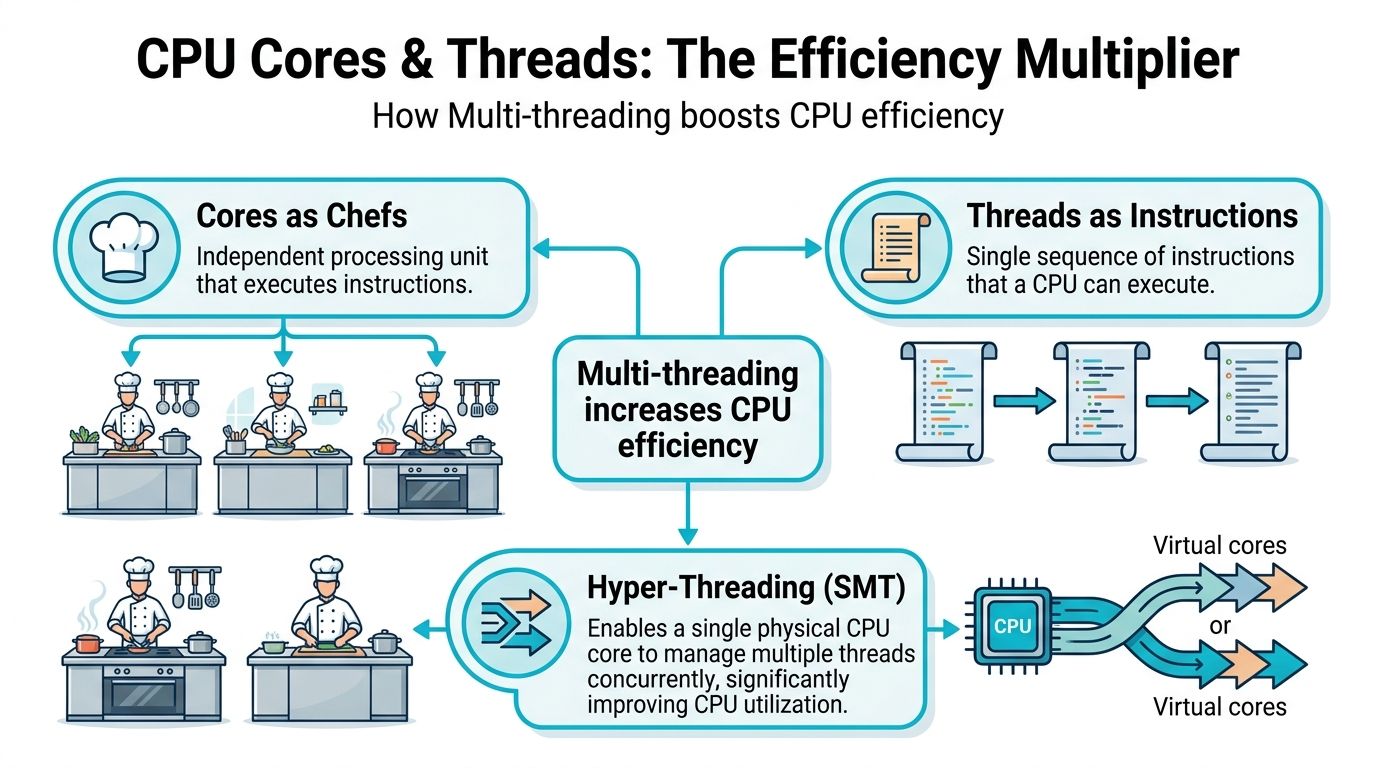
A physical CPU core is a real execution unit on the processor. It can run work independently of the other cores on the chip. If you want the plain-English version, think of a server CPU as a kitchen and each core as a dedicated chef.
One chef can prepare one dish at a time. Four chefs can prepare four dishes at the same time. That’s the part that matters in hosting. Cores create true parallel capacity.
Why physical cores became central
The industry didn’t move toward more cores as a marketing gimmick. It happened because single-threaded performance stopped improving at the old pace once power and heat limits became the constraint. The shift to multi-core CPUs in the mid-2000s marked that change, and Intel’s 2006 Core 2 Duo
That design shift is why modern hosting works the way it does. Virtualization, container density, and concurrent application hosting all depend on having multiple physical workers available at once.
What cores do well in real hosting
Physical cores matter most when the work is heavy, sustained, and parallel.
Use more cores when your server spends most of its day on tasks like:
- Database execution: multiple queries, joins, reporting jobs, and write-heavy activity
- Virtual machine hosting: several guests all demanding CPU at the same time
- Build and compile workloads: CI jobs, package builds, and source compilation
- Media processing: encoding, transcoding, and rendering
- Backend services with sustained load: application servers doing real compute rather than mostly waiting on I/O
In those cases, each core gives the scheduler another real place to run work without sharing the same execution engine.
What I watch for during sizing
A server usually needs more physical cores when you see one or more of these conditions:
- Run queue pressure: tasks are waiting for CPU even when total utilization doesn’t look catastrophic
- Consistent all-day load: not just bursts, but steady demand
- Multiple critical processes: database, web tier, backups, search, and monitoring all competing
- VM stacking: several guests that each have their own busy periods
If the server has to do many heavy things at once, start by respecting physical cores. Threads help utilization. Cores provide the real floor of compute capacity.
That distinction saves money because it prevents false economy. A smaller CPU with lots of logical threads can look attractive on paper, then struggle once several serious workloads land at the same time.
The Efficiency Multiplier Threads and Hyper-Threading
Threads matter most in hosting when a server has enough work to keep tripping over small stalls, but not enough sustained compute to justify a jump to a much larger CPU. That is common on VPS nodes, Proxmox clusters, and mixed application servers where traffic is uneven and many processes spend part of their time waiting on memory, storage, or network responses.
A thread is an execution context the operating system can schedule. In server specifications, extra threads usually come from SMT, or Simultaneous Multi-Threading. Intel calls its implementation Hyper-Threading. One physical core appears as two logical CPUs, which gives the scheduler more flexibility during short idle gaps inside that core.
What Hyper-Threading does
A physical core still has one set of execution resources. Hyper-Threading does not turn that core into two full cores. It lets the CPU keep a second stream of work ready so the core can stay busier when the first thread stalls.
At the hardware level, the processor keeps separate architectural state for each thread while sharing major execution units inside the same core. That design improves utilization during pipeline stalls and other wait periods, as outlined in this technical explanation of Hyper-Threading behavior.
In practice, that means better throughput on the right workloads and disappointing results on the wrong ones.
Where threads help in hosting
Threads pay off when the server is juggling many tasks with uneven CPU demand. I see the best results in environments such as:
- Web servers handling large numbers of short requests
- Virtualization hosts where guest load rises and falls throughout the day
- Container platforms running many small services with mixed activity patterns
- Application tiers that pause on database, storage, or API calls
- Shared hosting nodes where concurrency matters more than long, uninterrupted compute jobs
These are the cases where logical threads can improve density and responsiveness without the cost jump of moving to a CPU with significantly more physical cores.
Where threads disappoint
Threads share the same core. If both sibling threads want the same execution resources at the same moment, one waits.
That is why 8 cores / 16 threads should be treated as an 8-core CPU with some extra scheduling headroom, not as a 16-core processor. For budgeting and capacity planning, that distinction matters. Clients often see a high thread count and assume they can safely pack in more databases, more VMs, or more build jobs than the host can sustain. The result is higher CPU ready time, noisier neighbors on shared platforms, and upgrade decisions made under pressure instead of on schedule.
My rule is simple:
Count cores for guaranteed compute capacity. Count threads for improved utilization and better concurrency.
That framing makes CPU sizing more accurate across VPS, bare metal, and private cloud environments. It also keeps costs under control, because you are paying for the performance your workload can use, not for a thread count that looks better in a plan comparison.
Matching CPU to Workload Performance Benchmarks
The fastest way to choose wrong is to ask, “Which CPU is better?” without asking, “Better for what?”
A database server, a PHP web node, a Proxmox host, and a CI runner don’t stress the processor in the same way. The practical split is between workloads that need true parallel execution and workloads that benefit from better thread-level utilization.
When more cores beat more threads
For compute-intensive jobs, physical cores win.
Verified server benchmark guidance is clear on this point. For jobs like heavy database work or video editing, an 8-core CPU will outperform a 6-core/12-thread CPU even if the 6-core chip has a higher clock speed. The same source notes that HT can offer a 20-30% boost, but it is not a substitute for a physical core when true parallelism is required (ServerMania on cores vs threads).
That matches what admins see in practice:
- database engines prefer uncontended execution resources
- compilers scale well across real workers
- rendering and encoding jobs consume physical cores aggressively
- multi-VM hosts run more smoothly when several guests are active at once
When threads add real value
Thread-rich CPUs do well when many tasks are short, bursty, or waiting on something outside the core.
Good examples include:
- front-end web tiers
- reverse proxies
- lightweight application workers
- dense container nodes
- general-purpose VPS hosts with mixed tenant behavior
Here, SMT helps absorb concurrency and reduce waste inside each core.
Workload and Recommended CPU Configuration
| Workload Type | Prioritize More Cores or More Threads? | Reasoning | Recommended ARPHost Solution |
|---|---|---|---|
| Heavy relational database server | More cores | Complex queries and sustained compute benefit from true parallel execution on physical cores | Bare metal server |
| Video encoding or rendering pipeline | More cores | These jobs divide well across real workers and gain more from physical execution capacity than extra logical threads | Bare metal server |
| Busy WordPress or Magento web tier | More threads, after a solid core baseline | Many concurrent requests and waits can benefit from SMT efficiency | VPS hosting or private cloud VM |
| Multi-tenant virtualization host | Balanced, with a bias toward cores | Guest workloads vary, but oversubscribing thread-heavy hosts can create contention | Dedicated Proxmox private cloud |
| CI runners and build workers | More cores | Compiles and parallel build tasks usually scale better with physical workers | Bare metal server |
| Lightweight container platform | More threads, unless services are CPU-heavy | Many small services often benefit from better scheduling flexibility | VPS hosting or private cloud |
A practical way to classify your own workload
Ask these four questions:
- Does the app spend time waiting on I/O? If yes, threads help more.
- Can the work be split into many real workers? If yes, cores matter more.
- Will several services peak together? If yes, avoid thin physical core counts.
- Is the CPU host also running the hypervisor? If yes, leave room for the platform itself.
A small increase in real cores often solves a stubborn performance issue faster than doubling down on logical thread counts.
That’s especially true when the complaint is “the server feels slow under combined load,” not “one page is slow for one user.”
Sizing Your Infrastructure VPS vs Bare Metal vs Private Cloud
Once you understand cpu cores threads, the hosting product choice gets easier. The right platform depends on whether you need shared flexibility, dedicated CPU ownership, or a virtualized environment you control end to end.

VPS when flexibility matters more than exclusivity
A VPS is usually the right entry point when workloads are growing but still mixed. You get virtual CPUs, easier scaling, and lower cost than reserving a whole machine.
That fits well for:
- web apps with variable traffic
- staging environments
- small application stacks
- development boxes
- light database workloads paired with caching
The trade-off is that vCPUs are part of a virtualization layer. They map back to physical CPU resources on the host. A good platform design limits noisy-neighbor behavior, but a VPS is still about efficient sharing, not total hardware exclusivity.
Bare metal when contention is the problem
Choose bare metal when CPU isn’t just important, but central.
That usually means:
- a hot database server
- a build machine
- a game server sensitive to CPU scheduling
- a virtualization host where you want total placement control
- a workload that runs near CPU limits for long periods
On bare metal, you get direct access to all the machine’s cores and threads. There’s no neighboring tenant on the same compute node competing for scheduler attention. If your workload is sensitive to consistent CPU behavior, this is often the cleanest answer.
For a straightforward product-level comparison, this breakdown of dedicated server vs VPS hosting helps frame when dedicated resources start to justify the higher monthly cost.
Private cloud when you need both control and segmentation
A dedicated private cloud is where this gets more interesting.
You’re no longer choosing only one server personality. You’re choosing physical hardware, then deciding how to split it across VMs and containers. That opens up useful controls:
- pin a database VM to specific cores
- separate front-end and back-end workloads
- reserve CPU for firewall or edge services
- isolate noisy internal jobs from customer-facing systems
Under these conditions, thread-to-core ratios become operational, not theoretical. If you over-allocate vCPUs across many guests, the host may look healthy until several VMs become active together. Then scheduling latency shows up.
Quick sizing rules I’d use first
- Start with VPS if the application mix is modest and you want low-friction scaling.
- Move to bare metal when CPU contention is predictable and costly.
- Use private cloud when several workloads need isolation, custom placement, and cleaner long-term growth.
One practical option in that middle and upper range is ARPHost, which offers VPS hosting, bare metal servers, and dedicated Proxmox private clouds for teams that need either simple deployment or deeper VM-level CPU control.
Monitoring and Optimizing CPU Performance in Linux
A common support case looks like this. Average CPU usage stays under 50 percent, but the site still slows down during traffic bursts, queue workers fall behind, or one VM in a Proxmox cluster starts feeling inconsistent. In hosting environments, that usually points to scheduling, thread placement, or a workload that scales poorly across the CPUs you assigned.
The fix starts with measurement, not tuning.

Check what the OS sees
Run:
lscpu
Focus on:
- CPU(s) for total logical processors
- Core(s) per socket for physical core layout
- Thread(s) per core to confirm SMT
- Socket(s) for multi-socket systems
- NUMA node(s) on larger hosts
This tells you whether the server has more physical execution capacity or just more logical lanes for the scheduler to work with. That distinction matters when you are sizing a VPS, deciding whether a database should move to bare metal, or balancing guests on a private cloud host.
For live inspection, use:
htop
Watch for a few practical patterns:
- one or two logical CPUs pinned while others stay mostly idle
- even utilization across many CPUs
- short bursts versus sustained saturation
- steal time or scheduling pressure inside virtualized environments
Read the workload pattern, not only the CPU percentage
A Linux host can look healthy in aggregate and still be short on usable CPU for the part of the application that matters most. I see this often with web stacks that have one hot PHP worker pool, a database thread bottleneck, or background jobs competing with customer-facing traffic.
Common patterns include:
- One hot core, many cool cores: poor parallelism or a single-threaded bottleneck
- Most CPUs moderately busy: distribution is healthy and scaling is reasonable
- Short spikes across all CPUs: burst behavior, which may be fine if latency stays within target
- Constant high usage across the board: the host is undersized, oversubscribed, or running the wrong mix of workloads
For trend data instead of one-time snapshots, use a wider set of server performance monitoring tools for Linux and hosting environments. That gives you enough history to tell the difference between a daily spike and a capacity problem that is costing performance.
Effective advanced tuning
For VM hosts and performance-sensitive Linux systems, a few changes are worth testing because they affect both throughput and cost efficiency.
CPU affinity
Pin critical processes or VMs to specific CPUs when scheduler movement is adding latency. This is useful for databases, packet processing, and latency-sensitive application tiers.NUMA awareness
On larger hosts, keep memory access local where possible. Cross-node memory access can hurt consistency even when average CPU utilization looks acceptable.Application thread limits
Do not assume the best worker count matches every visible thread. Some applications perform better with fewer workers than the logical CPU total.SMT testing
Test with SMT enabled and disabled for CPU-bound services. Logical threads help many mixed workloads, but some compute-heavy tasks respond better to stricter core allocation.
More visible threads does not guarantee more completed work.
This matters most in shared and virtualized environments. A VPS with too many vCPUs can look attractive on paper and still lose on steady-state performance if the application spends its time waiting on contested scheduler time. In managed environments, placement, host density, and realistic thread counts save money. Buying more virtual CPU is not always the cheapest fix.
A short video walkthrough can help if you want to see Linux CPU monitoring from the terminal side before making scheduler changes.
A practical tuning order
Use this sequence:
- Measure first:
lscpu,htop, and application-level metrics - Classify the workload: CPU-bound, I/O-bound, or mixed
- Test worker counts: do not stop at defaults
- Pin only critical services: databases, latency-sensitive apps, and important VMs
- Retest after each change: lower latency with weaker throughput can still be a bad trade
The process is repetitive. It works because it keeps you from paying for extra cores when the problem is thread behavior, VM placement, or an application setting. Teams that want help with that analysis usually benefit from managed hosting, because someone needs to watch the host, the guest, and the application together instead of treating CPU as a single percentage.
Why ARPHost Excels in Performance Hosting
CPU sizing is rarely just about buying more compute. It’s about matching real application behavior to the right hosting model, then adjusting before bottlenecks become outages.
That’s where operational help matters. If your workload needs shared flexibility, VPS can make sense. If it needs direct, uncontended compute, dedicated hardware is the cleaner fit. If you’re balancing several systems that need isolation and growth room, a Proxmox-based private cloud gives you more control over placement and resource boundaries.
Teams that want a stronger baseline for dedicated infrastructure can review the practical advantages in this guide on 8 core benefits of dedicated server hosting.
What matters most is having someone look at the actual pattern of use:
- sustained compute versus short bursts
- guest density versus strict isolation
- database pressure versus web concurrency
- growth path versus current spend
If you get that part right, cpu cores threads stops being a confusing spec and becomes a useful planning tool.
If you’re weighing VPS, bare metal, or a Proxmox private cloud and want a second set of eyes on CPU sizing, ARPHost, LLC offers hosting and managed infrastructure options that can fit anything from a small web stack to a dedicated virtualization environment.
