

Most advice on server pricing starts in the wrong place. It asks what the server costs to buy, or what the monthly plan costs to rent. That’s not the true cost to server. That’s just the entry fee.
A server becomes expensive after procurement. The invoice is easy to read. The hard part is everything attached to keeping that system useful, secure, available, and staffed over time. If you only compare hardware prices or monthly hosting rates, you’ll understate your real infrastructure spend and make the wrong platform decision.
Beyond the Sticker Price The Real Cost to Server
A cheap server can be the most expensive server in your estate.
That sounds backward until you look at where budgets go. A 2024 ServerMania analysis of self-hosting costs found that hidden costs like electricity, maintenance time, and data management can represent up to 70% of overall spend, with staff time alone ranging from 20 to over 1,300 hours annually depending on complexity. That’s the part most “cost to server” guides skip.
What buyers usually miss
Teams often compare three numbers:
- Purchase price
- Monthly hosting fee
- Upgrade cost
Those matter, but they’re incomplete. The true cost to server includes the labor to patch the OS, troubleshoot failed services, rotate backups, handle storage growth, monitor utilization, review security alerts, and recover from mistakes. It also includes power, software subscriptions, replacement parts, and the business impact of outages.
Practical rule: If your model doesn’t include staff time, it isn’t a TCO model. It’s a shopping list.
A paid-off server isn’t free. It still consumes time, power, rack space, support attention, and risk tolerance. In many environments, those operating costs continue long after the hardware has been depreciated on paper.
Why this matters more in 2026
Infrastructure costs are moving in the wrong direction for anyone planning a refresh. Memory and storage pricing pressure is already pushing up the cost of server builds, and AI-driven demand is absorbing more capacity across the market. That means mistakes in sizing, architecture, or management model will be more expensive to correct than they were a few years ago.
For a CTO, the right question isn’t “What does this server cost?” It’s “What will this workload cost us to operate reliably over its life?” That answer changes when you compare VPS, bare metal, colocation, private cloud, and managed services on the same TCO basis.
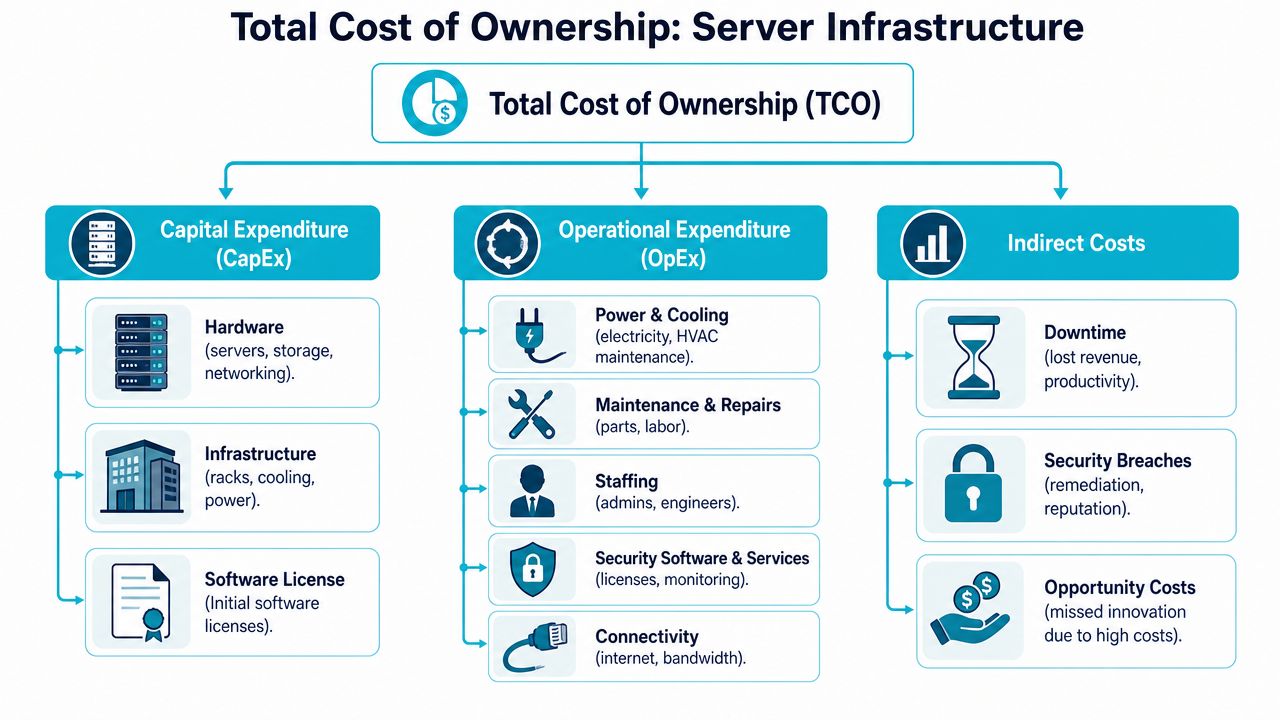
Deconstructing Server TCO Key Cost Components
Think about a server the way finance thinks about a vehicle fleet. The purchase price matters, but nobody confuses purchase price with total ownership cost. Fuel, tires, insurance, repairs, and driver time decide whether that asset is economical. Servers work the same way.
CapEx is the visible part
Capital expenditure is the part procurement usually sees first:
- Hardware acquisition such as servers, drives, memory, and switching
- Facility equipment if you’re on-prem, including racks, cooling, and power gear
- Initial software licensing for hypervisors, operating systems, management tools, or control panels
That number is tangible, which is why people overfocus on it.
OpEx is where the model gets real
Operational expenditure is where most server cost mistakes happen. Hardware inflation alone changes the economics. Industry reporting shows that enterprise SSD contract prices surged by 40–50% in Q4 2025, with forecasts for another 33–38% increase in Q1 2026 due to DRAM and SSD scarcity. If your refresh plan assumes flat component pricing, it’s already stale.
The recurring buckets are familiar to operators:
- Power and cooling for always-on systems
- Maintenance and replacement for failed drives, PSUs, fans, and memory
- Security tooling such as endpoint protection, malware scanning, and monitoring
- Connectivity including transit, cross-connects, and bandwidth commitments
- Administrative labor for patching, ticket handling, backup validation, and incident response
For buyers working through the arithmetic, this dedicated server hosting cost breakdown is a useful companion because it frames dedicated infrastructure in TCO terms rather than just monthly rent.
A short video can help when you need to explain the model to non-technical stakeholders.
Indirect costs change the decision
Indirect costs don’t always appear on the infrastructure invoice, but they still hit the business:
| Cost area | What it looks like in practice |
|---|---|
| Downtime | Failed deployments, missed transactions, user complaints, after-hours response |
| Security incidents | Emergency remediation, service interruption, audit work, reputation damage |
| Opportunity cost | Engineers spending time on server hygiene instead of shipping product |
A server with a lower monthly line item can still be the more expensive platform if it consumes more engineering attention.
This is why “cost to server” has to be modeled as a system, not a sticker.
VPS vs Dedicated Bare Metal A TCO Calculation
The wrong comparison is “Which is cheaper per month?” The right comparison is “Which platform fits the workload shape without creating waste?”
A VPS is usually the right starting point for web applications, business sites, APIs, and internal tools that need quick provisioning and flexible scaling. A dedicated bare metal server makes more sense when you need predictable compute, stronger isolation, storage-heavy performance, or a host for virtualization stacks like Proxmox.
For a practical side-by-side on platform trade-offs, this dedicated server vs VPS hosting comparison maps the decision criteria well.
Where each model fits
A high-performance VPS works well when the workload has changing demand, modest baseline resource needs, or a short deployment timeline. It also reduces the operational drag of buying, staging, and replacing hardware.
Bare metal is stronger when one tenant needs the whole machine. Typical examples include:
- Private virtualization hosts running KVM or LXC workloads
- Database nodes where noisy-neighbor risk isn’t acceptable
- Game servers that need stable CPU allocation
- Media processing or inference jobs that benefit from dedicated resources
The current dedicated inventory commonly discussed for those scenarios includes a Dual Intel Xeon E5-2690 V3 configuration for multi-tenant nodes, an AMD EPYC 4584PX for memory-heavy virtualization and database work, and an AMD Ryzen 9600X for smaller single-tenant application stacks.
A useful way to calculate TCO
For a three-year view, evaluate each option across the same categories:
Platform cost
VPS is pure recurring spend. Bare metal shifts more of the value into fixed dedicated capacity. On-prem adds facility and procurement complexity.Operations burden
VPS typically reduces hands-on hardware work. Bare metal needs more planning but gives tighter performance control. On-prem adds the broadest support surface.Growth path
If you’ll split workloads across many VMs or containers, dedicated hosts can become efficient. If the workload changes often, VPS usually preserves flexibility better.Risk profile
The more your internal team owns, the more you should price in patching discipline, backup verification, hardware failure handling, and recovery.
3-Year TCO Comparison VPS vs. Dedicated Server
| Cost Item | High-Performance VPS (ARPHost) | Dedicated Server (ARPHost) | Self-Hosted On-Prem Server |
|---|---|---|---|
| Entry cost | Low. Fast to provision | Moderate. Dedicated allocation | Highest complexity due to procurement and setup |
| Capacity model | Shared host, isolated VM resources | Full machine, fixed capacity | Full machine plus facility dependency |
| Scaling approach | Add or resize instances quickly | Add servers or redesign cluster | Buy, install, and integrate more hardware |
| Hardware maintenance | Provider handles failed components | Provider handles physical maintenance | Internal team handles spares and failures |
| Performance consistency | Good for many workloads, but shared substrate matters | Strongest isolation and predictability | Can be strong, but depends on internal design and operations |
| Staffing demand | Lower for infrastructure layer | Moderate, depends on management model | Highest, because every layer belongs to your team |
| Best fit | Websites, APIs, dev environments, variable demand | Databases, Proxmox nodes, game hosting, single-tenant apps | Special compliance or legacy constraints |
A hosted VPS can be the lowest-friction answer when speed and flexibility matter most. A dedicated server can have better long-run economics when the workload is steady and resource-hungry. On-prem rarely wins unless you have a clear operational reason and the team to support it.
Buy bare metal for stable demand and control. Buy VPS for agility. Don’t buy on-prem because the hardware quote looked cheap.
If you need security tooling bundled with hosting, a secure managed VPS hosting model with malware protection, isolated environments, and managed patching often closes the gap between flexibility and operational safety better than DIY builds.
Cloud vs Colocation Calculating Your Infrastructure Costs
Cloud and colocation solve different problems. Teams often compare them as if they were interchangeable. They’re not.
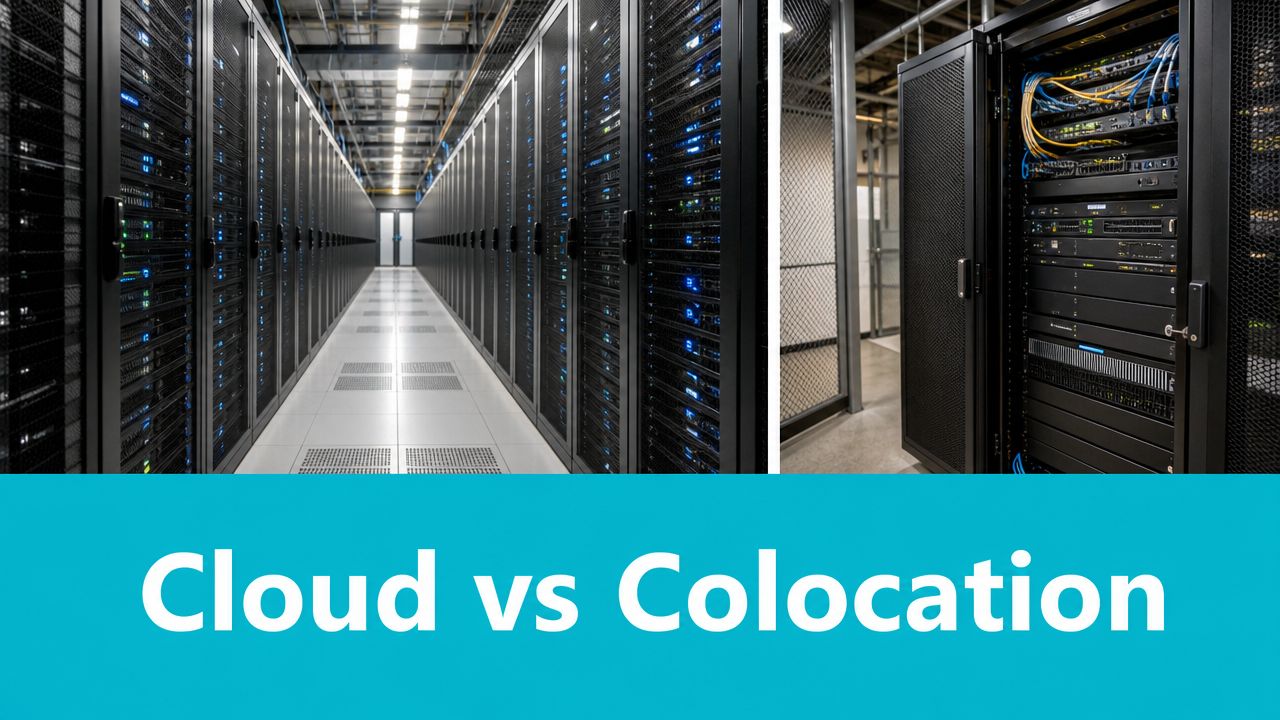
Cloud is an operating model. You rent abstracted infrastructure and pay for consumption. Colocation is a hosting model. You own the hardware and place it in a professional facility with reliable power, cooling, and connectivity. The correct choice depends less on ideology and more on workload predictability.
When cloud is the better spend
Cloud usually makes sense when traffic swings sharply, environments come and go, or product teams need fast experimentation. If the application’s baseline demand is low but burst behavior is high, paying for elasticity can be rational.
That’s especially true in analytics and data engineering patterns where storage, compute, and processing jobs don’t stay steady.
When colocation starts to win
Colocation becomes attractive when the workload is predictable and heavy enough that owned hardware stays busy. You trade hyperscaler flexibility for cost stability and hardware control. You also avoid running that hardware in your own building.
A practical review of colocation cost considerations helps frame this as a capacity planning question instead of a pure hosting question.
Here’s the decision lens I use:
- Stable demand favors colocation because fixed infrastructure gets utilized consistently.
- Burst demand favors cloud because idle owned hardware is wasted capital.
- Specialized hardware needs often favor colocation because you choose the exact server, storage, and network design.
- Internal operations maturity matters. Colocation still requires disciplined ownership of the stack above the rack.
A scenario-based way to think about it
If your application has a predictable transaction profile, known storage growth, and a stable set of services, colocation often lowers variance in your monthly costs. If your product launches regional spikes, runs temporary analytics jobs, or changes shape every quarter, cloud can be worth the premium because it avoids stranded capacity.
The cost to server in cloud is usually easier to start and harder to govern. The cost to server in colocation is harder to start and easier to forecast once the design is right.
Colocation is usually the better financial fit for steady workloads. Cloud is usually the better operational fit for uncertain ones.
Managed vs Unmanaged The Hidden Cost of Your Time
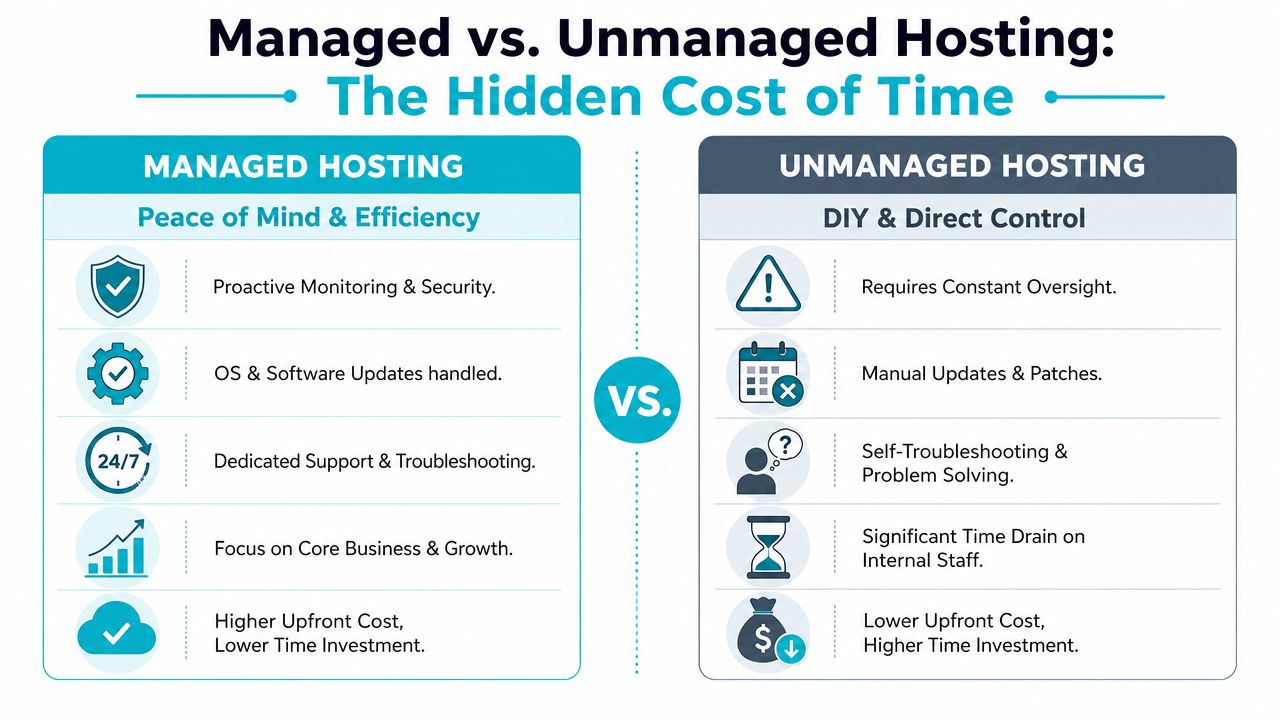
Unmanaged infrastructure looks cheap right up until your team has to run it.
That’s the trap. Buyers compare plan pricing and assume they’re saving money by taking ownership of patching, hardening, monitoring, troubleshooting, and backup validation. In practice, they’re moving costs from the provider invoice into internal labor and outage risk.
Labor dominates faster than people expect
The biggest line item in on-prem and DIY-heavy environments is often the people required to keep systems healthy. Michael Kenny’s TCO analysis notes that the ongoing cost of personnel to monitor, maintain, support, and upgrade an on-premise server system accounts for between 50% and 85% of total application costs in historical benchmarks.
That changes how unmanaged hosting should be evaluated. The monthly plan may be lower, but the business still pays for:
- Patch windows and emergency fixes
- Security review and policy enforcement
- Backup testing and restore drills
- Monitoring noise and after-hours response
- Escalation handling when something breaks at the worst time
Downtime turns DIY savings into false savings
The other hidden cost is interruption. Published research on downtime costs shows a single minute of server downtime costs an average of $9,000 for small companies and can exceed $300,000 for large enterprises. Once you put a dollar figure on outage time, unmanaged plans stop looking cheap.
Opportunity cost also belongs in the model. A senior engineer spending hours on routine server hygiene isn’t spending that time on delivery, automation, or customer-facing work.
Paying less for the server while paying more in staff time isn’t savings. It’s cost shifting.
What managed service actually buys you
Managed service isn’t only about convenience. It buys down operational risk.
A managed layer should cover the repetitive work that teams neglect when they’re busy: update handling, service monitoring, backup oversight, security response, and issue triage. For many SMB and mid-market teams, that’s the line between a controlled environment and a fragile one.
When internal staff is lean, fully managed IT services for servers usually cost less than recurring firefighting. The gain isn’t abstract peace of mind. Instead, it’s fewer interruptions, more predictable operations, and more engineering time left for the business.
Actionable Strategies to Reduce Your Server Costs
Server cost reduction usually fails for one reason. Teams negotiate harder on monthly hosting fees than on the operational waste wrapped around those fees.
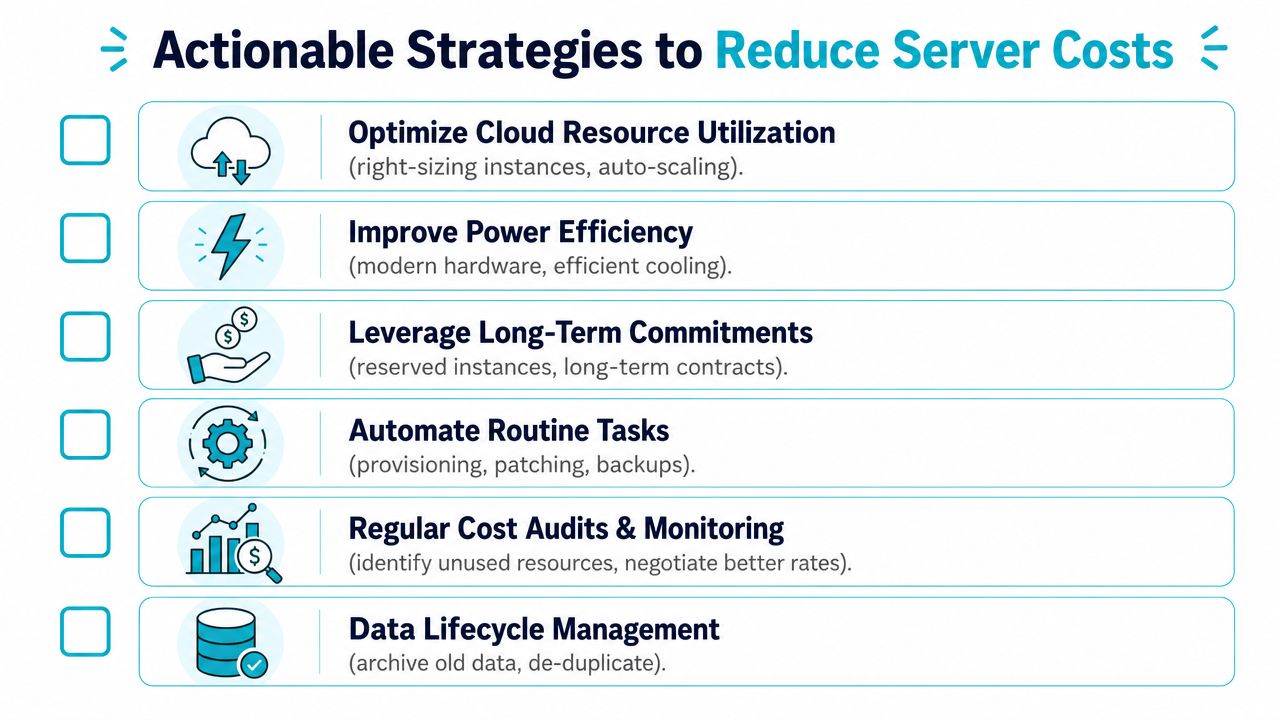
The practical way to cut TCO is to remove stranded capacity, reduce repetitive admin work, and limit the number of failure points your staff has to maintain. That lowers labor cost, power draw, backup sprawl, and outage exposure at the same time.
Consolidate with virtualization
Underused physical servers are expensive because they multiply everything around the hardware. More boxes mean more power circuits, more patching windows, more backup jobs, more monitoring targets, and more chances for a small issue to become an incident.
Consolidation fixes that if the host is sized correctly. Proxmox is a practical option because it runs KVM virtual machines and LXC containers in the same platform, which lets you place heavier and lighter workloads without maintaining separate stacks.
For reliable quorum in a Proxmox VE HA design, a minimum of three nodes is required, and the third node can be a low-spec device. That changes the math for smaller teams. High availability does not always require three identical servers.
For a basic CLI-driven cluster setup, the common pattern is:
pvecm create production-cluster
Then on additional nodes:
pvecm add first-node-management-address
pvecm status
That sequence reflects the standard CLI workflow described in the Proxmox VE 9 clustering guidance from the provided research background.
Right-size before you optimize
A surprising amount of waste sits in plain sight. Old project VMs stay online for months. Memory gets allocated for peak conditions that never arrive. Temporary migration systems become permanent.
A quarterly review usually catches the biggest issues fast:
- Idle resources still consuming compute, storage, and backup capacity
- Oversized virtual machines running far below their assigned CPU and RAM
- Duplicate services left behind after cutovers or application changes
- Storage growth caused by stale snapshots, logs, and old backup chains
A memory-dense host such as the AMD EPYC 4584PX with 192GB DDR5 RAM shows where this works well. One properly planned node can replace several fragmented systems, which cuts license overhead, rack footprint, and the amount of infrastructure your team has to babysit.
Automate the routine work
Labor is one of the easiest server costs to underestimate.
Every manual patch cycle, backup check, and VM build consumes skilled time that should be going to architecture, reliability, and security improvements. Automation turns those recurring tasks into a lower, more predictable operating cost.
Start with the jobs that repeat every week:
- Patch automation for guest operating systems and common packages
- Backup scheduling and restore testing so failures show up before an incident
- Service-level monitoring that tracks application health, not only host metrics
- Template-based provisioning for consistent VM and container deployment
The cheapest admin task is the one nobody has to perform by hand.
Harden management paths early
Security work belongs in the initial build because cleanup is expensive. A weak management plane can erase months of savings in a single incident through recovery time, forensic work, emergency consulting, and customer impact.
In Proxmox environments, the baseline is straightforward. Disable root SSH access. Use SSH keys. Apply a default deny-all firewall policy with explicit allow rules. Keep management traffic separate from VM and container traffic on a dedicated VLAN. Those controls reduce attack surface and make troubleshooting cleaner.
ARPHost, LLC is one example of a provider that supports this model across Proxmox private clouds, bare metal servers, secure web hosting bundles, colocation, and managed operations. In this context, the useful point is not the product list. It is the ability to standardize platforms so your team spends less time supporting one-off infrastructure decisions.
Why ARPHost Excels at Optimizing Server TCO
The right cost to server isn’t the lowest line item. It’s the lowest reliable operating cost for the workload you have.
That means matching platform to demand, reducing labor drag, minimizing outage exposure, and avoiding hardware sprawl. A VPS is often the correct entry point when you need fast deployment and flexible scaling. Bare metal is often the stronger long-term fit for dense virtualization, databases, or single-tenant workloads. Colocation makes sense when demand is predictable and you want facility-grade power and connectivity without running hardware in-house. Managed services change the model again because they remove a large amount of operational overhead from your internal team.
What good cost control looks like
A sound server strategy usually has these traits:
- Clear workload placement so steady jobs don’t live on overpriced elastic platforms
- A realistic labor model that includes patching, monitoring, and incident handling
- Security controls built into operations rather than added after a problem
- A growth path for moving from VPS to dedicated hardware or private cloud without a redesign crisis
That’s where a provider with VPS, bare metal, secure web hosting, colocation, Proxmox private cloud options, and managed support becomes useful. You can place each workload on the right service model instead of forcing every application into the same box.
Scaling this with the right service mix
If you’re evaluating dedicated Proxmox cloud pricing, the decision should be tied to cluster design, fault tolerance, backup policy, and management scope. If you’re shopping for secure managed VPS hosting, the important questions are patch handling, malware protection, isolation, and support responsiveness. If you need fully managed IT services for servers, the issue is whether the provider can absorb repetitive operational work so your team can focus elsewhere.
The strongest TCO outcomes usually come from treating infrastructure as a portfolio, not a single product category.
If you’re reviewing the cost to server across VPS, bare metal, colocation, private cloud, or managed operations, ARPHost, LLC is one place to compare practical options with transparent service models. For teams that need a starting point, you can review VPS hosting, browse bare metal servers, assess colocation services, or request a managed services quote based on the operational burden you want to offload.
