

Searching for a colocation data center near me usually starts in the wrong place. Distance matters, but a facility that is close to your office and weak on carriers, power, or contract terms will cost you more in downtime, delays, and surprises than a slightly farther site that’s built properly.
The better question is blunt: which nearby facility can carry your workload without hidden friction? That means looking at carrier diversity, power redundancy, cooling headroom, physical security, and the contract language that defines what you’re really buying. The market is big enough that you have options, too, because the U.S. colocation services industry is estimated at $17.1 billion in 2026 and includes 2,226 businesses, with broader forecasts projecting continued growth in the years ahead (Market and Markets).
Local availability is broader than most buyers assume. Pew Research Center says the U.S. has more than 3,000 operational data centers and more than 1,500 additional facilities in development, and 38% of Americans live within 5 miles of at least one operational data center That means a “near me” search is often a search across a cluster of facilities, not a single building on your side of town.
Keep a running list as you read. Separate must-haves from nice-to-haves, and treat anything that affects power, access, or connectivity as essential.
Why Searching for a Colocation Data Center Near Me Is the Wrong First Question
Most buyers start with geography because it feels practical. They want an easy drive, faster access to hardware, and a sense that the facility is “close enough” to matter. That instinct isn’t wrong, it’s just incomplete.
A nearby site only helps if it can deliver the basics without compromise. If the colo can’t support carrier diversity, redundant power, or clear service terms, then proximity becomes a convenience feature, not a business advantage. That’s why the first filter should be infrastructure quality, not map distance.
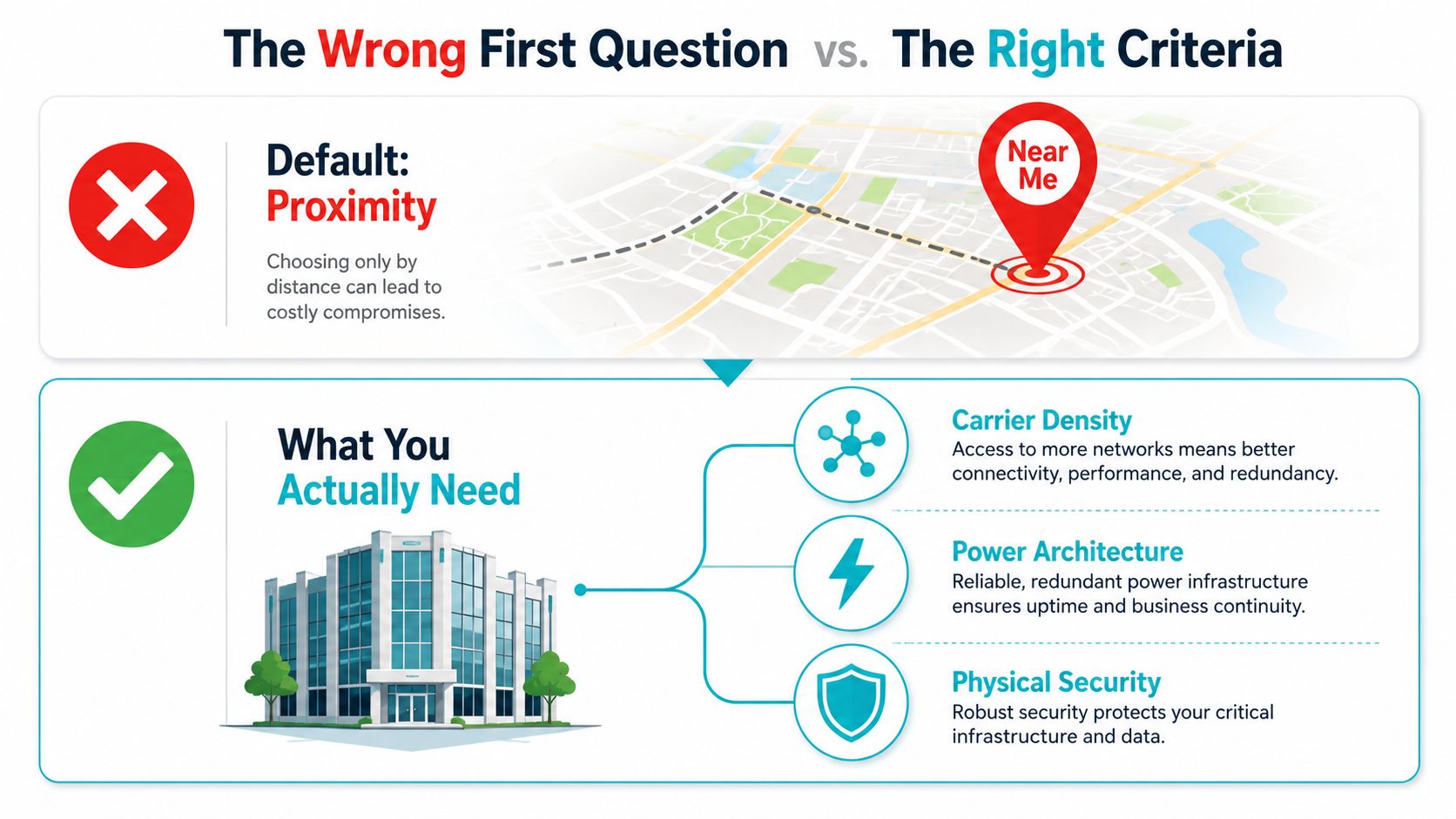
What “near me” really hides
A lot of local search results blur together. One facility might be physically close but carry weak network options, while another a little farther out might sit inside a stronger interconnect ecosystem and give you better routing choices. Cloud Interconnect’s Dedicated Interconnect is available from 161 locations, which is a good reminder that facility choice is really a network-design decision, not just a real-estate one (Google Cloud documentation).
The same logic applies to the built environment. A facility that looks ordinary on the outside can still have excellent power architecture, tight access control, and strong meet-me room connectivity. A site that wins on convenience but loses on those basics is the wrong place for production gear.
Practical rule: shortlist the facility that protects the workload first, then optimize for commute time.
The rest of this guide helps you separate signal from noise. Keep that checklist in mind while you compare options, because the right local colo is the one that supports your workload, your network, and your recovery plan without drama.
What Colocation Actually Is and What the Provider Owns
Colocation is a shared-responsibility model, and buyers get into trouble when they forget that. The provider owns the building and the infrastructure that keeps it running, while you own the hardware and everything installed on it. That split is the entire business model.
Leasing a fully serviced warehouse for servers is a good analogy. The landlord supplies the shell, power, cooling, security, and shared connectivity space. You bring the racks, the servers, the storage, and the operating environment that runs on top.
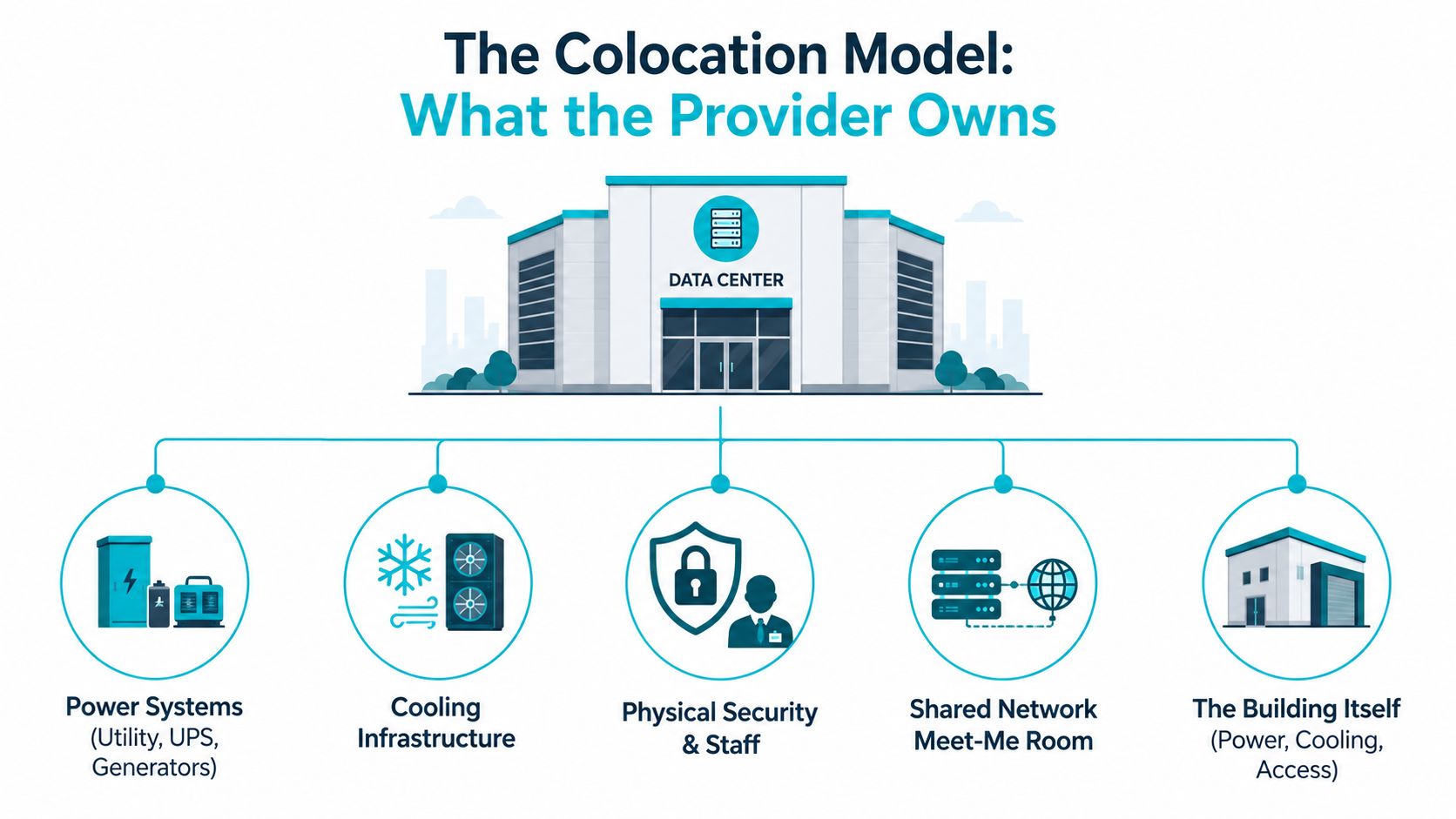
What the facility owns
The provider handles the hard physical layer. That includes HVAC, backup generators, UPS systems, perimeter security, fire suppression, and the shared network environment inside the facility. In the simplest terms, the colo’s job is to keep the room powered, cooled, and accessible under controlled conditions.
That’s why facility quality matters so much. If the provider underbuilds the cooling plant or skimped on backup power, your hardware inherits that weakness immediately. In colocation, you don’t get to separate application reliability from facility reliability.
What you still own
You remain responsible for the servers, storage, firmware, operating systems, applications, and in-rack cabling. If you want a patch applied, a RAID array replaced, or a VM migrated, that’s on your team unless the contract says otherwise. The provider is not your sysadmin by default.
That distinction also separates colocation from cloud and managed hosting. In public cloud, you rent abstracted compute. In managed hosting, the provider often owns more of the stack. In colocation, you retain the most physical control, which is exactly why it’s attractive for regulated workloads, hybrid designs, latency-sensitive applications, and teams that want control without building a data center from scratch.
For a clean definition of the model, ARPHost has a concise overview here: what is colocation hosting.
The Five Things That Actually Decide Whether a Local Colo Is Good
A local facility can look impressive on paper and still be wrong for your workload. You need a hard filter, not a marketing tour. The five things that matter most are power architecture, connectivity, physical security, certifications, and support terms.
Facility Criteria Reference Table
| Criterion | Minimum Acceptable | Recommended for Production |
|---|---|---|
| Power architecture | Redundant utility feed, UPS, generator coverage | 2N+1-style redundancy and clear outage protection |
| Connectivity | More than one network option | Carrier-neutral with cross-connect choices and cloud on-ramps |
| Physical security | Badge access and logged entry | Biometrics, mantraps, CCTV, visitor controls |
| Certifications | Basic policy documentation | Relevant compliance posture for your workload |
| Support | Business-hours response | 24/7 remote hands and documented response targets |
Power and cooling first
Power is where many colo claims collapse under scrutiny. Tier 4 facilities are described as allowing up to 26.3 minutes of downtime per year, using full 2N+1 redundancy, with at least 96 hours of power outage protection That’s the kind of architecture that keeps customer equipment alive when a feed, UPS string, or generator component fails.
Cooling matters just as much. Dense racks don’t care how polished the lobby looks. They care whether the plant can hold temperature under sustained load without creating hot spots or throttling headroom.
Connectivity and access
Connectivity is where “near me” can become a trap. If the facility is isolated from carrier ecosystems, you’ll spend more on cross-connects and get less flexibility later. A good local colo gives you options, not just an internet handoff.
Security, compliance, and support
Physical security should feel boring because it’s done well. You want access logs, controlled visitor policy, and staff who can explain the process without improvising. For compliance-heavy workloads, the provider should be able to speak clearly about how the facility aligns with your requirements.
A good colo doesn’t win because it has the most features. It wins because it matches your workload without creating hidden operational debt.
For a carrier-focused view of facility selection, review ARPHost’s carrier-neutral datacenter page, then compare that against your own network and compliance needs.
A Repeatable Shortlisting Workflow for Local Providers
Stop treating the search as a general browse. Turn it into a procurement workflow, and the list gets shorter fast. The goal is to move from a vague “near me” search to two or three defensible candidates.
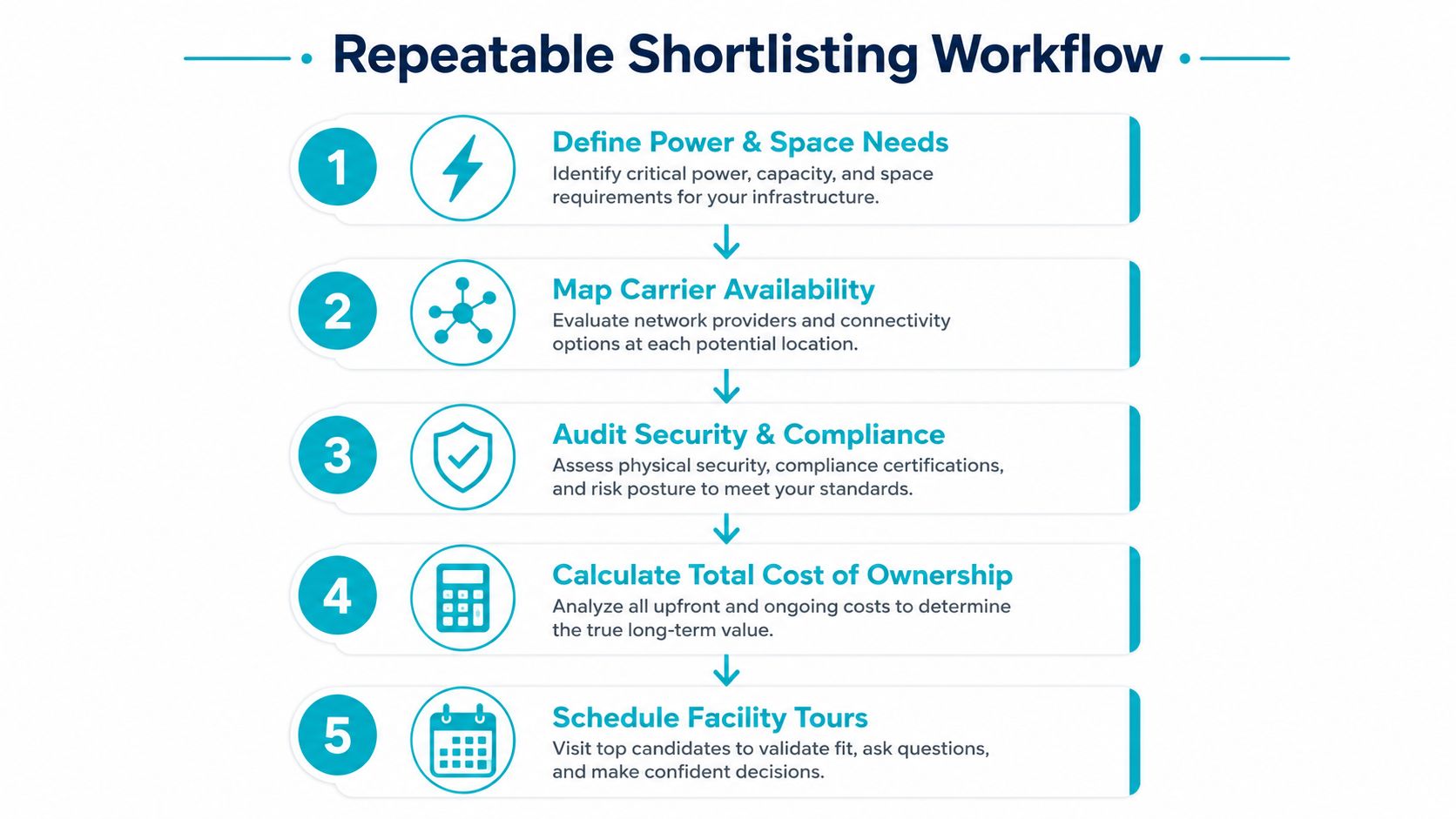
Start with requirements, not locations
Write down the workload first. Define power draw, space needs, compliance requirements, recovery expectations, and room for growth. If you don’t know how much power your equipment needs, you’re not ready to shop colo.
Then pull a candidate list from directories and search results. Don’t stop at the first facility that says it’s local. A metro may have several options, and the right one may be in a different part of the region.
Compare proposals like an engineer
Once quotes come back, compare them on the same template. Look at power commitment, cross-connect availability, remote hands, and whether the provider explains its SLA in plain language. Vague pricing usually means vague operations.
Watch for this: if the quote is light on service scope and heavy on assumptions, you’re not looking at a complete proposal.
Shortlist only what you can defend
A weak single-carrier facility can look cheap until you need redundancy. A quoted power figure that’s far below real delivered capacity is another warning sign. The cheapest option often hides the weakest infrastructure, while the most expensive option can still be a poor fit if it overshoots your actual needs.
Use the shortlist to schedule tours, not to debate hypotheticals forever. If a facility can’t make it through the RFP stage cleanly, don’t waste time on a site visit.
Translating Technical Requirements into Real Colo Specs
A mid-sized SaaS company moving a database cluster into colocation doesn’t need abstract advice. It needs translated specs. That means turning workload demands into concrete asks the provider can price and provision.
A simple workload-to-spec translation
If the cluster needs steady headroom, you ask for enough rack power to cover it without riding the edge. If the team expects growth, you avoid a cramped half-cabinet that forces a second move in six months. If the gear needs isolated failover paths, you plan for redundant connectivity from the start.
A practical way to consider it:
- Power density: request a committed kW figure that matches the actual draw, not a hopeful estimate.
- Rack space: choose full cabinet space if the gear set will expand, because swapping cabinets later creates avoidable disruption.
- Connectivity: size cross-connects for primary and secondary links, including cloud or ISP diversity where needed.
- Remote hands: make sure after-hours support is part of the operating plan if your team won’t be on-site at midnight.
What drives the quote
The same workload can generate very different pricing across facilities. One colo might have enough cooling and power headroom to absorb the cluster cleanly. Another might price more aggressively but force compromises on density, access, or expansion.
If the gear is dense, ask the provider to walk you through the thermal and electrical assumptions behind the quote. Don’t accept “we can fit it” as a technical answer. You need a facility that can carry the workload at operating temperature without pretending the cabinet is just a shelf.
A lot of buyers also undervalue maintenance timing. If you expect after-hours swaps or remote intervention, the support model matters as much as the steel and concrete. That’s the difference between a clean handoff and a long night.
On-Site Tour Checklist and Questions Worth Asking
Tours are where polished sales language gets tested against actual operations. Walk the facility like someone who will be responsible for recovering from its failures, because that’s the right mindset. If the room, yard, and loading path feel sloppy, assume the operations behind them are sloppy too.
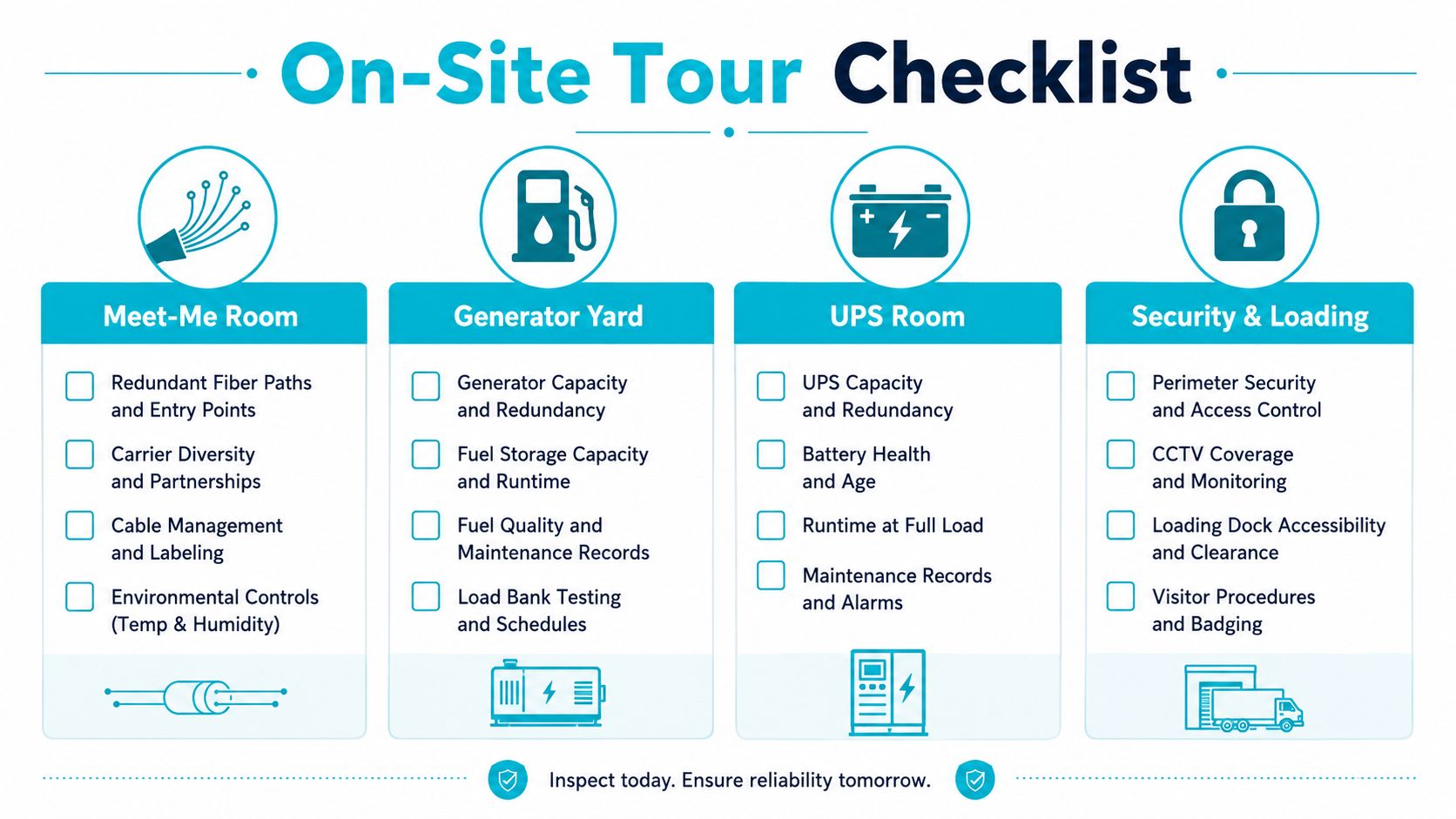
What to inspect first
Start in the meet-me room and look for clean fiber routing, orderly labeling, and visible discipline around access. Move to the generator yard and ask how backup power is maintained, tested, and fuel-managed. In the UPS room, look for layout, maintenance clarity, and the kind of housekeeping that shows the staff actively works the room.
Then check the security desk and the loading path. You want controlled access, clear visitor procedure, and a process that doesn’t stall when hardware needs to move.
Questions that expose real quality
Ask staff how often generators are tested under load, what the actual cross-connect lead time looks like, and how remote hands response is documented. Ask how capacity is allocated during a regional power event. Ask whether the facility can explain its compliance posture without hand-waving.
Red flags to walk away from
Unmarked cabling is a bad sign. Crowded aisles are a bad sign. Locked customer cages for routine access are a bad sign. Staff who can’t answer basic compliance questions are a very bad sign.
Leave the tour with notes, photos if permitted, and a simple scorecard. If you can’t compare facilities after the visit, you didn’t gather enough information.
Reading the Quote and Avoiding Hidden Colo Costs
The headline number on a colo quote is never the whole number. If you only compare monthly rack price, you’ll miss the charges that make one provider materially more expensive than another. The shared-responsibility model affects cost, too, because work you keep in-house is work the colo doesn’t bill for.
Sample Quote Comparison
| Line Item | Provider A | Provider B |
|---|---|---|
| Space | Lower base rate | Higher base rate |
| Power | Included at a modest commit | Higher power commit |
| Cross-connects | Separate charge | Bundled differently |
| Remote hands | Higher surcharge | Lower or clearer terms |
What usually gets missed
Look for installation fees, environmental monitoring charges, after-hours support surcharges, and overage terms if you exceed committed power. Those items can move the contract from acceptable to expensive very quickly. The quote only makes sense when you understand what sits inside the base rate and what gets billed later.
A slightly higher base rate can still be the better deal if the provider is straightforward about support and cross-connects. A cheap quote with aggressive add-ons usually means you’ll pay more after deployment, not less. That’s why the core comparison is total cost, not marketing price.
For a pricing-oriented lens, compare your proposal with ARPHost’s data center colocation pricing resources, then sanity-check the terms against your expected power, space, and support usage.
How ARPHost Fits a Local Buyer’s Shortlist
ARPHost’s Tampa, FL facility is a concrete local option for buyers in Tampa Bay, throughout Florida, and across the Southeast who want colocation with nearby access and cross-connect planning. It sits in the practical middle ground between owning your own room and outsourcing too much control.
The facility is positioned around 99.99% uptime SLA, redundant network, N+1 power, multiple Tier-1 bandwidth providers, biometric access controls, NVMe-capable host infrastructure, and 24/7 U.S.-based support with cited sub-15-minute average response times. Those are the right kinds of details to look for when you’re trying to keep production gear close without sacrificing resilience.
Where it fits well
Hybrid teams use a facility like this to host customer-owned hardware while keeping control of the stack. It also fits dedicated Proxmox private clouds, especially when the design calls for dedicated hardware and root-level control. For compute-heavy or multi-tenant builds, ARPHost also has bare metal options such as dual Xeon, AMD EPYC, and Ryzen configurations in Tampa that can support colocation-adjacent or private cloud planning.
What I’d put on the shortlist
If you’re comparing local options, include a colo site, a private cloud option, and a managed services path side by side. That keeps the conversation honest. The right answer for one workload might be customer-owned hardware in colo, while another workload is cleaner on a managed private cloud with storage and support wrapped in.
For next steps, review ARPHost colocation, dedicated Proxmox private clouds, and managed services. Why ARPHost excels here is simple, dedicated hardware options, hybrid design experience, and hands-on U.S.-based support without forcing you into a one-size-fits-all model.
ARPHost, LLC provides colocation, bare metal, VPS, private cloud, and managed services from Tampa, Florida, with the operational controls buyers should demand from a local infrastructure partner. If you’re evaluating a colocation data center near me, visit ARPHost, LLC to review the Tampa facility, compare service options, and decide whether colocation, private cloud, or managed infrastructure is the cleaner fit for your workload.
