

Your infrastructure team usually reaches colocation for the same reason finance starts asking harder questions. The cloud bill keeps moving, the workloads that matter most don't behave like stateless web apps, and the business wants tighter control over performance, licensing, security, or compliance. At that point, “just put it in the cloud” stops being a strategy and starts being a habit.
The mistake is assuming colocation cost is simple. It isn't just a monthly rack fee. It's the total of space, power, network access, hands-on support, setup work, and the operational choices you make around redundancy. A cheap quote can still be an expensive deployment if the quote hides the parts you'll eventually need.
For a CTO, the question isn't “What does a rack cost?” It's “What will year one cost, what risks are we buying down, and which parts should we still outsource?” That's where most pricing conversations go wrong.
Is It Time to Move Beyond the Cloud
A common pattern looks like this. A company starts on shared hosting, grows into VPS, adds a few dedicated instances, then realizes its core applications now need steadier performance, lower variance, and more predictable spend. Public cloud still works for bursty workloads and fast experiments, but the databases, internal services, backup targets, or regulated systems start pushing in a different direction.
That doesn't mean colocation is a step backward. It usually means the environment has matured.
Teams that already own hardware, or plan to standardize on known server builds, often find colocation attractive because it restores control over the stack. You choose the server platform, storage layout, hypervisor, and network design. You also stop paying for layers of abstraction you may not need for always-on workloads.
For some organizations, the move is also geographic and operational.
A lot of confusion starts with the term itself. If your stakeholders are still mixing up colocation, dedicated hosting, and private cloud, ARPHost has a straightforward explainer on what colocation hosting is that helps reset the conversation before you start comparing quotes.
Colocation makes the most financial sense when you already know your baseline workload, need hardware control, and want to stop treating infrastructure as an endlessly variable utility bill.
Hybrid designs are often the practical answer. Keep elastic and disposable workloads on VPS or cloud. Place steady-state infrastructure on owned hardware in a facility built for power, cooling, and connectivity. That split usually produces better budgeting discipline than trying to force every workload into one model.
Deconstructing Colocation Pricing Models
Most colocation pricing becomes easier to read once you break it into four buckets: space, power, connectivity, and services. Those are the levers that shape almost every quote.
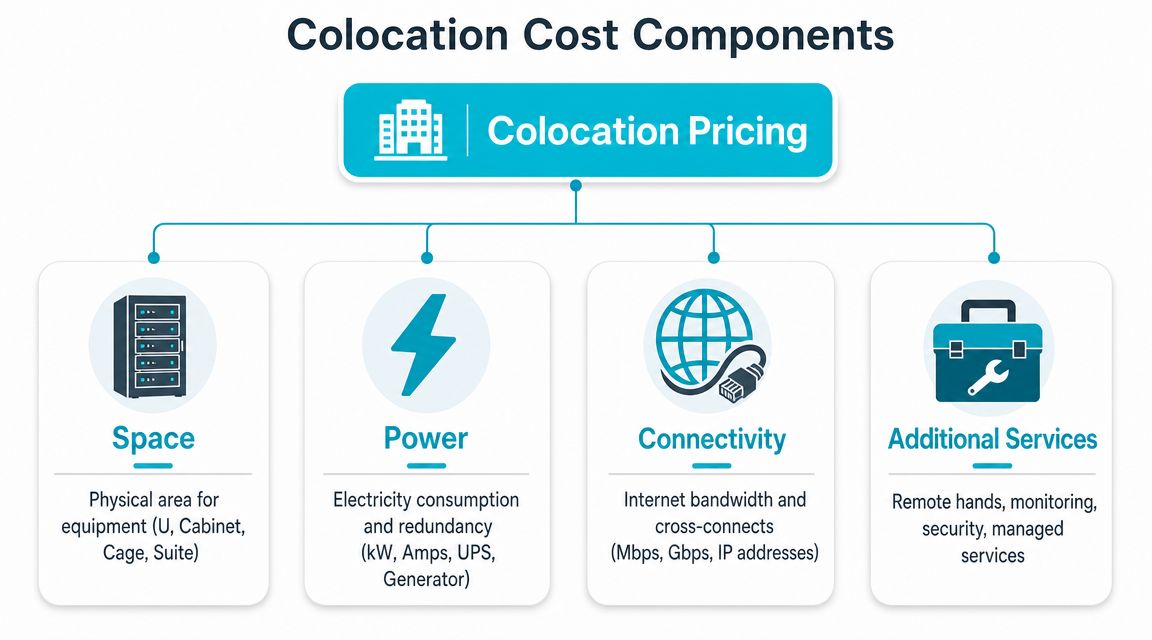
Space
Space is the property component of the bill. You're renting physical room for equipment, but providers don't always package it the same way. Small deployments may be priced by rack unit. Larger deployments move into quarter rack, half rack, full cabinet, cage, or private suite pricing.
One industry guide notes that a single rack was cited at about $100 to $300 per U per month, with the same guide noting that implementation labor can require a one-time $500 to $3,000 investment and server monitoring can add $75 to $400 per server per month.
That range matters because two racks with the same footprint may still produce very different total bills once power and support get layered in.
Power
Power is usually the line item that decides whether a quote is cheap or not. You're not only paying for electricity. You're paying for the facility's ability to deliver that electricity continuously, through resilient distribution, UPS systems, and generator-backed design.
Some providers sell power as an included monthly allowance. Others meter it or build pricing around a committed power envelope. If you ask for A+B feeds, higher circuit capacity, or denser cabinets, the cost rises because the provider has to reserve more electrical and cooling infrastructure for your footprint.
Practical rule: Size the deployment in kilowatts first, rack units second. A low-density cabinet and a high-density cabinet do not belong in the same budget model.
Connectivity
Connectivity is where many first-time buyers under-scope the design. Internet transit, blended bandwidth, private interconnects, IP allocations, and cross-connects all sit here. A basic deployment with a simple uplink is one thing. A design that needs carrier diversity, private cloud access, or low-latency interconnects is another.
The wrong buying behavior is treating bandwidth as an afterthought. The right one is deciding early whether the workload needs cheap internet access, route diversity, direct cloud access, or east-west interconnects inside the facility.
Services
Services cover everything people forget to budget for until the first incident. That includes remote hands, hardware installs, monitoring, cable work, escort fees, smart hands, after-hours requests, and managed operations.
Here's what works. Ask the provider to separate recurring from non-recurring charges and list which tasks are billable. What doesn't work is assuming “support” means unlimited physical work in the cabinet.
Why transparent billing matters
If a provider can't explain what is included in space, what is committed power, which network services are bundled, and what support is billable, you don't have a usable cost model. You have a sales estimate.
That's also where managed hosting providers can be useful. For example, ARPHost offers colocation alongside VPS hosting, bare metal servers, and managed infrastructure, which gives teams an easier path if they decide some workloads belong on colocated hardware and others don't.
Typical Colocation Costs and Market Ranges
A team approves a “$700 full rack” line item, then learns the design needs more power, a better network blend, and on-site help for installs. The cabinet price was real. It just was not the cost of operating the environment.
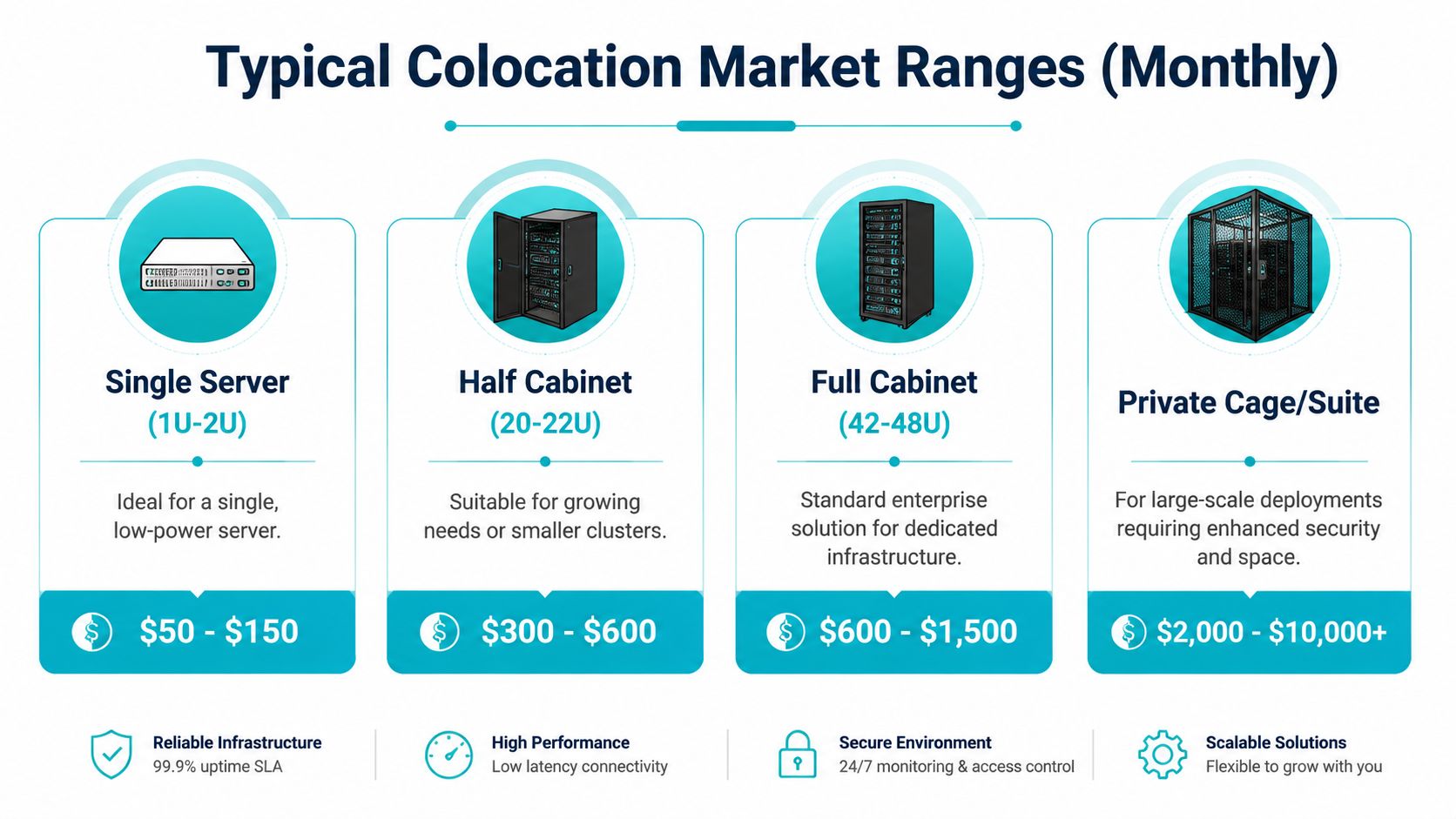
Market starting points
For early budgeting, the market usually breaks into five bands: individual servers, partial racks, full racks, and private cages. Industry pricing summaries published by providers such as Colocation America show the same broad pattern. Small 1U or 2U footprints sit at the low end, partial racks occupy the middle, and full cabinets or cages climb quickly once power density and connectivity requirements increase.
A practical planning range looks like this:
| Deployment type | Typical monthly range |
|---|---|
| Single server (1U to 2U) | Low hundreds |
| Quarter rack | Several hundred |
| Half rack | Mid-hundreds to low four figures |
| Full rack | High hundreds to low four figures |
| Private cage | Low four figures and up |
These are screening numbers. They help a CTO decide whether colocation belongs on the shortlist. They do not support a year-one approval by themselves.
Why the same rack can have very different pricing
Cabinet size is the easy part. Power is usually the primary cost driver.
A 42U rack filled with low-draw network gear prices very differently from a 42U rack loaded with dual-socket compute nodes, storage, or GPU systems. The floor footprint is identical, but the provider has to reserve a different amount of power capacity and cooling headroom. In many facilities, that difference matters more than the metal cabinet itself.
Two questions separate a usable quote from a marketing number:
- How much power is committed, and how is overage billed?
- Is the quoted rate based on actual rack density, or on a lightly loaded cabinet assumption?
If those answers are vague, the price range is not mature enough for budgeting.
Geography affects more than rent
Market location changes both recurring cost and design options. Major carrier hotels and primary metros often cost more because they offer stronger interconnection ecosystems, lower-latency access to partners, and more carrier choice. Secondary markets can be cheaper on space and utility cost, but they may limit network options or increase transport cost back to users, offices, or cloud regions.
That trade-off is why the cheapest market is not always the lowest-TCO choice. A lower cabinet rate loses its appeal if the architecture then requires extra transport circuits, longer remote response paths, or added complexity to reach cloud and network partners.
Use ranges for planning, then build the year-one model
The right way to use market ranges is to treat them as the first layer of the model. Start with the footprint. Add the committed power target. Add expected bandwidth and interconnects. Add the level of on-site operational support the team will need.
That last step is where budgets go wrong. A monthly rack quote can look competitive and still understate year-one cost by a wide margin once setup work, cross-connects, and remote hands are included.
ARPHost offers colocation alongside VPS hosting, bare metal servers, and managed infrastructure. That can be useful when a team needs to compare pure colocation pricing against a design that keeps some workloads off the rack and under managed operations.
Uncovering the Hidden Costs of Colocation
The monthly rack quote is rarely the number finance should use.

The most expensive colocation mistakes happen before the first server goes live. A team gets a headline price, signs off on it, then starts discovering the quote didn't include the practical requirements for operating in the facility. That's when “cheap” turns into “we should have modeled this better.”
One documented example shows exactly how this happens. An $800 cabinet special became $1,575 per month after PDU, bandwidth, cross-connect, and remote-hands charges were added, with a separate $750 setup fee for cross-connects.
The year-one costs that catch teams off guard
The usual problem areas are predictable:
- Non-recurring setup work. Install fees, provisioning charges, and interconnect setup often sit outside the monthly rate.
- Power distribution gear. If the quoted cabinet doesn't include the PDU arrangement you need, you'll pay to close that gap.
- Cross-connects. These are easy to miss in the first review and hard to avoid in real designs.
- Remote hands. If your team isn't local, simple tasks become billable events.
- Annual rate language. Even when the first-month quote looks acceptable, contract terms can change the longer cost curve.
A good buying process forces all of that into a year-one worksheet before legal ever sees the contract.
What year-one TCO should include
Use a model that separates recurring and non-recurring charges.
| Cost bucket | Include in year-one model |
|---|---|
| Recurring monthly | Space, committed power, bandwidth, cross-connect recurring charges, support |
| One-time | Setup, implementation labor, cross-connect install, hardware shipping, rack-and-stack work |
| Operational | Remote hands usage, spares handling, site visits, after-hours interventions |
That worksheet does two things. It surfaces hidden costs, and it shows whether unmanaged colocation is still worth it after staffing overhead is included.
A short overview like the one below is useful if your internal team needs a quick reset on where those surprise charges come from.
The right comparison isn't provider A versus provider B at monthly list price. It's provider A year-one landed cost versus provider B year-one landed cost, with your operating model included.
What doesn't work is approving colocation on cabinet price alone. What works is asking for an itemized quote that includes every required support and network dependency.
Colocation vs Alternatives A Cost-Benefit Analysis
Colocation is not automatically the lowest-cost answer. It's one model among several, and its value depends on what you already own, what your team can operate, and how much management burden you want to keep in-house.
It's worth reading alongside infrastructure quotes because hardware location is only one part of the cost equation. The people needed to run it matter just as much.
The comparison that matters
For most CTOs, realistic alternatives are:
- Colocation if you already own hardware or need full platform control.
- Bare metal server rental if you want dedicated hardware without owning the devices.
- Proxmox private cloud if you want dedicated infrastructure with virtualization flexibility and less physical management.
The trade-off isn't just cost. It's control versus operational burden.
Technical guidance from colocation operators stresses that colocation TCO includes the client's share of facility operating expenses such as physical security, building maintenance, and redundancy for power and cooling, while stronger redundancy and diverse carrier options raise cost but lower outage risk.
Infrastructure Cost & Control Comparison
| Criterion | Colocation | ARPHost Bare Metal Server | ARPHost Proxmox Private Cloud |
|---|---|---|---|
| Hardware ownership | You own it | Provider owns it | Provider supplies dedicated platform |
| Upfront capital | Higher if buying servers | Lower | Lower than buying and building yourself |
| Physical access control | Highest | Limited to service scope | Limited to service scope |
| Hypervisor choice | Full control | Depends on service model | Built for virtualization workflows |
| Scaling speed | Slower, involves procurement and install | Faster than colo | Faster for virtual workloads |
| Remote operations burden | Highest in unmanaged setups | Lower | Lower |
| Best fit | Stable workloads, owned hardware, deep control needs | Dedicated compute without hardware lifecycle work | Private cloud flexibility with dedicated resources |
When colocation wins
Colocation is usually strongest when you already have standardized hardware, know your sustained workload profile, and need low-level control over firmware, storage topology, or network architecture. It also fits organizations that want to depreciate hardware rather than rent it.
What doesn't work is choosing colocation when the need is simpler. If your team doesn't want to manage hardware refreshes, maintain spare parts, coordinate remote hands, or handle break-fix logistics, a rented dedicated server often gives you most of the performance benefit with less friction.
When dedicated bare metal or private cloud wins
Bare metal rental is the clean answer for teams that need single-tenant hardware and root control but don't want to own the physical estate. It removes procurement lead time, sparing strategy, and a lot of cabinet-level planning.
A Proxmox private cloud fits when the business needs clustered virtualization, isolation, and easier migration of VM-based workloads. If your roadmap includes HA virtualization, storage clustering, or staged VMware migration, this model often reduces operational drag compared with building the whole platform inside a colo footprint.
If you're weighing those options directly, compare ARPHost's colocation and hosting services against your expected hardware lifecycle, staffing model, and refresh timeline before assuming colocation is automatically cheaper.
Choosing Between Managed and Unmanaged Colocation
Unmanaged colocation sounds cheaper because the invoice shows fewer bundled services. That doesn't mean the environment costs less to run.
In unmanaged colocation, your team owns the operating burden. That includes OS maintenance, hardware diagnosis, replacement workflows, vendor coordination, after-hours response, documentation quality, and the practical reality of fixing physical issues from a distance. If your engineers are excellent but already overloaded, unmanaged colo often shifts cost from the provider line item into delayed projects, ticket queues, and escalation fatigue.
What managed colocation changes
Managed colocation changes who absorbs the operational friction. Instead of treating the facility as rented floor space, you're paying for execution around that space. That can include monitoring, patching, hands-on support, and coordinated response when hardware or connectivity issues appear.
Modern pricing models increasingly reflect facility efficiency and operational sophistication. One industry guide notes that providers factor in Power Usage Effectiveness, with enterprise environments often running around 1.45 PUE, and because PUE acts as a pricing multiplier, even small efficiency gains can materially affect monthly cost.
That's not just a facility metric. It's a reminder that expert operations reduce waste.
When unmanaged still makes sense
Unmanaged colocation still fits some teams well:
- You already have strong infrastructure staff who can own patching, break-fix, and vendor management.
- Your environment is standardized and well documented.
- Your deployment is local enough that site access isn't a recurring burden.
When managed is the safer financial choice
Managed service is usually the better ROI when uptime, security posture, and staff focus matter more than shaving a few visible line items off the quote.
Buy unmanaged colocation only if you can clearly name who will handle the work that the provider is not handling.
A small internal team should spend time on architecture, automation, and application reliability. It shouldn't spend half a week coordinating a failed drive swap or chasing a midnight console issue in a remote facility.
Your Colocation Provider Selection Checklist
Most provider evaluations fail because the shortlist is built on price before the technical questions are answered. A better process is to force every vendor through the same checklist and reject vague answers.
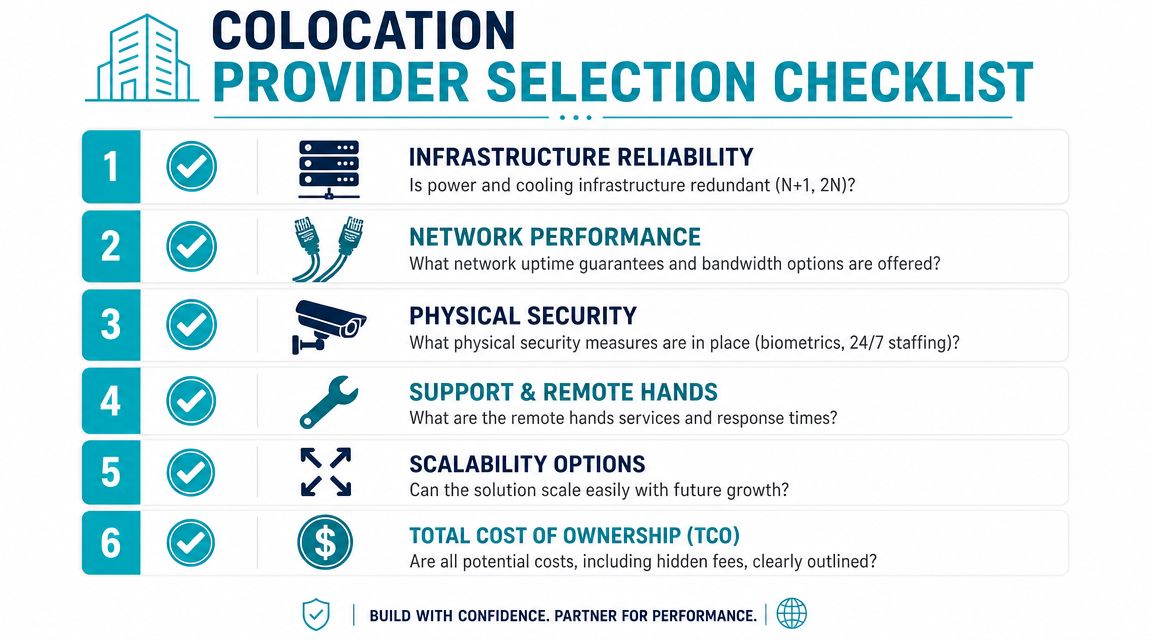
Ask these questions before you compare monthly rates
Power design
Ask whether the cabinet includes redundant feeds, how power is billed, and what happens if your draw exceeds assumptions.Cooling support for your rack profile
Don't ask if the room is cooled. Ask whether the facility can support your actual cabinet density and airflow pattern.Network options
Confirm bandwidth model, carrier diversity, private interconnect options, and the process for ordering additional cross-connects.Remote hands scope
Ask what is included, what is billable, what the response process looks like, and how after-hours requests are handled.Physical security controls
Contract clarity
Require an itemized breakdown of recurring and non-recurring charges, plus any escalation language that affects year-one and renewal budgeting.
The provider answers that should make you cautious
| Question area | Good answer | Bad answer |
|---|---|---|
| Power | Clear committed model and redundancy details | “It depends” without specifics |
| Support | Defined remote-hands policy | “We can usually help” |
| Network | Named options and ordering process | Bundled but unclear |
| Costing | Itemized MRC and NRC | Single headline quote |
For a practical baseline when comparing vendors, use ARPHost's guide to best colocation providers alongside your own worksheet so each quote gets evaluated on the same technical and financial criteria.
If a provider can't explain the full landed cost in writing, assume you'll discover it later in production.
If you want a transparent colocation quote that accounts for year-one TCO, support scope, and real operational trade-offs, contact ARPHost, LLC and have the infrastructure reviewed against your actual power, network, and management requirements rather than a generic rack price.
