

Your first major hosting upgrade usually starts with the same symptom set. Pages load inconsistently, background jobs pile up, the database gets spiky under normal traffic, and your VPS looks fine on paper until swap kicks in and everything feels slow at once.
That’s when a 64GB dedicated server starts making sense.
Not because 64GB is flashy. It isn’t. It sits in the practical middle of the market, where production workloads stop fighting for scraps and start getting room to breathe. A 2026 dedicated server pricing breakdown places 64 to 256 GB RAM systems in the mid-range tier, with typical monthly pricing of $100 to $600, while 32 to 64 GB entry-level systems often land around $40 to $100 per month. That’s a useful framing. A cheap dedicated server with 64GB RAM isn’t supposed to be the absolute lowest sticker price. It’s supposed to be the point where control, predictability, and usable capacity become affordable.
The mistake I see most often is treating “cheap” like a race to the bottom. In infrastructure, cheap only works when the server is balanced, the support model fits your team, and the monthly bill still makes sense after storage, backups, and operational overhead are counted.
When Your Project Outgrows Your Hosting
A growing business often spends too long trying to stretch a VPS past its intended role. The stack gets denser over time. You add a heavier database, a queue worker, a second application, maybe staging, maybe a few memory-hungry plugins, and suddenly every minor spike turns into a support event.
That’s the point where dedicated hardware stops being a luxury and starts being the cleanest fix.
A cheap dedicated server 64GB RAM plan is usually the first serious step into infrastructure that feels professional instead of constrained. You get full resource isolation, predictable memory allocation, and control over the operating system, storage layout, security policy, and service placement.
What cheap should mean
Cheap should mean strong value per month, not old hardware with hidden compromises.
A low monthly number can still be a bad deal if the server has slow disks, no remote console, weak support, or a CPU that drags under real application load. On the other hand, a reasonably priced dedicated box with 64GB RAM can stabilize a multi-site hosting environment, give your database cache room to work, and remove the noisy-neighbor problems that come with shared platforms and small virtual instances.
Practical rule: Upgrade when your team is spending more time managing limits than shipping work.
For many buyers, 64GB is the first configuration that supports a real mix of production tasks without constant tuning gymnastics. It can host several websites, a database tier, scheduled workers, light virtualization, or a development environment that mirrors production more closely.
Why this tier feels different
The big difference isn’t just speed. It’s consistency.
On a dedicated server, memory is yours. CPU scheduling is yours. Storage performance depends on your box, not on a crowded node. That changes how troubleshooting works. Instead of asking whether the host node is noisy or whether a VPS plan has burst limits, you can focus on the application itself.
If you need a baseline on what that model gives you, ARPHost’s explanation of dedicated server hosting is a useful reference point before comparing plans.
Decoding Specs What 64GB RAM Really Needs
The RAM headline gets attention, but 64GB alone doesn’t make a server good. A badly matched CPU or slow storage can turn a promising spec sheet into an expensive bottleneck.
The most useful way to evaluate this tier is to ask one question first. What is consuming resources on your workload right now? If your application is memory-bound, 64GB helps immediately. If your stack is blocked on disk latency or weak single-thread performance, the RAM upgrade won’t fix the underlying problem.
CPU still decides how responsive the server feels
Older dual-socket Xeon systems can still make sense when you need lots of threads for virtualization, parallel workers, or many small services. That’s why they remain common in affordable bare metal offers. They’re practical for dense hosting, but they won’t behave like a newer high-clock platform on single-threaded work.
By contrast, a modern CPU with fewer but faster cores often feels better for application servers, database-heavy web apps, build runners, and admin panels where per-core speed matters. This is why “64GB RAM” needs context. The same memory capacity can support very different outcomes depending on the processor behind it.
A useful technical rule from HostGator’s server specs guidance is that 64 GB RAM becomes most valuable when workloads are constrained by resident set size, while CPU generation and storage architecture still dominate user experience. That matches real-world operations. If the app can stay in memory, stability improves. If the CPU is old and the disks are sluggish, the system still feels slow.
Storage is often the hidden limiter
For web stacks and databases, storage architecture changes behavior fast.
- SATA SSDs are still workable for general hosting and lower-write workloads.
- NVMe storage is the better fit for databases, virtualization, and busy application stacks because latency and queue handling matter under concurrency.
- Enterprise storage matters more than raw capacity when uptime and sustained load are priorities.
If a provider advertises cheap 64GB RAM but pairs it with weak storage, you’re not buying a balanced server. You’re buying idle memory next to a traffic jam.
More RAM helps when the working set fits in memory. Faster storage helps when the application still has to wait on reads, writes, logs, and temp data.
Don’t ignore memory behavior inside the OS
A lot of teams treat swap as a side issue until performance tanks. That’s backwards. Swap behavior tells you whether the machine has enough headroom and whether the workload is spilling beyond useful memory boundaries.
If you need a quick refresher on how Linux uses overflow memory and why swap activity can make a server feel much slower than its RAM size suggests, this overview of swap memory is worth reviewing before you size the box.
A practical way to assess the whole server
Use a short checklist before buying:
- Match CPU to workload. High core counts help virtualization and many parallel services. Faster cores help databases, PHP apps, and compile-heavy tasks.
- Inspect storage type. NVMe is the safer choice when low latency matters.
- Ask about remote access. Remote console access becomes critical the first time networking or boot configuration breaks.
- Check protection and network policy. DDoS handling, port speed, and bandwidth policy can matter as much as compute.
- Prefer ECC memory. Production servers should use ECC RAM for reliability.
A 64GB machine is valuable because it gives your applications room. It only performs like a production server when the rest of the platform is built to keep up.
Managed vs Unmanaged The True Cost of Cheap
A 64GB dedicated server looks inexpensive on paper until routine admin work starts landing on your team. The monthly invoice is only part of the cost. Patching, monitoring, backup checks, security response, and failed boot recovery all have a labor cost, whether you pay a provider for it or assign it to your own staff.
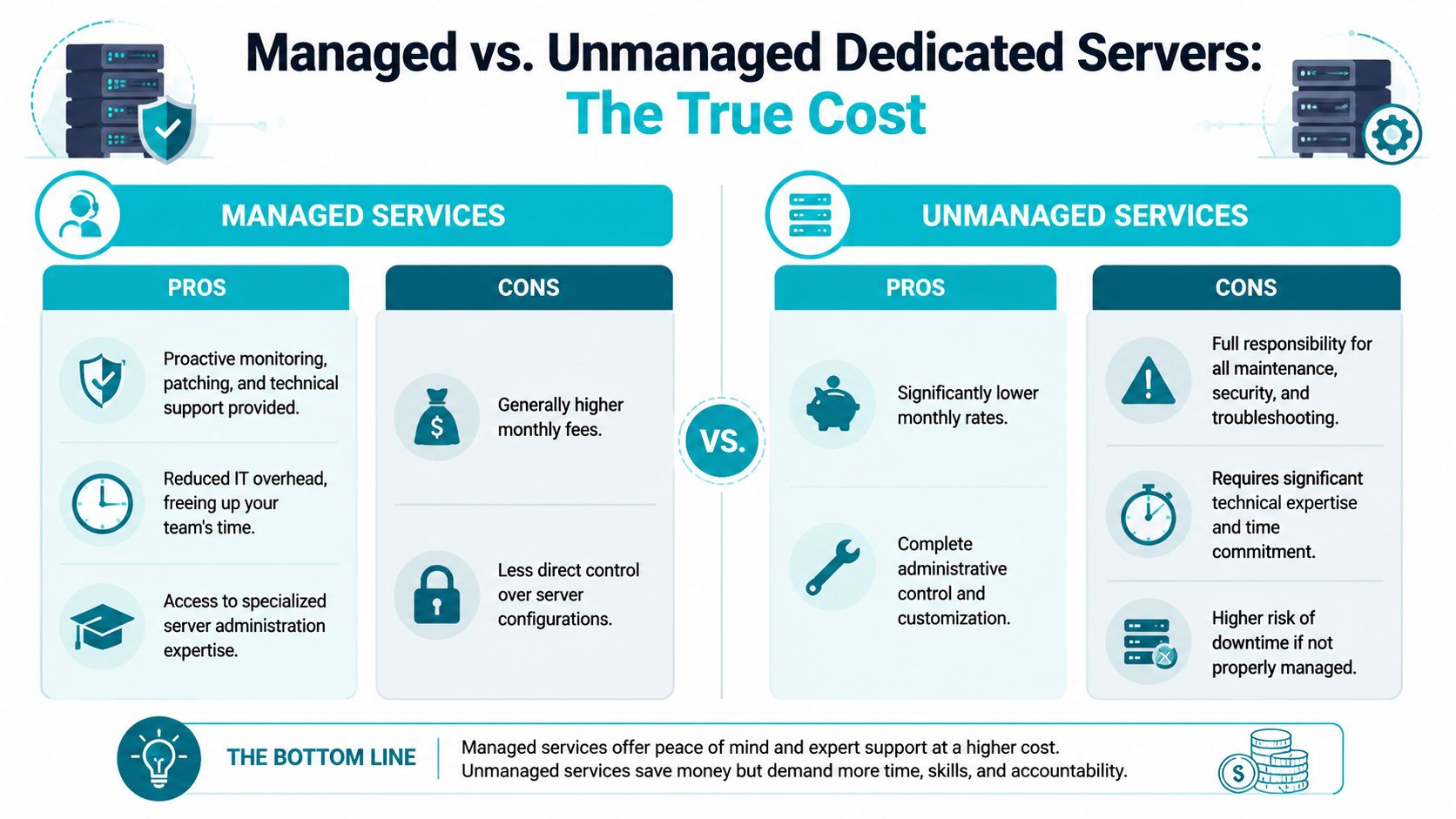
That is why managed versus unmanaged matters so much for buyers chasing a “cheap dedicated server 64gb ram” deal. Cheap should mean good operational value for the spend. It should not mean buying a server at one price and then absorbing the admin burden somewhere else.
What unmanaged really means
With unmanaged hosting, the provider gives you the hardware, network access, and usually basic replacement support if a component fails. Day-to-day server ownership stays with you.
That includes OS installation, hardening, firewall policy, update scheduling, service monitoring, backup design, restore testing, log review, and incident response. If a control panel update breaks PHP, your team handles it. If a kernel patch needs a maintenance window, your team plans it. If the box starts swapping at 2 a.m, your team diagnoses whether the problem is the database, a memory leak, or bad tuning.
For experienced Linux admins, that model can be cost-effective. For a small business, agency, or SaaS team without dedicated ops coverage, it often becomes expensive in less visible ways.
What managed changes
Managed service shifts the ownership boundary. You are still responsible for the application and business logic. The provider takes responsibility for the recurring system administration work that keeps the server stable over time.
That usually means baseline hardening, patch management, monitoring, backup handling where included, and help with server-side troubleshooting. The practical benefit is consistency. Admin work gets done on schedule instead of after a problem forces attention.
I have seen this trade-off many times on first dedicated deployments. Teams save money by choosing unmanaged, then spend far more in staff hours during the first bad update, disk issue, or restore request.
Operational reality: Small business outages usually come from delayed maintenance, weak backups, and missed alerts. They rarely start with exotic infrastructure failures.
Managed vs Unmanaged Server Responsibilities
| Task | Unmanaged (You are responsible) | ARPHost Managed (We handle it) |
|---|---|---|
| OS installation | You install and configure the operating system | We deploy and prepare the server |
| Security hardening | You configure firewall rules, SSH access, and baseline controls | We apply baseline hardening and ongoing security care |
| Patching | You schedule and apply updates | We manage routine patching |
| Monitoring | You deploy tools and respond to alerts | We provide proactive monitoring |
| Backups | You design, run, and verify backups | We handle backup workflows where included |
| Troubleshooting | You investigate service failures and recovery steps | We assist with server-side troubleshooting |
| Performance tuning | You analyze bottlenecks and tune services | We help tune the environment for the workload |
Which option is actually cheaper
The right answer depends on who will operate the server after launch.
Unmanaged is usually the lower monthly price. It makes sense when you already have internal administration skill, documented procedures, monitoring in place, and someone accountable for maintenance. In that setup, the lower bill can translate into lower total cost of ownership.
Managed is often the better value when the server supports revenue, client sites, production databases, or workloads that cannot sit broken until someone is free to investigate. Paying more each month can reduce emergency labor, shorten outages, and lower the odds of a backup or security failure becoming a business problem.
For a first major upgrade, I advise clients to price the server and the operating burden together. That is the true definition of cheap.
Top Use Cases for a 64GB Dedicated Server
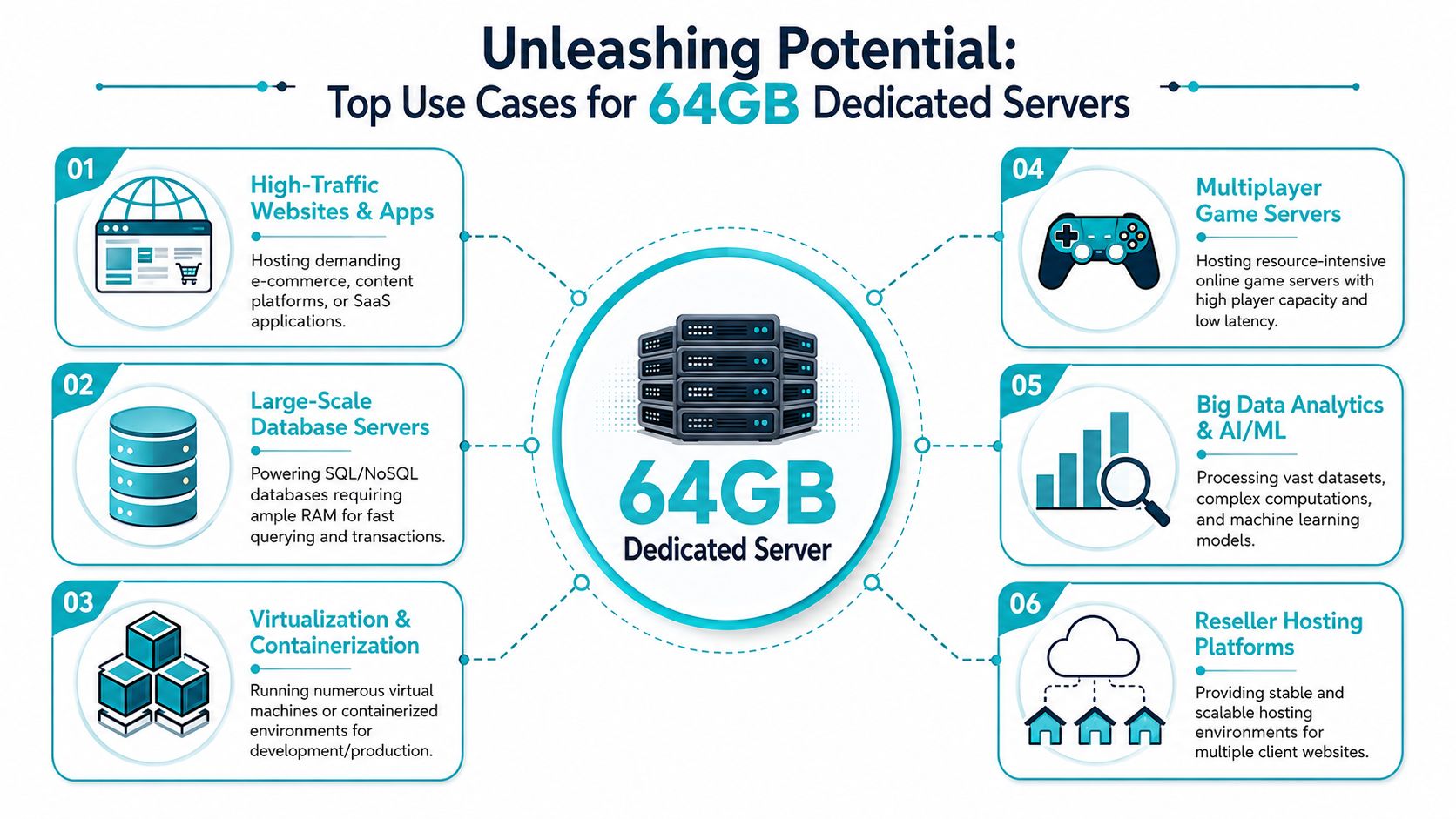
A 64GB dedicated server is most useful when you need one machine to do real work without constant memory pressure. It’s not a giant enterprise build. It’s the point where consolidation starts paying off.
Multi-site hosting and reseller environments
If you run several WordPress sites, client stacks, or a reseller hosting platform, 64GB gives you room for web workers, database buffers, mail services, and control panel overhead without every account competing for the same limited pool.
This is especially useful when a few sites are much heavier than the rest. Dedicated memory isolation and predictable CPU behavior stop one busy customer or one demanding application from degrading the entire environment.
Databases that need cache headroom
Databases get immediate value from memory when the working set can stay resident.
That doesn’t mean every database needs 64GB. It means the tier becomes attractive when queries, indexes, and application concurrency are pushing past the comfort zone of smaller plans. For e-commerce, inventory-driven apps, and reporting workloads, more memory usually improves consistency before it improves headline speed.
Proxmox and small private virtualization stacks
A 64GB dedicated box is a sensible starting point for Proxmox, KVM, or mixed VM and container hosting. You can separate services cleanly instead of piling everything into one OS image.
Our current bare metal inventory showcases the appeal of higher core-count systems, featuring a Dual Intel Xeon E5-2690 V3 with 28 cores, 56 threads, and 64GB DDR4 ECC RAM, which is a practical fit for Proxmox clusters, game servers, and multi-tenant VPS nodes through bare metal server offerings.
Game servers and real-time services
Game hosting benefits from dedicated compute, memory headroom, and stable storage performance. Some titles care more about clock speed, some care more about thread availability, and many care about both once mods and background services are added.
Application split example
A common, workable layout for a 64GB server looks like this:
- Frontend services running web or API traffic
- Database layer with enough memory for useful cache behavior
- Workers handling queues, scheduled jobs, or media tasks
- Staging or admin utilities isolated from production services
A server in this class works best when you use the RAM to reduce contention, not when you treat it as permission to stack unrelated workloads carelessly.
Cost Benchmarks and Finding Value in 2026
The price floor for 64GB dedicated servers is lower than many buyers expect, but that doesn’t mean every low-priced offer is equal.
Independent server pricing data shows 64GB ECC modules still carry real hardware cost, with listed prices including 64GB DDR4-2666 ECC RDIMM at $138, 64GB DDR4-2400 ECC RDIMM at $128, and 64GB DDR4-2400 ECC LRDIMM at $72 The same source also notes bare metal examples where one provider lists an 8-core E5-2670 server with 64GB RAM for $47.40/month and another lists a similar 8-core E5-2670 with 64GB RAM for $69.00/month. That’s why headline pricing alone can mislead. The monthly bill can look cheap even when the underlying platform is old.
How to read a cheap offer correctly
A low sticker price can still be a smart purchase. You just need to test the offer against operational value.
Look for these signals:
- CPU generation matters. An older Xeon may be perfectly fine for virtualization or bulk hosting, but less attractive for latency-sensitive applications.
- Storage defines responsiveness. NVMe usually justifies a higher monthly cost when the application is I/O-sensitive.
- Remote management matters. If the server has no practical console access, recovery gets slower and riskier.
- Included protections change the true cost. DDoS handling, backup options, and support scope all affect TCO.
A simple value filter
Before you commit, compare the plan against your actual workload:
| Checkpoint | Good value looks like |
|---|---|
| Memory | 64GB ECC RAM is paired with a workload that can use it |
| CPU | The processor matches your application profile |
| Storage | SSD or NVMe fits the read/write pattern |
| Access | Remote console and recovery options are available |
| Support | You know what happens when the server breaks |
If you want a broader pricing framework before shopping, ARPHost has a practical guide to dedicated server hosting cost that’s useful for budgeting discussions.
Why ARPHost is Your Best Choice for 64GB Servers
The most convincing 64GB server offers are the ones that stay sensible after you account for storage, connectivity, and support options.
One of the cleaner examples in this tier is the Dual Intel Xeon E5-2690 V3 configuration with 28 cores, 56 threads, and 64GB DDR4 ECC RAM. That hardware profile fits the buyers who usually search for a cheap dedicated server with 64GB RAM for the right reasons. They need thread capacity, dedicated memory, and a platform that can carry virtualization, multi-tenant hosting, or several application roles on one box.
Where this configuration fits
This kind of server works well for:
- Proxmox nodes where thread count helps support multiple VMs or containers
- Hosting stacks that run several websites, databases, and support services together
- Development and staging consolidation where dedicated hardware avoids resource contention
- Game and service hosting where predictable resources matter more than burstable cloud behavior
The main appeal isn’t just the memory size. It’s the balance between RAM capacity and CPU density.
Why total monthly value matters
A common problem in this segment is that a low advertised monthly cost only covers the box itself. A dedicated server pricing snapshot highlights that some entry offers reach $51.35/month for 64GB RAM, but the total cost comparison changes once you add operational needs like remote console access, DDoS protection, storage choices, and management. That’s the part many buyers miss until after deployment.
The current ARPHost inventory also gives a clear upgrade path if your workload grows out of 64GB. The AMD EPYC 4584PX with 192GB DDR5 RAM fits memory-intensive databases and higher-density virtualization. The AMD Ryzen 9600X with 96GB DDR5 RAM suits single-tenant application hosting where faster cores are more important than maximum thread count.
Buying advice: Choose the server that matches today’s workload shape, then make sure there’s a clean upgrade path when the application changes.
For teams that want dedicated hardware without taking on all of the administration burden, managed service on top of bare metal is often the practical middle ground.
Your Deployment and Migration Checklist
A 64GB dedicated server can lower your operating cost over time. A rushed migration can wipe out that savings in one bad weekend.
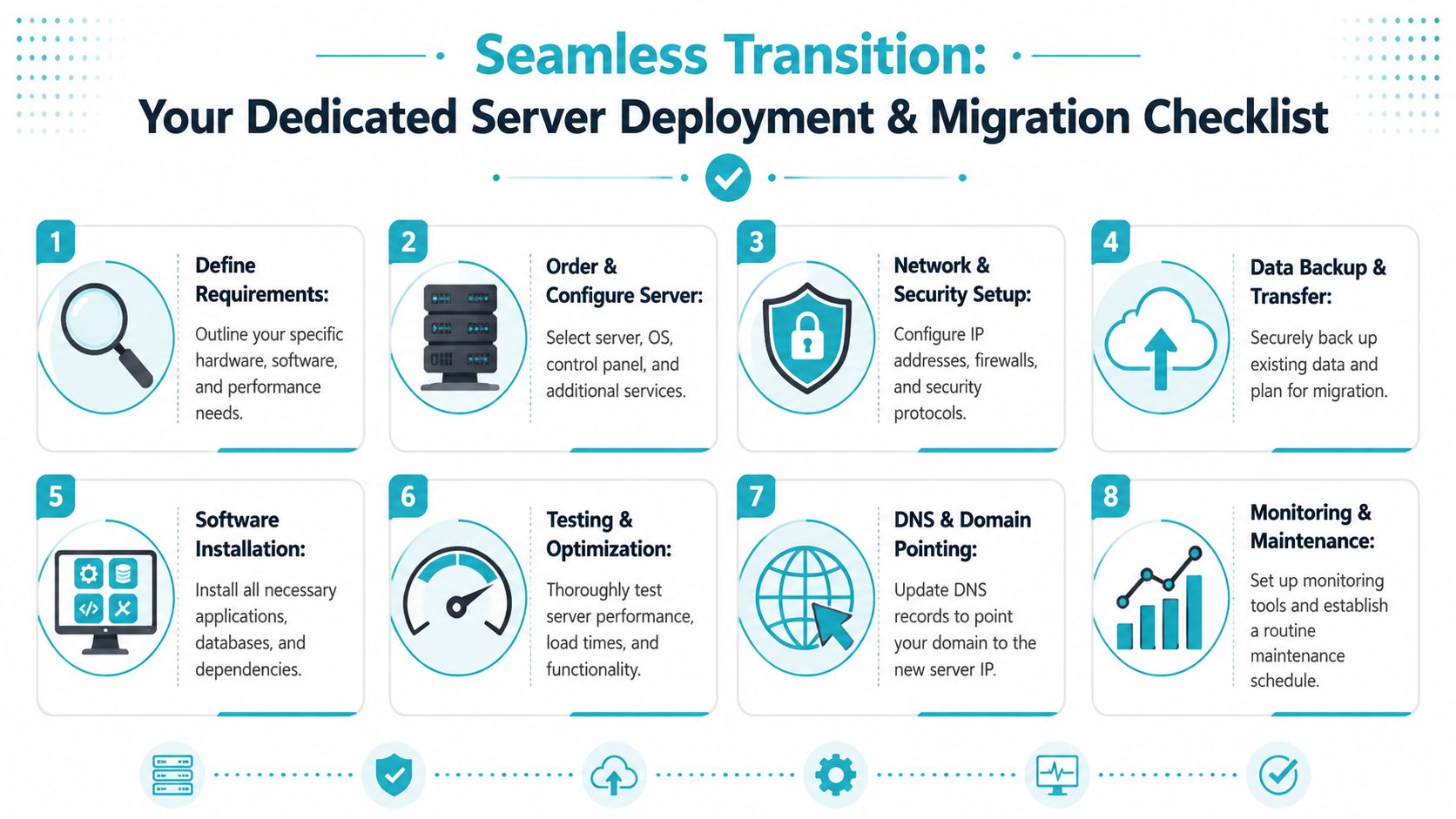
The teams that get real value from a server upgrade treat migration as an operations project, not a file copy job. Before any data moves, define the target state clearly. Know which services are changing, which ones must stay online, how long DNS can take to update, and what rollback looks like if performance or application behavior changes after cutover.
Pre-migration work that saves you later
Start with an audit. Keep it short, but make it complete.
- Map every service and dependency. Include web services, databases, queues, scheduled jobs, storage paths, mail handling, SSL certificates, and any control panel or licensing dependencies.
- Take restorable backups. Files and database dumps matter, but so do application configs, firewall rules, cron entries, and environment variables. Test that you can restore them.
- Define the server role before provisioning. A single application stack, a Proxmox host, and a container-based setup need different storage layouts, security rules, and monitoring.
- Build security into day one. Set SSH keys, restrict root access, apply updates, configure the firewall, and create least-privilege accounts before production traffic arrives.
- Set a rollback point. Cheap infrastructure stops being cheap if recovery depends on improvising under pressure.
Deployment tasks in the right order
Sequence matters more than speed.
- Install the base OS or hypervisor and harden it first.
- Deploy core packages and runtime dependencies so application behavior is predictable.
- Restore databases and files with the correct ownership, mounts, permissions, and service accounts.
- Load application code and configuration only after the platform is stable.
- Test on the server before public cutover. Check application health, login flows, database queries, background jobs, and outbound mail if the workload depends on it.
- Run a basic performance check. Look at memory pressure, disk latency, CPU load, and database response under expected traffic.
- Lower DNS TTL ahead of migration and update DNS last. That keeps rollback practical if the new host needs more work.
A controlled cutover costs less than an emergency rollback.
Post-cutover checks
The first few hours matter. Watch logs, RAM use, swap activity, disk I/O, scheduled tasks, backup jobs, and monitoring alerts. Confirm that someone owns incident response, especially if this is the first move from VPS hosting to bare metal.
This is also where the actual TCO question shows up. An unmanaged low-cost server can look attractive at checkout, but the value disappears fast if your team spends two days fixing permissions, mail routing, failed backups, or missed alerts after migration. For a first dedicated deployment, using ARPHost, LLC for the server and adding managed support where your team is thin is often the cheaper decision over the life of the system, even if the monthly invoice is higher.
If you’re planning a move to dedicated hardware and want help choosing the right platform, sizing management needs, or handling the migration cleanly, ARPHost, LLC offers bare metal servers, Proxmox private cloud options, VPS hosting, and managed services that can cover both the infrastructure and the operational side of the upgrade.
