

Think of a Call Data Record (CDR) as the DNA of a phone call. It doesn't contain the conversation itself—that's a separate recording—but it holds all the critical metadata that proves a call happened: the who, what, when, and where.
This little packet of data is the backbone of modern telecommunications management, especially for businesses leveraging VoIP on platforms like ARPHost's Virtual PBX phone systems.
What Is a Call Data Record Anyway?
Every time a call connects, drops, or even just rings without an answer, your phone system’s switch generates a log. That log is a Call Data Record. It's far from a dry, technical file; it’s a detailed story of each communication event, from start to finish.
For any business running on Voice over IP (VoIP), understanding CDRs is non-negotiable. They are the raw material you need to get a handle on your phone operations. Without them, you'd be flying blind—unable to accurately bill clients, diagnose a frustrating dropped call, or spot the tell-tale signs of toll fraud on your network.
What Do CDRs Actually Do?
At their core, Call Data Records provide a structured, undeniable account of every call. This allows you and your systems to:
- Bill with Precision: CDRs log the exact start time, end time, and duration needed for perfect, usage-based billing. No more guesswork.
- Troubleshoot with Speed: When a user complains about bad audio, the CDR is your first stop. It gives you the clues—like routing paths and technical flags—to find the problem fast.
- Analyze Performance: By pulling together thousands of CDRs, you can spot trends in call volume, identify peak hours, and measure team performance, which helps you make smarter business decisions.
A common mistake is thinking the CDR is the call recording. It’s not. The CDR is the metadata log that describes the call, while the actual audio is a completely separate file. Getting this right is the first step to properly managing your business phone system.
Understanding these records is key, but it's also helpful to know what generates them. To learn more about the systems behind the scenes, check out our guide on what a PBX system is.
Now, let's break down exactly what information you'll find inside a typical CDR.
Essential Fields of a Call Data Record
Here’s a quick-reference table that shows the most common data points you’ll find in a standard CDR and what they mean.
| Field Name | Description | Example Value |
|---|---|---|
| Originating Number | The phone number or extension that initiated the call. | 1-800-555-0101 |
| Destination Number | The number that was dialed by the originator. | 1-212-555-0199 |
| Call Start Time | The precise timestamp when the call was connected. | 2024-10-26 14:30:05 UTC |
| Call End Time | The timestamp when the call was terminated. | 2024-10-26 14:35:15 UTC |
| Call Duration | The total length of the call, typically in seconds. | 310 |
| Call Disposition | The final status of the call (e.g., Answered, Busy, No Answer). | ANSWERED |
As you can see, these simple fields provide a powerful, high-level overview of every single call that moves through your network.
Reading the Signals Inside a Call Data Record
If you think a Call Data Record is just for billing, you're missing half the story. The basic fields tell you who called whom and for how long, sure. But in a modern VoIP environment, a CDR is a goldmine of diagnostic data. To a trained eye, these records aren't just logs; they're the first line of defense when a call goes sideways.
When you get past the basics, you start to see the real magic. A VoIP CDR gives you a play-by-play of the call's journey across the network. These records are packed with metrics from the Session Initiation Protocol (SIP)—the engine running most business phone systems. This is where you find the clues to solve those maddening issues like one-way audio or calls that drop for no apparent reason.
This map breaks down the essential "who, when, and where" you'll find in every single CDR.
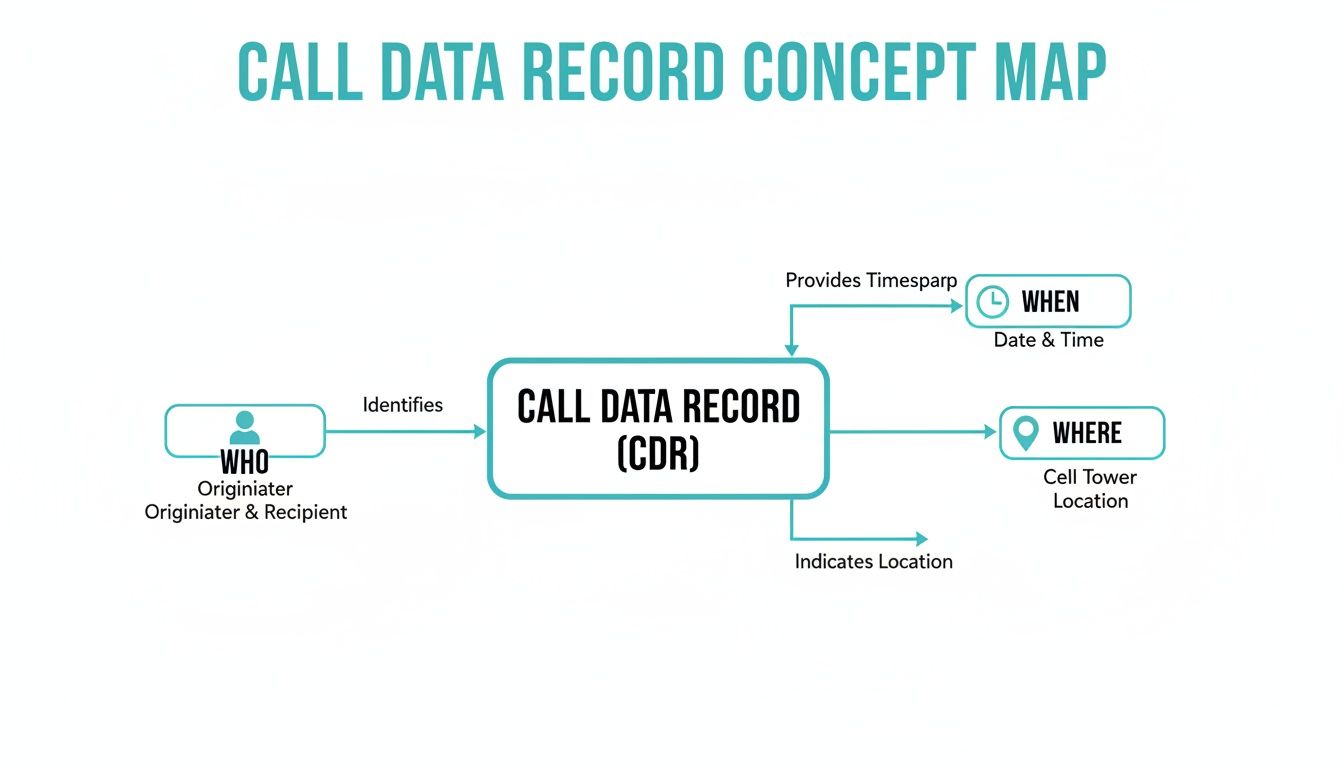
Think of this as the foundation. This core data—caller, recipient, and timing—is the starting point for any deeper analysis.
Decoding Key VoIP and SIP Indicators
When a call quality complaint lands on your desk, the CDR from your ARPHost Virtual PBX phone system holds the answers. Instead of playing a guessing game, you can look for specific technical flags that pinpoint the problem with surgical precision. Knowing these codes is a core skill for anyone managing a voice network.
Here are the key metrics to watch for:
- SIP Response Codes: These are three-digit codes that act like traffic signals for your calls. A
200 OKmeans the call connected just fine. But see a486 Busy Here? That tells you the recipient's line was already in use. Other codes can flag network timeouts, authentication errors, or routing dead ends. - Packet Loss: VoIP works by chopping your voice into thousands of tiny data packets. When some of those packets get lost on their way, you get choppy audio and awkward gaps in conversation. A high packet loss percentage in a CDR is a huge red flag for an unstable network connection.
- Jitter: This isn't about being nervous before a big presentation. Jitter measures the timing variation as those data packets arrive. High jitter means packets are showing up out of order, forcing the phone system to work overtime to piece the conversation back together. The result? Distorted or garbled audio.
A Practical Example from FreePBX
Let's say a user reports a dropped call. You pull the CDR from a system like FreePBX and see a normal start time and connection. But then you look at the hangupcause field and see a value of 16. That translates to "Normal Call Clearing," which means the system didn't see an error—one of the parties simply hung up the phone. Case closed.
But what if you saw a SIP code like 408 Request Timeout instead? That points directly to a network problem that stopped the endpoints from talking to each other. That simple distinction, found right in the CDR, can save you hours of pointless troubleshooting. With ARPHost's managed services, our team uses this exact data to monitor your system's health, often fixing issues before you even know they exist. To dig deeper into the tech behind this, check out our guide on how SIP trunking works.
A call data record is more than an accounting tool. It's a real-time diagnostic feed from your communications network. Mastering its contents is the fastest way to guarantee high-quality, reliable voice service for your organization.
Ultimately, these records give you the hard data you need to maintain a rock-solid voice network. By analyzing the rich information inside each CDR, you can ensure all your communication systems—from your secure web hosting bundles to your dedicated private clouds—are performing at their absolute best.
Putting Your Call Data Records to Work
Knowing the technical fields in a call data record is one thing. Actually turning that raw data into something that helps your business is a completely different ballgame. This is where theory gets a reality check. Smart businesses don't just let CDRs pile up—they put them to work, turning these simple logs into a powerful tool for better operations and smarter growth.
From keeping your billing honest to outsmarting fraudsters, your CDRs hold the keys to a more efficient and secure phone system. When you manage this data correctly, you get the kind of insights that let you make real decisions that actually affect your bottom line.
Flawless Billing and Cost Allocation
At its most basic, a call data record is all about financial integrity. For any business that bills for its time or communication services, getting the numbers right is non-negotiable. CDRs give you an indisputable log of every single billable interaction, capturing the exact start, end, and duration of each call.
This completely removes the guesswork from invoicing. It also makes it dead simple to allocate costs internally. For instance, a law firm can use CDRs to automatically tag call costs to specific client accounts, making sure every minute is accounted for and billed correctly. No more lost revenue.
Proactive Troubleshooting and Diagnostics
When a customer complains about bad call quality, the clock is ticking. A slow response doesn't just frustrate them; it can ding your company's reputation. With CDRs, you can skip the frustrating back-and-forth and get straight to the diagnosis.
Let's say a user reports a dropped call. Here’s a quick walkthrough of how you'd use a CDR to figure it out:
- Find the Record: Filter your CDRs by the user's extension and the rough time the call happened.
- Check the Disposition: Look at the
hangupcauseorSIP Response Code. A408 Request Timeoutcode screams network issue, while "Normal Clearing" just means the user hung up. - Analyze Quality Metrics: If the call connected but was choppy, check the packet loss and jitter values. High packet loss (>1%) is a classic sign of a bad internet connection on one end.
By analyzing these technical flags, your IT team—or the ARPHost managed services team—can pinpoint the root cause in minutes, not hours. This flips troubleshooting from a reactive headache into a proactive, data-driven process.
Advanced Fraud Detection
Toll fraud is a quiet but nasty threat. Attackers breach your phone system to make unauthorized—and very expensive—calls to international premium numbers. A single attack can cost a small business thousands. CDRs are your first line of defense here.
Fraudulent calls almost always leave a trail, creating patterns that stand out in your CDRs:
- A sudden explosion of calls to high-cost, obscure international destinations.
- Dozens of rapid-fire call attempts from one extension, usually happening after hours.
- Calls with ridiculously long durations to premium-rate numbers.
With ARPHost's managed IT services, we're constantly monitoring the CDRs from your Virtual PBX phone system for these exact red flags. This round-the-clock vigilance lets us spot and block fraud before it ever hits your wallet, giving you some much-needed peace of mind.
Business Intelligence and Performance Analytics
When you aggregate thousands of call data records, you're sitting on a goldmine of business intelligence. This is especially true now, with the call center software market booming. The SaaS segment alone was valued at over $41.7 billion in 2025 and is set to grow at a 21.9% CAGR from 2026 to 2033. That tells you just how critical call analytics have become. You can dive deeper into these trends and what they mean for customer engagement on givainc.com.
By analyzing trends across all your CDRs, you can get real answers to important questions:
- Optimize Staffing: Pinpoint your busiest call times to make sure you have enough agents ready to answer, cutting down on customer wait times.
- Measure Marketing ROI: Assign a unique phone number to each marketing campaign. By tracking call volumes to each number in your CDRs, you can see exactly which campaigns are making the phone ring.
- Boost Sales Performance: Look at metrics like average call duration and total call volume per sales agent. This helps you identify your top performers and see who might need a little extra coaching.
Ready to put this power to work for your business? It all starts with a solid foundation. Explore ARPHost's high-performance VPS hosting plans from just $5.99/month.
How to Manage CDRs in a Virtual PBX
Alright, so you know what a call data record is and why it's a goldmine of information. Now for the fun part: actually using them. Effectively managing these records is a core job of any Virtual PBX phone system, and this guide will get you hands-on with accessing, filtering, and exporting your call data.
The whole system works because of how calls are routed over the internet, a big shift from old-school phone lines. If you're new to the concept, this breakdown of What Is a Virtual Phone Number? is a great primer.
When it comes to digging into your CDRs, most modern platforms like FreePBX give you two main doors to walk through: the friendly Graphical User Interface (GUI) and the powerful Command-Line Interface (CLI).
Accessing CDRs Through the GUI
For day-to-day tasks, the GUI is your best friend. It’s built for managers and IT staff who need answers fast without having to get their hands dirty with code. It’s all about point-and-click simplicity.
You'll typically see a clean dashboard with powerful filtering options right at your fingertips. You can instantly search by call date, who called, who was called, and the outcome of the call (ANSWERED, BUSY, FAILED, etc.). This lets you pinpoint a specific call in seconds.
Here’s a step-by-step guide to using the GUI:
- Log In and Find the Reports: Jump into your Virtual PBX admin panel and look for a section called “CDR Reports,” “Call Logs,” or something similar.
- Filter Your Search: Use the search fields to zero in on what you need. Need to check on a customer complaint? Filter by their phone number and the date of their call.
- Analyze the Results: The dashboard will show you all matching calls, laying out key details like call duration, start time, and final status.
- Export for a Deeper Dive: Look for an "Export" or "Download as CSV" button. This lets you pull the data into a spreadsheet for more advanced analysis or record-keeping.
Using the Command-Line Interface for Advanced Control
For developers and sysadmins, the CLI is where the real power lies. If your Virtual PBX is running on one of ARPHost’s VPS hosting plans or a bare metal server, you have root access. This means you can bypass the GUI and query the CDR database directly.
For example, to find all calls from a specific number that failed, a sysadmin could log into the server via SSH and run a direct SQL query against the Asterisk database:
mysql -u<user> -p<password> asteriskcdrdb -e "SELECT calldate, src, dst, disposition, duration FROM cdr WHERE src = '18005551234' AND disposition = 'FAILED';"
This level of access is essential for building custom reports, integrating with other systems, or setting up automated alerts. It’s this kind of operational efficiency that makes a well-managed PBX so valuable. You can see how ARPHost saves businesses thousands of dollars with hosted virtualPBX/ by taking the technical burden off your plate.
CDR Access Methods GUI vs CLI
| Method | Pros | Cons | Best For |
|---|---|---|---|
| GUI (Graphical User Interface) | Easy to use, no coding required. Visual and intuitive. Quick filtering and exporting. | Limited to built-in reports. Less flexible for complex queries. | Managers, support staff, and non-technical users needing quick daily reports or to investigate specific calls. |
| CLI (Command-Line Interface) | Unmatched power and flexibility. Allows for complex, custom queries. Can be automated with scripts. | Requires technical knowledge (Linux, SQL). Steeper learning curve. Higher risk of error if not used carefully. | Developers, system administrators, and data analysts who need to build custom reports, automate tasks, or perform deep-dive troubleshooting. |
Ultimately, having both options available is ideal. The GUI serves the vast majority of everyday needs, while the CLI provides the horsepower for advanced data work when you need to pop the hood.
Why ARPHost Excels Here
Managing a PBX isn’t just about pulling reports. It’s about securing the system, running daily backups, and keeping everything optimized so your data is both safe and available when you need it. This is where a managed solution truly shines.
With ARPHost's managed Virtual PBX service, our experts handle the entire backend. We make sure your FreePBX instance is secure, your data is backed up every night, and the system is tuned for peak performance. This frees you from the administrative headaches, letting your team focus on what the call data actually means for your business—not on server maintenance.
Best Practices for CDR Security and Retention
A call data record isn't just an operational log; it’s a sensitive asset that demands strict governance. As you pile up this data, you’re also taking on the responsibility of protecting it. This calls for a clear-headed plan for security and retention—one that balances what your business needs with what the law (and your customers) expect.
The global push for better customer service is pouring gas on this fire. Spending on customer service tech is projected to hit a staggering $47 billion by 2028, with the conversation analytics market alone expected to reach $13.34 billion by 2032. These aren't just big numbers; they're a signal of how valuable this data has become, and they hammer home the need for a rock-solid infrastructure to manage it all. You can learn more about these expanding call center trends and what the data shows.
Developing a Data Retention Policy
First thing's first: you can't keep every call data record forever. Hoarding data is a liability, not an asset. A formal data retention policy is your first line of defense, defining exactly how long you store CDRs and when you’re obligated to securely get rid of them.
Your policy needs to walk a tightrope between two key factors:
- Business Needs: How long do you actually need the data for spotting trends, settling billing disputes, or reviewing team performance? For most analytics, a 12-24 month window is more than enough.
- Legal Compliance: Regulations like GDPR and CCPA have iron-clad rules about data minimization and storage limits. Getting this wrong can lead to fines that make your eyes water, so your policy must align with all relevant laws.
A smart approach is to classify data based on its job. CDRs tied to billing might need to be kept for a few years for accounting purposes, while records used for a one-off troubleshooting ticket can probably be wiped after 90 days.
Core Security Measures for CDRs
With a retention plan in place, your next job is to lock the data down. Call data is packed with Personally Identifiable Information (PII) like phone numbers, making it a goldmine for attackers.
Given the sensitive nature of call data records, implementing robust measures is a critical best practice. It's wise to review comprehensive data leak prevention strategies to ensure your organization has a layered defense against unauthorized access.
Here are the non-negotiable security controls you need:
- Encryption at Rest: All stored CDRs must be encrypted. If an attacker gets their hands on the physical server, the data should be nothing but unreadable gibberish without the encryption key.
- Encryption in Transit: As CDRs travel from your PBX to a storage or analytics server, that connection has to be wrapped in TLS encryption. No excuses. This stops eavesdroppers cold.
- Access Control: Not everyone on your team needs to see raw call logs. Use role-based access control (RBAC) to make sure only authorized people can view, query, or export CDRs.
- Anonymization: For business intelligence, you rarely need the actual phone numbers. Use anonymization or pseudonymization to swap out PII for generic IDs. This lets you analyze data safely without putting customer info at risk.
Scaling This with ARPHost
Meeting these security and compliance demands isn't something you do on a shared, flimsy setup. It requires a robust, isolated infrastructure. This is exactly where ARPHost's secure-by-design solutions give you a massive advantage. Our dedicated Proxmox private clouds offer the ultimate control—a completely segregated hardware environment to store and process your sensitive call data.
For any business that needs to guarantee data sovereignty or meet intense compliance standards, a private cloud ensures your CDRs never touch shared infrastructure. Pair that with our secure web hosting bundles, which pack in Imunify360 and proactive monitoring, and you get a multi-layered defense that guards your data from end to end.
Ready to build a secure foundation for your communications data? View Proxmox Private Cloud plans at arphost.com/proxmox-private-clouds/.
Scaling Your CDR Analysis with ARPHost
Sure, a single Call Data Record is great for figuring out why one specific call dropped. But the real magic happens when you start looking at all of them together. When you aggregate and analyze CDRs at scale, you stop just fixing problems and start finding opportunities. This is how you connect the dots between your call logs, your CRM, and your Business Intelligence (BI) tools to see the full picture.
Of course, that’s easier said than done. Shoveling millions of records from your phone system into an analytics platform isn't a simple drag-and-drop. You’ll hit infrastructure walls fast—not enough processing power, slow storage, and manual workflows that just can't keep up. This is where ARPHost goes from just being a provider to being your infrastructure partner.
Building Your Analytics Foundation
First things first, you need a data pipeline. Think of it as a conveyor belt that automatically grabs CDRs from your Virtual PBX phone system, cleans them up into a format that makes sense, and drops them into a central spot like a data warehouse or a BI tool like Power BI or Tableau.
This isn't out-of-the-box stuff; it's custom work. That’s exactly what ARPHost’s fully managed IT services are for. Our team can build you those automated pipelines, making sure your analytics platforms are constantly fed with fresh, accurate call data without anyone having to lift a finger.
Powering Large-Scale Data Analysis
Once all that data is in one place, you need the raw horsepower to actually sift through it. Running complex queries across millions of call records will bring a standard virtual server to its knees. This is a job for dedicated hardware, plain and simple.
An organization's ability to extract insights is directly limited by its underlying infrastructure. Without sufficient processing power, even the most advanced BI tools will fail to deliver timely results, rendering real-time analysis impossible.
This is where our bare metal servers make all the difference. You get direct, uncontested access to CPU, RAM, and storage. It's the raw muscle you need to crunch massive datasets, ensuring your queries run in seconds, not hours. No more waiting around for reports to load.
For businesses that want a single, secure foundation for their entire communications and analytics stack, we offer dedicated Proxmox private clouds. It’s the best of both worlds: a completely isolated environment with the raw performance of bare metal and the flexibility of virtualization. You can run your PBX, your data warehouse, and your BI tools together in a high-performance ecosystem built to grow with you.
Partnering with ARPHost means you can finally stop worrying about infrastructure bottlenecks. We give you the solid foundation you need to unlock the full story hidden inside every single call data record.
Ready to build a powerful analytics stack without the management overhead? Request a managed services quote at arphost.com/managed-services/ to discuss your custom data pipeline today.
Frequently Asked Questions About CDRs
Even with a solid grasp of Call Data Records, a few questions always seem to surface. It's time to tackle the most common points of confusion head-on so you can manage your communications data with complete confidence.
Let's clear the air and get these answered.
Does a Call Data Record Include the Call Recording?
Absolutely not. This is hands-down the biggest misconception about CDRs. A call data record is pure metadata—it’s the digital receipt that describes the call, not the audio of the conversation itself.
- CDR (Metadata): This is the "who, what, when, and where." It tells you who called whom, the call's start time, and its duration.
- Call Recording (Media): This is the actual audio file containing the conversation.
Think of it this way: the CDR is like the envelope of a letter, showing the sender, recipient, and postmark. The call recording is the letter inside. They are two entirely separate pieces of data that are stored and managed differently.
How Long Should We Keep Our CDRs?
The classic answer is: it depends. There's no one-size-fits-all rule, which means you need to sit down and create a formal data retention policy.
Your policy should balance a few key factors:
- Business Analytics: How far back do you need to look to spot trends? For tracking things like seasonal call patterns or year-over-year performance, 12 to 24 months of data is usually a good starting point.
- Billing and Financials: When it comes to accounting or resolving invoice disputes, you might need to keep CDRs for several years. The exact duration depends on financial regulations in your region.
- Legal Compliance: Regulations like GDPR are strict about data minimization. You have to justify why you're keeping data and get rid of it once that reason no longer exists.
Most businesses find a tiered approach works best. For example, keep billing-related CDRs for several years while purging records used for short-term troubleshooting after just a few months.
Can CDRs Be Used to Track Employee Productivity?
Yes, but you have to walk a fine line between insight and intrusion. Used correctly, aggregated CDRs can give you powerful insights into team performance without feeling like Big Brother is watching.
For instance, you can easily see:
- Average call volume per agent or team.
- Average call duration.
- Call answer rates and missed call percentages.
This kind of data is gold for identifying your top performers, figuring out who might need a bit more training, and making sure you have enough staff on deck during peak hours. The key is transparency. Be open with your team about what you're measuring and why the goal is to boost team performance and improve the customer experience, not to micromanage.
With the right infrastructure from ARPHost, you can ensure your CDRs are secure, accessible, and ready for analysis. Our solutions provide the foundation for turning your raw call data into genuine business intelligence.
Build your secure communications stack today with our powerful Bare Metal Servers and take full control of your data.