

When you think of "IT support," what comes to mind? For many, it's the classic break-fix model: something breaks, you call for help, and a technician shows up to put out the fire. That reactive approach is a relic.
Modern business IT support has completely flipped the script. It’s no longer about just fixing what's broken; it's a strategic partnership designed to prevent problems, tighten security, and actually help your business grow. This guide provides a technical overview of what modern IT support entails and how to choose a partner that accelerates your business, not just fixes it.
From Firefighting to Strategic Advantage
Think of it this way: the old model was a mechanic who only appears after your car has already broken down on the highway. You’re stranded, losing time and money. Modern IT support is more like a Formula 1 pit crew—a team of specialists constantly monitoring every system, using data to predict failures before they happen, and ensuring your entire operation runs at peak performance. They aren't just fixing flats; they're engineering a competitive advantage.
This shift is a necessity. Not long ago, a single in-house IT person could handle a few servers in a closet. Today's businesses run on a complex web of cloud services, virtual machines, and countless interconnected apps. A single point of failure—like a misconfigured firewall rule or an unpatched hypervisor—can bring your entire operation to a standstill, expose sensitive data, and wreck your reputation.
The Move to Specialized Providers
This growing complexity is exactly why so many companies are ditching large, expensive in-house IT departments. Instead, they're partnering with specialized providers who offer a deep bench of expertise that would be impossibly expensive or difficult to hire and retain internally.
The market numbers back this up. The global IT professional services market, valued at USD 1,044.97 billion in 2025, is expected to explode to USD 2,565.16 billion by 2035. This incredible growth underscores just how vital expert IT guidance has become. You can explore the full projections and dive deeper into the market dynamics in the detailed report.
Smart IT support is no longer just a cost center—it's a powerful engine for growth, efficiency, and resilience. By offloading complex infrastructure management, businesses can reallocate internal resources toward innovation and core objectives.
Why ARPHost Excels Here
ARPHost was built on this modern approach, acting as a true extension of your team. Instead of you scrambling to find experts in networking, server management, and security, we deliver it all as a unified, cohesive solution. Our hands-on expertise covers the full stack of modern infrastructure.
We handle everything from:
- Managed Infrastructure: Whether it's cost-effective secure VPS hosting starting at just $5.99/month or a high-performance Dedicated Proxmox Private Cloud running on enterprise-grade bare metal.
- Security Focus: We bundle industry-leading tools like Imunify360 and CloudLinux OS into our secure web hosting bundles to protect your digital assets proactively, not after an attack.
- Specialized Expertise: We thrive in complex environments, offering hands-on support for Proxmox, Juniper networking, and Virtual PBX phone systems.
With ARPHost, you get more than just a vendor; you gain a strategic partner committed to keeping your technology perfectly aligned with your business goals.
Ready to transform your IT from a cost into a competitive edge? Request a managed services quote and let our experts build a plan that works for you.
The Core Components of Modern IT Support Services
Real business IT support isn't just a phone number you call when your email breaks. It’s a complete ecosystem of services working behind the scenes to keep your operations secure, efficient, and online. Think of it as the foundation, plumbing, and security system for your digital operations—each part is essential.
Getting a handle on these core components is the first step to building a tech strategy that doesn't just fix problems, but prevents them.
Managed Infrastructure
Your IT infrastructure—the servers, storage, and network gear—is the engine of your business. Managing it isn't just about keeping the lights on. It’s about fine-tuning that engine for performance, security, and growth.
Properly managing your tech stack starts with knowing what you have. Following solid IT Asset Management best practices ensures every piece of hardware and software is tracked, maintained, and secure.
A provider might manage a mix of environments for you, such as:
- Bare Metal Servers: For when you need raw, dedicated power for resource-hungry applications like databases or transcoding without the hypervisor overhead.
- Private Clouds: Think of this as your own personal cloud, built on dedicated hardware like Proxmox. You get the flexibility of cloud computing with the security and control of a private network.
- High-Availability VPS: Leveraging KVM virtualization and distributed storage like CEPH, these offer a fast, scalable, and resilient way to deploy different workloads without needing a separate machine for each.
At ARPHost, we specialize in this, offering high-performance Dedicated Proxmox Private Clouds where you get full root access to dedicated hardware. You can build out a custom environment without the headache and capital cost of owning and managing it all yourself.
Proactive Monitoring and Maintenance
The best IT support stops problems before they start. This is the whole idea behind proactive monitoring. Specialized tools and expert eyes keep a constant watch on your systems, 24/7.
It’s like having a digital security guard patrolling your servers. This system looks for early warning signs—a server’s disk space getting dangerously low, a sudden spike in network traffic, or a piece of hardware showing signs of failure. Technicians get an alert and step in before it can cause an outage. For anyone curious about the tech behind this, you can learn more about the top RMM tools for MSPs and their key features.
A proactive approach turns IT from a reactive cost center into a strategic asset. By preventing downtime, you protect revenue, maintain customer trust, and keep your team productive. This shift is fundamental to modern IT support.
Network Security and Firewall Management
Your network is the front door to your business, and leaving it unlocked is not an option. A critical piece of any IT support service is strong network security that goes way beyond a simple antivirus program.
This involves a layered defense, including:
- Firewall Configuration: Setting up and actively managing enterprise-grade firewalls (like Juniper devices) to block malicious traffic and prevent unauthorized access. For example, a managed service can implement rules to block traffic from known malicious IP ranges and restrict access to management ports.
- Threat Detection: Using advanced tools to spot and neutralize threats like malware, ransomware, and phishing attacks as they happen.
- Secure Web Hosting: Implementing security at the application level. ARPHost’s Secure Web Hosting Bundles, for instance, use Imunify360 and CloudLinux OS to protect websites and email from common attacks.
This constant vigilance is what keeps your data safe and your services online in the face of non-stop cyber threats.
Backup and Disaster Recovery
Let's be realistic: no system is perfect. Hardware fails, data gets corrupted, and security breaches happen. That’s why a rock-solid Backup and Disaster Recovery (BDR) plan is non-negotiable.
This is your ultimate safety net. It means regularly backing up your critical data and having a tested plan to get it back online quickly if something catastrophic happens.
Modern BDR is more than just copying files. For example, ARPHost provides Proxmox Backup as a Service with immutable, offsite backups. "Immutable" is a key term here—it means once a backup is written, it cannot be changed or deleted. This makes it a powerful weapon against ransomware that often tries to encrypt your backups first. If the worst happens, you have a clean, uncompromised copy of your data ready to restore.
Ready to build a more resilient infrastructure? Explore our Dedicated Proxmox Private Cloud plans to see how managed hardware can transform your IT strategy.
Choosing Your IT Support Model
Picking the right IT support structure isn't just a line item on a budget; it's a decision that shapes your company's security, agility, and bottom line. You really have three paths: a proactive managed service, a reactive 'break-fix' approach, or the traditional in-house team. Each has its place, but the right choice depends entirely on your business's size, complexity, and how much risk you're willing to stomach.
The whole decision boils down to what you can't live without. Is it a predictable monthly bill? Access to specialists who have seen it all? Or a rock-solid security posture? A tiny startup might get by with a break-fix guy on speed dial, but once your technology is tied directly to your revenue, you can't afford the downtime or security holes that come with a purely reactive plan.
Managed Services vs. Break-Fix
The core difference here is philosophy: are you preventing fires or just putting them out? A break-fix provider is the fire department—you only call them when the building's already burning. They bill you by the hour for the emergency, which means their incentive is tied to your problems, not your success. This inevitably leads to unpredictable costs and painful downtime.
On the other hand, you have the Managed Service Provider (MSP) model. An MSP, like ARPHost, works on a flat, predictable monthly fee. This simple shift completely changes the dynamic. Our success is directly tied to keeping your systems running flawlessly, not on how many emergency hours we can bill.
The real power of the MSP model is its predictable cost. For one fixed monthly fee, you get a full team of experts focused on proactive monitoring, maintenance, and security. It turns a chaotic, variable expense into a stable, budget-friendly investment.
It's a game-changer for any business where uptime equals revenue. Think of it this way: the break-fix model is having a fire department on call. The managed services model is having a crew actively fireproofing your building, 24/7.
In-House Teams and the Expertise Gap
Hiring your own IT team sounds great on paper. You get dedicated staff who live and breathe your business. But the reality is often a different story. The costs of salaries, benefits, and constant training for even a small team add up fast. More importantly, it’s practically impossible for a couple of in-house generalists to master the sprawling, complex technologies modern businesses rely on.
Seriously, can your one or two IT people also be certified experts in:
- Proxmox VE 9 for private cloud management?
- Juniper network devices for enterprise-grade routing and security?
- Virtual PBX phone systems for modern business communications?
- Advanced cybersecurity protocols and ever-changing compliance standards?
Probably not. And that's where the expertise gap becomes a real business risk. This is the moment a managed services partner proves its worth. Instead of hiring one person, you get access to an entire bench of certified specialists for a fraction of the cost. A partner like ARPHost brings a depth of experience that an in-house team can rarely match because we solve these problems for hundreds of clients, day in and day out. You can see how this partnership works by exploring our fully managed IT services for businesses.
For any growing business, it comes down to choosing between unpredictable bills from break-fix emergencies, the massive overhead of a full-time team, or the predictable, expert-driven model of managed services. When you partner with ARPHost, you're not just outsourcing IT; you're securing the specialized knowledge and proactive care you need to grow—without the six-figure payroll.
The Critical Role of Security and Compliance in IT Support

In today's world, thinking of security as just another IT feature is a recipe for disaster. It’s the absolute bedrock of your entire operation. A great business IT support partner isn't just fixing things; they are your first line of defense, turning your security posture from a reactive afterthought into a proactive shield against the relentless barrage of digital threats.
This isn't about simply installing antivirus software and calling it a day. It’s about building a multi-layered defense strategy. An expert provider doesn't sit around waiting for an attack—they work tirelessly to ensure it never happens in the first place.
Proactive Threat Defense and Patch Management
The best security is the kind that slams the door on an attacker before they can even get a foot in. This means your IT partner should be handling several critical, ongoing tasks without you even noticing.
Here’s a quick step-by-step example of proactive patch management:
- Inventory: Your provider uses RMM tools to maintain a real-time inventory of all software and OS versions across your servers.
- Monitor: They constantly monitor vendor channels (e.g., Debian Security Announcements, Red Hat Errata) for new vulnerability disclosures.
- Test: When a critical patch is released, it's first applied to a non-production or staging server to ensure it doesn't break applications.
- Deploy: Once validated, the patch is deployed across all production systems during a scheduled maintenance window to minimize disruption.
- Advanced Threat Detection: Old threats are easy, but modern attacks require modern tools. Solutions like Imunify360, which we bake into ARPHost's Secure Web Hosting Bundles, use AI-driven detection to spot and neutralize malware, web attacks, and intrusion attempts in real time.
- Active Firewall Management: A firewall is just a wall unless someone is actively guarding it. This means meticulously managing traffic rules, blacklisting malicious IPs, and constantly analyzing logs to catch suspicious activity before it becomes a full-blown breach.
Data Isolation and Compliance Adherence
If you handle sensitive information, just blocking attacks isn’t enough. You have to prove your data is properly isolated and that you’re meeting strict regulatory standards. This is where your hosting architecture is make-or-break.
For businesses in healthcare, finance, or e-commerce, meeting compliance standards like HIPAA or PCI-DSS isn't optional—it's a legal requirement. The right IT partner doesn't just provide infrastructure; they provide an environment architected for compliance from the ground up.
Take a shared server, for example. Using an operating system like CloudLinux OS creates a virtual "cage" around each user account using Lightweight Virtualized Environments (LVE). This isolation is critical—it prevents one compromised account from consuming all server resources or infecting everyone else on the same server. To see how this fits into a bigger picture, you can read our guide on a layered approach to infrastructure security.
A knowledgeable IT partner will walk you through the technical weeds of standards like HIPAA and PCI-DSS, ensuring your server configurations, data encryption, and access controls are built to meet—and exceed—those mandates.
The Ultimate Defense: Ransomware and Disaster Recovery
Even with the world's best defenses, you have to plan for the worst. Ransomware remains a devastatingly effective threat, with the power to encrypt not only your live data but your backups, too. This is where immutable backups completely change the game.
The intense focus on data security and privacy is what’s fueling massive growth in the IT services industry. Projections show the global market will balloon to USD 3,299.78 billion by 2033, growing at a healthy 8.9% CAGR. More and more businesses are shifting to cloud-based solutions, which offer far better protection against both digital and physical threats than a dusty server in a closet. You can dive into the numbers in the full report on the global IT services market from Grand View Research.
ARPHost’s Proxmox Backup as a Service is built for this exact scenario. It creates immutable, offsite backups, which means that once a backup is written, it cannot be changed or deleted by anyone—not even a hacker who has gained full access to your network.
If ransomware hits, you have clean, uncorrupted, and encrypted copies of your data sitting safely offsite, ready for a quick restoration. It turns a potential business-ending catastrophe into a manageable inconvenience.
Choosing the right provider for your business IT support is a big deal. It’s a decision that directly affects your security, your team's productivity, and how fast you can grow. You need to look past the shiny marketing slicks and ask the tough questions that peel back the layers and show you what a provider is really made of.
This isn't just about finding a help desk. It's about finding a true partner, an extension of your own team. This checklist will help you tell the difference.
A Practical Checklist for Choosing Your IT Partner
Evaluate Technical Expertise and Certifications
The technical depth of your IT partner is the bedrock of the entire relationship. Vague promises of "experience" are a red flag. You need to dig for specific, proven know-how with the actual technologies your business runs on.
Use these questions to separate the experts from the pretenders:
- Do you have certified, in-house experts for specific platforms like Proxmox VE? They should be able to show you current certifications, not just claim a passing familiarity. This proves they invest in their team's skills.
- Can you walk me through a complex VMware to Proxmox migration you've managed? Ask for a real-world example or a detailed case study. How they answer will tell you everything about their strategic thinking and problem-solving chops.
- What's your team's hands-on experience with enterprise-grade network hardware, like Juniper devices? Solid network management is non-negotiable for performance and security. If they fumble this question, walk away.
A provider's confidence and clarity in answering these technical questions is a strong indicator of their hands-on capabilities. Hesitation or generic answers often signal they are reselling another company's services.
Analyze Support Availability and Infrastructure Ownership
When your systems go down, every second feels like an hour. You have to know who you’re calling and who actually owns the hardware. This is crucial for getting fast resolutions and holding someone accountable.
Ask these critical logistical questions:
- Is your expert support team available 24/7/365, and are they actually your employees? Many providers outsource their after-hours support to third-party call centers with limited access and even less knowledge. You need direct access to the engineers who manage your servers.
- Do you own and operate your own hardware and data center infrastructure? A provider that owns its metal has total control over performance, security, and maintenance schedules. Resellers are stuck in the middle, often pointing fingers at their upstream provider during an outage.
- What is your guaranteed response time for a critical, production-down incident? Get this in writing. A clear Service Level Agreement (SLA) for response times is the hallmark of a professional managed services provider.
Why ARPHost Excels Here
We believe transparency is the key to any good partnership. At ARPHost, we’re built to be the kind of partner these questions are designed to find. We don't just welcome this level of scrutiny—we think it's essential.
Here’s how we stack up:
- U.S.-Based 24/7 Expert Support: Our entire support team is in-house and available around the clock. When you have a problem, you talk directly to the engineers who know your infrastructure inside and out.
- We Own Our Hardware: We aren't resellers. We own and manage our own bare metal servers, network gear, and data center space. This gives us complete control over performance and security. Our Dedicated Proxmox Private Clouds run on hardware you can trust because we own it.
- Proven Specialization: Our expertise isn't just a marketing claim; it’s the core of our business. From complex VMware to Proxmox 9 migrations to managing robust Juniper-powered networks, our team has the deep, hands-on experience you need.
Choosing the right IT partner comes down to finding a team you can trust with your most critical assets. Are you ready to work with a provider that checks all the boxes? Request a managed services quote and let our experts show you the difference.
Onboarding and Migrating to Your New IT Partner
Switching to a new IT provider feels like a huge undertaking. We get it. But a good partner doesn't just show up and take the keys; they guide you through a planned, transparent migration that feels less like a headache and more like a genuine upgrade.
The goal isn't just to "flip a switch." It's a carefully managed project designed to move your infrastructure to a more stable, secure, and higher-performing home with as little disruption as humanly possible.
The Phased Migration Process
A successful migration is never a single, all-or-nothing event. It’s a staged process that kicks off with a deep-dive discovery and audit of your current setup. Your new partner should be obsessed with identifying every server, application, and dependency before a single byte is moved.
From there, they build a detailed game plan. Let's walk through a common real-world scenario: moving from an aging VMware environment to a modern Proxmox VE 9 cluster.
- Discovery and Audit: First, the team maps out your existing virtual machines (VMs), storage setup, and network configurations in VMware. This is critical to ensure nothing gets left behind or misconfigured.
- Infrastructure Prep: While the audit happens, your new Proxmox Private Cloud is provisioned on dedicated hardware. It’s configured for high availability from the start and locked down according to security best practices.
- Pilot Migration: A non-critical VM is migrated first. This is the test flight. It validates the migration tools, the process, and the timing, letting the team work out any kinks before your core systems are touched.
- Phased Rollout: VMs are moved in logical batches—usually overnight or on weekends—to avoid impacting your day-to-day business. After each phase, everything is rigorously tested to confirm it’s running perfectly.
- Final Cutover and Decommission: Once all systems are live and stable on Proxmox, the old VMware environment is officially taken offline and decommissioned.
This infographic breaks down the three pillars you need from a partner to pull this off: real expertise, solid support, and robust infrastructure.
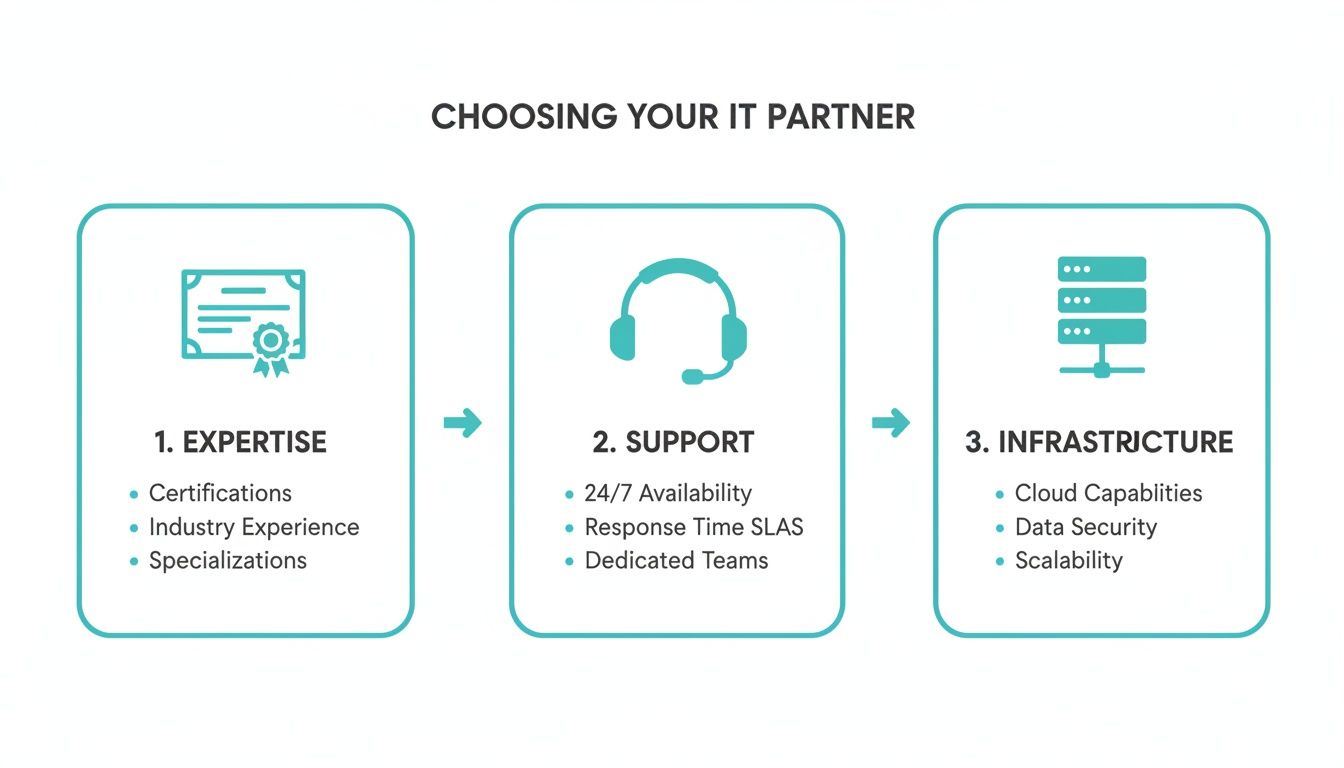
A provider’s technical skill, constant availability, and quality hardware are the bedrock of any successful IT partnership. It’s no surprise, then, that worldwide spending on IT services is projected to hit a staggering USD 1.87 trillion in 2026—a 9% jump from 2025—making it the largest category of tech spending. You can see more on the 2026 tech market forecast from CRN to get a feel for what’s driving this growth.
Scaling This with ARPHost
At ARPHost, this isn't just a theoretical process; it's what we do every day. We provide hands-on, managed migration support for complex moves, like shifting from VMware to our Dedicated Proxmox Private Clouds. Our engineers become an extension of your team, handling all the technical heavy lifting so you can focus on running your business.
Once you’re migrated, we don't just disappear. We roll straight into proactive monitoring and management to ensure your new environment delivers the long-term stability and performance you were promised.
Ready for a seamless move to a better IT infrastructure? View Proxmox Private Cloud plans at arphost.com/proxmox-private-clouds/ and let our team handle the migration.
Frequently Asked Questions About Business IT Support
When it comes to IT support, a few questions pop up time and time again. Let's clear the air and tackle the most common ones head-on so you can make decisions with confidence.
How Much Does Business IT Support Typically Cost?
The cost can swing wildly, and it really comes down to the model you choose. The old-school break-fix approach is a budget nightmare—you get hit with surprise bills whenever a crisis strikes. On the other end, a full-time in-house team means high, fixed overhead for salaries, benefits, and constant training.
This is where fully managed IT services shines. You get a predictable, flat monthly fee that’s based on what you actually need. It flips the script from reactive firefighting to proactive prevention, which almost always lowers your total costs by stopping expensive problems before they ever start. For instance, while full-scale managed services are custom-quoted, ARPHost provides flexible building blocks like high-availability VPS hosting starting at just $5.99/month, letting you build out a powerful, cost-effective solution.
My Business Is Small—Do I Really Need Managed IT Support?
Yes, absolutely. In fact, small businesses are the ones who can least afford not to have it. Cybercriminals often see smaller companies as low-hanging fruit, and just a few hours of downtime can be financially devastating for a growing operation.
Instead of sinking your budget into a single full-time IT hire, managed support gives you access to an entire team of experts for a fraction of the cost. You get proactive monitoring, enterprise-grade security, and robust maintenance. This frees you up to do what you do best—grow your business—knowing your technology is stable and secure. ARPHost's scalable plans, from Secure Web Hosting Bundles to a fully managed private cloud, are built to grow right alongside you.
What Is the Difference Between Managed Hosting and Fully Managed IT Services?
This is a great question, and it's a point of frequent confusion. They sound similar, but they cover very different parts of your technology stack.
Managed hosting is all about the server infrastructure—the engine that runs your website or applications. A managed hosting provider handles the physical hardware, network connectivity, and hypervisor layer (like Proxmox or KVM). They ensure the server is online, secure, and performing well, but your responsibility starts at the operating system level.
Fully managed IT services is the whole package. It's a much broader umbrella that includes managed hosting but extends to your entire IT world. This means managing the operating system, applications, databases, endpoint protection for your team's computers, network and firewall management, VoIP phone systems, and day-to-day user support.
ARPHost offers both, giving you the flexibility to get exactly the level of business IT support you need. We can manage just your high-performance Proxmox private cloud, or we can become your fully outsourced IT department, handling everything from the server to your employees' desktops.
Ready to get the expert support you need with predictable pricing? ARPHost is here to help. Request a managed services quote and our team will build a plan tailored to your business goals.