

You’re usually reading a guide like this at the exact moment a simple Minecraft setup starts failing you.
Maybe the world lives on a desktop under someone’s bed. Maybe a shared host boots, but chunk generation stutters and backups are an afterthought. Maybe the server works fine until more players join, a plugin update lands badly, or the storage starts thrashing. That’s when build servers for minecraft stops being a hobby task and starts looking a lot like systems administration.
A Minecraft server is still an application stack. It needs sane capacity planning, a clean OS baseline, predictable storage, controlled change management, monitoring, backups, and a migration path when the community grows. Ignore those pieces and you end up firefighting lag, corruption, and player complaints instead of running a stable service.
Beyond Basic Realms Planning Your Pro Minecraft Server
Consumer hosting gets people started. It rarely gives operators the control they need once the server becomes a real service for a community, class, client group, or internal gaming network.
That matters because the Minecraft ecosystem is no small niche. The multiplayer server environment exceeds 2.6 million active servers as of 2026, and Minecraft reached 212.32 million monthly active users in Q1 2026, with the United States hosting over 4,000 servers and representing about 40% of the global total. At that scale, reliable infrastructure isn’t overkill. It’s table stakes.
What changes when you go pro
A professional-grade Minecraft environment has different priorities than a casual Realm.
- Performance consistency matters more than raw peak speed. Players notice stutter, delayed block updates, and slow chunk loads faster than they notice average CPU utilization.
- Recovery procedures have to exist before you need them. World corruption is survivable if you have tested backups. It’s catastrophic if you don’t.
- Security controls stop being optional the moment the server is public, semi-public, or managed by more than one person.
- Scalability planning keeps you from rebuilding under pressure when one seasonal event, YouTube mention, or school break doubles traffic.
The stack you need
For most serious deployments, think in layers:
- Compute with good single-core performance and enough RAM for your player count and plugins.
- Fast storage, preferably SSD or NVMe, because world access patterns punish slow disks.
- A stable Linux base with a non-root admin workflow.
- A server runtime such as Vanilla, Paper, Forge, or Fabric matched to your goals.
- Monitoring and backups that run whether you remember them or not.
- A migration path from small VPS to dedicated hardware or private cloud.
Practical rule: If the world matters, build the server so another admin could recover it at 2 a.m. without guessing.
A lot of basic tutorials stop at “it starts and players can join.” That’s only the first checkpoint. A well-built Minecraft server should also survive reboots, handle updates cleanly, keep logs, limit blast radius when changes go wrong, and make expansion boring instead of stressful.
Choosing Your Foundation VPS vs Bare Metal Servers
The first real decision is the platform. Get this wrong and you spend months trying to optimize around limits you selected on day one.
For builders and community operators, infrastructure quality has direct gameplay impact. Creative server coverage points to a gap in public discussions around tick rate, lag compensation, uptime guarantees, and the hardware transparency serious builders need. If someone spends hours on a large redstone build or a detailed plot, storage latency and CPU contention stop being backend details.
When a VPS is the right call
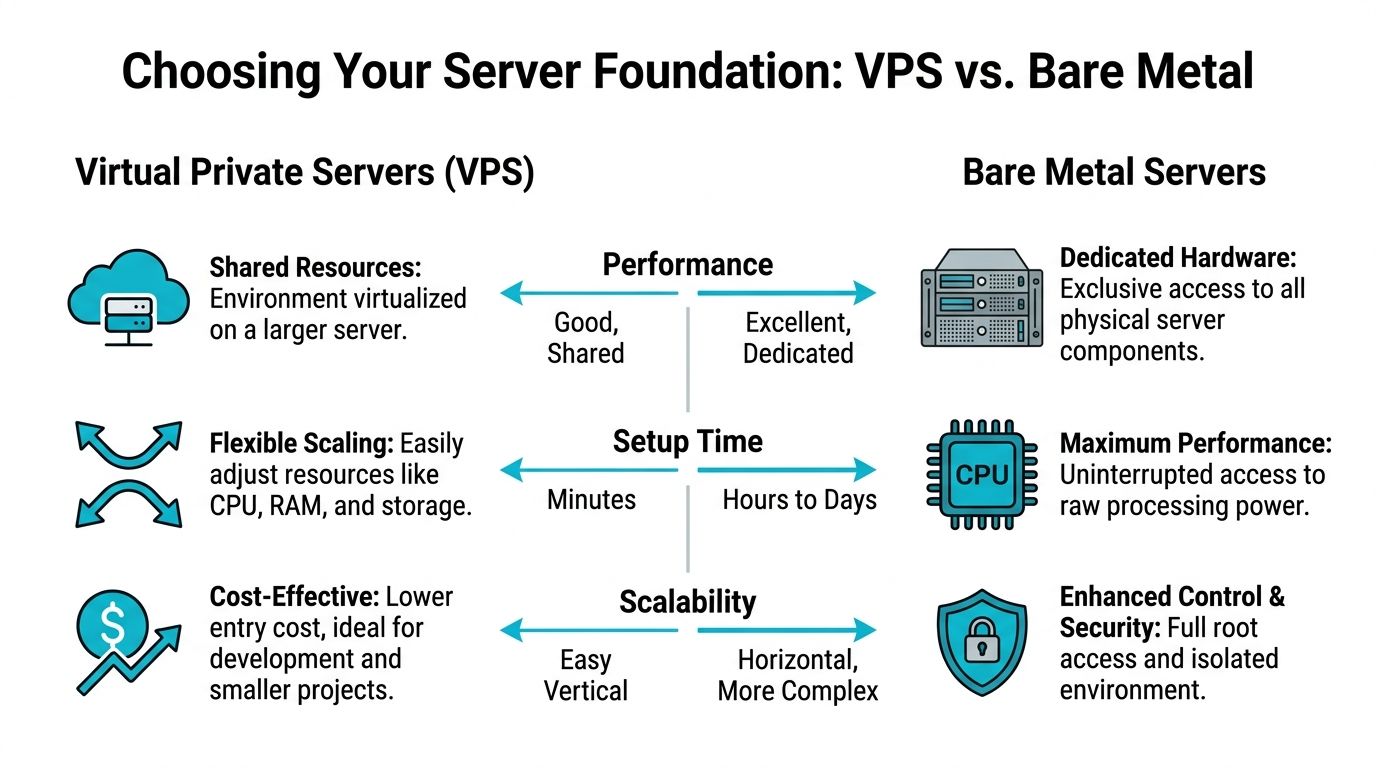
A KVM VPS is usually the correct starting point for smaller public servers, test servers, staff staging, or plugin development.
Use a VPS when you want:
- Fast provisioning so you can deploy in minutes and rebuild quickly if needed.
- Easy vertical scaling when RAM or vCPU needs increase.
- Operational simplicity for one main instance and maybe one test node.
- Lower entry cost while you validate the server’s growth pattern.
A VPS makes sense when you’re still learning your workload. It’s also a good fit if you want separate environments, such as one production Paper server and one private staging server for plugin testing.
When bare metal earns its cost
A bare metal server makes sense when your Minecraft instance is the workload, not just one app among many.
Choose bare metal when you need:
- Dedicated CPU access without noisy neighbors.
- Predictable I/O for large worlds, heavy chunk generation, or modded packs.
- Full control over disks, hypervisor choices, and storage layout.
- Headroom for multiple services such as game server, database, backup target, and monitoring node.
High player counts, large modpacks, and multi-world operations become manageable in this environment. You’re not fighting a shared virtualization layer every time the server gets busy.
Public servers rarely fail because they lacked one more plugin. They fail because the operator built production on a platform that couldn’t absorb growth or mistakes.
Where Proxmox private cloud fits
There’s a middle ground between “single VPS” and “one large dedicated box.” A private cloud built on Proxmox is useful when you want isolation between services without giving up control.
Typical examples:
| Need | Better fit |
|---|---|
| One small Paper server | VPS |
| One busy modded server | Bare metal |
| Production plus staging plus backups | Proxmox private cloud |
| Multi-server network with segmented services | Proxmox private cloud |
A Proxmox layout gives you cleaner separation. Run the proxy on one VM, the game server on another, backups on a third, and keep a test environment that won’t touch production files. That’s standard systems thinking, and it maps well to Minecraft operations.
If you want a technical breakdown of trade-offs before buying infrastructure, ARPHost has a useful comparison on dedicated server vs VPS.
What to prioritize first
Don’t over-focus on total core count. Minecraft punishes weak single-thread performance more than many admins expect.
Check these in order:
- CPU clocks first because tick handling benefits from strong single-core speed.
- Storage second because chunk loading and save activity expose slow disks fast.
- RAM third because enough memory matters, but over-allocating Java can create its own problems.
- Network location last, but still deliberately. Put the server near your player base when possible.
For build servers for minecraft, the winning design is rarely the fanciest one. It’s the one that matches current load, leaves space for growth, and doesn’t force a complete rebuild when the community stops being small.
Initial Server Provisioning and OS Setup
Most bad Minecraft deployments start with a messy host. Wrong Java version, running as root, no firewall, random files in a home directory, and no service management. Clean that up before you ever download a server jar.
A structured Linux setup on Ubuntu or Debian delivers a 95%+ first-boot success rate, while Windows sits at 70%, often because of Java path and environment issues, according to this Minecraft server setup guide.

Start with a minimal Linux host
Use Ubuntu Server 24.04 or another stable server-focused Linux distribution. Keep the install lean. A GUI adds overhead and another patch surface you don’t need.
After first login:
sudo apt update && sudo apt upgrade -y
sudo apt install ufw curl wget screen unzip nano -y
That gives you a current package set and the basic tools you’ll use.
If you’re building on physical hardware rather than renting a VPS, disk layout matters before the OS even goes on.
Create an admin user and stop living on root
Running the game server as root is lazy and risky. Create a normal administrative account, then use privilege escalation only where needed.
sudo adduser mcadmin
sudo usermod -aG sudo mcadmin
If you use SSH keys, add them for that account and test login before disabling password access. Keep administrative access boring and repeatable.
A good baseline also includes a dedicated service user for the Minecraft process itself:
sudo adduser --system --home /opt/minecraft --group minecraft
That separates server files from your admin account and reduces accidental permission problems.
Put a firewall in place early
Don’t wait until the server is public. Put host-level controls in place before the application exists.
sudo ufw allow OpenSSH
sudo ufw allow 25565/tcp
sudo ufw enable
sudo ufw status
That’s enough for a standard Java server baseline. If you change ports later, adjust the rule set deliberately. Keep SSH locked down and don’t expose anything you aren’t using.
Install the correct Java runtime
Modern Minecraft server versions depend on the right Java release. Mismatched Java versions cause startup failures that look mysterious until you check logs.
Install Java and verify it:
sudo apt install openjdk-21-jre-headless -y
java -version
For environments where you also compile tools or run supporting Java utilities, install the JDK instead of only the JRE:
sudo apt install openjdk-21-jdk-headless -y
java -version
A Minecraft server that won’t start is often not a Minecraft problem. It’s usually Java, permissions, or a broken service definition.
Build a sane directory layout
Keep your files where another admin expects to find them.
sudo mkdir -p /opt/minecraft/{server,backups,scripts,logs}
sudo chown -R minecraft:minecraft /opt/minecraft
sudo chmod -R 750 /opt/minecraft
Suggested use:
- /opt/minecraft/server for jars, configs, and world data
- /opt/minecraft/backups for local backup staging
- /opt/minecraft/scripts for start, stop, and maintenance scripts
- /opt/minecraft/logs for exported or rotated operational logs
Use systemd from the start
Screen and tmux are fine for troubleshooting. They shouldn’t be your production process manager.
Create a placeholder service file so your future runtime is predictable:
sudo nano /etc/systemd/system/minecraft.service
Basic template:
[Unit]
Description=Minecraft Server
After=network.target

[Service]
User=minecraft
Group=minecraft
WorkingDirectory=/opt/minecraft/server
ExecStart=/usr/bin/java -jar server.jar nogui
Restart=on-failure
RestartSec=5

[Install]
WantedBy=multi-user.target
Don’t enable it yet if the jar isn’t in place. Just establish the pattern.
Document the host baseline
Before touching the game itself, record:
- OS version
- Kernel version
- Java version
- Firewall status
- Disk mount points
- Allocated RAM and vCPU
- Who has sudo access
That sounds bureaucratic until the first handoff or outage. Then it becomes the difference between a quick fix and blind guessing.
For admins who want a broader Linux baseline before application deployment, this walkthrough on setting up a Linux server is a useful reference for standard host preparation.
Installing and Configuring Your Minecraft Server Software
The software choice sets your operating model. Don’t treat Vanilla, Paper, Forge, and Fabric as interchangeable. They solve different problems.
Paper is the default recommendation for most public Java servers because it gives you performance improvements and plugin support without the operational weight of a full modded stack. Vanilla still has a place, especially for purity or compatibility testing. Forge and Fabric belong in environments where mods are a core requirement, not a future maybe.
Minecraft Server Software Comparison
| Software Type | Primary Use Case | Performance | Plugin Support | Mod Support |
|---|---|---|---|---|
| Vanilla | Standard gameplay with minimal changes | Good | No | No |
| Paper | Public servers, optimized survival, admin tooling | High | Yes | Limited |
| Forge | Heavily modded gameplay | Lower under heavy load | Limited | Yes |
| Fabric | Lightweight modded setups | Good to high | Limited | Yes |
Download and prepare the server
Create a clean working directory and switch to the service account if needed.
cd /opt/minecraft/server
sudo -u minecraft bash
For a standard Java server, place the downloaded jar in the server directory. Name it consistently so your service file doesn’t need constant edits.
mv ~/server-download.jar /opt/minecraft/server/server.jar
cd /opt/minecraft/server
Run it once to generate initial files:
java -Xmx4G -Xms4G -jar server.jar nogui
That first run creates eula.txt, server.properties, log files, and world directories.
Accept the EULA:
sed -i 's/eula=false/eula=true/' eula.txt
Then start it again to finish initialization.
Use a startup script instead of typing long commands
A dedicated launch script cuts mistakes. Put it in your scripts directory or directly in the server path.
nano start.sh
chmod +x start.sh
Basic example:
#!/bin/bash
cd /opt/minecraft/server
exec java -Xms4G -Xmx4G -jar server.jar nogui
For Paper, just replace the jar name if you keep a versioned file:
#!/bin/bash
cd /opt/minecraft/server
exec java -Xms4G -Xmx4G -jar paper.jar nogui
If you’re using systemd, point ExecStart to this script rather than embedding every launch argument in the unit file.
Set the properties that matter
The default server.properties file is functional, but it’s not tuned. Start with the settings that affect access, load, and moderation.
Key examples:
max-playerscontrols the connection ceiling. Set it to what the hardware can sustain, not what you hope to attract.online-mode=trueshould stay enabled for public servers unless you know exactly why you’re changing it.view-distanceaffects world simulation pressure and chunk load behavior.motdshould identify the environment clearly, especially if you run production and staging.difficultyandgamemodebelong to community design, but they still need to be explicit.
A conservative baseline for a new public Paper server often looks like this:
max-players=20
online-mode=true
view-distance=10
simulation-distance=8
motd=Production Minecraft Server
Pick software based on admin burden
Junior admins often get trapped here. They install the most flexible option, then spend all their time maintaining it.
Use this rule set:
- Pick Vanilla if your priority is compatibility and the feature set is intentionally minimal.
- Pick Paper if you want plugins, better operational headroom, and a more forgiving performance profile.
- Pick Forge if the server exists specifically for a modpack that requires it.
- Pick Fabric if you want mods but prefer a lighter footprint and a more selective stack.
If you don’t already have a reason to run Forge, don’t start with Forge.
Make the service persistent
Once the jar and configs are in place, update the systemd service:
[Unit]
Description=Minecraft Server
After=network.target

[Service]
User=minecraft
Group=minecraft
WorkingDirectory=/opt/minecraft/server
ExecStart=/opt/minecraft/server/start.sh
Restart=on-failure
RestartSec=5

[Install]
WantedBy=multi-user.target
Then load and start it:
sudo systemctl daemon-reload
sudo systemctl enable minecraft
sudo systemctl start minecraft
sudo systemctl status minecraft
Use journalctl -u minecraft -f during first boot. It gives you cleaner operational visibility than leaving a console attached.
Performance Tuning and Security Hardening
A Minecraft server that boots is not necessarily a Minecraft server that performs. Most lag problems come from a handful of recurring mistakes. Slow storage, oversized view distance, weak JVM settings, too many entities, or no guardrails around who can change what.
Vanilla servers often struggle to maintain 20 TPS with just 20 players, while an optimized PaperMC deployment can hold 20 TPS with significantly lower CPU usage under heavy modpacks. The same source notes that a large percentage of self-hosted lag comes from HDD storage instead of SSD, and a notable portion comes from unoptimized view-distance settings in the Minecraft server setup tutorial.
Tune the JVM for the workload
Default Java launch behavior works, but it doesn’t work well under sustained load. For Paper or a busy Java server, use a tested launch profile.
Example for an 8 GB allocation:
java -Xms8G -Xmx8G
-XX:+UseG1GC
-XX:+ParallelRefProcEnabled
-XX:MaxGCPauseMillis=200
-jar paper.jar --nogui
A few operational notes matter here:
- Keep
XmsandXmxaligned on stable production servers to reduce heap resizing behavior. - Don’t allocate all host RAM to Java. Leave memory for the OS, page cache, logging, and management tools.
- Avoid copying giant flag sets blindly if you don’t understand them. Test one change at a time.
Fix storage before chasing exotic tweaks
Admins love to tweak JVM flags, viewing it as advanced. In practice, moving from HDD to SSD or NVMe often solves more visible pain than an hour spent tuning Java.
Prioritize in this order:
- Use SSD or NVMe storage
- Reduce excessive view distance
- Trim unnecessary plugins
- Profile entities and chunk activity
- Tune Java heap and GC
If players report long login delays, rubber-banding during exploration, or spikes during autosaves, storage and chunk generation are your first suspects.
Lock down access and process boundaries
Hardening starts with basic hygiene:
- Run the game as a dedicated user
- Keep SSH separate from the application account
- Restrict sudo to admins
- Patch the host regularly
- Disable unused services
- Store backups outside the live world path
On the Minecraft side, be careful with operator privileges, plugin permissions, and RCON exposure. If you enable remote administration, limit access paths and document exactly who can use it.
A griefing incident is often a permissions problem wearing a gameplay disguise.
For a broader host-level checklist, this server hardening checklist is a good reference before you expose the server to a wider audience.
Reduce player-facing risk
Public game servers attract nuisance traffic. Even small communities can deal with connection floods, login abuse, or repeated exploit attempts against outdated plugins.
Do the basics well:
- Keep plugins updated and remove abandoned ones.
- Review logs after each update instead of assuming startup success means runtime health.
- Separate staging from production when testing major pack or plugin changes.
- Use DNS and firewall changes deliberately, with a rollback plan.
- Limit who can edit configs and keep those edits in versioned notes or a repository.
For teams that don’t want to self-manage every host, firewall, and monitoring task, managed infrastructure is often the sensible line. ARPHost offers VPS, bare metal, and Proxmox-based environments with options for proactive monitoring and managed support, which can reduce the operational burden around patching, uptime monitoring, and recovery planning.
Ongoing Operations Backups Monitoring and Scaling
This is the part most hobby guides skip. They stop at successful launch. Real server administration starts the day after.
Communities grow unevenly. One week looks quiet. The next week a school break starts, a creator mentions the server, or a new modpack brings everyone back at once. That’s why operators need capacity planning before they need more capacity. As noted in this discussion of community growth challenges, smaller operators often hit performance bottlenecks when moving from a single server to a broader network without a clear scaling model around VPS growth, load balancing, and provisioning strategy in this video on scaling server infrastructure.

Backups need policy, not intention
If the only backup plan is “I copy the world folder sometimes,” you don’t have a backup plan.
Build one around three questions:
| Question | Operational answer |
|---|---|
| How often do you back up | On a schedule, not manually |
| Where do backups live | Separate from the production filesystem |
| Have you tested restore | Restore to a non-production path and verify boot |
A practical Linux approach is a cron-driven script that stops writes briefly, copies or syncs the world data, and timestamps the archive. For more mature environments, snapshot-based backups at the VM or filesystem layer are cleaner than file copies taken under load.
Monitor what players feel
Host monitoring shouldn’t stop at CPU and RAM graphs. Watch the signals that correlate to player complaints.
Focus on:
- TPS trends because they reflect gameplay quality directly
- RAM pressure so Java doesn’t get blamed for host exhaustion
- Disk latency because world saves and chunk loads expose it quickly
- Restart frequency because repeated process exits often signal corruption or bad updates
- Backup success logs because silent failures are common
Prometheus and Grafana work well if you already run observability tooling. Simpler setups can still use systemd logs, shell scripts, and alerting through your existing operations stack.
Scale in stages, not in panic
A clean growth path usually looks like this:
- Stage one is a single VPS for one main server.
- Stage two adds more RAM, faster storage, or a move to a stronger plan.
- Stage three migrates to bare metal when the workload becomes sustained and performance-sensitive.
- Stage four separates services into a multi-node or virtualized design with proxy, production, staging, and backup roles isolated.
That progression is easier if you’ve kept your file layout clean, used service definitions instead of ad hoc sessions, and documented every custom change.
The easiest migration is the one you prepared for before anyone asked for it.
Scaling This with ARPHost
If you’re running a small server today, start with a VPS you can manage cleanly and upgrade without rebuilding. If you’re already feeling the limits of shared resources, move to dedicated hardware or a private cloud before player experience degrades. If you don’t want backups, host patching, monitoring, and migration work landing on your internal team, offloading those tasks to managed infrastructure is usually cheaper than repeated downtime and emergency fixes.
If you want help turning a Minecraft host into a properly managed service, ARPHost, LLC provides VPS, bare metal servers, Proxmox private clouds, backup services, and managed infrastructure support that fit the full lifecycle covered above, from first deployment to long-term scaling.
