

A store can run for months on entry-level hosting and still look healthy from the outside. Then traffic starts arriving from paid campaigns, the catalog grows, more apps get installed, and the weak point shifts from marketing to infrastructure. Pages still load, but the margin for error disappears. A spike in concurrent sessions, a slow database query, or a backup job at the wrong time can turn a normal sales day into lost orders.
Choosing the best hosting for online store is not a routine purchase. It determines how much CPU and memory your application can use, how isolated your workloads are from other tenants, how fast storage responds under write-heavy checkout traffic, and how much control your team has over caching, backups, firewall rules, and deployment. Those choices also decide whether the next step is a clean upgrade to VPS or private infrastructure, or a rushed migration after an outage.
Generic hosting roundups rarely cover that transition well. Ecommerce teams do not only need a cheap plan that keeps WordPress or Magento online. They need a path from shared hosting to VPS, bare metal, or private cloud before performance, security, and operational control start limiting revenue.
Your Store Is Growing But Your Hosting Is Holding You Back
The failure pattern is predictable. A store launches on basic hosting because it’s cheap and easy. That works for a while. Then product imports get heavier, search and filtering add database load, checkout sessions pile up, and every plugin update increases the chance of a conflict under load.

Customers don’t care whether the bottleneck is PHP workers, disk I/O, or a noisy neighbor on shared infrastructure. They see a slow store and leave. The global web hosting market is projected to reach $355.81 billion by 2029, and that growth is tied closely to ecommerce demand. At the same time, 47% of users expect pages to load in 2 seconds or less, and every 1-second delay can reduce conversions by 7%.
That’s the true cost of bad hosting. It doesn’t just produce technical annoyance. It interrupts revenue at the exact moment demand arrives.
What breaks first
In practice, the first signs usually show up in places merchants notice immediately:
- Admin lag: Product edits, order management, and plugin updates start taking too long.
- Checkout instability: Sessions expire, cart fragments pile up, and payment callbacks become less predictable.
- Traffic sensitivity: Normal marketing pushes cause visible slowdowns.
- Backup anxiety: Restores are unclear, untested, or incomplete.
- Security drift: The store runs with outdated plugins because updates feel risky.
Shared hosting often fails gradually, not dramatically. That makes it more dangerous, because teams normalize poor performance until a sale or seasonal spike exposes it.
Hosting has to match the business stage
A new store can survive on a simpler stack. A growing store usually can’t. Once ecommerce becomes operationally important, hosting has to do three things well: isolate workloads, scale cleanly, and give you a recovery path when something breaks.
That’s where the conversation shifts from generic plans to actual infrastructure choices. Shared hosting may still fit a very small catalog and light order volume. After that, most serious stores move toward VPS, bare metal, or private cloud because those models give you predictable resources, better control, and fewer surprises during peak periods.
Key Criteria for Selecting Ecommerce Hosting
Price is a weak filter for ecommerce hosting. A store can survive on a cheap plan during quiet weeks, then fail during a product launch, ad campaign, or holiday spike because the server cannot keep up with dynamic requests.
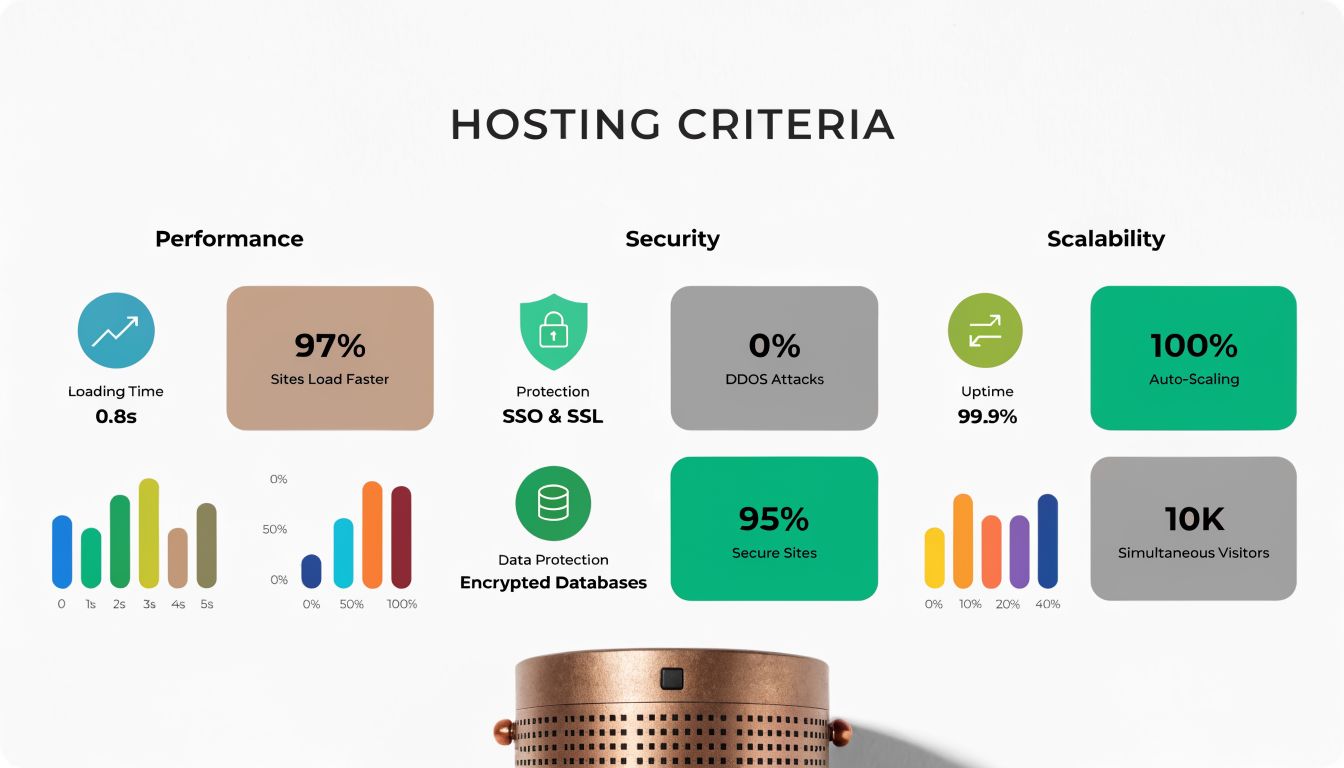
A better buying model checks five things: performance under load, security controls, scaling path, backup quality, and total operating cost. If you want a broader procurement checklist before comparing infrastructure in detail, this guide on how to choose a web hosting provider pairs well with the technical criteria below.
Performance under real store load
Online stores generate mixed traffic. Category pages may cache well, but search, cart updates, login sessions, coupon logic, shipping calculations, and checkout do not. Hosting has to handle those uncached requests without queueing users behind slow PHP workers or disk I/O.
These are the signals that matter:
- Reserved CPU and RAM: Shared contention causes erratic response times, especially during checkout bursts.
- A tuned application stack: Nginx or LiteSpeed, correctly sized PHP-FPM pools, OPcache, Redis where the platform supports it, and a database server configured for the store’s query pattern.
- Fast storage: NVMe matters more than marketing copy when the app is writing sessions, order rows, and index updates.
- Edge delivery for static assets: A CDN should handle images, CSS, JavaScript, and media so the origin server can spend its resources on dynamic work.
- Headroom for concurrency: Stores fail when they can process one request quickly but thirty requests badly.
This is also where infrastructure class starts to matter. Shared hosting can post decent synthetic benchmarks and still perform poorly once multiple tenants compete for the same CPU scheduler, disk, or database service.
Security that matches payment and customer data risk
Ecommerce security is operational, not cosmetic. The core question is whether the provider gives you enough control to reduce attack surface, patch systems on time, isolate workloads, and recover cleanly after an incident.
A sound baseline includes:
- Web application firewall coverage: Block common exploit traffic before it reaches WordPress, Magento, or a custom app.
- Malware detection and file integrity checks: You need to know when code changes unexpectedly.
- Patch process: OS packages, PHP versions, database engines, control panels, plugins, and extensions all need maintenance windows and ownership.
- Strong isolation: A compromise in one account should not expose neighboring sites or admin services.
- TLS, access controls, and logging: HTTPS is assumed. SSH policy, admin MFA, and useful logs matter just as much when investigating abuse or failed logins.
WordPress and WooCommerce deserve extra scrutiny because of their plugin ecosystems. The software itself can be run safely, but only if updates, extension review, and least-privilege access are treated as routine operations rather than occasional cleanup.
Here’s a useful walkthrough before you continue with provider comparisons:
Scalability without a forced rebuild
Growth should not require replacing the whole hosting model under pressure. The practical question is whether the current environment can absorb the next stage of demand with planned changes instead of emergency migration.
Two scaling patterns matter:
- Vertical scaling: Add CPU, RAM, and storage to a single server or VM.
- Horizontal scaling: Split web, database, cache, search, queues, or background jobs across multiple systems.
Most stores start with vertical scaling because it is cheaper and simpler to operate. That usually means a properly sized VPS with root access and a stack you can tune. Larger stores outgrow that model when one box is handling web traffic, MySQL, Redis, search, cron, image processing, and backups at the same time. At that point, the right answer is architecture, not another low-end plan with more vague “resources.”
A good host should let you move from shared to VPS, from VPS to bare metal, or into private cloud without changing platforms blindly or rebuilding deployment processes from scratch.
Backups and recovery discipline
Backup quality matters more than backup availability. Many providers advertise backups, but the useful details are frequency, retention, storage location, encryption, and restore testing.
Check for these points:
- Database-aware backups: Files alone will not recover orders, carts, customer records, or catalog changes.
- Defined retention: Teams need to know whether they can restore last night, last week, or last month.
- Off-node copies: A backup stored on the same failed server is not a recovery plan.
- Restore tests: Recovery time should be measured, not guessed.
For ecommerce, I also look for partial restore options. Restoring a single database, media directory, or staging copy is often faster and less disruptive than rolling back the entire server.
Total cost of ownership
The monthly fee is only one variable. The actual cost includes migration work, performance tuning, monitoring, patching, failed deployments, downtime during traffic spikes, and the staff time needed to keep the stack healthy.
Cheap hosting often shifts labor and risk onto the store owner. Higher quality hosting usually costs more upfront but reduces firefighting, failed checkouts, and unplanned rebuilds later. For a growing store, that trade-off is usually the difference between a host that merely runs the site and infrastructure that can support the business.
Comparing Hosting Types for Your Online Store
Hosting choice shows up in checkout speed, admin responsiveness, deployment flexibility, and how much failure your store can absorb during a traffic spike. Shared hosting, VPS, bare metal, and private cloud are not interchangeable. Each one sets hard limits on performance tuning, isolation, and how far the stack can grow before another migration is required.
Here is the short comparison.
| Feature | Shared Hosting | VPS Hosting (ARPHost KVM) | Bare Metal Server (ARPHost) | Private Cloud (ARPHost Proxmox) |
|---|---|---|---|---|
| Best fit | New or very small stores | Growing stores that need isolated resources | Heavy stores with custom stacks | Multi-service stores needing control and expansion |
| Resource isolation | Low | High | Full | High to full, depending on design |
| Performance consistency | Variable | Predictable | Very strong | Predictable and flexible |
| Root access | Usually limited | Yes | Yes | Yes |
| Security control | Basic | Stronger | Strongest per node | Strong and highly customizable |
| Scaling path | Limited | Vertical first | Hardware-based expansion | Vertical and architectural expansion |
| Operational complexity | Low | Moderate | Higher | Higher |
| Typical use | Small catalogs, low traffic | WooCommerce, Magento, custom apps | Large catalogs, intensive search, custom services | Complex ecommerce environments and multi-tier apps |
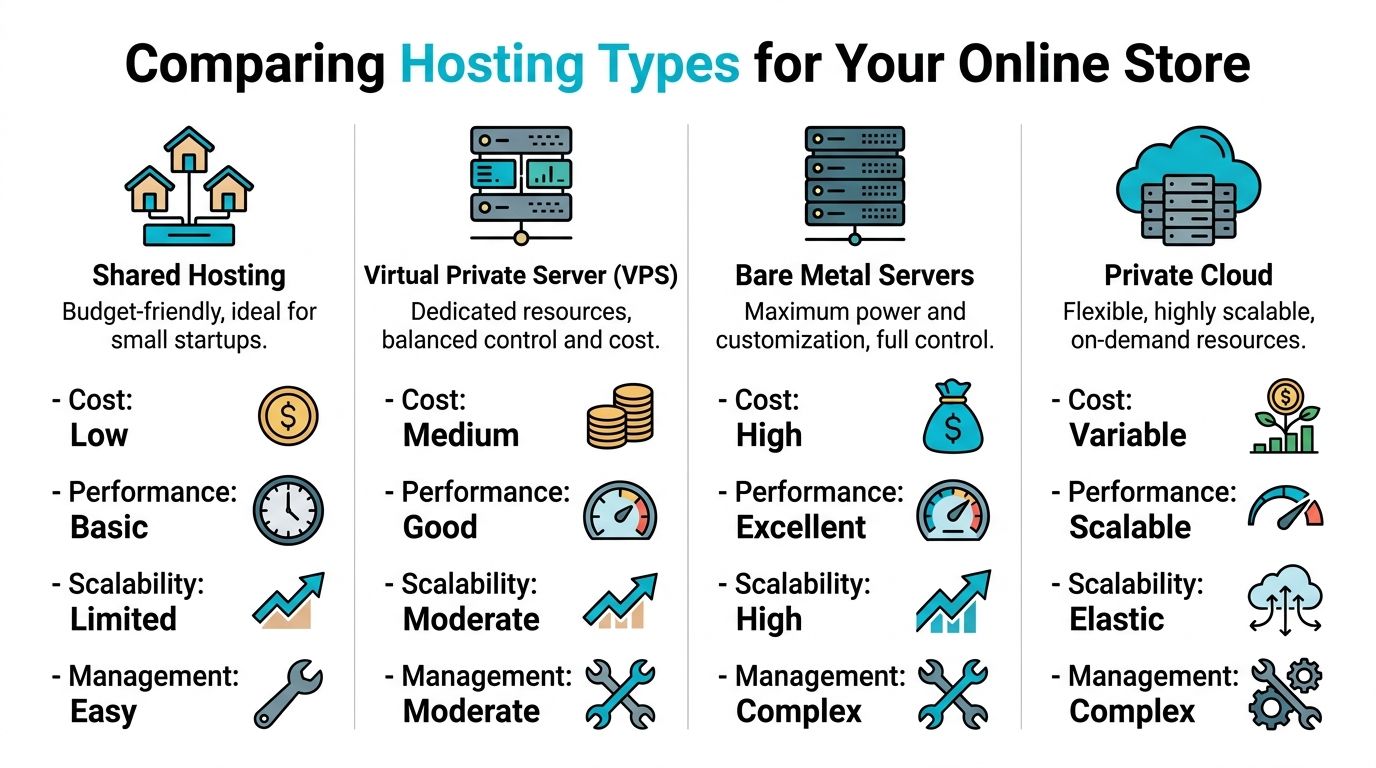
Shared hosting
Shared hosting fits stores that are still proving demand. It keeps cost low, but it also limits what can be tuned. PHP worker counts, database settings, cache layers, cron behavior, and web server rules are often fixed by the provider.
That matters fast on ecommerce workloads. A content site can tolerate some latency. A store with active carts, coupon logic, inventory checks, and payment callbacks cannot.
Use shared hosting if the store has a small catalog, light order volume, and no expectation of running custom services such as Redis, Elasticsearch, or separate staging environments. Treat it as an entry point, not a long-term architecture.
VPS hosting
VPS is the practical starting point for stores that are generating meaningful revenue and need stable performance under load. The gain is not only more CPU and RAM. The gain is control. You can tune PHP-FPM to match available memory, add Redis for object caching, isolate noisy scheduled jobs, and set worker limits based on real traffic instead of provider defaults.
KVM VPS plans are especially useful for ecommerce because the isolation is closer to a dedicated server than a generic shared account. If checkout traffic spikes and PHP workers start stacking up, the store is less exposed to interference from neighboring tenants.
A simple WooCommerce or Magento stack often looks like this on a VPS:
- 2 to 4 vCPU for smaller stores, more once search and background jobs grow
- 4 to 8 GB RAM as a starting point
- Nginx or Apache with tuned PHP-FPM pools
- Redis object cache
- Separate staging environment if deployments are frequent
- Off-server backups and external monitoring
For teams deciding whether the move is justified, this comparison of shared hosting vs VPS is useful because it maps the upgrade to actual resource isolation and administration changes.
Bare metal servers
Bare metal is the right choice when virtualization overhead, shared storage patterns, or fixed VPS ceilings start getting in the way. This usually happens with large catalogs, heavy search indexing, expensive database queries, ERP sync jobs, or stores that need strict control over disk layout and CPU allocation.
The operational trade-off is real. A bare metal server gives full hardware access, but scaling is less flexible than a VM-based setup. Adding capacity often means resizing through a hardware change, adding another node, or redesigning service placement. For teams that know the workload and want consistent database and application performance, that trade is often worth it.
I usually recommend bare metal when the database is large enough that storage latency and sustained CPU availability matter more than quick vertical resizing.
Private cloud
Private cloud becomes the better fit once the store is more than one server and more than one environment. At that point, the business may need separate application nodes, database instances, staging, internal services, VPN-restricted admin tooling, and backup systems that are isolated from production.
A Proxmox-based private cloud gives that structure. Teams can place workloads on separate VMs, reserve resources for critical services, snapshot before risky changes, and build around failure domains instead of hoping one large server never has a problem.
It also gives cleaner paths for architectural growth. For example, web and PHP can live on one VM group, MariaDB or PostgreSQL on another, Redis on its own instance, and object storage or backup targets outside the application tier.
Which model fits each growth stage
The right hosting type depends on the shape of the workload and the cost of failure.
- Shared hosting fits early stores with low order volume and minimal customization.
- VPS fits growing stores that need predictable response times, root access, and application-level tuning.
- Bare metal fits stores with heavier databases, large catalogs, custom services, or stricter performance requirements.
- Private cloud fits businesses running multiple services, multiple environments, and more formal operational controls.
For many stores, the roadmap is shared hosting to VPS, then VPS to either bare metal or private cloud. That transition path matters more than feature checklists because each move changes what the team can tune, isolate, secure, and recover.
Platform-Specific Hosting Recommendations
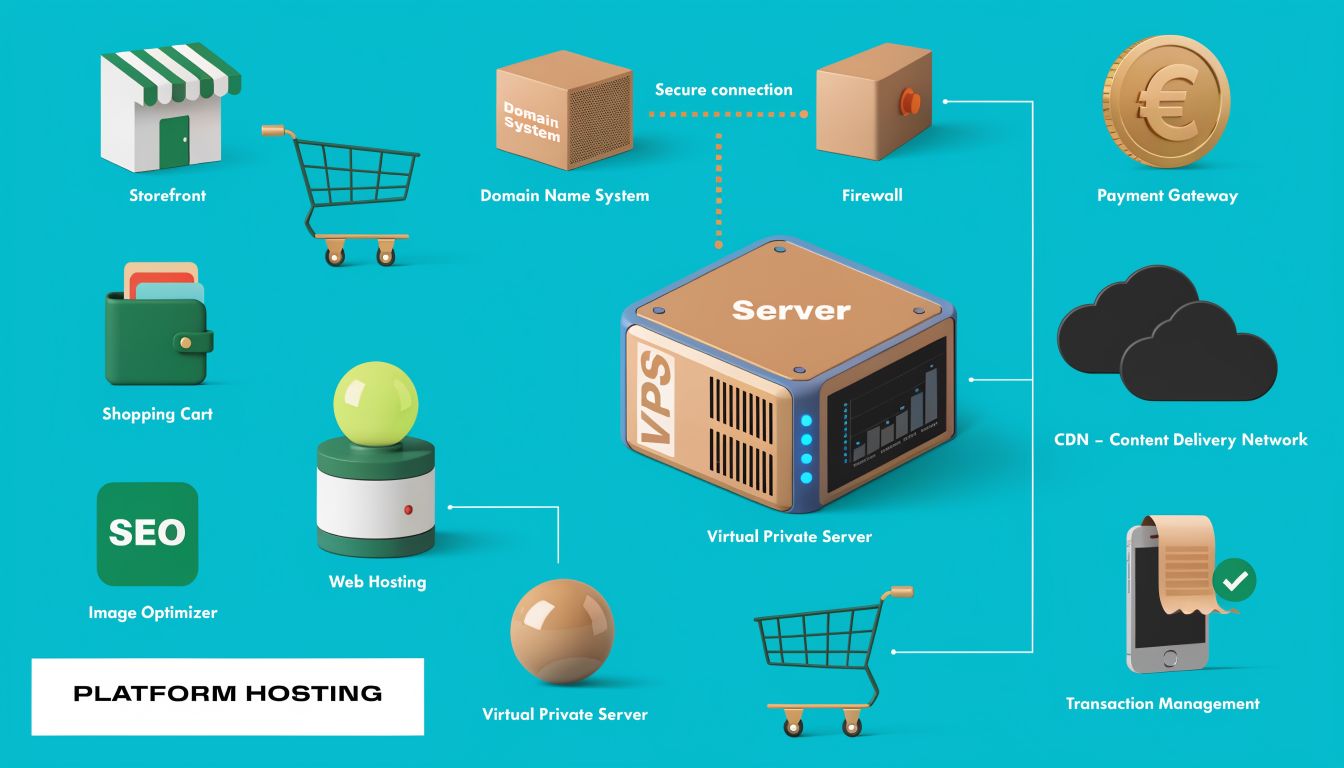
Not all ecommerce platforms stress hosting the same way. WooCommerce, Magento, and headless storefronts each create different bottlenecks. The right server choice depends on the application behavior, not just store size.
WooCommerce
WooCommerce is flexible and widely used, but it can become inefficient fast if the stack is left on generic hosting defaults. Product queries, cart fragments, search, variation-heavy catalogs, and plugin bloat all add up.
The strongest baseline recommendation is clear. A 4–8GB VPS with Redis caching, a tuned PHP-FPM, and an Nginx web server is the optimal configuration to handle significant WooCommerce traffic.
That stack works because each component fixes a known ecommerce pain point:
- Nginx handles concurrent connections efficiently
- PHP-FPM tuning keeps worker pools from becoming chaotic under checkout load
- Redis reduces repeated database work for sessions, objects, and transient-heavy behavior
- Dedicated VPS resources stop neighboring tenants from stealing headroom
A practical baseline for WooCommerce usually looks like this:
apt update && apt install nginx redis-server php-fpm php-redis mariadb-server
Then tune the application stack around real store behavior:
- Cache what’s safe: Product pages and catalog components, not personalized checkout flows
- Keep plugins disciplined: Every plugin adds code paths, queries, and potential security exposure
- Separate cron from page hits: Use real scheduled jobs rather than pseudo-cron triggered by visitors
- Watch PHP worker saturation: Slow checkout often starts there
For WordPress-specific deployments, this guide to managed hosting for WordPress is useful when deciding how much tuning and maintenance your team wants to own.
WooCommerce doesn’t just need “WordPress hosting.” It needs a store-aware stack.
Magento
Magento is powerful, but it is not forgiving on weak infrastructure. It likes memory, CPU, fast storage, and careful service design. If the store runs layered navigation, advanced search, multiple stores, or deep integration work, lightweight hosting becomes painful quickly.
Magento usually performs best when you plan for:
- Dedicated compute headroom
- Separate cache and database services when complexity increases
- Aggressive indexer and cron management
- Search infrastructure that isn’t competing with checkout traffic
- A deployment process that avoids in-place surprises
VPS can still work for moderate stores, but the ceiling arrives sooner than with WooCommerce. For larger builds, bare metal or a private-cloud layout often becomes the cleaner option because it gives you room to separate web, cache, search, and database responsibilities.
Headless commerce
Headless commerce changes the hosting question entirely. Instead of “where do I run my store,” the primary question becomes “how do I host multiple moving parts cleanly.”
A common pattern is:
- frontend application
- backend commerce engine or API
- database
- cache layer
- media storage
- build and deployment pipeline
That model benefits from VPS or private cloud because teams need root control, service separation, environment parity, and better deployment tooling than most beginner ecommerce hosts provide.
A lot of teams underestimate integration complexity here. Platform selection doesn’t end at checkout features. It affects fulfillment, inventory sync, support workflows, and how much fragility gets introduced between systems.
One practical provider path
For businesses that want a self-hosted route without giving up support options, ARPHost offers VPS hosting, bare metal servers, instant applications for platforms such as WordPress and Magento, and managed services for teams that want help with monitoring, backups, and migrations. That makes it a workable option when a store is moving off generic shared hosting but isn’t ready to build everything from scratch.
Hosting Blueprints for Small, Medium, and Enterprise Stores
A store that handles 20 orders a day needs a different hosting plan than a store that gets hammered by paid traffic, marketplace sync jobs, and a peak-hour checkout queue. The mistake is waiting for outages to force that decision. Infrastructure should be selected based on failure tolerance, operational load, and how much control the team requires.
Small store blueprint
Small stores usually need simplicity more than scale. If the catalog is modest, extensions are limited, and the team is not deploying code every week, the goal is stable hosting with a clean path out of entry-level plans.
A practical setup includes:
- Web stack: Nginx or Apache with PHP-FPM
- Caching: Page cache and browser cache
- Security: WAF, SSL, malware scanning, least-privilege admin access
- Backups: Daily database and file backups, with restore testing
- Operations: Manual updates are acceptable if they follow a checklist
This can still run well on quality shared or entry VPS hosting. The limit is not plan marketing. The limit is noisy-neighbor risk, low worker capacity, and restricted control once plugins, search, or checkout load starts climbing.
Medium store blueprint
Medium stores sit in the uncomfortable middle. Revenue depends on the site, but the business often does not have a dedicated infrastructure team yet. Shared hosting starts to break down here because resource contention and generic server settings show up as slow category pages, admin lag, and random checkout failures during campaigns.
The usual answer is a managed VPS with predictable resources and root-level tuning:
- Dedicated vCPU and RAM
- Nginx
- Redis or Memcached
- Tuned PHP-FPM workers
- Isolated backups
- Monitoring for CPU, memory, disk, and service health
A basic service enablement on a Linux VPS might look like this:
systemctl enable nginx
systemctl enable php-fpm
systemctl enable redis-server
systemctl enable mariadb
That only gets the services online. Optimal gains come from tuning them properly. Set PHP-FPM workers to match available memory, move sessions into Redis if the application supports it, and confirm backup retention is off-server. If an outage would trigger a Slack war room or executive escalation, the store belongs in this tier at minimum.
Enterprise store blueprint
Enterprise ecommerce needs separation of duties across the stack. Web traffic, background jobs, search, and the database should not compete blindly on one machine unless the workload is small enough to prove otherwise.
A stronger blueprint usually includes:
- Dedicated web tier for application traffic
- Separate database placement with replication or a clear recovery plan
- Redis or Memcached layer for objects, sessions, or full-page cache support
- CDN in front of static assets
- Staging environment that mirrors production closely
- Off-node backups with tested restore procedures
- Private cloud or bare metal base when isolation, compliance, or sustained load requires it
The trade-off is straightforward. Private cloud gives cleaner segmentation, easier policy control, and room to split services across nodes. Bare metal gives more predictable performance for database-heavy or consistently busy stores because there is no hypervisor overhead and no shared host contention. Teams running multiple storefronts, ERP sync, heavy search indexing, or large import jobs usually benefit from private cloud design. Teams with one large store and sustained high database pressure often get better value from well-spec'd bare metal.
At this level, architecture decisions matter more than the hosting label. A badly configured cluster can perform worse than a disciplined single-server deployment. A well-planned stack with isolated services, measured capacity, and clear recovery procedures is what supports enterprise ecommerce.
Planning Your Hosting Migration and Deployment
At 2:00 a.m, the DNS cutover finishes, the new server answers requests, and checkout starts failing because Redis sessions were not configured the same way as the old stack. That is a migration problem, not a hosting problem. Stores get into trouble during moves because they copy files and databases but miss the operating details that keep orders flowing.
Migration planning starts with a dependency map, not a backup job. Record the application version, PHP and database versions, web server rules, cron schedule, SSL setup, storage paths, cache layers, search service, and every external system that reads or writes store data. Payment gateways, tax services, shipping labels, ERP sync, email delivery, fraud tools, and webhook consumers all need to be accounted for before any data moves.
Pre-migration planning
Build the target environment first and make it behave like production before you copy anything. That means matching service versions where possible, defining rollback conditions, lowering DNS TTL in advance, and freezing nonessential code or catalog changes during the migration window.
The minimum prep list is straightforward:
- Create verified backups of files and databases
- Document current service versions and configuration differences
- List all scheduled tasks, webhooks, and third-party integrations
- Set a content freeze for the migration window
- Lower DNS TTL early enough for cutover to matter
- Prepare a rollback plan with a clear decision point
A standard file sync often starts with:
rsync -avz /var/www/html/ user@newserver:/var/www/html/
And a database export commonly starts with:
mysqldump -u dbuser -p dbname > store.sql
Those commands are only the start. For larger stores, a final incremental sync close to cutover is usually required so orders, customer records, and media changes do not drift too far between source and target.
Execution on the target environment
Restore into the new stack and test it under controlled access before public traffic hits it. A hosts file override, temporary URL, or restricted preview domain is enough if it lets the team exercise real storefront behavior without indexing the staging copy.
Test the paths that make money and the paths that break quietly:
- Admin login and role permissions
- Product media and theme assets
- Cart updates and session persistence
- Checkout flow through the payment gateway
- Search, filtering, and layered navigation
- Transactional email sending
- Cron jobs, queues, imports, and webhook delivery
Platform changes need extra attention. A move from Apache to Nginx can break rewrite behavior. A switch to Redis for sessions or object cache can expose stale data, login loops, or cart loss if exclusions are wrong. A database version change can surface slow queries that were hidden on the old host because traffic was lower or indexing was incomplete.
Go-live and post-cutover monitoring
Cut over only after the new environment has passed functional testing. Keep the old environment online, but place it in a controlled state so it can serve as a rollback target without accepting conflicting writes longer than necessary.
Watch the first hours closely. Review application logs, PHP errors, web server errors, queue workers, mail delivery, and payment callback activity. Track resource pressure at the same time because stores often look healthy at low traffic, then fail when caches warm, search reindexes, and real checkout volume starts.
Focus on these signals:
- Application and PHP errors
- Failed payment or shipping callbacks
- Broken images, wrong file paths, or mixed content
- CPU, memory, disk I/O, and database saturation
- Cache or session misconfiguration
- Missed cron executions and stuck background jobs
Why ARPHost excels here
Migration work usually includes more than data transfer. Teams often need the new server built correctly, backups validated, services tuned, and rollback steps defined before anyone changes DNS. ARPHost is relevant in that context because the company operates the infrastructure layers involved in the move, including hosted environments, VPS, bare metal, Proxmox private cloud, backups, and migration support.
That matters most when the project includes a platform change, service split, or performance rebuild instead of a simple host-to-host copy.
Why ARPHost is Your Partner for Ecommerce Growth
A common failure point in ecommerce is not the first launch. It is the jump from a basic hosting plan to infrastructure that can handle traffic spikes, heavier catalogs, background jobs, and stricter security requirements without constant workarounds.
That transition is where provider fit starts to matter. A growing store may need to move from a single hosting account to a VPS with reserved resources, then to bare metal or a private cloud once database load, checkout traffic, and compliance requirements outgrow shared environments. Changing vendors at every stage adds migration risk, configuration drift, and wasted engineering time.
ARPHost is relevant because its service range maps to that progression. The company offers shared hosting, KVM VPS, bare metal, private cloud, backups, colocation, and managed support under one roof. That gives a store a practical upgrade path when the stack needs more CPU headroom, stronger tenant isolation, custom firewall rules, or dedicated database capacity.
For ecommerce teams, that matters in day-to-day operations. Stores often need Redis configured correctly, PHP workers sized to match traffic, backups tested against real recovery objectives, and staging environments that reflect production closely enough to catch plugin and deployment issues before release. Those are infrastructure decisions, not marketing features.
If the current host limits root access, blocks service-level tuning, or turns every performance issue into a support ticket loop, the next step is usually a platform with clearer resource boundaries and more control.
ARPHost, LLC offers that path. You can start with VPS hosting, move into secure VPS bundles, deploy on Proxmox private clouds, or request a custom plan built around your store’s application, database, and recovery requirements.
