

A small business owner usually starts the same way. You search for a domain, see a low first-year price, and assume the registrar decision is basically finished. Then the second year arrives, the checkout starts adding privacy, email, security, and renewal surprises, and the problem shifts from buying a name to managing a piece of business infrastructure.
That’s why the best domain registrar for small business isn’t the one with the flashiest promo. It’s the one that keeps ownership clear, renewals predictable, transfers easy, and DNS management stable when you connect the domain to real hosting.
Your Domain Is More Than Just a Name
The most expensive domain decision often starts with the cheapest ad.
A business owner sees a promotional domain offer, registers quickly, and moves on to more urgent work like the website, email, bookings, or online store. Months later, they need to point that domain to a hosting account, add DNS records for email, or transfer it away from a bundled platform that no longer fits. That’s when the registrar stops feeling like a simple storefront and starts acting like a gatekeeper.

I’ve seen this pattern repeatedly. The domain itself wasn’t the problem. The friction came later, when the owner discovered high renewal pricing, aggressive add-ons, limited DNS controls, or confusing transfer steps. A cheap first-year registration became a long-term administrative chore.
If you’re still comparing options, it helps to treat domain buying as part of your infrastructure planning, not just branding. A practical starting point is to review how different providers register domain names and what ownership, support, and management options come with the purchase.
For businesses that want domain search and registration in the same place as hosting planning, ARPHost also provides domain registration tools that fit that workflow.
Your registrar controls the asset your website, email, and public identity depend on. Choose it like you’d choose a bank account, not like you’d choose a coupon.
Evaluating Registrars Beyond the Sticker Price
A registrar should be judged on operational value, not just checkout price. Early in the buying process, small businesses usually compare only the first-year number. That’s the wrong metric.
Use this quick comparison frame before you commit:
| Criteria | What to check | Why it matters |
|---|---|---|
| Intro pricing | First-year cost and required terms | Promo pricing can hide lock-in |
| Renewal policy | Standard renewal price and visibility | This drives long-term ownership cost |
| Privacy | Whether WHOIS privacy is included | Protects contact data and reduces nuisance exposure |
| DNS controls | Record editing, nameserver flexibility, DNSSEC | Needed for hosting, email, and migrations |
| Transfer freedom | Unlocking, auth code access, support responsiveness | Prevents platform lock-in |
| Security | MFA, domain lock, alerting | Reduces hijack and account takeover risk |
| Support quality | Real help for DNS and transfer issues | Critical when something breaks during launch |
Pricing is a lifecycle cost
A registrar that looks cheap at checkout can be expensive over time. One of the most overlooked issues in this market is the multi-year renewal trap. A published guide on registrar selection notes that GoDaddy is criticized for upselling and rising costs post-promotion, with.com renewals often jumping from $12 first-year to $20+ annually, while Namecheap and Porkbun maintain stable low renewals around $9-10/year. The same guide also notes that registering five domains over three years could cost $150 more with upsell-heavy registrars vs. budget ones, and points to 15% of domains lost yearly to expiration traps in the same discussion of ownership risk and auto-renewal behavior (Eye On Annapolis).
That’s not just a budgeting issue. It affects continuity. When businesses register multiple brand, campaign, or regional domains, renewal design becomes part of risk management.
If you want a practical checklist for comparing providers before purchase, this guide on choosing a domain registrar is worth keeping open while you shop.
Privacy shouldn’t be an add-on
If a registrar charges extra for basic privacy, that’s a signal. The domain industry has normalized upsells around features that many businesses now treat as baseline protections.
For a small business, WHOIS privacy is not cosmetic. It reduces unnecessary exposure of account contact details and keeps ownership cleaner when staff change or outside contractors have access to the site.
DNS quality affects uptime
Many buyers don’t think about DNS until the day they launch. Then they discover that the registrar’s dashboard is awkward, record changes are hard to verify, or nameserver edits are buried under account menus.
A good registrar makes common tasks fast:
- Edit records cleanly: You should be able to update A, CNAME, TXT, MX, and nameserver settings without hunting through upsell prompts.
- Support custom hosting: If you’re using a VPS, dedicated server, or control panel like Webuzo, the registrar should not fight that setup.
- Give you visibility: You need confidence that records were saved correctly and are propagating as expected.
Practical rule: If DNS management feels confusing during setup, it will feel worse during an outage.
Transfer freedom matters before you need it
Businesses rarely care about transfer policies until they outgrow a provider. Then they learn which registrars make leaving easy and which ones make it tedious.
Check these points before you register:
- Can you prepare the domain for transfer without opening a support ticket?
- Can you retrieve the authorization code directly in the dashboard?
- Is there a clear transfer timeline and status view?
- Does the registrar bury critical options behind bundled product flows?
If the answer to any of those is murky, the provider is telling you how it treats customer control.
Support quality changes the real cost
Domain problems never arrive on a quiet afternoon with plenty of spare time. They appear during launches, migrations, SSL cutovers, or after someone changed DNS in the wrong zone.
Small businesses don’t need generic support. They need someone who understands the difference between registrar-level issues and hosting-level issues. A registrar with weak support increases downtime because you spend hours proving where the fault sits.
Security features should be default expectations
The essentials are straightforward. Look for account protection, domain lock, and support for stronger DNS security practices. You don’t need a registrar that markets fear. You need one that handles ownership protection with boring consistency.
The right way to evaluate a registrar is simple. Ask how easy it is to own the domain, renew it, secure it, move it, and connect it to the rest of your stack. If the answer is “easy only on day one,” keep looking.
A Side-by-Side Comparison of Top Registrars for 2026
The best registrar depends on what kind of business you run and how technical your hosting setup is. Some providers win on transparency. Others win on DNS tooling or bundled convenience. Some are still popular largely because they spend heavily on marketing and make first-time buying easy.
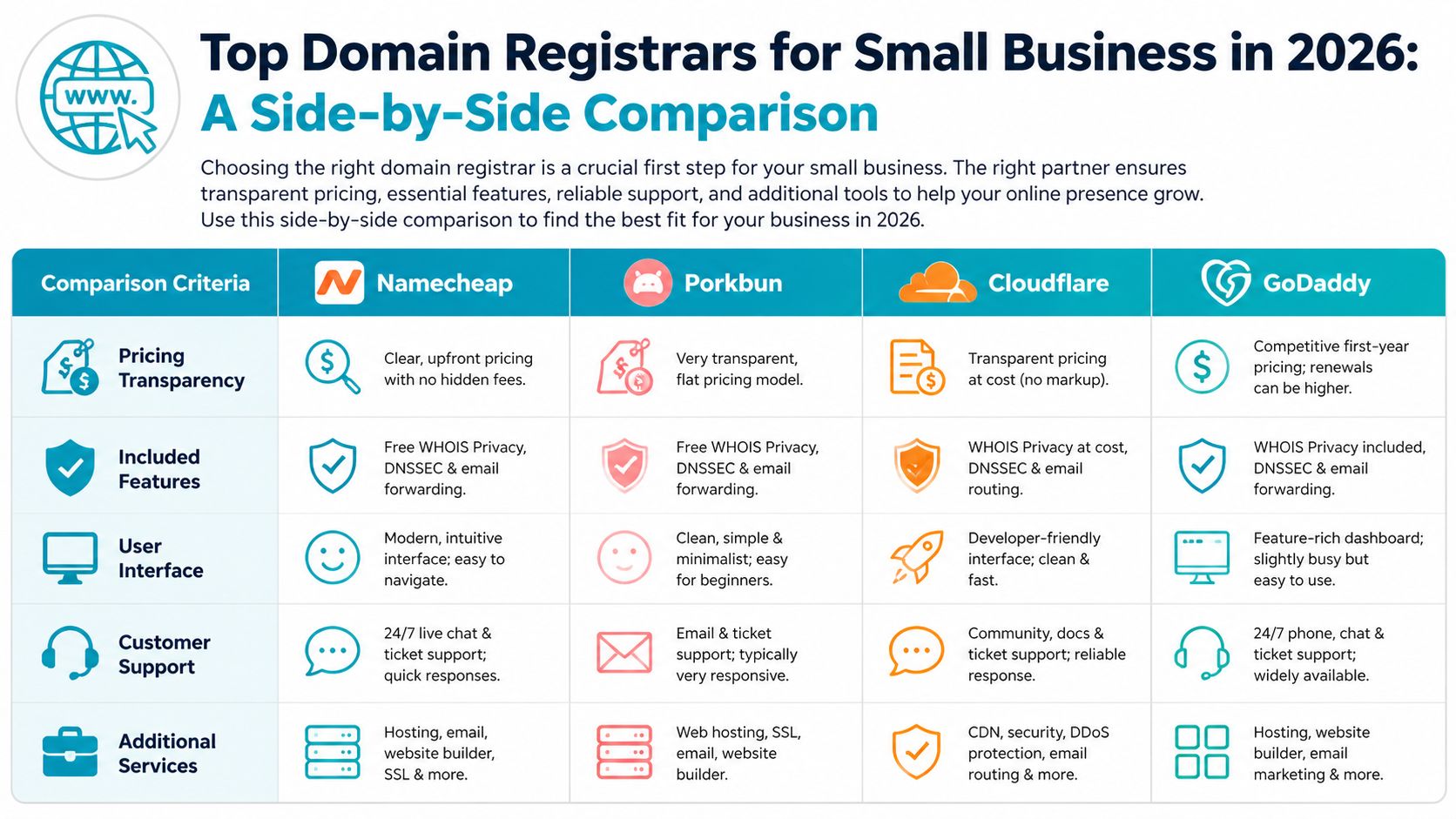
This comparison puts four common choices in the same frame.
| Registrar | Pricing transparency | Included features | Interface | Support posture | Best fit |
|---|---|---|---|---|---|
| Namecheap | Strong | Free WHOIS privacy, broad TLD support | Familiar and approachable | Live chat available | Small businesses that want low friction |
| Porkbun | Strong | Privacy and useful extras | Simple, lighter-weight feel | Generally straightforward | Cost-conscious startups |
| Cloudflare | Strong | Security-focused DNS and registrar model | More technical | Better for self-directed teams | Agencies, developers, performance-first shops |
| GoDaddy | Weaker due to upsell-heavy flow | Broad ecosystem of add-ons | Polished sales experience | Large support operation | Buyers who want an all-in-one storefront |
Namecheap for balanced value
For many small businesses, Namecheap is the most balanced choice because it combines low-friction buying with predictable ownership features. According to a 2026 market roundup, Namecheap, founded in 2001, has managed between 18 and 24 million domains, with over 18 million registered domains confirmed across sources. The same write-up highlights its transparent pricing, minimal upsells, free WHOIS privacy, and .com introductory pricing of $6.49 to $8.98 for the first year in the U.S.
That scale matters because it suggests process maturity. Registrars handling millions of domains tend to have settled workflows for renewals, transfers, and support. For small business owners, Namecheap’s appeal is less about novelty and more about reduced drama.
It’s also one of the easier registrars to recommend when the buyer wants a mainstream provider with a recognizable interface, broad TLD access, and fewer checkout distractions.
Porkbun for low-cost ownership
Porkbun appeals to businesses that care about cost discipline and don’t need a giant product catalog around the domain. It has built a reputation around straightforward pricing and a lighter sales process.
Where Porkbun tends to work well:
- Lean startups that want several domains without stacked upsells
- Side brands or campaign domains where long-term holding cost matters
- Owners who want basics included without navigating a large marketplace
Its trade-off is that the experience can feel more utilitarian. That isn’t a flaw for a technical buyer, but it may feel sparse to someone expecting hand-holding or broad bundled services.
Cloudflare for DNS-first operators
Cloudflare is rarely the first registrar a non-technical owner thinks of, but it deserves serious attention if performance, security, and DNS control matter more than checkout simplicity.
Its real advantage is integration. If your team already thinks in terms of proxying, DNS policy, origin security, edge controls, and application delivery, Cloudflare fits the way you work. It also makes sense for agencies managing multiple client environments where DNS consistency matters as much as the registration itself.
This is often the best choice when the domain is being connected to:
- A VPS with custom application routing
- A private cloud or clustered environment
- A site that needs tighter DNS and security discipline
- A multi-service setup where mail, app, and CDN decisions are separate
The downside is that Cloudflare isn’t designed around novice reassurance. A small business owner without in-house technical help may find it less intuitive than Namecheap or Porkbun.
For technical teams, the registrar isn’t just where you buy the domain. It’s where your DNS control model begins.
GoDaddy for convenience with a cost warning
GoDaddy remains common because it’s visible, familiar, and designed to sell a complete business stack. That can help a first-time buyer who wants domains, website builder tools, email, and hosting in one shopping flow.
But convenience at signup often creates complexity later. In practice, GoDaddy is the provider I most often see attached to renewal complaints, add-on confusion, and ownership cost drift. The issue isn’t that the platform can’t work. It’s that buyers need to be unusually careful at every stage of purchase and renewal.
GoDaddy makes the most sense when a business explicitly wants a bundled commercial ecosystem and accepts that the total cost may climb over time.
Which one works for most small businesses
If you want the short version, here it is:
- Choose Namecheap if you want the most balanced mainstream option.
- Choose Porkbun if low-friction ownership cost is your top priority.
- Choose Cloudflare if your business runs on technical hosting and you highly value DNS performance and control.
- Choose GoDaddy only if you value bundled convenience enough to tolerate a more sales-driven experience.
The best domain registrar for small business is usually the provider that creates the fewest operational surprises over the life of the domain. That’s a different question from “who has the cheapest ad today.”
Connecting Your Domain to High-Performance Hosting
Buying the domain is the easy part. Connecting it properly is where small businesses lose time.
When a business launches on a VPS, bare metal server, or private cloud, DNS stops being abstract. The registrar has to cooperate with the hosting environment, and that’s where weak dashboards, unclear nameserver workflows, and poor record visibility start causing real problems.
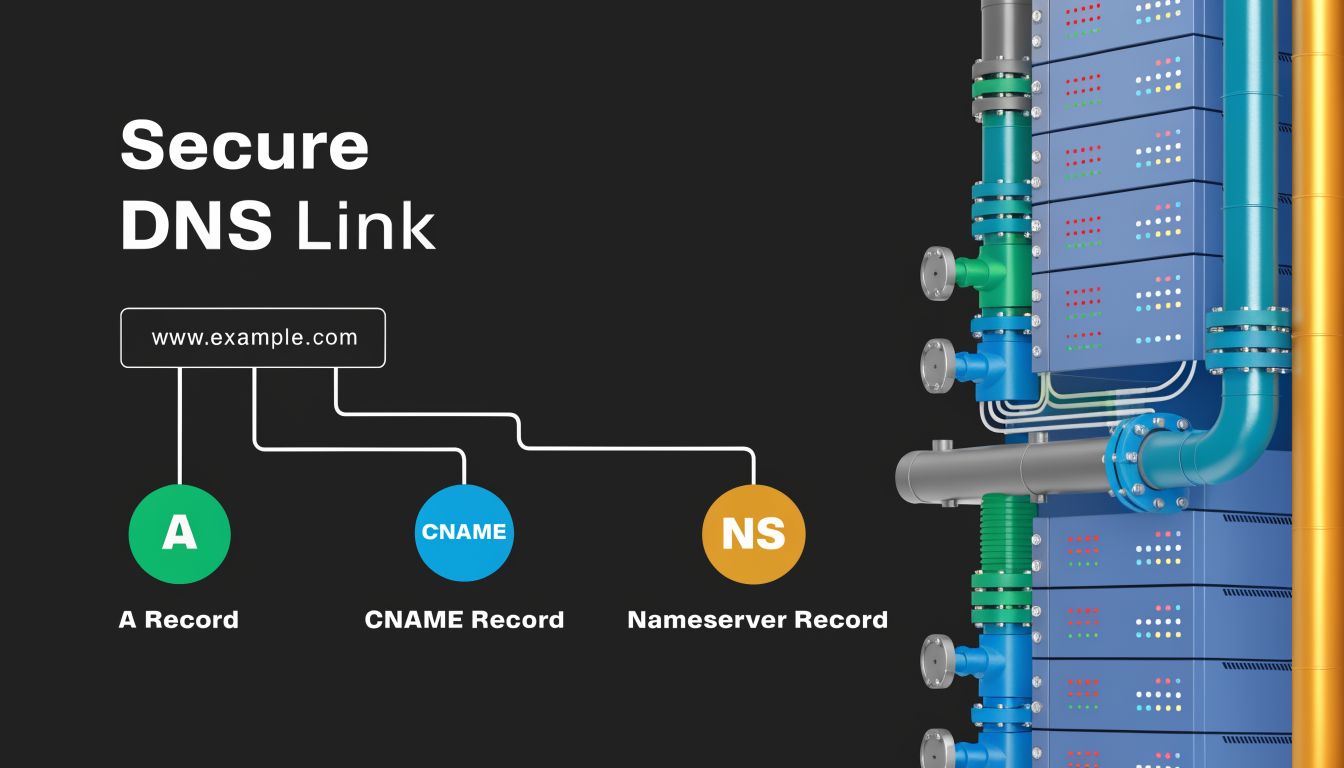
A recurring gap in registrar advice is the lack of guidance for modern hosting stacks. A recent discussion of this problem notes that DNS propagation delays can take up to 48 hours and that custom nameserver setup issues disrupt deployments involving VPS, Proxmox, and bare metal environments (YouTube discussion). That’s why a domain setup that looked simple in marketing copy can become messy during a live migration.
What records usually matter first
For most small business deployments, you’ll deal with a small set of record types first:
- A record for sending the root domain to the web server
- CNAME record for aliases such as
www - NS records if you’re delegating DNS to another provider
- TXT and MX records later for email validation and mail routing
If your registrar makes these edits hard to see and verify, deployment slows down immediately.
A practical domain pointing workflow
When pointing a newly registered domain to a hosting stack, use a disciplined sequence.
Confirm where DNS will live
Decide whether DNS stays at the registrar or moves to a dedicated DNS platform. Don’t mix assumptions between teams.Add only the required initial records
Start with the records needed to bring up the website. Don’t pile in mail, verification, redirects, and experimental entries at the same time unless you have to.Validate nameserver authority before troubleshooting
Many launch delays happen because someone edits records in the wrong DNS zone.Allow for propagation time
If you change authoritative nameservers, expect lag. At this point, many owners panic and re-edit records, creating more confusion.Test the site and SSL after DNS settles
Confirm the website is loading from the intended server before layering on application changes.
Common failure points with VPS and private cloud hosting
Registrars usually document simple website builder connections well. They document custom hosting less well.
The trouble spots are predictable:
- Wrong nameserver target: The business edits records at the registrar even though DNS was delegated elsewhere.
- Misread propagation: Someone assumes the change failed and starts making duplicate edits.
- Application-first thinking: The team troubleshoots WordPress, Magento, or SSL before verifying DNS authority.
- Hosting and registrar finger-pointing: Each provider says the problem sits on the other side.
A plain-language explanation of DNS propagation helps non-technical owners avoid that trap and gives technical staff a cleaner way to explain what’s happening internally.
A visual walkthrough helps here:
Scaling this with ARPHost
If you’re running business sites on secure web hosting, VPS, or a private cloud, the operational win comes from reducing handoffs between the team that controls the domain and the team that controls the server. That matters even more for instant WordPress or Magento deployments, where DNS and hosting have to line up cleanly before launch.
The practical approach is to standardize ownership, DNS decisions, and hosting responsibility early. That removes guesswork when you later add staging sites, move applications, or shift from basic hosting to more advanced infrastructure.
Which Registrar Is Right for Your Business Scenario
The right registrar depends less on brand popularity and more on the way your business operates. A solo consultant, a growing online store, and a technical agency don’t need the same control model.

The bootstrapped startup
A small startup usually needs three things from a registrar: predictable renewals, clean management, and low effort. This is the buyer most likely to get trapped by first-year deals because cash discipline is tight and the domain decision feels minor.
For that scenario, registrars with straightforward pricing and minimal upsells tend to be the safest fit. Porkbun is often a sensible choice here. Namecheap also works well if the business owner wants a more familiar dashboard and broad support for future add-ons.
Good fit criteria for this group:
- Low long-term cost
- Simple renewal management
- Included privacy
- No pressure to bundle everything on day one
The growing e-commerce store
An e-commerce business should think beyond the domain itself and ask a more important question: how quickly can the team resolve a launch or DNS problem when revenue is on the line?
For online stores, registrar choice matters most when paired with hosting. Strong DNS control, easy SSL-related setup, and stable renewals matter more than a tiny first-year discount. For this reason, a business may prefer a registrar with easier DNS management or choose a setup that separates DNS control from the registrar entirely.
A store doesn’t lose money because the domain was expensive. It loses money because the site, checkout, or transactional email stops resolving correctly.
If you’re operating a Magento, WooCommerce, or other transaction-heavy stack, the registrar should support clean DNS changes and easy ownership management while the hosting platform handles performance and scaling.
The technical agency or developer-led business
Agencies and developer-led teams usually care less about front-end polish and more about control, consistency, and delegation.
Cloudflare often makes sense in this scenario because the registrar decision is part of a broader DNS and security posture. Agencies managing multiple client domains need repeatable workflows, clean nameserver changes, and reliable policy around access. The registrar isn’t isolated from the hosting design. It becomes part of the deployment process.
This model works especially well when the business runs custom stacks on VPS, bare metal, or private cloud infrastructure and wants to keep registrar decisions aligned with operational standards.
The practical match
Use the simplest tool that still supports your real hosting plan.
If your business is small and non-technical, choose transparency first. If your business is growing and downtime costs you sales, choose operational stability first. If your team manages infrastructure professionally, choose control first.
That’s usually the clearest path to picking the best domain registrar for small business without overbuying or underplanning.
Why an Integrated Host and Registrar Like ARPHost Excels
Most domain headaches aren’t caused by the domain itself. They come from split responsibility.
One company controls the registration. Another controls DNS. A third handles hosting. When something fails, the small business owner becomes the project manager for a dispute between vendors. That model wastes time, especially during migrations, SSL deployment, email cutovers, and application launches.
An integrated provider reduces that friction. If the same environment can support domain registration, hosting, and ongoing server operations, troubleshooting becomes much cleaner. That’s the core value. Not novelty, not bundling for its own sake, just fewer moving parts.
What improves when services are aligned
The operational gains are practical:
- Fewer support handoffs because the same provider can see both the domain and hosting context
- Cleaner DNS changes when the team knows the target environment
- Simpler launches for websites, stores, and business email
- Easier scaling when the business moves from basic web hosting to VPS or dedicated infrastructure
This is especially relevant for businesses that start small but expect infrastructure to get more complex over time. A company may begin with a straightforward website, then add ecommerce, transactional email, staging environments, API services, or a migration into private cloud resources.
Where this fits in real operations
For startups, a lightweight VPS or secure web hosting bundle often makes sense because the business needs predictable costs and enough flexibility to grow.
For established businesses, the need usually shifts toward stronger isolation, better backup discipline, managed monitoring, or dedicated infrastructure. At that point, domain management can’t stay detached from the rest of the stack without creating more coordination overhead.
A provider such as ARPHost, LLC fits this model by combining domain services with VPS hosting, secure web hosting bundles, bare metal servers, Proxmox private clouds, instant applications, and fully managed IT services. That combination is useful when the business wants one operating partner for both the public-facing entry point and the infrastructure behind it.
The business case is stability
A registrar-only decision optimizes for a narrow purchase. An integrated decision optimizes for ownership, deployment, and support over time.
That doesn’t mean every business must bundle everything from day one. It means the smartest buyers choose a registrar and hosting path that won’t create unnecessary friction later. If you know your website, email, applications, or server environment will need hands-on support, integration becomes a risk reduction strategy, not just a convenience feature.
Frequently Asked Questions About Domain Registration
Do I have to host my website with my domain registrar
No. You can register a domain with one provider and host the website somewhere else.
That separation gives you flexibility, and many businesses use it successfully. The trade-off is support complexity. When DNS, SSL, email, or site routing breaks, you may need to coordinate between multiple vendors. If your business has limited technical time, keeping domain and hosting decisions aligned can make operations simpler.
What is domain privacy and why does it matter
Domain privacy helps limit public exposure of the contact details associated with domain ownership. For a business, that matters because domains are not just branding assets. They’re administrative assets tied to your website and often to key communications.
Treat privacy as a baseline feature, not a luxury add-on. If a registrar charges extra for it, review the rest of the pricing model carefully.
How hard is it to transfer a domain to another provider
In most cases, domain transfers are manageable if the registrar gives you clear access to transfer release tools and authorization steps. The process is usually straightforward when the domain is in good standing and the administrative email path is under your control.
Often, the obstacle is usually not technical difficulty. It’s poor workflow design. Registrars that hide transfer settings or make support necessary for routine actions turn a simple change into a nuisance.
Will changing registrars affect my website
Not by itself, if the transfer is planned correctly and DNS remains stable. Problems usually happen when a team changes nameservers, edits DNS in the wrong place, or combines too many changes at once.
The safest approach is to separate registrar transfer tasks from active website reconfiguration whenever possible.
Should I buy multiple domains for my business
Sometimes, yes. It can make sense to register common brand variants, campaign names, or defensive domains that protect your naming strategy.
But don’t buy extra domains without a renewal plan. Every additional registration becomes another asset to track, secure, and renew. If nobody owns that process internally, the portfolio gets messy fast.
What should I do right after registering a domain
Take care of the administrative basics first:
- Enable account protection using the registrar’s available security controls
- Confirm ownership contacts so renewal and transfer notices go to the right mailbox
- Document where DNS is hosted before anyone starts website setup
- Record renewal responsibility so the domain doesn’t become “everyone’s job” and therefore no one’s
A domain is easy to buy and surprisingly easy to mishandle. The businesses that avoid trouble usually don’t do anything clever. They just manage ownership with discipline.
If you want domain registration, hosting, and managed infrastructure handled in one place, ARPHost, LLC offers domain services, secure VPS hosting, bare metal servers, Proxmox private clouds, instant application deployment, and fully managed IT support for businesses that want fewer vendor handoffs and clearer technical ownership.
