

Choosing the right backup solution is one of the most critical infrastructure decisions a small business can make. It’s not just about recovering a deleted file; it’s about ensuring operational continuity in the face of hardware failure, cyberattacks, or catastrophic data loss. A “set it and forget it” approach no longer suffices when faced with modern threats that target backup repositories directly.
For IT professionals and sysadmins, the ideal solution must balance robust technical features like immutability and rapid recovery times with the practical realities of a small business budget and limited administrative overhead. Before diving into specific services, it’s helpful to grasp the basics; for a guide on how to perform fundamental backups, consider reviewing this article on understanding the fundamental steps of backing up computer files. This foundational knowledge will help you better evaluate the advanced platforms we cover.
This guide moves beyond generic recommendations to provide a technical deep dive into the seven best backup solutions for small business. We analyze each platform’s architecture, ideal use cases, and key performance indicators like Recovery Time Objectives (RTO) and Recovery Point Objectives (RPO). Our goal is to provide actionable insights to help you protect your most critical workloads, from Proxmox VE clusters and bare metal servers to employee endpoints and cloud applications. For each option, we’ll provide direct links and screenshots to help you visualize the platform and make an informed decision.
1. Proxmox Backup as a Service
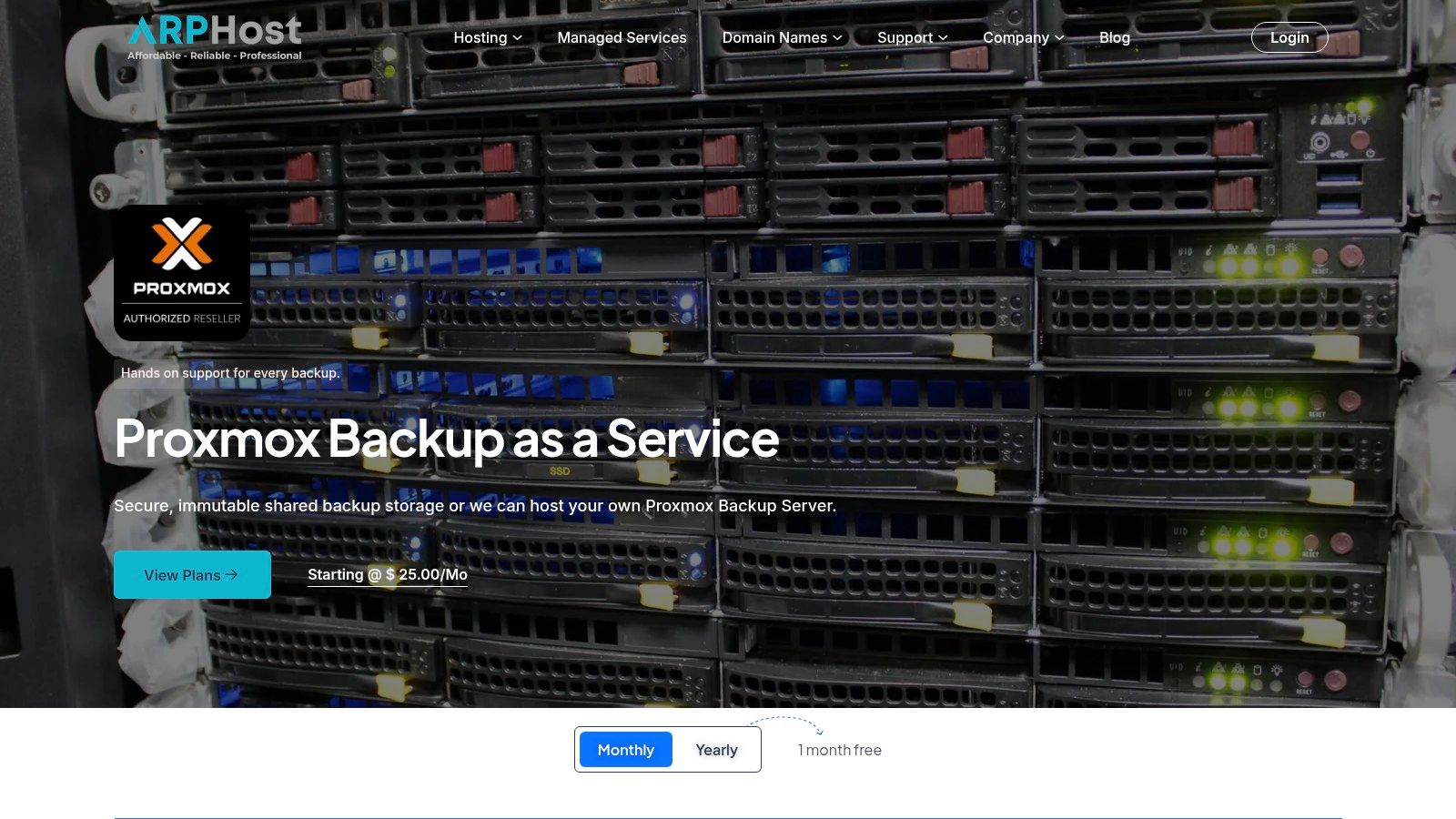
ARPHost’s Proxmox Backup as a Service stands out as a premier choice for small businesses already invested in or migrating to the Proxmox VE ecosystem. This managed solution delivers enterprise-grade data protection, security, and efficiency without requiring an in-house team of backup specialists. It directly addresses the most critical modern data threats, including ransomware and accidental deletion, by integrating robust security features natively.
This service is engineered to be a seamless extension of your Proxmox environment, removing the common friction points associated with third-party backup tools. By leveraging Proxmox’s own backup technology, it ensures maximum compatibility, performance, and reliability, making it one of the best backup solutions for small business teams seeking a powerful yet straightforward system.
Why It’s a Top Choice for SMBs
What sets this service apart is its specialized focus combined with flexible management options. Many generic cloud backup services offer a one-size-fits-all approach that may not be optimized for virtualized environments. ARPHost, in contrast, provides a purpose-built solution that capitalizes on the strengths of Proxmox Backup Server (PBS).
The core of the offering is built on two key principles: security and efficiency. Backups are inherently immutable, meaning once a backup snapshot is written, it cannot be altered or encrypted by a ransomware attack. This feature is critical for ensuring your recovery point is always viable. Furthermore, all data is encrypted both in transit and at rest, helping you meet strict compliance standards.
Key Features & Technical Breakdown
ARPHost’s service packages the most vital features of PBS into a managed offering:
- Immutable, Encrypted Backups: Provides a formidable defense against ransomware and malicious tampering. Immutability ensures your backup data remains in its original, unchangeable state.
- Block-Level Deduplication: This technology is a game-changer for storage efficiency. Instead of storing redundant copies of the same data blocks, PBS stores only a single instance, drastically reducing storage consumption and lowering long-term costs.
- Flexible Management Models: Businesses can choose the level of control that fits their needs. Opt for a fully managed solution where ARPHost handles all backup administration, monitoring, and verification, or choose a self-directed model for full control, backed by 24/7 expert support.
- Predictable, Scalable Pricing: Storage is offered in clear, scalable tiers starting at 500 GB. This transparent pricing model eliminates surprise costs and allows your backup infrastructure to grow seamlessly with your business.
- Native Proxmox Integration: As a Proxmox-native tool, it works flawlessly with Proxmox VE hosts. Integration is straightforward, and the performance is optimized for backing up KVM virtual machines and LXC containers.
Pros and Cons
| Pros | Cons |
|---|---|
| Exceptional Ransomware Resistance via immutable and encrypted backups. | Proxmox-Specific: Not a general-purpose tool for other hypervisors like VMware or Hyper-V. |
| Significant Cost Savings from block-level deduplication, which minimizes storage usage. | Minimum Tier Size: The 500 GB starting tier may exceed the needs of very small, single-server setups. |
| Flexible Management Options (fully managed or self-directed) to match your team’s expertise. | |
| Streamlined Vendor Experience when combined with ARPHost’s other Proxmox services, including private clouds and migrations. | |
| Expert 24/7 Support from a U.S.-based team of IT professionals. |
Ideal Use Case and Implementation
This service is the ideal backup solution for any small or medium-sized business running workloads on Proxmox VE. It is particularly valuable for organizations that lack a dedicated IT staff to manage complex backup systems but still require robust, compliant data protection.
Technical How-To: Connecting Proxmox VE to a Remote PBS Datastore
- In your Proxmox VE web interface, navigate to
Datacenter->Storage.- Click
Addand selectProxmox Backup Server.- Enter the connection details provided by your managed service provider:
- ID: A descriptive name for your storage (e.g.,
arphost-pbs).- Server: The hostname or IP address of the PBS instance.
- Username: Your PBS user ID (e.g.,
vmbackups@pbs).- Password: Your API token or password.
- Datastore: The name of the target datastore on the PBS.
- Fingerprint: The server’s certificate fingerprint for verification.
- Click
Add. The new storage is now available as a backup target for all VMs and CTs.
For businesses considering a move away from other virtualization platforms, this service can be a key component of a successful migration. To see a real-world example of integrating this technology, you can explore a detailed VMware to Proxmox VE migration guide that highlights the role of Proxmox Backup Server in the process.
Learn more at: Proxmox Backup as a Service
2. Backblaze Business Backup
Backblaze Business Backup is a cloud-based backup service laser-focused on providing simple, reliable, and unlimited data protection for endpoints like desktops and laptops. It excels at a “set it and forget it” deployment model, making it an excellent choice for small businesses without dedicated IT staff who need to ensure every employee’s machine is backed up without micromanagement. This solution is specifically for workstations (Windows and macOS) and directly attached external drives.
Key Features and Capabilities
Backblaze simplifies endpoint protection with a straightforward feature set designed for efficiency and ease of use.
- Unlimited Backup: Its core value proposition is the flat-rate pricing that allows for unlimited data backup from a single computer and its attached external drives. This eliminates data caps and unpredictable overage fees.
- Centralized Administration: The web-based admin console allows a manager to invite users, view backup status across the organization, and manage billing from a single dashboard.
- Flexible Restore Options: Data can be restored via a free web download for smaller files. For larger restores, Backblaze offers its unique “Restore by Mail” service, where they will ship a USB hard drive (up to 8 TB) or flash drive with your data anywhere in the world. The drive is free if you return it within 30 days.
- Version History: Backblaze retains deleted files and previous versions of files for 30 days by default, which can be extended to one year or forever for a small additional fee, providing a crucial safety net against accidental deletion or ransomware.
Implementation Note: Deploying Backblaze is as simple as sending an invitation link from the admin console to your employees. The lightweight client installs in minutes and immediately begins its initial backup in the background, minimizing user disruption.
Where Backblaze Stands Out
The primary advantage of Backblaze is its unparalleled simplicity and cost predictability, making it one of the best backup solutions for small business endpoint protection. Unlike solutions that charge per gigabyte, its per-computer model is easy to budget for. The user interface is clean and requires virtually no training for end-users, while the restore process is famously reliable and user-friendly.
However, its focus is a double-edged sword. Backblaze Business Backup does not natively back up servers, virtual machines, or network-attached storage (NAS). For that, you would need to use their separate IaaS product, Backblaze B2 Cloud Storage, in conjunction with a third-party tool like Veeam, Duplicati, or Synology’s Hyper Backup. This makes it a perfect component of a hybrid strategy but not a singular, all-in-one solution for complex IT environments.
Learn more at: https://www.backblaze.com/cloud-backup/business
3. CrashPlan for Small Business
CrashPlan for Small Business offers robust, set-and-forget endpoint backup focused on comprehensive versioning and administrative control. It is designed for small businesses that need to protect data on user workstations (Windows, macOS, and Linux) with a high degree of certainty. CrashPlan excels at providing continuous, background data protection that doesn’t interrupt employee workflow, making it a strong contender for companies that prioritize long-term data retention and easy device migration.
Key Features and Capabilities
CrashPlan provides a feature set tailored for small organizations that need granular control over their endpoint backup strategy without requiring a dedicated IT team.
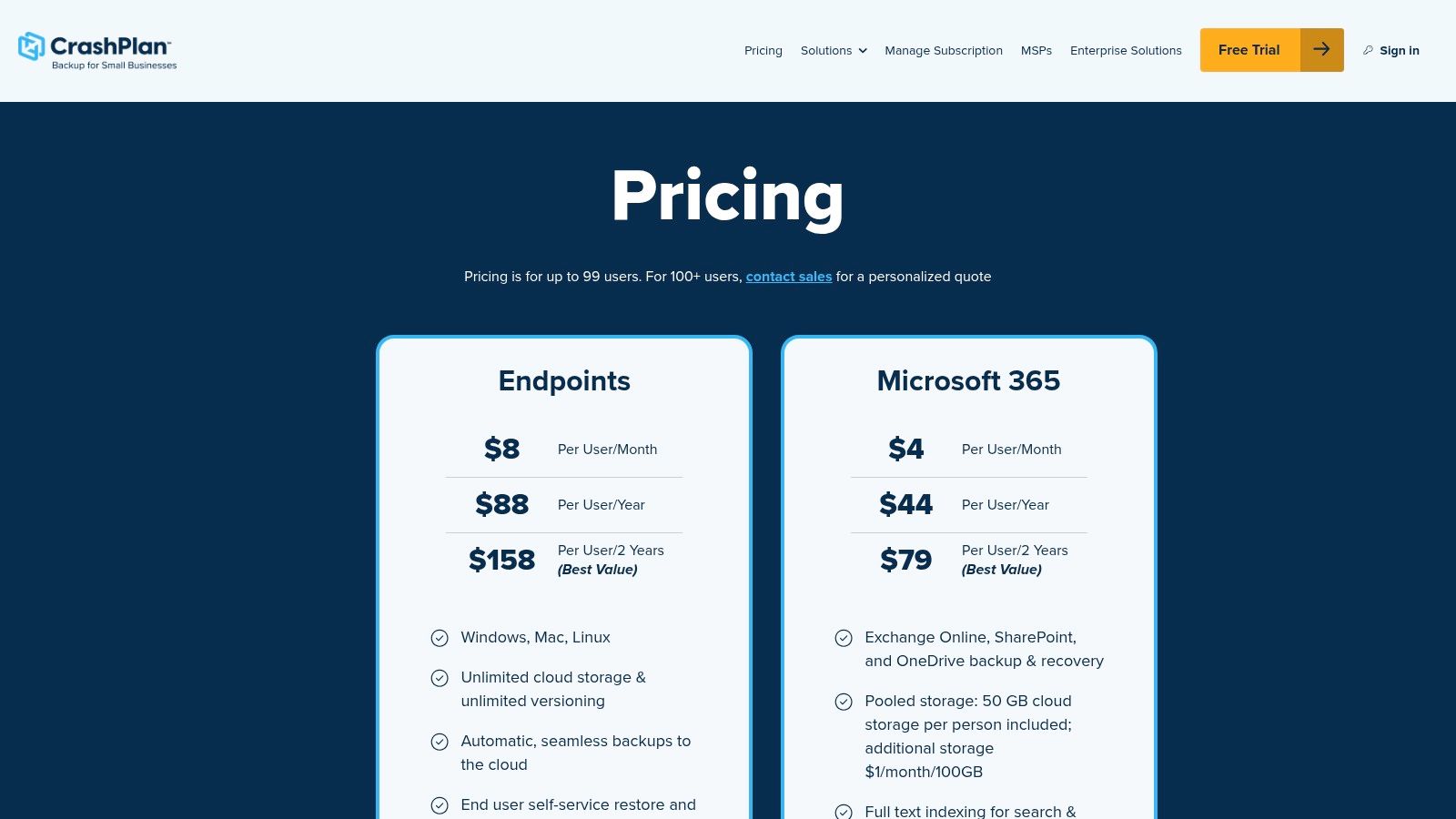
- Unlimited Storage & Versioning: Each license comes with unlimited cloud storage for a single device. A key differentiator is its versioning policy; it keeps unlimited versions of files forever and retains deleted files for a default of 90 days.
- Continuous, Automatic Backup: The client runs silently in the background, continuously backing up new and changed files. This approach helps achieve a very low Recovery Point Objective (RPO) for file-level recovery.
- Centralized Management Console: A web-based dashboard allows administrators to monitor backup status for all users, enforce backup policies, and manage user accounts and devices from a single location.
- Self-Service Restores & Device Migration: Users can easily restore files themselves without needing admin intervention. The platform simplifies migrating a user’s backup archive to a new or repaired computer, getting them back to work quickly after a hardware failure.
Implementation Note: Deployment involves creating user accounts in the admin console and sending invites. The lightweight client installs quickly and begins its initial backup. Admins can configure CPU usage limits to ensure the backup process never impacts system performance during work hours.
Where CrashPlan Stands Out
CrashPlan’s primary strength lies in its exceptional file versioning capabilities and its competitive, straightforward pricing, making it one of the best backup solutions for small business environments concerned with granular recovery. The ability to restore a file to any of its previous versions provides a powerful defense against data corruption and ransomware. Its “set it and forget it” nature ensures compliance without adding to the administrative workload. This functionality is a cornerstone of any effective disaster recovery plan.
However, CrashPlan is strictly an endpoint backup solution and is not designed for servers or NAS devices. Each license is tied to one user and one device, meaning backing up multiple computers for a single user requires purchasing additional licenses. While its default 90-day retention for deleted files is generous, businesses with stricter, long-term compliance needs may need to adjust settings or consider other solutions for archival.
Learn more at: https://smb.crashplan.com/smb/pricing/
4. IDrive Business and Team
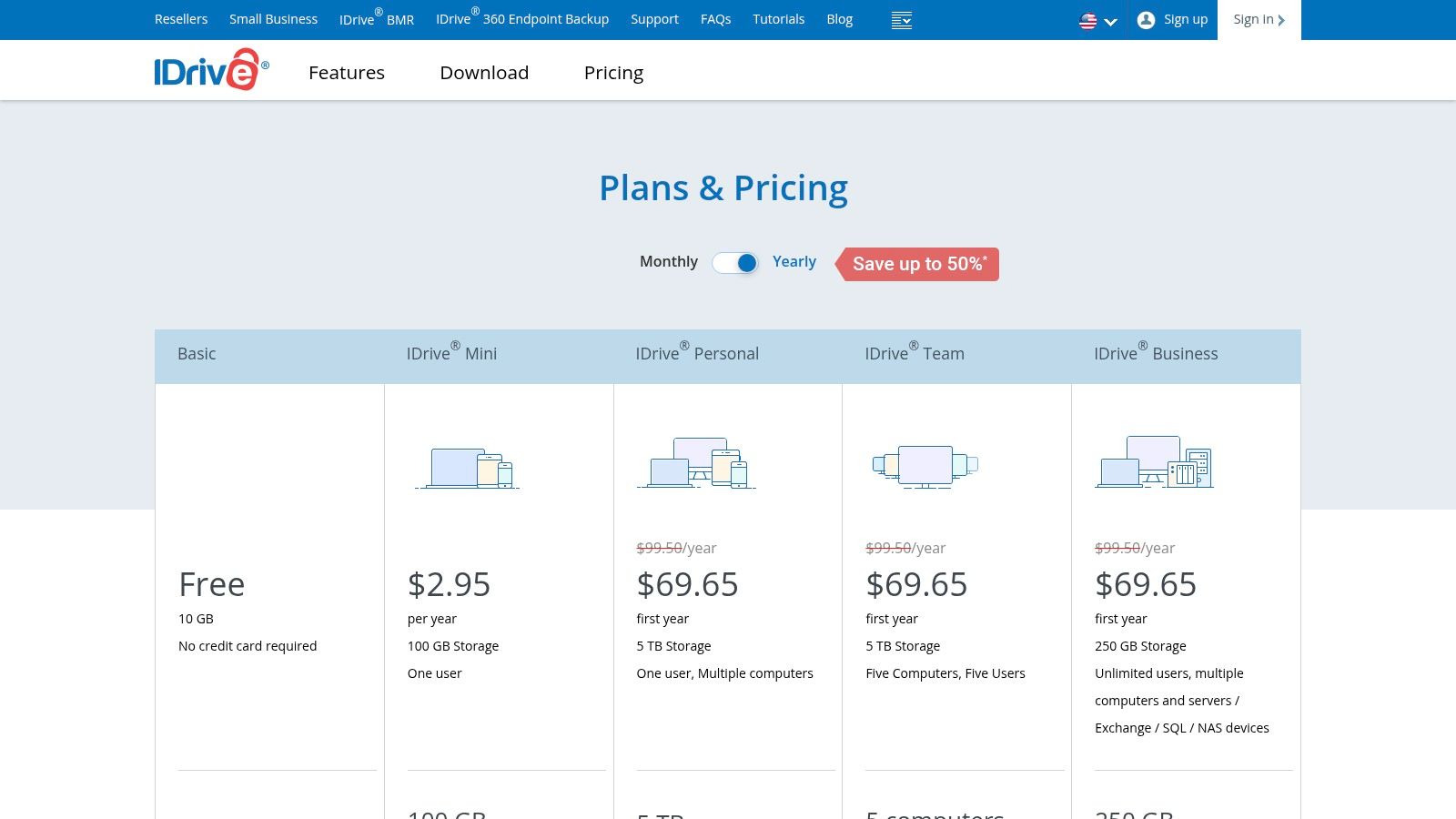
IDrive offers a highly versatile cloud backup solution designed to protect a wide range of devices and platforms, making it a strong contender for small businesses with diverse IT environments. Unlike single-purpose tools, IDrive combines endpoint, server, NAS, and SaaS application backup into a single, unified platform. Its granular pricing tiers allow businesses to choose a plan that precisely fits their storage needs and device count, avoiding the one-size-fits-all approach.
Key Features and Capabilities
IDrive’s strength lies in its comprehensive feature set that covers nearly every backup scenario a small business might encounter.
- Diverse Workload Support: IDrive can back up an unlimited number of PCs, Macs, iPhones, iPads, and Android devices. It also provides specialized agents for server environments, including MS SQL Server, MS Exchange Server, Hyper-V, and VMware.
- NAS and Mapped Drive Backup: The platform includes dedicated applications for Synology, QNAP, and Netgear ReadyNAS devices, allowing direct cloud backup without requiring a computer as an intermediary.
- SaaS Backup Add-ons: Businesses can add protection for critical cloud applications like Microsoft 365 and Google Workspace. This service is priced per seat and covers Mail, OneDrive, SharePoint, Calendar, and Contacts.
- IDrive Express: For initial seeding or large restores, IDrive offers a physical data shipment service. They send you a secure hard drive (up to 5 TB), and this service is free once per year for Business plan users, significantly reducing initial backup times.
Implementation Note: Setting up server backups involves installing the appropriate agent on the target machine (e.g., the Exchange Server). From the web console, you can then configure a backup set, define the schedule, and set encryption options. The process is guided but requires more technical oversight than simple endpoint clients.
Where IDrive Stands Out
IDrive’s main advantage is its exceptional flexibility and all-in-one approach. It is one of the best backup solutions for small businesses that need to protect endpoints, servers, and NAS devices without juggling multiple vendors. The Business plans are particularly attractive, as they offer a generous storage quota for an unlimited number of users and devices, which is highly scalable. The platform is also compliant with standards like HIPAA, making it suitable for businesses in regulated industries.
The trade-off for this flexibility is increased complexity and potential for overage fees. Unlike flat-rate unlimited services, you must monitor your storage usage to stay within your chosen tier. While the web interface is comprehensive, managing diverse backup sets for servers, workstations, and NAS devices requires more hands-on configuration than simpler, endpoint-only solutions. This makes it ideal for a business with some IT knowledge or a managed service provider who can handle the initial setup and monitoring.
Learn more at: https://www.idrive.com/pricing
5. Acronis Cyber Protect for Small Business
Acronis Cyber Protect for Small Business moves beyond traditional data protection by integrating backup, disaster recovery, and next-generation cybersecurity into a single, unified platform. This solution is engineered for small businesses that want to consolidate their IT security and data protection stack, reducing complexity and administrative overhead. It provides a comprehensive shield for a wide range of workloads, including servers, workstations, virtual machines, and cloud applications like Microsoft 365.
Key Features and Capabilities
Acronis delivers a powerful, consolidated toolset managed from one intuitive web-based console, bridging the gap between backup and security.
- Integrated Cybersecurity: The platform includes AI-powered anti-malware, anti-ransomware, and antivirus protection that actively scans systems and backups for threats. This ensures that you aren’t just backing up data but also safeguarding it from corruption or compromise.
- Full-Image Backup and Recovery: Acronis supports full-disk imaging for physical servers (Windows, Linux), virtual machines (VMware, Hyper-V), and workstations. This enables bare-metal recovery to dissimilar hardware, a critical feature for minimizing downtime after a catastrophic failure.
- Flexible Storage Options: Backups can be stored in the secure Acronis Cloud, a public cloud like AWS or Azure, on-premises network storage (NAS), or local disks. This hybrid approach allows businesses to easily follow the 3-2-1 backup rule.
- Centralized Management Console: A single web interface provides complete visibility and control over all protected devices. From this dashboard, administrators can configure backup policies, monitor security alerts, manage recovery tasks, and generate reports.
Implementation Note: Deployment involves installing a single, lightweight agent on each machine you wish to protect. Once installed, the device appears in the central console, where you can apply a pre-configured or custom protection plan that defines backup schedules, storage locations, and security settings.
Where Acronis Stands Out
Acronis’s primary advantage is its converged approach, making it one of the best backup solutions for small business owners seeking efficiency and robust protection without juggling multiple vendors. The integration of backup with active anti-ransomware is a standout feature; it can detect and halt illicit encryption processes and automatically restore any affected files. For businesses that need to protect a diverse IT environment-from physical servers to cloud SaaS applications-Acronis offers a level of workload coverage that many simpler tools lack. Its support for immutable storage provides an essential defense against advanced cyberthreats, a topic explored in our guide to immutable backup solutions.
However, this extensive feature set can introduce a steeper learning curve compared to “set it and forget it” services. The pricing model is granular, based on the type of workload (server, workstation, VM, Microsoft 365 seat) and the feature tier, which can become more expensive than single-purpose backup tools if you don’t need the advanced security capabilities. This makes it ideal for businesses prioritizing security consolidation but potentially over-featured for those who just need basic file backup.
Learn more at: https://www.acronis.com/en-us/products/cyber-protect/small-business/
6. Veeam Data Platform Essentials
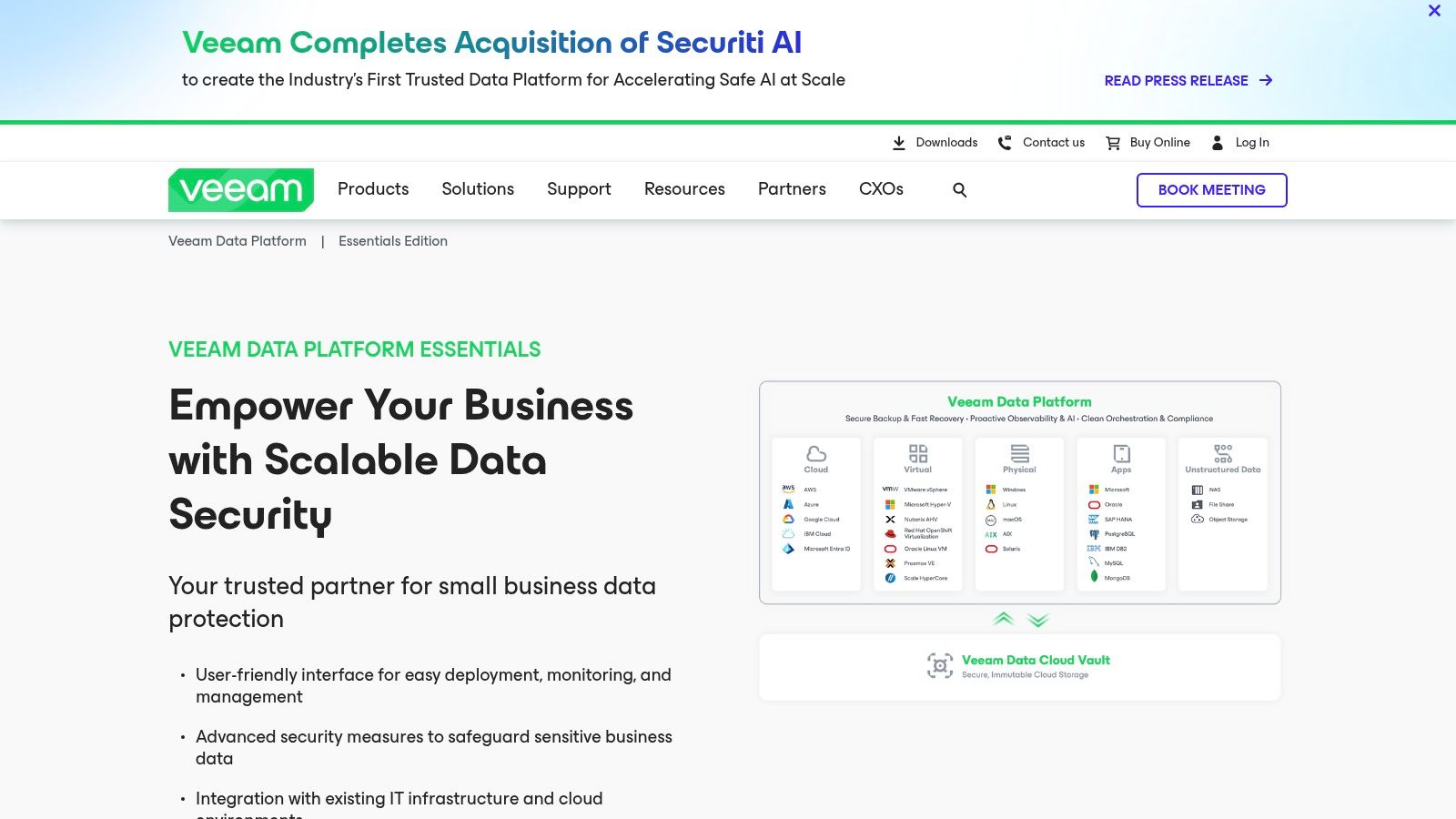
Veeam Data Platform Essentials offers the power of an enterprise-grade backup and recovery solution, smartly packaged and priced for small businesses. It moves beyond simple endpoint protection to provide comprehensive coverage for a mixed IT environment, including virtual machines (VMware, Hyper-V), physical servers (Windows, Linux), network-attached storage (NAS), and cloud workloads. This makes it an ideal choice for businesses with on-premise servers or hybrid-cloud setups that have outgrown basic cloud backup tools.
Key Features and Capabilities
Veeam provides a unified platform with a rich feature set designed for flexibility, security, and rapid recovery.
- Veeam Universal Licensing (VUL): Sold in bundles of 5, these licenses are portable across workloads. You can protect a mix of VMs, physical servers, cloud instances, or enterprise applications without purchasing different products. This flexibility is perfect for a small business’s evolving infrastructure.
- Comprehensive Workload Protection: Veeam excels at agent-based and agentless backup for both virtual and physical environments. It provides application-aware processing to ensure consistent backups of services like Microsoft SQL Server and Active Directory.
- Powerful Recovery Options: Beyond simple file restores, Veeam offers Instant VM Recovery, which allows you to restart a failed VM directly from the backup file in minutes. This dramatically improves Recovery Time Objectives (RTOs).
- Ransomware Protection: Veeam enables immutable backups by integrating with object storage providers (like AWS S3 or Backblaze B2) that support Object Lock. This makes your backup data unchangeable for a set period, protecting it from being encrypted or deleted by malware.
- Included 24/7 Support: The Essentials package includes enterprise-level production support, ensuring you have access to expert help when you need it most.
Technical How-To: Setting Up an Immutable S3 Repository
- Install the Veeam Backup & Replication server on a Windows machine (physical or virtual).
- In the
Backup Infrastructureview, selectBackup Repositories->Add Repository.- Choose
Object storage->Amazon S3(orS3 Compatible).- Enter your cloud credentials and select a bucket that has
Object Lockenabled.- Configure a folder for your backups within the bucket.
- In the next step, check the box for
Make recent backups immutable for X days. Set your desired immutability period (e.g., 14 days).- Complete the wizard. Now, any backup job targeting this repository will have ransomware-proof immutability.
Where Veeam Stands Out
Veeam’s primary advantage is its enterprise-level feature set and flexibility, which make it one of the best backup solutions for a small business with a diverse IT footprint. The ability to protect servers, VMs, and NAS devices from a single console is a significant step up from endpoint-only solutions. Its mature ecosystem and vast integration with storage hardware and cloud platforms provide unmatched choice and control.
However, this power comes with a steeper learning curve compared to “set and forget” services. While the interface is well-designed, initial configuration requires a solid understanding of backup concepts like repositories, proxies, and the 3-2-1-1-0 rule. Pricing is based on 5-license bundles, which may be an upfront commitment for very small teams, and final costs are often determined through a partner or reseller. It is not an all-in-one managed service but rather a powerful software tool that gives you full control over your data protection strategy.
Learn more at: https://www.veeam.com/products/veeam-data-platform/essentials.html
7. CDW
CDW is not a backup software provider itself but rather a major IT solutions reseller and technology partner. It earns its place on this list as an essential resource for small businesses that need to research, compare, procure, and finance a wide array of backup solutions from market-leading vendors. For businesses looking beyond simple endpoint protection to more robust server, virtual machine, or hybrid cloud environments, CDW provides a centralized marketplace and expert guidance.
Key Features and Capabilities
CDW acts as a strategic procurement hub, offering services and access that simplify the complex process of selecting enterprise-grade technology.
- Broad Vendor Catalog: CDW offers a vast selection of backup software and hardware appliances. This includes solutions from Veeam, Barracuda, Commvault, Cohesity, Druva, Rubrik, and many others, allowing for side-by-side evaluation of features and licensing models.
- Expert Consultation: Small businesses can connect with US-based account managers and solution specialists. These experts help with needs analysis, solution sizing, and navigating complex licensing for products like VMware or Proxmox VE environments.
- Flexible Procurement and Financing: The platform provides multiple ways to purchase, including direct buys, formal quotes for budget approval, and various financing options. This helps manage cash flow when investing in significant IT infrastructure.
- Comprehensive Product Information: Each product listing includes detailed data sheets, vendor-provided solution pages, and specifications. This helps IT managers conduct thorough due diligence before making a purchasing decision.
Implementation Note: A practical way to use CDW is to first identify your core requirements (e.g., “backup for 3 Proxmox VE hosts and 15 VMs with off-site replication”). You can then use their search filters to narrow down vendors and engage an account manager to generate a comparative quote for the top two or three options.
Where CDW Stands Out
CDW’s primary strength is its role as a one-stop shop for comparing and acquiring some of the best backup solutions for small business, especially those with complex needs. Instead of engaging with multiple vendor sales teams, you can manage the entire evaluation and procurement process through a single point of contact. The ability to bundle backup software with servers, networking hardware, and other IT components simplifies purchasing and logistics.
However, the platform is not designed for instant, self-service purchases of all its offerings. Many enterprise-level solutions require you to “request a quote,” which introduces a sales cycle rather than a simple checkout process. Furthermore, the sheer breadth of the catalog can be overwhelming for those without a clear idea of their technical requirements. It is best utilized when you have specific needs, such as finding a backup solution that integrates with bare metal servers or securing a Veeam license for a new virtualization cluster, and need an efficient way to procure it.
Learn more at: https://www.cdw.com/
Top 7 Small-Business Backup Solutions Comparison
| Solution | Implementation Complexity 🔄 | Resource Requirements ⚡ | Expected Outcomes ⭐📊 | Ideal Use Cases 💡 | Key Advantages ⭐ |
|---|---|---|---|---|---|
| Proxmox Backup as a Service | Low (fully managed) → Moderate (self‑managed); Proxmox integration 🔄 | Requires Proxmox environment; storage tiers start at 500 GB; optional managed ops ⚡ | Immutable, encrypted backups with block‑level dedupe → recoverability and cost control ⭐📊 | Small businesses using Proxmox, migrations, private clouds 💡 | Immutable + encrypted backups; deduplication; 24/7 expert support; native Proxmox fit ⭐ |
| Backblaze Business Backup | Very low — lightweight agent and centralized console 🔄 | Per‑computer license (1:1); internet bandwidth for backups; minimal infra ⚡ | Simple, reliable endpoint backup with predictable per‑device pricing ⭐📊 | Workstation/endpoint protection for SMBs with low admin overhead 💡 | Unlimited data per computer; easy setup; straightforward restores; low per‑endpoint cost ⭐ |
| CrashPlan for Small Business | Low — continuous agent and central management 🔄 | Per‑device licensing; cross‑platform agents (Win/macOS/Linux) ⚡ | Continuous endpoint backup with long/unlimited version history ⭐📊 | SMBs that need long retention and easy device migration 💡 | Unlimited storage per device; self‑service restores; competitive per‑device pricing ⭐ |
| IDrive Business and Team | Moderate — more configuration and tier choices 🔄 | Storage‑tier plans, server/NAS/SaaS add‑ons; potential overage monitoring ⚡ | Granular coverage across endpoints, servers, NAS and SaaS; compliance options ⭐📊 | Teams/SMBs with mixed workloads and granular pricing needs 💡 | Broad workload support; transparent tiering; NAS and SaaS backup options ⭐ |
| Acronis Cyber Protect for Small Business | High — integrated backup + security, steeper learning curve 🔄 | Agent for endpoints/servers; security features add config and resource needs; licensing/add‑ons ⚡ | Consolidated backup + anti‑ransomware + endpoint management in one console ⭐📊 | SMBs wanting combined backup and cybersecurity from a single platform 💡 | Single agent/console for backup & protection; wide workload coverage; MSP availability ⭐ |
| Veeam Data Platform Essentials | Moderate–High — enterprise features and architecture planning 🔄 | Per‑workload bundle licensing; storage targets; object storage for immutability recommended ⚡ | Enterprise‑grade VM/server recovery, portable licensing, immutability options ⭐📊 | SMBs with VMware/Hyper‑V and mixed physical/cloud environments requiring robust DR 💡 | Mature platform; flexible licensing; extensive integrations and support ecosystem ⭐ |
| CDW | Low for procurement; deployment complexity depends on chosen vendor 🔄 | Procurement, quotes, financing; depends on selected software/appliance/hardware ⚡ | Centralized sourcing, vendor comparison, and procurement efficiency ⭐📊 | Organizations needing vendor comparisons, quotes, financing and procurement help 💡 | Broad vendor catalog; US‑based account support; specialist consults and financing options ⭐ |
Making the Final Cut: How to Choose and Implement Your Ideal Backup Solution
We’ve explored a comprehensive lineup of the best backup solutions for small business, from the hypervisor-native power of Proxmox Backup as a Service to the endpoint-focused protection of CrashPlan and the all-in-one cyber protection of Acronis. Each platform offers a unique blend of features, pricing models, and deployment strategies tailored to different business needs. The key takeaway is that data protection is not a one-size-fits-all problem; the right solution is a strategic asset that aligns directly with your infrastructure, operational workflows, and recovery objectives.
Your journey from evaluation to implementation requires a clear-eyed assessment of your specific environment. A business running a multi-node Proxmox VE cluster will find unparalleled efficiency with a managed Proxmox Backup solution, while a company with a remote workforce will prioritize a tool like Backblaze or IDrive that excels at protecting distributed user endpoints. The choice is less about which tool is universally “best” and more about which is perfectly suited to your technical and business requirements.
From Evaluation to Action: A Strategic Framework
Making the final decision involves more than comparing feature checklists. It requires a practical, step-by-step approach to ensure your chosen solution delivers real-world resilience. A misaligned tool can introduce more complexity and risk than it mitigates.
To crystallize your decision-making process, consider these critical factors:
- Map Your Infrastructure: Are you protecting virtual machines on a Proxmox private cloud, bare metal servers, user laptops, or a hybrid environment? Your primary infrastructure dictates your starting point. For instance, Veeam offers robust support for VMware and Hyper-V, making it a strong contender for businesses invested in those ecosystems.
- Define Your RTO and RPO: How quickly do you need to recover (Recovery Time Objective), and how much data can you afford to lose (Recovery Point Objective)? An RTO of minutes demands a solution with instant VM recovery and granular restore options, while a less critical system might be served by a simple nightly cloud backup.
- Assess Your Team’s Expertise: Do you have a dedicated IT team with the expertise to manage on-premises backup servers, storage repositories, and complex networking? If not, a fully managed service or a simple, cloud-native platform like CrashPlan frees up your team to focus on strategic initiatives rather than backup administration.
- Calculate the Total Cost of Ownership (TCO): Look beyond the monthly subscription fee. Factor in the costs of storage, administrative overhead, and potential egress fees for data recovery. A solution that seems cheap upfront might become expensive when you account for the staff hours required to manage it effectively.
- Verify Compliance and Security Requirements: For businesses operating in regulated industries like healthcare or finance, ensuring your chosen backup solution meets specific compliance standards, such as HIPAA, is non-negotiable. It’s essential to understand the capabilities of the top HIPAA compliant cloud providers that your backup service might leverage to store your sensitive data securely. Features like immutable backups and end-to-end encryption are critical for defending against ransomware and ensuring data integrity.
Your Next Steps to Bulletproof Data Protection
Choosing a solution is only half the battle; successful implementation and ongoing management are what truly safeguard your business. Once you’ve selected your platform, your immediate priority should be to establish a clear, documented, and tested backup strategy.
Create a formal backup policy that outlines what data is backed up, the frequency of backups, and the data retention period. Most importantly, schedule regular, documented disaster recovery tests. A backup plan that has never been tested is not a plan; it’s a liability. Simulate a real-world failure, whether it’s a corrupted database or a full server outage, and walk through the entire recovery process. This is the only way to identify gaps in your strategy and ensure you can meet your RTO and RPO when it counts.
Ultimately, the best backup solution for your small business is the one that is implemented, automated, monitored, and tested. It becomes an invisible, yet indispensable, part of your daily operations, providing the peace of mind that your most valuable asset, your data, is secure and recoverable, no matter what challenges arise.
Ready to move beyond planning and implement a robust, managed backup strategy? The experts at ARPHost, LLC specialize in designing and managing custom data protection solutions for Proxmox, bare metal, and complex hybrid environments. Let us help you build a resilient infrastructure that protects your business and powers your growth.