


Ultimately, the benefits of virtualized servers boil down to three core advantages: dramatic cost savings, enhanced operational agility, and far superior resource utilization. By partitioning a single physical server into multiple, isolated virtual machines (VMs), businesses can eliminate underused hardware, slash operational expenses, and streamline IT management. It's about achieving enterprise-level efficiency and resilience without the enterprise-level price tag.
From Physical Racks to Virtual Powerhouses
Think of your IT setup like a real estate portfolio. In the old days, launching a new application was like building a brand-new, single-family house for it. Each app needed its own dedicated physical server, with its own CPU, memory, and storage. This wasn't just expensive—it was incredibly wasteful. Most servers were barely breaking a sweat, running at just 10-15% of their actual capacity. Data centers became bloated with underperforming hardware, racking up huge costs for the machines themselves, plus the power, cooling, and floor space to keep them running.
This is exactly the problem server virtualization was born to solve. It’s like hiring a brilliant property manager for your hardware, turning one powerful physical server into a high-density, multi-unit apartment building. Each of your applications gets its own secure, isolated apartment—a VM—with all the resources it needs to run perfectly.
The magic behind this is a piece of software called a hypervisor. It sits between the physical hardware and the virtual machines, acting as a traffic cop that intelligently directs resources like CPU power, RAM, and storage to each VM exactly when it's needed.
At its core, virtualization abstracts the computing resources from the physical hardware, allowing for far greater density and flexibility. This fundamental shift is what enables the consolidation of dozens of workloads onto a single machine, a cornerstone of modern IT infrastructure.
The Role of KVM in Modern Virtualization
Here at ARPHost, our solutions are built on Kernel-based Virtual Machine (KVM), a powerful open-source hypervisor baked directly into the Linux kernel. It’s the rock-solid foundation for enterprise platforms like Proxmox VE. Unlike some other hypervisors, KVM delivers true hardware virtualization. This means every VM gets its own dedicated slice of virtualized hardware, ensuring top-tier performance and security—a key reason we use it for our Dedicated Proxmox Private Clouds.
To really appreciate what virtualized servers bring to the table, it helps to understand the core ideas behind virtualization technology. Now that we've framed the old-school problems of hardware sprawl and high costs, we can dig into the real, tangible business advantages that virtualization delivers.
Slash Your Budget with Server Consolidation
Let's talk about the most immediate and tangible win you get with virtualization: serious cost savings. By collapsing multiple workloads that once needed their own dedicated hardware onto a single physical server, you can cut both your upfront Capital Expenditures (CapEx) and ongoing Operational Expenditures (OpEx).
Think about the old way of doing things. Need a new app? Buy a new server. Need a development environment? Buy another server. Before you know it, you have a rack full of machines, each one drawing power and requiring its own maintenance, even if it’s only using 10-15% of its available resources. It’s a model that leads directly to hardware sprawl and a bloated budget.
Virtualization completely flips that script. Instead of ten separate, underutilized servers, you can fire up one powerful machine and run all ten workloads as neatly isolated virtual machines. The savings on hardware alone are immediate and often staggering.
Visualizing the Impact of Consolidation
The image below paints a clear picture of this shift. It’s about moving from a cluttered, inefficient multi-server setup to a clean, powerful, and consolidated virtual environment.
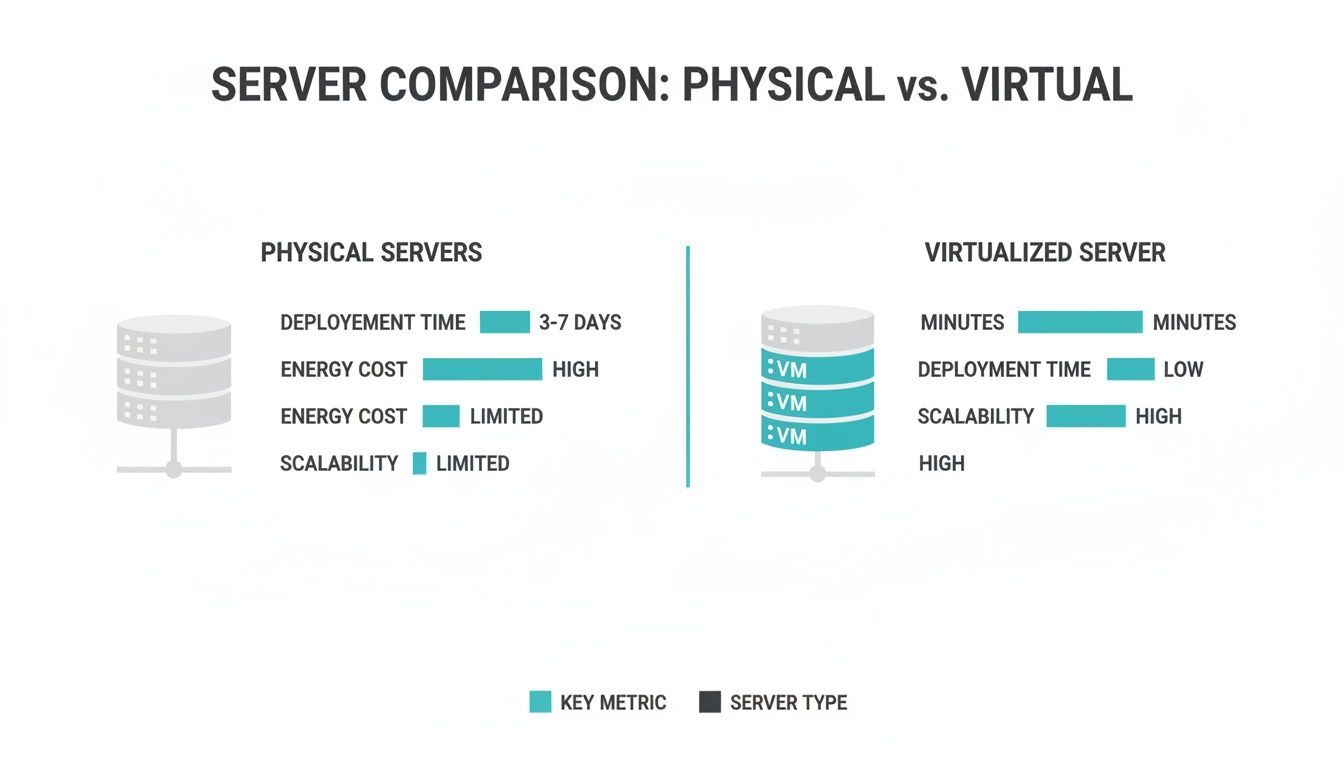
This isn’t just about tidying up your server room; it’s about fundamentally changing how efficiently you use your resources.
Slashing Operational Costs Year After Year
The financial perks don't stop after you buy the hardware. Consolidating servers kicks off a domino effect of OpEx savings that add up month after month, year after year.
Fewer physical machines means you’re buying less electricity to run them and spending less on air conditioning to keep them from overheating—a massive and often overlooked expense in any server environment. In fact, studies show virtualization can cut hardware and maintenance costs by up to 40% and slash power and cooling needs by an incredible 80%.
That's not just a theoretical number. The University of Iowa, for example, shrank its data center footprint from 10 racks down to just 2 after virtualizing its infrastructure, leading to huge savings.
Physical vs. Virtualized Server Cost Comparison (Annual Estimate)
To make this more concrete, let's compare the costs of a traditional setup with a modern virtualized approach from ARPHost.
This table shows a typical scenario where a business consolidates 10 physical servers, each handling a separate workload, onto a single ARPHost Proxmox Private Cloud.
| Cost Factor | 10 Physical Servers (Traditional) | 1 ARPHost Virtualized Server (Proxmox Private Cloud) |
|---|---|---|
| Hardware Purchase/Lease | ~$20,000 (upfront or leased) | $0 (Included in monthly fee) |
| Annual Power & Cooling | ~$8,000 | $0 (Included) |
| Annual Licensing (OS) | ~$2,500 | $0 (Linux-based, included) |
| Network Infrastructure | ~$1,500 (Switches, cables) | $0 (Included) |
| Annual Maintenance | ~$2,000 | $0 (Included) |
| Estimated Annual Total | ~$34,000 | ~$3,588 (based on $299/month plan) |
The difference is dramatic. You're not just saving money; you're freeing up capital that can be reinvested into growing your business, whether that's through marketing, product development, or hiring.
For a deeper look into smart financial planning for your tech stack, be sure to read our complete guide on IT cost optimization strategies.
Why ARPHost Excels Here
At ARPHost, we turn virtualization's cost-saving potential into a tangible business reality. Our Dedicated Proxmox Private Clouds (starting at $299/month) provide the high-performance hardware needed for large-scale consolidation, complete with full root access. For smaller workloads, our secure managed VPS hosting (from just $5.99/month) offers the same enterprise-grade KVM virtualization, letting you start lean and scale efficiently. We provide the tools and managed expertise to optimize your IT spend without compromising performance.
Build Resilient Operations with Faster Disaster Recovery
In business, downtime isn't just an inconvenience—it's a direct hit to your revenue and reputation. When a physical server dies, the recovery process is a slow, painful marathon. You have to find new hardware, reinstall the OS, reconfigure every single application, and then, finally, restore data from the last good backup. This isn't a quick fix; it can drag on for hours, or even days, grinding your operations to a halt.
Virtualization completely flips this script. Instead of treating a server failure like a five-alarm fire, it becomes a predictable, manageable task. The single biggest win here is the massive improvement in disaster recovery. You're no longer rebuilding a server from scratch. You're restoring a complete, working virtual machine in minutes.
The magic behind this is a feature called VM snapshots. Think of a snapshot as a perfect, point-in-time "photograph" of your entire virtual server—its disk, memory, and all configuration settings. If a software update goes sideways, a file gets corrupted, or ransomware strikes, you don't waste hours troubleshooting. You just roll back to the last clean snapshot, and your server is back online, exactly as it was.
The Power of Snapshots and Live Migration
The speed and simplicity of restoring from a snapshot are game-changers for business continuity. What used to be a multi-day disaster is now a minor operational hiccup.
But it gets even better. Advanced platforms like Proxmox also give you live migration, another critical tool for building resilience. Live migration lets you move a running virtual machine from one physical server to another with zero downtime. This is incredibly useful for things like hardware maintenance, applying security patches, or balancing server loads without ever interrupting service for your users.
The Proxmox VE web interface gives you a central command center to manage all of this, as you can see below.
This centralized dashboard makes complex jobs like creating snapshots, running backups, or migrating VMs straightforward, putting powerful recovery tools right at your fingertips.
Virtualization and Your DR Strategy
Together, these features are the bedrock of a modern, resilient IT strategy. Disaster recovery and scalability are two of the most powerful arguments for virtualization, helping businesses bounce back faster and grow without hitting a wall. Snapshots capture a VM's state instantly, making backups and restores far simpler than their physical counterparts. Virtual copies spin up faster, turning a stressful, chaotic recovery into a predictable process.
The efficiency gains are real. When the University of Iowa moved to virtualization, it slashed its data center footprint from 10 racks to just 2 while also boosting physical security.
Of course, while virtualization offers fantastic system-level protection, knowing how to recover deleted files on a granular level is still a vital skill. To put all these pieces together into a cohesive strategy for your organization, take a look at our guide on what is disaster recovery planning.
Scaling This with ARPHost
At ARPHost, we transform these powerful features into a fully managed safety net for your business. Our Proxmox Backup-as-a-Service delivers automated, encrypted, and immutable backups, so your data is always protected and ready to be restored. If you're coming from another platform, our managed migration services handle the entire switch from platforms like VMware, minimizing risk and downtime. We build and manage resilient infrastructures—from high-availability VPS clusters to dedicated Proxmox private clouds—letting you focus on your business, confident that your critical systems are secure.
Protect your business from the unexpected. Explore ARPHost's managed services and build a truly resilient infrastructure today.
Unlock Unmatched Agility and Scalability
In a market that moves at lightning speed, waiting days or weeks for a new physical server is a death sentence for innovation. This is where virtualization completely changes the game. One of its most powerful benefits is the incredible agility it hands you. Forget the slow, expensive grind of traditional hardware provisioning. With virtualization, you can deploy a fully functional server environment in minutes.
This isn't just a technical tweak; it's a massive competitive advantage.
Think about it. Your dev team needs to test a new feature right now. Instead of filing a hardware request and waiting, they can just spin up an isolated virtual server, run their tests, and tear it down when they're done. Or maybe your marketing team is about to launch a huge campaign. You can instantly provision a few extra web servers to handle the traffic spike, ensuring the site stays fast and responsive for every single visitor.
This ability to react instantly to business needs comes from one core principle: separating the software from the hardware. You're no longer trapped by physical limits.
A New Server in Seconds, Not Weeks
With a platform like Proxmox VE, the process of creating a new KVM-based virtual machine can be as simple as running a single command. This is the engine that drives true on-demand infrastructure.
For instance, if you need a quick test environment with 2 CPU cores and 4GB of RAM, you can just pop open the command line and type:
# Create a new VM with ID 101, 2 cores, 4096MB RAM, and a virtio network device
qm create 101 --name "dev-test-vm" --cores 2 --memory 4096 --net0 virtio,bridge=vmbr0
That one line accomplishes what used to take a purchase order, shipping, racking, and manual configuration—all in a matter of seconds. That’s agility in its purest form.
Scaling Up vs. Scaling Out: The Power to Choose
Virtualization doesn't just make things faster; it makes them smarter. It gives you two distinct ways to handle growth, letting you adapt to any workload with precision.
Vertical Scaling (Scaling Up): This is all about adding more muscle to a single virtual machine. Think adding more CPU cores, RAM, or disk space. It’s the perfect solution when a specific application, like a database server, is getting hammered and just needs more horsepower. Often, you can do this with a quick reboot, no complex migrations needed.
Horizontal Scaling (Scaling Out): Instead of making one server bigger, you just add more servers. This means creating clones of an existing VM from a template and distributing the load across them. This is the go-to strategy for web applications, where a fleet of identical web servers can work behind a load balancer to handle massive, unpredictable traffic.
Virtualization gives you the freedom to choose the right scaling strategy for the job. You can beef up a single critical server or deploy an entire fleet of clones on demand, all from a centralized management interface. This flexibility ensures you're never paying for resources you don't need or getting caught unprepared by sudden growth.
ARPHost’s infrastructure is built from the ground up to master both scaling models. Our High-Availability VPS Hosting, running on enterprise-grade KVM virtualization and a resilient CEPH storage backend, is the ideal platform for production workloads that demand instant scalability and zero downtime.
Whether you need to instantly add more RAM to your application server or clone a dozen web servers for a flash sale, our platform is ready to respond.
Ready to scale without limits? Explore ARPHost's High-Availability VPS plans and deploy your next project on an infrastructure built for growth.
Enhance Your Security with True Isolation
In any IT setup, security is everything. It’s a constant thought. When you start consolidating multiple workloads onto a single server, it's natural to worry: what happens if one application gets compromised? Does it take down everything else with it?
This is where one of the most powerful—and often underrated—benefits of virtualization comes into play: true, hardware-enforced isolation.
Imagine a physical server running a bunch of different apps on one operating system. It's like a house with all the doors between the rooms wide open. If a burglar gets into one room, they have free rein to move through the entire house and access everything.
Virtualization completely flips that script. The hypervisor acts like a master architect, building a secure apartment complex on the foundation of your server hardware. Each virtual machine is its own locked, self-contained apartment with reinforced walls.

If a security breach hits one VM—let’s say a web server is compromised—the damage is contained within that single "apartment." The hypervisor acts as a security guard, preventing the attacker from moving laterally to infect other VMs on the same physical machine. This containment dramatically shrinks the blast radius of any security incident.
Layering Security at the Network Level
This isolation isn't just about the VMs themselves; it extends deep into the network. Modern virtualization platforms like Proxmox VE come with a built-in, VM-aware firewall. This is a game-changer because it lets you create incredibly specific security rules for each VM right at the hypervisor level.
You can enforce strict rules to control traffic between VMs, a practice known as network segmentation. For example, you can set a rule that your database server can only accept connections from your application server, and absolutely nothing else.
This creates a zero-trust environment where every communication pathway is explicitly defined and locked down. It adds a critical layer of defense against both internal mistakes and external threats.
How ARPHost Fortifies Your Virtual Environment
At ARPHost, we don’t just rely on the default benefits. We build on this strong foundation with a multi-layered security strategy to protect your entire infrastructure, from the hardware right up to your application code.
- Secure Web Hosting Bundles: Our secure VPS hosting bundles take KVM's hardware isolation and add CloudLinux OS, which creates another layer of isolation between individual users inside a single VM. It's perfect for shared hosting environments.
- Proactive Threat Defense: We bundle Imunify360 with these plans. It’s a full security suite with a web application firewall (WAF), malware scanning, and proactive defense against common exploits.
- Advanced Network Security: For our Proxmox Private Cloud and bare metal clients, we use enterprise-grade Juniper network devices. Our managed network services enable sophisticated firewall rules and network segmentation to lock down your entire private cloud.
By combining the built-in isolation from virtualization with purpose-built security tools and expert management, you create a hardened environment that is far more resilient than a traditional, non-virtualized setup. It’s about building security into the very fabric of your infrastructure.
Ready to build a more secure and isolated infrastructure? Explore our Secure VPS Bundles and see how we integrate top-tier security at every layer.
Streamline Your Server Management and Automation
Beyond the raw numbers of cost savings and hardware utilization, one of the most impactful benefits of virtualization is how it radically simplifies IT administration.
Remember the old way? To patch a server, check its performance, or roll out a new app, you had to log into each physical box, one by one. This manual approach wasn't just slow and tedious—it was a breeding ground for human error and a real bottleneck to getting anything done.
Virtualization flips that model on its head by centralizing control. It takes a sprawling, disconnected rack of servers and turns it into a single, cohesive system you can manage from one place. No more juggling a dozen different logins; you get a unified "single pane of glass" to see and manage everything.
Centralized Control with Proxmox VE
This is where tools like the Proxmox VE web interface become your command center. From a single browser window, you can execute tasks that used to take hours of hands-on work in a cold server room.
This screenshot of the Proxmox VE 8.1 GUI gives you a sense of just how much power is at your fingertips.
From this one dashboard, an admin can spin up a new VM, configure network interfaces, manage storage pools, schedule backups, and watch the real-time performance of every single workload. You can do all this without ever having to physically touch a server. This centralized model is a massive boost for both productivity and consistency.
Embracing Automation and DevOps Workflows
But centralized management is just the starting point. The real magic happens when you introduce automation, and this is where virtualization truly shines. Platforms like Proxmox expose a powerful Application Programming Interface (API), which lets you script and automate practically every aspect of infrastructure management.
Instead of an admin clicking through a GUI, your DevOps team can write simple scripts to handle routine jobs automatically. Think about it:
- Spin up new VMs for a developer's test environment on demand.
- Automate backup schedules and replication for your disaster recovery plan.
- Integrate with your CI/CD pipelines to deploy application updates without a hiccup.
- Scale resources up or down automatically based on live monitoring data.
This level of automation bridges the gap between your infrastructure and your development workflows, letting your team move faster and with more confidence. To see how these practices work in detail, check out our guide on Infrastructure as Code best practices.
Why ARPHost Excels Here
While virtualization is powerful, managing it effectively still requires deep expertise in monitoring, security, and day-to-day maintenance. This is where ARPHost's Fully Managed IT Services can turn your infrastructure from a complex chore into a strategic advantage. Our expert team handles the heavy lifting so you don't have to.
We take care of everything:
- Proactive 24/7 Monitoring: We keep a close eye on your servers, network, and apps around the clock, catching and fixing issues before they ever affect your business.
- Patch Management & Security: We make sure your systems are always current with the latest security patches and locked down with solid firewall rules.
- Backup & Disaster Recovery: We manage your entire backup strategy—from configuration to restoration drills—so you know your data is always safe and recoverable.
- Expert Support: Our team becomes an extension of yours, giving you the expertise needed to scale, troubleshoot, and optimize your environment.
By handing off infrastructure management to ARPHost, you free up your internal team to focus on innovation and your core business goals, all while knowing your technology foundation is in expert hands.
Ready to offload complex server management? Request a custom quote for our Fully Managed IT Services and let us handle the details.
Got Questions? We've Got Answers
Switching to a virtualized setup is a big move, and it's natural to have questions. Let's tackle some of the most common ones that come up when people are thinking about the benefits of virtualized servers.
Is Virtualization Secure?
Absolutely. When done right, virtualization is a massive security upgrade. The hypervisor acts like a digital bouncer, creating a strong, hardware-enforced wall between each virtual machine (VM). If one VM gets into trouble, the issue is contained—it can't jump over to the others on the same physical server. This alone drastically shrinks the blast radius of any potential breach.
At ARPHost, we take that built-in security and crank it up a notch. Our Secure Web Hosting Bundles add extra defenses like CloudLinux OS for isolating individual users and Imunify360 to proactively hunt down threats, building a truly hardened environment.
Will Virtualization Hurt Performance?
This is a classic concern, but modern tech has made it a non-issue. Today's hypervisors, like the KVM that drives our Proxmox Private Clouds, are incredibly efficient. We're talking about an overhead of less than 1-2%.
For the vast majority of business apps, you simply won't notice a difference compared to running on bare metal. In fact, because you can give each VM the exact resources it needs and scale them up or down instantly, you often end up with better, more responsive application performance overall.
How Hard Is It to Migrate Existing Servers?
Migrating a physical server to a virtual one (a process called P2V) is a well-worn path. There are fantastic tools that can automate most of the heavy lifting, essentially taking a snapshot of your physical machine and turning it into a VM.
Yes, it takes some careful planning to make sure there's little to no downtime, but the payoff in simplified management and disaster recovery is huge.
Key Takeaway: Don't let the fear of migration stop you. ARPHost offers managed migration services where our experts handle the whole shebang. We'll get you moved over smoothly and securely from platforms like VMware to a modern Proxmox private cloud.
This hands-on approach takes the risk and the technical headache off your plate, so you can start enjoying the benefits of virtualization right away.
FAQ on Virtualized Servers
To help clear things up even further, here's a quick-reference table with straightforward answers to other common questions about jumping into a virtualized server environment.
| Question | Answer |
|---|---|
| What's the biggest mistake people make? | Underestimating planning. Jumping in without a clear strategy for resource allocation, backups, and security can lead to messy, underperforming environments. |
| Can I run different operating systems? | Yes, that's a major benefit. You can have a Linux VM for your web server and a Windows VM for a specific application, all running on the same physical hardware. |
| Is it more expensive than physical servers? | Initially, there's a setup process. But long-term, virtualization almost always saves money by reducing hardware, power, and cooling costs significantly. |
| How does disaster recovery improve? | Instead of rebuilding a physical server, you can restore a VM from a snapshot in minutes. Replication to a secondary site becomes much simpler and more affordable. |
| Do I need special skills to manage it? | There's a learning curve, but platforms like Proxmox make it manageable. For those who'd rather not deal with it, a managed service is the perfect solution. |
Hopefully, these answers give you the confidence to explore what virtualization can do for your business.
Ready to modernize your infrastructure with expert guidance? ARPHost's managed services team can design, deploy, and manage a high-performance virtual environment tailored to your business needs. Explore our fully managed IT services today.