

Your team already knows the pattern. The help desk gets pinged before coffee, the finance lead hates the latest repair invoice, and someone from operations keeps getting pulled away from real work because the network or a server is acting up again. That kind of IT drag doesn’t just waste time, it makes growth feel fragile.
Managed IT services replace that scramble with a system. Instead of waiting for things to break, a provider handles monitoring, patching, support, backup, and recovery as an ongoing operating model, so technology behaves more like an asset and less like a fire drill. The market’s scale shows how normal this has become, with managed services valued at an estimated USD 330.4 billion in 2025 and projected to reach USD 370.5 billion in 2026, on the way to USD 1,118.2 billion by 2034 according to industry estimates (Fortune Business Insights).
Moving from IT Chaos to Strategic Control
A growing business usually does not fail because it lacks hardware. It slows down because no one owns the full picture, tickets stack up, patching gets delayed, backups are assumed to be fine, and the first clear warning is often an outage.
Managed IT changes that operating reality. The model is more than outsourced break-fix support, it is a framework for predictable spend, proactive control, and clear accountability. Once IT is managed as a process, leaders can see what is stable, what is at risk, and what needs investment before the next incident turns into downtime.
That shift shows up in day-to-day operations. When support is handled through defined service levels, teams stop relying on memory and urgency, and start working from measured response times, repair targets, and recurring issue trends. A provider that tracks MTTR, escalations, and SLA compliance gives leadership a clearer view of whether IT is under control or drifting into avoidable risk.
The business case is already visible in how the market has expanded. Managed services are no longer a niche stopgap, they have become a mainstream infrastructure strategy as enterprises and SMBs look for predictable monthly costs and access to specialized expertise. In practical terms, that means less time spent improvising and more time spent running the business.
Practical rule: if the team cannot tell you the last patch date, the current backup status, and the mean time to repair a recurring issue, IT is still being managed reactively.
A managed provider can cover the everyday work that rarely creates new revenue but always consumes attention, including server administration, endpoint support, patch cadence, monitoring, and escalation handling. For businesses that want that structure without building it from scratch, ARPHost’s fully managed IT services is one operational option to evaluate alongside internal staffing and other outsourced models. ARPHost also brings practical experience with Proxmox environments and server management, which matters when virtual infrastructure, patching, and recovery need to be handled with discipline rather than guesswork.
The core value is control. When systems are watched, tickets are measured, and responsibilities are explicit, IT becomes easier to budget, easier to audit, and easier to scale. Leaders get a steadier operating rhythm, fewer surprise outages, and a clearer path to making infrastructure a predictable business function.
The Core Business Benefits of Managed IT Services
A growing company can keep hiring, selling, and shipping work, yet still lose time every week to patching, recovery, approvals, and avoidable outages. Managed IT changes that operating pattern. It replaces emergency spending with a steadier model and gives leadership a clearer view of what IT is doing, what it is costing, and where the risk sits.
Predictable budgeting instead of surprise spending
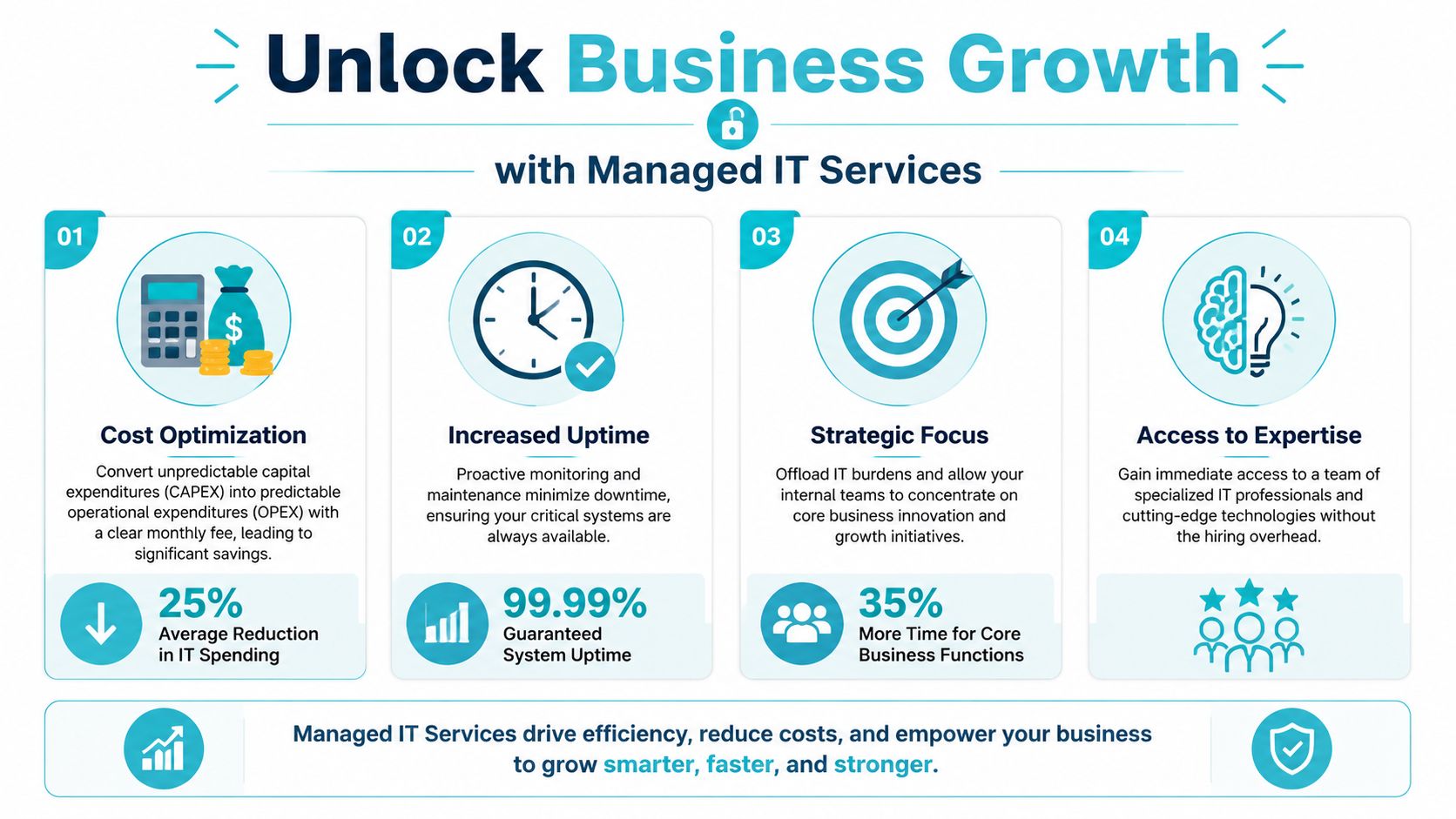
Managed services turn a messy mix of repair bills, overtime, and rushed hardware purchases into a defined monthly cost. Industry sources report that businesses commonly cut IT operating costs by 20% to 40%, with some realizing 25% to 45% in three-year savings when they move away from break-fix spending (VGICS Global). That matters because the finance team can plan around a known run rate instead of reacting to every outage as a separate budget event.
The practical benefit shows up in planning. A steady operating expense makes it easier to schedule equipment refreshes, approve software purchases, and protect cash flow when systems reach end of life. It also reduces the hidden cost of keeping senior staff tied up in troubleshooting instead of spending that time on product, sales, or delivery.
More time for core business work
Managed services also reduce the operational drag on internal teams. When IT problems no longer pull the CTO, office manager, or operations lead into ad hoc support work, those people can stay on revenue-producing priorities. The same industry summary that highlights cost savings also points to managed IT as a way to protect business focus by taking routine technical maintenance off the internal team’s plate.
That difference is easy to feel inside a business. There are fewer interruptions, fewer emergency approvals, and fewer moments where a senior person has to stop real work to handle a system issue.
Bottom line: you are not just buying support, you are buying back executive attention.
Why ARPHost excels here
Transparent pricing matters because managed IT only works when the scope is clear. If the contract is vague, the savings can disappear into change requests and surprise exclusions. For businesses that want a managed model with clear service boundaries, ARPHost’s managed IT services for businesses are one operational option to evaluate alongside internal staffing and other outsourced models.
ARPHost’s service model is built around managed infrastructure, custom plans, and direct support, which makes it easier to match coverage to the actual environment instead of forcing a one-size-fits-all package. That is especially relevant when Proxmox environments and server management need disciplined handling for patching, virtual infrastructure, and recovery.
The result is straightforward. A business gets cost discipline, fewer interruptions, and less dependence on whoever happens to be available that day. Managed IT becomes a strategic investment because it gives the company a more predictable operating rhythm, not just a help desk.
Key Technical Advantages and Operational Improvements
The financial case matters, but the technical case is what keeps a business stable on Monday morning. Managed IT changes how systems are monitored, how threats are contained, and how recovery is handled when something still goes wrong.
Monitoring turns incidents into managed events
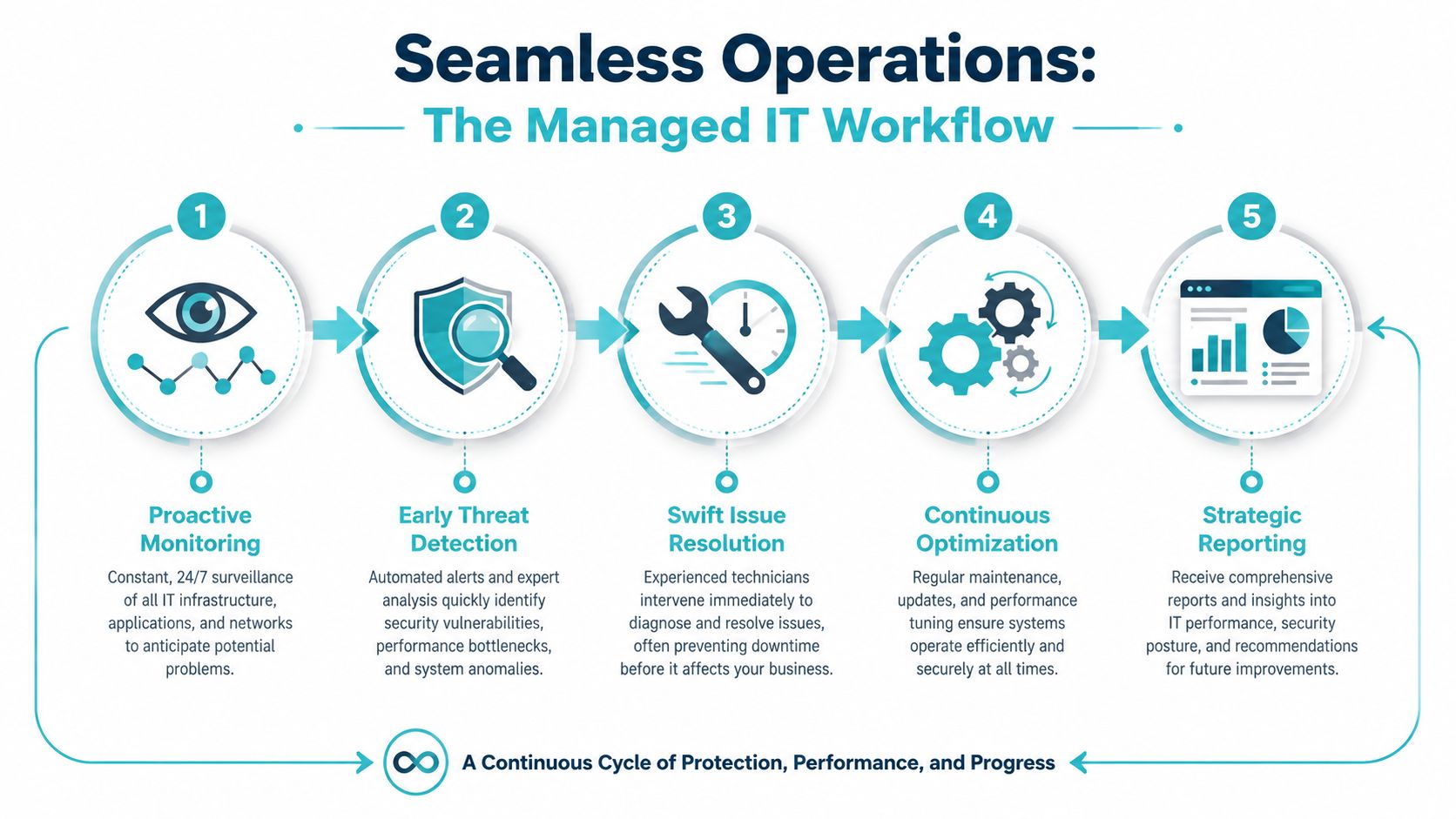
A mature managed service does not wait for users to complain. It tracks availability, response times, patch levels, backup success, and remediation speed in a single operational view, which is the kind of discipline that moves IT from reactive support to process-driven management. That scorecard matters because each metric points to a failure point that can be measured and improved.
Lower MTTR shortens outage duration. Better FCR reduces escalation churn. Strong patch compliance narrows the exposure window for known vulnerabilities. Verified backup success improves recovery odds after ransomware, accidental deletion, or storage failure.
Security and recovery work together
Security is more than antivirus on a laptop. In a managed model, endpoint protection, firewall administration, patching, and alert response are coordinated so the environment is defended at multiple layers. That same mindset applies to secure hosting bundles that include tools like Imunify360, where malware defense, account isolation, and operational visibility matter more than any single security feature.
Recovery is the part many teams underrate until they need it. Backup coverage and disaster recovery planning decide whether an outage becomes a short interruption or a business event that keeps growing. A managed provider should be able to explain not just that backups exist, but who checks them, how often restores are tested, and what happens if the primary platform fails.
Proxmox and network management need discipline
Virtualization and network stacks are where unmanaged environments often drift. Proxmox clusters need deliberate topology, and a properly designed HA setup starts with 3 nodes That is not an academic detail. It is the difference between a resilient cluster and one that looks redundant until the wrong node fails.
On the networking side, managed administration of Juniper devices, firewalls, and routing rules reduces the chance that a small config change becomes a service outage. For a business, that usually means cleaner change control, steadier performance, and fewer after-hours surprises.
Managed operations also make cost control more measurable. If leadership wants a clearer framework for that side of the decision, ARPHost’s IT cost optimization strategies show how infrastructure discipline affects spend, support effort, and avoidable downtime.
Real World ROI From Managed Infrastructure
A practical example makes the return easier to judge. A company is running a customer-facing application on an aging on-prem server. The machine is slow, the backup process is manual, and every patch window is a risk because no one wants to take production down at the wrong time.
The migration path is clear. The workload moves to a Proxmox private cloud on dedicated hardware, and the cluster is designed with 3 nodes so quorum can survive a node loss without turning availability into guesswork. For heavier workloads, an AMD EPYC 4584PX bare metal server makes sense when memory density and storage speed matter, while a Dual Intel Xeon E5-2690 V3 configuration fits multi-tenant virtualization and cluster-style workloads. That design choice is not about hardware for its own sake. It is about giving the business a platform that can absorb failure without interrupting service.
The operational before-and-after is where ROI becomes visible. The old setup needed frequent manual checks, ad hoc fixes, and too much trust in aging hardware. The managed environment gives the company continuous monitoring, automated maintenance, and a single monthly cost structure instead of unpredictable repair cycles. If the workload changes, the business can expand the environment without rebuilding the whole stack. That shift matters because it turns infrastructure from a reactive expense into a controlled service with measurable performance.
Metrics are what make that control real. Managed operations should be judged on response time, restore success, MTTR, and SLA compliance, because those numbers show whether the environment is getting steadier or just sounding better in meetings. A provider that can track incidents, verify backups, and close tickets consistently gives leadership a clearer read on operational risk. A provider that only talks about uptime without showing the underlying work leaves too much to chance.
The broader market points in the same direction. Managed services are associated with lower IT operating costs in many industry summaries, and some firms report multi-year savings as they move away from break-fix work and into subscription-based operations. The value is not only in what gets saved, it is also in what stops happening, fewer outages, fewer escalations, and fewer interruptions to the team. This highlights the core financial benefit. Predictable operations usually cost less to run than constant recovery work.
For companies trying to tighten spend without giving up control, ARPHost’s IT cost optimization strategies are worth reviewing alongside any migration plan. The same discipline applies whether the goal is cost containment, better uptime, or cleaner scaling.
Operational lesson: if a platform cannot be monitored, restored, and scaled with the same level of discipline, the business is not running infrastructure. It is gambling on it.
How to Evaluate and Choose a Managed Service Provider
Start with how the provider runs operations, not how it presents itself in a sales call. A team can look polished on paper and still fall short in daily execution if the SLA is vague, escalation steps are unclear, or the engineers do not know your environment.
Questions that expose real capability
Ask whether the provider has direct experience with the platforms you use, especially virtualization, storage, firewalling, and backup systems. If your environment includes Proxmox, the team should understand HA design, storage layout, and failure domains, not just basic VM creation.
Ask how service quality is measured, then ask for proof. A serious provider can discuss response times, patch cadence, backup verification, and incident closure in plain terms, and can show how those measures are tracked from month to month. Earlier discussion of MTTR, FCR, and patch compliance matters here, because those numbers show whether operations are becoming steadier or only sounding better in meetings.
Ask for the reporting sample before you sign. If the report does not show operational reality, the SLA is probably more marketing than management.
Check the contract and the support structure
Review the SLA in plain language. Find out what counts as a priority-one event, how response times are defined, and who owns after-hours coverage. The contract should also spell out backup responsibilities, update windows, and what happens during a major incident.
The support footprint matters too. U.S.-based expert coverage, clear escalation paths, and direct communication channels usually reduce friction when the clock is running. That is one reason many buyers compare providers against ARPHost’s managed services pricing models before they commit, because pricing structure and support depth need to match the way the business operates.
A good provider can also explain the economics of managed service delivery without hiding behind jargon. Some organizations need a fully managed model, while others are better served by a hybrid arrangement or internal team augmentation.
Managed vs Unmanaged Plans Which Is Right For You
The right model depends on control, staffing, and tolerance for risk. Some teams want full ownership of the stack. Others want the provider to absorb the operational burden so the business can stay focused on delivery.
| Feature | Unmanaged Plan | Managed Plan |
|---|---|---|
| Cost structure | Lower monthly baseline, but more internal labor and unpredictable labor spikes | Higher recurring fee, but more predictable budgeting |
| Support level | Basic infrastructure access and limited handholding | Monitoring, updates, escalation, and ongoing administration |
| Technical expertise needed | Strong internal IT or DevOps capability required | Less in-house depth required, provider handles more of the stack |
| Patching and security | Customer owns patch cadence, hardening, and response | Provider manages patching, security tasks, and routine remediation |
| Monitoring and backups | Customer is responsible for setup and verification | Provider usually manages monitoring and backup checks |
| Scalability | Flexible if your team can manage growth | Easier growth if the provider is already handling operations |
| Ideal fit | DevOps teams, infrastructure engineers, hands-on technical buyers | SMBs, lean teams, and owners who need reliable operations |
A DevOps group that wants full control may prefer an unmanaged bare metal server or a self-managed virtualization layer. That gives the team maximum freedom, but it also means the team owns patching, monitoring, and recovery decisions. A small business owner, by contrast, often benefits more from a fully managed secure VPS or managed hosting bundle, because the priority is predictable service rather than administrative overhead.
The decision is less about ideology and more about responsibility. If your team already has the people and processes to run infrastructure well, unmanaged can make sense. If not, the cost of one bad outage can dwarf the monthly savings.
Future Proofing Your IT with ARPHost
Managed IT services work best when they’re treated as a long-term operating model, not a one-time fix. The business gets steadier costs, better visibility, stronger recovery habits, and a support structure that scales as systems get more complex.
That matters whether you’re starting with a single VPS or planning a private cloud with clustered virtualization and dedicated hardware. A lean team can begin with secure $5.99/month VPS hosting, while a growing organization can move into enterprise-grade Proxmox private clouds when workload isolation, root control, and expansion become more important. For broader environments that need servers, networking, and ongoing administration, ARPHost, LLC is one provider that combines hosting and managed services under the same operational umbrella.
The fundamental aim of managed IT is not outsourcing for its own sake. It’s building a business where technology is measurable, support is predictable, and growth doesn’t keep breaking the floor underneath it.
A CTA for ARPHost, LLC.
