

A lot of Florida businesses reach the same point the same way. The application stack worked fine on a VPS when traffic was light, the database was modest, and compliance reviews were informal. Then response times start drifting, backup windows get messy, and every infrastructure change feels riskier than it should.
That’s usually when the fundamental question appears. Not “Which plan is cheaper this month?” but “What platform gives us control, predictable performance, and a cleaner path for security and compliance?” For many teams, the answer is a bare metal server in Tampa, Florida. It gives you dedicated hardware, local deployment options, and an operating model that’s easier to reason about when the workload matters.
Is Your Cloud Hosting Holding Your Florida Business Back
If your business runs customer portals, internal apps, VoIP platforms, healthcare systems, eCommerce databases, or development pipelines, shared infrastructure often fails in familiar ways. Performance varies at the wrong moments. Storage latency shows up during imports, syncs, and reporting. Security reviews uncover gaps between what the provider manages and what your team assumed was covered.
Those issues get worse when the business is local and the workload is not generic. A Tampa healthcare group may need tighter operational control around systems touching HIPAA-regulated data. A logistics company may care less about broad global reach and more about reliable low-latency access for Florida users and branch offices. A software team may need root access, custom kernel settings, and fixed hardware behavior for build jobs or container hosts.
The usual warning signs
A move to bare metal becomes reasonable when you see patterns like these:
- Performance spikes without code changes that suggest host-level contention rather than application faults
- Compliance friction where auditors ask who controls patching, logging, backups, and physical isolation
- Infrastructure drift because the current platform is easy to launch on but awkward to standardize
- Cost confusion when add-ons for storage, snapshots, managed support, and bandwidth start stacking up
- Migration fear because nobody wants to move a production database onto a platform with unknown behavior
Practical rule: If your team spends more time compensating for the hosting platform than improving the application, the platform is now the bottleneck.
A bare metal server changes that equation. You get direct control of the operating system, storage layout, firewalling, virtualization stack, and monitoring standards. This also ensures you stop sharing the underlying machine with unknown tenants.
That matters in Florida because infrastructure decisions often aren’t just technical. They’re operational. They affect how you document compliance, how you support branch users, how you recover from incidents, and how confidently you can scale.
What Is a Bare Metal Server and Why Use One
A bare metal server is a physical server assigned to your business alone. You get the full machine, direct control over the operating system, storage layout, network policy, and any virtualization layer you choose to install. IBM describes the model as dedicated access to physical hardware for predictable performance. That definition matters less than the operating result. Noisy-neighbor problems are removed, hardware behavior is easier to benchmark, and change control becomes far more disciplined.
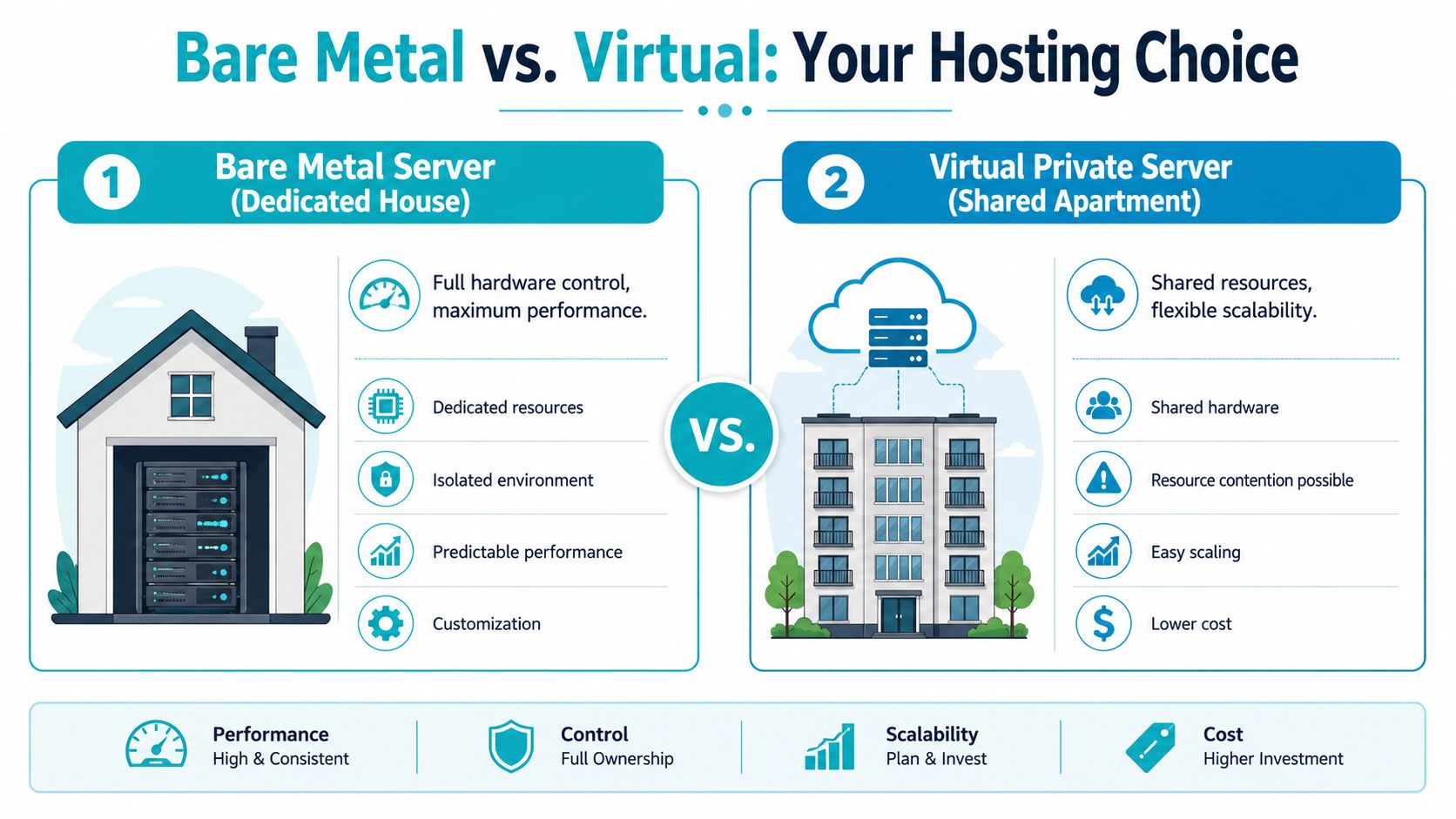
For a Florida business, that control usually matters in three cases. First, the application has become sensitive to inconsistent CPU, disk, or memory performance. Second, the compliance burden has increased, which is common in healthcare, legal, and financial environments. Third, monthly cloud costs have become hard to forecast because usage pricing, premium storage, snapshots, and support tiers keep stacking up.
A VPS works well for general web workloads and early-stage deployments. Bare metal is the better fit when the business needs fixed hardware behavior and clear operational boundaries. That distinction becomes important if you are hosting patient data for a Tampa medical practice under HIPAA expectations, running a private virtualization cluster for multiple branch offices, or supporting applications where users notice even modest delays. Teams trying to reduce server response time often find that dedicated hardware gives them a cleaner starting point than a crowded virtual host.
Where bare metal earns the extra cost
Bare metal is rarely the cheapest option on day one. It can be the cheaper option over a year or two if it prevents overprovisioning, trims licensing sprawl, and reduces time spent diagnosing host-level variability.
It tends to pay off for workloads like these:
- Databases and analytics systems that need consistent IOPS, stable memory access, and low jitter
- Private cloud or virtualization hosts running Proxmox, KVM, VMware, or container platforms that need predictable resource allocation
- Security-sensitive applications where single-tenant hardware simplifies access control, logging standards, and audit discussions
- High-traffic business applications that need steady throughput during local demand spikes, seasonal events, or batch-processing windows
Processor choice is a good example of why bare metal decisions should stay tied to the workload. A high-core CPU is often the right pick for dense VM consolidation. A higher-clock processor can outperform it for application tiers, CI runners, and transactional systems that care more about per-thread speed than total core count. NVMe can improve database and cache-heavy performance, but only if the application is storage-bound. Otherwise, that budget may be better spent on RAM, backup design, or managed support.
Why Florida buyers choose it
In Florida, the decision is usually operational as much as technical. Healthcare groups need cleaner documentation around patching, access, and data handling. Professional services firms want predictable costs for line-of-business systems. Multi-location companies need infrastructure they can standardize instead of improvising around platform limits.
That is why the bare metal conversation should not stop at “dedicated versus virtual.” The right question is whether a dedicated server gives your team a simpler, more controllable foundation for the workload you already run. If you need a quick baseline before comparing Tampa providers, this overview of what a bare metal server is is a useful reference.
Bare metal makes sense when predictable performance, stronger isolation, and tighter operational control will save more time and risk than the hardware costs.
The Tampa Advantage for High-Performance Infrastructure
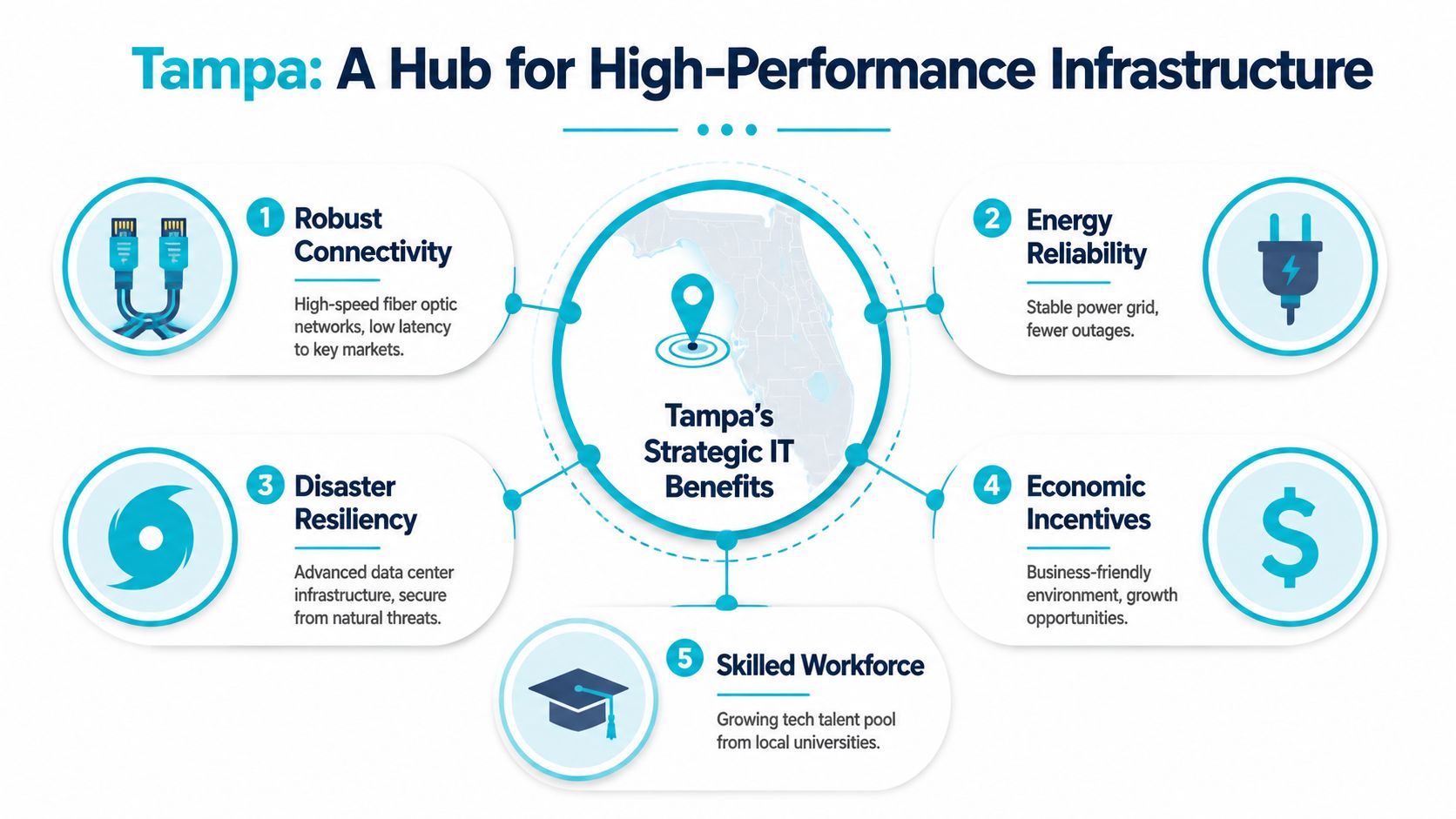
Location matters, but not for the reason most buyers think. The city name alone doesn’t guarantee speed. What matters is whether the metro has enough provider density, carrier access, and operational maturity to support production infrastructure without treating your deployment like an afterthought.
Tampa now checks that box. It has evolved into a multi-facility, multi-provider ecosystem. Hivelocity announced a 30,000-square-foot facility intended to add 20,000 more servers, and Lumen lists 16 distinct bare metal configurations in Tampa, which is a concrete sign of standardized service maturity in that market, as documented by Data Center Dynamics on Tampa expansion activity.
Why that matters for a Florida deployment
A mature metro gives you better purchasing options and fewer ugly surprises. If a provider can deliver bare metal, colocation, and adjacent services from the same regional footprint, you can design for growth instead of redesigning later.
For Florida businesses, Tampa is often attractive for three practical reasons:
- Regional proximity supports lower-latency access for users and offices across the state and the Southeast.
- Operational flexibility improves when you can pair bare metal with colocation or private cloud options in one market.
- Compliance workflows are often easier when infrastructure decisions stay closer to the business and its support teams.
That last point is under-discussed. A lot of teams focus on processor models and skip the governance side. But for healthcare, finance, and regulated service firms, local operational clarity can matter as much as benchmark speed.
Performance is more than CPU specs
If your real goal is to Tampa helps when your users are in Florida or nearby markets, but the full result comes from combining the right region with proper storage, caching, memory sizing, and network design.
There’s also a procurement advantage. Tampa isn’t behaving like a tiny edge market anymore. It has enough infrastructure depth to support hybrid patterns instead of one-off dedicated server rentals. That matters when your first deployment grows into replicated nodes, DR planning, or a staged migration toward colocation. Teams evaluating rack space and expansion paths can compare those options against local Tampa colocation pricing as part of the same regional strategy.
A strong Tampa deployment is not “a server near Florida.” It’s a local infrastructure plan with room for security controls, migration staging, and future expansion.
How to Choose Your Tampa Bare Metal Server Specs
Most bad bare metal purchases come from buying the CPU first and reasoning backward. That’s not how production systems fail. They fail because the wrong component becomes the choke point under a very specific workload. Sometimes it’s RAM. Sometimes storage latency. Sometimes the application is fine, but the network port can’t feed it.
HostColor’s Tampa-oriented bare metal offerings illustrate the point well. They list port ranges from 250 Mbps to 20 Gbps, and note that CPU, RAM, and storage can be scaled to the physical limits of the selected hardware, which is a reminder that server performance is defined by both hardware and network envelope, not processor choice alone, as shown on HostColor’s bare metal server page.
Start with the workload, not the spec sheet
Use this order instead:
Application profile
Is it database-heavy, memory-heavy, CPU-bound, or storage-sensitive?Concurrency model
Are you running one critical application, many VMs, or multiple customer environments?Storage behavior
Does the workload need low-latency random I/O, or is it mostly sequential and tolerant?Network shape
Do users mostly read small dynamic responses, or are you pushing large files, backups, media, or replication traffic?
What each hardware choice changes
Core count versus clock speed
High core counts help when you’re hosting many guests or parallel jobs. Higher clock speeds tend to feel better for single-tenant app stacks, game services, and workloads where a few threads do most of the work.DDR4 versus DDR5
RAM is not just a capacity decision. Newer memory platforms are useful when your application is sensitive to memory throughput or when you’re stacking denser virtualization or heavier in-memory caching.NVMe versus general enterprise storage
NVMe reduces a lot of pain in busy databases, logging pipelines, and VM hosts.
ARPHost Tampa Server Configurations by Workload
| Server Configuration | Best For | Key Specs |
|---|---|---|
| Dual Intel Xeon E5-2690 V3 | Proxmox clusters, game server hosting, multi-tenant VPS nodes | 28 cores, 56 threads, 64GB DDR4 ECC RAM, enterprise storage, Tampa, FL |
| AMD EPYC 4584PX | Large databases, AI/ML inference, high-density virtualization, memory-intensive workloads | 16 cores, 32 threads, 192GB DDR5 RAM, NVMe SSD storage, Tampa, FL |
| AMD Ryzen 9600X | Single-tenant apps, development environments, high-clock-speed workloads | 6 cores, 12 threads, 96GB DDR5 RAM, NVMe SSD storage, Tampa, FL |
Buying guidance that works in practice
Don’t overbuy cores for a database that needs RAM and fast storage. Don’t choose a powerful NVMe host and then put it behind a network tier that becomes the bottleneck. And don’t treat “upgrade later” as a strategy if migration windows are hard to get approved in your business.
For many Florida teams, the cleanest first move is a single dedicated host sized with headroom for the next stage, then a second node later for replication, backup, or virtualization growth.
Managed Versus Unmanaged A Critical Business Decision
A Tampa clinic, law office, or SaaS company can buy the right server and still make the wrong operating choice.
The question is not whether your team wants control. It is whether your business can reliably own patching, monitoring, backups, incident response, and audit evidence after the server goes live. For Florida organizations with HIPAA exposure, customer data retention requirements, or tight recovery targets during hurricane season, that distinction affects risk, staffing, and total cost more than the hardware itself.
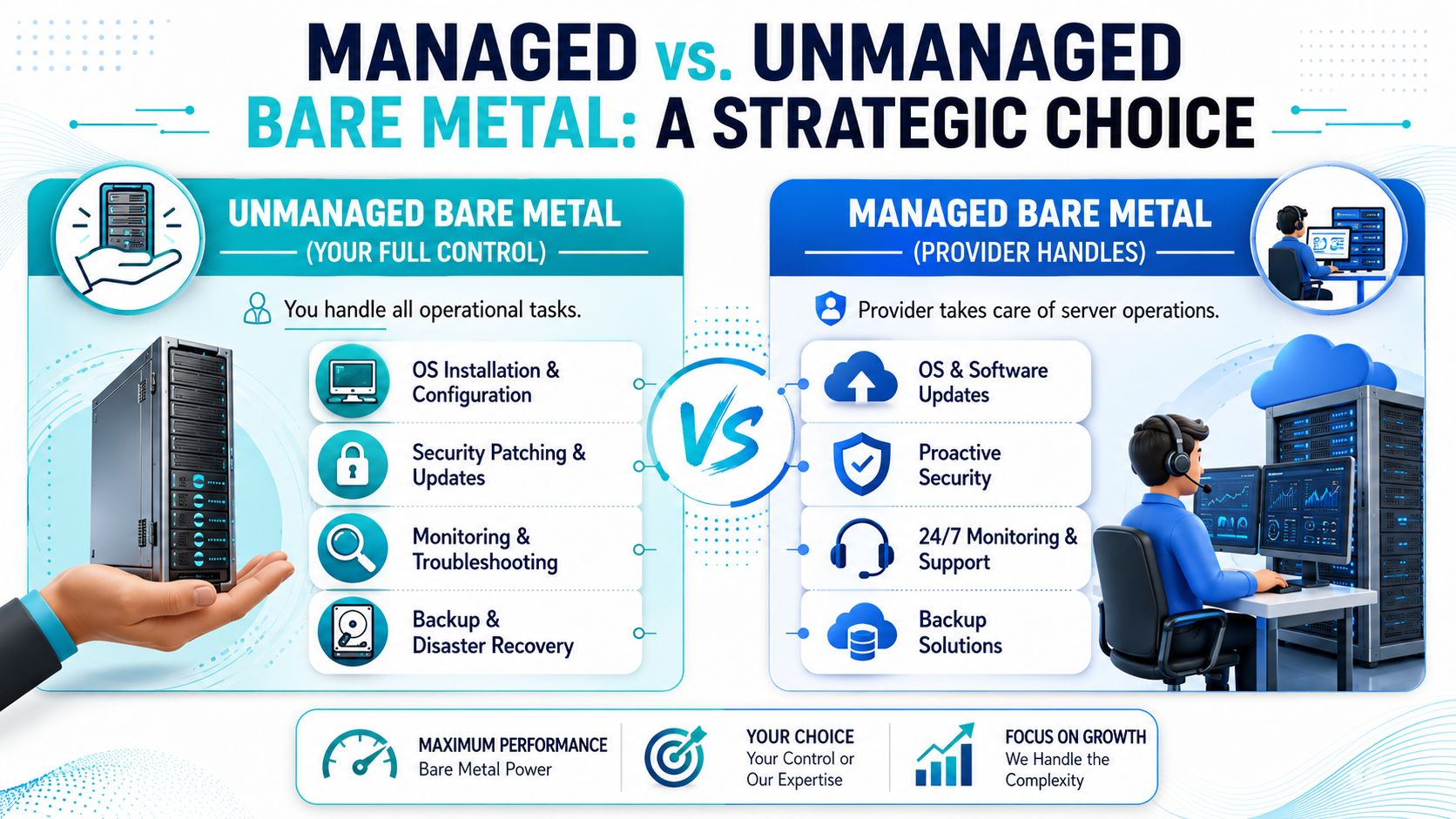
With an unmanaged bare metal server, the provider gives you the machine, network access, and usually a basic hardware support boundary. Your team handles the operating system, hardening standard, update process, backup jobs, alerting thresholds, access reviews, and every late-night problem that sits above failed hardware. That model works well for companies with experienced administrators, documented runbooks, and real on-call coverage. It usually fails when a small internal team is already stretched across Microsoft 365, endpoint support, compliance requests, and line-of-business applications.
What unmanaged really requires
Buyers often price unmanaged hosting as if they are only comparing server rental. In practice, they are also choosing to fund an operations function.
That includes:
- OS ownership, including installation standards, package control, update testing, and rollback planning
- Security administration, including firewall rules, account hygiene, logging, vulnerability response, and evidence for audits
- Monitoring and alerting, so disk pressure, failed services, certificate expiration, and memory exhaustion are caught before users call
- Backup and recovery discipline, with restore testing, retention policies, and written incident procedures
- Change control, especially for healthcare, legal, and financial workloads where undocumented fixes create compliance problems later
The trade-off is straightforward. Unmanaged gives skilled teams more flexibility and sometimes lower direct monthly cost. It also puts operational mistakes on your payroll.
Where managed service earns its cost
Managed service makes sense when uptime, security, and accountability matter more than having your staff build every layer by hand. I recommend it most often for Florida businesses migrating from shared hosting, aging on-prem servers, or a cloud footprint that became expensive and hard to govern.
A good managed model should cover repetitive operational work that causes real outages. Patching. Baseline hardening. Monitoring. Backup oversight. Escalation during failures. Clear separation between what your application team owns and what the infrastructure provider owns. If those lines are vague, you are not buying management. You are buying a ticket queue.
For migration projects, that operating model matters before cutover day. A documented bare metal server provisioning process reduces the common failures I see during rushed moves, such as missing agents, weak firewall defaults, inconsistent user permissions, and backup jobs that were never tested on the new host.
A practical way to decide
Choose unmanaged if your team can answer yes to most of these questions:
- Do you have an internal admin who owns Linux or Windows server operations end to end?
- Can you patch on schedule without delaying for weeks?
- Do you already monitor system health, backup success, and security events in a disciplined way?
- Can you produce restore evidence and access records for an audit?
- Is there actual after-hours coverage when a production service fails?
Choose managed if the answer is no on several of them, or if your internal team should be focused on applications and business systems instead of maintaining hosting infrastructure.
A Tampa healthcare practice is a good example. It may not need more root access. It may need a provider that can keep the server patched, preserve logs, support backup routines, and maintain a stable baseline that stands up during a HIPAA review. The same logic applies to professional services firms that need predictable latency to Florida users but do not want to build an in-house infrastructure operations team.
ARPHost offers managed services around hosted workloads, including support for monitoring, patching, security, and infrastructure operations. For many buyers, that operational wrapper matters more than small differences in raw server specs.
Your Migration and Provisioning Roadmap
Most bare metal projects succeed or fail before the server is ever powered on. The technical build matters, but the migration plan matters more. If your team treats provisioning as “rent server, copy files, switch DNS later,” you’ll create avoidable downtime, inconsistent permissions, broken dependencies, and a rollback plan that exists only in someone’s head.
A roadmap that keeps risk under control
1. Planning and dependency mapping
Document what runs today. That includes application services, databases, scheduled jobs, storage mounts, certificates, user access paths, and backup routines. This is also where you decide whether the target is a single server, a virtualization host, or the first node in a broader private cloud.
2. Provision the server correctly
Start with the hardware profile that matches the workload, then define the software baseline. OS version, partitioning, filesystem, monitoring agent, backup agent, access controls, and logging should be settled before data moves. Teams that need a repeatable handoff often benefit from a formal bare metal server provisioning process rather than ad hoc setup.
3. Build before you migrate
Install runtimes, web services, database engines, security tools, and observability before production data is introduced. A new host should be operationally ready, not just online.
Cutover without chaos
4. Stage the migration
Move data in a controlled sequence. Test application behavior with current datasets. Validate file ownership, service bindings, scheduled tasks, and backup execution on the new host.
5. Run a go-live checklist
Use a written checklist. Application health, login paths, queue processing, logging, alerts, and restore points should all be confirmed before final cutover.
Don’t accept “the service starts” as proof that migration is complete. The real test is whether the full operating workflow behaves normally after cutover.
For VMware or mixed-environment teams, the best migrations usually start by simplifying, not cloning every old decision into the new environment. That’s especially true if you’re moving toward Proxmox or consolidating several small workloads onto one dedicated host.
Pricing SLAs and Getting Started with ARPHost
A Tampa business buying bare metal should price the full operating model, not just the server. Monthly cost is only one part of the decision. The bigger questions are whether the platform gives your team predictable performance, clear support ownership, and a support path that fits the risk of the workload.
That matters more in Florida than many buyers expect. A healthcare practice handling HIPAA-regulated data, a legal office with strict retention requirements, and an e-commerce company serving customers across the state will not measure value the same way. One may care most about documented access control and incident response. Another may care more about low-latency database performance and fast hardware replacement. Good pricing review starts with that business context, then works down to CPU, RAM, storage, and management scope.
The quote itself usually changes based on five inputs: hardware tier, memory, disk layout, bandwidth profile, and whether the provider manages the system after delivery. Buyers comparing hosted bare metal to self-managed colocation should also ask who absorbs the operational burden. Power, cooling, remote hands, failed component replacement, monitoring, and after-hours response all affect the actual cost, even if they sit outside the base server rate.
What an SLA should actually give you
An SLA is a risk document. Read it that way.
A useful SLA should state exactly what service is covered, how uptime is measured, how incidents are reported, and what happens when hardware fails. It should also separate provider responsibility from customer responsibility. That line becomes very important when a Tampa company is deciding between unmanaged infrastructure for an experienced internal team and a more hands-on service model for a lean IT department.
Look for:
- Specific uptime terms tied to the actual service you are buying
- Support scope in plain language so there is no confusion during an outage
- Escalation paths for urgent incidents including after-hours handling
- Hardware replacement process with realistic expectations for failed drives, RAM, or motherboard issues
- Maintenance and change controls so scheduled work does not surprise your operations team
Providers with bare metal, colocation, disaster recovery, and private cloud offerings often have the operational maturity to support hybrid environments. That does not guarantee fit. It does mean they are more likely to understand practical migration issues, compliance boundaries, and what local businesses in Tampa need from infrastructure.
A practical way to start with ARPHost
Start with the workload, not the product page. List the applications, data sensitivity, traffic pattern, storage needs, and compliance requirements first. For Florida organizations in healthcare or other regulated fields, that means confirming how the server will be secured, monitored, backed up, and administered before procurement is approved.
Then ask direct pre-sales questions. Who owns OS patching. Who responds to filesystem alerts. What is the process for failed hardware. How are reboots handled after hours. Those answers will tell you more than a long list of server specs.
Use this shortlist:
- Match inventory to the workload based on CPU, RAM, disk type, and growth expectations.
- Review the SLA and support boundary with the same care you give the hardware configuration.
- Confirm the operating model for backups, monitoring, access control, and incident response.
- Approve a documented build standard so the server is supportable on day one.
If your current cloud setup is creating noisy-neighbor performance, rising monthly spend, or compliance friction, a bare metal server in Tampa, Florida can be the cleaner long-term choice.
ARPHost, LLC provides Tampa-based bare metal servers, VPS hosting, colocation, Proxmox private cloud options, and fully managed IT services for teams that need dedicated infrastructure with hands-on operational support. If you’re comparing managed versus unmanaged hosting, planning a Florida migration, or sizing a dedicated server for database, virtualization, or application workloads, review the available bare metal server inventory or explore VPS hosting.
