

Bare metal server pricing in 2026 usually lands between $100 and $400 per month for business-ready builds, with entry hardware around $50 to $80, premium configurations above $1,000, and managed support often adding $50 to $200 on top. If you only compare headline rates, you'll miss the bill, and that's where buyers get burned.
You're probably staring at two quotes that both say $199/month and assuming they're equivalent. They're not. One may include bandwidth, backups, and support, while the other charges separately for transfer, storage, and hands-on help, which is why the true monthly spend can diverge fast once the server is in production.
Why Two Bare Metal Quotes Rarely Match
Two bare metal quotes can look identical on paper and still produce very different monthly bills. I see this all the time when a buyer sends me a pair of proposals and asks which one is cheaper. One vendor wraps in support, transfer, and backup storage. The other sells a lean hardware slice and bills every add-on separately.
That's why bare metal server pricing is not a single number. It's a stack of line items that changes with CPU class, RAM, storage type, bandwidth policy, and management level. A market guide from Cherry Servers puts entry-level machines around $40–$65 per month and notes that higher-spec systems can move into the $150–$400+ range, with fully managed support adding $50–$200/month on top of hardware costs. The same source also shows broader bands at $50–$150, $150–$400, and $400–$1,000+ depending on the build and service model. Cherry Servers cost guide
What buyers usually miss
A quote is only useful if it answers the questions that matter in production. If it doesn't, it's marketing dressed up as procurement.
Practical rule: compare the full monthly invoice, not the posted server rate.
Read the rest of this article like a procurement checklist, not a price list. If you run stable workloads, your likely spend will usually sit in the $100–$400 business band. If you need dense memory, high-throughput storage, or premium networking, expect the bill to climb into the $400–$1,000+ zone, and in some cases well beyond that.
Hourly vs Monthly Billing Models
Hourly billing is for short-lived work. Monthly billing is for systems you plan to keep online. Buyers who mix those two use cases usually overspend, because they pay committed pricing for experiments or pay premium hourly rates for workloads that never change.
A basic hourly server around $0.09/hour works out to roughly $65/month if you ran it all month, which lines up with the entry baseline in the pricing guides above. That same class of machine can make sense for a test environment, a migration rehearsal, or a short burst of dev work. A committed monthly deal around $99/month is better when the box stays busy all month and doesn't need frequent resizing.
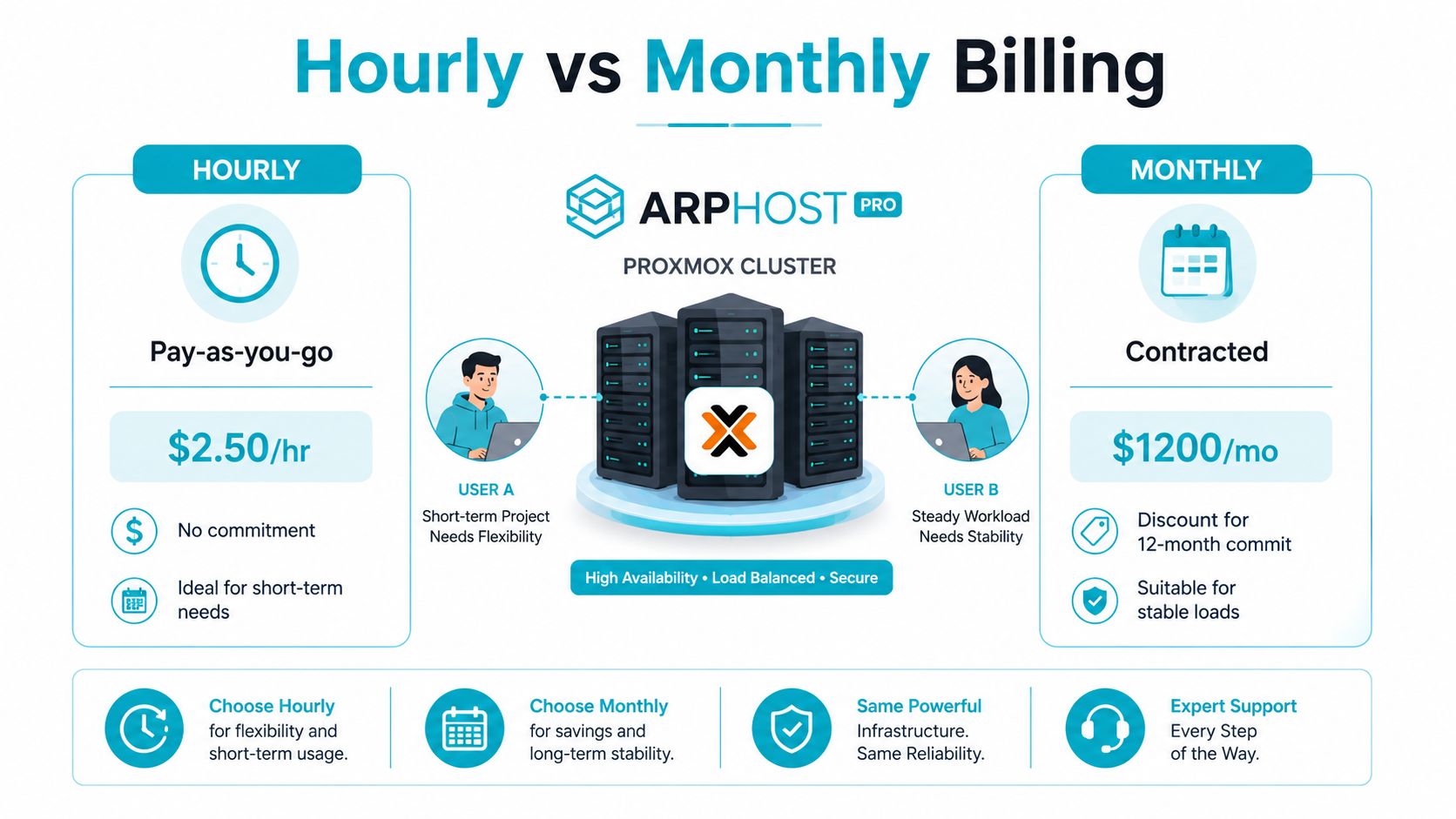
Use the billing model that matches the workload
If the server exists for a weekend project, hourly wins. If it carries customer traffic, monthly usually wins because the provider can price the capacity more predictably. That's especially true for database nodes, virtualization hosts, and anything with steady storage or network use.
Provisioning speed matters too. Some providers can spin up bare metal quickly, while others treat it like a manual deployment. The more friction there is in setup, the less useful hourly billing becomes for real operations. OS licensing can also change the economics, especially if Windows or commercial control panels are part of the stack.
It's the right kind of reference because it treats management as a line item, not a fuzzy promise.
Key Cost Drivers Behind Every Quote
Hardware is only the start. The quote changes when the provider moves from commodity parts to enterprise silicon, from shared storage to NVMe, or from basic bandwidth to premium network entitlements. That's why two servers with similar CPU labels can still price very differently.
What moves the number fastest
CPU generation and core count matter, but not in isolation. A newer EPYC or Xeon bin costs more because it usually lands with better memory support, more I/O headroom, and a higher network tier. ECC RAM capacity pushes the bill harder once you move from moderate memory to dense virtualization or database-heavy builds. Storage also swings the price fast, because NVMe costs more than SATA SSD, and SATA costs more than HDD in performance-sensitive environments.
Bandwidth is the other big trap. A low headline rate can hide a tight transfer cap or expensive overage policy. DDoS protection, SLA level, backup frequency, retention, and support all stack on top of the base server.
The best way to read a quote is to subtract what you don't need. If the workload doesn't care about ultra-low latency storage, don't buy the flash tier. If the workload is internal and predictable, don't pay for network excess you'll never touch.
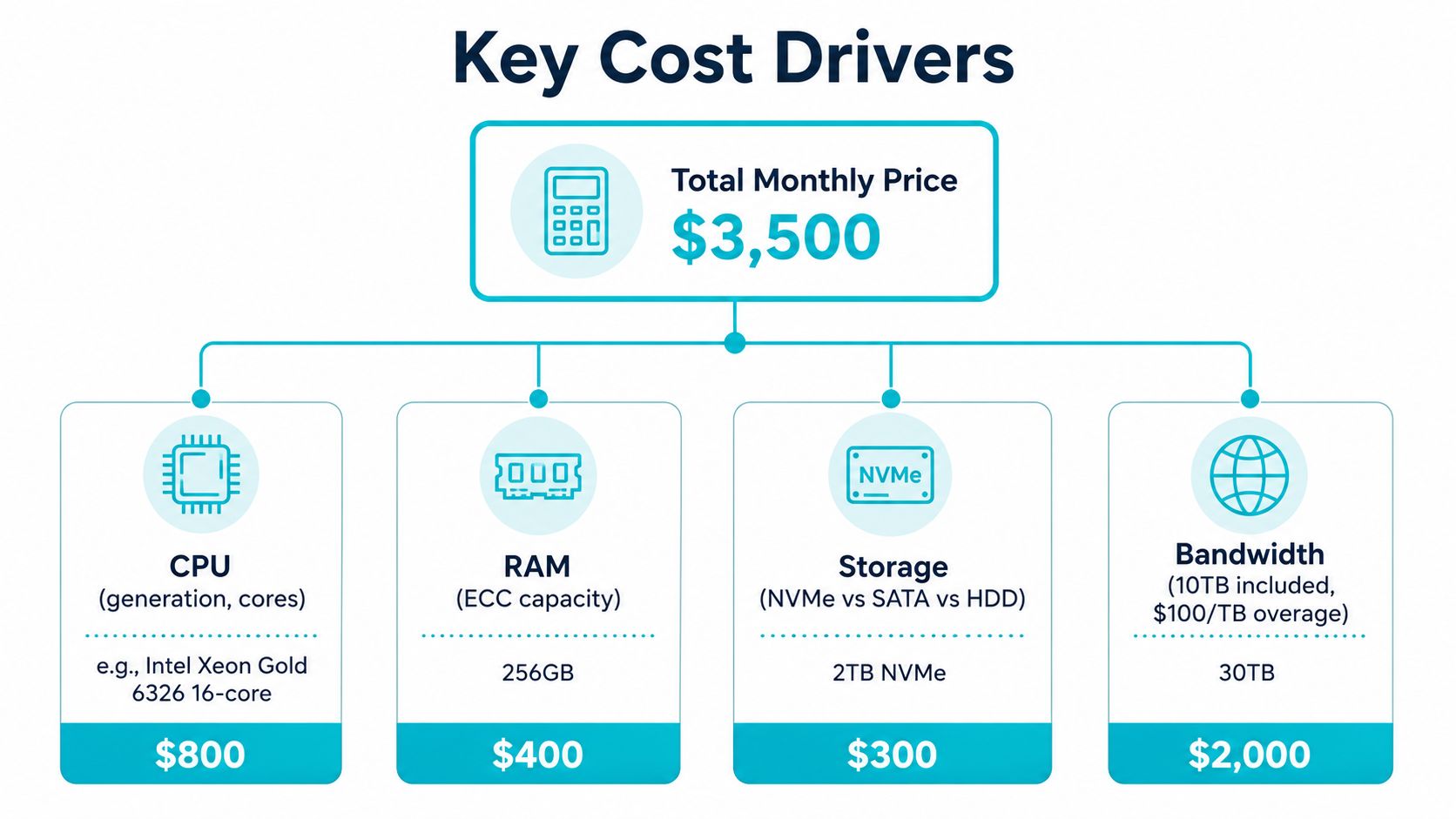
A simple worked example
Start with a 16-core / 64 GB / dual-NVMe baseline. That gets you into the kind of build providers often price in the midrange. Add another 128 GB of RAM, and the quote climbs because memory density is one of the cleanest cost multipliers. Upgrade again to dual-CPU hardware, and the bill rises further because you've crossed into a different class of silicon and board design.
Switch from HDD to NVMe, and you're paying for I/O, not just capacity. Add managed support, and the monthly total increases again because someone else is now monitoring, patching, or responding on your behalf. The important part is not the exact line item math, it's the pattern, every spec choice has a price, and some choices are worth it while others are vanity spend.
Typical 2026 Price Bands and Example Builds
The market is wide enough that you should think in bands, not one-off quotes. In 2026, the practical spread runs from under $100/month for entry hardware to $1,000+ for heavy-duty builds, with most business buyers landing somewhere in the middle. Rackdog's May 2026 examples put an entry server at $80/mo, a mid-tier EPYC/NVMe system at $454/mo, and a high-end 64-core, 1.1 TB RAM system at $1,600/mo, which is a useful snapshot of how fast the curve steepens. Rackdog bare metal pricing
ARPHost's Tampa inventory fits neatly into those bands. A AMD Ryzen 9600X | 6 cores | 96GB DDR5 | NVMe SSD build is the kind of single-tenant machine you'd expect to use for dev environments or fast application hosting. The AMD EPYC 4584PX | 16 cores | 192GB DDR5 | NVMe SSD configuration fits denser virtualization and memory-heavy workloads. The Dual Intel Xeon E5-2690 V3 | 28 cores | 64GB DDR4 ECC | Enterprise storage machine makes sense for Proxmox clusters, game servers, and multi-tenant nodes.
| Band | Typical Configuration | Monthly Range | Workload Fit |
|---|---|---|---|
| Entry | 6-core CPU, 32 GB to 96 GB RAM, SSD or NVMe | Under $100 to about $150 | Light apps, labs, small sites |
| Mainstream business | 16-core class, 64 GB to 192 GB RAM, NVMe | About $100 to $400 | Production apps, databases, virtualization |
| High-performance | 32 cores or more, large NVMe, stronger bandwidth | About $400 to $1,000 | Dense compute, heavy I/O, bigger clusters |
| Premium or AI-grade | 64 cores, 1 TB+ RAM, high-throughput networking | $1,000 to $4,000+ | HPC, AI inference, high-density platforms |
How to place your workload
If your application is mostly CPU-bound and single-tenant, the Ryzen class is usually enough. If you're running multiple VMs, a large database, or memory-hungry services, the EPYC system is the smarter spend. If you're building a cluster or a multi-tenant platform, the Xeon box is a solid fit because it gives you more physical cores to divide across workloads.
For reference pricing and category positioning, use dedicated server hosting cost as a starting point, then factor in the production add-ons that affect your bill.
Bare Metal vs VPS and Public Cloud on Cost
Bare metal usually beats public cloud when the workload is steady and dense. VPS often wins when you're still uncertain about utilization or when you need to buy a small slice of infrastructure without taking on hardware scale. Public cloud wins when elasticity matters more than fixed cost.
That's the simple version. The harder version is where most buyers should focus. One comparative analysis shows an OpenMetal bare metal setup at $619/month versus an AWS 3-year reserved instance at $1,337/month for a small equivalent configuration, which is a 54% savings. In a larger setup, the comparison was $1,173.60/month for bare metal versus $2,121/month on AWS, a 45% savings. OpenMetal reserved instance comparison
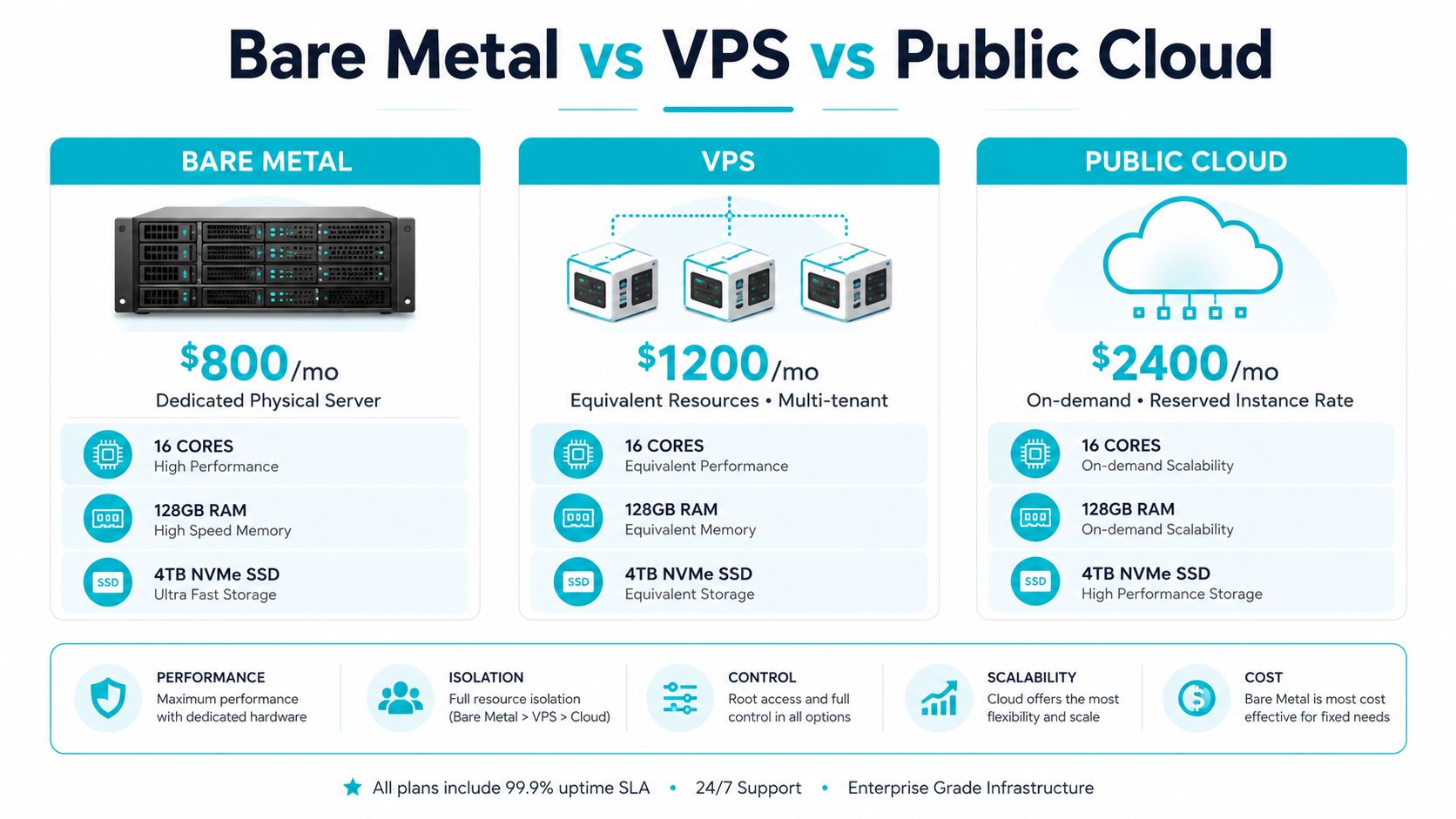
Where the break-even usually lands
For dense, always-on workloads, bare metal starts to look better as utilization stays high and memory or storage demand rises. For bursty apps, public cloud still makes sense because you're buying flexibility, not raw efficiency.
A strict cost comparison also has to account for performance consistency. On bare metal, the hardware is yours, so you don't get the same noisy-neighbor problem you'll see in multitenant environments. That matters when database latency or virtualization density is driving the business case.
For a direct hosting comparison, dedicated server vs VPS is the right internal page to review before you commit to one model. My blunt view is this. If the workload is steady, memory-heavy, and storage-rich, buy bare metal. If you're still proving demand, start smaller and only scale into physical hardware when you can justify it.
Hidden Costs and Total Cost of Ownership
Headline price is where vendors get lazy and buyers get hurt. A server advertised at $99/month can become a much larger bill once you add production realities like bandwidth overages, setup work, backups, licensing, taxes, and support.
IBM's pricing page is unusually honest about this. It says bare-metal prices are indicative, can vary by country, and may exclude taxes and duties. That should be the default assumption in every procurement conversation. A simple entry quote can look cheap until you add the parts you need to run a business workload. IBM bare metal pricing
The bill you should expect to see
Ask for the full monthly total, not just the server sticker price. In many cases, the invoice needs to account for:
- Bandwidth overages: Included transfer is rarely unlimited in the way buyers imagine.
- Backup storage: A small quota is common, production retention is not.
- OS and panel licensing: Windows and commercial control panels change the number fast.
- Managed support: If your team wants patching, monitoring, and response, someone has to pay for that labor.
- Taxes and duties: Some quotes leave them off the page.
A very ordinary-looking server can climb from a headline rate into the $250 to $350/month range once those add-ons are attached.
Ask for the itemized quote
Before you sign, ask for a fully-loaded monthly number with every included and excluded charge spelled out. If the provider can't give you that cleanly, walk away. You're not buying a one-line ad, you're buying an operating environment.
For a practical internal reference on how the full bill is framed, use cost to server as your baseline and compare it against the provider's actual production terms.
Negotiation Tactics and Cost-Saving Moves
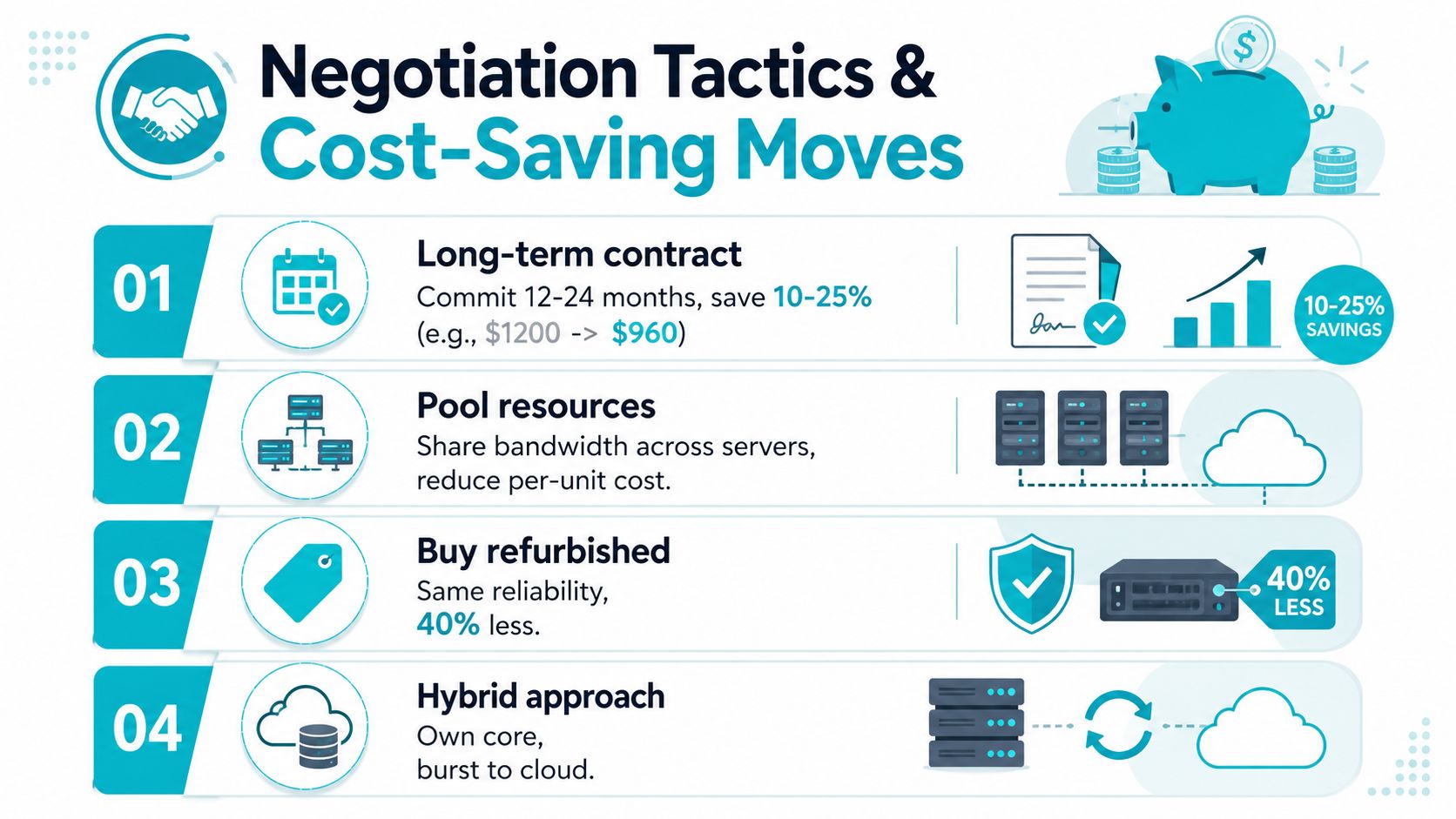
The cleanest way to lower bare metal server pricing is to stop overbuying capacity. Buyers usually waste money in one of three places, too much bandwidth, too much managed support, or a configuration that's bigger than the workload needs. Fix those first.
The moves that actually matter
Commit longer if the workload is stable. Providers often discount 12- or 24-month terms, and that's the easiest way to lower the effective monthly rate without touching performance.
Pool bandwidth across servers. One busy node and one quiet node don't need separate inflated allowances if the provider can aggregate usage sensibly.
Use BYOIP when it fits. If you already control address space, you can avoid some per-address friction.
Choose SATA when IOPS don't matter. NVMe is excellent, but it's wasted money if the application never touches the storage fast path.
Trim managed services when your team can do the work. If you already have patching, monitoring, and incident response covered, don't pay twice for it.
Buyer discipline beats vendor optimism. If a feature doesn't change uptime, security, or user experience, it's probably not worth paying for.
Watch the contract language on exit terms too. The cheapest monthly rate can become expensive if you're trapped in a bad renewal or forced into a painful migration. The best deal is the one that lets you leave cleanly if the provider stops performing.
Choosing the Right Provider and Scaling with ARPHost
A production-grade provider should be boring in the best way. I look for NVMe storage by default, a published SLA, layered DDoS protection, 24/7 support, clear bandwidth terms, and a facility location that matches the workload's latency needs. If any of those are fuzzy, the quote isn't ready for real infrastructure.
The Tampa, FL location matters if you want regional proximity and predictable support alignment. ARPHost, LLC is one option in that category, with bare metal, VPS, private cloud, colocation, and managed services from its Tampa facility. For buyers who want a broad service stack rather than a single server, that mix is practical.
Match the hardware to the job
The Dual Intel Xeon E5-2690 V3 | 28 cores | 64GB DDR4 ECC | Enterprise storage box is the right kind of chassis for Proxmox clusters, game servers, and multi-tenant VPS nodes. The AMD EPYC 4584PX | 16 cores | 192GB DDR5 | NVMe SSD server belongs on memory-heavy databases, AI or ML inference, and high-density virtualization. The AMD Ryzen 9600X | 6 cores | 96GB DDR5 | NVMe SSD configuration is better for single-tenant applications and high-clock-speed development environments.
Use a short provider checklist
- Storage default: Confirm whether NVMe is standard or an upgrade.
- SLA clarity: Ask what the uptime commitment is and how credits work.
- Security stack: Verify DDoS mitigation and firewall coverage.
- Support model: Get the response window in writing.
- Network tier: Confirm bandwidth class and whether transfer is pooled or isolated.
- Location: Match the datacenter to your users, regulators, or latency budget.
If your roadmap includes virtualization, the next logical step is a dedicated Proxmox environment. If it's mostly application hosting, start with the bare metal catalog. If you need operating help, managed services are the piece that keeps the infrastructure from becoming a distraction.
You can review the available hardware at bare metal servers, compare private cloud options through Proxmox private clouds, and check the current VPS and security bundles at secure VPS bundles. For teams that want hands-on infrastructure help, managed services is the right place to start.
If you want a real quote instead of a headline number, visit ARPHost, LLC and ask for a fully-loaded bare metal or private cloud proposal. ARPHost can size the hardware, bandwidth, and support together so you see the actual monthly bill before you sign.
