

At some point, every infrastructure team gets the same unpleasant test. A physical server stops booting, a RAID controller goes sideways, or malware leaves the operating system untrustworthy. The business doesn’t care whether the root cause was storage, firmware, or a bad patch. It cares whether services come back cleanly and how long people stay down.
That’s why bare metal server backup has to start with recovery goals, not software menus. If your plan begins with “which tool should we install,” you’re already too low in the stack. The right question is simpler: how much data can this workload lose, and how fast does it need to return?
Teams that get this right treat backup as an operational discipline. They define restore targets, capture full system images where it matters, test boot media, and rehearse restores before they need them. Everything else is implementation detail.
Why Bare Metal Backups Are Your Ultimate Safety Net
A file backup helps when someone deletes a spreadsheet. It doesn’t solve a dead motherboard, an unbootable OS, or a server that’s been trashed badly enough that rebuilding by hand turns into an all-night project.
Bare metal backup fixes that class of problem because it captures the whole server environment in one image. That includes the operating system, applications, drivers, configuration, and data. When the server is gone in practical terms, you aren’t reconstructing it piece by piece. You’re restoring the machine as a system.
The business value is hard to ignore, bare metal recovery solutions can save organizations nearly $1 million per recovery incident while reducing recovery times by 75%. The same source notes that instead of rebuilding from scratch over hours or days, teams can restore the operating system and reconfigure it in minutes instead of hours.
That difference changes how you plan continuity.
Planning beats panic
Most failed recoveries don’t fail because the backup job never ran. They fail because the organization never decided what “recovered” means. If payroll can tolerate a delay but your customer database can’t, those systems need different backup cadence, storage placement, and restore testing.
Practical rule: A backup job isn’t your safety net. A verified restore path is.
In practice, bare metal server backup works best for:
- Critical line-of-business servers where rebuilding the OS and middleware manually would be slow and error-prone
- Domain infrastructure and application hosts that depend on exact service configuration
- Ransomware response when you need to wipe and restore to a known-good image
- Hardware replacement and rapid redeployment when the business can’t wait for a full rebuild window
If you run dedicated systems, private cloud nodes, or mixed physical and virtual infrastructure, bare metal recovery belongs in the core plan, not the appendix.
Designing Your Backup Strategy RPO RTO and Backup Types
Before choosing commands or products, define the service objective for each workload. That means two things: your acceptable data loss window and your acceptable downtime window. Administrators usually talk about those as RPO and RTO.
RPO answers, “How much recent data can we afford to lose?” RTO answers, “How quickly does this system need to be back?” Those values should drive backup frequency, image depth, storage location, and test cadence.
Start with workload tiers
A small business usually doesn’t need every server protected the same way. A sensible split looks like this:
- Revenue-impacting systems need the shortest recovery window and the cleanest restore path
- Internal operations systems often need full-system protection, but may allow a longer recovery window
- Archive or utility systems may be fine with slower recovery and simpler file-level methods
That leads directly to the backup type you choose.
Comparison of Bare Metal Backup Types
| Backup Type | Best For | Pros | Cons |
|---|---|---|---|
| Bare metal image backup | Full server recovery after hardware failure, ransomware, or severe OS corruption | Restores operating system, apps, configuration, and data as one unit; ideal for complete rebuilds | Larger footprint, less efficient for restoring just one file |
| File-level backup | Shared data, documents, exports, and user content | Easy granular recovery of individual files and folders | Doesn’t rebuild a full server from scratch |
| Application-aware or system-wide backup | Workloads that need consistency plus recovery flexibility | Can support selective recovery and broader restore coverage depending on platform | More planning required around app state, restore scope, and storage design |
One useful distinction often gets buried in vendor copy. Bare metal backup isn’t the same thing as “portable to any hardware.”
Bare metal restore versus full server backup
Many find themselves unprepared in an emergency because Microsoft explicitly notes that bare metal restore isn’t supported when restoring to a different make, model, or hardware configuration. By contrast, a full server backup, which includes bare metal, system state, and disks, can be restored to different hardware or operating system instances, as explained in Microsoft’s discussion of full versus bare metal backup options.
That means the phrase “bare metal” by itself doesn’t guarantee cross-hardware freedom.
If your continuity plan depends on restoring to replacement hardware that won’t match the original box, verify that capability first. Don’t assume the term BMR covers it.
This trade-off matters even more in mixed estates. Teams running older Intel hosts, newer AMD systems, and virtual targets often need a restore strategy that’s broader than a same-hardware image. In those environments, a full server backup can be the safer design choice than a narrowly interpreted BMR workflow.
The baseline still matters
Whatever stack you choose, keep the 3-2-1 backup rule in place. Backblaze defines it as maintaining at least three total copies of data, with two stored locally and one stored off-site, as described in Backblaze’s guidance on bare metal backup and recovery.
That’s still the floor. For bare metal server backup, the image itself is only part of the job. You also need storage separation, restore media, permissions, and an actual recovery target.
Executing the Backup Tools and Command-Line Recipes
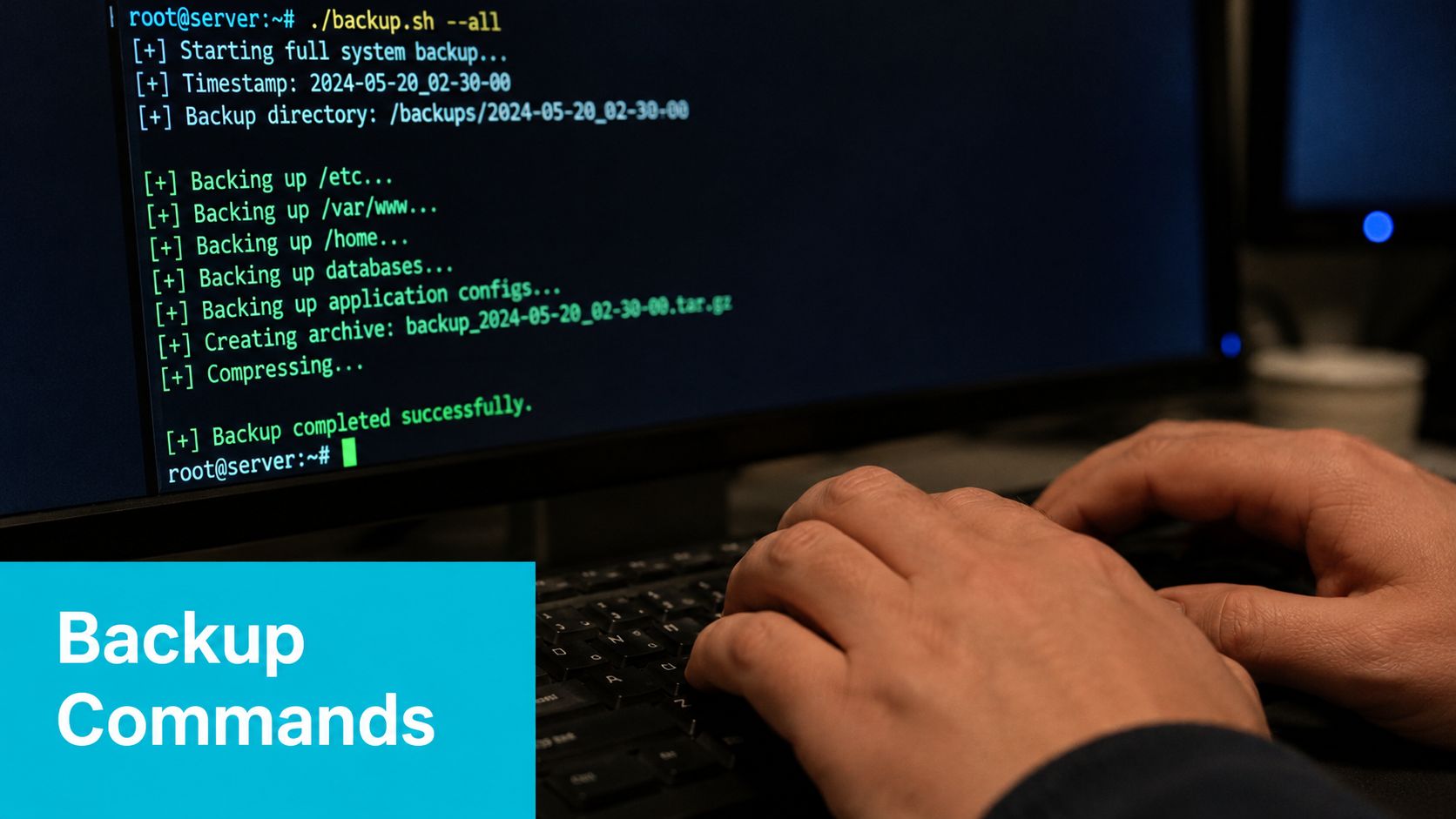
The first layer of bare metal server backup is mechanical. You need a repeatable way to capture the system, move data to safe storage, and document how the restore starts.
Linux image and file recipes
For Linux, I separate disk imaging from file replication. They solve different problems.
A raw image with dd is blunt, but it’s useful when you need a block-for-block capture of a boot disk:
lsblk
sudo dd if=/dev/sda of=/backup/server-sda.img bs=64K conv=noerror,sync status=progress
Use that carefully. Confirm the source disk before you press Enter. dd doesn’t forgive typos.
For active data and configuration, rsync is usually more practical:
sudo rsync -aAXHv --delete
 --exclude={"/dev/*","/proc/*","/sys/*","/tmp/*","/run/*","/mnt/*","/media/*","/lost+found"}
 / /backup/server-rootfs/
That won’t create a bootable bare metal image by itself, but it gives you a restorable filesystem copy with permissions, ACLs, and extended attributes preserved.
Windows Server with wbadmin
On Windows Server, wbadmin remains the native baseline for full system protection:
wbadmin start backup -backupTarget:E: -allCritical -quiet
If you want a full server backup instead of only critical volumes:
wbadmin start backup -backupTarget:E: -allCritical -systemState -quiet
For teams staying close to built-in tooling, this is often the simplest starting point. Document the backup target, retention handling, and boot media location right away. Native tools are fine until no one remembers how the recovery chain was supposed to start.
Boot media and recovery workflow
A bare metal image is useless if you can’t boot into a recovery environment and reach the repository that holds it. Keep these pieces together:
- Recovery media such as a bootable USB or ISO
- Repository access details stored securely
- Server-specific notes on storage controller mode, boot mode, and partition layout
The recovery process itself is easier to grasp when you see it demonstrated in sequence:
When Proxmox changes the equation
If you’re running Proxmox VE, manual imaging gets old fast. Proxmox Backup Server gives you a more operationally sane path with scheduled backups, verification, and storage efficiency built into the workflow.
A typical VM backup command on a Proxmox host looks like this:
vzdump 101 --storage pbs-store --mode snapshot --compress zstd
That’s a better fit for environments where physical servers host many virtual workloads and you need consistent, repeated protection without hand-built scripts everywhere.
For shops that want to pair bare metal servers with virtualization, dedicated Proxmox infrastructure offers an attractive solution. Private cloud clusters built for Proxmox VE 9, especially the kind of dedicated environments commonly priced from $299/month in the market, remove a lot of the friction around backup scheduling, restore orchestration, and node-level consistency.
Manual commands are fine for proving a concept. They’re not the end state for a busy production estate.
Securing Your Backups Automation Encryption and Immutability
The most common backup mistake isn’t technical. It’s cultural. Someone sets up jobs, sees green checkmarks for a while, and assumes the problem is solved.
It isn’t.
A bare metal backup repository is a high-value target. If attackers can encrypt it, delete it, or log into it with overbroad privileges, your recovery plan turns into paperwork.
Automate first, then harden
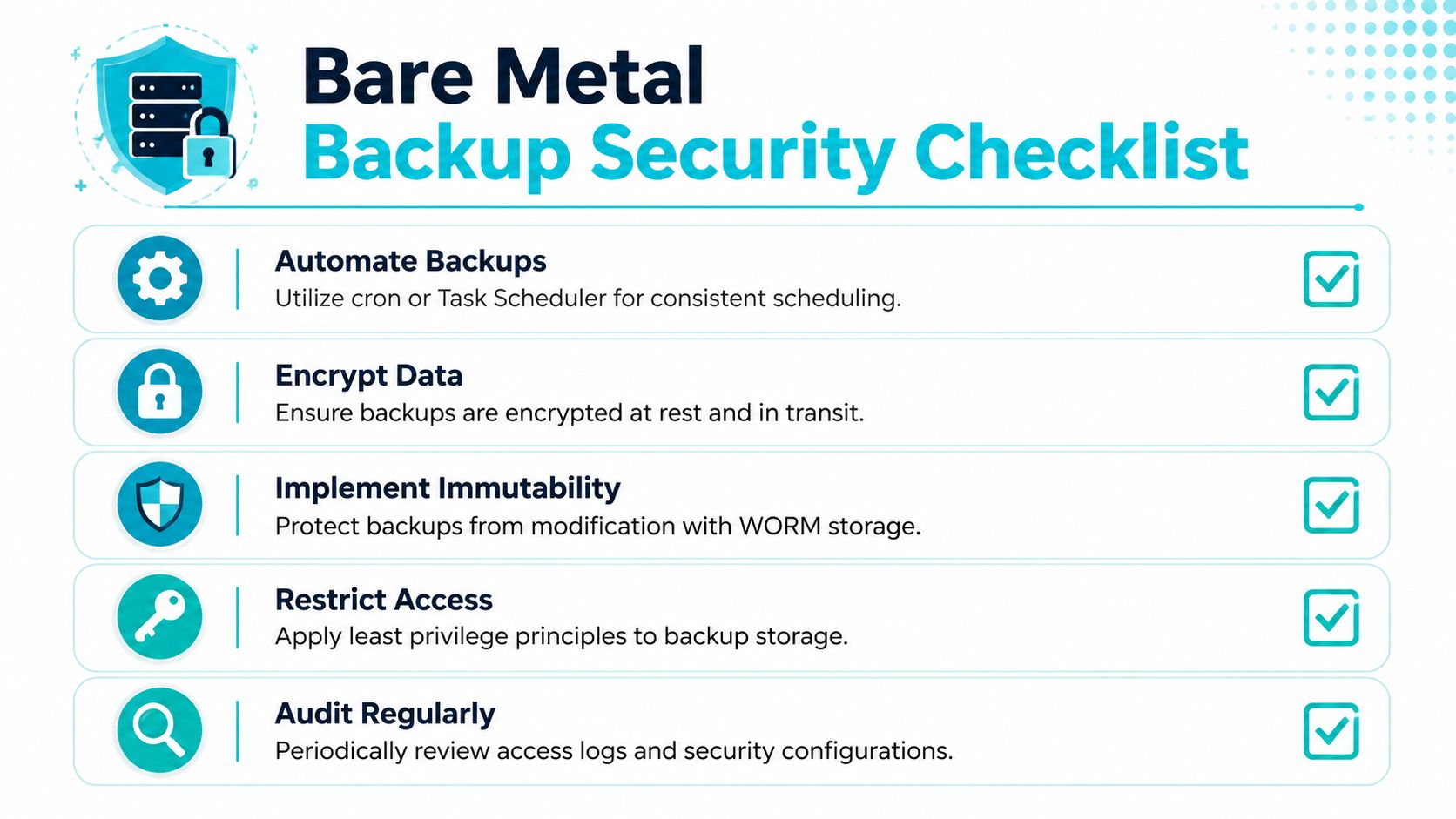
Run backups on schedule so operators don’t become the scheduler.
On Linux, a basic cron entry is enough to enforce consistency:
0 1 * * * /usr/local/sbin/run-baremetal-backup.sh
On Windows, Task Scheduler can launch wbadmin or vendor tooling under a service account with the correct privileges. That last part matters. Whole-system backup operations require administrative access, and many failed restores trace back to credential mistakes made long before the incident.
Encryption and immutable storage
Encrypt backup data at rest and in transit. The exact method depends on your platform, but the control objective is the same. If someone steals storage media or intercepts repository traffic, the image shouldn’t be readable.
Then add immutability. WORM-style retention or repository lockout windows stop routine modification and make it much harder for ransomware to wipe your recovery points. If you need a practical reference architecture for that, look at immutable backup solutions.
What actually breaks in the real world
TierPoint’s guidance is blunt: a successful bare metal recovery plan requires explicit administrator permissions, creation of bootable media, and rigorous testing. The same source states that 68% of ransomware recovery attempts failed in the last 12 months due to untested BMR media or missing admin credentials, making immutable, encrypted backup storage a necessity.
That’s the operational lesson. Security controls don’t help if nobody validated the media, the credentials, or the boot path.
A practical hardening checklist looks like this:
- Separate access paths so backup admins and production admins aren’t always the same account set
- Protect repositories with least privilege and avoid broad interactive access
- Store media and credentials deliberately so they survive the same event that kills the source server
- Review backup logs and access logs instead of trusting status emails forever
Backups fail quietly when nobody checks the conditions around them.
The Moment of Truth Testing Your Restore Process
A test restore feels inconvenient right up until it saves you. Then it looks like the smartest maintenance window you ever scheduled.
Run the fire drill in isolation
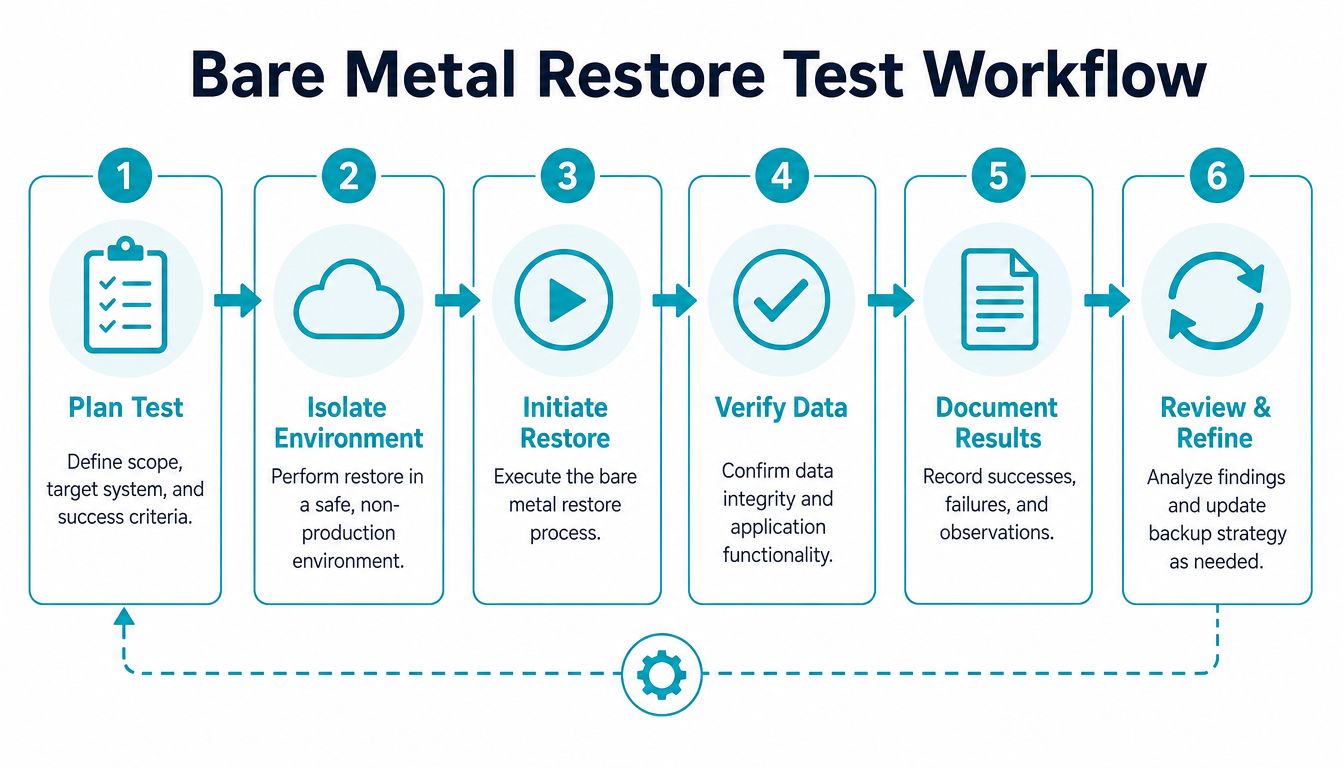
Don’t test on production hardware. Build an isolated target and treat the restore like a controlled incident.
The sequence is straightforward:
- Define the test scope. Pick a server, a restore point, and clear success criteria.
- Prepare bootable recovery media. Confirm it still boots on the target platform.
- Provision a safe restore target. That may be spare hardware, a lab node, or a temporary VM if the workflow supports it.
- Execute the restore from the selected image.
- Validate boot, services, and data.
- Record what failed or needed manual adjustment.
If your team needs a practical walkthrough for the restore side, keep a documented runbook and compare it against a working example such as this restore-from-backup guide.
What a good test actually proves
A good restore test doesn’t stop at “the machine boots.” It proves that the recovered server can do its job.
Check items such as:
- Boot consistency across BIOS or UEFI settings and storage presentation
- Application behavior after the restore, not just OS login
- Data integrity in the files or databases people use
- Authentication and service dependencies for workloads tied to other infrastructure
For damaged storage or failed media where the backup chain itself may be in question, it also helps to know where to escalate.
The cadence that keeps confidence high
Semperis recommends weekly automated backup integrity checks and monthly restore testing procedures for random files to maintain a >99% success rate, according to Semperis guidance on bare metal recovery pitfalls.
That recommendation aligns with what works operationally. Frequent integrity checks catch corruption early. Scheduled restore drills expose the hidden issues, such as missing drivers, expired credentials, or boot media nobody’s touched in months.
One practical example: if you’re testing a memory-heavy application stack or a large database restore, use a target with enough headroom that the workload can behave normally after recovery. An AMD EPYC 4584PX with 192GB DDR5 RAM is a strong fit for that kind of validation lab because it gives you room to test the application, not just the boot sequence.
Recovery testing isn’t about optimism. It’s about removing surprises before the incident starts billing your downtime.
Why ARPHost Excels with Managed Bare Metal Backup
Organizations can assemble a workable bare metal server backup stack. Fewer teams keep it documented, monitored, secured, and tested well enough that the restore works cleanly under pressure. That gap is where managed infrastructure support earns its keep.
Where in-house plans usually strain
The friction points are predictable:
- Tool sprawl across physical servers, virtualization nodes, and offsite repositories
- Operational drift where backup jobs exist but media, credentials, and restore notes fall out of date
- Testing fatigue because nobody wants to burn maintenance windows on rehearsal
- Security gaps around immutable retention, access control, and encrypted offsite copies
A managed partner closes those gaps by turning backup from a side duty into a maintained service.
The infrastructure side matters too
When you’re protecting production systems, recovery design and compute design belong together. That’s especially true for virtualization clusters, private cloud builds, and mixed physical-virtual estates.
For example:
- Dual Intel Xeon E5-2690 V3, 28 cores, 56 threads, 64GB DDR4 ECC RAM fits Proxmox clusters, game server hosting, and multi-tenant VPS nodes.
- AMD EPYC 4584PX, 16 cores, 32 threads, 192GB DDR5 RAM suits large databases, AI or ML inference, and high-density virtualization.
- AMD Ryzen 9600X, 6 cores, 12 threads, 96GB DDR5 RAM works well for single-tenant applications and development environments that benefit from high clock speed.
Those are the kinds of dedicated hardware profiles that make restore planning practical instead of theoretical. If your recovery target is underpowered, recovery may “succeed” while the application still performs badly enough to fail the business objective.
Why ARPHost fits this operational model
ARPHost’s strength is that it isn’t just selling compute. It aligns hosting, backup, and managed operations in one place.
A strong managed bare metal backup program should include:
- Dedicated hardware options for production servers and test restores
- VPS capacity for lightweight recovery labs, utility services, and supporting infrastructure
- Proxmox-based private cloud expertise for clustered virtualization and backup orchestration
- Managed monitoring and patching so backup dependencies don’t rot
- Offsite encrypted storage and immutable retention as standard operating controls
- Restore validation and documented runbooks instead of assumption-driven recovery
That combination is especially useful for SMBs and lean IT teams that need enterprise-style discipline without hiring a full-time backup specialist.
Scaling this with ARPHost
If you want to keep control but reduce risk, there are a few clean entry points:
- Start small with virtual infrastructure through VPS hosting for utility servers, test restores, or staging.
- Move critical workloads to dedicated hardware through bare metal servers when you need stronger isolation and predictable performance.
- Build clustered virtualization with Proxmox private clouds when recovery orchestration, consolidation, and root-level control matter.
- Hand off operations through fully managed IT services if your team needs monitoring, patching, backup oversight, and disaster recovery support.
- Centralize backup retention with Proxmox Backup as a Service when you need managed encrypted and immutable backup handling.
The practical advantage is time. Your team spends less effort babysitting jobs, tracking repository health, or scrambling through old notes during an outage. More importantly, the recovery process becomes repeatable.
That’s the primary objective of bare metal server backup. Not more software. Not bigger backup volumes. A restore path that works when the machine doesn’t.
If your team needs help designing a recovery-first backup strategy, ARPHost, LLC offers dedicated servers, Proxmox private clouds, secure backup services, and fully managed IT support that can turn bare metal recovery from a risky side process into a dependable part of your infrastructure.
