

You usually find out whether your backups matter on the worst day of the quarter.
A host fails. A VM won't boot after a patch cycle. A user deletes the wrong data and notices too late. Or ransomware hits the production estate and suddenly the question isn't whether data was copied somewhere. It's whether you can restore the right workload, in the right order, fast enough to keep the business operating.
That's why backup as a service deserves a more serious look than most vendor pages give it. The marketing story is simple. Data goes offsite, storage is handled for you, and the service is billed as a subscription. The operational story is harder. Recovery speed, restore workflow, workload coverage, and isolation of backup copies are what separate a real continuity plan from a false sense of safety.
What is Backup as a Service and Why It Matters Now
A backup problem rarely starts as a backup problem. It starts as a business outage.
A finance team can't open shared files. An application server is corrupted. A virtualization node drops a critical guest. At that point, nobody in the room cares that the backup dashboard was green last night. They care about whether payroll runs, orders ship, and email comes back online before the day gets worse.

The practical definition
Backup as a service is a provider-delivered backup model where the infrastructure, backup software, and storage are handled for you instead of being built and maintained entirely on your own systems. For most IT teams, that means less time managing backup servers, storage expansion, patching, failed jobs, and repository health.
The appeal isn't just convenience. It's simplification of a stack that gets neglected in many environments because it sits outside production until the day everything depends on it.
Why it matters now
The market has grown because organizations stopped treating backup as a side utility and started treating it as part of core infrastructure. One industry source says the BaaS market was $4.80 billion in 2023 and projects $33.56 billion by 2030, while the broader cloud backup market was $7.13 billion and is expected to reach $21.6 billion by 2030 by 2030.
That doesn't prove every service is good. It does show where budgets and operational priorities have moved.
Practical rule: If recovery is business-critical, backup can't live as an afterthought attached to a storage purchase.
A lot of teams also underestimate how closely backup ties into recovery planning. If the organization hasn't mapped system dependencies, restore order, fallback communications, and decision-making authority, the backup service alone won't save the day. That's why a stronger disaster recovery planning process usually sits beside backup decisions, not behind them.
What clients should ask first
Before discussing storage size or retention, start with three questions:
- What has to come back first: Business systems don't fail in neat categories. Rank the workloads that must return before users can function.
- Who owns the restore call: During an incident, somebody has to approve restores, validate integrity, and decide whether you recover files, applications, or whole systems.
- What recovery looks like in practice: A copied dataset isn't the same thing as a usable service.
That last point is where most BaaS discussions need more honesty.
BaaS Architectures and Delivery Models Explained
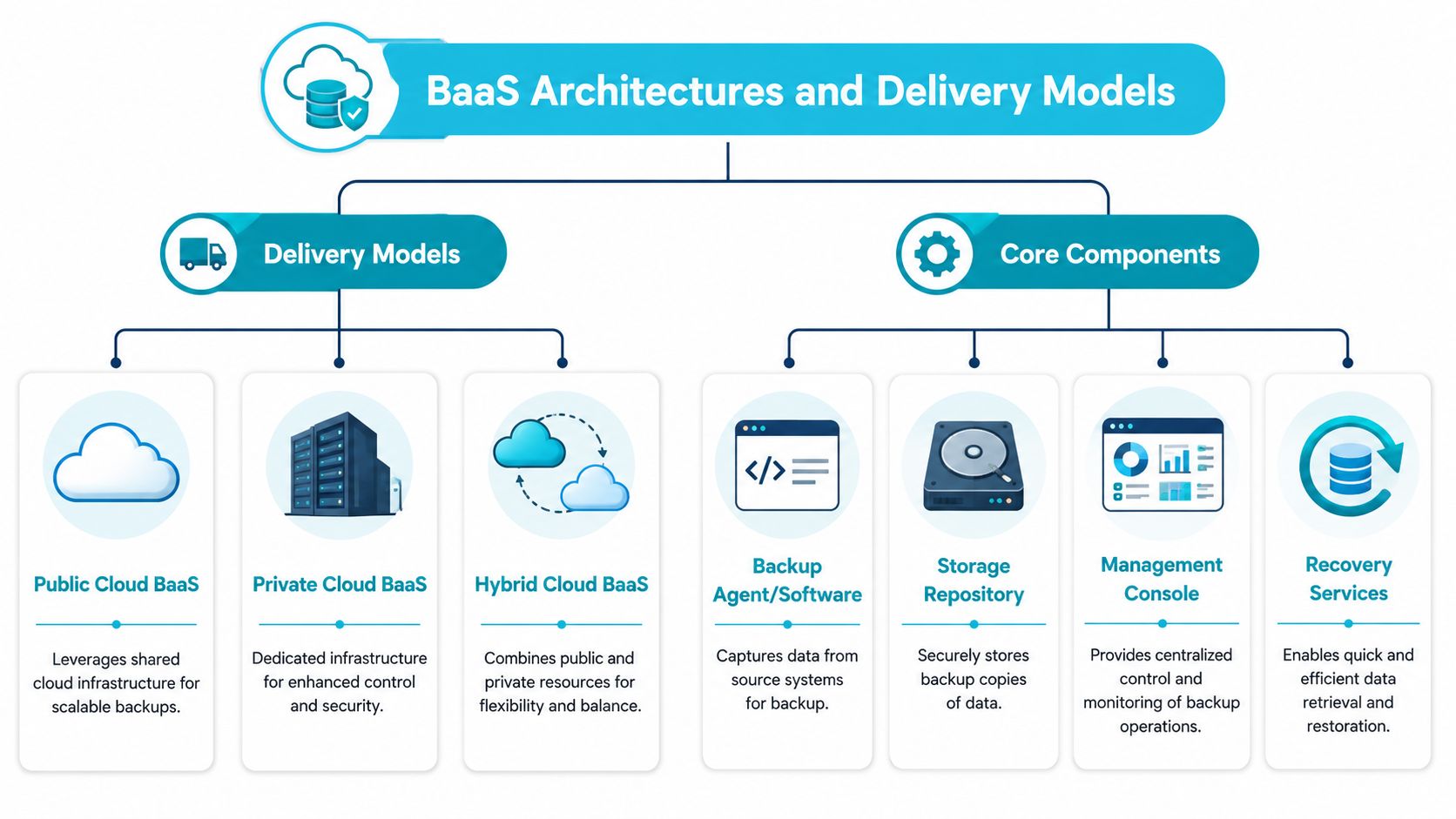
Under the hood, backup as a service is less mysterious than it sounds. It's a delivery model. The provider runs the backup platform and storage layer, and the customer consumes protection as a service instead of building the full stack in-house.
Delivery models that matter
Most BaaS environments land in one of these operating patterns:
- Public cloud backed service: Good for teams that want quick deployment and elastic capacity. The trade-off is less control over where every layer lives and how performance behaves during heavy restore demand.
- Private cloud or dedicated backup estate: Better when isolation, governance, or predictable performance matter more than maximum flexibility.
- Hybrid design: Common when businesses want local recovery options for some systems and provider-managed offsite protection for disaster scenarios.
A lot of buyers also blur the line between self-managed cloud backup and managed BaaS. They aren't the same thing. Renting cloud storage and pointing backup software at it still leaves you with backup server lifecycle, monitoring, patching, alerting, retention design, and restore testing.
Core components of a real BaaS stack
The moving parts are usually familiar:
| Component | What it does | Why it matters |
|---|---|---|
| Backup agent or API integration | Captures workload data from servers, VMs, endpoints, databases, or SaaS apps | Determines how complete and application-aware protection really is |
| Backup repository | Stores backup copies in provider-managed infrastructure | Affects durability, isolation, retention, and cost |
| Management console | Exposes job status, policy control, alerts, and restore actions | Shapes day-to-day operations and incident handling |
| Recovery workflow | Handles file restores, VM restores, database recovery, and environment rebuild steps | Decides whether backup turns into uptime |
One technical point deserves special attention. BaaS is a SaaS-delivered protection model that externalizes infrastructure, software management, and storage to the provider, which removes the need to run on-premises backup hardware. That same architecture can make immutable or air-gapped copies easier to deploy because the provider isolates backup copies from the primary network, reducing the blast radius of ransomware or accidental deletion.
Agent-based and agentless choices
Design gets practical.
Agentless backup often fits virtualized environments well. It can simplify deployment and reduce administrative overhead when you're protecting many VMs through the hypervisor layer.
Agent-based backup still matters for application consistency, endpoint coverage, and systems where workload awareness matters more than deployment simplicity.
In practice, strong environments use both where appropriate. File servers, database services, virtual machines, and SaaS data don't all behave the same way. A provider that only supports one method usually forces compromises later.
A short visual overview helps here:
The architecture that looks cheapest during procurement often becomes the slowest and least predictable during a full restore.
DIY versus managed delivery
A do-it-yourself design can work if your team has time, discipline, and enough operational maturity to monitor jobs, verify recoverability, rotate credentials, patch the platform, and test restores.
A managed model makes more sense when:
- Internal staff are thinly stretched: Backup operations get handled consistently instead of only when an alert becomes urgent.
- Recovery expectations are formalized: Someone needs to align backup design to business recovery requirements.
- Security separation matters: Isolated repositories and stricter operational boundaries are easier to maintain.
The difference isn't where the data sits. The difference is who owns backup as an operational system.
The Business Impact of BaaS Benefits and Realities
A good backup service reduces operational drag. A bad one just moves the drag somewhere less visible.
That's why the business case for backup as a service should never be framed as “cloud is easier.” The better case is that the right service can shrink the number of backup-related systems your team has to run, reduce capital spending on backup hardware, and move routine monitoring and maintenance off your internal queue.
Where the value is real
When companies move away from self-built backup estates, three benefits usually show up first.
- Less infrastructure to own: You're not buying, housing, patching, and refreshing separate backup servers and storage shelves just to protect production.
- More usable IT time: Senior engineers stop spending hours on backup hygiene and can focus on platform work, migrations, hardening, or application support.
- Cleaner budgeting: Subscription delivery can be easier to forecast than irregular hardware purchases plus software renewals.
That last point matters more than many teams admit. Backup spend often gets scattered across hardware, software, support contracts, and emergency upgrades. BaaS can pull those costs into a single service conversation.
Where buyers get caught out
The realities are equally important.
Restore speed still depends on physics. If you need to recover a large environment over constrained bandwidth, “it's in the cloud” won't magically produce a fast rebuild.
Provider uptime becomes part of your risk model. If the service console, restore mechanism, or repository access path is impaired, your recovery plan needs to account for that.
SLA language matters. Some providers are really selling durable storage with backup features. Others are selling operational recovery support. Those are different services.
Operational note: The most expensive backup is the one that looked complete until the first major restore.
A practical buying conversation should include not just where copies are stored, but how restores are executed, who validates recoverability, how failed jobs are handled overnight, and what escalation path exists when the restore itself fails.
Budget decisions should include modernization context
Backup doesn't live in isolation from the rest of the estate. If you're replacing old virtualization clusters, consolidating servers, or refactoring hosted applications, the backup design should change too. Teams trying to understand cloud modernization costs often discover that backup and recovery assumptions from the old environment don't fit the new one.
That's common in hybrid estates. A company may modernize web applications, keep a legacy database on dedicated hardware, and move user collaboration into SaaS. A single backup model rarely fits all three without deliberate planning.
What works and what doesn't
What works:
| Approach | Business effect |
|---|---|
| Aligning backup policy to application criticality | Recovery resources go to the systems that keep revenue and operations moving |
| Separating backup administration from day-to-day user access | Lowers the chance of accidental or malicious deletion of backup data |
| Testing representative restores on a schedule | Exposes failure points before a real incident |
What doesn't:
- Buying on storage price alone: Cheap storage doesn't guarantee a usable recovery workflow.
- Using one retention rule for every system: Critical databases and low-value file shares shouldn't be treated identically.
- Treating backups as complete because jobs succeeded: A passed backup window doesn't prove a successful restore.
That's the key business reality. Backup as a service can absolutely improve cost control and resilience, but only when the service is evaluated as a recovery platform, not just a storage destination.
Decoding RTO RPO and Retention Policies for Your Data
Most backup conversations become clearer the minute you stop talking about “good backup coverage” and start talking about RTO, RPO, and retention.
Those three items define what the service is expected to do.
RPO is about acceptable data loss
Recovery Point Objective (RPO) answers one question: how much data can you afford to lose between the last good backup and the outage?
If a workload is backed up every night and fails late the next afternoon, your recovery point may be many hours old. For some systems, that's acceptable. For a transactional database, it may not be.
RTO is about acceptable downtime
Recovery Time Objective (RTO) answers a different question: how long can the workload stay unavailable before the business starts taking real damage?
Many backup projects disappoint stakeholders. The backup exists, but the restore takes too long because the team didn't factor in data size, restore sequencing, bandwidth, boot validation, application dependencies, or user testing.
For operations teams, the key variables in BaaS are backup scope, schedule, and restore workflow. The service needs to support application-aware protection for VMs, databases, endpoints, and SaaS apps, then align backup frequency to the required RPO. Dashboards, 24/7 monitoring, and self-service or ticketed restores also materially affect RTO because restore orchestration matters as much as storage durability, as described in the G-Cloud service guidance on managed backup operations.
Retention is about history and compliance
Retention defines how long you keep restore points.
That sounds simple until legal, operational, and cost requirements collide. Short retention may help control storage use but leave you exposed when corruption goes unnoticed for weeks. Long retention supports audit and rollback needs, but it has to be deliberate.
A lot of businesses still use a practical rotation mindset such as keeping more frequent recent copies and fewer older long-term copies. The exact policy matters less than whether it matches the data's value and compliance needs.
Example BaaS service tiers and use cases
| Service Tier | Example Use Case | Typical RPO | Typical RTO | Typical Retention |
|---|---|---|---|---|
| Critical application tier | Customer-facing database or ERP workload | Very short and tightly scheduled | Fast, prioritized recovery | Short-term operational copies plus longer compliance retention |
| Standard production tier | Core file server, internal app VM, line-of-business system | Scheduled through the business day or daily, based on impact | Moderate recovery window | Operational retention sized for rollback needs |
| Endpoint and user data tier | Laptops, desktops, departmental file sets | Daily or policy-driven | File-level restore focus | User recovery history for accidental deletion and rollback |
| Archive and compliance tier | Historical records, inactive projects, regulated data | Infrequent | Slow recovery is acceptable | Long-term retention based on legal or business policy |
Field advice: Set RTO and RPO by business impact first. Then design the backup schedule and restore method to fit. Teams that do it in reverse usually overprotect low-value data and underprotect revenue systems.
A fast way to set targets
Use this order:
- List business services, not just servers
- Map dependencies between workloads
- Assign downtime tolerance
- Assign acceptable data loss
- Choose retention for rollback, audit, and legal needs
- Test whether the restore method can meet the target
If the target says a system must return quickly, but the restore process requires manual rebuilds and large data transfers with no rehearsal, the target is only paperwork.
Critical Security and Compliance Layers in BaaS
Backup that isn't secure becomes part of the attack surface.
That's especially true now that attackers don't stop at production systems. They look for management consoles, privileged accounts, connected repositories, and any mechanism that lets them delete or encrypt recovery data before the business can respond.
Backup security starts with separation
If the same credentials, network paths, and admin habits control both production and backups, the environment is fragile.
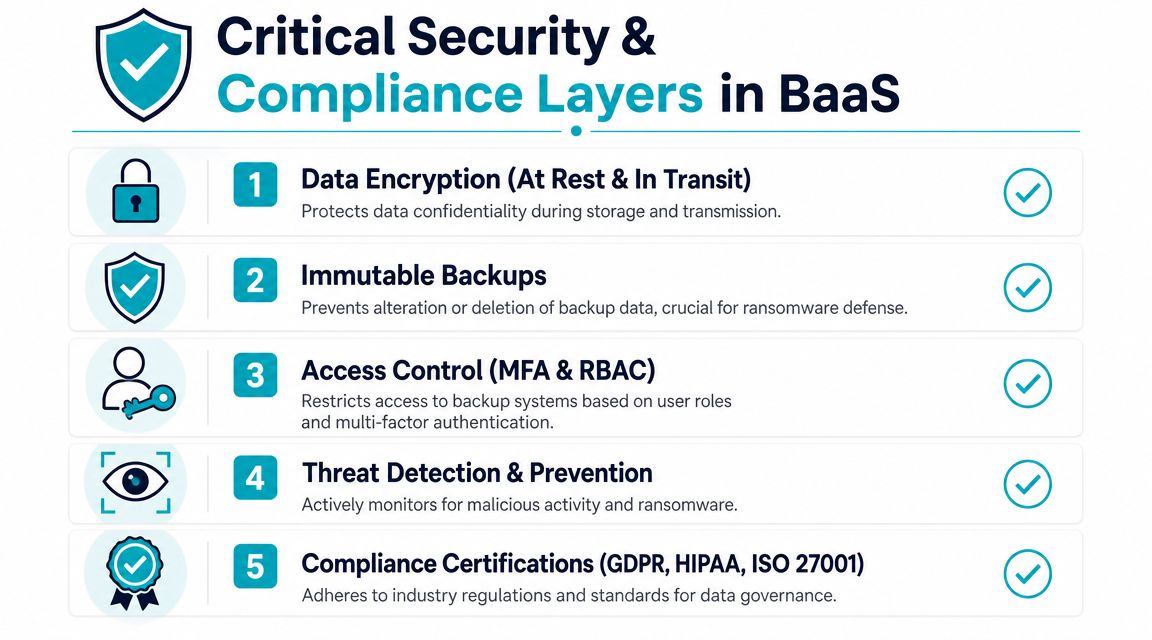
A stronger BaaS design usually includes:
- Encryption at rest and in transit: Data should stay unreadable if intercepted or if storage is accessed outside approved controls.
- Immutable backup copies: Stored data can't be modified or deleted during the protected period.
- Access control with MFA and RBAC: Restore authority, policy management, and backup administration shouldn't all live in one broad admin role.
- Alerting around suspicious behavior: Deletion attempts, unusual access, and policy tampering should trigger action.
- Auditability: You need records of what was backed up, who accessed it, and when restore actions happened.
The restore gap is the real security gap
Many vendor pages do a decent job describing backup storage. Fewer explain recovery under pressure.
That gap matters. Independent industry guidance on ransomware resilience stresses that backup alone does not equal recovery. Organizations need tested restore procedures, immutable copies, and clear recovery-point and recovery-time targets because ransomware often targets backup systems as well as production systems. It also notes that buyers increasingly compare BaaS with broader disaster recovery capability, not just standalone backup.
This is why security reviews should ask recovery questions, not just encryption questions.
- Can the provider restore a single file, a VM, and a full environment?
- What happens during a partial outage when identity systems are also affected?
- Are restore procedures rehearsed or just documented?
Security for backups isn't only about keeping copies safe. It's about making sure recovery survives the same event that broke production.
Compliance is shared, not outsourced
A BaaS provider can help with the platform side of compliance. They can supply secure storage, access controls, logging, and operational guardrails. They do not automatically make your organization compliant.
Your team still owns policy decisions such as retention duration, data classification, access approval, and validation that restore handling fits your regulatory obligations.
A useful way to think about it is this:
| Layer | Provider typically helps with | Customer still owns |
|---|---|---|
| Platform security | Storage security, operational controls, backup infrastructure management | Internal identity governance, account hygiene, approval workflows |
| Data protection controls | Encryption support, immutable storage options, audit logging | What gets protected, who can restore, how long copies are kept |
| Compliance evidence | Logs, system records, service documentation | Mapping those controls to your legal and regulatory requirements |
For teams tightening ransomware posture, reviewing immutable backup options for recovery isolation is a sensible place to start because it forces a more serious conversation about deletion resistance and restore trust.
What to verify before signing
Ask for demonstration, not brochure language:
- Show me a restore.
- Show me role separation.
- Show me deletion protection.
- Show me audit trails.
- Show me how a full rebuild is run.
If a provider can only explain how data is copied, you still don't know how recovery will behave.
Your Go-To Checklist for Evaluating BaaS Vendors
A serious vendor review should feel a bit uncomfortable. If the questions are too easy, they probably aren't reaching the failure points that matter.
The goal isn't to find a platform with the longest feature list. It's to find one that protects the workloads you run and can recover them the way your business expects.
Technical fit questions
Start with workload coverage.
- Do you support the systems we run: Ask specifically about VMs, databases, file servers, endpoints, and SaaS applications.
- How is application consistency handled: Crash-consistent copies may be fine for some workloads and insufficient for others.
- What restore types are available: File-level, image-level, bare-metal, and granular application restores answer different problems.
- Can we protect mixed infrastructure: Many SMB and midmarket estates still span VPS, bare metal, private cloud, and hosted applications.
If the answer to any of those is vague, the product is probably being stretched beyond its design.
Recovery and operations questions
Here, many evaluations get lazy. Don't stop at “how often do backups run?”
Ask these instead:
- How long do typical restores take for our workload types
- Who monitors failed jobs and after-hours alerts
- What's the escalation path during an incident
- How are restores tested and documented
- Can we restore into alternate infrastructure if the primary environment is unavailable
A provider that can explain recovery sequencing is usually more mature than one that keeps returning to storage capacity.
Buyer check: If the sales engineer can describe backup jobs in detail but gets fuzzy about restore orchestration, keep digging.
Security and control questions
These should be direct.
| Question | Why it matters |
|---|---|
| How do you implement immutability or deletion protection | Protects against malicious or accidental destruction of backup data |
| What access controls exist for backup administration and restore actions | Limits blast radius from stolen credentials or internal mistakes |
| How are backup systems isolated from the primary environment | Reduces the chance that one compromise takes out both production and backup |
| What audit records can we review | Supports incident investigation and governance |
Commercial and support questions
Pricing needs context. A lower monthly number may exclude monitoring, restore assistance, or meaningful retention.
Ask:
- What drives pricing: Protected workloads, storage consumed, feature set, or support level.
- What counts as a restore event: Some providers include basic restores and charge for larger recovery help.
- What support is included: Ticket-only support feels very different from a managed service with active oversight.
- What happens when our data footprint changes: Growth should not force a redesign every few months.
Signs of a stronger provider
The better vendors usually do four things well:
- They ask about business services, not just server count
- They define recovery expectations before quoting
- They can show policy, monitoring, and restore workflows clearly
- They are candid about trade-offs such as bandwidth, sequencing, and dependency mapping
That's what separates a commodity backup offer from a service you can rely on when the outage is real.
The ARPHost Advantage with Proxmox Backup as a Service
Proxmox environments are common in organizations that want control, efficient virtualization, and a cleaner alternative to heavier licensing models. They also create a specific backup challenge. You need image-level protection, sensible retention, reliable VM restore options, and an operational process that doesn't collapse when a host failure turns into a multi-system incident.
That's where a Proxmox-centered BaaS design makes sense.
How this looks in a real environment
Take a typical midmarket setup. The business runs a small Proxmox cluster with a web front end, an internal application VM, a database VM, and a utility VM handling supporting services. The environment may sit on dedicated infrastructure, a private cloud, or a mixed estate that also includes web hosting and a few standalone services.
A backup design that only answers “where do the copies go” won't be enough here. The requirement is operational:
- Which VM gets restored first
- Whether individual files can be recovered without rolling back an entire machine
- Whether the backup copies are isolated from the production compromise
- Whether the restore path is documented well enough for an engineer on call to execute it fast
What a Proxmox-focused service should deliver
For this kind of customer, the useful features are practical rather than flashy:
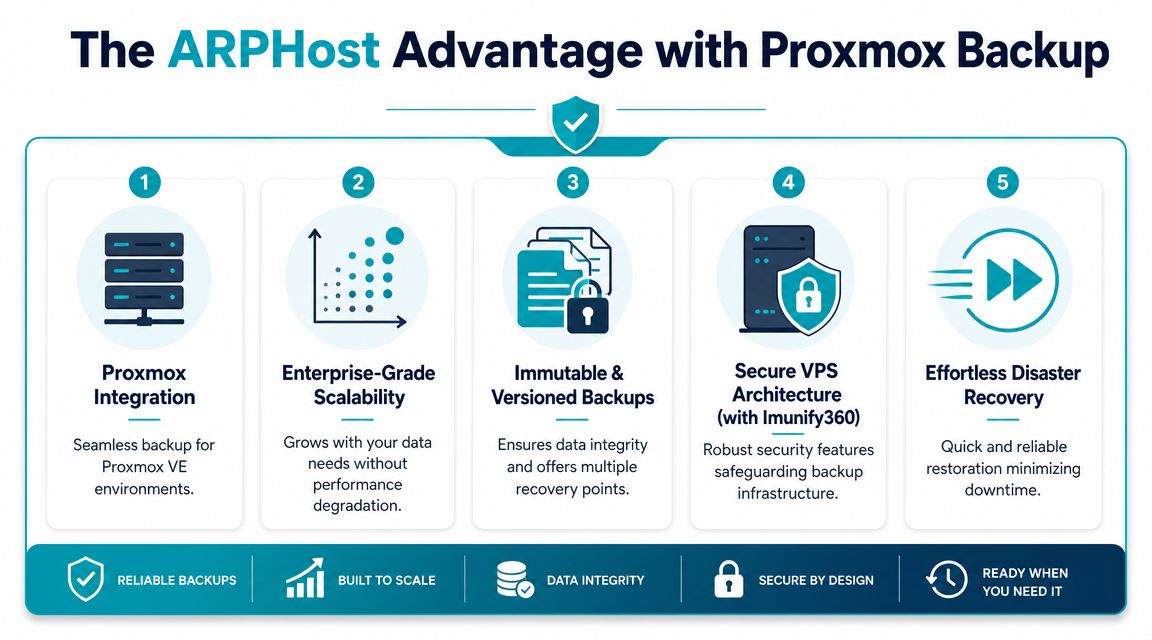
- Image-aware VM protection: Hypervisor-native backup matters because it shortens the path from incident to restore.
- Versioned restore points: Not every incident needs a full rollback. Sometimes the right answer is a clean point from before corruption or operator error.
- Encrypted and immutable backup storage: This improves resilience when the production environment can't be trusted.
- Integration with broader hosting and infrastructure choices: Backup gets easier to operationalize when it fits the same environment your VPS, dedicated servers, or private cloud already use.
A provider such as ARPHost's Proxmox Backup as a Service is relevant in that context because it's built around Proxmox-oriented recovery rather than generic object storage with a backup label attached.
A simple restoration workflow
When this is implemented well, the incident response flow is straightforward:
| Incident | Likely restore action | Business outcome |
|---|---|---|
| Single file deletion inside a VM | Granular file recovery from a clean restore point | Users get data back without rolling back the whole server |
| VM corruption after update | Restore affected VM to a known-good state | Service returns faster with less manual rebuild work |
| Host loss or broader environment issue | Rebuild and restore prioritized workloads in order | Downtime is managed according to business importance |
That's the main advantage of managed backup in a Proxmox estate. It connects backup mechanics to actual service recovery.
Scaling this with hosting and managed services
This approach also fits organizations that don't run one neat platform. It can sit alongside VPS hosting, bare metal servers, dedicated Proxmox private clouds, colocation, secure web hosting bundles, and fully managed IT services when the recovery policy is designed as one system instead of several disconnected products.
A few practical next steps:
- Need a small production landing zone: Start with VPS hosting for lighter workloads that still need disciplined backup planning.
- Running websites, mail, and business apps together: Review the secure VPS bundles if you want hosting plus a stronger default security posture.
- Planning a larger virtualization footprint: Check Proxmox private clouds when you need dedicated infrastructure with more control over recovery design.
- Want backup and operations handled together: Request managed services if your team needs help with monitoring, patching, incident response, and continuity planning.
If your team is weighing backup as a service, focus on restore performance, isolation, and operational clarity before anything else. ARPHost, LLC can help you map those requirements to Proxmox backup, hosting, and managed infrastructure options so recovery works the way the business expects when something breaks.
