

The most common advice on Ryzen servers is too simple: high benchmark scores mean high server performance, so buy the fastest consumer CPU you can afford.
That advice breaks down in production.
A server isn’t a desktop that happens to sit in a rack. It runs under sustained load, depends on predictable thermals, storage behavior, memory integrity, remote recovery options, and support when something fails at the wrong time. A fast chip helps, but it doesn’t answer the question that matters to operators: is this the right platform for this workload, under this risk profile?
For many teams, an AMD Ryzen dedicated server is a smart buy. Ryzen’s high clock speeds are valuable when applications care more about per-core speed than raw socket-scale throughput. That’s why Ryzen gets attention for game hosting, build runners, and single-tenant application stacks. But benchmark charts still need context. As Bacloud notes in its guidance on server CPU benchmarking, benchmark metrics alone don’t guarantee proportional service gains because bottlenecks often sit in memory speed, I/O architecture, or the software stack.
Practical rule: buy for the bottleneck you actually have, not the benchmark you like reading about.
That changes the conversation. A key question isn’t whether Ryzen is good. It is. A key question is when Ryzen is the right tool, and when an EPYC or Xeon platform is the safer long-term decision.
For small business hosting, CI workers, development environments, and latency-sensitive single-tenant workloads, Ryzen can be a sharp fit. For dense virtualization, uptime-sensitive databases, and infrastructure that can’t tolerate hardware-level compromises, server-class platforms usually justify their higher cost.
Introduction Beyond the Desktop Hype
Desktop hype has trained buyers to look for peak scores first and ask operational questions later.
That works when you’re building a workstation. It doesn’t work nearly as well when you’re selecting a server that may host revenue-generating applications, customer data, or internal systems that need to stay available day and night. The difference isn’t subtle. A server choice affects maintenance windows, replacement options, platform stability under long load cycles, and how much operational slack your team has when something goes wrong.
Why fast isn’t always enough
Ryzen has justly earned its reputation. It offers strong per-core speed, high boost behavior, and attractive pricing relative to many server-class alternatives. That’s exactly why it keeps showing up in buyer guides and budget dedicated server catalogs.
But a hosting architect doesn’t stop at CPU selection. You also ask:
- How long will this box sit under sustained load
- Does the workload need server-grade management features
- Is minor downtime acceptable, or is it expensive
- Will storage latency or memory behavior erase the CPU advantage
- Is this machine single-tenant, or will many users depend on it
Those questions usually matter more than the headline benchmark.
The decision framework that actually works
A professional server decision starts with business impact, then maps hardware to that risk profile. If the workload is latency-sensitive, lightly parallel, and operationally flexible, Ryzen often makes sense. If the workload is multi-tenant, memory-hungry, or uptime-critical, that same choice can become a false economy.
Server hardware should match failure tolerance. Teams that can absorb minor interruptions can use different hardware strategies than teams that can’t.
That’s where many buyers miss the mark. They compare processors as if they live in identical operating conditions. They don’t. Ryzen, EPYC, and Xeon are built with different assumptions about duty cycle, platform features, and deployment context.
What Defines an AMD Ryzen Dedicated Server
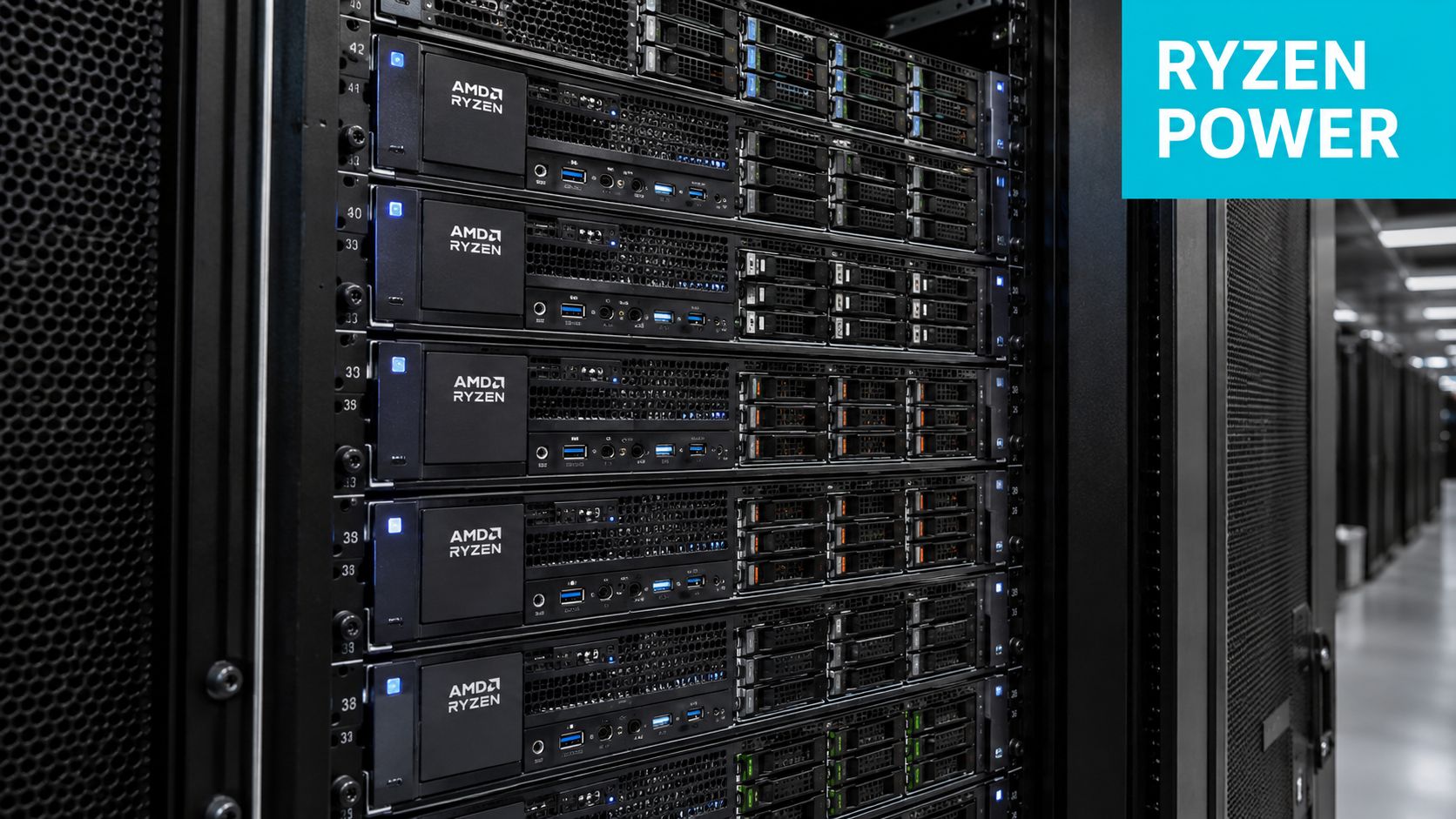
An AMD Ryzen dedicated server is a single-tenant physical server built on Ryzen silicon, usually paired with consumer-adjacent platform components and sold for high clock speed per dollar rather than full enterprise platform depth.
That distinction affects the whole buying decision. A Ryzen server is usually not chosen for maximum socket density, massive memory capacity, or the management features common in higher-end datacenter platforms. It is chosen because some workloads respond better to fast cores, modest platform cost, and straightforward single-server deployment.
The characteristics that matter in practice
In production, Ryzen servers are usually defined less by marketing labels and more by how they are built and operated.
- Fast individual cores: Ryzen performs well on latency-sensitive tasks, small application stacks, game hosting, build jobs, and busy web services that do not spread evenly across many cores.
- Lower platform cost: Buyers often get strong application responsiveness without paying for the larger memory footprints, PCIe lane counts, and multi-tenant headroom expected from server-first platforms.
- Single-tenant bias: Ryzen makes the most sense when one customer, one team, or one application stack owns the box and can size it around known behavior.
- Tighter platform limits: Expandability, remote management options, and long-term infrastructure flexibility vary more than they do on a purpose-built EPYC dedicated server platform.
That last point matters. Ryzen can be a very good server CPU. It is still a narrower infrastructure choice than EPYC or Xeon.
ECC RAM is a platform question, not a checkbox
ECC support on Ryzen is often discussed badly because buyers focus on the processor and ignore the board, chipset, and host implementation. In practice, ECC on Ryzen can be available, partially supported, or absent from the final hosting configuration.
As discussed in a Linux admin thread focused on Ryzen server ECC considerations, ECC support depends on the surrounding platform and matters most when memory errors carry real business risk. For a standard web stack or disposable game instance, a provider may reasonably prioritize cost and speed. For financial workloads, large datasets, or production systems where silent corruption is expensive, that trade-off deserves much closer review.
What a buyer should verify before ordering
Ignore the product headline and verify the actual server build.
| Item | Why it matters |
|---|---|
| Motherboard and chipset | Ryzen server behavior depends heavily on the board and platform features the provider actually enables |
| Memory configuration | ECC availability, DIMM limits, and upgrade path affect reliability and lifecycle value |
| Cooling design | Sustained all-core load exposes weak thermal design quickly |
| Storage layout | NVMe choice, drive count, and RAID options often matter more than a small CPU tier change |
| Remote management | Recovery time gets worse if out-of-band access is weak or unavailable |
| Provider support model | Managed support changes the buying decision at this point |
A Ryzen dedicated server is best understood as a targeted performance platform. It can be an excellent fit for the right workload and a poor fit for infrastructure that needs broader scaling, deeper redundancy, or stricter operational controls. That is the line experienced buyers should draw before comparing prices.
Performance Showdown Ryzen vs EPYC and Xeon
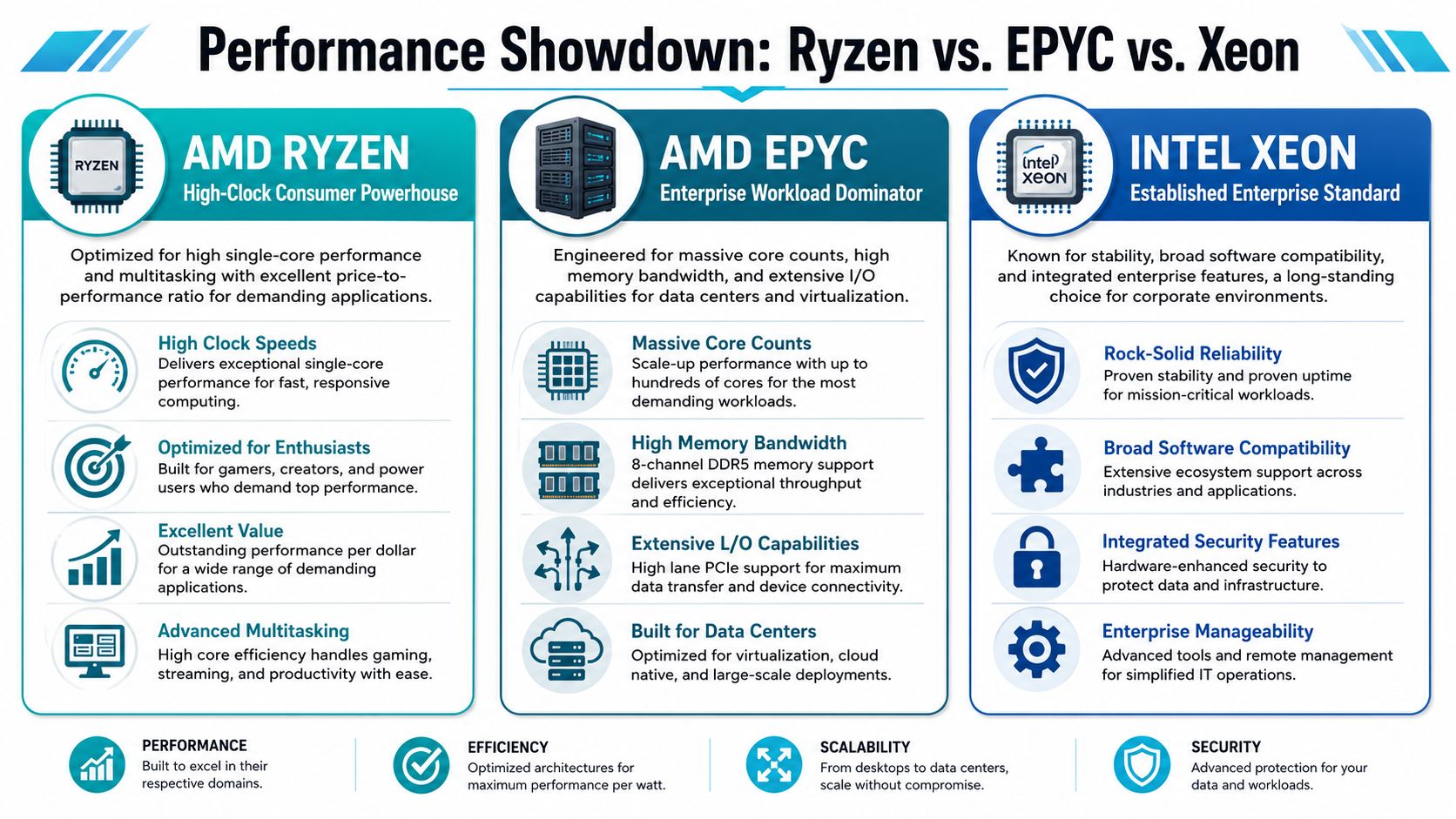
The cleanest way to compare these processor lines is to stop thinking in terms of winners and start thinking in terms of design priorities.
Ryzen is built to go fast per core. EPYC is built to carry heavy, sustained infrastructure work. Xeon remains relevant where teams value established enterprise patterns, broad software familiarity, and conservative deployment behavior.
Ryzen is the sprinter
Ryzen does very well when responsiveness matters more than platform depth. That’s why it keeps showing up in gaming, web workloads, and developer-facing environments.
Its strength is straightforward: very fast cores and a compelling entry point. For applications that care about request latency, compile speed, or a small number of busy threads, Ryzen often feels faster than buyers expect from its price bracket.
EPYC is the platform play
EPYC is what you buy when the server itself is infrastructure, not just a host for one workload. It is engineered for continuous production use and usually makes more sense for dense virtualization, memory-heavy data services, and environments where downtime carries real cost.
A useful way to frame it is this: Ryzen can be excellent for performance-sensitive tasks, but EPYC is built for operational duty.
Later in your evaluation, compare that against a managed option like ARPHost AMD EPYC dedicated server plans if your workload needs stronger long-run production characteristics.
Xeon still has a place
Xeon doesn’t always win the loudest benchmark arguments, but it remains relevant in environments that prioritize familiar enterprise deployment patterns. It can still be the right answer for older software stacks, conservative standardization, and some mixed corporate environments where operational consistency matters more than squeezing every bit of price-performance from the CPU.
A short visual helps frame the trade-off.
Sustained load is where the gap gets real
Ryzen processors offer strong core counts and price-to-performance, but they’re primarily validated for consumer workloads like gaming and web projects rather than continuous 24/7 production server environments. That same comparison notes that Ryzen can face increased thermal challenges under sustained load.
That is the dividing line many buying guides gloss over.
If the box can slow down, reboot, or wait for maintenance without hurting the business, Ryzen is easier to justify. If the box underpins other systems, the CPU choice should get more conservative.
Why ARPHost excels here
A provider with mixed inventory is more useful than one that tries to force every workload onto one CPU family. The practical choices look different depending on your use case:
- AMD Ryzen 9600X with 96GB DDR5 RAM and NVMe SSD storage: suited to single-tenant applications, development environments, and high-clock-speed workloads.
- AMD EPYC 4584PX with 192GB DDR5 RAM and NVMe SSD storage: a stronger fit for memory-intensive workloads, larger databases, AI or ML inference, and high-density virtualization.
- Dual Intel Xeon E5-2690 V3 with 64GB DDR4 ECC RAM: useful for Proxmox clusters, game server hosting, and multi-tenant VPS node roles.
That spread matters. It lets operators match the platform to the job instead of pretending one CPU family solves everything.
Ideal Workloads for a Ryzen Dedicated Server
Ryzen shines when the application cares about fast individual cores, predictable single-tenant behavior, and cost control.
That combination makes it more useful than some enterprise buyers assume, but also less universal than enthusiast advice suggests.
Where Ryzen is a strong fit
The easiest wins usually fall into a few categories.
- Game servers: Ryzen’s high clock behavior is a natural match for game server processes that care about tick responsiveness and don’t spread cleanly across many cores.
- CI and build runners: Fast compile jobs and short-lived automation tasks often benefit more from clock speed than from very high socket-scale parallelism.
- Development environments: Single-team staging stacks, test databases, and integration environments often run well on Ryzen when downtime tolerance exists.
- Single-tenant web applications: If one application owns the machine and traffic patterns reward fast request handling, Ryzen can be a practical choice.
- Rendering and mixed compute jobs: Some creator or developer workflows benefit from Ryzen’s strong workstation-style behavior.
The workload alignment isn’t theoretical. Kimsufi’s AMD server overview notes that Ryzen 7 and Ryzen 9 server processors provide up to 48 physical cores with frequencies boosted beyond 5 GHz, making them relevant for game servers, CI/CD build pipelines, 3D rendering tools, and multi-threaded databases.
A practical example
For a small SaaS team, a Ryzen server makes sense when they want one machine for:
- Git-based CI jobs
- a staging application stack
- a non-critical internal API
- short-lived containers for testing
That is very different from using the same machine as a dense virtualization node serving many unrelated customers. The first case plays to Ryzen’s strengths. The second starts to expose its compromises.
Where I would use caution
I wouldn’t default to Ryzen for these roles unless there was a clear reason and an accepted risk profile:
- Multi-tenant VPS hosting nodes where noisy neighbors, sustained load, and support expectations push you toward server-class platforms.
- Primary production databases for revenue-critical systems.
- Infrastructure hosts that run clustered services, many virtual machines, or broad internal dependencies.
- Always-on business systems where maintenance flexibility is limited.
A quick Linux check can confirm what the server is doing after deployment:
lscpu
cat /proc/cpuinfo | grep "MHz" | head
Those commands won’t replace profiling, but they help verify the processor presentation and current frequency behavior on a live box.
The AMD Ryzen 9600X is a good example of the right kind of Ryzen deployment. It fits single-tenant applications, development environments, and workloads that benefit from high clock speed more than from platform-scale enterprise features. If the business case depends on low latency and moderate complexity, that’s a sensible target profile.
Your Buying Checklist Choosing the Right Configuration
Most bad server purchases happen because the buyer starts with CPU brand and stops there.
A better process is to eliminate mismatches early. Ryzen can save money and still perform well, but only when the rest of the configuration supports the workload.
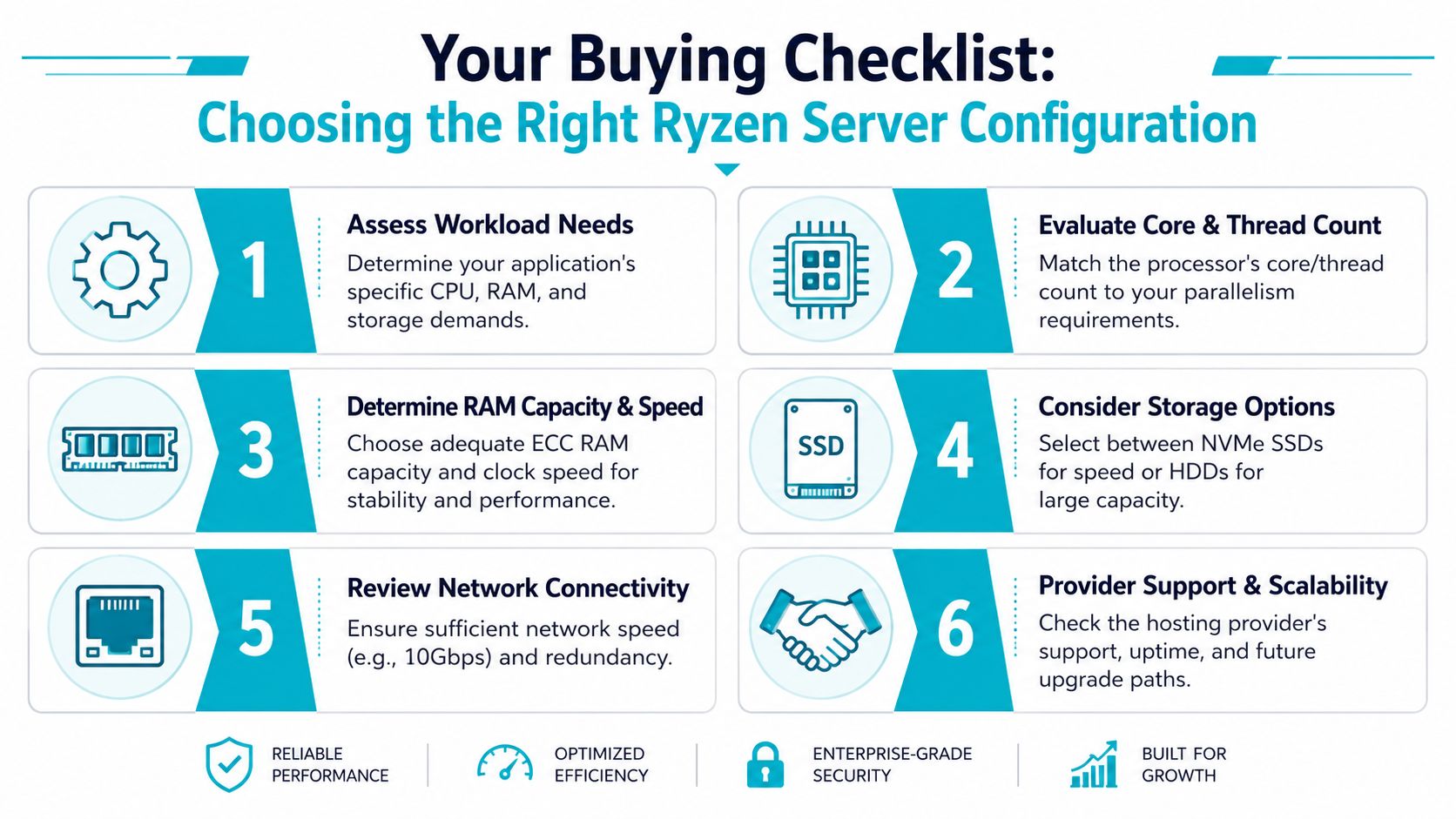
Six checks before you commit
Start with workload shape
Ask whether your application is latency-sensitive, heavily parallel, memory-heavy, or I/O-bound. A light web server or CI runner may not need EPYC-class hardware at all.Identify the actual bottleneck
If slow queries come from storage waits or poor application design, a faster CPU won’t fix much. Profile first.Decide whether ECC is operationally necessary
Not every workload needs it equally, but some absolutely do. Safety-critical and data-integrity-sensitive systems deserve stricter standards.Prioritize NVMe over marketing fluff
For many deployments, faster storage changes user experience more than a more expensive CPU tier.Check remote management and support depth
A dedicated server isn’t useful if recovery requires slow ticket loops and weak console access.Plan the next move now
Ask what happens when you outgrow the box. Can you migrate into virtualization, private cloud, or a stronger bare metal tier cleanly?
Don’t overspec by habit
A lot of teams buy server-class hardware because it feels safer, even when the workload doesn’t warrant it. That’s expensive inertia.
The same guide notes that 16-core/32-thread Ryzen SKUs are sufficient for light web servers and CI pipelines, and that providers often overspec with EPYC, increasing cost unnecessarily.
Buy the cheaper platform when it still clears your operational requirements. Buy the stronger platform when failure costs more than the savings.
Storage and resilience questions matter more than buyers expect
CPU gets all the attention, but storage layout often decides whether the deployment feels fast and recoverable.
Use this short review:
| Question | Why you should care |
|---|---|
| NVMe or slower storage | Affects compile times, database responsiveness, and app startup |
| Single drive or redundant layout | Changes failure behavior and maintenance risk |
| Backup design | Determines recovery speed after operator error or hardware fault |
| RAID approach | Influences resilience and rebuild planning |
If you need a refresher on storage redundancy before ordering, review this RAID configuration guide and map it to your application’s recovery expectations.
Why ARPHost excels here
Managed support changes the buying decision. Hardware alone doesn’t answer patching, monitoring, backup discipline, or incident response. Buyers that need help beyond provisioning should compare not just CPU models, but service depth across secure web hosting bundles, KVM VPS, Proxmox private cloud options, colocation, and fully managed IT services.
Managing and Migrating to Your Ryzen Server
Buying the server is the easy part. Operating it cleanly is where most of the work lives.
For a straightforward single-tenant deployment, start with the basics: update the OS, validate storage performance, confirm CPU governor behavior, install monitoring, and document how you recover the application if the node fails. Teams that skip this end up with a fast server and a weak operating model.
A clean starting pattern
For Linux-based deployments, I like a simple sequence:
apt update && apt upgrade -y
apt install htop nvme-cli smartmontools curl -y
systemctl enable --now smartd
That gets you a baseline for package hygiene, process visibility, NVMe inspection, and disk health monitoring. From there, layer your application, firewall policy, backups, and alerting.
Using Ryzen for Proxmox labs and light virtualization
Ryzen can also work well for Proxmox VE 9 labs, test clusters, development virtualization, and smaller private environments where you want fast cores and don’t need the heaviest enterprise footprint.
A typical install flow looks like this after initial provisioning:
apt update && apt upgrade -y
reboot
Once the host is ready, deploy Proxmox, create your first VM, and keep the platform lean. On Ryzen, I’d stay disciplined about guest sprawl. This isn’t the place to imitate a dense enterprise virtualization node unless you’ve tested carefully.
Migration planning matters more than the hardware
If you’re moving an application from older bare metal, VMware, or another dedicated environment, the migration plan should be stricter than the hardware choice. Inventory services, define rollback steps, test backup restores, and schedule cutover with realistic expectations.
For that process, use a proper technical server migration checklist before you move anything customer-facing.
A lot of teams eventually decide they want Proxmox without building and managing every layer themselves. That’s where hosted private cloud and managed migration support can make sense, especially for organizations moving from VMware into Proxmox-based infrastructure or standardizing backups, monitoring, and lifecycle management.
Conclusion Ryzen for Speed ARPHost for Strategy
Ryzen earns its place in dedicated hosting, but only when the workload fits the platform.
For high-clock, single-tenant jobs, the value is real. A Ryzen dedicated server makes sense for latency-sensitive applications, smaller database workloads, build servers, game hosting, and web stacks that benefit more from fast cores than from high VM density or large memory footprints. In those cases, buying EPYC or Xeon too early can mean paying for expansion headroom you will not use.
The mistake is treating Ryzen like a universal production standard. Once the business depends on heavier consolidation, larger RAM ceilings, more PCIe lanes, broader platform validation, or stronger tolerance for sustained multi-tenant load, server-class hardware becomes the better operational choice. That is usually where EPYC or Xeon justifies the higher spend, not because benchmark charts look better, but because the platform gives you more margin when the environment grows or fails under pressure.
Ask a harder question than “which CPU is faster?”
Ask which platform leaves enough room for the cost of being wrong.
If an outage, scaling limit, or migration mistake would have low business impact, Ryzen is often a smart, efficient buy. If the server will carry revenue-critical systems, denser virtualization, larger storage fabrics, or stricter uptime targets, choose the platform built for that job from day one. I have seen teams save money with Ryzen on focused workloads, then lose that advantage later when growth forced a rushed move to enterprise hardware.
That is the useful decision framework. Match Ryzen to speed-first deployments. Match EPYC or Xeon to infrastructure that needs more memory, more expansion, and lower operational risk over time.
If you’re weighing Ryzen against EPYC, Xeon, VPS, or a Proxmox-based private cloud, ARPHost, LLC offers a useful starting point across bare metal servers, VPS hosting, secure web hosting bundles, Proxmox private clouds, and managed services. For a high-clock single-tenant deployment, review the Ryzen options. For denser production infrastructure, compare EPYC and Xeon paths. If you want help mapping workload risk to the right platform, request a technical review before you provision.
