

Legacy servers usually fail in predictable ways. VM sprawl pushes CPU ready time up, database latency gets noisy at the worst times, and teams keep adding workarounds because replacing the platform feels riskier than living with it. That works for a while, until one box is expected to run web apps, backups, internal tools, containers, and a growing virtualization stack without becoming the bottleneck.
That’s where an AMD EPYC dedicated server changes the conversation. The value isn’t just raw compute. It’s better consolidation, more flexible memory and I/O headroom, and a cleaner path to matching hardware with the workload instead of forcing the workload into whatever server happened to be available.
A lot of buyers already know they want dedicated hardware. The harder question is which EPYC generation and which server profile fit the job. A Proxmox node needs something different from a transactional database box. A CI runner has different priorities than a multi-tenant VPS host. If you’re weighing dedicated infrastructure options, it helps to start with a grounded view of what dedicated server hosting actually gives you before narrowing the CPU family and platform design.
Introduction Why Your Next Server Should Be EPYC
Most infrastructure refreshes start with a complaint that sounds simple: “the server is slow.” In practice, the problem is usually density, not just speed. Older platforms struggle when you ask them to do modern work like host dense virtualization, feed fast NVMe storage consistently, and keep enough memory available for databases and application caches at the same time.
EPYC matters because it was built for that data center reality. It gave operators a way to scale up single-socket deployments without immediately jumping into more complex and expensive layouts. That changed server planning for hosting providers, internal IT teams, and anyone trying to keep application growth from turning into hardware sprawl.
Practical rule: If your environment keeps splitting one workload across too many small servers just to avoid CPU, memory, or PCIe limits, it’s time to evaluate whether one stronger EPYC node can simplify the design.
The buying decision still needs discipline. More cores won’t fix poor storage choices. Large RAM capacity won’t help if the network path is weak or if the platform isn’t managed properly. The right answer is a balanced server with a role: virtualization host, database system, web platform, or hybrid private cloud node.
That’s the lens to use throughout this guide. Match the EPYC platform to the workload first. Then decide how much operational responsibility your team should own, and where managed help makes sense.
Understanding the EPYC Architecture Advantage
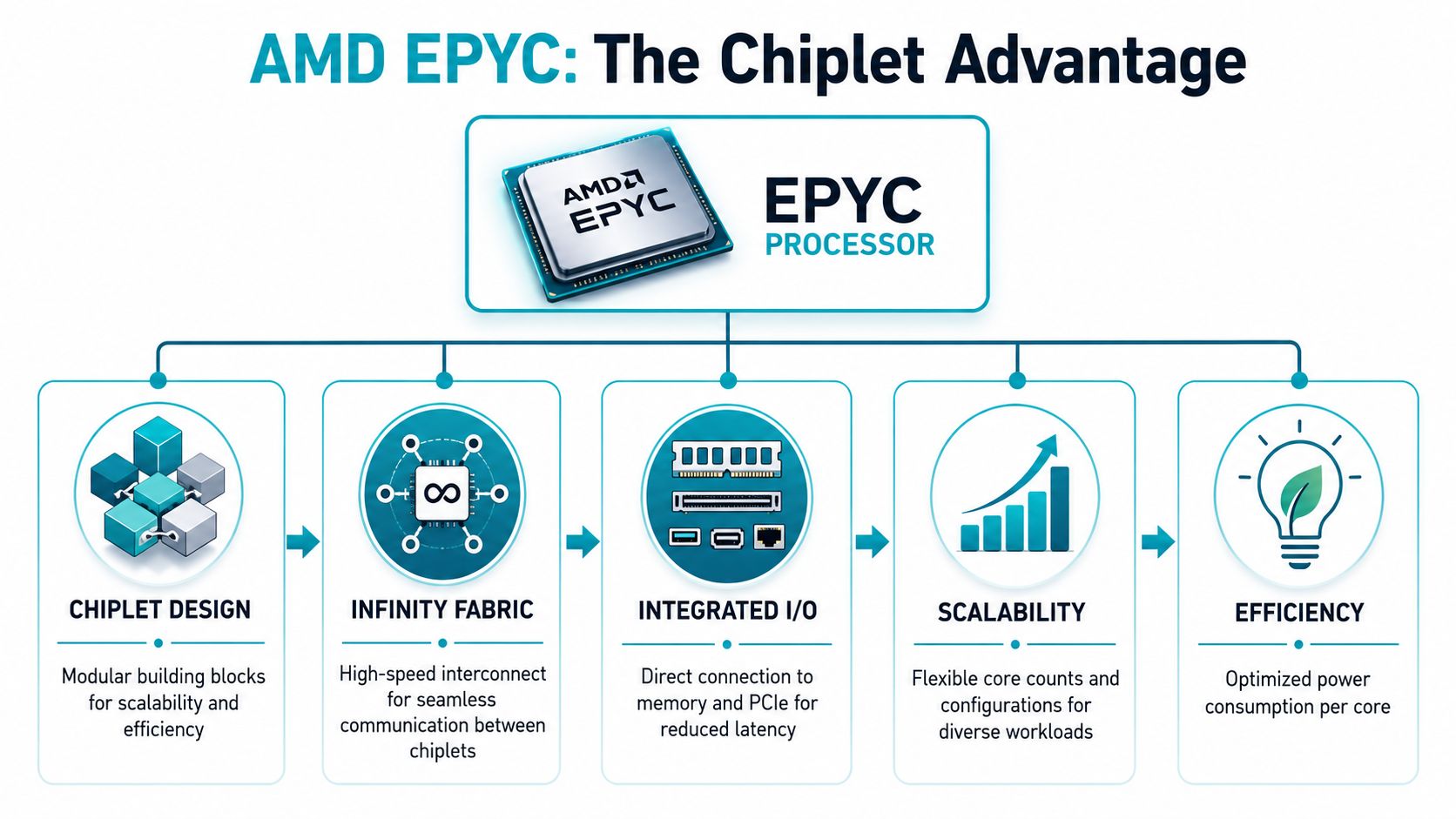
The architectural jump is easier to understand if you stop thinking about CPUs as one giant block of silicon. EPYC’s design is more like a high-performance engine built from specialized modules working together. Instead of forcing everything into one oversized part, AMD split compute into chiplets and connected them efficiently. That improves scalability and lets the platform deliver more cores and strong I/O without making the server design clumsy.
Why chiplets matter in real deployments
Think of a traditional monolithic CPU like an engine block where every cylinder, intake path, and exhaust path is forced into one casting. It can work well, but scaling it gets harder. A chiplet approach is more modular. You can increase compute resources while keeping the platform practical for manufacturing and deployment.
For hosting and virtualization teams, that translates into business outcomes:
- Higher consolidation potential because more cores can fit into a practical server design.
- Better platform balance when storage, networking cards, and accelerators need lots of PCIe connectivity.
- Cleaner single-socket builds that avoid complexity some teams used to accept as normal.
AMD’s server push became hard to ignore when the first generation arrived. AMD EPYC dedicated servers entered the data center market in sequence starting with the first-generation Naples chips in June 2017, marking a major shift in the x86 server space. The initial EPYC 7001 series offered up to 32 cores and 64 threads per socket, along with 128 PCIe 3.0 lanes and support for up to 2 TB of DDR4 memory per socket, which made dense virtualization and cloud workloads possible in configurations that had often required costlier alternatives before that point.
That’s why EPYC changed buying patterns. It wasn’t only a benchmark story. It gave admins more room to attach fast storage, more room to scale memory, and more freedom to keep systems single-socket when they wanted simpler licensing, power, and thermal planning.
A quick refresher on the CPU terminology helps when comparing options. If you need that baseline, this guide to CPU cores and threads is a useful sanity check before comparing bare metal offers.
Generational progress that actually matters
Later generations pushed the idea further. The key practical takeaway is that EPYC evolved from “interesting alternative” into “serious default candidate” for hosting, cloud, and database infrastructure. More cores, stronger memory behavior, and better efficiency widened the gap between a server that merely runs workloads and one that consolidates them well.
Here’s the useful mental model when evaluating generations:
- Early EPYC solved platform limits and offered strong I/O headroom.
- Later EPYC improved density and made consolidation more attractive.
- Current EPYC buying decisions are less about novelty and more about fitting the right SKU to the right operational profile.
For a quick visual primer, this video is a good companion before you start selecting hardware classes.
EPYC is strongest when you buy it for platform balance, not just for the headline core count.
That distinction matters. A badly planned high-core server can still underperform if memory, storage, or hypervisor design is wrong. A well-matched EPYC system usually wins because the rest of the platform can keep up.
Matching AMD EPYC Servers to Your Workload
Server selection starts with the workload, not the badge on the chassis. The right EPYC box for a Proxmox cluster is often the wrong box for a build farm or a latency-sensitive application server. Core count matters, but so do memory headroom, cache behavior, storage latency, and how the application scales under load.
EPYC is useful because it gives you room to choose for the constraint you have. Some deployments need more threads per host to keep VM density high. Others need large RAM pools so databases, caches, and analytics jobs stay in memory and stop hammering disk. ARPHost’s lineup makes that matching process practical because the configurations map cleanly to common hosting jobs instead of forcing every project into one oversized template.
Workload-first buying logic
For high-density virtualization, the first question is usually how many active guests the node must carry without scheduling pressure. If the environment runs mixed business workloads with bursts across many VMs, thread availability and memory capacity usually decide tenant density more than peak single-core speed. An EPYC host with plenty of RAM and fast NVMe storage is usually the safer fit for Proxmox, especially when you want fewer compromises as the cluster fills up.
For memory-intensive databases, RAM is often the purchase driver. A database that keeps its working set in memory behaves very differently from one that spills into constant storage reads. In practice, I would rather run the right CPU with enough memory than a larger CPU attached to an undersized memory profile. The second server looks stronger on paper and loses under production load.
For high-clock or lightly parallel applications, buying too many cores can waste budget. CI runners, app servers with modest concurrency, and isolated development environments often benefit more from strong per-thread performance and simpler host design than from a large virtualization-oriented platform.
ARPHost Server Workload Matching Matrix
| Workload | Recommended ARPHost Server | Key Benefit |
|---|---|---|
| Proxmox clusters and multi-tenant VPS nodes | Dual Intel Xeon E5-2690 V3 bare metal server | Many cores and threads for dense mixed-tenant allocation |
| Memory-intensive databases | AMD EPYC 4584PX bare metal server | Large DDR5 memory footprint with NVMe storage for cache-heavy and I/O-sensitive workloads |
| AI and ML inference on dedicated hardware | AMD EPYC 4584PX bare metal server | Good balance of compute and RAM for models that need local memory headroom |
| Single-tenant app hosting and development environments | AMD Ryzen 9600X bare metal server | Strong fit for lighter dedicated workloads that favor clock speed and isolation |
| CI and build systems | AMD Ryzen 9600X bare metal server | Responsive per-thread behavior for compile and pipeline tasks |
| Private cloud expansion node | AMD EPYC 4584PX bare metal server | Dense RAM profile for virtualization and service consolidation |
What works and what doesn’t
The AMD EPYC 4584PX is the cleanest fit when memory density and modern platform balance are the priority. With 16 cores, 32 threads, 192GB DDR5 RAM, and NVMe SSD storage, it suits database servers, in-memory caches, inference workloads, and virtualization nodes where each VM needs meaningful RAM allocation. It is not the highest-core option you could buy. It is often the better ROI option when the business problem is consolidation without memory starvation.
The Dual Intel Xeon E5-2690 V3 still fits some jobs. With 28 cores, 56 threads and 64GB DDR4 ECC RAM, it works for Proxmox labs, game hosting, and mixed-tenant environments where thread count matters more than memory per guest. The trade-off is obvious. Once tenants or applications start demanding larger memory reservations, that platform hits limits sooner than a newer EPYC configuration.
The Ryzen 9600X belongs in a narrower lane. It is a sensible choice for single-tenant applications, developer systems, and build pipelines that reward faster individual threads. It is a weak choice for dense multi-tenant virtualization because that use case usually punishes limited memory expansion and lower consolidation headroom.
Buy for the bottleneck you have. If your database is cache-starved, more threads do not fix it. If your hypervisor is short on schedulable CPU time, adding RAM alone will not remove contention.
Examples by use case
Proxmox and private cloud nodes
Choose EPYC when the plan includes many VMs, larger guest memory assignments, or steady growth over the next year. The 4584PX is a good example of a node that balances enough cores with enough RAM to avoid the common mistake of building a VM host that looks dense but runs out of usable memory first.Large SQL or NoSQL systems
Favor the EPYC 4584PX when the database benefits from keeping more of the working set in memory. That usually improves consistency, reduces storage pressure, and gives a better return than paying for extra cores the database will not use efficiently.Web hosting stacks and secure bundles
Match the server to account density and isolation requirements. A Ryzen box can be the cleaner answer for smaller single-tenant estates. EPYC gives more room for consolidation when the hosting stack includes many accounts, background services, and heavier memory use.Dedicated Proxmox private clouds
Some teams need more than one strong node. They need a cluster shape that can grow cleanly. For that model, Proxmox private cloud plans are often a better operational fit than assembling individual servers one at a time.
Key Configuration and Networking Considerations
A fast EPYC CPU can still deliver a slow service if the server is built around the wrong constraints. I see this most often on virtualization hosts that look strong on paper, then stall under backup activity, replication traffic, or a few noisy tenants because memory, storage, or network capacity was sized too tightly.

Start with the parts that usually cap performance
On EPYC, memory design deserves the same attention as core count. ECC RAM is the standard for any production dedicated server, especially on Proxmox nodes, database servers, and mixed hosting systems where one memory fault can affect many services at once. The true sizing question is not total installed RAM. It is usable RAM after the host OS, hypervisor, filesystem cache, monitoring, backup tooling, and growth buffer are accounted for.
That distinction matters with ARPHost deployments such as the EPYC 4584PX. It is easy to see the CPU and assume you can drive high VM density immediately. In practice, VM consolidation succeeds when memory headroom stays available during patching, migrations, and recovery events, not just during a quiet benchmark run.
Storage follows the same rule. NVMe is usually the right baseline because it cuts latency where businesses feel it acutely: database queries, login spikes, VM boots, package updates, control panel tasks, and restore tests. A cheaper disk layout can make a strong EPYC server feel inconsistent, which usually costs more in admin time and user complaints than the hardware savings justified.
Use a simple workload check before you lock the build:
- For Proxmox hosts, reserve memory for the node itself and assume some guests will peak together during backups, updates, or failover.
- For databases, size for the active working set and write behavior, not just whether the service starts and passes a smoke test.
- For shared web and application stacks, leave I/O room for malware scans, scheduled jobs, log rotation, and backups so customer traffic does not fight maintenance tasks.
Network design decides how well the server behaves under load
Network quality shows up fast on EPYC systems because the compute side rarely becomes the first limit. Replication traffic, offsite backups, remote admin sessions, VM migrations, API traffic, and customer requests all share the same path somewhere in the stack. If switching, routing, or upstream capacity is inconsistent, the server spends time waiting on the network instead of finishing work.
That becomes more obvious as a deployment grows. A single dedicated server may tolerate mediocre east-west traffic for a while. A clustered Proxmox environment will not. Poor network consistency appears as slow migrations, replication lag, uneven storage performance, and failover tests that look fine one day and messy the next.
Plan for maintenance traffic, not only production traffic.
That means separating the nice-looking sales spec from the operating reality. A server intended for databases needs predictable latency during backup windows. A virtualization node needs enough bandwidth and switching quality to handle migrations and replication without stealing responsiveness from tenant workloads. A mixed hosting box needs room for control plane activity, customer traffic, and security jobs at the same time.
Operational advice: Size CPU, RAM, storage, and network for normal load plus maintenance events and fault conditions. That is how you avoid buying a server that performs well only when nothing unusual is happening.
Build patterns that hold up in production
Three configuration patterns tend to work well with EPYC dedicated servers:
Database-first build
Put budget into memory capacity, low-latency NVMe, and a storage layout that can tolerate failure without turning recovery into a crisis. The return is steadier query performance and less time spent chasing I/O stalls.Virtualization-first build
Start with RAM density and realistic guest overhead, then match core count to consolidation goals, then confirm storage can absorb backup and snapshot activity. This is usually the right order for ROI because oversubscribed memory causes trouble faster than a modest CPU ceiling.Web and application hosting build
Balance burst CPU, fast NVMe, and stable network paths so cache misses, database calls, updates, and customer traffic can coexist. Under these conditions, an EPYC platform often pays off over time, because the box has enough headroom to keep service quality stable as account density rises.
If budget forces a phased rollout, start with the configuration that protects the current bottleneck and leaves a clean upgrade path. For many teams, that means buying enough RAM and NVMe performance on day one, then scaling tenant count or database load into the platform instead of rebuilding early because the original spec was too close to the edge.
Choosing Between Managed and Unmanaged Hosting
A common failure pattern looks like this: a company buys a strong EPYC box for performance, plans to handle operations internally, then discovers six months later that patching slips, alerts go to a shared inbox, and nobody has tested a restore since deployment. The hardware is not the problem. The operating model is.
On an AMD EPYC dedicated server, the managed versus unmanaged decision affects ROI as much as the CPU choice. A well-matched ARPHost system, whether that is a higher-frequency EPYC 4584PX for application hosting or a denser EPYC platform for Proxmox, only delivers its expected value if someone is consistently handling updates, monitoring, backup checks, and incident response.
When unmanaged is the right fit
Unmanaged hosting works well for teams that already run Linux or Windows infrastructure with discipline. They have clear ownership, documented change control, and people available after hours when a kernel update, failed array member, or broken service needs attention.
Choose unmanaged if these conditions are true:
- Your team owns day-to-day infrastructure operations and already handles patching, monitoring, logging, and recovery workflows.
- You need full stack control for custom kernels, unusual hypervisor builds, specialized security tools, or deployment methods a standard managed plan may not cover.
- You want to tune the platform directly for workload-specific goals such as CPU pinning in Proxmox, custom backup chains, or database-level performance testing.
- You have enough internal depth that one admin leaving does not turn the server into undocumented tribal knowledge.
This model often makes financial sense for SaaS teams, hosting resellers, and platform engineering groups that spread one administrator’s time across many servers. In that case, avoiding a management layer can lower recurring cost without raising much risk.
When managed usually produces better ROI
Managed hosting fits teams that need the server to stay healthy but do not want infrastructure work competing with product delivery, customer support, or internal IT projects. That includes agencies, growing e-commerce businesses, database-backed applications, and smaller MSPs covering a wide client base with a limited senior staff.
The value is operational coverage.
Managed support is usually the better choice when you need:
- Consistent patching and hardening so the server does not drift from its original baseline.
- Active monitoring and alert response so disk issues, service failures, and abnormal resource use get handled before they become customer-facing outages.
- Backup oversight and restore verification so recovery is based on tested procedures, not assumptions.
- Faster escalation paths when hardware, network, or OS problems overlap and internal teams would otherwise spend hours isolating the fault.
For many businesses, the cost question is simple. Paying for management is often cheaper than losing a day of engineering time to a preventable incident, or carrying a powerful EPYC server that is only half maintained. That trade-off gets sharper on virtualization hosts and database systems, where one operational mistake can affect many tenants, VMs, or critical datasets at once.
The expensive mistake is not buying managed service. It is running an unmanaged server without the staff time and process maturity required to keep it stable.
A practical decision filter
Use this table to decide based on staffing and risk, not preference:
| Question | If yes | If no |
|---|---|---|
| Do you have staff who can patch, monitor, and respond to incidents on schedule? | Unmanaged can work well | Managed is usually safer |
| Do you need deep root-level control for a custom stack or hypervisor design? | Unmanaged is often the better fit | Managed is usually simpler |
| Would downtime, failed backups, or configuration drift have a direct business cost? | Managed deserves stronger consideration | Unmanaged may be acceptable |
| Are you deploying EPYC for dense VM hosting or a revenue-critical database? | Managed often protects ROI better | Unmanaged may still fit lower-risk workloads |
The right answer depends on workload and team shape. A company running a single internal application on an ARPHost EPYC server may do well with unmanaged service if its admins are attentive and available. A business consolidating client workloads onto a high-density EPYC virtualization node usually benefits from managed support because the operational blast radius is larger, and mistakes cost more.
EPYC Security and Backup Best Practices
Security conversations around server hardware often stop too early. Vendors mention ECC memory, secure boot, or “enterprise security,” then move on. That leaves the dangerous impression that platform security is automatic. It isn’t. EPYC includes meaningful hardware-backed features, but those features only help when someone configures them, maintains them, and fits them into the rest of the stack.
What EPYC gives you at the silicon layer
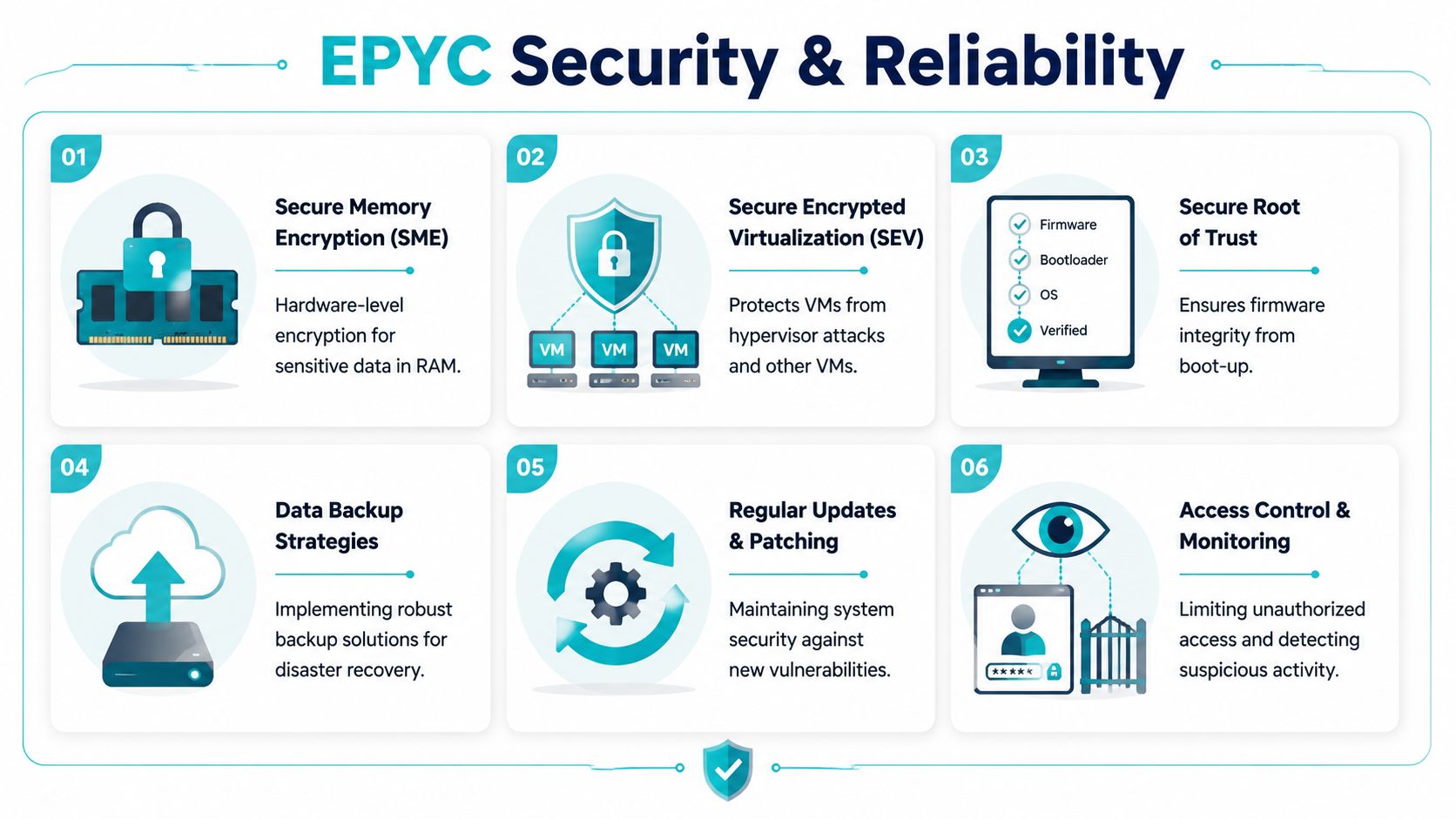
A useful place to start is AMD’s security foundation., AMD’s Secure Processor is a hardware-based security subsystem that underpins features like Secure Memory Encryption and Secure Encrypted Virtualization, which protect against physical or hypervisor-level memory attacks. That matters most in multi-tenant and virtualization-heavy environments where memory isolation and trust boundaries aren’t theoretical concerns.
The same analysis also points out a real deployment gap: many hosting-focused articles mention these features but don’t explain how an MSP or IT manager should configure and maintain them. That’s the part that affects real uptime and audit readiness.
What admins still have to do
Hardware support doesn’t remove operational responsibility. Teams still need to handle:
- Firmware discipline so BIOS and microcode updates are applied intentionally and tested.
- Secure boot chain validation so the server starts from trusted components.
- Access control around hypervisor management, remote console access, and privileged accounts.
- Patch cadence for the OS, virtualization stack, and management tools.
For exposed services, network and platform protections still matter. Dedicated hardware should be paired with strong filtering, sensible firewall policy, and upstream protections appropriate to the role. If your server is public-facing, dedicated server DDoS protection options belong in the design conversation early, not after the first incident.
Security features in the CPU are a foundation. They are not a finished security program.
Backup strategy that survives real incidents
Backups fail in two common ways. Either they were never restorable, or they were too connected to the compromised environment to be trustworthy when needed. A credible backup plan for an EPYC server should include separation, immutability where possible, and restore testing.
A practical model looks like this:
Local fast recovery path
Keep recent backups or snapshots for quick operational recovery.Off-system protected backup copy
Store backup data outside the failure domain of the primary server.Regular restore testing
Verify file-level and full-system recovery procedures.
This is especially important for Proxmox environments. VM snapshots are not the same thing as a complete backup strategy. A mature setup usually combines platform-aware backups with retention policies and off-host storage. For teams running private clouds or migration-heavy estates, Proxmox Backup as a Service is one way to separate backup operations from the production node itself.
Layering the stack for web-facing workloads
If the EPYC server will host websites, email, or customer applications, add controls above the hardware layer:
- Application isolation for multi-site or multi-user environments
- Malware scanning and cleanup workflows
- OS and package patching
- Log review and alerting
- Configuration baselines for web services
That’s also where secure web hosting bundles, control panel hardening, and managed patching pull their weight. Hardware encryption helps protect memory. It doesn’t remove the need to secure WordPress, PHP, mail services, or admin panels.
Why ARPHost Excels for Your EPYC Deployment
An EPYC server choice usually starts with hardware and ends with operating model. The teams that get the best results line up both from day one. They know whether the server is a long-term single-tenant box, the first node in a Proxmox cluster, or a database host that will need managed oversight once production traffic ramps up.
ARPHost stands out because the EPYC offering fits real deployment paths instead of forcing every workload into the same shape. A good example is the AMD EPYC 4584PX. With 16 cores, 32 threads, 192GB DDR5 RAM, and NVMe SSD storage, it fits several high-value use cases: denser Proxmox virtualization, memory-hungry databases, application stacks that need fast local storage, and inference workloads that care more about core efficiency and RAM headroom than sheer socket count. That matters for ROI. You avoid paying for a larger platform before the workload can justify it, while still leaving enough room for consolidation.
That middle ground is often the sweet spot.
I see many deployments fail at the sizing stage for a simple reason. The provider offers a long parts list, but not much guidance on what each server is good at. ARPHost’s lineup is easier to work with because the roles are clearer. If EPYC is the right fit, you can build around it. If a Dual Xeon node is better for a specific lab, legacy, or multi-tenant virtualization job, that option is still on the table. If the workload is lighter, a Ryzen box may carry it at a lower monthly cost.
The business advantage is straightforward. Better workload fit usually means fewer stranded resources, fewer migrations caused by poor initial sizing, and less time spent redesigning the environment six months later.
ARPHost also makes sense for teams whose architecture is likely to expand. A dedicated EPYC server is often phase one. Phase two might be a private cloud, a backup target, a colocated footprint, or a split design where heavier applications stay on dedicated hardware and smaller public-facing services live elsewhere. That flexibility matters if you are building with growth in mind instead of treating the first server as an isolated purchase.
Support quality changes the outcome just as much as CPU choice. Provisioning a server is easy. Handling migrations, storage oddities, firewall changes, noisy VM performance, and patching windows without disrupting production is harder. ARPHost, LLC is a stronger fit for organizations that want one provider that can supply the server, help shape the deployment, and keep supporting it as the environment gets more complex.
These are the areas that usually decide whether an EPYC deployment stays efficient:
Practical workload mapping
Matching the EPYC generation and server profile to the actual job, whether that is a Proxmox host, a database node, or a mixed application server.Room to scale without a redesign
Starting on dedicated hardware, then expanding into clustered virtualization, backup separation, or hybrid infrastructure as requirements change.Operational support after launch
Help with migrations, patching, monitoring, service troubleshooting, and the day-to-day tasks that internal teams often underestimate.A broader service stack
Useful if the same provider may also need to cover VPS deployments, private cloud builds, colocation, or managed services later.
The short version is simple. ARPHost is a good EPYC partner when you need more than a rented chassis. The value comes from being able to match a server like the EPYC 4584PX to the right workload now, then extend that design into a larger platform without rebuilding the plan from scratch.
If you’re planning an AMD EPYC dedicated server for virtualization, databases, web hosting, or a larger private cloud build, ARPHost, LLC offers bare metal servers, Proxmox private clouds, secure VPS hosting, colocation, backups, and managed IT services that can be combined around the workload instead of forcing a one-size-fits-all setup.
