


You’re trying to reach a website, run a deployment script, or connect to an API, and instead of the content you expect, you’re hit with a 407 Proxy Authorization Required error. What gives?
This isn't your typical server-side glitch. The 407 error is a roadblock thrown up by an intermediary—a proxy server on your network that's demanding credentials before it will pass your request along. For IT professionals, this error can halt automated tasks, block access to critical resources, and disrupt production workflows, making a fast resolution essential.
What a 407 Error Is (And Isn't)
When a "407 Proxy Authorization Required" status code appears, it’s a clear sign your request was stopped cold before it ever reached its destination server.
Think of it this way: the final website is your destination office, but the proxy server is the security desk in the lobby that needs to see your ID badge first. If you don't have one, or if it's invalid, you're not getting past the lobby. This is a crucial distinction from the more common 401 Unauthorized error, which comes from the destination server itself (the office telling you that you can't enter).
Knowing the difference tells you exactly where to look. A 407 means the problem is with your client configuration, application code, or local network infrastructure—not the external application you're trying to reach.
Why This Error Is a Big Deal in Business
In a business environment, a 407 error is rarely a minor hiccup. It’s a full-stop that can halt critical operations and kill productivity. I’ve seen it happen time and again:
- Automated Scripts: DevOps teams watch deployment scripts or API monitors fail because they weren't configured with the right proxy credentials, delaying updates and skewing metrics.
- Corporate Networks: Employees find themselves unable to access external resources because their browser or application isn't correctly authenticated with the company's secure proxy.
- Complex Hosting Setups: Applications running on a secure web hosting VPS or bare metal server can't connect to third-party services like payment gateways or data feeds because of a misconfigured outbound proxy.
In each scenario, the error can stall software updates, block data syncs, and bring essential services to a grinding halt. That makes fixing it a top priority for any developer or IT manager.
This is where ARPHost excels. Managing complex network layers is what we do best. With ARPHost's fully managed IT services, our experts handle the configuration, monitoring, and troubleshooting of proxy and network issues for you. Your team stays focused on core business tasks, knowing the infrastructure is secure and optimized.
Quick Answer: 407 Error vs 401 Error
To fix the problem fast, you have to know which one you're dealing with. They might sound similar, but their origins and solutions are worlds apart. Understanding the difference is the first step to a fast fix. Here’s how to tell them apart.
| Characteristic | 407 Proxy Authorization Required | 401 Unauthorized |
|---|---|---|
| Error Source | An intermediary proxy server between the client and the destination server. | The final destination server (e.g., the web server hosting the site). |
| Authentication Header | Proxy-Authorization is required in the client's request. | Authorization is required in the client's request. |
| Common Scenario | Accessing the internet from a corporate network, a secure data center, or through a required gateway. | Logging into a password-protected website or accessing a secured API endpoint. |
| Troubleshooting Focus | Client-side application, browser proxy settings, or environment variables on your server or local machine. | Application code credentials, user login details, or API keys being sent to the final server. |
Getting this right from the start saves you from chasing ghosts on the destination server when the issue is on your own network. If you're grappling with these concepts, our guide on how to configure a reverse proxy can provide some helpful background on how these intermediaries work.
Diagnosing the Root Causes of 407 Proxy Errors
When a 407 Proxy Authentication Required error pops up, the knee-jerk reaction is to blame a typo in the password. And sometimes, it really is that simple. But more often than not, the real culprit is buried deeper in a misconfiguration somewhere between your client, your application code, and the network infrastructure itself.
I've seen it countless times. The problem could be as simple as stale credentials cached in a browser's proxy settings. Or it might be a subtle oversight on a new ARPHost VPS hosting plan, where a script's environment variable HTTP_PROXY was set but forgot to include the authentication details. To fix it, you have to look beyond the obvious.
This flowchart is a great starting point for figuring out where your investigation should begin when a request fails. It helps visualize how a 407 error is a gatekeeper problem—it comes from an intermediary proxy, not the final destination server.
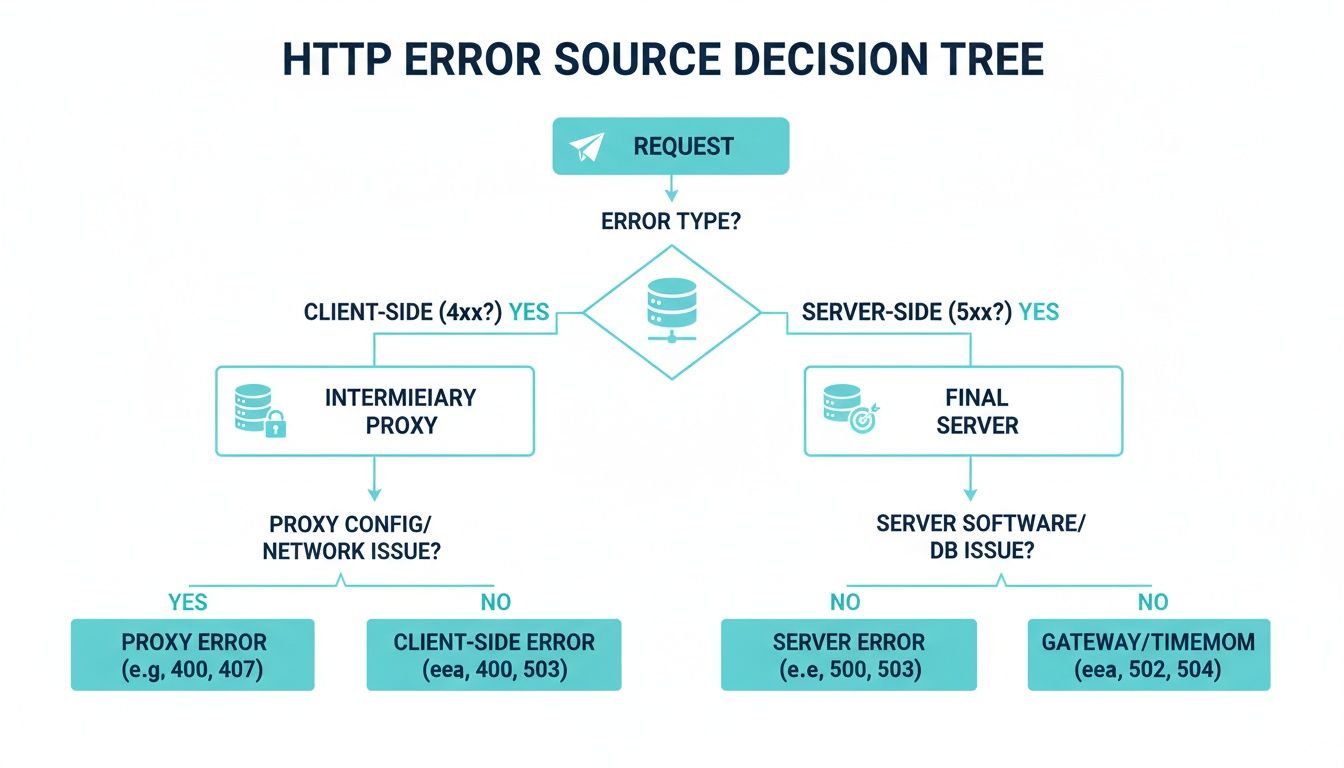
As the chart shows, the 407 is unique. Your request never even reached its final destination. The proxy server slammed the door shut, which is exactly why our troubleshooting has to start right there.
Common Culprits from the Client to the Server
Let's walk through the usual suspects, starting from your local machine and moving up the chain.
- Client-Side Misconfigurations: This is ground zero and the most frequent cause. Think outdated proxy credentials saved in a browser, incorrect network settings in the operating system, or even VPN software that’s conflicting with corporate proxy rules.
- Application-Level Failures: Automation scripts, especially those written in Python or Node.js, are notorious for this. If the developer didn't explicitly code the logic to handle and send the
Proxy-Authorizationheader, that script is going to fail 100% of the time it runs behind an authenticating proxy. - Infrastructure and Network Issues: On a larger scale, you could be dealing with a transparent proxy that intercepts all traffic without any client-side setup. In these cases, strict corporate firewalls or misconfigured network ACLs might block the authentication handshake, leading straight to a 407.
A big part of tracking this down is having a solid grasp of how data moves across the network, including the role of a specific TCP/IP port. At its core, a 407 error is a network authentication failure, and understanding how ports and protocols communicate is key.
The Proxy-Authenticate Header and Its Schemes
When a proxy server issues a 407 error, it includes a Proxy-Authenticate header in the response. This header tells your client how it needs to authenticate. Understanding the common schemes can save you a ton of guesswork.
Here's a quick rundown of the authentication methods you'll most likely encounter:
Proxy Authentication Methods at a Glance
| Authentication Scheme | Description | Security Level | Common Use Case |
|---|---|---|---|
| Basic | Sends username and password as a Base64-encoded string. Simple but not encrypted over HTTP. | Low | Quick setups, internal networks, or APIs where TLS/SSL provides the encryption layer. |
| Digest | A challenge-response mechanism that hashes the credentials instead of sending them in cleartext. | Medium | An improvement over Basic, used when you need more security without the complexity of Kerberos or NTLM. |
| NTLM | A proprietary challenge-response protocol common in Windows-based corporate networks. | Medium | Enterprise environments with Windows Active Directory for seamless single sign-on (SSO). |
| Kerberos | A robust, ticket-based authentication protocol that provides strong, mutual authentication. | High | Large-scale, high-security enterprise networks, especially those integrating with Unix/Linux and Windows systems. |
Checking the Proxy-Authenticate header in the response is the fastest way to know what the proxy expects. If it asks for Digest, sending Basic credentials will fail every time.
Real-World Scenario: An E-commerce Breakdown
Picture an e-commerce platform humming along on a powerful ARPHost bare metal server. To process payments, the site needs to hit an external payment gateway's API. For security and compliance, all outbound company traffic is routed through a secure proxy.
Now, if the application's code was written without proxy authentication in mind, every single API call to the payment gateway will be blocked by the internal proxy, which dutifully returns a 407 error. The payment gateway never even sees the request. The result? A complete halt in sales until a developer updates the code to authenticate correctly with the proxy.
While a 407 error points to a problem with your proxy, a 403 error means the final server has forbidden your request. People often mix these up, but the fixes are worlds apart. If you think the destination server is the one blocking you, you should investigate a 403 Forbidden error in Nginx instead.
By understanding these common causes and the authentication flow, you can stop guessing and start diagnosing. Pinpointing whether the issue is with the client, the application, or the network is the first step toward a fast and effective fix.
How to Resolve 407 Errors in Your Applications

Alright, let's get our hands dirty and squash this 407 Proxy Authorization Required error. The fix is almost always the same: your application isn't passing the right credentials to the proxy. The real trick is knowing how to provide those credentials in your specific tool or language.
This section gives you actionable, code-level solutions you can use right away, whether you're working in the terminal, a Python script, or a Node.js app running on one of ARPHost’s platforms.
Fixing 407s From the Command Line with curl
For most IT professionals, curl is the first tool we reach for to debug HTTP issues. When a proxy gets in the way, just setting the proxy address isn't enough—you have to explicitly pass your credentials.
The flag you're looking for is --proxy-user. It takes your username and password separated by a colon (user:password).
Here’s a real-world example. Let's imagine your proxy is at http://proxy.yourcompany.com:8080 and you need to authenticate with the username dev-user and password P@ssw0rd!.
# Correctly authenticate a curl request through a proxy
curl --proxy http://proxy.yourcompany.com:8080
     --proxy-user dev-user:'P@ssw0rd!'
     -L https://api.externalservice.com/v1/data
Pay close attention to the single quotes around the password. This is a best practice, especially if your password contains special characters like ! or $ that your shell might otherwise try to interpret.
Resolving 407s in Python Scripts
Python scripts, particularly those used for automation or data scraping, run into 407 errors all the time. The requests library handles this gracefully, but you have to build the proxies dictionary just right.
You’ll need to embed the credentials directly into the proxy URL itself, following the http://user:password@proxy-host:port format.
Here's a commented, copy-paste-ready example that follows security best practices by using environment variables.
import requests
import os

# Best Practice: Load credentials from environment variables, never hardcode them.
proxy_user = os.getenv("PROXY_USER", "dev-user")
proxy_pass = os.getenv("PROXY_PASS", "P@ssw0rd!")
proxy_host = "proxy.yourcompany.com"
proxy_port = 8080

# Build the proxy URL with credentials baked in.
proxy_url_http = f"http://{proxy_user}:{proxy_pass}@{proxy_host}:{proxy_port}"
proxy_url_https = f"https://{proxy_user}:{proxy_pass}@{proxy_host}:{proxy_port}"

# Tell 'requests' which proxy to use for each protocol.
proxies = {
    "http": proxy_url_http,
    "https": proxy_url_https,
}

try:
    # Pass your configured proxies to the request.
    response = requests.get("https://api.externalservice.com/v1/data", proxies=proxies)
    response.raise_for_status()  # This will throw an error for any 4xx/5xx responses.
    print("Successfully connected through proxy!")
    print(response.json())
except requests.exceptions.ProxyError as e:
    print(f"Caught a ProxyError: {e}")
    print("This is almost certainly a 407. Double-check your proxy credentials and address.")
Expert Tip: Never hardcode credentials in your source code. I can't stress this enough. Using environment variables, as shown above, is far more secure and flexible, especially when deploying on secure VPS hosting or any shared environment. It's a fundamental tenet of modern DevOps and secure coding.
Authenticating in Node.js Applications
If you're a Node.js developer using axios, the setup is quite similar. You'll pass a proxy object in your request configuration that spells out the host, port, and authentication details.
Here’s how you get an authenticated axios request up and running.
const axios = require('axios');

// Again, pull credentials from environment variables for security.
const proxyConfig = {
    host: 'proxy.yourcompany.com',
    port: 8080,
    auth: {
        username: process.env.PROXY_USER || 'dev-user',
        password: process.env.PROXY_PASS || 'P@ssw0rd!'
    },
    protocol: 'http' // The protocol the proxy server itself uses.
};

axios.get('https://api.externalservice.com/v1/data', {
    proxy: proxyConfig
})
.then(response => {
    console.log('Successfully fetched data through proxy!');
    console.log(response.data);
})
.catch(error => {
    if (error.response && error.response.status === 407) {
        console.error('Error: 407 Proxy Authorization Required. Check credentials in proxy config.');
    } else {
        console.error('An unexpected error occurred:', error.message);
    }
});
These code-level fixes put you in control, letting you solve the 407 error at its source. For issues affecting multiple apps on one server, you might look into system-wide proxy settings. If you're managing more complex network flows, our guide on how to configure load balancing can also offer some valuable insights.
Configuring Your Server for Proxy Authentication

Alright, enough about the client side. Let's get our hands dirty on the server where the 407 Proxy Authentication Required error actually originates. If you’re the one running the proxy, your world is all about setting up secure, logical authentication.
This means you're in charge of user access, defining clear access control lists (ACLs), and knowing exactly where to look in the logs when a user can't connect. You're not just reacting to errors; you're architecting the gateway. For any serious business, a well-tuned proxy is a non-negotiable tool for security, compliance, and network performance.
Setting Up Squid for Basic Authentication
Squid is an old-school workhorse—a fantastic caching and forwarding proxy that many of us have relied on for years. Getting basic authentication running is a bread-and-butter task. You’ll be living in the squid.conf file to point to your authentication program, create an ACL that enforces it, and then tie it all together with http_access rules.
First things first, you need a password file. The htpasswd utility, which usually ships with Apache tools (apache2-utils), is the perfect tool for the job.
# Create a new password file and add your first user
htpasswd -c /etc/squid/passwords user1

# Add more users to the file you just created
htpasswd /etc/squid/passwords user2
Once your password file is populated, it's time to tell Squid how to use it. Open up /etc/squid/squid.conf and add your logic.
# Define the auth program and where to find the password file
auth_param basic program /usr/lib64/squid/basic_ncsa_auth /etc/squid/passwords
auth_param basic realm "Proxy Authentication Required - Please Enter Credentials"

# Create an ACL that checks if a user has passed authentication
acl authenticated proxy_auth REQUIRED

# Apply the rule: only traffic from authenticated users gets through
http_access allow authenticated

# Block everyone else. This is a critical security step.
http_access deny all
This configuration is simple but incredibly effective. It locks down your proxy so only users listed in your passwords file can get through. The text you set in the realm is what your users will see in the browser’s login pop-up, so make it clear.
Using Nginx as a Forward Proxy
While Nginx is legendary as a reverse proxy, you can absolutely bend it to your will and make it function as a forward proxy with authentication. Be warned: this is a bit more of an advanced maneuver. It requires the ngx_http_proxy_connect_module and some smart configuration, especially to properly handle HTTPS CONNECT requests.
Here’s a conceptual look at what a basic Nginx forward proxy config might entail.
server {
    listen 8080;

    # The password file you made with htpasswd
    auth_basic "Proxy Authentication Required";
    auth_basic_user_file /etc/nginx/proxy_passwords;

    # You'll need a resolver for DNS lookups of external sites
    resolver 8.8.8.8; # Use a public DNS or your internal one

    location / {
        # This is an authenticated-only proxy, so deny direct access
        deny all;
    }

    # Handling the actual proxying and CONNECT tunnels for HTTPS requires
    # more advanced directives and potentially third-party modules.
    # This example is simplified for conceptual clarity.
    # ...
}
Honestly, turning Nginx into a full-fledged forward proxy is not for the faint of heart. If your needs are straightforward, Squid is often a more direct path. But if your infrastructure is already standardized on Nginx, it’s a powerful and viable option.
Why ARPHost Excels at Custom Network Configurations
Building and managing authenticated proxies requires a deep bench of technical expertise. This is exactly where ARPHost's managed services shine, letting you offload complex network tuning and focus on your actual business.
- Fully Managed IT Services: Our team will design, deploy, and manage your entire proxy infrastructure from the ground up. We handle the nitty-gritty of configuration, user management, and proactive monitoring to keep your network secure and performant. Get a quote for our managed services today.
- Dedicated Proxmox Private Clouds: For maximum control, our Proxmox private cloud environments (starting at $299/month) give you dedicated hardware. You can spin up isolated VMs for proxy servers like Squid or Nginx, build custom network topologies, and enforce sophisticated access rules with zero "noisy neighbor" problems.
- Secure Managed VPS Hosting: Even on a smaller scale, our secure VPS hosting plans provide the root access you need to install and configure your own proxy server, all backed by our 24/7 expert support and security tools like Imunify360.
The HTTP 407 Proxy Authentication Required status has become a major source of downtime in many hosting environments. In fact, it's responsible for an estimated 22% of all authentication failures on VPS and bare metal servers. Unlike a 403 Forbidden error, the 407 specifically verifies identity at the network gateway, and with the correct
Proxy-Authorizationheaders, roughly 80% of retries succeed. Discover more insights about the nuances of this HTTP status code on MDN Web Docs.
Preventing 407 Errors With Proactive Management
If you’re only thinking about a 407 Proxy Authorization Required error after it crashes a deployment or a user complains, you’re already behind. The best IT teams don't just put out fires; they build fireproof infrastructures.
Shifting from reactive firefighting to proactive management means treating your proxy configuration as a living part of your stack, not a "set it and forget it" task. This discipline is what separates a team constantly bogged down by tickets from one that’s free to innovate.
The Proactive Proxy Playbook
A solid proactive strategy isn't complicated. It’s built on clear processes and smart tooling that make authentication failures a rare exception, not a daily headache. Getting these habits locked down will drastically cut down on 407 errors.
Here's what every robust proxy management workflow should include:
- Create a Central Source of Truth: Every proxy server needs clear, accessible documentation. I'm talking address, port, auth method, and exactly how to get credentials. This stops developers from guessing and shipping broken code.
- Stop Hardcoding Credentials: Embedding passwords in config files or scripts is a security nightmare waiting to happen. Use a real secrets manager like HashiCorp Vault or your cloud provider's equivalent. It centralizes secrets, makes rotation a breeze, and gives you a clean audit trail.
- Audit Your Access Lists Religiously: Don't let your proxy's user list turn into a graveyard of old accounts. Run quarterly or bi-annual audits to remove credentials for former employees, old projects, and deprecated apps. This tightens security and shrinks your margin for error.
- Standardize Everything: Use Group Policy Objects (GPOs) for your Windows fleet or a configuration management tool like Ansible for Linux. Push standardized proxy settings to every client and server so they're configured correctly from day one.
This isn't just about preventing one error code. It's about building a stable, predictable environment that supports the business instead of getting in its way.
Build Resilience with Managed Services and Secure Code
Preventing 407 errors isn’t just about managing credentials—it’s about architecting your entire stack for clarity and control. This is where a strategic partner can make all the difference.
Our Fully Managed IT Services are proactive by design. Our team doesn’t just sit around waiting for tickets. We actively monitor your network services, including proxies, to catch authentication issues before they ever become a service disruption for you. It’s hands-off resilience.
Likewise, strong web application security best practices are a huge piece of the puzzle. A well-secured app is far less likely to suffer from the kind of configuration drift that causes proxy failures in the first place.
The Ultimate Fix: Total Network Isolation with a Private Cloud
One of the most powerful moves you can make to eliminate proxy headaches for good is to take control of your network. In shared hosting, you're always at the mercy of upstream network rules you can't see or change. A Dedicated Proxmox Private Cloud from ARPHost rips that variable out of the equation.
You get a completely clean network environment on hardware that’s 100% yours. You control the entire topology, from virtual switches to firewall rules.
This lets you:
- Carve out isolated networks for development, staging, and production using Proxmox's powerful virtual networking.
- Spin up your own dedicated proxy servers (like Squid or Nginx) configured exactly how you need them.
- Completely eliminate the risk of an unknown upstream proxy hijacking your traffic.
With a Proxmox Private Cloud from ARPHost, you’re not just renting a server; you're commanding your own slice of the data center. That level of control is the ultimate strategy for wiping out a whole class of network problems, including the dreaded 407.
Common Questions About the 407 Proxy Error
When you're staring down a 407 Proxy Authentication Required error, a few common questions always pop up. Let's get right to them and clear the air so you can get your connections working again.
Can a Firewall Cause a 407 Error?
Not directly, but it's a classic case of guilt by association. The firewall itself won't generate a 407 status code—that’s the proxy’s job. However, a misconfigured firewall rule can absolutely be the root cause.
Think of it this way: if your firewall is blocking the traffic carrying your credentials to the proxy, the proxy never sees your authentication attempt. From its perspective, you never sent the credentials, so it correctly responds with a 407. You'll end up chasing your tail looking at proxy configs when the real culprit is a network rule silently dropping packets. Always check both firewall and proxy logs to get the complete story.
Why Do I Only Get a 407 Error With a Specific App?
This is a dead giveaway that the issue is with the application itself, not your network. If your browser and other tools can connect just fine, but one specific piece of software can't, it's almost always a configuration problem within that app.
Many applications, especially older command-line tools or custom scripts, don't automatically respect system-wide proxy settings. They often need to be told explicitly where the proxy is and what credentials to use. Dig into that app’s documentation or configuration files for settings like proxy_url or similar.
Expert Tip: For stubborn apps that completely lack proxy support, a transparent proxy or a network tunnel can be a lifesaver. On an ARPHost Bare Metal Server, you have the root access needed to implement this kind of advanced network routing, forcing the app's traffic through the proxy without it ever knowing. Explore our Bare Metal solutions.
How Do I Bypass the Proxy for Local Addresses?
You absolutely should bypass the proxy for local traffic. Sending requests for localhost out to an external proxy and back again is a major performance killer and a potential security hole.
Most environments use a no_proxy or "bypass list" setting. This is just a comma-separated list of hosts or IP ranges that your system should connect to directly. At a minimum, your list should include localhost and 127.0.0.1. It's also smart to add your internal network ranges, like 10.0.0.0/8 or 192.168.0.0/16, to keep internal traffic off the proxy.
Is It Safe to Store Proxy Credentials in Environment Variables?
It's common, but "safe" is a strong word. Using environment variables is certainly better than hardcoding a password directly into a script. But on a shared server, any other user with shell access might be able to read those variables and snatch your credentials.
It's a step up from plain text, but it's not a production-grade solution.
For any sensitive environment, especially on a secure web hosting VPS or a private cloud instance, you need a real secrets management solution. Tools like HashiCorp Vault provide a far more secure, auditable, and manageable way to handle sensitive credentials without exposing them. ARPHost's managed services can help integrate these tools into your workflow.
At ARPHost, our team helps you navigate complex network configurations with ease. Explore our VPS hosting plans starting at just $5.99/month and gain the control you need to build a resilient and secure infrastructure.