

Peak traffic hits, dashboards stay green for CPU, and users still complain that everything feels slow. The database starts timing out. A few virtual machines go unresponsive. Redis looks healthy until eviction pressure appears, then latency jumps. At that point, a common question arises: do we just need more RAM?
Sometimes the answer is yes. Sometimes it’s expensive misdiagnosis.
A 192GB RAM dedicated server solves a real class of problems, but it only pays off when the rest of the platform can keep up. If your workload is constrained by memory pressure, a high-memory box changes what you can consolidate onto one node. If your actual limit is CPU contention or storage saturation, adding RAM alone won’t fix the symptoms. That gap matters because many hosting pages present 192GB as a spec to admire, not a capacity you have to size correctly.
The practical question isn’t whether 192GB is “a lot.” It is. The practical question is whether your databases, VM fleet, cache layers, backup jobs, and application bursts can use that memory without pushing the bottleneck somewhere else. That’s where design decisions around CPU, ECC, NVMe, virtualization overhead, and management model become more important than the headline number.
When Your Infrastructure Hits a Memory Wall
The pattern is familiar in production environments. A team starts on a comfortable server footprint. The application grows. A staging stack gets added because deployments need safer testing. Redis moves from “nice to have” to mandatory because the database can’t carry every repeated query. A few VMs are spun up for internal tools, batch jobs, or customer-specific workloads. Nothing breaks all at once, but the node becomes unpredictable.
What operators usually see first is inconsistency. The morning is fine. Afternoon traffic pushes query latency up. Nightly jobs overlap with backups and suddenly swap activity appears, cache hit rates drop, and the whole machine feels unstable. That’s when a memory ceiling becomes visible. The server isn’t just “busy.” It’s shuffling active data between RAM and slower storage because the working set no longer fits cleanly.
A 192GB server enters the conversation at exactly this stage. Not as a vanity upgrade. As a way to hold larger active datasets in memory, keep more guests resident, and reduce the penalty of mixed workloads sharing one box.
Practical rule: Upgrade to high-memory hardware when you can point to a memory-driven symptom such as swap pressure, buffer eviction, cache churn, or failed consolidation. Don’t upgrade just because the VM count looks high on paper.
That nuance matters even more for virtualization. Many teams assume a larger RAM pool automatically means far more VMs. In practice, RAM only removes one limiter. The host still needs enough CPU scheduling capacity and enough storage throughput to support those guests under load. A 192GB system can absolutely be the right move for Proxmox clusters, database consolidation, private cloud nodes, and in-memory services. It just needs to be sized as a platform, not purchased as a memory number.
What 192GB RAM Really Means for Performance
Think of memory as working surface area. A small workbench forces you to keep putting tools away and pulling them back out. A warehouse floor lets you keep everything active, organized, and immediately reachable. That’s what 192GB of RAM changes. It lets the operating system, database buffer pools, application caches, and virtualization overhead coexist without constant eviction.
The biggest win is avoiding disk-based swap. If the active working set fits in memory, the server stops wasting time moving hot data out to storage and dragging it back in again. If you want a clean refresher on why that matters operationally, this short guide on swap memory and when it hurts performance is worth bookmarking.
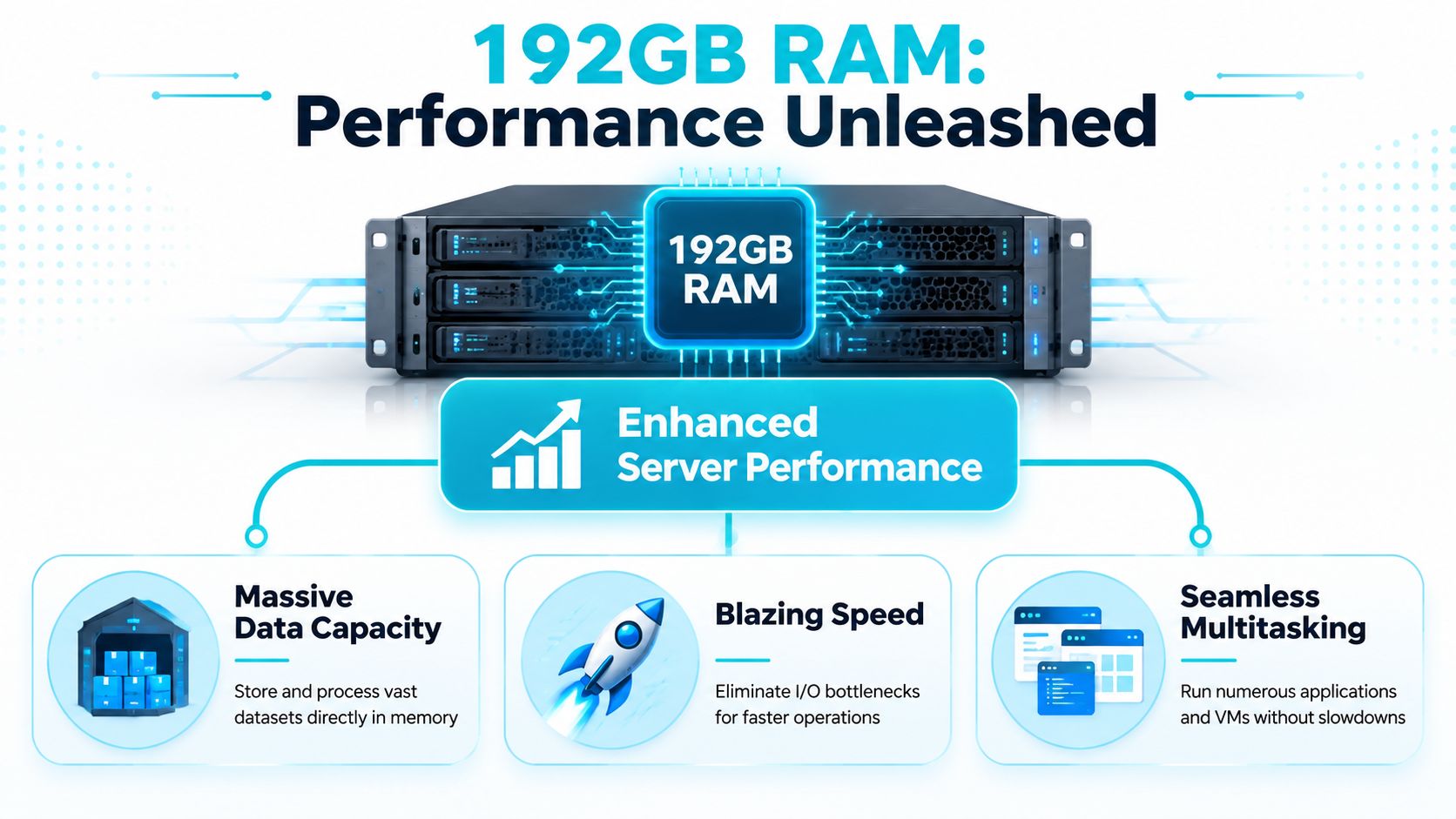
What changes at the hardware level
A DDR5-based 192GB server doesn’t just hold more data. It also changes how quickly the CPU can get at it. A 192GB RAM dedicated server with DDR5 architecture reduces memory latency to approximately 1.5–2.0 ns compared to DDR4’s 3.0–4.0 ns. That shift is tied to a 30–40% reduction in data processing time for large-scale database queries, and it also allows 24–30 high-memory containers in Proxmox without the performance degradation and out-of-memory failures that smaller memory pools run into.
That matters for workloads that are memory-hungry rather than purely CPU-bound. Query engines stop stalling on repeated reads. In-memory indexes stay warm. Container hosts stop thrashing when several guests get busy at once.
What changes at the application level
The practical effect shows up in three places:
- Databases stay warmer: Larger buffer pools mean more reads come from memory instead of storage.
- Caches become meaningful: Redis or Memcached can hold a serious working set instead of a token slice.
- Multi-tenant hosts stay calmer: The hypervisor can keep more guest memory resident without pushing inactive pages toward swap.
A high-memory server also improves burst handling. Short I/O spikes don’t translate into immediate user-visible slowdowns because the machine can absorb more activity in RAM before storage becomes the emergency spillover path.
More RAM doesn’t make a weak platform fast. It gives a balanced platform room to stay fast under pressure.
Where teams misread the benefit
Some buyers treat 192GB as proof they can oversubscribe aggressively. That’s the wrong lesson. The benefit is stability under real load, not theoretical density. If your application spends all day waiting on storage queues or fighting for CPU time, a larger memory pool won’t fix those root causes. But if the host is memory-constrained today, moving to 192GB often turns performance from erratic to predictable, and predictability is what production systems need most.
Ideal Workloads for a 192GB RAM Server
A 192GB machine earns its keep when memory is part of the workload’s core design, not just a nice buffer. That usually means database-heavy applications, in-memory services, dense virtualization, and analytics stacks that need to keep large datasets resident.
Large database servers
PostgreSQL, MySQL, and Microsoft SQL Server all benefit when the hot dataset fits in memory. The point isn’t just “more cache.” The point is fewer expensive storage round trips for repeated reads, less churn in shared buffers, and more consistent query behavior during peak periods.
For reporting systems, SaaS back ends, and transactional platforms, this often changes the operating pattern from constant paging pressure to steady-state in-memory work. Query plans still matter. Indexing still matters. But a server that can keep larger portions of the working set resident gives those optimizations room to matter.
In-memory cache layers
Redis is the obvious example because performance is directly tied to memory availability. A cache that’s too small doesn’t fail dramatically. It slowly becomes less useful. Hit rates fall, the database gets hammered, and the team starts tuning application code around an infrastructure problem.
A documented architecture showed what this looks like in practice. A 192GB RAM server was configured with a 60GB database buffer pool, a 20GB staging environment, and a 40GB Redis caching layer in the same node, showing how one system can support concurrent high-density services when memory is sized appropriately, as shown in this documented 192GB deployment example.
High-density Proxmox virtualization
Marketing pages usually oversimplify the story. They imply that RAM equals VM count. It doesn’t.
A 192GB host can support a meaningful number of production VMs or LXC containers, especially if you’re running mixed Linux workloads, application tiers, utility services, and internal tools. It’s also strong for dedicated Proxmox private cloud nodes where tenants need isolation without spreading small services across too many physical boxes.
But density only works when you watch all three constraints together:
| Constraint | What it limits | What happens when ignored |
|---|---|---|
| RAM | Guest residency and cache space | Swap pressure and OOM events |
| CPU | Scheduling and parallel work | Ready time grows, guests stall |
| Storage I/O | Read/write response under concurrency | Latency spikes across multiple VMs |
That’s the fundamental buying framework. A 192GB host can consolidate aggressively, but consolidation without CPU and I/O headroom just moves the bottleneck.
A short walkthrough on Proxmox and memory-heavy server planning helps here:
AI, ML, and analytics jobs
Memory capacity becomes decisive when datasets are too large for smaller nodes to process cleanly. For AI and ML pipelines, larger memory pools reduce the need to fragment jobs awkwardly or spill data to disk during preprocessing and feature handling. The same logic applies to analytics pipelines and Kafka-heavy systems where buffering and in-memory state determine whether throughput stays smooth or collapses under bursts.
If the workload’s active dataset, cache tier, and virtualization overhead all need to be live at once, 192GB stops being generous and starts being necessary.
Hardware That Keeps Pace With High Memory
A 192GB memory pool is only useful if the rest of the server can feed it. High-memory systems fail in predictable ways when builders overspend on RAM and underspec everything else. The result is a machine that looks strong in a product table but stalls in production.
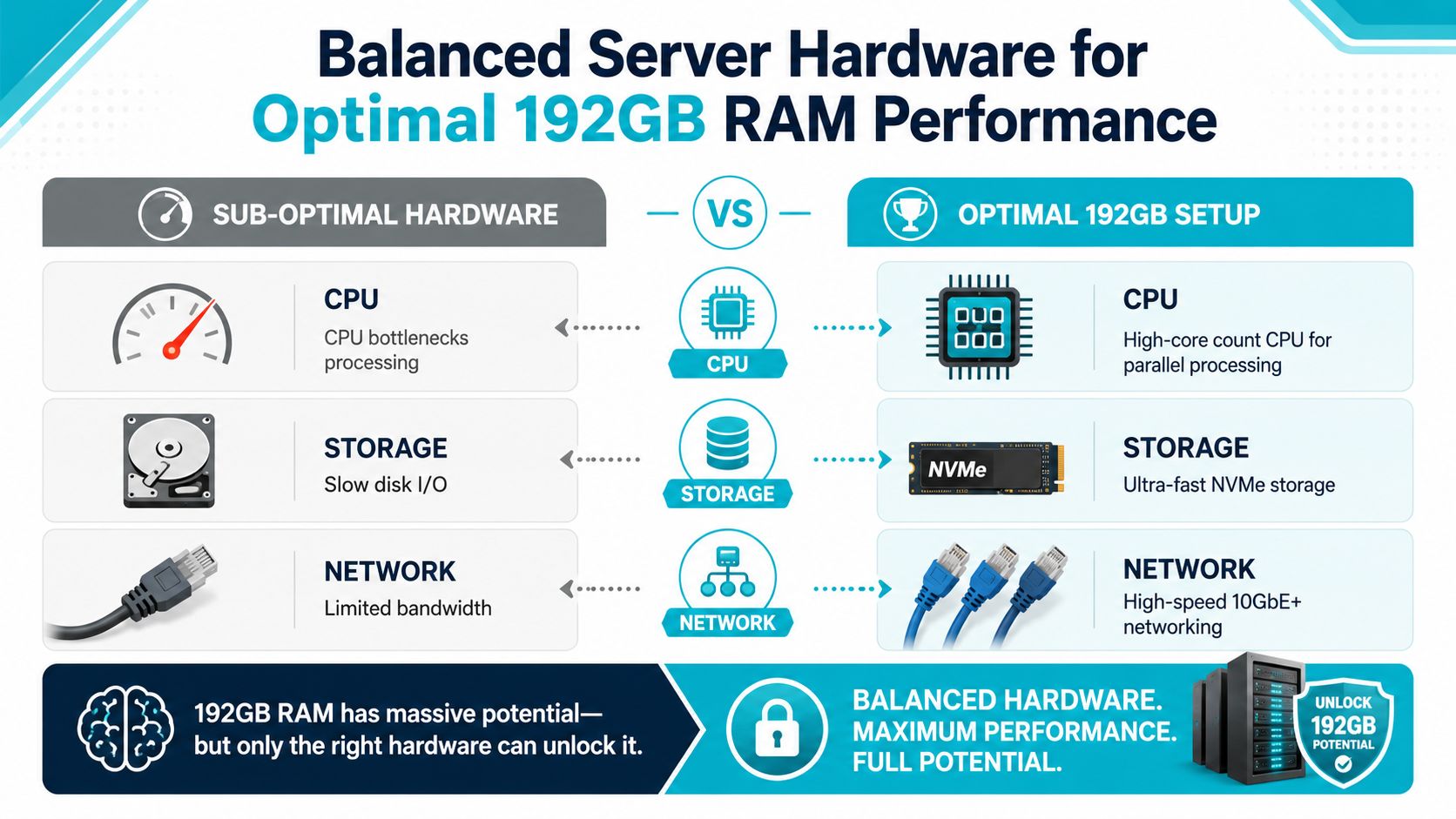
CPU balance matters more than buyers expect
If you’re building for virtualization, database concurrency, or parallel analytics, core count matters because more guests and worker processes can stay scheduled without excessive contention. If you’re running a narrower application stack with stronger single-thread sensitivity, clock speed matters more.
That’s why server selection should follow workload shape:
- AMD EPYC class systems: Better suited to parallel database activity, AI/ML pipelines, and VM density.
- Ryzen class systems: Strong choice for lighter single-tenant application stacks and development environments.
- Older dual Xeon systems: Still useful for broad virtualization roles when memory needs are lower and consolidation economics matter.
The mistake is assuming any CPU can “use” 192GB equally well. It can’t.
DDR5 and ECC are not optional details
For memory-intensive work, DDR5 changes the performance envelope, especially when paired with modern server CPUs. For enterprise use, ECC is the more important detail.
For AI/ML workloads, non-ECC DDR5 systems can experience 1 critical memory error per 12,000 training hours, causing silent job failures, while ECC DDR5 reduces that to less than 0.3 failures per 10,000 hours, with an 8–12% latency overhead. That trade-off is acceptable for production systems because reproducibility and data integrity matter more than chasing the lowest possible latency.
Operational advice: If the server holds databases, training jobs, replicated data, or anything you can’t afford to corrupt silently, choose ECC first and optimize around it.
Storage and network determine whether the memory advantage survives
When teams ask why a high-memory host still feels slow, storage is usually the first suspect. NVMe isn’t a luxury in this class of server. It’s the minimum to keep read and write paths from becoming the new bottleneck once RAM pressure is relieved.
Network also matters for clustered environments, backup flows, and east-west traffic between services. High-memory hosts often aggregate more services per node, which raises the impact of network bursts. A box that can cache aggressively but can’t move data cleanly across the fabric won’t feel balanced for long.
A simple hardware decision table
| Workload style | CPU priority | Memory type | Storage priority |
|---|---|---|---|
| Dense Proxmox host | More cores | DDR5 ECC | NVMe |
| Database-heavy application | Balanced cores and per-core speed | ECC | NVMe |
| Single-tenant dev or app server | Higher clock speed | DDR5 | NVMe |
| AI or long-running compute | Strong parallelism | DDR5 ECC | Fast local SSD |
This is the practical lens for evaluating any 192GB server. Memory gets the headline. CPU, ECC, storage, and network decide whether the system is fully usable.
The ARPHost AMD EPYC 192GB Server Solution
A good example of a balanced high-memory configuration is the AMD EPYC 4584PX platform with 192GB DDR5 RAM and NVMe storage. That pairing makes sense because the memory capacity, modern memory channels, and CPU layout are aligned around the same class of workloads: large databases, memory-resident application layers, and dense virtualization on a single node.
The documented threshold is clear. A 192GB DDR5 ECC RAM capacity paired with an AMD EPYC 4584PX processor supports single-node processing of datasets exceeding 100GB and real-time data ingestion rates of 40GB/s, which is the level needed for production Proxmox clusters managing 50+ concurrent VMs

Why this configuration is balanced
The useful part of this design isn’t just the memory quantity. It’s the ratio between CPU capability, memory bandwidth, and storage speed. That’s why this class of host fits workloads such as:
- Large relational databases with heavy buffer usage and sustained concurrent reads
- Dedicated Proxmox private cloud nodes where memory headroom supports many active guests
- Inference and preprocessing workloads that need datasets held locally rather than streamed in small pieces
- Mixed-role consolidation where database, cache, and supporting services share one bare metal system
If you’re evaluating this hardware profile specifically, the AMD EPYC dedicated server page is the direct reference point for the platform.
Why ARPHost excels here
ARPHost, LLC offers this server class as part of its bare metal lineup alongside lower-memory Ryzen and Xeon options, which makes workload-based selection easier than trying to force every project onto one platform. The surrounding service stack is also relevant: bare metal servers, dedicated Proxmox private clouds, colocation, secure web hosting bundles, instant applications, and fully managed IT services all fit naturally around a high-memory node when the environment grows beyond a single box.
That matters in real operations. A 192GB host is often the start of a broader design, not the end of one.
Sizing Your Server and Choosing a Management Plan
The biggest buying mistake with a 192GB server is treating RAM as the only scaling input. It isn’t. The more useful question is how many VMs or services the host can run before CPU scheduling and storage latency become the limits.
That’s the VM density misconception. A large RAM pool makes aggressive consolidation possible, but it does not guarantee good consolidation. In practice, many teams discover they can allocate far more memory on paper than the host can sustain once real application traffic, background jobs, and storage activity collide.
Managed versus unmanaged in real operations
An unmanaged server makes sense when your team already owns patching, kernel updates, security hardening, backups, monitoring, and hypervisor troubleshooting. It gives you full control, but it also makes you responsible for every operational mistake and every overnight alert.
A managed plan is the better fit when the server is business-critical and the internal team is focused on applications rather than infrastructure maintenance. For organizations that need proactive oversight, the fully managed dedicated server hosting option is the practical route because it aligns the hardware decision with ongoing operations instead of treating them separately.
A simple way to understand it:
- Choose unmanaged if your administrators want root control and already run your patching and monitoring discipline.
- Choose managed if uptime, security hygiene, and faster incident response matter more than owning every low-level task.
- Choose a private cloud design if your roadmap already includes multiple nodes, HA behavior, or migration from another hypervisor.
Why component pricing changes the buying decision
There’s also a procurement angle many teams miss. Between October and December 2025, server-grade DDR5 prices surged by 307% in a single quarter, with enterprise modules rising from $600 to $800 annually before the spike to $2,000 to $4,000 per unit If you’re buying hardware during a volatile memory cycle, fixed-price hosted infrastructure can reduce budget risk.
That’s especially relevant when you’re planning multiple hosts, backups, and refresh timing together. Good asset visibility also helps. Teams that don’t know exactly what they already own tend to overbuy or replace the wrong layer first, which is why structured computer inventory solutions are useful during capacity planning.
The right server size is the one that leaves headroom in memory, CPU, and storage at the same time. If only one layer has room, the host isn’t actually sized correctly.
Quick Tips for Monitoring Your Server Memory
Start with the basics from the shell. You don’t need a full observability stack to spot memory trouble early.
- Use
free -hto check total, used, available, and swap usage. Focus on available memory and whether swap is creeping up during normal load. - Run
vmstatto watch system pressure over time. If you see ongoing swap activity, the node is under memory stress or carrying a mis-sized workload. - Watch
toporhtopto identify which processes are consuming memory and whether CPU contention is appearing alongside RAM pressure. - Check trends, not snapshots. A single high-memory reading may be harmless cache use. Repeated pressure during batch windows or traffic spikes is what matters.
Manual checks are enough for triage. They’re not enough for sustained production oversight, especially on virtualization hosts or database nodes where issues start gradually.
If you’re planning a high-memory deployment, ARPHost, LLC offers bare metal servers, dedicated Proxmox private clouds, secure managed VPS hosting, colocation, and fully managed IT services that fit different operational models. Start with the hardware that matches your workload, then decide whether you want to run it yourself or hand off monitoring, patching, backups, and day-to-day server administration to a managed team.
